An open source project to help you learn about system design step by step
NOTE: The work on this repo is still in progress. Some information might be lacking or missing at this point.
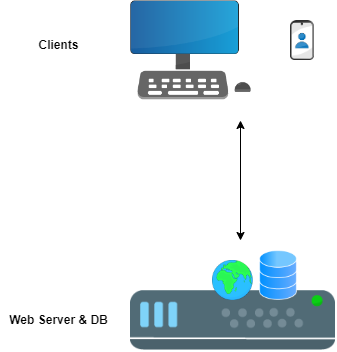
Two issues:
Apply vertical scaling. By adding more resources to the server (i.e. CPU & RAM) it will allow it to handle more load. This is nota permanent solution because at some point the load might scale to a point where it's not possible to add more RAM and CPU to the instance nor it's really worthwhile.
The two improvements would be:
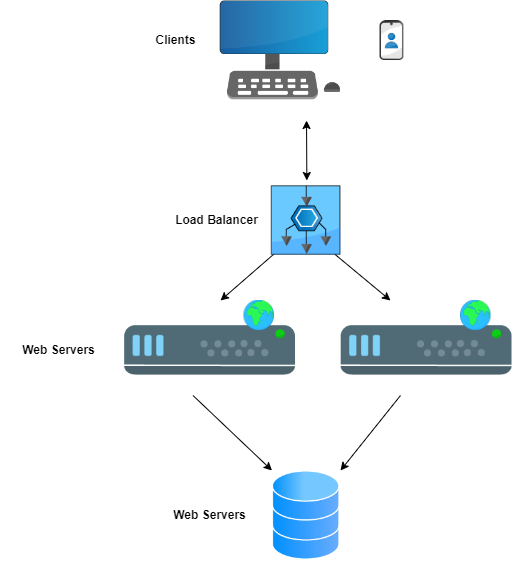
In this case what you need is two components:
Your instance might not be strong enough to handle requests from multiple users and soon enough you might see RAM and CPU utilized fully. One way to deal with it is, to perform what is called "Vertical Scaling" which is the act of adding more resources to your instance. In AWS case, switching to an instance type with more resources like M5 for example.
Note: The problem with vertical scaling (in case you have one node) is downtime (when upgrading the instance type, the instance will be down) so another thing you would want to do is "Horizontal Scaling" which is the act of adding more instances/resources.
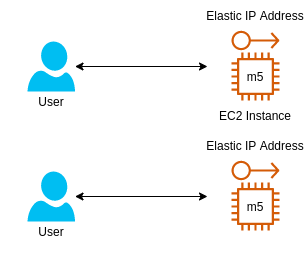
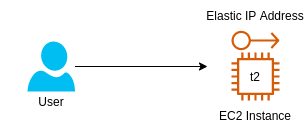
Instead of using elastic IP addresses we can add a record in the DNS, using the Route 53 service, to have a record from the type A. This way, all users will be able to access the app using an hostname and the IP address will be provided to them by the DNS
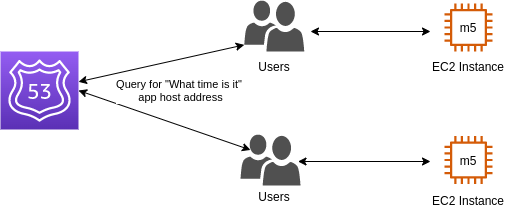
It's important to note that this solution is not optimal if you plan to scale down and up at some point. Due to the TTL value of a record, a user will keep contacting the same IP address, even if the node is already down.
A more proper and complete architecture would be to use an ELB
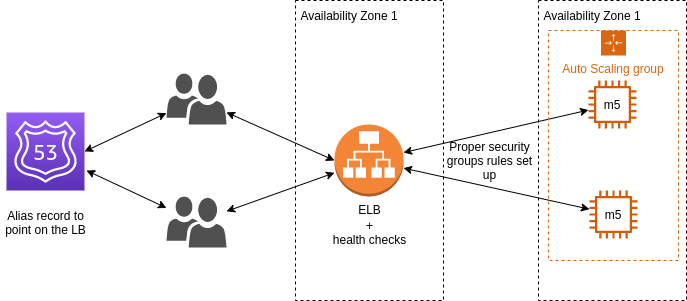
But even with ELB used and "Auto scaling group" for automatically scaling the nodes, this architecture is not optimal. Can you point what is the problem with current architecture? (from two different aspecs)
With current architecture, the application is perhaps able to scale up and down, but when the availability zone is down, your entire application is down. So the first improvement would be to make both ELB and the application itself (the EC2 instances) multi-AZ.
Secondly, if you know you always need an instance (or two) for the application, you might want to have reserved nodes. Reserved nodes means you pay less for instances which means you save on costs.
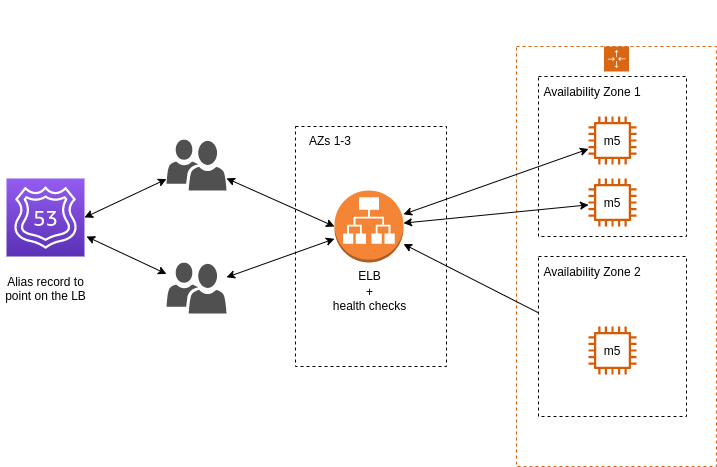
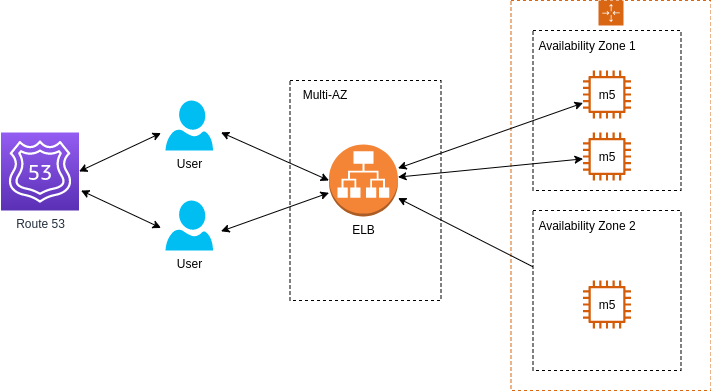
The problem is that users report that when they browse for additional video games to buy, they lose their shopping cart. What is the problem with the current architecture and how to deal with it?
Such application is a stateful application, meaning it's important that we'll keep the information about the client from one session to another. It seems that with current architecture, every time the user initiates new session, it's perform against a different instance without saving client information.
There are a couple of solutions that can be applied in this case:
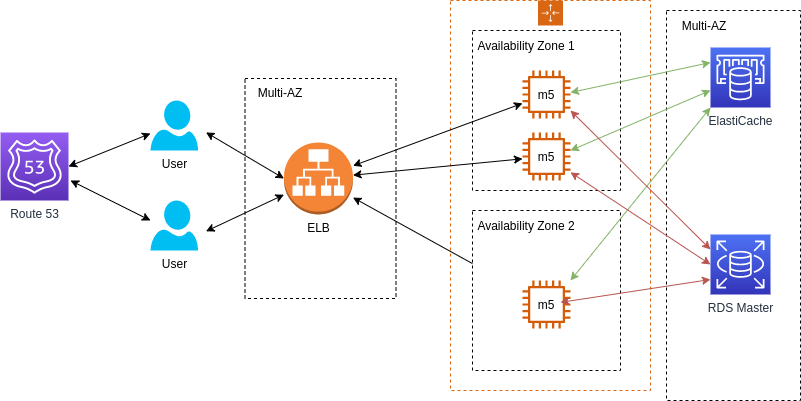
There is something called "server session" where we need to add a new component to the architecture - ElastiCache or DynamoDB, to store the data on the shopping cart of each user. In order to identify it, we'll use a session ID which will be sent by the client/user every request
For long term data (user name, address, etc.) we'll use a database (e.g. RDS). There are a couple of variations as to how we can use it. A master instance where we'll write the data and a replication from which we'll read data:
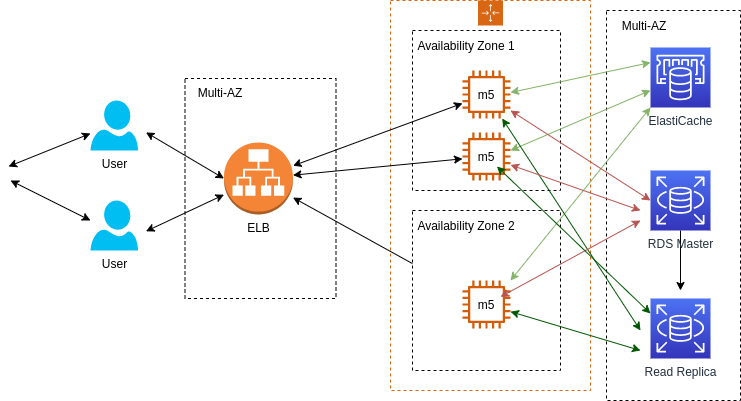
A different approach can be to use Cache + DB, where for each session, we'll check if the data is in the cache and if it's not, then we'll access the DB (this is also called "Write Through"):
Note: Exercises may repeat themselves in different variations to practice and emphasize different concepts.
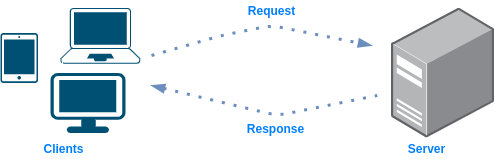
Limitations:
How to improve:
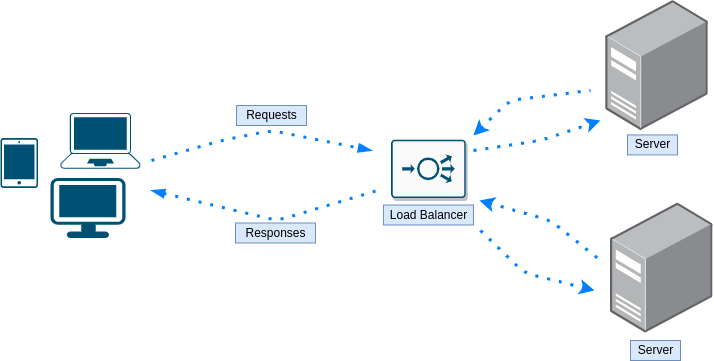
Further limitations:
Yes, one could use DNS load balancing.
Bonus question: which algorithm a DNS load balancer will use?
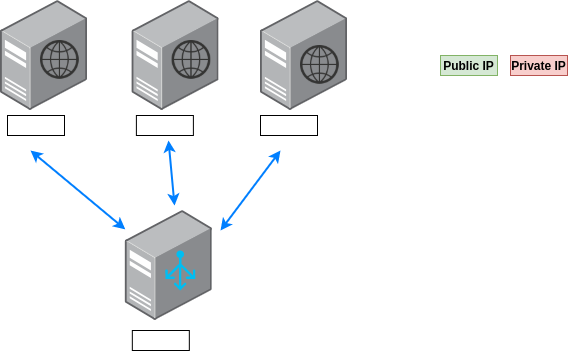
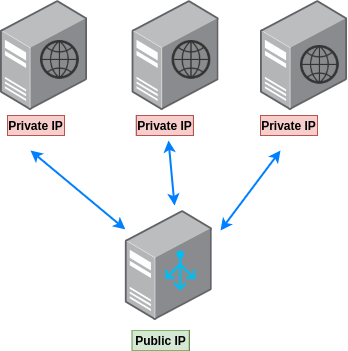
It makes sense to hide the web servers behind the load balancers instead of giving users direct access to them, so each one of them will have a private IP assigned to it. The load balancer should have a public IP since, we except anyone who would like to access a certain web page/resource, to go through the load balancer hence, it should be accessible to users.
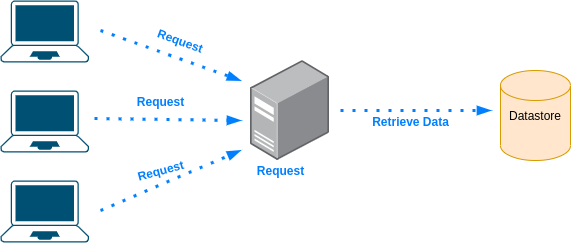
Limitations:
How to improve:
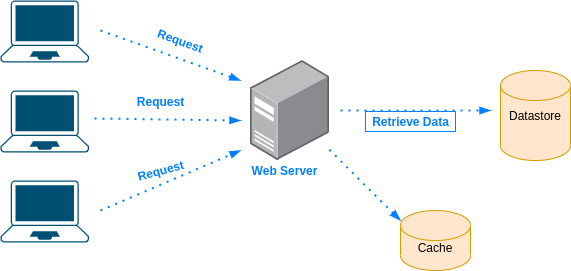
Why to use cache?
For multiple reasons:
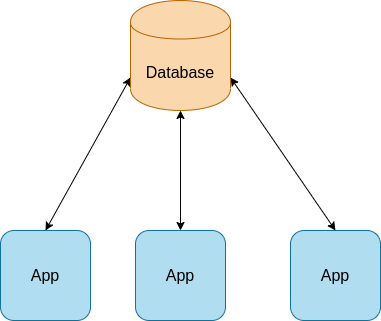
Limitations:
How to improve:
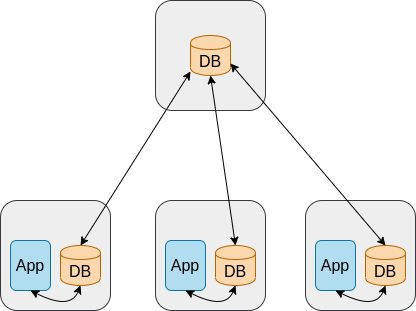
Further limitations:
Limitations:
How to improve:
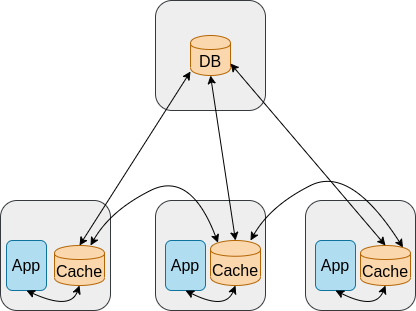
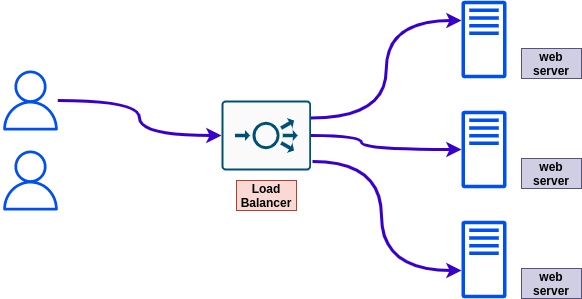
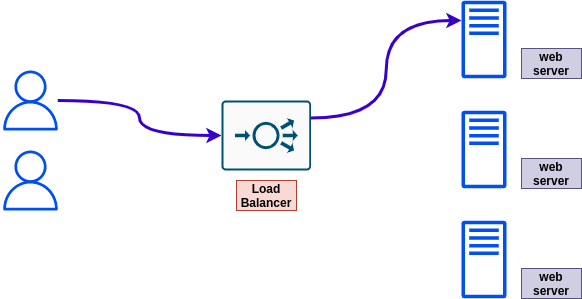
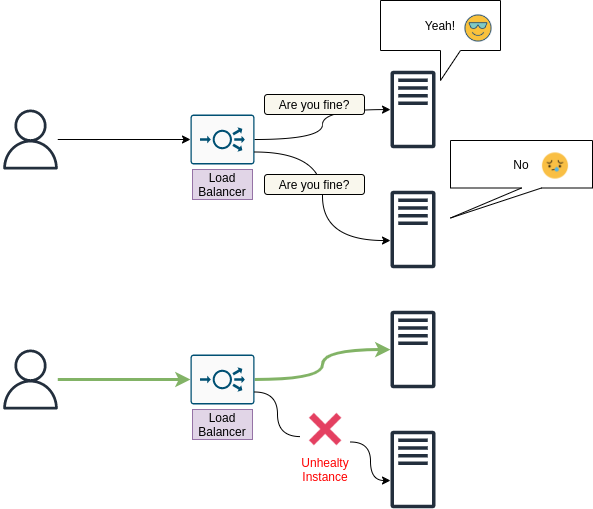
One possible way to deal with it, is by using health checks. Where an instance that doesn't pass the health check, will be excluded from the list of instances used by the load balancer to forward traffic to.
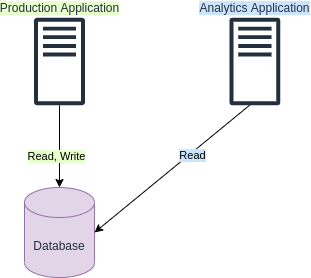
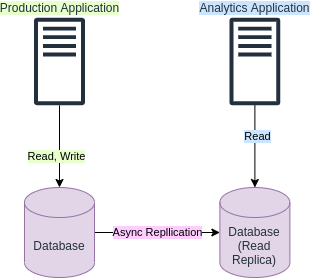
Adding another application to work against the same database can create additional load on your database which may lead to issues since the additional load might reach the limits of your database capacity constraints.
One improvement to the design could be to add a read replica instance of your database. This way the new application can work against the read replica instead of the original database. The replication will be asynchronous but in most cases, for analytics applications, that's good enough.
This is a more "simplified" version of exercises section. No drawings, no evolving exercises, no strange exercises names, just straightforward questions, each in its own category.
Scalability issue. The web server doesn't scales :'(
In order to avoid such issues, the web server has to scale based on the usage. More users -> More CPU, RAM utilization -> Add more resources (= scale up). An
When there are less users accessing the website, scale down.
False. If your server doesn't have to execute the request since the result is already in the cache, then it's actually the opposite - there is less load on the server in addition to reduced load times.
The CPU have multiple cores. Each task is executed by a different core.
Also, it might only appear to run simultaneously. If every process is getting CPU allocation every nanosecond, the user might think that both processes are running simultaneously.
From wikipedia: "A virtual private server (VPS) is a virtual machine sold as a service by an Internet hosting service."
False. You get a private VM that no one else can or should use.
There many great resources out there to learn about system design in different ways - videos, blogs, etc. I've gathered some of them here for you
This section focusing on the development aspect of system design (e.g. Version Control, Development Environment, etc.). Note: it might overlap with other sections such 'Cloud System Design'.
For each scenario try to identify the following:
You are part of a team which owns a Git monorepo. Recently this monorepo grown quite a lot and now includes hundred thousands of files. Recently, developers in your team complain it takes a lot of time to run some Git commands, especially those related to filesystem state (e.g. git status takes a couple of seconds or even minutes). What would you suggest the team to do?
Let's start with stating the facts:
Next, it would be good to understand how exactly these different commands work in order to understand what we can do about the problem.
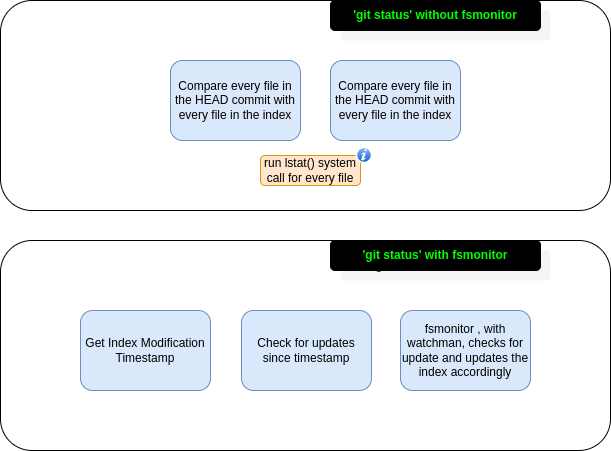
In case of git status, it runs diffs on HEAD and the index and also the index and working directory, to understand what is being tracked and what's not. This results in running lstat() system call which returns a struct on each file (including information like device ID, permissions, inode number, timestamp info, etc.). Running this on hundred thousands of files takes time, which explains why git status takes seconds, if not minutes, to run.
The solution should be focusing on how Git can perform less work in regards to its operations. In this case it's very technology specific, but there is always something to learn, even in specific implementations, on the general design approach.
fsmonitor (filesystem monitor) of Git. With fsmonitor (which integrated with Watchman), Git spawn a daemon that will watch for any changes continuously in the working directory of your repository and will cache them . This way, when you run git status instead of scanning the working directory, you are using a cached state of your index.
Enable feature.manyFile with git config feature.manyFiles true. This does two things:
Sets index.version = 4 which enables path-prefix compression in the index
Sets core.untrackedCache=true which by default is set to keep. The untracked cache is quite important concept. What it does is to record the mtime of all the files and directories in the working directory. This way, when time comes to iterate over all the files and directories, it can skip those whom mtime wasn't updated.
Before enabling it, you might want to run git update-index --test-untracked-cache to test it out and make sure mtime operational on your system.
Git also has the built-in git-maintainence command which optimizes Git repository so it's faster to run commands like git add or git fatch and also, the git repository takes less disk space. It's recommended to run this command periodically (e.g. each day).
Track only what is used/modified by developers - some repositories may include generated files that are required for the project to run properly (or support certain accessibility options), but not actually being modified by any way by the developers. In that case, tracking them is futile.
In order to avoid populating those file in the working directory, one can use the sparse checkout feature of Git.
Finally, with certain build systems, you can know which files are being used/relevant exactly based on the component of the project that the developer is focusing on. This, together with the sparse checkout can lead to a situation where only a small subset of the files are being populated in the working directory. Making commands like git add, git status, etc. really quick
This section covers system designs of different types of applications. Nothing too specific, but yet quite common in the real world as a type of application.
For each type of application we are going to mention its:
Design a payment and reservation system for parking garages that supports three type of vehicles:
With flat rate based on vehicle type and time
Note: if you've been told to design this type of system without any other requirements, the rate and special parking, is something you should ask about.
Ask clarifying questions such as:
/reserve
/cancel
/payment
/calculate_payment - calculate the payment for reserving a parking spot
/free_spots - get free spots where the car can park (note: small car might be able to park in bigger car spot)
/allocate_spot - do the actual reservation of a parking spot
/create_account - the ability to create an account so users can use the app and reserve parking spots
/login
We can assume that the number of users is limited to the number of parking spots in each garage and taking into account the number of garages of course.
Given that, users scale is pretty predictable and can't reach unexpected count (assuming no new garages can be added or fixed rate of new garages being added)
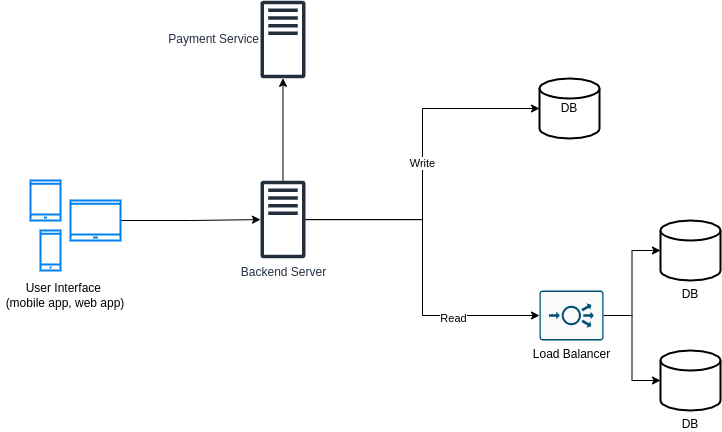
SQL based database with the following tables
Reservations
| Field | Type |
|---|---|
| id | primary key, serial |
| start | timestamp |
| end | timestamp |
| paid | boolean |
Garages
| Field | Type |
|---|---|
| id | primary key, serial |
| zipcode | varchar |
| rate_compact | decimal |
| rate_compact | decimal |
| rate_regular | decimal |
| rate_large | decimal |
Spots
| Field | Type |
|---|---|
| id | primary key, serial |
| garage_id | foreign_key, int |
| vehicle_type | enum |
| status | enum |
Users
| Field | Type |
|---|---|
| id | primary key, serial |
| varchar (SHA-256) | |
| first_name | varchar |
| last_name | varchar |
Vehicles
| Field | Type |
|---|---|
| id | primary key, serial |
| license | varchar |
| type | enum |
This section covers system designs of real world applications.
Each section here will include full details on the system. It's recommended, as part of your learning process, that you will NOT look at these full details and start by trying figuring them out by yourself. More specifically, for every system:
Messaging:
User account:
TODO
TODO
How to perform system design? TODO(abregman): this section is not yet ready
If you are here because you have a system design interview, here are a couple of suggestions:
More specific suggestions based on the phase of the interview:
Note: You might want to ask yourself these questions also after you've done performing a system design
The project banner, the icons used in "General" exercises section and the system design index, designed by Arie Bregman
If you would like to contribute to the project, please read the contribution guidelines

31 followers · starred Feb 2023
133 followers · starred Nov 2024
78 followers · starred Oct 2025
1 followers · starred Mar 2026
An open source project to help you learn about system design step by step
NOTE: The work on this repo is still in progress. Some information might be lacking or missing at this point.
Two issues:
Apply vertical scaling. By adding more resources to the server (i.e. CPU & RAM) it will allow it to handle more load. This is nota permanent solution because at some point the load might scale to a point where it's not possible to add more RAM and CPU to the instance nor it's really worthwhile.
The two improvements would be:
In this case what you need is two components:
Your instance might not be strong enough to handle requests from multiple users and soon enough you might see RAM and CPU utilized fully. One way to deal with it is, to perform what is called "Vertical Scaling" which is the act of adding more resources to your instance. In AWS case, switching to an instance type with more resources like M5 for example.
Note: The problem with vertical scaling (in case you have one node) is downtime (when upgrading the instance type, the instance will be down) so another thing you would want to do is "Horizontal Scaling" which is the act of adding more instances/resources.
Instead of using elastic IP addresses we can add a record in the DNS, using the Route 53 service, to have a record from the type A. This way, all users will be able to access the app using an hostname and the IP address will be provided to them by the DNS
It's important to note that this solution is not optimal if you plan to scale down and up at some point. Due to the TTL value of a record, a user will keep contacting the same IP address, even if the node is already down.
A more proper and complete architecture would be to use an ELB
But even with ELB used and "Auto scaling group" for automatically scaling the nodes, this architecture is not optimal. Can you point what is the problem with current architecture? (from two different aspecs)
With current architecture, the application is perhaps able to scale up and down, but when the availability zone is down, your entire application is down. So the first improvement would be to make both ELB and the application itself (the EC2 instances) multi-AZ.
Secondly, if you know you always need an instance (or two) for the application, you might want to have reserved nodes. Reserved nodes means you pay less for instances which means you save on costs.
The problem is that users report that when they browse for additional video games to buy, they lose their shopping cart. What is the problem with the current architecture and how to deal with it?
Such application is a stateful application, meaning it's important that we'll keep the information about the client from one session to another. It seems that with current architecture, every time the user initiates new session, it's perform against a different instance without saving client information.
There are a couple of solutions that can be applied in this case:
There is something called "server session" where we need to add a new component to the architecture - ElastiCache or DynamoDB, to store the data on the shopping cart of each user. In order to identify it, we'll use a session ID which will be sent by the client/user every request
For long term data (user name, address, etc.) we'll use a database (e.g. RDS). There are a couple of variations as to how we can use it. A master instance where we'll write the data and a replication from which we'll read data:
A different approach can be to use Cache + DB, where for each session, we'll check if the data is in the cache and if it's not, then we'll access the DB (this is also called "Write Through"):
Note: Exercises may repeat themselves in different variations to practice and emphasize different concepts.
Limitations:
How to improve:
Further limitations:
Yes, one could use DNS load balancing.
Bonus question: which algorithm a DNS load balancer will use?
It makes sense to hide the web servers behind the load balancers instead of giving users direct access to them, so each one of them will have a private IP assigned to it. The load balancer should have a public IP since, we except anyone who would like to access a certain web page/resource, to go through the load balancer hence, it should be accessible to users.
Limitations:
How to improve:
Why to use cache?
For multiple reasons:
Limitations:
How to improve:
Further limitations:
Limitations:
How to improve:
One possible way to deal with it, is by using health checks. Where an instance that doesn't pass the health check, will be excluded from the list of instances used by the load balancer to forward traffic to.
Adding another application to work against the same database can create additional load on your database which may lead to issues since the additional load might reach the limits of your database capacity constraints.
One improvement to the design could be to add a read replica instance of your database. This way the new application can work against the read replica instead of the original database. The replication will be asynchronous but in most cases, for analytics applications, that's good enough.
This is a more "simplified" version of exercises section. No drawings, no evolving exercises, no strange exercises names, just straightforward questions, each in its own category.
Scalability issue. The web server doesn't scales :'(
In order to avoid such issues, the web server has to scale based on the usage. More users -> More CPU, RAM utilization -> Add more resources (= scale up). An
When there are less users accessing the website, scale down.
False. If your server doesn't have to execute the request since the result is already in the cache, then it's actually the opposite - there is less load on the server in addition to reduced load times.
The CPU have multiple cores. Each task is executed by a different core.
Also, it might only appear to run simultaneously. If every process is getting CPU allocation every nanosecond, the user might think that both processes are running simultaneously.
From wikipedia: "A virtual private server (VPS) is a virtual machine sold as a service by an Internet hosting service."
False. You get a private VM that no one else can or should use.
There many great resources out there to learn about system design in different ways - videos, blogs, etc. I've gathered some of them here for you
This section focusing on the development aspect of system design (e.g. Version Control, Development Environment, etc.). Note: it might overlap with other sections such 'Cloud System Design'.
For each scenario try to identify the following:
You are part of a team which owns a Git monorepo. Recently this monorepo grown quite a lot and now includes hundred thousands of files. Recently, developers in your team complain it takes a lot of time to run some Git commands, especially those related to filesystem state (e.g. git status takes a couple of seconds or even minutes). What would you suggest the team to do?
Let's start with stating the facts:
Next, it would be good to understand how exactly these different commands work in order to understand what we can do about the problem.
In case of git status, it runs diffs on HEAD and the index and also the index and working directory, to understand what is being tracked and what's not. This results in running lstat() system call which returns a struct on each file (including information like device ID, permissions, inode number, timestamp info, etc.). Running this on hundred thousands of files takes time, which explains why git status takes seconds, if not minutes, to run.
The solution should be focusing on how Git can perform less work in regards to its operations. In this case it's very technology specific, but there is always something to learn, even in specific implementations, on the general design approach.
fsmonitor (filesystem monitor) of Git. With fsmonitor (which integrated with Watchman), Git spawn a daemon that will watch for any changes continuously in the working directory of your repository and will cache them . This way, when you run git status instead of scanning the working directory, you are using a cached state of your index.
Enable feature.manyFile with git config feature.manyFiles true. This does two things:
Sets index.version = 4 which enables path-prefix compression in the index
Sets core.untrackedCache=true which by default is set to keep. The untracked cache is quite important concept. What it does is to record the mtime of all the files and directories in the working directory. This way, when time comes to iterate over all the files and directories, it can skip those whom mtime wasn't updated.
Before enabling it, you might want to run git update-index --test-untracked-cache to test it out and make sure mtime operational on your system.
Git also has the built-in git-maintainence command which optimizes Git repository so it's faster to run commands like git add or git fatch and also, the git repository takes less disk space. It's recommended to run this command periodically (e.g. each day).
Track only what is used/modified by developers - some repositories may include generated files that are required for the project to run properly (or support certain accessibility options), but not actually being modified by any way by the developers. In that case, tracking them is futile.
In order to avoid populating those file in the working directory, one can use the sparse checkout feature of Git.
Finally, with certain build systems, you can know which files are being used/relevant exactly based on the component of the project that the developer is focusing on. This, together with the sparse checkout can lead to a situation where only a small subset of the files are being populated in the working directory. Making commands like git add, git status, etc. really quick
This section covers system designs of different types of applications. Nothing too specific, but yet quite common in the real world as a type of application.
For each type of application we are going to mention its:
Design a payment and reservation system for parking garages that supports three type of vehicles:
With flat rate based on vehicle type and time
Note: if you've been told to design this type of system without any other requirements, the rate and special parking, is something you should ask about.
Ask clarifying questions such as:
/reserve
/cancel
/payment
/calculate_payment - calculate the payment for reserving a parking spot
/free_spots - get free spots where the car can park (note: small car might be able to park in bigger car spot)
/allocate_spot - do the actual reservation of a parking spot
/create_account - the ability to create an account so users can use the app and reserve parking spots
/login
We can assume that the number of users is limited to the number of parking spots in each garage and taking into account the number of garages of course.
Given that, users scale is pretty predictable and can't reach unexpected count (assuming no new garages can be added or fixed rate of new garages being added)
SQL based database with the following tables
Reservations
| Field | Type |
|---|---|
| id | primary key, serial |
| start | timestamp |
| end | timestamp |
| paid | boolean |
Garages
| Field | Type |
|---|---|
| id | primary key, serial |
| zipcode | varchar |
| rate_compact | decimal |
| rate_compact | decimal |
| rate_regular | decimal |
| rate_large | decimal |
Spots
| Field | Type |
|---|---|
| id | primary key, serial |
| garage_id | foreign_key, int |
| vehicle_type | enum |
| status | enum |
Users
| Field | Type |
|---|---|
| id | primary key, serial |
| varchar (SHA-256) | |
| first_name | varchar |
| last_name | varchar |
Vehicles
| Field | Type |
|---|---|
| id | primary key, serial |
| license | varchar |
| type | enum |
This section covers system designs of real world applications.
Each section here will include full details on the system. It's recommended, as part of your learning process, that you will NOT look at these full details and start by trying figuring them out by yourself. More specifically, for every system:
Messaging:
User account:
TODO
TODO
How to perform system design? TODO(abregman): this section is not yet ready
If you are here because you have a system design interview, here are a couple of suggestions:
More specific suggestions based on the phase of the interview:
Note: You might want to ask yourself these questions also after you've done performing a system design
The project banner, the icons used in "General" exercises section and the system design index, designed by Arie Bregman
If you would like to contribute to the project, please read the contribution guidelines
31 followers · starred Feb 2023
133 followers · starred Nov 2024
78 followers · starred Oct 2025
1 followers · starred Mar 2026