
A browser-based isometric island builder with the soft, sun-bleached look of Mykonos. Vanilla ES modules, no bundler, mobile-friendly.
See the codeREADME
Mykonos Island Voxels
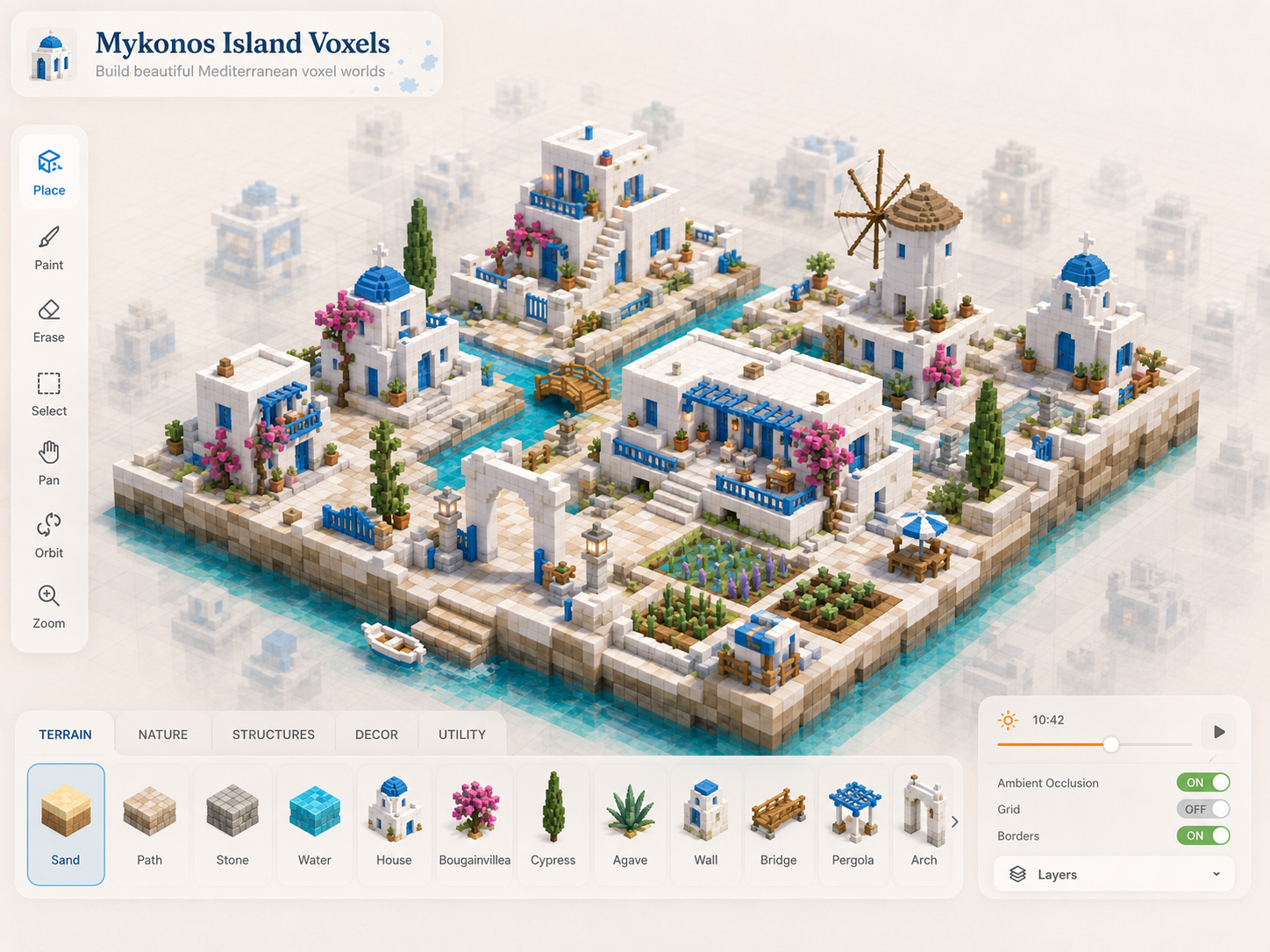
A browser-based isometric island builder with the soft, sun-bleached Mediterranean look of Mykonos: cobalt-blue domes on whitewashed walls, bougainvillea spilling over stone, olive trees, windmills, narrow cobble paths, and a sea you can carve with a click.
It's a small, self-contained creative toy — drop blocks on a 14×14 grid and a tiny village builds itself in front of you. There's no goal, no resource grind, no scoring; just the puzzle-piece pleasure of arranging things until they look right.
🌐 Play it: https://mykonos-island-voxels.netlify.app
Features
- Click-to-build isometric grid. Pick an asset from the right-side palette, click a cell, and it pops in with an elastic placement animation.
- One-click "Fill with grass" to carpet the island and start arranging in seconds.
- 75+ painterly assets organised into terrain, nature, props, water, and buildings — chapels, windmills, two-story villas, cypress, olive trees, agave, wells, lanterns, fences, bridges, and more.
- Touch-first mobile UI. Tap to place, long-press to erase, drag to brush, two-finger pinch and pan. Layout adapts from desktop down to small phones with safe-area insets for the iPhone notch.
- High-fidelity asset pipeline. Source PNGs are pre-rendered at 6× display resolution at load time, baked into high-DPI cached layers, then composited per frame so the canvas stays crisp at every zoom on every screen density.
- Auto-save. Your island is persisted to
localStorageand re-loaded on the next visit. - Tasteful sound design. Distinct placement sounds for water, stone, wood, small vegetation, large vegetation, and UI clicks, with debounced overlap so brush-painting doesn't flood the bus.
- Pure ES modules. No bundler, no transpiler, no
node_modules— openindex.htmland it runs.
Controls
Mouse + keyboard
| Input | Action |
|---|---|
| Click | Place selected asset |
| Drag | Brush-place across cells |
| Right click | Erase tile |
| Right drag | Brush-erase |
| Shift + drag | Pan camera |
| Scroll wheel | Zoom |
H / V | Flip the placement preview |
E | Toggle erase mode |
G | Toggle grid overlay |
1–5 | Switch palette categories |
S / R | Save / reset |
Touch
| Gesture | Action |
|---|---|
| Tap | Place selected asset |
| Drag | Brush-place across cells |
| Long-press (~420 ms) | Erase the tile under your finger |
| Two-finger pinch | Zoom |
| Two-finger drag | Pan camera |
Run it locally
The project is plain HTML / CSS / ES modules — there's no build step
required to develop on it. Because browsers refuse to load ES modules
from file:// URLs, you do need to serve it over HTTP. Pick whichever
of these is easiest:
# any one of these from the project root:
python3 -m http.server 8000
npx serve .
npx http-server -c-1 .
Then open http://localhost:8000.
Deploy
The site is deployed to Netlify. The included netlify.toml and
netlify-build.mjs produce a clean dist/ folder containing only the
runtime files (no design references, no .DS_Store, no .webp
duplicates) and ship the right cache headers (immutable for assets,
must-revalidate for HTML/CSS/JS).
netlify deploy --prod
Project layout
.
├── index.html               # entry point
├── styles.css               # the entire UI (no framework)
├── src/
│   ├── main.js              # boot, asset loading, starter scene
│   ├── config.js            # grid size, tile dims, palette, debug flags
│   ├── core/
│   │   ├── Game.js          # game state + tool dispatch
│   │   ├── Camera.js        # pan / zoom / change notifications
│   │   ├── Renderer.js      # layered canvas caching + animations
│   │   └── InputManager.js  # mouse + touch + keyboard
│   ├── grid/
│   │   ├── IsoGrid.js       # screen ↔ cell math
│   │   └── TileMap.js       # terrain + objects, occupancy index
│   ├── building/
│   │   └── PlacementSystem.js
│   ├── assets/
│   │   ├── assetManifest.js # the 75+ asset definitions
│   │   ├── assetLoader.js   # PNG → display canvas + shadow canvas
│   │   ├── imageToAsset.js  # silhouette extraction, anchor inference
│   │   └── voxelRenderer.js # procedural fallback when PNGs missing
│   ├── ui/
│   │   ├── UIManager.js
│   │   ├── Toolbar.js
│   │   ├── AssetPalette.js
│   │   ├── HUD.js
│   │   └── Audio.js         # WebAudio clip routing + debouncing
│   └── persistence/
│       └── SaveSystem.js
├── assets/                  # PNG asset pack (pre-generated)
├── *.ogg                    # placement / UI sound effects
├── netlify.toml
└── netlify-build.mjs
Architecture notes
A few choices worth flagging if you want to hack on the renderer:
- Layered cache rendering.
Renderer.jskeeps four cache canvases: a screen-space backdrop + vignette pair (rebuilt on resize), a world-space platform (rebuilt on grid resize), a world-space terrain layer (rebuilt when the terrain version counter changes), and a world-space static-objects layer (rebuilt on add/remove). Each frame the renderer composites these caches and overlays only the currently animating tiles. Idle frames are essentially free. - High-DPI cache canvases. Cache canvases are sized at
world × CACHE_SCALE(2× on standard displays, 3× on retina) so that even after the camera scales them up, the pixels are at or near final on-screen resolution. The asset displayCanvases are pre-rendered at up to 6× their reference size, so detail flows through without any "softening" intermediate. - Spatial occupancy index in
TileMap. Object lookup and free-cell checks are O(1) per cell instead of O(N) over the object list. - Dirty-flag rendering.
markDirty()is called from camera / input / tool transitions; the loop early-exits when the scene is static and no animations are pending.
Contributing
PRs welcome. Please:
- Keep it framework-free — no bundlers, no transpilers, no
node_modulesfor the runtime. - Keep the asset count modest and the visual style coherent (cobalt-on-cream, soft shadows, gentle elastic motion).
- Don't add per-frame
ctx.filter, ImageBitmap shenanigans, or anything that would re-introduce frame drops at heavy scenes. The renderer's caching invariants are load-bearing.
License
MIT — see LICENSE.
The PNG asset pack in assets/ is released under the same license,
generated for this project. Audio clips were authored separately;
see file metadata if you need to attribute them.
Similar repos


Languages
JavaScript
85.8%
CSS
10.1%
Python
2.2%
HTML
1.9%
A browser-based isometric island builder with the soft, sun-bleached look of Mykonos. Vanilla ES modules, no bundler, mobile-friendly.
See the codeREADME
Mykonos Island Voxels
A browser-based isometric island builder with the soft, sun-bleached Mediterranean look of Mykonos: cobalt-blue domes on whitewashed walls, bougainvillea spilling over stone, olive trees, windmills, narrow cobble paths, and a sea you can carve with a click.
It's a small, self-contained creative toy — drop blocks on a 14×14 grid and a tiny village builds itself in front of you. There's no goal, no resource grind, no scoring; just the puzzle-piece pleasure of arranging things until they look right.
🌐 Play it: https://mykonos-island-voxels.netlify.app
Features
- Click-to-build isometric grid. Pick an asset from the right-side palette, click a cell, and it pops in with an elastic placement animation.
- One-click "Fill with grass" to carpet the island and start arranging in seconds.
- 75+ painterly assets organised into terrain, nature, props, water, and buildings — chapels, windmills, two-story villas, cypress, olive trees, agave, wells, lanterns, fences, bridges, and more.
- Touch-first mobile UI. Tap to place, long-press to erase, drag to brush, two-finger pinch and pan. Layout adapts from desktop down to small phones with safe-area insets for the iPhone notch.
- High-fidelity asset pipeline. Source PNGs are pre-rendered at 6× display resolution at load time, baked into high-DPI cached layers, then composited per frame so the canvas stays crisp at every zoom on every screen density.
- Auto-save. Your island is persisted to
localStorageand re-loaded on the next visit. - Tasteful sound design. Distinct placement sounds for water, stone, wood, small vegetation, large vegetation, and UI clicks, with debounced overlap so brush-painting doesn't flood the bus.
- Pure ES modules. No bundler, no transpiler, no
node_modules— openindex.htmland it runs.
Controls
Mouse + keyboard
| Input | Action |
|---|---|
| Click | Place selected asset |
| Drag | Brush-place across cells |
| Right click | Erase tile |
| Right drag | Brush-erase |
| Shift + drag | Pan camera |
| Scroll wheel | Zoom |
H / V | Flip the placement preview |
E | Toggle erase mode |
G | Toggle grid overlay |
1–5 | Switch palette categories |
S / R | Save / reset |
Touch
| Gesture | Action |
|---|---|
| Tap | Place selected asset |
| Drag | Brush-place across cells |
| Long-press (~420 ms) | Erase the tile under your finger |
| Two-finger pinch | Zoom |
| Two-finger drag | Pan camera |
Run it locally
The project is plain HTML / CSS / ES modules — there's no build step
required to develop on it. Because browsers refuse to load ES modules
from file:// URLs, you do need to serve it over HTTP. Pick whichever
of these is easiest:
# any one of these from the project root:
python3 -m http.server 8000
npx serve .
npx http-server -c-1 .
Then open http://localhost:8000.
Deploy
The site is deployed to Netlify. The included netlify.toml and
netlify-build.mjs produce a clean dist/ folder containing only the
runtime files (no design references, no .DS_Store, no .webp
duplicates) and ship the right cache headers (immutable for assets,
must-revalidate for HTML/CSS/JS).
netlify deploy --prod
Project layout
.
├── index.html               # entry point
├── styles.css               # the entire UI (no framework)
├── src/
│   ├── main.js              # boot, asset loading, starter scene
│   ├── config.js            # grid size, tile dims, palette, debug flags
│   ├── core/
│   │   ├── Game.js          # game state + tool dispatch
│   │   ├── Camera.js        # pan / zoom / change notifications
│   │   ├── Renderer.js      # layered canvas caching + animations
│   │   └── InputManager.js  # mouse + touch + keyboard
│   ├── grid/
│   │   ├── IsoGrid.js       # screen ↔ cell math
│   │   └── TileMap.js       # terrain + objects, occupancy index
│   ├── building/
│   │   └── PlacementSystem.js
│   ├── assets/
│   │   ├── assetManifest.js # the 75+ asset definitions
│   │   ├── assetLoader.js   # PNG → display canvas + shadow canvas
│   │   ├── imageToAsset.js  # silhouette extraction, anchor inference
│   │   └── voxelRenderer.js # procedural fallback when PNGs missing
│   ├── ui/
│   │   ├── UIManager.js
│   │   ├── Toolbar.js
│   │   ├── AssetPalette.js
│   │   ├── HUD.js
│   │   └── Audio.js         # WebAudio clip routing + debouncing
│   └── persistence/
│       └── SaveSystem.js
├── assets/                  # PNG asset pack (pre-generated)
├── *.ogg                    # placement / UI sound effects
├── netlify.toml
└── netlify-build.mjs
Architecture notes
A few choices worth flagging if you want to hack on the renderer:
- Layered cache rendering.
Renderer.jskeeps four cache canvases: a screen-space backdrop + vignette pair (rebuilt on resize), a world-space platform (rebuilt on grid resize), a world-space terrain layer (rebuilt when the terrain version counter changes), and a world-space static-objects layer (rebuilt on add/remove). Each frame the renderer composites these caches and overlays only the currently animating tiles. Idle frames are essentially free. - High-DPI cache canvases. Cache canvases are sized at
world × CACHE_SCALE(2× on standard displays, 3× on retina) so that even after the camera scales them up, the pixels are at or near final on-screen resolution. The asset displayCanvases are pre-rendered at up to 6× their reference size, so detail flows through without any "softening" intermediate. - Spatial occupancy index in
TileMap. Object lookup and free-cell checks are O(1) per cell instead of O(N) over the object list. - Dirty-flag rendering.
markDirty()is called from camera / input / tool transitions; the loop early-exits when the scene is static and no animations are pending.
Contributing
PRs welcome. Please:
- Keep it framework-free — no bundlers, no transpilers, no
node_modulesfor the runtime. - Keep the asset count modest and the visual style coherent (cobalt-on-cream, soft shadows, gentle elastic motion).
- Don't add per-frame
ctx.filter, ImageBitmap shenanigans, or anything that would re-introduce frame drops at heavy scenes. The renderer's caching invariants are load-bearing.
License
MIT — see LICENSE.
The PNG asset pack in assets/ is released under the same license,
generated for this project. Audio clips were authored separately;
see file metadata if you need to attribute them.
Similar repos
Languages
JavaScript
85.8%
CSS
10.1%
Python
2.2%
HTML
1.9%