
🔖 GitHub Action for working painlessly with deployment statuses
See the codeREADME
GitHub Deployments 

bobheadxi/deployments is a GitHub Action for working painlessly with GitHub deployment statuses.
Instead of exposing convoluted Action configuration that mirrors that of the GitHub API like some of the other available Actions do, this Action simply exposes a number of configurable, easy-to-use "steps" common to most deployment lifecycles.
📢 This project is in need of additional maintainers - if you are interested in helping out please let me know!
A simple example:
on:
  push:
    branches:
    - main

jobs:
  deploy:
    runs-on: ubuntu-latest
    steps:
    - name: start deployment
      uses: bobheadxi/deployments@v1
      id: deployment
      with:
        step: start
        token: ${{ secrets.GITHUB_TOKEN }}
        env: release

    - name: do my deploy
      # ...

    - name: update deployment status
      uses: bobheadxi/deployments@v1
      if: always()
      with:
        step: finish
        token: ${{ secrets.GITHUB_TOKEN }}
        status: ${{ job.status }}
        env: ${{ steps.deployment.outputs.env }}
        deployment_id: ${{ steps.deployment.outputs.deployment_id }}
You can also refer to other projects that also use this action - you can find more usages of this action on Sourcegraph, or check out the following examples:
github/super-linter- GitHub's all-in-one linter Action
mxcl/PromiseKit- promises for Swift and Objective-C
saleor/saleor- modular, high performance, headless e-commerce storefront
sharetribe/sharetribe- marketplace software
skylines-project/skylines- live tracking, flight database and competition web platform
Also feel free to chime in on the show and tell discussion to share your usages of this Action!
Check out this blog post for a bit of background on the origins of this project.
Configuration
The following inputs configuration options are for all steps:
| Variable | Default | Purpose |
|---|---|---|
step | One of start, finish, deactivate-env, or delete-env | |
token | ${{ github.token }} | provide your ${{ github.token }} or ${{ secrets.GITHUB_TOKEN }} for API access |
env | identifier for environment to deploy to (e.g. staging, prod, main) | |
repository | Current repository | target a specific repository for updates, e.g. owner/repo |
logs | URL to GitHub commit checks | URL of your deployment logs |
desc | GitHub-generated description | description for this deployment |
ref | github.ref | Specify a particular git ref to use, (e.g. ${{ github.head_ref }}) |
step: start
This is best used on the push: { branches: [ ... ] } event, but you can also have release: { types: [ published ] } trigger this event.
start should be followed by whatever deployment tasks you want to do, and it creates and marks a deployment as "started":

In addition to the core configuration, the following inputs are available:
| Variable | Default | Purpose |
|---|---|---|
deployment_id | Use an existing deployment instead of creating a new one (e.g. ${{ github.event.deployment.id }}) | |
override | false | whether to mark existing deployments of this environment as inactive |
payload | JSON-formatted dictionary with extra information about the deployment | |
task | 'deploy' | change the task associated with this deployment, can be any string |
The following outputs are available:
| Variable | Purpose |
|---|---|
deployment_id | ID of created GitHub deployment |
status_id | ID of created GitHub deployment status |
env | name of configured environment |
Simple Push Example
on:
  push:
    branches:
    - main

jobs:
  deploy:
    steps:
    - name: start deployment
      uses: bobheadxi/deployments@v1
      id: deployment
      with:
        step: start
        env: release

    - name: do my deploy
      # ...
Simple Pull Request Example
on:
  pull_request:

jobs:
  deploy:
    runs-on: ubuntu-latest
    steps:
    - name: start deployment
      uses: bobheadxi/deployments@v1
      id: deployment
      with:
        step: start
        env: integration

    - name: do my deploy
      # ...
step: finish
This is best used after step: start and should follow whatever deployment tasks you want to do in the same workflow.
finish marks an in-progress deployment as complete:
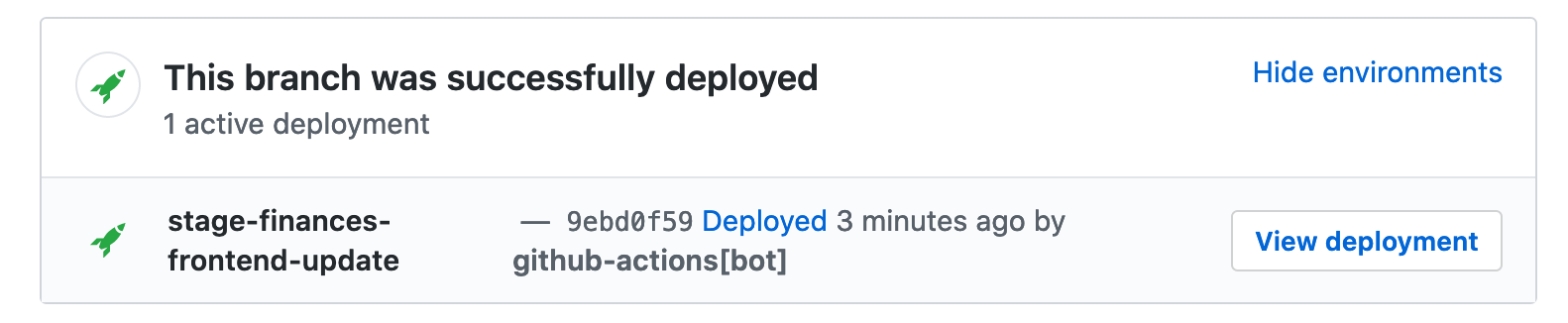
In addition to the core configuration, the following inputs are available:
| Variable | Default | Purpose |
|---|---|---|
status | provide the current deployment job status ${{ job.status }} | |
deployment_id | identifier for deployment to update (see outputs of step: start) | |
env_url | URL to view deployed environment | |
override | true | whether to manually mark existing deployments of this environment as inactive |
auto_inactive | false | whether to let GitHub handle marking existing deployments of this environment as inactive (if and only if a new deployment succeeds). |
Simple Example
# ...

jobs:
  deploy:
    steps:
    - name: start deployment
      # ... see previous example

    - name: do my deploy
      # ...

    - name: update deployment status
      uses: bobheadxi/deployments@v1
      if: always()
      with:
        step: finish
        token: ${{ secrets.GITHUB_TOKEN }}
        status: ${{ job.status }}
        env: ${{ steps.deployment.outputs.env }}
        deployment_id: ${{ steps.deployment.outputs.deployment_id }}
step: deactivate-env
This is best used on the pull_request: { types: [ closed ] } event, since GitHub does not seem to provide a event to detect when branches are deleted.
This step can be used to automatically shut down deployments you create on pull requests and mark environments as destroyed:

Refer to the core configuration for available inputs.
Simple Example
on:
  pull_request:
    types: [ closed ]

jobs:
  prune:
    steps:
    # see https://dev.to/bobheadxi/branch-previews-with-google-app-engine-and-github-actions-3pco
    - name: extract branch name
      id: get_branch
      shell: bash
      env:
        PR_HEAD: ${{ github.head_ref }}
      run: echo "##[set-output name=branch;]$(echo ${PR_HEAD#refs/heads/} | tr / -)"

    - name: do my deployment shutdown
      # ...

    - name: mark environment as deactivated
      uses: bobheadxi/deployments@v1
      with:
        step: deactivate-env
        token: ${{ secrets.GITHUB_TOKEN }}
        env: ${{ steps.get_branch.outputs.branch }}
        desc: Environment was pruned
step: delete-env
This is the same as deactivate-env, except deletes the environment entirely. See step: deactivate-env for more details.
Note that the default GITHUB_TOKEN does not allow environment deletion - you have to set a personal access token with deployments:write and administration:write permissions and provide it in the token input.
Refer to the core configuration for available inputs.
Debugging
The argument debug: true can be provided to print arguments used by deployments and log debug information.
If you run into an problems or have any questions, feel free to open an issue or discussion!
Migrating to v1
bobheadxi/deployments@v1 makes the following breaking changes from v0.6.x:
- CHANGED:
no_overrideis nowoverride, and the default behaviour isoverride: trueinstep: finish(step: startbehaviour remains unchanged, but you can now setoverride: trueon it now as well). - CHANGED:
log_argsis nowdebug, but does the same thing as before. - CHANGED:
envis now always required. You can useenv: ${{ steps.deployment.outputs.env }}to avoid repeating your env configuration. - REMOVED:
transient- all deployments created by this action aretransientby default, with removals handled byoverride,auto_inactive, orstep: deactivate-env. - ADDED:
step: delete-envdeletes an environment entirely.
Then you can change your workflow to target the v1 tag, and automatically receive updates going forward:
- uses: bobheadxi/deployments@v0.6.2
+ uses: bobheadxi/deployments@v1
Migrating to v1.2.0
The token configuration variable now has a default value so if you are happy with the default (${{ github.secret }}) you can simplify the action configuration by removing this from your actions.
Contributors



Similar repos


Languages
TypeScript
98.2%
JavaScript
1.7%
🔖 GitHub Action for working painlessly with deployment statuses
See the codeREADME
GitHub Deployments
bobheadxi/deployments is a GitHub Action for working painlessly with GitHub deployment statuses.
Instead of exposing convoluted Action configuration that mirrors that of the GitHub API like some of the other available Actions do, this Action simply exposes a number of configurable, easy-to-use "steps" common to most deployment lifecycles.
📢 This project is in need of additional maintainers - if you are interested in helping out please let me know!
A simple example:
on:
  push:
    branches:
    - main

jobs:
  deploy:
    runs-on: ubuntu-latest
    steps:
    - name: start deployment
      uses: bobheadxi/deployments@v1
      id: deployment
      with:
        step: start
        token: ${{ secrets.GITHUB_TOKEN }}
        env: release

    - name: do my deploy
      # ...

    - name: update deployment status
      uses: bobheadxi/deployments@v1
      if: always()
      with:
        step: finish
        token: ${{ secrets.GITHUB_TOKEN }}
        status: ${{ job.status }}
        env: ${{ steps.deployment.outputs.env }}
        deployment_id: ${{ steps.deployment.outputs.deployment_id }}
You can also refer to other projects that also use this action - you can find more usages of this action on Sourcegraph, or check out the following examples:
github/super-lintermxcl/PromiseKitsaleor/saleorsharetribe/sharetribeskylines-project/skylines
Also feel free to chime in on the show and tell discussion to share your usages of this Action!
Check out this blog post for a bit of background on the origins of this project.
Configuration
The following inputs configuration options are for all steps:
| Variable | Default | Purpose |
|---|---|---|
step | One of start, finish, deactivate-env, or delete-env | |
token | ${{ github.token }} | provide your ${{ github.token }} or ${{ secrets.GITHUB_TOKEN }} for API access |
env | identifier for environment to deploy to (e.g. staging, prod, main) | |
repository | Current repository | target a specific repository for updates, e.g. owner/repo |
logs | URL to GitHub commit checks | URL of your deployment logs |
desc | GitHub-generated description | description for this deployment |
ref | github.ref | Specify a particular git ref to use, (e.g. ${{ github.head_ref }}) |
step: start
This is best used on the push: { branches: [ ... ] } event, but you can also have release: { types: [ published ] } trigger this event.
start should be followed by whatever deployment tasks you want to do, and it creates and marks a deployment as "started":
In addition to the core configuration, the following inputs are available:
| Variable | Default | Purpose |
|---|---|---|
deployment_id | Use an existing deployment instead of creating a new one (e.g. ${{ github.event.deployment.id }}) | |
override | false | whether to mark existing deployments of this environment as inactive |
payload | JSON-formatted dictionary with extra information about the deployment | |
task | 'deploy' | change the task associated with this deployment, can be any string |
The following outputs are available:
| Variable | Purpose |
|---|---|
deployment_id | ID of created GitHub deployment |
status_id | ID of created GitHub deployment status |
env | name of configured environment |
Simple Push Example
on:
  push:
    branches:
    - main

jobs:
  deploy:
    steps:
    - name: start deployment
      uses: bobheadxi/deployments@v1
      id: deployment
      with:
        step: start
        env: release

    - name: do my deploy
      # ...
Simple Pull Request Example
on:
  pull_request:

jobs:
  deploy:
    runs-on: ubuntu-latest
    steps:
    - name: start deployment
      uses: bobheadxi/deployments@v1
      id: deployment
      with:
        step: start
        env: integration

    - name: do my deploy
      # ...
step: finish
This is best used after step: start and should follow whatever deployment tasks you want to do in the same workflow.
finish marks an in-progress deployment as complete:
In addition to the core configuration, the following inputs are available:
| Variable | Default | Purpose |
|---|---|---|
status | provide the current deployment job status ${{ job.status }} | |
deployment_id | identifier for deployment to update (see outputs of step: start) | |
env_url | URL to view deployed environment | |
override | true | whether to manually mark existing deployments of this environment as inactive |
auto_inactive | false | whether to let GitHub handle marking existing deployments of this environment as inactive (if and only if a new deployment succeeds). |
Simple Example
# ...

jobs:
  deploy:
    steps:
    - name: start deployment
      # ... see previous example

    - name: do my deploy
      # ...

    - name: update deployment status
      uses: bobheadxi/deployments@v1
      if: always()
      with:
        step: finish
        token: ${{ secrets.GITHUB_TOKEN }}
        status: ${{ job.status }}
        env: ${{ steps.deployment.outputs.env }}
        deployment_id: ${{ steps.deployment.outputs.deployment_id }}
step: deactivate-env
This is best used on the pull_request: { types: [ closed ] } event, since GitHub does not seem to provide a event to detect when branches are deleted.
This step can be used to automatically shut down deployments you create on pull requests and mark environments as destroyed:
Refer to the core configuration for available inputs.
Simple Example
on:
  pull_request:
    types: [ closed ]

jobs:
  prune:
    steps:
    # see https://dev.to/bobheadxi/branch-previews-with-google-app-engine-and-github-actions-3pco
    - name: extract branch name
      id: get_branch
      shell: bash
      env:
        PR_HEAD: ${{ github.head_ref }}
      run: echo "##[set-output name=branch;]$(echo ${PR_HEAD#refs/heads/} | tr / -)"

    - name: do my deployment shutdown
      # ...

    - name: mark environment as deactivated
      uses: bobheadxi/deployments@v1
      with:
        step: deactivate-env
        token: ${{ secrets.GITHUB_TOKEN }}
        env: ${{ steps.get_branch.outputs.branch }}
        desc: Environment was pruned
step: delete-env
This is the same as deactivate-env, except deletes the environment entirely. See step: deactivate-env for more details.
Note that the default GITHUB_TOKEN does not allow environment deletion - you have to set a personal access token with deployments:write and administration:write permissions and provide it in the token input.
Refer to the core configuration for available inputs.
Debugging
The argument debug: true can be provided to print arguments used by deployments and log debug information.
If you run into an problems or have any questions, feel free to open an issue or discussion!
Migrating to v1
bobheadxi/deployments@v1 makes the following breaking changes from v0.6.x:
- CHANGED:
no_overrideis nowoverride, and the default behaviour isoverride: trueinstep: finish(step: startbehaviour remains unchanged, but you can now setoverride: trueon it now as well). - CHANGED:
log_argsis nowdebug, but does the same thing as before. - CHANGED:
envis now always required. You can useenv: ${{ steps.deployment.outputs.env }}to avoid repeating your env configuration. - REMOVED:
transient- all deployments created by this action aretransientby default, with removals handled byoverride,auto_inactive, orstep: deactivate-env. - ADDED:
step: delete-envdeletes an environment entirely.
Then you can change your workflow to target the v1 tag, and automatically receive updates going forward:
- uses: bobheadxi/deployments@v0.6.2
+ uses: bobheadxi/deployments@v1
Migrating to v1.2.0
The token configuration variable now has a default value so if you are happy with the default (${{ github.secret }}) you can simplify the action configuration by removing this from your actions.
Similar repos
Contributors
Languages
TypeScript
98.2%
JavaScript
1.7%