
README
Logit Lens Llama Advanced
An interactive tool to analyze and intervene on LLM internal states. Now updated to support TransformerLens backend.
Example
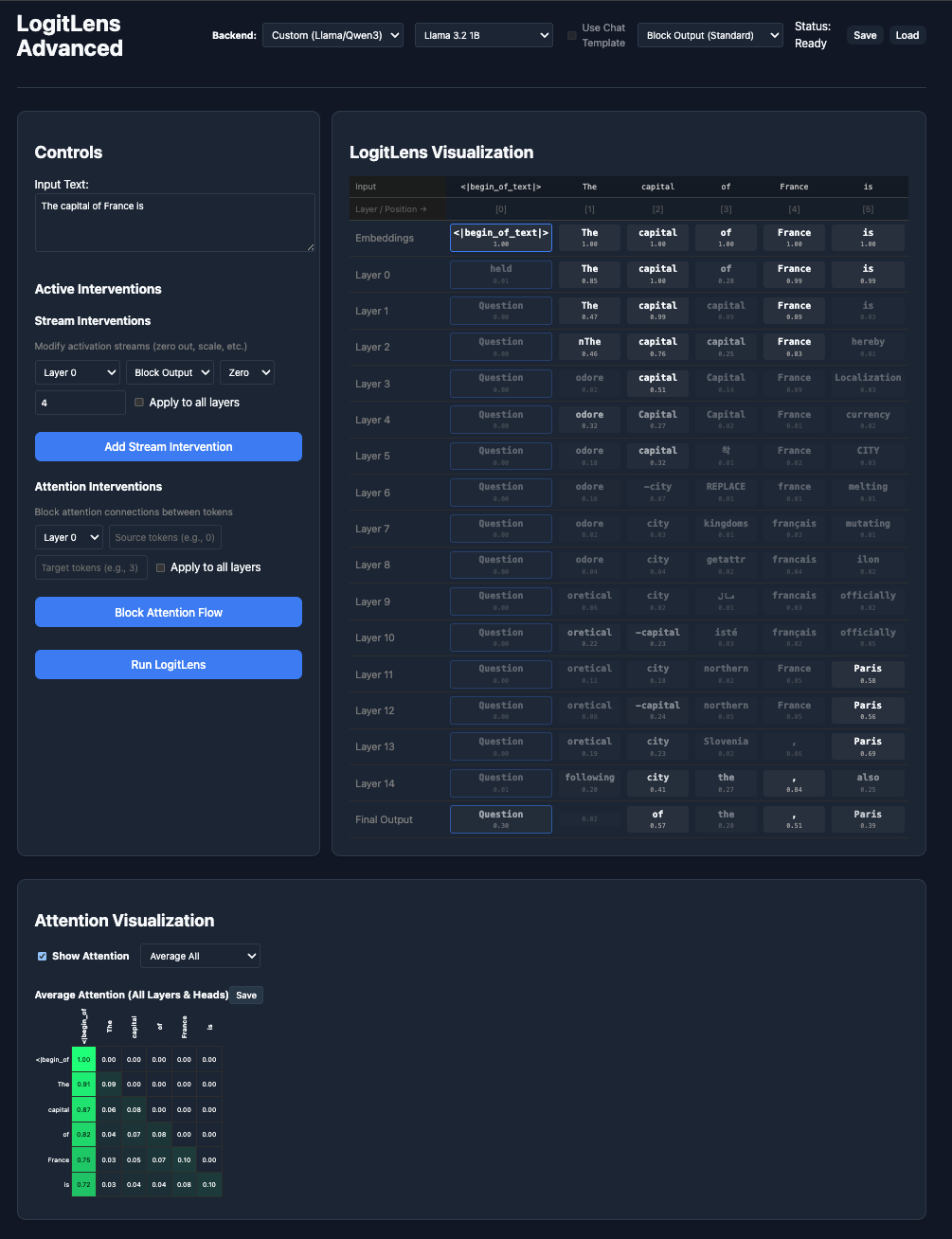 Now support visualize Attention and TransformerLens Backend
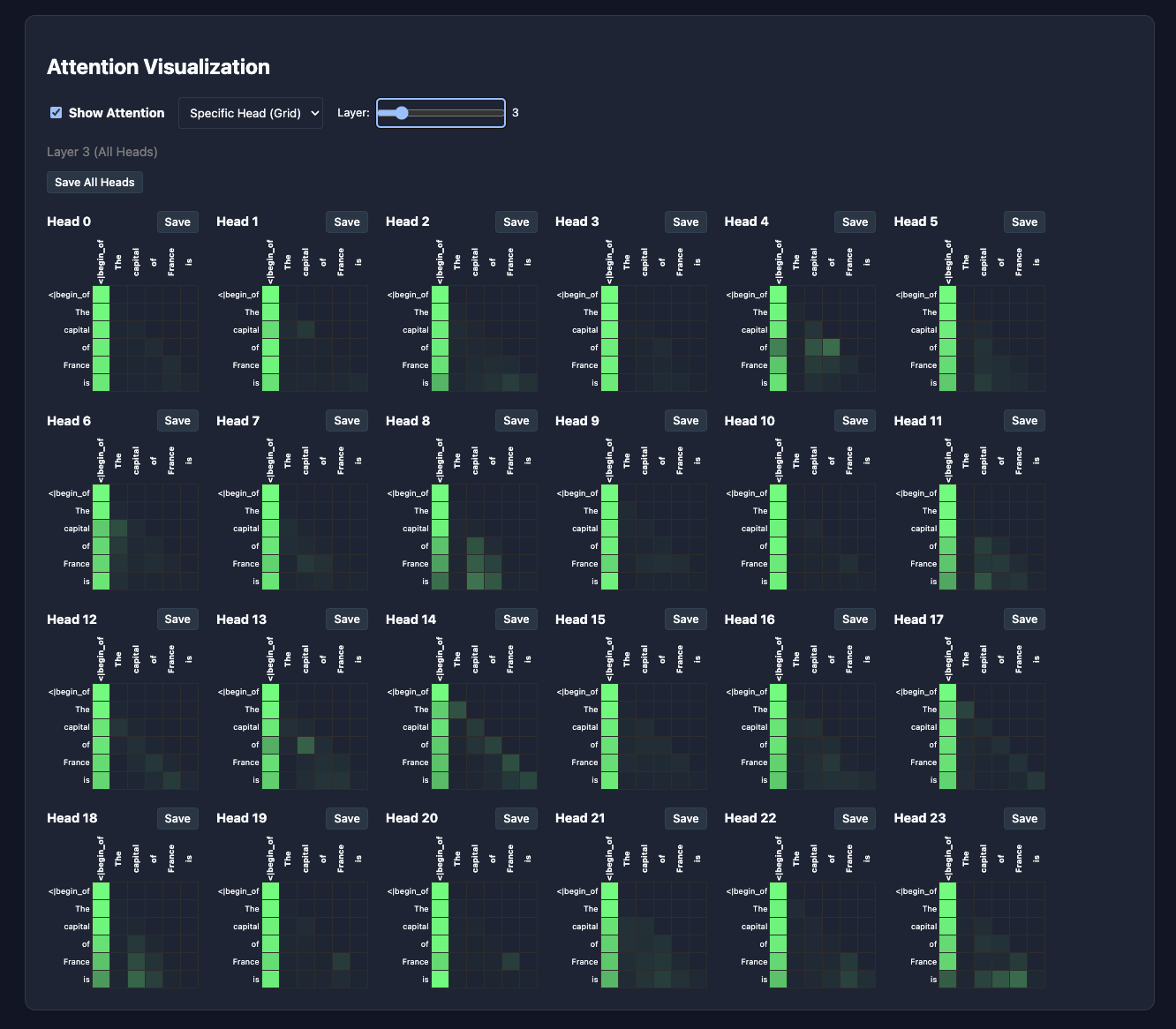
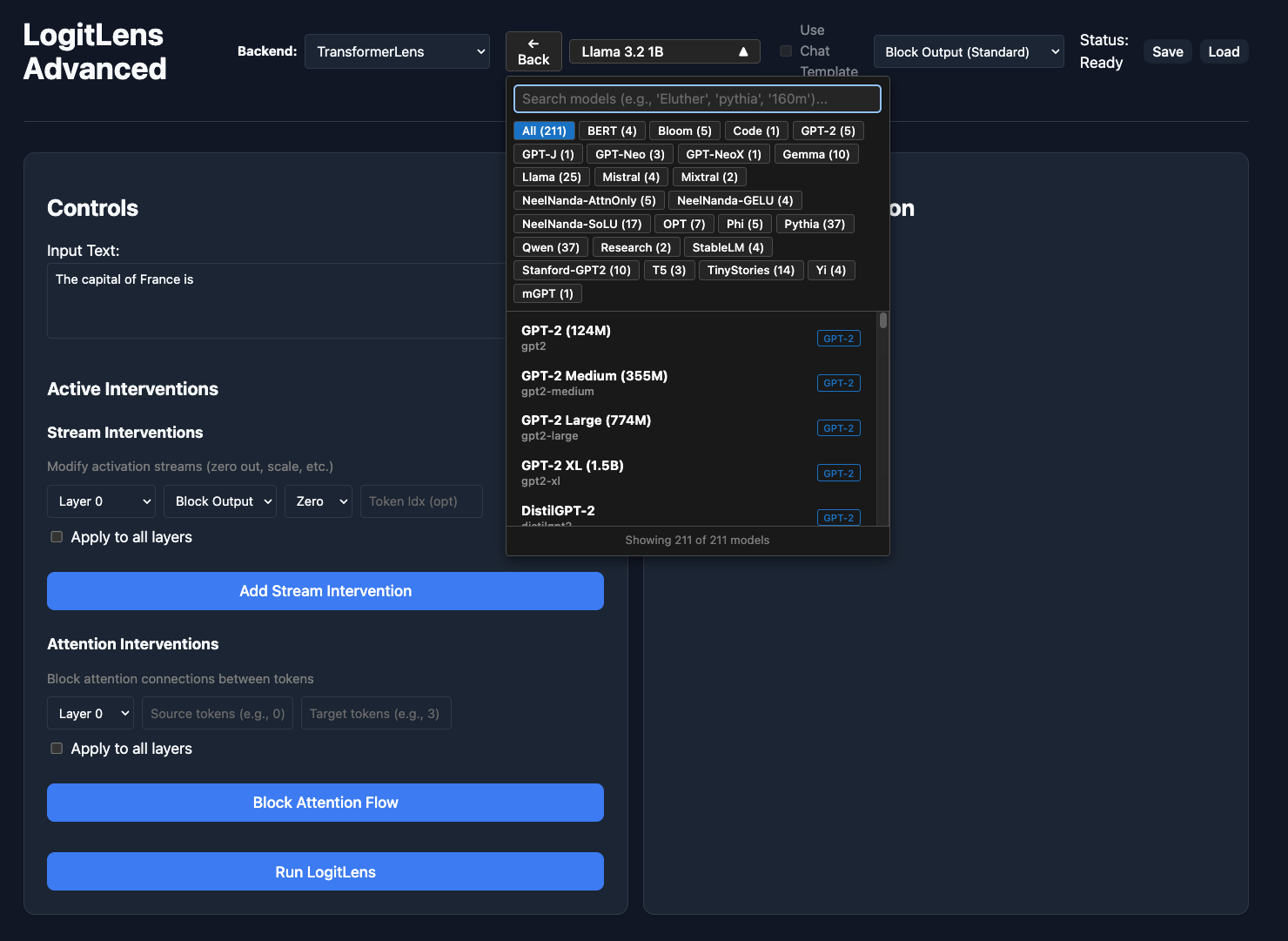
| Attention Visualization | TransformerLens Backend |
|---|---|
 |  |
Features
- Interactive Logit Lens: Visualize the model's prediction at every layer (Embeddings -> Layers -> Output).
- Option to include or exclude Post Attention LogitLens.
- Interventions: Modify internal streams (Residual, Attention, MLP)
- Zero: Zero out specific vector streams.
- Scale: Scale vectors by a factor.
- Block Attention: Prevent information flow between specific tokens on a layer or across layers.
- FYI: Attention blocking mechanism happens before softmax, sending -inf to attention scores. Attention scores will add up to 1.
- Session Management: Save and load your analysis sessions (config + full tensor state).
- Sessions will be saved to
saved_states/directory. - Interventions, LogitLens results are saved in the
config.jsonfile - Activations are saved in the
tensors.npzfile (hidden_states,layer_names,state_kinds,lens_type,post_attention_states, …). Layout depends on the logit-lens mode (block_output,combined, orpost_attention); usesession_tensors.load_session_archive()in notebooks.- Update on Nov 25, 2025: Now includes attention scores in the
tensors.npzfile.
- Update on Nov 25, 2025: Now includes attention scores in the
- Size of
tensors.npzfile is large. Keep it in mind. (73MB for 3.2 3B 51 tokens)
- Sessions will be saved to
- Attention Visualization: Visualize attention scores. You have option to visualize
- Average attention scores across all layers and heads
- Average attention scores across particular layer
- Attention scores for a particular head
- Save attention plots as PDF (LaTeX-friendly). Default App style matches the in-app green heatmap with attention scores; optional Colormap styles and Title on save checkbox in the attention controls.
- Some examples can be found in the
attention_visualizations/directory.
- Some examples can be found in the
Installation
-
Backend:
# Recommended: custom + TransformerLens backends uv sync --extra transformerlens # Custom backend only (smaller install; TransformerLens option disabled in UI) uv sync -
Frontend:
cd frontend
npm install
In order to access Llama models from meta-llama you would need to set up a huggingface token.
Backend Options
The tool now supports two backend implementations:
- Custom Backend: Original implementation control over Llama and Qwen3 architectures
- TransformerLens Backend: Uses the TransformerLens library for broader model support (200+ models including GPT-2, Mistral, Phi, Gemma, Qwen1/1.5/2/2.5, and more)
You can switch between backends in the frontend UI. The UI provides:
- Predefined model dropdown with popular models
- Searchable model browser: When using TransformerLens backend, select "Browse All TransformerLens Models (211)..." to access a searchable dropdown with 211 officially supported models. Search by model name, family (e.g., "Pythia", "Gemma"), or size (e.g., "160m")
Usage
-
Start the Backend:
uv run uvicorn server_v2:app --reload --port 8000 -
Start the Frontend:
cd frontend npm run dev -
Open
http://localhost:5173in your browser.
Minor Quirks
If a model is not in your local Hugging Face cache, the UI prompts before downloading from the Hub. While downloading, the app may look frozen—check the backend terminal for progress (gated models need HF_TOKEN).
Stream intervention's Attention Output modification modifies the attention output right before adding to the residual stream. Thus, this intervention wouldn't be seen in visualize attention.
Testing
To verify both backends work correctly, run:
# Compare Custom vs TransformerLens output (comprehensive test)
uv run python tests_backend/test_backend_parity.py

# Detailed normalization and probability comparison
uv run python tests_backend/test_norm_debug.py

# Test attention blocking
uv run python tests_backend/test_attention_blocking.py

# Basic backend functionality test
uv run python tests_backend/test_backends.py
Expected Results:
- ✅ Top-1 predictions match 100%
- ✅ Top-5 overlap 90%+
- ✅ Probability differences <1%
Recent Updates
- 2026-01-13: Fixed a bug where the final output was being normalized twice.
- 2026-01-12: Implemented support for TransformerLens backend.
- 2025-11: Added Qwen3 model support
TODO
- Add support for Qwen models
- Add TransformerLens backend support
- Fix backend parity issues
- Create updated demo
- Create better UI indications
- Create a diff screen
- Diff based on interventions
- Diff based on model checkpoints
- Activation Analysis Tools
Citation
If you use this tool in your research, please cite the repository and the methods it builds on.
This software
@software{logit_lens_llama_advanced,
  author       = {Kim, Sungwon},
  title        = {Logit Lens Llama Advanced},
  year         = {2026},
  url          = {https://github.com/blindTissue/logit_lens_llama_advanced},
  note         = {Interactive logit lens visualization and intervention for LLMs}
}
License
MIT
Contributors

27 commits
Similar repos


Languages
Python
60.2%
TypeScript
33.1%
Jupyter Notebook
5.3%
CSS
1.0%
README
Logit Lens Llama Advanced
An interactive tool to analyze and intervene on LLM internal states. Now updated to support TransformerLens backend.
Example
Now support visualize Attention and TransformerLens Backend
| Attention Visualization | TransformerLens Backend |
|---|---|
| |
Features
- Interactive Logit Lens: Visualize the model's prediction at every layer (Embeddings -> Layers -> Output).
- Option to include or exclude Post Attention LogitLens.
- Interventions: Modify internal streams (Residual, Attention, MLP)
- Zero: Zero out specific vector streams.
- Scale: Scale vectors by a factor.
- Block Attention: Prevent information flow between specific tokens on a layer or across layers.
- FYI: Attention blocking mechanism happens before softmax, sending -inf to attention scores. Attention scores will add up to 1.
- Session Management: Save and load your analysis sessions (config + full tensor state).
- Sessions will be saved to
saved_states/directory. - Interventions, LogitLens results are saved in the
config.jsonfile - Activations are saved in the
tensors.npzfile (hidden_states,layer_names,state_kinds,lens_type,post_attention_states, …). Layout depends on the logit-lens mode (block_output,combined, orpost_attention); usesession_tensors.load_session_archive()in notebooks.- Update on Nov 25, 2025: Now includes attention scores in the
tensors.npzfile.
- Update on Nov 25, 2025: Now includes attention scores in the
- Size of
tensors.npzfile is large. Keep it in mind. (73MB for 3.2 3B 51 tokens)
- Sessions will be saved to
- Attention Visualization: Visualize attention scores. You have option to visualize
- Average attention scores across all layers and heads
- Average attention scores across particular layer
- Attention scores for a particular head
- Save attention plots as PDF (LaTeX-friendly). Default App style matches the in-app green heatmap with attention scores; optional Colormap styles and Title on save checkbox in the attention controls.
- Some examples can be found in the
attention_visualizations/directory.
- Some examples can be found in the
Installation
-
Backend:
# Recommended: custom + TransformerLens backends uv sync --extra transformerlens # Custom backend only (smaller install; TransformerLens option disabled in UI) uv sync -
Frontend:
cd frontend
npm install
In order to access Llama models from meta-llama you would need to set up a huggingface token.
Backend Options
The tool now supports two backend implementations:
- Custom Backend: Original implementation control over Llama and Qwen3 architectures
- TransformerLens Backend: Uses the TransformerLens library for broader model support (200+ models including GPT-2, Mistral, Phi, Gemma, Qwen1/1.5/2/2.5, and more)
You can switch between backends in the frontend UI. The UI provides:
- Predefined model dropdown with popular models
- Searchable model browser: When using TransformerLens backend, select "Browse All TransformerLens Models (211)..." to access a searchable dropdown with 211 officially supported models. Search by model name, family (e.g., "Pythia", "Gemma"), or size (e.g., "160m")
Usage
-
Start the Backend:
uv run uvicorn server_v2:app --reload --port 8000 -
Start the Frontend:
cd frontend npm run dev -
Open
http://localhost:5173in your browser.
Minor Quirks
If a model is not in your local Hugging Face cache, the UI prompts before downloading from the Hub. While downloading, the app may look frozen—check the backend terminal for progress (gated models need HF_TOKEN).
Stream intervention's Attention Output modification modifies the attention output right before adding to the residual stream. Thus, this intervention wouldn't be seen in visualize attention.
Testing
To verify both backends work correctly, run:
# Compare Custom vs TransformerLens output (comprehensive test)
uv run python tests_backend/test_backend_parity.py

# Detailed normalization and probability comparison
uv run python tests_backend/test_norm_debug.py

# Test attention blocking
uv run python tests_backend/test_attention_blocking.py

# Basic backend functionality test
uv run python tests_backend/test_backends.py
Expected Results:
- ✅ Top-1 predictions match 100%
- ✅ Top-5 overlap 90%+
- ✅ Probability differences <1%
Recent Updates
- 2026-01-13: Fixed a bug where the final output was being normalized twice.
- 2026-01-12: Implemented support for TransformerLens backend.
- 2025-11: Added Qwen3 model support
TODO
- Add support for Qwen models
- Add TransformerLens backend support
- Fix backend parity issues
- Create updated demo
- Create better UI indications
- Create a diff screen
- Diff based on interventions
- Diff based on model checkpoints
- Activation Analysis Tools
Citation
If you use this tool in your research, please cite the repository and the methods it builds on.
This software
@software{logit_lens_llama_advanced,
  author       = {Kim, Sungwon},
  title        = {Logit Lens Llama Advanced},
  year         = {2026},
  url          = {https://github.com/blindTissue/logit_lens_llama_advanced},
  note         = {Interactive logit lens visualization and intervention for LLMs}
}
License
MIT
Similar repos
Contributors
27 commits
Languages
Python
60.2%
TypeScript
33.1%
Jupyter Notebook
5.3%
CSS
1.0%