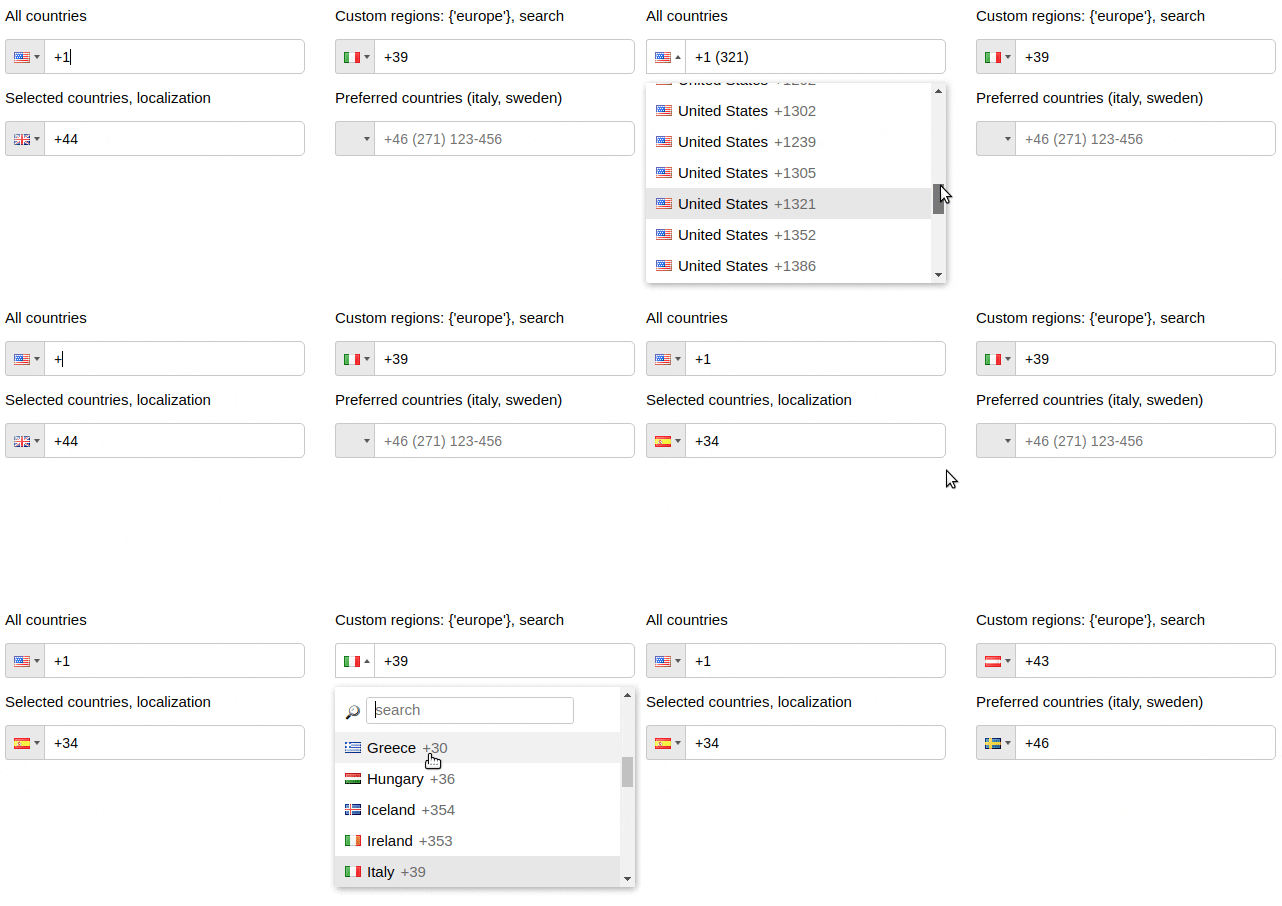
📞 Highly customizable phone input component with auto formatting
See the codeHighly customizable phone input component with auto formatting.




npm install react-phone-input-2 --save
import PhoneInput from 'react-phone-input-2'
import 'react-phone-input-2/lib/style.css'

<PhoneInput
  country={'us'}
  value={this.state.phone}
  onChange={phone => this.setState({ phone })}
/>
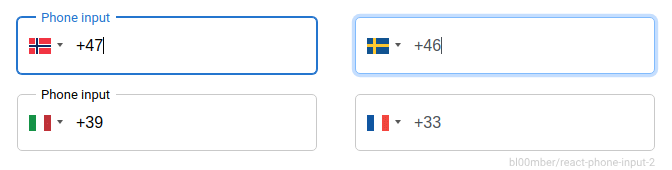
available styles - style • high-res • material • bootstrap • semantic-ui • plain
| Name | Type | Description | Example |
|---|---|---|---|
| country | string | initial country | 'us' | 1 |
| value | string | input state value | |
| onlyCountries | array | country codes to be included | ['cu','cw','kz'] |
| preferredCountries | array | country codes to be at the top | ['cu','cw','kz'] |
| excludeCountries | array | array of country codes to be excluded | ['cu','cw','kz'] |
| placeholder | string | custom placeholder | |
| inputProps | object | props to pass into the input | |
| Booleans | Default | Description |
|---|---|---|
| autoFormat | true | on/off phone formatting |
| disabled | false | disable input and dropdown |
| disableDropdown | false | disable dropdown only |
| disableCountryCode | false | |
| enableAreaCodes | false | enable local codes for all countries |
| enableTerritories | false | enable dependent territories with population of ~100,000 or lower |
| enableLongNumbers | false | boolean/number |
| countryCodeEditable | true | |
| enableSearch | false | enable search in the dropdown |
| disableSearchIcon | false | hide icon for the search field |
<PhoneInput
  inputProps={{
    name: 'phone',
    required: true,
    autoFocus: true
  }}
/>
| containerClass | string | class for container | |
| inputClass | string | class for input | |
| buttonClass | string | class for dropdown button | |
| dropdownClass | string | class for dropdown container | |
| searchClass | string | class for search field | |
| containerStyle | object | styles for container | |
| inputStyle | object | styles for input | |
| buttonStyle | object | styles for dropdown button | |
| dropdownStyle | object | styles for dropdown container | |
| searchStyle | object | styles for search field | |
| onChange | onFocus | onBlur | onClick | onKeyDown |
onChange(value, country, e, formattedValue)
Country data object not returns from onKeyDown event
| Data | Type | Description |
|---|---|---|
| value/event | string/object | event or the phone number |
| country data | object | country object { name, dialCode, countryCode (iso2) } |
| Name | Type | Description |
|---|---|---|
| regions | array/string | to show countries only from specified regions |
| Regions |
|---|
| ['america', 'europe', 'asia', 'oceania', 'africa'] |
| Subregions |
| ['north-america', 'south-america', 'central-america', 'carribean', 'eu-union', 'ex-ussr', 'ex-yugos', 'baltic', 'middle-east', 'north-africa'] |
<PhoneInput
  country='de'
  regions={'europe'}
/>

<PhoneInput
  country='us'
  regions={['north-america', 'carribean']}
/>
es Spanish, de Deutsch, ru Russian, fr French
jp Japanese, cn Chinese, pt Portuguese, it Italian
ir Iranian, ar Arabic, tr Turkish, id Indonesian
hu Hungarian, pl Polish, ko Korean
import es from 'react-phone-input-2/lang/es.json'

<PhoneInput
  localization={es}
/>
<PhoneInput
  enableAreaCodes={true}
  enableAreaCodes={['us', 'ca']}
  enableAreaCodeStretch
/>
If enableAreaCodeStretch is added, the part of the mask with the area code will not stretch to length of the respective section of phone mask.
Example: +61 (2), +61 (02)
<PhoneInput
  onlyCountries={['fr', 'at']}
  masks={{fr: '(...) ..-..-..', at: '(....) ...-....'}}
/>
<PhoneInput
  onlyCountries={['gr', 'fr', 'us']}
  areaCodes={{gr: ['2694', '2647'], fr: ['369', '463'], us: ['300']}}
/>
| defaultMask | ... ... ... ... .. |
| alwaysDefaultMask | false |
| prefix | + |
| searchPlaceholder | 'search' |
| searchNotFound | 'No entries to show' |
| copyNumbersOnly | true |
| renderStringAsFlag | string |
| autocompleteSearch | false |
| jumpCursorToEnd | false |
| priority | {{ca: 0, us: 1, kz: 0, ru: 1}} |
| enableClickOutside | true |
| showDropdown | false |
| defaultErrorMessage | string |
| specialLabel | string |
| disableInitialCountryGuess | false |
| disableCountryGuess | false |
<PhoneInput
  onlyCountries={['de', 'es']}
  localization={{de: 'Deutschland', es: 'España'}}
/>

<PhoneInput
  onlyCountries={['de', 'es']}
  localization={{'Germany': 'Deutschland', 'Spain': 'España'}}
/>
<PhoneInput
  onlyCountries={['fr', 'at']}
  preserveOrder={['onlyCountries', 'preferredCountries']}
/>
handleOnChange(value, data, event, formattedValue) {
  this.setState({ rawPhone: value.slice(data.dialCode.length) })
}
isValid(value, country, countries, hiddenAreaCodes)
<PhoneInput
  isValid={(value, country) => {
    if (value.match(/12345/)) {
      return 'Invalid value: '+value+', '+country.name;
    } else if (value.match(/1234/)) {
      return false;
    } else {
      return true;
    }
  }}
/>
import startsWith from 'lodash.startswith';

<PhoneInput
  isValid={(inputNumber, country, countries) => {
    return countries.some((country) => {
      return startsWith(inputNumber, country.dialCode) || startsWith(country.dialCode, inputNumber);
    });
  }}
/>
To clear country, pass null as value.
const phoneCountryFormat = useMemo(() => phoneCountry?.format || undefined, [phoneCountry]);
const placeholder = useMemo(() => {
  if (phoneCountryFormat) {
    const words = phoneCountryFormat.split(' ');
    words.shift(); // I'm using only local numbers so here I remove the country code from the format
    let text = words.join(' ');
     // first digit is special on french numbers, these 3 lines could be removed
    if (country === 'fr') {
      text = text.replace('.', '6');
    }
    while (text.indexOf('.') > -1) {
      text = text.replace('.', `${Math.min(9, Math.max(1, Math.floor(Math.random() * 10)))}`);
    }
    return text;
  }
  return '';
}, [phoneCountryFormat, country]);
<script src="https://unpkg.com/[email protected]/dist/lib.js"></script>

Based on react-phone-input
Make sure you donated for lib maintenance 
Overall
Maintained
Code review
Latest release
Releases this year
81 followers · starred Jun 2020
38 followers · starred Nov 2023
25 followers · starred Jun 2022
12 followers · starred Oct 2021
📞 Highly customizable phone input component with auto formatting
See the codeHighly customizable phone input component with auto formatting.
npm install react-phone-input-2 --save
import PhoneInput from 'react-phone-input-2'
import 'react-phone-input-2/lib/style.css'

<PhoneInput
  country={'us'}
  value={this.state.phone}
  onChange={phone => this.setState({ phone })}
/>
available styles - style • high-res • material • bootstrap • semantic-ui • plain
| Name | Type | Description | Example |
|---|---|---|---|
| country | string | initial country | 'us' | 1 |
| value | string | input state value | |
| onlyCountries | array | country codes to be included | ['cu','cw','kz'] |
| preferredCountries | array | country codes to be at the top | ['cu','cw','kz'] |
| excludeCountries | array | array of country codes to be excluded | ['cu','cw','kz'] |
| placeholder | string | custom placeholder | |
| inputProps | object | props to pass into the input | |
| Booleans | Default | Description |
|---|---|---|
| autoFormat | true | on/off phone formatting |
| disabled | false | disable input and dropdown |
| disableDropdown | false | disable dropdown only |
| disableCountryCode | false | |
| enableAreaCodes | false | enable local codes for all countries |
| enableTerritories | false | enable dependent territories with population of ~100,000 or lower |
| enableLongNumbers | false | boolean/number |
| countryCodeEditable | true | |
| enableSearch | false | enable search in the dropdown |
| disableSearchIcon | false | hide icon for the search field |
<PhoneInput
  inputProps={{
    name: 'phone',
    required: true,
    autoFocus: true
  }}
/>
| containerClass | string | class for container | |
| inputClass | string | class for input | |
| buttonClass | string | class for dropdown button | |
| dropdownClass | string | class for dropdown container | |
| searchClass | string | class for search field | |
| containerStyle | object | styles for container | |
| inputStyle | object | styles for input | |
| buttonStyle | object | styles for dropdown button | |
| dropdownStyle | object | styles for dropdown container | |
| searchStyle | object | styles for search field | |
| onChange | onFocus | onBlur | onClick | onKeyDown |
onChange(value, country, e, formattedValue)
Country data object not returns from onKeyDown event
| Data | Type | Description |
|---|---|---|
| value/event | string/object | event or the phone number |
| country data | object | country object { name, dialCode, countryCode (iso2) } |
| Name | Type | Description |
|---|---|---|
| regions | array/string | to show countries only from specified regions |
| Regions |
|---|
| ['america', 'europe', 'asia', 'oceania', 'africa'] |
| Subregions |
| ['north-america', 'south-america', 'central-america', 'carribean', 'eu-union', 'ex-ussr', 'ex-yugos', 'baltic', 'middle-east', 'north-africa'] |
<PhoneInput
  country='de'
  regions={'europe'}
/>

<PhoneInput
  country='us'
  regions={['north-america', 'carribean']}
/>
es Spanish, de Deutsch, ru Russian, fr French
jp Japanese, cn Chinese, pt Portuguese, it Italian
ir Iranian, ar Arabic, tr Turkish, id Indonesian
hu Hungarian, pl Polish, ko Korean
import es from 'react-phone-input-2/lang/es.json'

<PhoneInput
  localization={es}
/>
<PhoneInput
  enableAreaCodes={true}
  enableAreaCodes={['us', 'ca']}
  enableAreaCodeStretch
/>
If enableAreaCodeStretch is added, the part of the mask with the area code will not stretch to length of the respective section of phone mask.
Example: +61 (2), +61 (02)
<PhoneInput
  onlyCountries={['fr', 'at']}
  masks={{fr: '(...) ..-..-..', at: '(....) ...-....'}}
/>
<PhoneInput
  onlyCountries={['gr', 'fr', 'us']}
  areaCodes={{gr: ['2694', '2647'], fr: ['369', '463'], us: ['300']}}
/>
| defaultMask | ... ... ... ... .. |
| alwaysDefaultMask | false |
| prefix | + |
| searchPlaceholder | 'search' |
| searchNotFound | 'No entries to show' |
| copyNumbersOnly | true |
| renderStringAsFlag | string |
| autocompleteSearch | false |
| jumpCursorToEnd | false |
| priority | {{ca: 0, us: 1, kz: 0, ru: 1}} |
| enableClickOutside | true |
| showDropdown | false |
| defaultErrorMessage | string |
| specialLabel | string |
| disableInitialCountryGuess | false |
| disableCountryGuess | false |
<PhoneInput
  onlyCountries={['de', 'es']}
  localization={{de: 'Deutschland', es: 'España'}}
/>

<PhoneInput
  onlyCountries={['de', 'es']}
  localization={{'Germany': 'Deutschland', 'Spain': 'España'}}
/>
<PhoneInput
  onlyCountries={['fr', 'at']}
  preserveOrder={['onlyCountries', 'preferredCountries']}
/>
handleOnChange(value, data, event, formattedValue) {
  this.setState({ rawPhone: value.slice(data.dialCode.length) })
}
isValid(value, country, countries, hiddenAreaCodes)
<PhoneInput
  isValid={(value, country) => {
    if (value.match(/12345/)) {
      return 'Invalid value: '+value+', '+country.name;
    } else if (value.match(/1234/)) {
      return false;
    } else {
      return true;
    }
  }}
/>
import startsWith from 'lodash.startswith';

<PhoneInput
  isValid={(inputNumber, country, countries) => {
    return countries.some((country) => {
      return startsWith(inputNumber, country.dialCode) || startsWith(country.dialCode, inputNumber);
    });
  }}
/>
To clear country, pass null as value.
const phoneCountryFormat = useMemo(() => phoneCountry?.format || undefined, [phoneCountry]);
const placeholder = useMemo(() => {
  if (phoneCountryFormat) {
    const words = phoneCountryFormat.split(' ');
    words.shift(); // I'm using only local numbers so here I remove the country code from the format
    let text = words.join(' ');
     // first digit is special on french numbers, these 3 lines could be removed
    if (country === 'fr') {
      text = text.replace('.', '6');
    }
    while (text.indexOf('.') > -1) {
      text = text.replace('.', `${Math.min(9, Math.max(1, Math.floor(Math.random() * 10)))}`);
    }
    return text;
  }
  return '';
}, [phoneCountryFormat, country]);
<script src="https://unpkg.com/[email protected]/dist/lib.js"></script>
Based on react-phone-input
Make sure you donated for lib maintenance
Overall
Maintained
Code review
Latest release
Releases this year
81 followers · starred Jun 2020
38 followers · starred Nov 2023
25 followers · starred Jun 2022
12 followers · starred Oct 2021



