
Example language server (LSP) implementation for a toy language
Haskell
60
23 commits
updated Jul 21, 2021
README
Minimalistic language server (LSP) implementation
Language server protocol example for a toy language implemented in Haskell, using the lsp Haskell library under the hood.
The "language" itself is very minimal to keep the implementation simple, but the LSP support aims to be somewhat realistic.
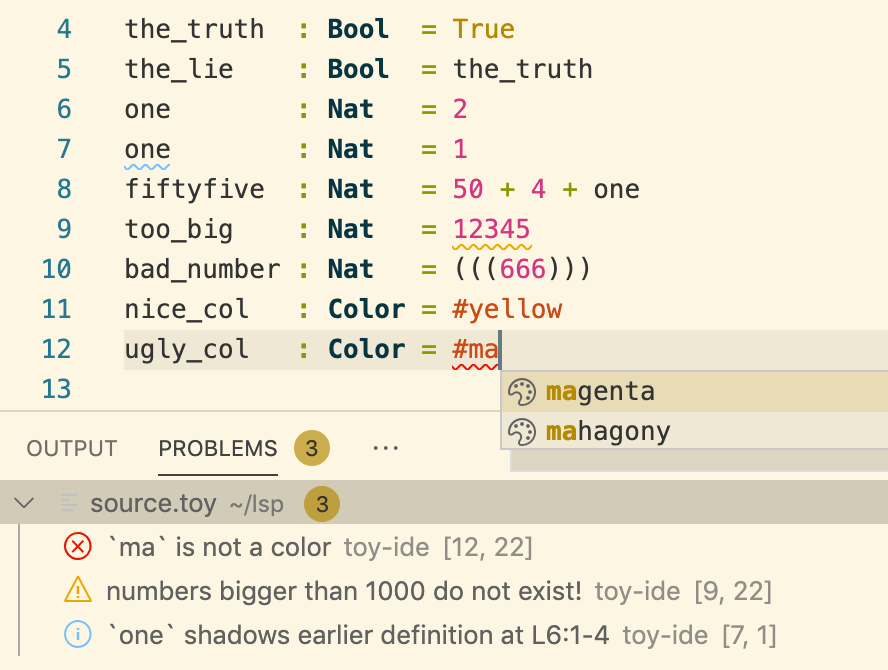
IDE features
- parsing, scope and type errors
- variable scope highlighting, shadowing info
- scope-aware renaming
- type information on hovering
- completion (colors + LaTeX style greek letters)
- jump to definition
- ad-hoc diagnostic (warnings for large numbers and rainbow color)
Syntax highlighting
Syntax highlighting was not supported by the Language Server Protocol when
this was originally written... which is quite a serious instance of What. The. Fuck.
Apparently semantic highlighting finally comes with 3.16, but lsp does not
support that yet.
Instead, we have rudimentary syntax highlighting (in VS Code only) via TextMate grammars, which are an abomination on earth if I've seen one...
The language
Our toy language consists of top-level declarations. Each declaration starts on a new line, and has the format:
indentifier : type = expression
There are three built-in types:
BoolNatColor
Expressions are built up from literal constants, variables, a built-in infix operator
(plus), and can use parentheses. Declarations are checked against the type.
For colors, we have a fixed list of pre-defined colors. Color names are
prefixed by a hash # character.
Example "program"
the_truth  : Bool  = True
the_lie    : Bool  = the_truth
one        : Nat   = 1
fiftyfive  : Nat   = 50 + 4 + one
too_big    : Nat   = 12345
bad_number : Nat   = (((666)))
ugly_col   : Color = #black
nice_col   : Color = #rainbow
Installation instructions (for VS Code)
- Install
lspandmegaparsec:
$ cabal install lsp
$ cabal install megaparsec
- Build the server executable. This will hopefully build an executable
ToyLang-IDE.exeand put it somewhere in the path:
$ cabal install
- Install
npm(if not already installed) - run the following (in the project directory!):
$ npm i vscode-languageclient
- Install VS Code (if not already installed)
- Open the project directory in VS Code
- Press F5 to test the language server
- Open a new text file and paste the example program above.
NB: You have to first save the file for the extension to be activated.
And choose the file extension
.toy, otherwise nothing will happen! - Play around! For example, F2 does scope-aware renaming, and F12 is jump to definition.
You should see something like this:
To permanently install the extension, copy the whole project into the extension folder (?):
- On Windows:
%USERPROFILE%\.vscode\extensions - On macOs / Linux:
~/.vscode/extensions
Contributors

23 commits
Similar repos


Languages
Haskell
98.5%
JavaScript
1.5%
Example language server (LSP) implementation for a toy language
Haskell
60
23 commits
updated Jul 21, 2021
README
Minimalistic language server (LSP) implementation
Language server protocol example for a toy language implemented in Haskell, using the lsp Haskell library under the hood.
The "language" itself is very minimal to keep the implementation simple, but the LSP support aims to be somewhat realistic.
IDE features
- parsing, scope and type errors
- variable scope highlighting, shadowing info
- scope-aware renaming
- type information on hovering
- completion (colors + LaTeX style greek letters)
- jump to definition
- ad-hoc diagnostic (warnings for large numbers and rainbow color)
Syntax highlighting
Syntax highlighting was not supported by the Language Server Protocol when
this was originally written... which is quite a serious instance of What. The. Fuck.
Apparently semantic highlighting finally comes with 3.16, but lsp does not
support that yet.
Instead, we have rudimentary syntax highlighting (in VS Code only) via TextMate grammars, which are an abomination on earth if I've seen one...
The language
Our toy language consists of top-level declarations. Each declaration starts on a new line, and has the format:
indentifier : type = expression
There are three built-in types:
BoolNatColor
Expressions are built up from literal constants, variables, a built-in infix operator
(plus), and can use parentheses. Declarations are checked against the type.
For colors, we have a fixed list of pre-defined colors. Color names are
prefixed by a hash # character.
Example "program"
the_truth  : Bool  = True
the_lie    : Bool  = the_truth
one        : Nat   = 1
fiftyfive  : Nat   = 50 + 4 + one
too_big    : Nat   = 12345
bad_number : Nat   = (((666)))
ugly_col   : Color = #black
nice_col   : Color = #rainbow
Installation instructions (for VS Code)
- Install
lspandmegaparsec:
$ cabal install lsp
$ cabal install megaparsec
- Build the server executable. This will hopefully build an executable
ToyLang-IDE.exeand put it somewhere in the path:
$ cabal install
- Install
npm(if not already installed) - run the following (in the project directory!):
$ npm i vscode-languageclient
- Install VS Code (if not already installed)
- Open the project directory in VS Code
- Press F5 to test the language server
- Open a new text file and paste the example program above.
NB: You have to first save the file for the extension to be activated.
And choose the file extension
.toy, otherwise nothing will happen! - Play around! For example, F2 does scope-aware renaming, and F12 is jump to definition.
You should see something like this:
To permanently install the extension, copy the whole project into the extension folder (?):
- On Windows:
%USERPROFILE%\.vscode\extensions - On macOs / Linux:
~/.vscode/extensions
Similar repos
Contributors
23 commits
Languages
Haskell
98.5%
JavaScript
1.5%