
Bitflix - MCP Apps Example Application for video, powered by the Bitmovin Player.
TypeScript
4
54 commits
updated Sep 21, 2026
See what people are saying
README
Bitflix - MCP Apps Example Application
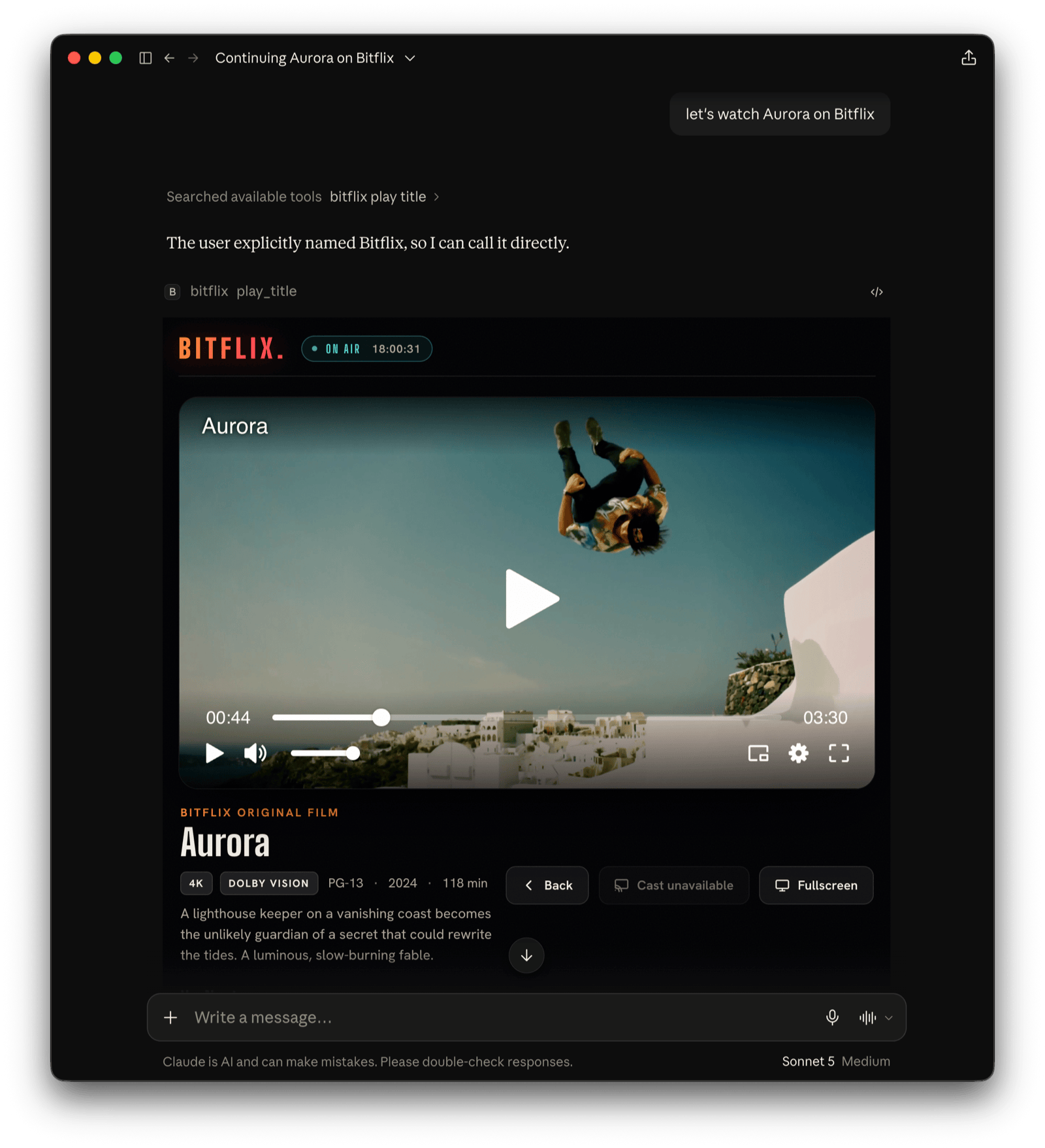
Bitflix is a fictional streaming network (sports · news · films · originals) shipped as an MCP App.
You open it, browse it, get recommendations, and watch, all by talking to ChatGPT or Claude. It's a reference implementation, and a working answer to:
What does an online video platform need to be when the "app" is a conversation and the UI is generated on the fly?
Bitflix is built on the Skybridge React framework for MCP Apps, so you can run it in the local playground, expose it through a dev tunnel, or deploy it to a permanent URL. The Bitmovin Player handles video playback directly in the chat widget.
What's in the box
src/
├── catalog.ts          # content: titles, public test streams, sections, search/recommend
├── index.ts            # entry point: runs the app
├── server.ts           # Skybridge app + 5 tools, CSP
├── env.ts              # typed env (BITMOVIN_PLAYER_KEY)
├── helpers.ts          # generateHelpers<AppType>() → typed useToolInfo / useCallTool
└── views/
    ├── browse.tsx · recommend.tsx · live.tsx · player.tsx · diagnostics.tsx  # one entry per tool
    ├── css/index.css       # stylesheet (theme, rails, tiles, chips, player stage)
    ├── hooks.ts            # view hooks
    └── components/
        ├── BitflixApp.tsx          # shared widget: browse + player + cast + chips
        ├── BitmovinPlayer.tsx      # Bitmovin Player in a React component
        ├── BitmovinPlayerLazy.tsx  # code-split wrapper around the player
        ├── Diagnostics.tsx         # video-capability probe for the host sandbox (DRM, fullscreen, cast…)
        ├── Icon.tsx                # inline SVG icon component
        └── cover.ts                # inline SVG cover art, one of nine hand-drawn scenes
Tools
Each tool the server offers binds to a view via registerTool({ view: { component } }).
| Tool | View | Example utterance |
|---|---|---|
browse_catalog | browse | "open Bitflix", "show me sports" |
get_recommendations | recommend | "what should I watch tonight?" |
whats_live | live | "any games on?", "what's live?" |
play_title | player | "play the finals", "resume Aurora" |
run_diagnostics | diagnostics | "test what video features work here" |
The first four tools render the shared BitflixApp, which switches between the browse face and the player
face via payload.view. Clicking a tile starts playback, the category chips call back to the server with
useCallTool, and data-llm keeps the model in sync with what's on screen.
The run_diagnostics tool renders the Diagnostics view, a live probe of what the current MCP host's widget
sandbox supports for video. It covers MSE, EME/DRM key systems (Widevine, PlayReady, FairPlay, ClearKey), Web
Workers, WebAssembly, fullscreen (host display-mode request and native Fullscreen API), Picture-in-Picture,
casting/Presentation, and autoplay.
Content / Streams
All streams are public test assets, so the demo works out of the box:
- VoD plays HLS and DASH "Art of Motion" test content hosted on
cdn.bitmovin.com - Live plays DASH-IF livesim2, a real live DASH stream that is fully public
(CORS
*, self-hosted segments) - Cover art is inline SVG, composed from one of nine hand-drawn scenes (court, pitch, globe, film, summit, orbit…)
Content Security Policy:
The app's widget runs in a sandboxed iframe and can only reach origins the server declares up front. So VIEW_CSP
in src/server.ts allow-lists the origins hosting the content and any other network-loaded resources.
See CSP & CORS in the MCP Apps docs.
Bitmovin Player license key
The bitmovin-player dependency is a proprietary, commercially-licensed SDK. See the Licensing section.
Visit the Bitmovin dashboard to start a trial subscription or retrieve
a license key for your active subscription.
Run it
Requires Node 22.12+ (24+ is recommended).
npm ci
cp .env.example .env        # create .env file and add your own BITMOVIN_PLAYER_KEY
npm run dev                 # then open the DevTools playground at http://localhost:3000
npm run dev: local DevTools playground at port3000(run each tool, audit CSP, etc.)npm run dev:tunnel: same, exposed over a stable tunnel you can add to Claude/ChatGPTnpm run build/npm start: production build / servenpm run deploy: deploy to Alpic for a permanent HTTPS URL
Player domain allow-listing:
A Bitmovin Player license only works on the domains you register for it in the Bitmovin dashboard.
-
Allow-list the MCP host's sandbox domain, i.e.
*.claudemcpcontent.comfor Claude and*.oaiusercontent.comfor ChatGPT. -
When testing on the DevTools playground in a web browser on a non-localhost domain (tunnel or a deployed URL), also allow-list that domain.
Connect to your MCP host (e.g. Claude or ChatGPT)
- Run
npm run dev:tunnelto get a public URL to your MCP server, e.g.https://foo-bar-42.alpic.dev/mcp - Add this URL as a custom MCP/connector in your Claude/ChatGPT app
- Open a new chat and write "open Bitflix", "what's live?", "recommend something short"
Troubleshooting
If the MCP app does not render:
- Use the Claude or ChatGPT app. Not every MCP host renders MCP Apps views; some may show only the tool call and its text result.
- Update the Claude/ChatGPT app. MCP Apps support is new, and older versions may not render views.
- Open the MCP URL (e.g.
https://foo-bar-42.alpic.dev/mcp) in a web browser. A running server answers with a small JSON error (Method not allowed). - If run with
npm run dev, open the MCP URL without the/mcppath to reach the DevTools playground and run the tool there. If the view renders, the server is fine and the problem is on the host app side. - Remove and re-add the MCP connector in your host app.
Known Issues & Limitations
The MCP host (e.g. Claude, ChatGPT) controls the widget sandbox's capabilities. The MCP Apps specification is still under active development, so those capabilities currently vary between hosts and shift as the specification and the host implementations evolve. Depending on which host is used, the following features may behave differently or not work at all:
- Fullscreen
- Autoplay with sound
- Playback of DRM-protected content
- Remote Playback (Google Cast and Apple AirPlay)
- Picture-in-Picture
- Client-side advertising
Run the run_diagnostics tool in your host to see what it permits.
Licensing
The source code in this repository is released under the MIT License.
The Bitmovin Player SDK (bitmovin-player NPM dependency) is proprietary and commercially licensed by Bitmovin.
To run this app you must get your own Bitmovin Player license key from the
Bitmovin dashboard and comply with the
Bitmovin Player license terms.
The streams in the catalog are third-party public test assets, used for demonstration only.
Bitflix, its teams, scores, and titles are fictional.
Contributors

47 commits

7 commits
Similar repos





Languages
TypeScript
79.4%
CSS
19.3%
JavaScript
1.3%
Bitflix - MCP Apps Example Application for video, powered by the Bitmovin Player.
TypeScript
4
54 commits
updated Sep 21, 2026
See what people are saying
README
Bitflix - MCP Apps Example Application
Bitflix is a fictional streaming network (sports · news · films · originals) shipped as an MCP App.
You open it, browse it, get recommendations, and watch, all by talking to ChatGPT or Claude. It's a reference implementation, and a working answer to:
What does an online video platform need to be when the "app" is a conversation and the UI is generated on the fly?
Bitflix is built on the Skybridge React framework for MCP Apps, so you can run it in the local playground, expose it through a dev tunnel, or deploy it to a permanent URL. The Bitmovin Player handles video playback directly in the chat widget.
What's in the box
src/
├── catalog.ts          # content: titles, public test streams, sections, search/recommend
├── index.ts            # entry point: runs the app
├── server.ts           # Skybridge app + 5 tools, CSP
├── env.ts              # typed env (BITMOVIN_PLAYER_KEY)
├── helpers.ts          # generateHelpers<AppType>() → typed useToolInfo / useCallTool
└── views/
    ├── browse.tsx · recommend.tsx · live.tsx · player.tsx · diagnostics.tsx  # one entry per tool
    ├── css/index.css       # stylesheet (theme, rails, tiles, chips, player stage)
    ├── hooks.ts            # view hooks
    └── components/
        ├── BitflixApp.tsx          # shared widget: browse + player + cast + chips
        ├── BitmovinPlayer.tsx      # Bitmovin Player in a React component
        ├── BitmovinPlayerLazy.tsx  # code-split wrapper around the player
        ├── Diagnostics.tsx         # video-capability probe for the host sandbox (DRM, fullscreen, cast…)
        ├── Icon.tsx                # inline SVG icon component
        └── cover.ts                # inline SVG cover art, one of nine hand-drawn scenes
Tools
Each tool the server offers binds to a view via registerTool({ view: { component } }).
| Tool | View | Example utterance |
|---|---|---|
browse_catalog | browse | "open Bitflix", "show me sports" |
get_recommendations | recommend | "what should I watch tonight?" |
whats_live | live | "any games on?", "what's live?" |
play_title | player | "play the finals", "resume Aurora" |
run_diagnostics | diagnostics | "test what video features work here" |
The first four tools render the shared BitflixApp, which switches between the browse face and the player
face via payload.view. Clicking a tile starts playback, the category chips call back to the server with
useCallTool, and data-llm keeps the model in sync with what's on screen.
The run_diagnostics tool renders the Diagnostics view, a live probe of what the current MCP host's widget
sandbox supports for video. It covers MSE, EME/DRM key systems (Widevine, PlayReady, FairPlay, ClearKey), Web
Workers, WebAssembly, fullscreen (host display-mode request and native Fullscreen API), Picture-in-Picture,
casting/Presentation, and autoplay.
Content / Streams
All streams are public test assets, so the demo works out of the box:
- VoD plays HLS and DASH "Art of Motion" test content hosted on
cdn.bitmovin.com - Live plays DASH-IF livesim2, a real live DASH stream that is fully public
(CORS
*, self-hosted segments) - Cover art is inline SVG, composed from one of nine hand-drawn scenes (court, pitch, globe, film, summit, orbit…)
Content Security Policy:
The app's widget runs in a sandboxed iframe and can only reach origins the server declares up front. So VIEW_CSP
in src/server.ts allow-lists the origins hosting the content and any other network-loaded resources.
See CSP & CORS in the MCP Apps docs.
Bitmovin Player license key
The bitmovin-player dependency is a proprietary, commercially-licensed SDK. See the Licensing section.
Visit the Bitmovin dashboard to start a trial subscription or retrieve
a license key for your active subscription.
Run it
Requires Node 22.12+ (24+ is recommended).
npm ci
cp .env.example .env        # create .env file and add your own BITMOVIN_PLAYER_KEY
npm run dev                 # then open the DevTools playground at http://localhost:3000
npm run dev: local DevTools playground at port3000(run each tool, audit CSP, etc.)npm run dev:tunnel: same, exposed over a stable tunnel you can add to Claude/ChatGPTnpm run build/npm start: production build / servenpm run deploy: deploy to Alpic for a permanent HTTPS URL
Player domain allow-listing:
A Bitmovin Player license only works on the domains you register for it in the Bitmovin dashboard.
-
Allow-list the MCP host's sandbox domain, i.e.
*.claudemcpcontent.comfor Claude and*.oaiusercontent.comfor ChatGPT. -
When testing on the DevTools playground in a web browser on a non-localhost domain (tunnel or a deployed URL), also allow-list that domain.
Connect to your MCP host (e.g. Claude or ChatGPT)
- Run
npm run dev:tunnelto get a public URL to your MCP server, e.g.https://foo-bar-42.alpic.dev/mcp - Add this URL as a custom MCP/connector in your Claude/ChatGPT app
- Open a new chat and write "open Bitflix", "what's live?", "recommend something short"
Troubleshooting
If the MCP app does not render:
- Use the Claude or ChatGPT app. Not every MCP host renders MCP Apps views; some may show only the tool call and its text result.
- Update the Claude/ChatGPT app. MCP Apps support is new, and older versions may not render views.
- Open the MCP URL (e.g.
https://foo-bar-42.alpic.dev/mcp) in a web browser. A running server answers with a small JSON error (Method not allowed). - If run with
npm run dev, open the MCP URL without the/mcppath to reach the DevTools playground and run the tool there. If the view renders, the server is fine and the problem is on the host app side. - Remove and re-add the MCP connector in your host app.
Known Issues & Limitations
The MCP host (e.g. Claude, ChatGPT) controls the widget sandbox's capabilities. The MCP Apps specification is still under active development, so those capabilities currently vary between hosts and shift as the specification and the host implementations evolve. Depending on which host is used, the following features may behave differently or not work at all:
- Fullscreen
- Autoplay with sound
- Playback of DRM-protected content
- Remote Playback (Google Cast and Apple AirPlay)
- Picture-in-Picture
- Client-side advertising
Run the run_diagnostics tool in your host to see what it permits.
Licensing
The source code in this repository is released under the MIT License.
The Bitmovin Player SDK (bitmovin-player NPM dependency) is proprietary and commercially licensed by Bitmovin.
To run this app you must get your own Bitmovin Player license key from the
Bitmovin dashboard and comply with the
Bitmovin Player license terms.
The streams in the catalog are third-party public test assets, used for demonstration only.
Bitflix, its teams, scores, and titles are fictional.
Similar repos
Contributors
47 commits
7 commits
Languages
TypeScript
79.4%
CSS
19.3%
JavaScript
1.3%