
Try Sigma Photo Pro presets on Sigma SD1/SD15 X3F files side by side in the browser - plus tools to measure what SPP actually does. Single Go binary.
Go
0
6 commits
updated Sep 25, 2026
See what people are saying
README
Foveon Lab
Try Sigma Photo Pro (SPP) presets on your Sigma SD1 / SD15 X3F files, side by side, in the browser — without importing, clicking and waiting in SPP for every preset.
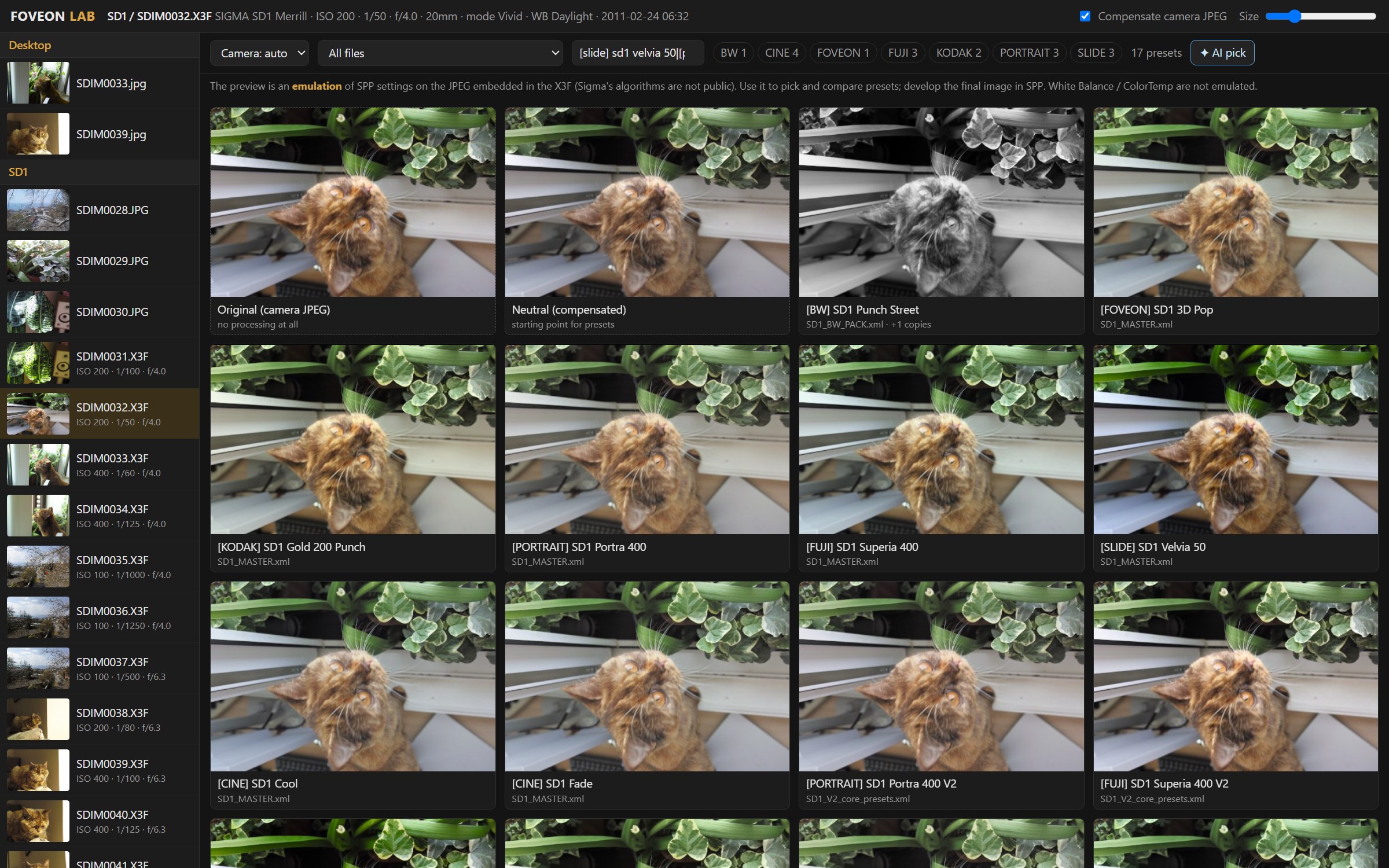
- Scans your folders for
.X3Ffiles and reads the full-size JPEG embedded in each X3F (SD1 Merrill: 4704×3136, SD15: 2640×1760). No Foveon raw decoding needed. - Loads every SPP preset XML it finds (comma or dot decimals, identical duplicates folded),
filters by camera,
[GROUP]tag, file or name. - Grid view: one photo through every preset at once. Click a tile for a large view with sliders;
←/→steps through presets, holdOfor the camera original. - Save as preset writes an SPP-importable XML (
FoveonLab_SD1.xml/FoveonLab_SD15.xmlin the presets folder; saving the same name replaces it instead of duplicating). - Export JPEG renders the full preview resolution next to the photo, in a
foveon-lab/folder. - Calibration tools measure what SPP actually does, to replace guesses with measured curves (below).
Single Go binary, no runtime dependencies, runs locally on 127.0.0.1 only.
Install
go install github.com/biopoetic/foveon-lab@latest
or clone and go build -o foveon-lab.exe . (Go 1.25+).
Usage
foveon-lab                       # scans your Desktop, presets from "Desktop/foveon pack", opens the browser
foveon-lab -photos "D:\Photos;E:\Sigma" -presets "D:\SPP presets" -port 8777 -no-open
Photos are found up to 4 levels below each -photos folder.
AI agent: pick and tune a preset for you
Click ✦ AI pick (grid) or ✦ AI (editor). A vision model looks at the photo, shortlists presets by rendering them on it, compares the renders (each comes with objective stats: clipping, crushed shadows, brightness, saturation, warmth), fine-tunes the best one, and explains its choice. You watch every step live, then Open in editor to save it as an SPP preset or export it. You can give it a direction, e.g. "warm film look", "moody", "natural skin".
It works with any OpenAI-compatible Chat Completions API that accepts images and tool calls. The
default is DeepSeek's deepseek-flash:
set DEEPSEEK_API_KEY=sk-...          # Windows (export ... on macOS/Linux)
foveon-lab
foveon-lab -ai-base https://api.openai.com/v1 -ai-model <vision model> -ai-key-env OPENAI_API_KEY
- Downscaled renders of the photo (≤ 768 px) are sent to the model provider.
- A run is typically 4–8 model calls, ~60–100k input tokens — about 1–2 US cents on DeepSeek (September 2026 pricing).
- The agent judges the emulated preview, so its choices inherit the emulation's limits (see below).
Limitations — read this
- The preview is an emulation, not SPP. Sigma's algorithms (X3 Fill Light, colour modes, highlight
handling) are not public. The emulation (
render/) gets the direction and relative strength of each preset right, not the exact pixels. Use it to choose and compare presets; develop final images in SPP. - The source is the camera's own JPEG, which already has the in-camera colour mode applied (often
Vivid). "Compensate camera JPEG" undoes that approximately, from the X3F metadata
(
CM_DESC,SATU_DESC,CONT_DESC), so presets start from a more neutral base. - ColorMode codes: 4 = Standard, 6 = Portrait, 7 = Landscape were inferred from preset packs; other codes are unknown (the calibration pack probes them).
- White Balance / ColorTemp are kept and written back but not emulated.
- Tested with SD1 Merrill (X3F 3.0) and SD15 (X3F 2.3) files. Other Foveon cameras (DP Merrill, Quattro, fp) are untested.
Calibration: measuring SPP instead of guessing
foveon-lab calibrate   # creates Desktop/foveon-calibration: preset pack + INSTRUCTIONS.txt + exports/
foveon-lab analyze     # measures the exports → report.txt + calibration.json
Each [CAL] preset moves exactly one SPP control to a known value (e.g. Contrast +0.5); everything
else matches the neutral preset A00. You apply each preset in SPP to the same photo and save it as
<photo>_<code>.tif. analyze then compares every export with SPP's own neutral A00 export and
reports, per control:
- the tone curve (output vs input brightness),
- the saturation gain,
- a 3×3 linear colour matrix (for colour modes and colour adjust) and its fit error,
- whether it acts locally (Fill Light) — brightness shift by pixel vs. surrounding brightness,
- how far this project's emulation is from SPP for the same setting.
calibrate also suggests good calibration photos from your library (wide tonal range, colour,
little clipping). This is black-box measurement of SPP's output; nothing is decompiled.
Project layout
| Path | What |
|---|---|
x3f/ | X3F container: section directory, embedded JPEGs, PROP metadata |
preset/ | SPP preset XML reading/writing |
render/ | linear-light float pipeline emulating the SPP sliders |
calib/ | calibration preset pack, export analysis, source-photo suggestions |
agent/ | vision-model agent loop (tools: render_presets, render, finish) |
web/index.html | the UI (embedded into the binary) |
go test ./...
Tests that use real X3F files or preset folders skip themselves when those are not on the machine.
Contributing
Issues and pull requests are welcome — especially calibration results (report.txt) from SPP, and
X3F samples from other Foveon cameras.
Legal
MIT licensed — see LICENSE.
Sigma, Foveon, X3F and Sigma Photo Pro are trademarks of SIGMA Corporation. This is an independent project, not affiliated with or endorsed by SIGMA Corporation. It reads the documented-by-the-community X3F container format and never modifies your original files.
Contributors

6 commits
Similar repos


Languages
Go
79.2%
HTML
20.8%
Try Sigma Photo Pro presets on Sigma SD1/SD15 X3F files side by side in the browser - plus tools to measure what SPP actually does. Single Go binary.
Go
0
6 commits
updated Sep 25, 2026
See what people are saying
README
Foveon Lab
Try Sigma Photo Pro (SPP) presets on your Sigma SD1 / SD15 X3F files, side by side, in the browser — without importing, clicking and waiting in SPP for every preset.
- Scans your folders for
.X3Ffiles and reads the full-size JPEG embedded in each X3F (SD1 Merrill: 4704×3136, SD15: 2640×1760). No Foveon raw decoding needed. - Loads every SPP preset XML it finds (comma or dot decimals, identical duplicates folded),
filters by camera,
[GROUP]tag, file or name. - Grid view: one photo through every preset at once. Click a tile for a large view with sliders;
←/→steps through presets, holdOfor the camera original. - Save as preset writes an SPP-importable XML (
FoveonLab_SD1.xml/FoveonLab_SD15.xmlin the presets folder; saving the same name replaces it instead of duplicating). - Export JPEG renders the full preview resolution next to the photo, in a
foveon-lab/folder. - Calibration tools measure what SPP actually does, to replace guesses with measured curves (below).
Single Go binary, no runtime dependencies, runs locally on 127.0.0.1 only.
Install
go install github.com/biopoetic/foveon-lab@latest
or clone and go build -o foveon-lab.exe . (Go 1.25+).
Usage
foveon-lab                       # scans your Desktop, presets from "Desktop/foveon pack", opens the browser
foveon-lab -photos "D:\Photos;E:\Sigma" -presets "D:\SPP presets" -port 8777 -no-open
Photos are found up to 4 levels below each -photos folder.
AI agent: pick and tune a preset for you
Click ✦ AI pick (grid) or ✦ AI (editor). A vision model looks at the photo, shortlists presets by rendering them on it, compares the renders (each comes with objective stats: clipping, crushed shadows, brightness, saturation, warmth), fine-tunes the best one, and explains its choice. You watch every step live, then Open in editor to save it as an SPP preset or export it. You can give it a direction, e.g. "warm film look", "moody", "natural skin".
It works with any OpenAI-compatible Chat Completions API that accepts images and tool calls. The
default is DeepSeek's deepseek-flash:
set DEEPSEEK_API_KEY=sk-...          # Windows (export ... on macOS/Linux)
foveon-lab
foveon-lab -ai-base https://api.openai.com/v1 -ai-model <vision model> -ai-key-env OPENAI_API_KEY
- Downscaled renders of the photo (≤ 768 px) are sent to the model provider.
- A run is typically 4–8 model calls, ~60–100k input tokens — about 1–2 US cents on DeepSeek (September 2026 pricing).
- The agent judges the emulated preview, so its choices inherit the emulation's limits (see below).
Limitations — read this
- The preview is an emulation, not SPP. Sigma's algorithms (X3 Fill Light, colour modes, highlight
handling) are not public. The emulation (
render/) gets the direction and relative strength of each preset right, not the exact pixels. Use it to choose and compare presets; develop final images in SPP. - The source is the camera's own JPEG, which already has the in-camera colour mode applied (often
Vivid). "Compensate camera JPEG" undoes that approximately, from the X3F metadata
(
CM_DESC,SATU_DESC,CONT_DESC), so presets start from a more neutral base. - ColorMode codes: 4 = Standard, 6 = Portrait, 7 = Landscape were inferred from preset packs; other codes are unknown (the calibration pack probes them).
- White Balance / ColorTemp are kept and written back but not emulated.
- Tested with SD1 Merrill (X3F 3.0) and SD15 (X3F 2.3) files. Other Foveon cameras (DP Merrill, Quattro, fp) are untested.
Calibration: measuring SPP instead of guessing
foveon-lab calibrate   # creates Desktop/foveon-calibration: preset pack + INSTRUCTIONS.txt + exports/
foveon-lab analyze     # measures the exports → report.txt + calibration.json
Each [CAL] preset moves exactly one SPP control to a known value (e.g. Contrast +0.5); everything
else matches the neutral preset A00. You apply each preset in SPP to the same photo and save it as
<photo>_<code>.tif. analyze then compares every export with SPP's own neutral A00 export and
reports, per control:
- the tone curve (output vs input brightness),
- the saturation gain,
- a 3×3 linear colour matrix (for colour modes and colour adjust) and its fit error,
- whether it acts locally (Fill Light) — brightness shift by pixel vs. surrounding brightness,
- how far this project's emulation is from SPP for the same setting.
calibrate also suggests good calibration photos from your library (wide tonal range, colour,
little clipping). This is black-box measurement of SPP's output; nothing is decompiled.
Project layout
| Path | What |
|---|---|
x3f/ | X3F container: section directory, embedded JPEGs, PROP metadata |
preset/ | SPP preset XML reading/writing |
render/ | linear-light float pipeline emulating the SPP sliders |
calib/ | calibration preset pack, export analysis, source-photo suggestions |
agent/ | vision-model agent loop (tools: render_presets, render, finish) |
web/index.html | the UI (embedded into the binary) |
go test ./...
Tests that use real X3F files or preset folders skip themselves when those are not on the machine.
Contributing
Issues and pull requests are welcome — especially calibration results (report.txt) from SPP, and
X3F samples from other Foveon cameras.
Legal
MIT licensed — see LICENSE.
Sigma, Foveon, X3F and Sigma Photo Pro are trademarks of SIGMA Corporation. This is an independent project, not affiliated with or endorsed by SIGMA Corporation. It reads the documented-by-the-community X3F container format and never modifies your original files.
Similar repos
Contributors
6 commits
Languages
Go
79.2%
HTML
20.8%