
Parallel HYpergraph MEssaging Streams
See the codeREADME
PHYMES: Parallel HYpergraph MEssaging Streams





Introduction
🤔 What is PHYMES?
PHYMES (Parallel HYpergraph MEssaging Streams) is a subject-based message passing algorithm based on directed hypergraphs which provide the expressivity needed to model the heterogeneity and complexity of the real world. More details in the guide.
🤔 What can PHYMES do?
🤖 build complex Agentic AI workflows. Examples for building a chat bot, a tool calling agent, and document RAG agent are provided using embedded token/tensor services or local/remote token/tensor services using OpenAI compatible APIs. 💿 deploy Agentic AI-enabled apps. Examples and recipes for building and deploying on the cloud, on the edge, or in the browser are provided. 🧑🔬 train and optimize Agentic AI algorithms and workflows. Examples for monitoring deployed Agentic AI workflows and training new ML models or optimizing workflow execution from the telemetry data are provided.
🤔 Why PHYMES?
🔐 written 100% in Rust for performance, safety, and security.
🌎 deployable on any platform (Linux, MacOs, Win, Android, and iOS) and in the browser (WebAssembly).
💪 scalable to massive data sets using columnar in memory format, parallel and stream native processing, and GPU acceleration.
🧩 interoperable with existing stacks by interfacing with cross-platform Arrow and WASM/WASI.
🔎 instrumented with tracing and customizable metrics to debug faster.
🤔 Who and what inspired PHYMES?
PHYMES takes inspiration from real world networks including biological networks. The implementation of PHYMES takes inspiration from DataFusion, Pregel, and PyG.
🙏 PHYMES would not be possible if it were not for the amazing open-sources projects that it is built on top of including Arrow and Candle with full-stack support from Tokio, Dioxus, and Wasmtime.
Installation
Precompiled bundles for different Arch, OS, CUDA versions, and Token and Tensor services (e.g. for Agentic AI workflows) are provided on the releases page.
| Arch | OS | CUDA | Token service |
|---|---|---|---|
| x86_64-unknown-linux-gnu | ubuntu22.04, ubuntu24.04 | 12.6.2, 12.9.1 | candle, api |
| wasm32-wasip2 | n/a | n/a | candle |
| wasm32-unknown-unknown | n/a | n/a | candle |
Token services for agentic AI workflows can embedded in the application using candle or accessed locally e.g., self-hosted NVIDIA NIMs docker containers or remotely e.g., OpenAI, NVIDIA NIMs, etc. that adhere to the OpenAI API schema using api. Tensor services are embedded in the application using candle with CPU vectorization and GPU acceleration support.
To install the phymes application, download the precompiled bundle that matches your system and needs, and unzip the bundle. Double click on phymes-server to start the server. Navigate to http://127.0.0.1:4000/ to view the web application.
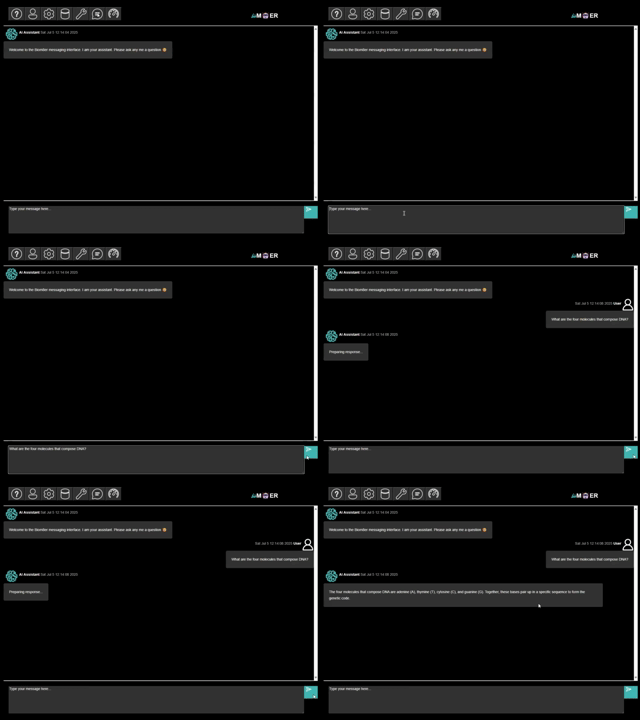
Click to see the full video
Alternatively, you can make REST API requests against the server using e.g., curl.
# Sign-in and get our JWT token
curl -X POST -u EMAIL:PASSWORD http://localhost:4000/app/v1/sign_in
# mock response {"email":"EMAIL","jwt":"JWTTOKEN","network_plans":["GenerateText","RAGTextPDF","TabularDataOps"]}

# View a subject table from the network state
curl -H "Content-Type: application/json" -H "Authorization: Bearer JWTTOKEN" -d '{"name":"","subject":"chat_processor_1","publisher":"EMAILChat","message":[],"update":"None","network_name":"EMAILChat","format":"Bytes","stream":false}' http://localhost:4000/app/v1/get_state

# Chat request
# Make the user query and encode into bytes
query_str=$(printf '[{"content":"Write a python function to count prime numbers","role":"user","timestamp":%s}]' "$(date +%s)")
query_bytes=$(echo -n "$query_str" | od -An -t u1)
query_array=$(echo "$query_bytes" | xargs | tr ' ' ',')

# Make the message to send to the server
# Be sure to replace EMAIL with your actual email!
# Note that the network_name = email + network_plan (which we also use for the publisher)
message=$(printf '{"name":"query","subject":"UserMessages","publisher":"EMAILChat","message":[%s],"update":{"Extend":{"subject_name":"UserMessages"}},"network_name":"EMAILChat","format":"Bytes","stream":false}' "$query_array")

# Make the chat request to the server
# Be sure to replace JWTTOKEN with your actual JWT token!
curl -H "Content-Type: application/json" -H "Authorization: Bearer JWTTOKEN" -d $message http://localhost:4000/app/v1/chat
Before running the phymes-server, setup the environmental variables as needed to access the local or remote OpenAI API token service endpoints.
# OpenAI API Key
export OPENAI_API_KEY=sk-proj-...

# NVIDIA API Key
export NGC_API_KEY=nvapi-...

# URL of the local/remote TGI OpenAI or NIMs deployment
export CHAT_API_URL=http://0.0.0.0:8000/v1

# URL of the local/remote TEI OpenAI or NIMs deployment
export EMBED_API_URL=http://0.0.0.0:8001/v1
WASM builds of phymes-server can be ran as stateless functions for embedded application using wasmtime or serverless applications.
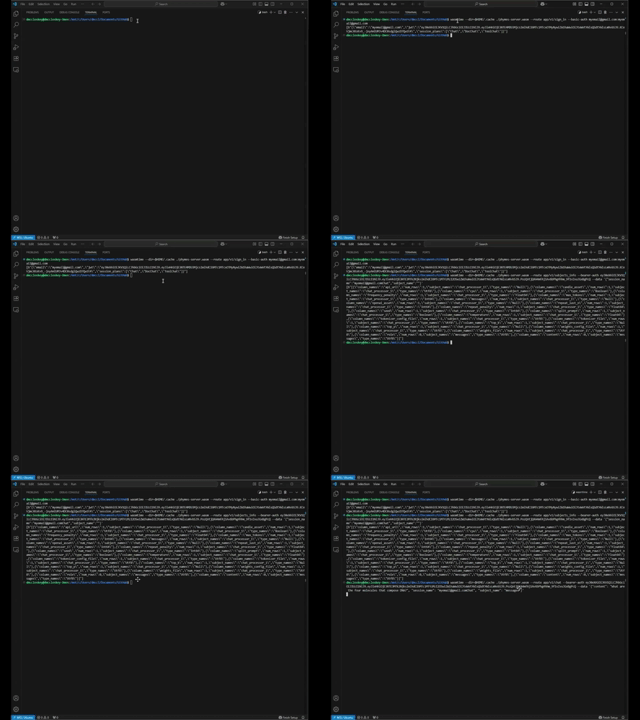
Click to see the full video
# Sign-in and get our JWT token
wasmtime target/wasm32-wasip2/release/phymes-server.wasm --route app/v1/sign_in --basic-auth EMAIL:PASSWORD
# mock response {"email":"EMAIL","jwt":"JWTTOKEN","network_plans":["GenerateText","RAGTextPDF","TabularDataOps"]}

# View a subject table from the network state
wasmtime --dir=$HOME/.cache target/wasm32-wasip2/release/phymes-server.wasm --route app/v1/get_state --bearer-auth JWTTOKEN --data '{"name":"","subject":"chat_processor_1","publisher":"EMAILChat","message":[],"update":"None","network_name":"EMAILChat","format":"Bytes","stream":false}'

# Chat request
# Be sure to replace JWTTOKEN with your actual JWT token!
# Note that message is the same as in the previous example
wasmtime --dir=$HOME/.cache target/wasm32-wasip2/release/phymes-server.wasm --route app/v1/chat --bearer-auth JWTTOKEN --data $message
The phymes application is available for desktop (Linux, Windows, MacOS) and mobile (Android, iOS), but requires building from source on the target platform (i.e., Linux for Linux desktop, Windows for Windows desktop, MacOS for MacOS desktop, Linux for Android, and MacOS for iOS). See contributing guide for detailed installation and build instructions.
Repository
The phymes-subject, phymes-ml, phymes-data, phymes-network, phymes-server, phymes-app crates form a full-stack application that can run Agentic AI workflows, (Hyper-)Graph algorithms, and/or Simulate complex real world networks at scale using a web, desktop, or mobile interface.
| Crate | Description | Latest API Docs | README |
|---|---|---|---|
phymes-diagnostics | Diagnostic tools for debugging and optimizing | docs.rs | README |
phymes-subject | Core hypergraph messaging functionality | docs.rs | README |
phymes-ml | Support for machine learning (ML) and generative artificial intelligence (AI) | docs.rs | README |
phymes-data | Support for GPU accelerated data wrangling | docs.rs | README |
phymes-network | Support for building Agentic AI hypergraph messaging applications | docs.rs | README |
phymes-server | Server that runs the Agentic AI hypergraph messaging services | docs.rs | README |
phymes-app | Frontend UI for dynamically interacting with the Agentic AI hypergraph messaging services | docs.rs | README |
Roadmap
- More production-ready agentic AI examples beyond simple chatbot, tool call, and RAG agents.
- Expanded benchmark of hardware accelerated accelerated Data operators, ML models, and Agentic AI workflows and their primitives.
- See issues for more...
Community
The best place to engage with the Biom8er phymes community is on GitHub Discussions. New features and bug fix requests should be submitted via GitHub issues which acts as the system of record for development. Design and more technical discussions should also take place on GitHub issues.
Contributors

43 commits
Similar repos





Languages
Rust
98.9%
Parallel HYpergraph MEssaging Streams
See the codeREADME
PHYMES: Parallel HYpergraph MEssaging Streams
Introduction
🤔 What is PHYMES?
PHYMES (Parallel HYpergraph MEssaging Streams) is a subject-based message passing algorithm based on directed hypergraphs which provide the expressivity needed to model the heterogeneity and complexity of the real world. More details in the guide.
🤔 What can PHYMES do?
🤖 build complex Agentic AI workflows. Examples for building a chat bot, a tool calling agent, and document RAG agent are provided using embedded token/tensor services or local/remote token/tensor services using OpenAI compatible APIs. 💿 deploy Agentic AI-enabled apps. Examples and recipes for building and deploying on the cloud, on the edge, or in the browser are provided. 🧑🔬 train and optimize Agentic AI algorithms and workflows. Examples for monitoring deployed Agentic AI workflows and training new ML models or optimizing workflow execution from the telemetry data are provided.
🤔 Why PHYMES?
🔐 written 100% in Rust for performance, safety, and security.
🌎 deployable on any platform (Linux, MacOs, Win, Android, and iOS) and in the browser (WebAssembly).
💪 scalable to massive data sets using columnar in memory format, parallel and stream native processing, and GPU acceleration.
🧩 interoperable with existing stacks by interfacing with cross-platform Arrow and WASM/WASI.
🔎 instrumented with tracing and customizable metrics to debug faster.
🤔 Who and what inspired PHYMES?
PHYMES takes inspiration from real world networks including biological networks. The implementation of PHYMES takes inspiration from DataFusion, Pregel, and PyG.
🙏 PHYMES would not be possible if it were not for the amazing open-sources projects that it is built on top of including Arrow and Candle with full-stack support from Tokio, Dioxus, and Wasmtime.
Installation
Precompiled bundles for different Arch, OS, CUDA versions, and Token and Tensor services (e.g. for Agentic AI workflows) are provided on the releases page.
| Arch | OS | CUDA | Token service |
|---|---|---|---|
| x86_64-unknown-linux-gnu | ubuntu22.04, ubuntu24.04 | 12.6.2, 12.9.1 | candle, api |
| wasm32-wasip2 | n/a | n/a | candle |
| wasm32-unknown-unknown | n/a | n/a | candle |
Token services for agentic AI workflows can embedded in the application using candle or accessed locally e.g., self-hosted NVIDIA NIMs docker containers or remotely e.g., OpenAI, NVIDIA NIMs, etc. that adhere to the OpenAI API schema using api. Tensor services are embedded in the application using candle with CPU vectorization and GPU acceleration support.
To install the phymes application, download the precompiled bundle that matches your system and needs, and unzip the bundle. Double click on phymes-server to start the server. Navigate to http://127.0.0.1:4000/ to view the web application.
Click to see the full video
Alternatively, you can make REST API requests against the server using e.g., curl.
# Sign-in and get our JWT token
curl -X POST -u EMAIL:PASSWORD http://localhost:4000/app/v1/sign_in
# mock response {"email":"EMAIL","jwt":"JWTTOKEN","network_plans":["GenerateText","RAGTextPDF","TabularDataOps"]}

# View a subject table from the network state
curl -H "Content-Type: application/json" -H "Authorization: Bearer JWTTOKEN" -d '{"name":"","subject":"chat_processor_1","publisher":"EMAILChat","message":[],"update":"None","network_name":"EMAILChat","format":"Bytes","stream":false}' http://localhost:4000/app/v1/get_state

# Chat request
# Make the user query and encode into bytes
query_str=$(printf '[{"content":"Write a python function to count prime numbers","role":"user","timestamp":%s}]' "$(date +%s)")
query_bytes=$(echo -n "$query_str" | od -An -t u1)
query_array=$(echo "$query_bytes" | xargs | tr ' ' ',')

# Make the message to send to the server
# Be sure to replace EMAIL with your actual email!
# Note that the network_name = email + network_plan (which we also use for the publisher)
message=$(printf '{"name":"query","subject":"UserMessages","publisher":"EMAILChat","message":[%s],"update":{"Extend":{"subject_name":"UserMessages"}},"network_name":"EMAILChat","format":"Bytes","stream":false}' "$query_array")

# Make the chat request to the server
# Be sure to replace JWTTOKEN with your actual JWT token!
curl -H "Content-Type: application/json" -H "Authorization: Bearer JWTTOKEN" -d $message http://localhost:4000/app/v1/chat
Before running the phymes-server, setup the environmental variables as needed to access the local or remote OpenAI API token service endpoints.
# OpenAI API Key
export OPENAI_API_KEY=sk-proj-...

# NVIDIA API Key
export NGC_API_KEY=nvapi-...

# URL of the local/remote TGI OpenAI or NIMs deployment
export CHAT_API_URL=http://0.0.0.0:8000/v1

# URL of the local/remote TEI OpenAI or NIMs deployment
export EMBED_API_URL=http://0.0.0.0:8001/v1
WASM builds of phymes-server can be ran as stateless functions for embedded application using wasmtime or serverless applications.
Click to see the full video
# Sign-in and get our JWT token
wasmtime target/wasm32-wasip2/release/phymes-server.wasm --route app/v1/sign_in --basic-auth EMAIL:PASSWORD
# mock response {"email":"EMAIL","jwt":"JWTTOKEN","network_plans":["GenerateText","RAGTextPDF","TabularDataOps"]}

# View a subject table from the network state
wasmtime --dir=$HOME/.cache target/wasm32-wasip2/release/phymes-server.wasm --route app/v1/get_state --bearer-auth JWTTOKEN --data '{"name":"","subject":"chat_processor_1","publisher":"EMAILChat","message":[],"update":"None","network_name":"EMAILChat","format":"Bytes","stream":false}'

# Chat request
# Be sure to replace JWTTOKEN with your actual JWT token!
# Note that message is the same as in the previous example
wasmtime --dir=$HOME/.cache target/wasm32-wasip2/release/phymes-server.wasm --route app/v1/chat --bearer-auth JWTTOKEN --data $message
The phymes application is available for desktop (Linux, Windows, MacOS) and mobile (Android, iOS), but requires building from source on the target platform (i.e., Linux for Linux desktop, Windows for Windows desktop, MacOS for MacOS desktop, Linux for Android, and MacOS for iOS). See contributing guide for detailed installation and build instructions.
Repository
The phymes-subject, phymes-ml, phymes-data, phymes-network, phymes-server, phymes-app crates form a full-stack application that can run Agentic AI workflows, (Hyper-)Graph algorithms, and/or Simulate complex real world networks at scale using a web, desktop, or mobile interface.
| Crate | Description | Latest API Docs | README |
|---|---|---|---|
phymes-diagnostics | Diagnostic tools for debugging and optimizing | docs.rs | README |
phymes-subject | Core hypergraph messaging functionality | docs.rs | README |
phymes-ml | Support for machine learning (ML) and generative artificial intelligence (AI) | docs.rs | README |
phymes-data | Support for GPU accelerated data wrangling | docs.rs | README |
phymes-network | Support for building Agentic AI hypergraph messaging applications | docs.rs | README |
phymes-server | Server that runs the Agentic AI hypergraph messaging services | docs.rs | README |
phymes-app | Frontend UI for dynamically interacting with the Agentic AI hypergraph messaging services | docs.rs | README |
Roadmap
- More production-ready agentic AI examples beyond simple chatbot, tool call, and RAG agents.
- Expanded benchmark of hardware accelerated accelerated Data operators, ML models, and Agentic AI workflows and their primitives.
- See issues for more...
Community
The best place to engage with the Biom8er phymes community is on GitHub Discussions. New features and bug fix requests should be submitted via GitHub issues which acts as the system of record for development. Design and more technical discussions should also take place on GitHub issues.
Similar repos
Contributors
43 commits
Languages
Rust
98.9%