
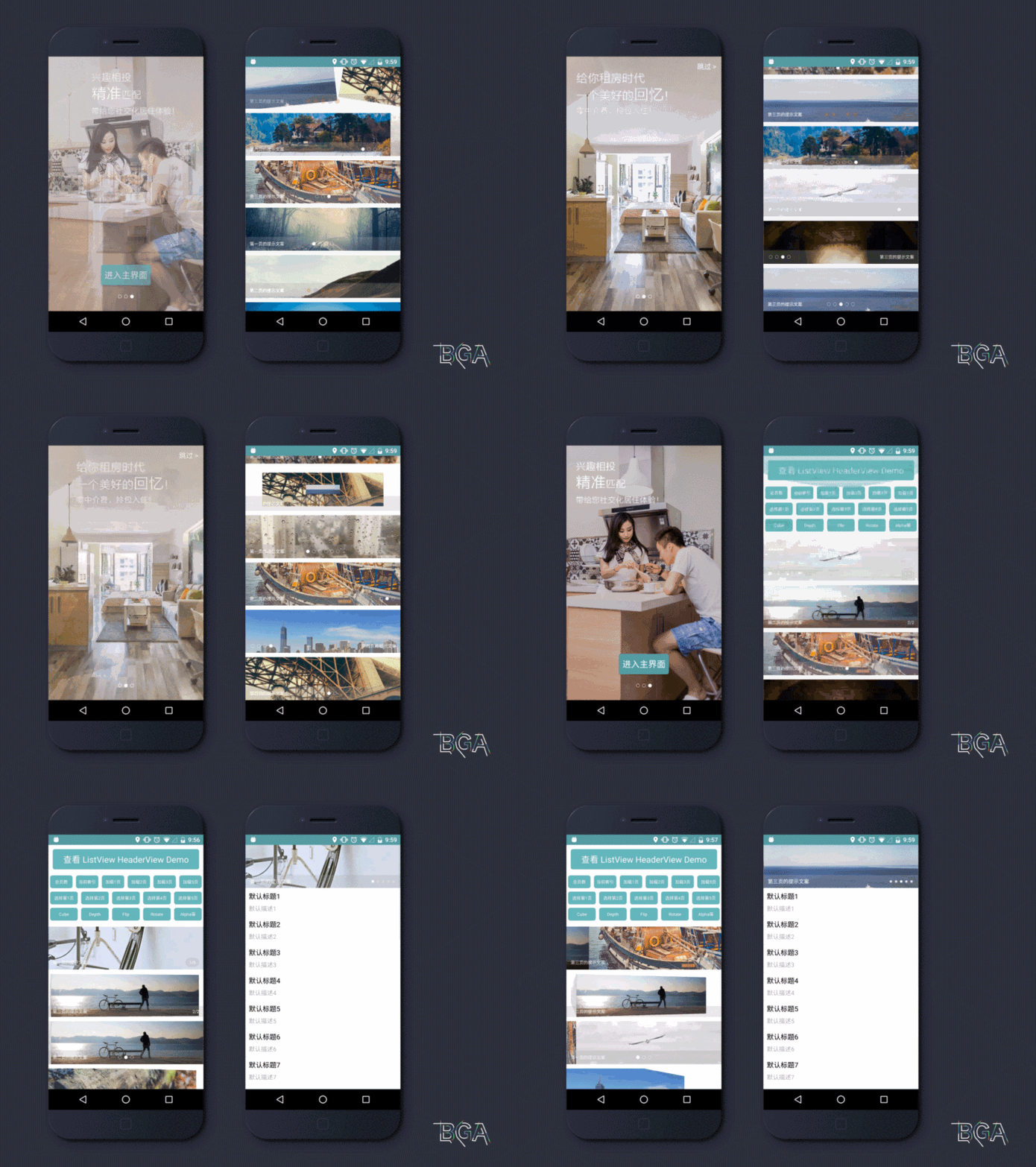
点击下载 BGABannerDemo.apk 或扫描下面的二维码安装

该库已迁移到 AndroidX(minSdk 21),使用方工程需开启 AndroidX(
android.useAndroidX=true)
implementation 'cn.bingoogolapple:bga-banner:latestVersion'
<cn.bingoogolapple.bgabanner.BGABanner
    android:id="@+id/banner_guide_content"
    style="@style/MatchMatch"
    app:banner_pageChangeDuration="1000"
    app:banner_pointAutoPlayAble="false"
    app:banner_pointContainerBackground="@android:color/transparent"
    app:banner_pointDrawable="@drawable/bga_banner_selector_point_hollow"
    app:banner_pointTopBottomMargin="15dp"
    app:banner_transitionEffect="alpha" />
有多种配置数据源的方式,这里仅列出三种方式。更多初始化方式请查看 demo
配置数据源的方式1:通过传入数据模型并结合 Adapter 的方式配置数据源。这种方式主要用于加载网络图片,以及实现少于3页时的无限轮播
mContentBanner.setAdapter(new BGABanner.Adapter<ImageView, String>() {
    @Override
    public void fillBannerItem(BGABanner banner, ImageView itemView, String model, int position) {
        Glide.with(MainActivity.this)
                .load(model)
                .placeholder(R.drawable.holder)
                .error(R.drawable.holder)
                .centerCrop()
                .dontAnimate()
                .into(itemView);
    }
});

mContentBanner.setData(Arrays.asList("网络图片路径1", "网络图片路径2", "网络图片路径3"), Arrays.asList("提示文字1", "提示文字2", "提示文字3"));
配置数据源的方式2:通过直接传入视图集合的方式配置数据源,主要用于自定义引导页每个页面布局的情况
List<View> views = new ArrayList<>();
views.add(View.inflate(context, R.layout.layout_guide_one, null));
views.add(View.inflate(context, R.layout.layout_guide_two, null));
views.add(View.inflate(context, R.layout.layout_guide_three, null));
mContentBanner.setData(views);
配置数据源的方式3:通过传入图片资源 id 的方式配置数据源,主要用于引导页每一页都是只显示图片的情况
// Bitmap 的宽高在 maxWidth maxHeight 和 minWidth minHeight 之间
BGALocalImageSize localImageSize = new BGALocalImageSize(720, 1280, 320, 640);
// 设置数据源
mContentBanner.setData(localImageSize, ImageView.ScaleType.CENTER_CROP,
        R.drawable.uoko_guide_background_1,
        R.drawable.uoko_guide_background_2,
        R.drawable.uoko_guide_background_3);
mContentBanner.setDelegate(new BGABanner.Delegate<ImageView, String>() {
    @Override
    public void onBannerItemClick(BGABanner banner, ImageView itemView, String model, int position) {
        Toast.makeText(banner.getContext(), "点击了" + position, Toast.LENGTH_SHORT).show();
    }
});
mContentBanner.setEnterSkipViewIdAndDelegate(R.id.btn_guide_enter, R.id.tv_guide_skip, new BGABanner.GuideDelegate() {
    @Override
    public void onClickEnterOrSkip() {
        startActivity(new Intent(GuideActivity.this, MainActivity.class));
        finish();
    }
});
<declare-styleable name="BGABanner">
    <!-- 指示点容器背景 -->
    <attr name="banner_pointContainerBackground" format="reference|color" />
    <!-- 指示点背景 -->
    <attr name="banner_pointDrawable" format="reference" />
    <!-- 指示点容器左右内间距 -->
    <attr name="banner_pointContainerLeftRightPadding" format="dimension" />
    <!-- 指示点上下外间距 -->
    <attr name="banner_pointTopBottomMargin" format="dimension" />
    <!-- 指示点左右外间距 -->
    <attr name="banner_pointLeftRightMargin" format="dimension" />
    <!-- 指示器的位置 -->
    <attr name="banner_indicatorGravity">
        <flag name="top" value="0x30" />
        <flag name="bottom" value="0x50" />
        <flag name="left" value="0x03" />
        <flag name="right" value="0x05" />
        <flag name="center_horizontal" value="0x01" />
    </attr>
    <!-- 是否开启自动轮播 -->
    <attr name="banner_pointAutoPlayAble" format="boolean" />
    <!-- 自动轮播的时间间隔 -->
    <attr name="banner_pointAutoPlayInterval" format="integer" />
    <!-- 页码切换过程的时间长度 -->
    <attr name="banner_pageChangeDuration" format="integer" />
    <!-- 页面切换的动画效果 -->
    <attr name="banner_transitionEffect" format="enum">
        <enum name="defaultEffect" value="0" />
        <enum name="alpha" value="1" />
        <enum name="rotate" value="2" />
        <enum name="cube" value="3" />
        <enum name="flip" value="4" />
        <enum name="accordion" value="5" />
        <enum name="zoomFade" value="6" />
        <enum name="fade" value="7" />
        <enum name="zoomCenter" value="8" />
        <enum name="zoomStack" value="9" />
        <enum name="stack" value="10" />
        <enum name="depth" value="11" />
        <enum name="zoom" value="12" />
    </attr>
    <!-- 提示文案的文字颜色 -->
    <attr name="banner_tipTextColor" format="reference|color" />
    <!-- 提示文案的文字大小 -->
    <attr name="banner_tipTextSize" format="dimension" />
    <!-- 加载网络数据时覆盖在 BGABanner 最上层的占位图 -->
    <attr name="banner_placeholderDrawable" format="reference" />
    <!-- 是否是数字指示器 -->
    <attr name="banner_isNumberIndicator" format="boolean" />
    <!-- 数字指示器文字颜色 -->
    <attr name="banner_numberIndicatorTextColor" format="reference|color" />
    <!-- 数字指示器文字大小 -->
    <attr name="banner_numberIndicatorTextSize" format="dimension" />
    <!-- 数字指示器背景 -->
    <attr name="banner_numberIndicatorBackground" format="reference" />
    <!-- 当只有一页数据时是否显示指示器,默认值为 false -->
    <attr name="banner_isNeedShowIndicatorOnOnlyOnePage" format="boolean" />
    <!-- 自动轮播区域距离 BGABanner 底部的距离,用于使指示器区域与自动轮播区域不重叠 -->
    <attr name="banner_contentBottomMargin" format="dimension"/>
    <!-- 宽高比例,如果大于 0,则会根据宽度来计算高度,否则使用 android:layout_height 指定的高度 -->
    <attr name="banner_aspectRatio" format="float"/>
    <!-- 占位图和资源图片缩放模式 -->
    <attr name="android:scaleType"/>
</declare-styleable>
| 个人微信号 | 微信群 | 公众号 |
|---|---|---|
 |  |  |
| 个人 QQ 号 | QQ 群 |
|---|---|
 |  |
如果您觉得 BGA 系列开源库或工具软件帮您节省了大量的开发时间,可以扫描下方的二维码打赏支持。您的支持将鼓励我继续创作,打赏后还可以加我微信免费开通一年 上帝小助手浏览器扩展/插件开发平台 的会员服务
| 微信 | 支付宝 | |
|---|---|---|
 |  |  |
Copyright 2015 bingoogolapple

Licensed under the Apache License, Version 2.0 (the "License");
you may not use this file except in compliance with the License.
You may obtain a copy of the License at

   http://www.apache.org/licenses/LICENSE-2.0

Unless required by applicable law or agreed to in writing, software
distributed under the License is distributed on an "AS IS" BASIS,
WITHOUT WARRANTIES OR CONDITIONS OF ANY KIND, either express or implied.
See the License for the specific language governing permissions and
limitations under the License.
点击下载 BGABannerDemo.apk 或扫描下面的二维码安装
该库已迁移到 AndroidX(minSdk 21),使用方工程需开启 AndroidX(
android.useAndroidX=true)
implementation 'cn.bingoogolapple:bga-banner:latestVersion'
<cn.bingoogolapple.bgabanner.BGABanner
    android:id="@+id/banner_guide_content"
    style="@style/MatchMatch"
    app:banner_pageChangeDuration="1000"
    app:banner_pointAutoPlayAble="false"
    app:banner_pointContainerBackground="@android:color/transparent"
    app:banner_pointDrawable="@drawable/bga_banner_selector_point_hollow"
    app:banner_pointTopBottomMargin="15dp"
    app:banner_transitionEffect="alpha" />
有多种配置数据源的方式,这里仅列出三种方式。更多初始化方式请查看 demo
配置数据源的方式1:通过传入数据模型并结合 Adapter 的方式配置数据源。这种方式主要用于加载网络图片,以及实现少于3页时的无限轮播
mContentBanner.setAdapter(new BGABanner.Adapter<ImageView, String>() {
    @Override
    public void fillBannerItem(BGABanner banner, ImageView itemView, String model, int position) {
        Glide.with(MainActivity.this)
                .load(model)
                .placeholder(R.drawable.holder)
                .error(R.drawable.holder)
                .centerCrop()
                .dontAnimate()
                .into(itemView);
    }
});

mContentBanner.setData(Arrays.asList("网络图片路径1", "网络图片路径2", "网络图片路径3"), Arrays.asList("提示文字1", "提示文字2", "提示文字3"));
配置数据源的方式2:通过直接传入视图集合的方式配置数据源,主要用于自定义引导页每个页面布局的情况
List<View> views = new ArrayList<>();
views.add(View.inflate(context, R.layout.layout_guide_one, null));
views.add(View.inflate(context, R.layout.layout_guide_two, null));
views.add(View.inflate(context, R.layout.layout_guide_three, null));
mContentBanner.setData(views);
配置数据源的方式3:通过传入图片资源 id 的方式配置数据源,主要用于引导页每一页都是只显示图片的情况
// Bitmap 的宽高在 maxWidth maxHeight 和 minWidth minHeight 之间
BGALocalImageSize localImageSize = new BGALocalImageSize(720, 1280, 320, 640);
// 设置数据源
mContentBanner.setData(localImageSize, ImageView.ScaleType.CENTER_CROP,
        R.drawable.uoko_guide_background_1,
        R.drawable.uoko_guide_background_2,
        R.drawable.uoko_guide_background_3);
mContentBanner.setDelegate(new BGABanner.Delegate<ImageView, String>() {
    @Override
    public void onBannerItemClick(BGABanner banner, ImageView itemView, String model, int position) {
        Toast.makeText(banner.getContext(), "点击了" + position, Toast.LENGTH_SHORT).show();
    }
});
mContentBanner.setEnterSkipViewIdAndDelegate(R.id.btn_guide_enter, R.id.tv_guide_skip, new BGABanner.GuideDelegate() {
    @Override
    public void onClickEnterOrSkip() {
        startActivity(new Intent(GuideActivity.this, MainActivity.class));
        finish();
    }
});
<declare-styleable name="BGABanner">
    <!-- 指示点容器背景 -->
    <attr name="banner_pointContainerBackground" format="reference|color" />
    <!-- 指示点背景 -->
    <attr name="banner_pointDrawable" format="reference" />
    <!-- 指示点容器左右内间距 -->
    <attr name="banner_pointContainerLeftRightPadding" format="dimension" />
    <!-- 指示点上下外间距 -->
    <attr name="banner_pointTopBottomMargin" format="dimension" />
    <!-- 指示点左右外间距 -->
    <attr name="banner_pointLeftRightMargin" format="dimension" />
    <!-- 指示器的位置 -->
    <attr name="banner_indicatorGravity">
        <flag name="top" value="0x30" />
        <flag name="bottom" value="0x50" />
        <flag name="left" value="0x03" />
        <flag name="right" value="0x05" />
        <flag name="center_horizontal" value="0x01" />
    </attr>
    <!-- 是否开启自动轮播 -->
    <attr name="banner_pointAutoPlayAble" format="boolean" />
    <!-- 自动轮播的时间间隔 -->
    <attr name="banner_pointAutoPlayInterval" format="integer" />
    <!-- 页码切换过程的时间长度 -->
    <attr name="banner_pageChangeDuration" format="integer" />
    <!-- 页面切换的动画效果 -->
    <attr name="banner_transitionEffect" format="enum">
        <enum name="defaultEffect" value="0" />
        <enum name="alpha" value="1" />
        <enum name="rotate" value="2" />
        <enum name="cube" value="3" />
        <enum name="flip" value="4" />
        <enum name="accordion" value="5" />
        <enum name="zoomFade" value="6" />
        <enum name="fade" value="7" />
        <enum name="zoomCenter" value="8" />
        <enum name="zoomStack" value="9" />
        <enum name="stack" value="10" />
        <enum name="depth" value="11" />
        <enum name="zoom" value="12" />
    </attr>
    <!-- 提示文案的文字颜色 -->
    <attr name="banner_tipTextColor" format="reference|color" />
    <!-- 提示文案的文字大小 -->
    <attr name="banner_tipTextSize" format="dimension" />
    <!-- 加载网络数据时覆盖在 BGABanner 最上层的占位图 -->
    <attr name="banner_placeholderDrawable" format="reference" />
    <!-- 是否是数字指示器 -->
    <attr name="banner_isNumberIndicator" format="boolean" />
    <!-- 数字指示器文字颜色 -->
    <attr name="banner_numberIndicatorTextColor" format="reference|color" />
    <!-- 数字指示器文字大小 -->
    <attr name="banner_numberIndicatorTextSize" format="dimension" />
    <!-- 数字指示器背景 -->
    <attr name="banner_numberIndicatorBackground" format="reference" />
    <!-- 当只有一页数据时是否显示指示器,默认值为 false -->
    <attr name="banner_isNeedShowIndicatorOnOnlyOnePage" format="boolean" />
    <!-- 自动轮播区域距离 BGABanner 底部的距离,用于使指示器区域与自动轮播区域不重叠 -->
    <attr name="banner_contentBottomMargin" format="dimension"/>
    <!-- 宽高比例,如果大于 0,则会根据宽度来计算高度,否则使用 android:layout_height 指定的高度 -->
    <attr name="banner_aspectRatio" format="float"/>
    <!-- 占位图和资源图片缩放模式 -->
    <attr name="android:scaleType"/>
</declare-styleable>
| 个人微信号 | 微信群 | 公众号 |
|---|---|---|
| | |
| 个人 QQ 号 | QQ 群 |
|---|---|
| |
如果您觉得 BGA 系列开源库或工具软件帮您节省了大量的开发时间,可以扫描下方的二维码打赏支持。您的支持将鼓励我继续创作,打赏后还可以加我微信免费开通一年 上帝小助手浏览器扩展/插件开发平台 的会员服务
| 微信 | 支付宝 | |
|---|---|---|
| | |
Copyright 2015 bingoogolapple

Licensed under the Apache License, Version 2.0 (the "License");
you may not use this file except in compliance with the License.
You may obtain a copy of the License at

   http://www.apache.org/licenses/LICENSE-2.0

Unless required by applicable law or agreed to in writing, software
distributed under the License is distributed on an "AS IS" BASIS,
WITHOUT WARRANTIES OR CONDITIONS OF ANY KIND, either express or implied.
See the License for the specific language governing permissions and
limitations under the License.





