
MOVED: https://gitlab.com/bharadwaj-raju/QOverview
See the codeREADME
qOverview has moved!
Now at GitLab!
qOverview
GNOME's Activities dashboard, for other desktops
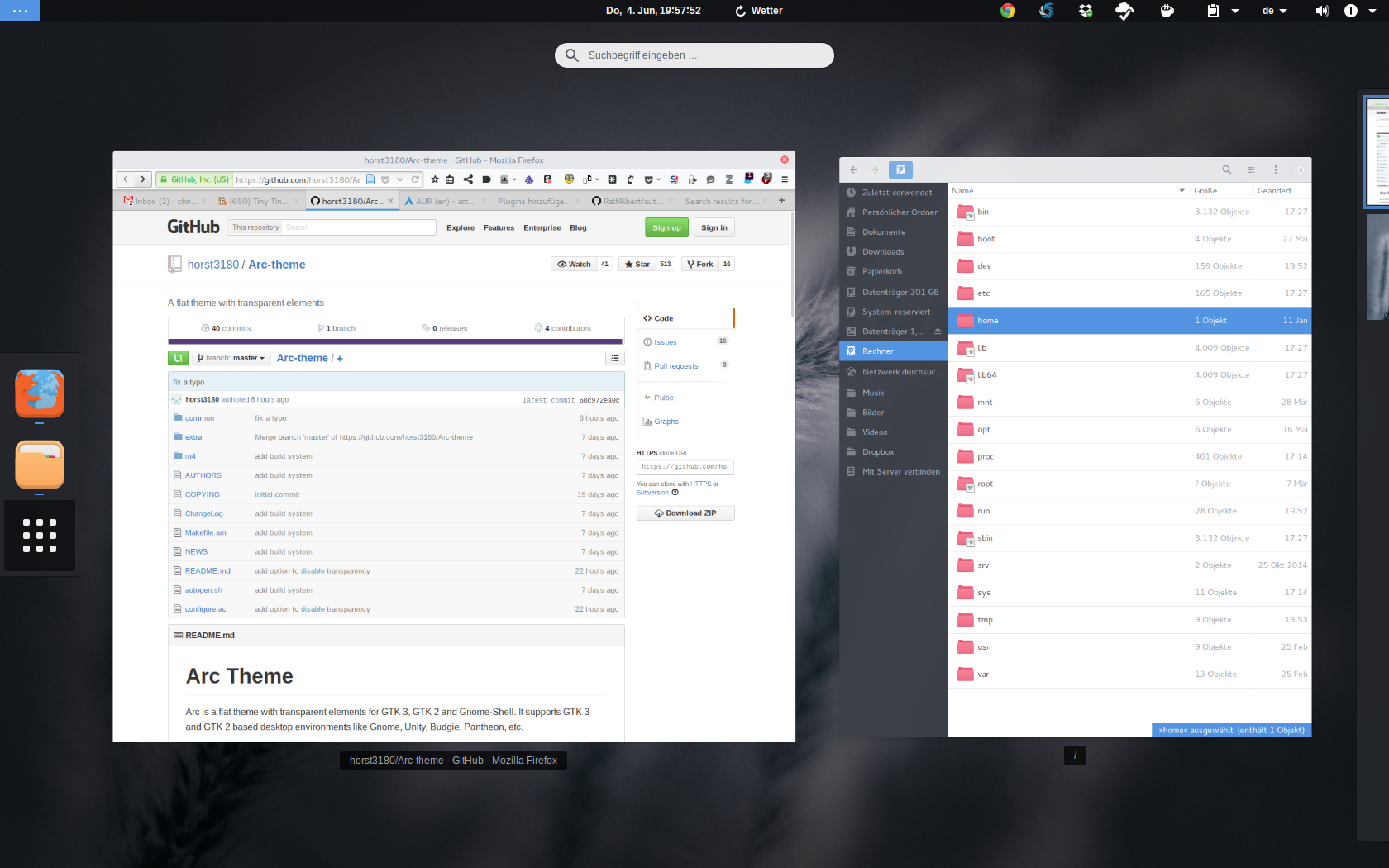
qOverview is a dashboard which is a clone of inspired by GNOME's Activities.
qOverview:
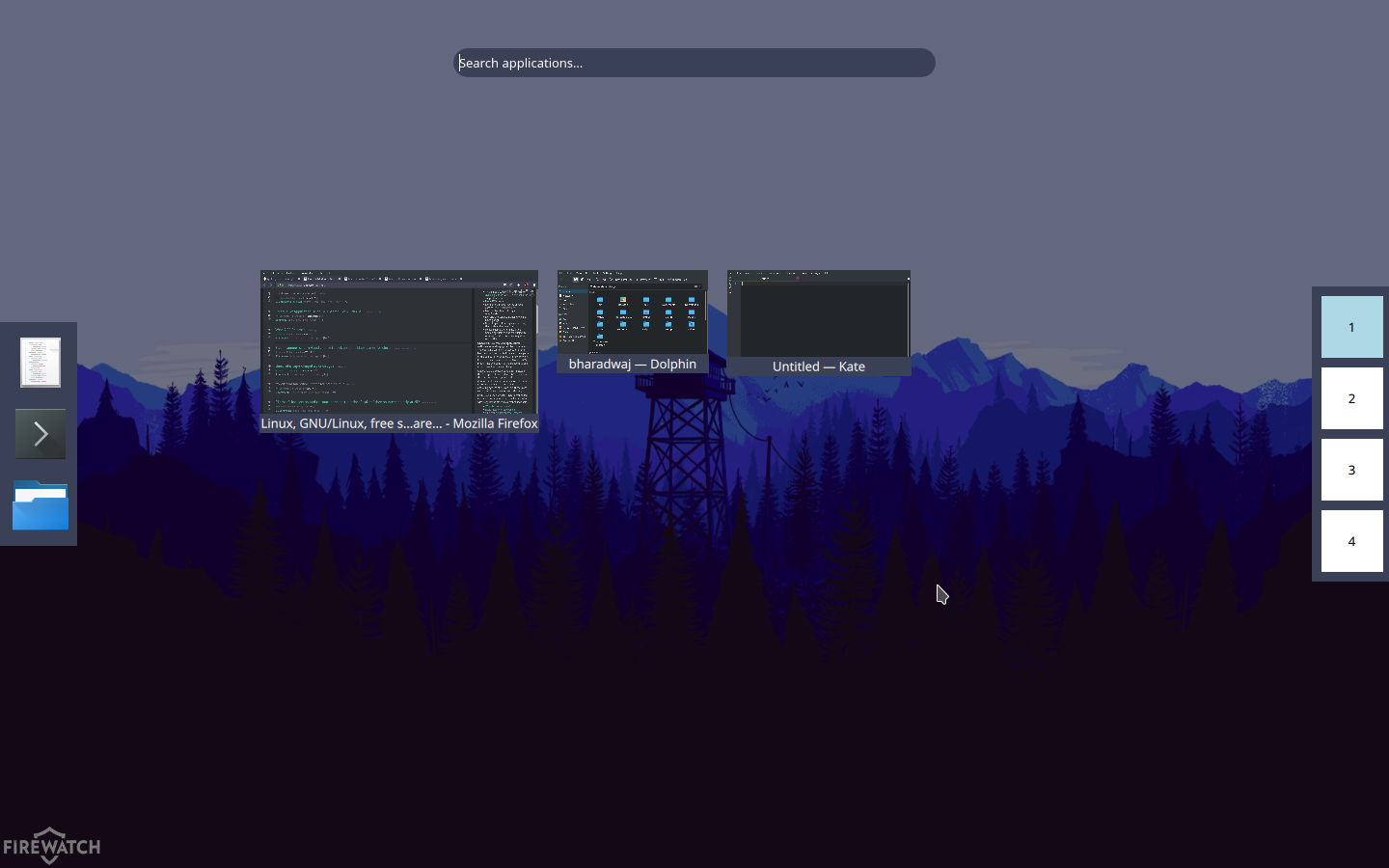
GNOME Activities:
qOverview is written in QML with a Python backend.
How to Install
Prerequisites
The following programs must be installed before installing qOverview. Package names of these for major distros are listed alongside.
- Python 3
- PyQt 5 (Arch:
python-pyqt5,qt5-declarative| Ubuntu:python3-pyqt5,python3-pyqt5.qtquick| SUSE:python3-qt5| Fedora:python3-PyQt5) - Python-DBus (Arch:
python-dbus| Ubuntu:python3-dbus| SUSE:python-dbus| Fedora:python3-dbus) - Python-GObject (Arch:
python-gobject| Ubuntu:python3-gi| SUSE:python3-gobject| Fedora:pygobject3) - PyYAML (Arch:
python-yaml| Ubuntu:python3-yaml| SUSE:python3-PyYAML| Fedora:python3-PyYAML| PyPI/Pip:PyYAML) - wmctrl (Arch, Ubuntu, SUSE, Fedora:
wmctrl) - xdotool (Arch, Ubuntu, SUSE, Fedora:
xdotool)
NOTE: qOverview needs X11 to run, and thus is incompatible with Wayland.
If the listed package names are incorrect/don't work/etc please report the issue!
Installation
Download and run this:
$ sudo ./install.sh
NOTE: Don't want to use the KDE Frameworks version? Add --no-kde-frameworks to the command above.
NOTE: To uninstall, use the above command with --uninstall
How to Setup & Use
Initial Setup
-
Set the
qoverview-config-servercommand to run on startup. -
Run the command
qoverview-config-server >/dev/null 2>&1 & disownin a terminal. -
Add items to the dock using the file
~/.config/qoverview.yaml. See Settings. -
You can now put the
qoverviewcommand on a shortcut key, and/or a screen corner.
See your desktop's settings tool for these.
For putting qOverview on a screen corner, see Binding to screen corner.
Use
Press said shortcut key/screen corner and see!
NOTE: In qOverview, middle mouse button click on a window will close it. This can be disabled, see settings
NOTE: To drag-and-drop a window to a workspace, drag it by holding the title bar below the window.
Settings
See the file ~/.config/qoverview.yaml. It has all the settings (and is quite well-commented).
Binding to screen corner
The xdotool utility will allow you to do bind qOverview to a screen corner or edge easily.
You can bind to the following corners and edges of the screen:
-
top -
bottom -
left -
right -
top-left -
top-right -
bottom-left -
top-right
To do this, run the command
$ xdotool behave_screen_edge EDGE_OR_CORNER exec qoverview
where EDGE_OR_CORNER is to be replaced with the position of your choice from the list above.
Also, set the above-mentioned command to run at startup.
What works and what doesn't
Every feature of GNOME Activities is provided, except…
- A more natural layout for the windows
License
Licensed under the GNU General Public License version 3 or (at your option) a later version.
See the included LICENSE file.
Credits
KDE's Breeze icon theme for the included missing-icon.svg (taken from question.svg)
Contributors

1 commits
Similar repos


Languages
Python
64.7%
QML
26.1%
Shell
9.2%
MOVED: https://gitlab.com/bharadwaj-raju/QOverview
See the codeREADME
qOverview has moved!
Now at GitLab!
qOverview
GNOME's Activities dashboard, for other desktops
qOverview is a dashboard which is a clone of inspired by GNOME's Activities.
qOverview:
GNOME Activities:
qOverview is written in QML with a Python backend.
How to Install
Prerequisites
The following programs must be installed before installing qOverview. Package names of these for major distros are listed alongside.
- Python 3
- PyQt 5 (Arch:
python-pyqt5,qt5-declarative| Ubuntu:python3-pyqt5,python3-pyqt5.qtquick| SUSE:python3-qt5| Fedora:python3-PyQt5) - Python-DBus (Arch:
python-dbus| Ubuntu:python3-dbus| SUSE:python-dbus| Fedora:python3-dbus) - Python-GObject (Arch:
python-gobject| Ubuntu:python3-gi| SUSE:python3-gobject| Fedora:pygobject3) - PyYAML (Arch:
python-yaml| Ubuntu:python3-yaml| SUSE:python3-PyYAML| Fedora:python3-PyYAML| PyPI/Pip:PyYAML) - wmctrl (Arch, Ubuntu, SUSE, Fedora:
wmctrl) - xdotool (Arch, Ubuntu, SUSE, Fedora:
xdotool)
NOTE: qOverview needs X11 to run, and thus is incompatible with Wayland.
If the listed package names are incorrect/don't work/etc please report the issue!
Installation
Download and run this:
$ sudo ./install.sh
NOTE: Don't want to use the KDE Frameworks version? Add --no-kde-frameworks to the command above.
NOTE: To uninstall, use the above command with --uninstall
How to Setup & Use
Initial Setup
-
Set the
qoverview-config-servercommand to run on startup. -
Run the command
qoverview-config-server >/dev/null 2>&1 & disownin a terminal. -
Add items to the dock using the file
~/.config/qoverview.yaml. See Settings. -
You can now put the
qoverviewcommand on a shortcut key, and/or a screen corner.
See your desktop's settings tool for these.
For putting qOverview on a screen corner, see Binding to screen corner.
Use
Press said shortcut key/screen corner and see!
NOTE: In qOverview, middle mouse button click on a window will close it. This can be disabled, see settings
NOTE: To drag-and-drop a window to a workspace, drag it by holding the title bar below the window.
Settings
See the file ~/.config/qoverview.yaml. It has all the settings (and is quite well-commented).
Binding to screen corner
The xdotool utility will allow you to do bind qOverview to a screen corner or edge easily.
You can bind to the following corners and edges of the screen:
-
top -
bottom -
left -
right -
top-left -
top-right -
bottom-left -
top-right
To do this, run the command
$ xdotool behave_screen_edge EDGE_OR_CORNER exec qoverview
where EDGE_OR_CORNER is to be replaced with the position of your choice from the list above.
Also, set the above-mentioned command to run at startup.
What works and what doesn't
Every feature of GNOME Activities is provided, except…
- A more natural layout for the windows
License
Licensed under the GNU General Public License version 3 or (at your option) a later version.
See the included LICENSE file.
Credits
KDE's Breeze icon theme for the included missing-icon.svg (taken from question.svg)
Similar repos
Contributors
1 commits
Languages
Python
64.7%
QML
26.1%
Shell
9.2%