
An agent-first CLI-based hierarchical task manager backed by SQLite
Go
24
226 commits
updated Sep 2, 2026
See what people are saying
README
Jobs
The task tracker that agents love using and humans love watching.
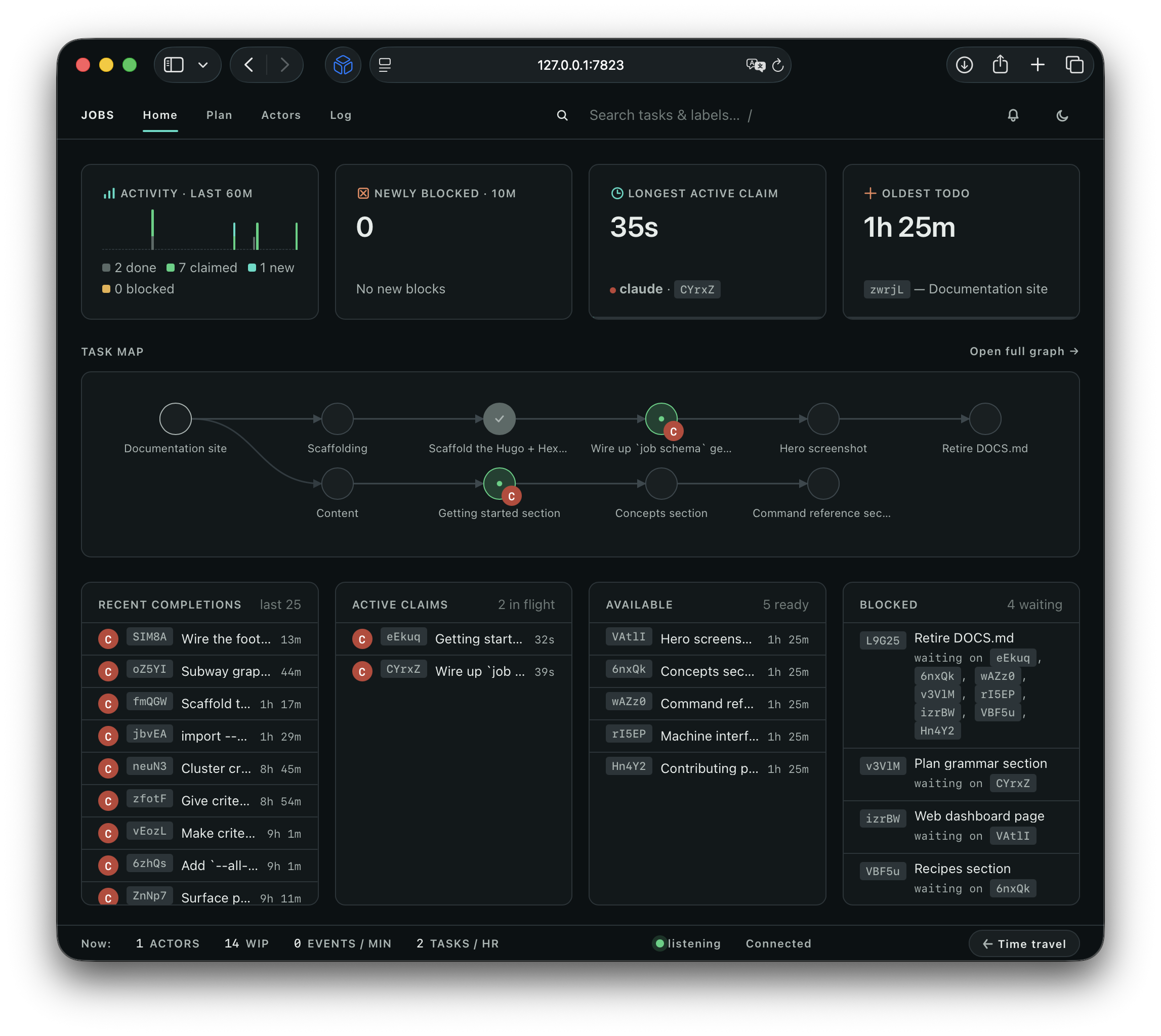
Jobs is a CLI tool which helps agents create detailed plans and carry them out methodically.
A plan can contain blockers, acceptance criteria and hierarchy, making it a powerful hybrid of a spec/PRD and a directed acyclic graph (DAG). I like to say it “writes like a plan, runs like a DAG.”
Jobs is a replacement for Plan Mode, to-do tools, and task trackers. It comes with a rich dashboard because why not.
This document was written by a human for humans. If you're an agent, run job --help or check out the docs.
Workflow overview
- Have your agent read
job schemaand then write a Markdown document which starts with the “why” and ends with the “what:” a fenced YAML block with a hierarchical plan. - Open the doc, review it, and edit as needed.
- Import the plan; start with
job import plan.md --dry-runto check for errors, then drop the--dry-run. - Have your agent run
job statusand claim the first task. - Start the dashboard with
job serveand observe.
While YAML is an objectively bad format, this particular YAML schema is quite readable for humans and easy for agents to generate, which put it ahead of Markdown or JSON.
Getting started
Install
$ go install github.com/bensyverson/jobs/cmd/job@latest
This drops the job binary into $HOME/go/bin (or $GOBIN if set). Make sure that directory is on your PATH.
AGENTS.md or CLAUDE.md
Add this line to your AGENTS file:
To create and manage plans and task lists, always use the `job` command.
If you find the agent is still triggering its built-in Plan mode or to-do list tool, you can strengthen the language.
Setup
job will prompt the agent to initialize the database, or you can do it manually with job init --as <name>. This will create a local SQLite database at ./.jobs.db, with <name> recorded as the default identity every unattributed write is credited to.
Name the assistant, not the account it runs under — the coding agent's own name, not your username:
$ job init --as claude

or after init:

$ job identity set claude --as <your-username>
What to commit
Commit .jobs/log/ — plain text, one file per checkout, and the record of every task and event. Run job gitignore once to exclude the rest (.jobs.db*, the disposable cache, and .jobs/local.json, this machine's own identity and focus).
That makes git pull the sync: clone the repo on another machine, run job status, and your tasks are there. Two machines can work at once — each appends to its own file, so the log never conflicts. See The store.
Dashboard
To start the dashboard, type job serve.
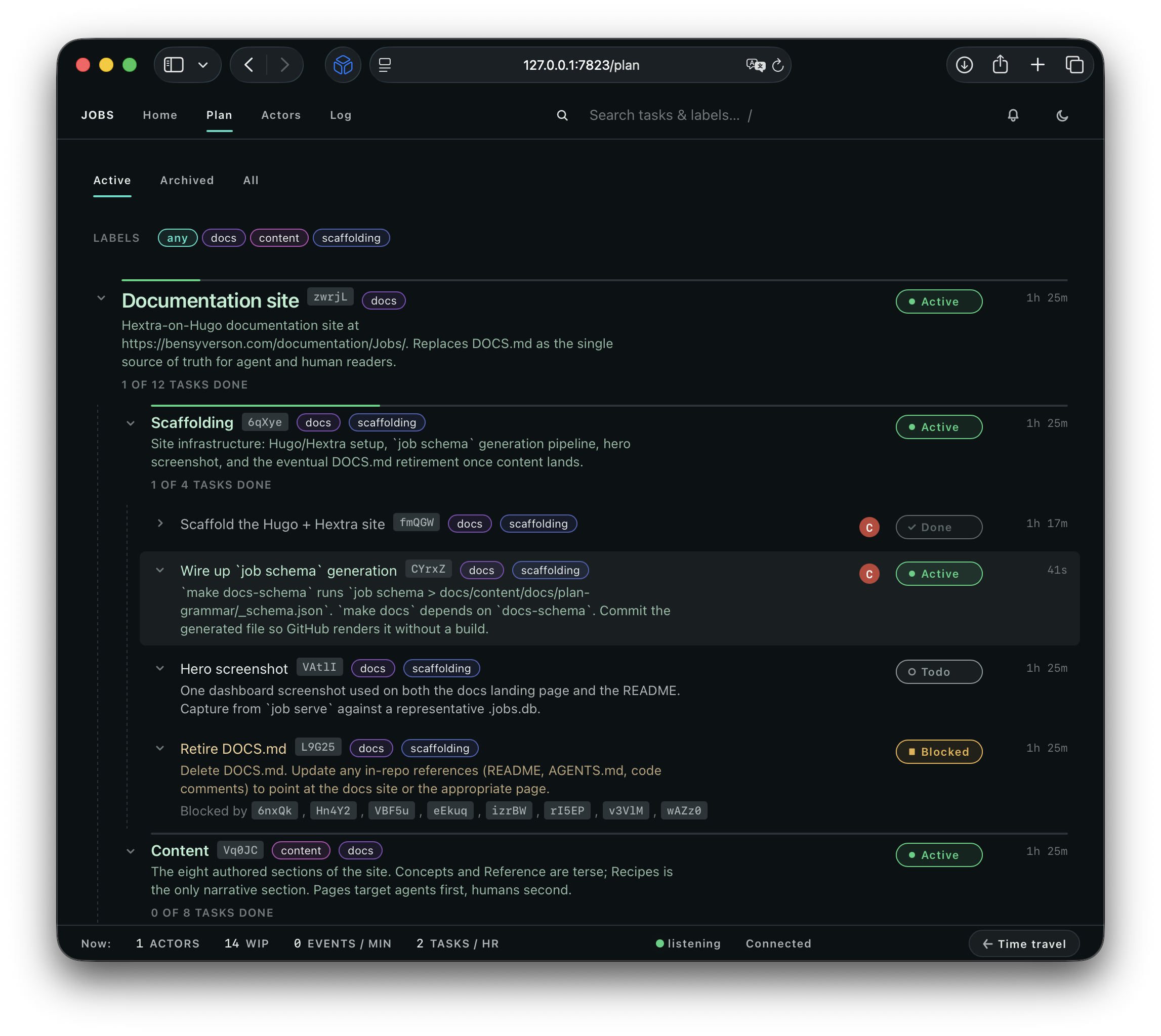
The Plan contains the written plan, organized hierarchically:
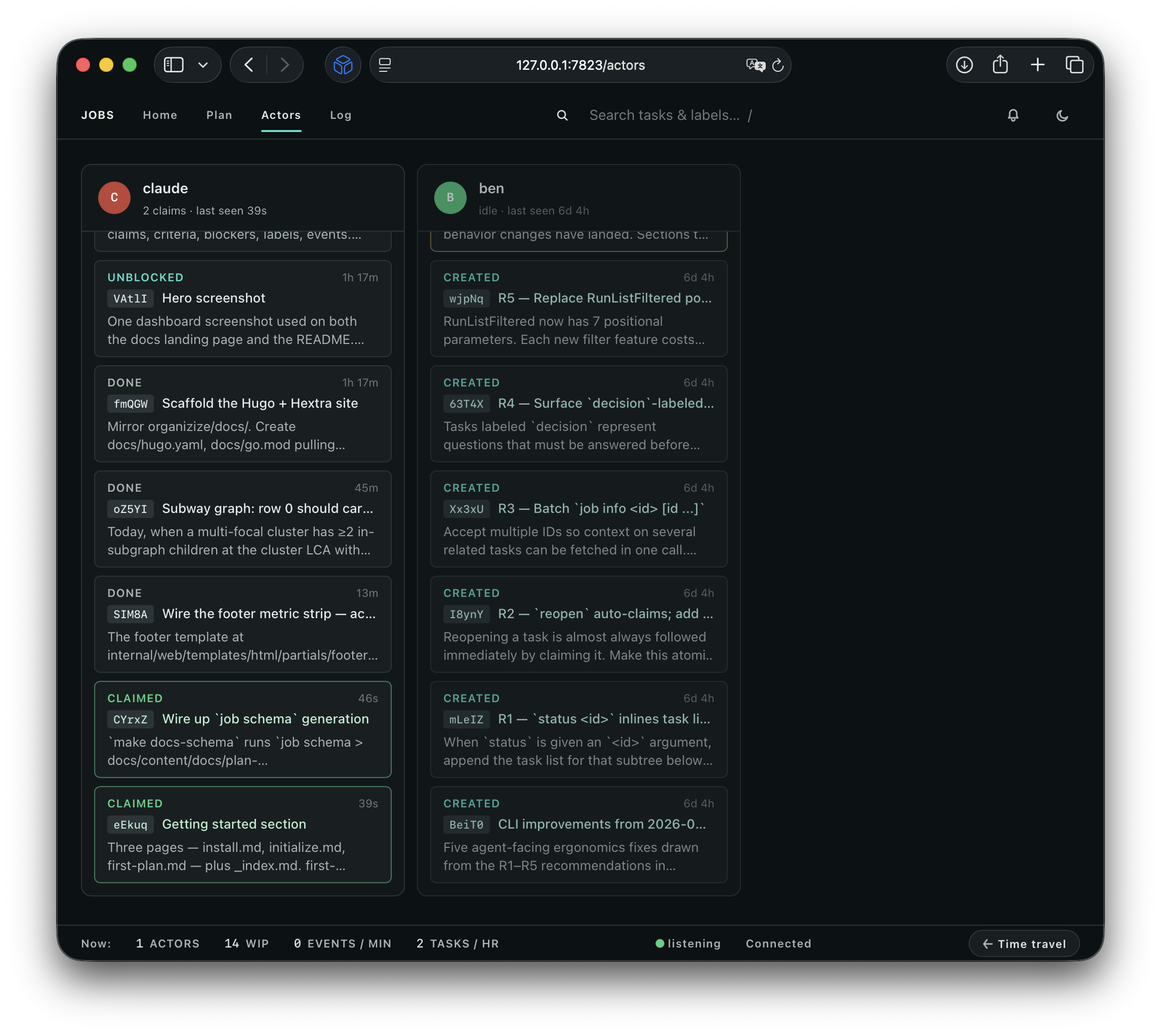
Actors — see what each agent is working on:
|
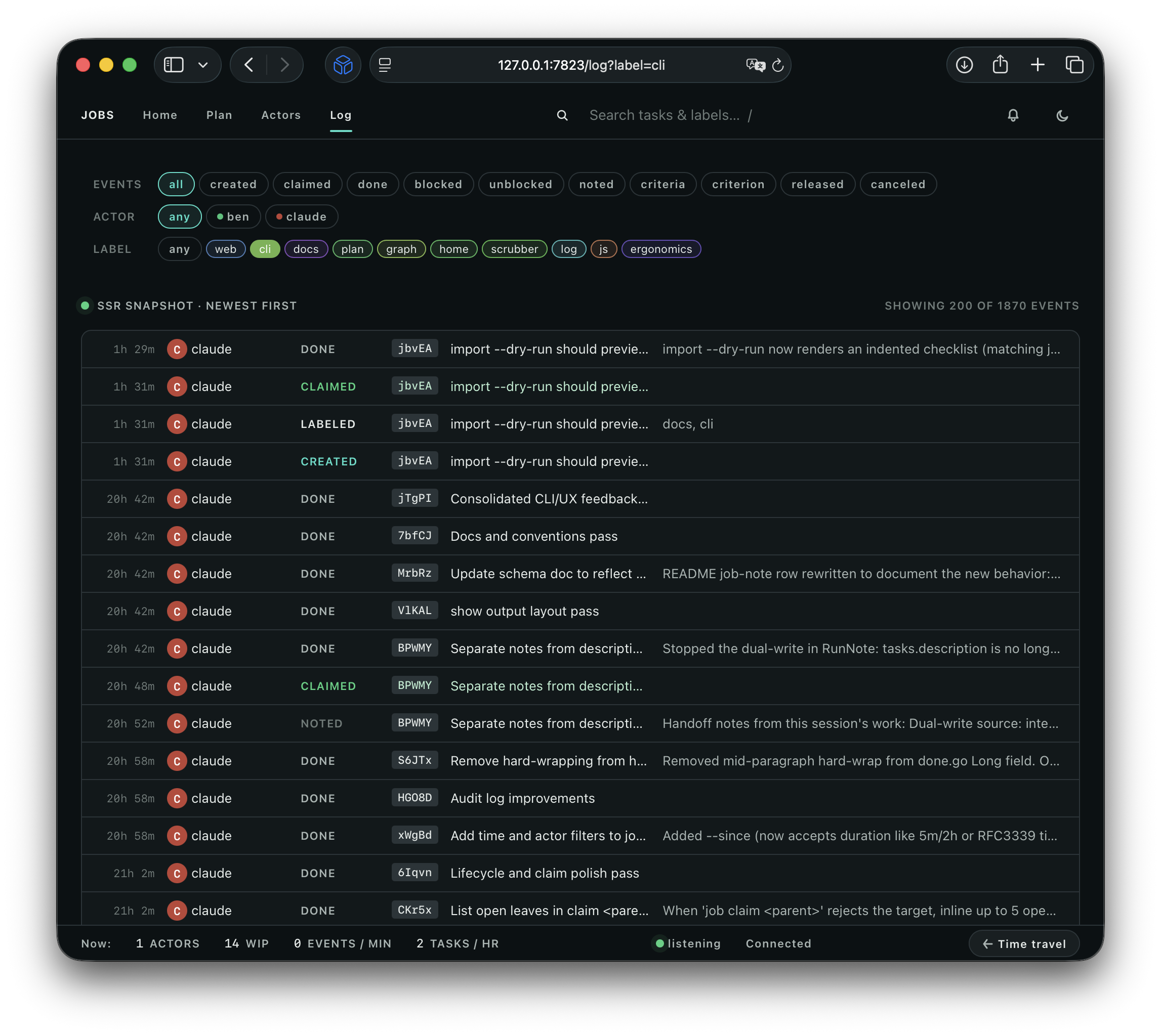
Log — every event with filter chips:
|
Click the **Time Travel** button to reveal a zoomable timeline. Grab the scrubber or use the arrow keys to inspect the exact task flow:

What Jobs is… and isn’t
- Jobs is local-first. Jobs is great for coordinating and executing work locally. In the future I may add a Postgres back-end for remote collaboration.
- Jobs is not a harness or orchestrator. Agents who use Jobs are highly influenced to follow the plan and meet acceptance criteria, but Jobs doesn’t run the agent or enforce stage gates.
- Jobs is not a communication layer. Jobs enables multiple agents to collaborate on a single Plan with proper attribution, but attribution is opt-in, and there is no mechanism to pass messages.
Design principles
- Agent-first ergonomics. The primary user is an LLM, so the system is designed to be intuitive to an agent, and offer just the right level of context.
- Learnable. Agents learn how to use Jobs by using Jobs. The output of a command often teaches the agent about the system and offers a hint about their next step.
- Interruptible. Because Jobs holds rich data about the state of the plan, you can pause work at any time and resume with a different model or fresh context.
- Human-friendly. Plans are written in a readable YAML format, allowing you to understand what the agent is proposing. During the execution phase, you can see exactly what’s happening in the dashboard.
User-Centered Design
In order to shape job, I’ve conducted countless interviews with agents to gather their feedback and synthesize that feedback into design iterations. I’ve captured much of this research in the project folder so you can “view source” if you’re curious.
My goal in applying User-Centered Design has been to make job easier for agents to adopt, reduce round-trips and errors with the CLI, and increase positive functional emotions. After using job, agents have used words like “delightful,” “satisfying,” and “felt good.” Does this matter? I actually think it might.
License
This project is licensed under the MIT License.
Copyright (c) 2026 Ben Syverson
Contributors

226 commits
Similar repos


Languages
Go
71.9%
JavaScript
13.7%
HTML
7.8%
CSS
4.5%
Go Template
1.8%
An agent-first CLI-based hierarchical task manager backed by SQLite
Go
24
226 commits
updated Sep 2, 2026
See what people are saying
README
Jobs
The task tracker that agents love using and humans love watching.
Jobs is a CLI tool which helps agents create detailed plans and carry them out methodically.
A plan can contain blockers, acceptance criteria and hierarchy, making it a powerful hybrid of a spec/PRD and a directed acyclic graph (DAG). I like to say it “writes like a plan, runs like a DAG.”
Jobs is a replacement for Plan Mode, to-do tools, and task trackers. It comes with a rich dashboard because why not.
This document was written by a human for humans. If you're an agent, run job --help or check out the docs.
Workflow overview
- Have your agent read
job schemaand then write a Markdown document which starts with the “why” and ends with the “what:” a fenced YAML block with a hierarchical plan. - Open the doc, review it, and edit as needed.
- Import the plan; start with
job import plan.md --dry-runto check for errors, then drop the--dry-run. - Have your agent run
job statusand claim the first task. - Start the dashboard with
job serveand observe.
While YAML is an objectively bad format, this particular YAML schema is quite readable for humans and easy for agents to generate, which put it ahead of Markdown or JSON.
Getting started
Install
$ go install github.com/bensyverson/jobs/cmd/job@latest
This drops the job binary into $HOME/go/bin (or $GOBIN if set). Make sure that directory is on your PATH.
AGENTS.md or CLAUDE.md
Add this line to your AGENTS file:
To create and manage plans and task lists, always use the `job` command.
If you find the agent is still triggering its built-in Plan mode or to-do list tool, you can strengthen the language.
Setup
job will prompt the agent to initialize the database, or you can do it manually with job init --as <name>. This will create a local SQLite database at ./.jobs.db, with <name> recorded as the default identity every unattributed write is credited to.
Name the assistant, not the account it runs under — the coding agent's own name, not your username:
$ job init --as claude

or after init:

$ job identity set claude --as <your-username>
What to commit
Commit .jobs/log/ — plain text, one file per checkout, and the record of every task and event. Run job gitignore once to exclude the rest (.jobs.db*, the disposable cache, and .jobs/local.json, this machine's own identity and focus).
That makes git pull the sync: clone the repo on another machine, run job status, and your tasks are there. Two machines can work at once — each appends to its own file, so the log never conflicts. See The store.
Dashboard
To start the dashboard, type job serve.
The Plan contains the written plan, organized hierarchically:
|
Actors — see what each agent is working on:
|
Log — every event with filter chips:
|
Click the **Time Travel** button to reveal a zoomable timeline. Grab the scrubber or use the arrow keys to inspect the exact task flow:
What Jobs is… and isn’t
- Jobs is local-first. Jobs is great for coordinating and executing work locally. In the future I may add a Postgres back-end for remote collaboration.
- Jobs is not a harness or orchestrator. Agents who use Jobs are highly influenced to follow the plan and meet acceptance criteria, but Jobs doesn’t run the agent or enforce stage gates.
- Jobs is not a communication layer. Jobs enables multiple agents to collaborate on a single Plan with proper attribution, but attribution is opt-in, and there is no mechanism to pass messages.
Design principles
- Agent-first ergonomics. The primary user is an LLM, so the system is designed to be intuitive to an agent, and offer just the right level of context.
- Learnable. Agents learn how to use Jobs by using Jobs. The output of a command often teaches the agent about the system and offers a hint about their next step.
- Interruptible. Because Jobs holds rich data about the state of the plan, you can pause work at any time and resume with a different model or fresh context.
- Human-friendly. Plans are written in a readable YAML format, allowing you to understand what the agent is proposing. During the execution phase, you can see exactly what’s happening in the dashboard.
User-Centered Design
In order to shape job, I’ve conducted countless interviews with agents to gather their feedback and synthesize that feedback into design iterations. I’ve captured much of this research in the project folder so you can “view source” if you’re curious.
My goal in applying User-Centered Design has been to make job easier for agents to adopt, reduce round-trips and errors with the CLI, and increase positive functional emotions. After using job, agents have used words like “delightful,” “satisfying,” and “felt good.” Does this matter? I actually think it might.
License
This project is licensed under the MIT License.
Copyright (c) 2026 Ben Syverson
Similar repos
Contributors
226 commits
Languages
Go
71.9%
JavaScript
13.7%
HTML
7.8%
CSS
4.5%
Go Template
1.8%