
README
td-dwpose
A standalone TouchDesigner Custom Operator TOP for DWPose whole-body pose detection. Outputs an OpenPose-format stick-figure suitable for ControlNet conditioning, runs entirely on the GPU via TensorRT 10.
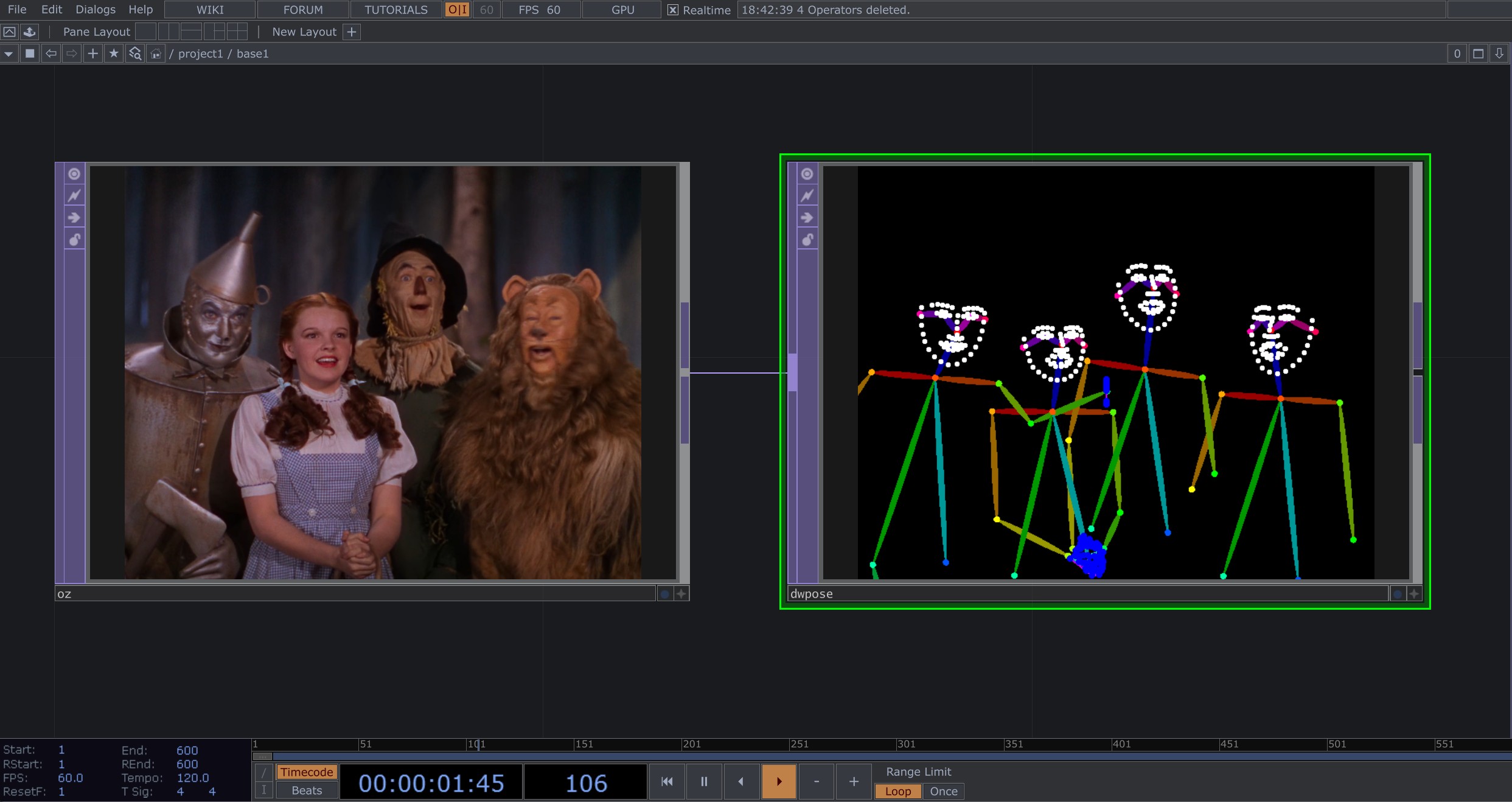
Body skeleton, both hands (21 keypoints each), and 68 face
landmarks are detected per person, multi-person scenes work out of the
box, and the rendered stick-figure matches controlnet_aux's output
byte-for-byte so any SD ControlNet OpenPose model can consume it
directly.
Contents
- Requirements
- Build from source
- Install into TouchDesigner
- Usage
- Parameters
- Info CHOP channels
- Architecture
- Performance
- License
- Acknowledgements
Requirements
System
- OS: Windows 10/11 x64 (TouchDesigner Custom Operator plugins are Windows-only at present)
- GPU: NVIDIA, compute capability 7.5 or newer (Turing / Ampere / Ada / Hopper / Blackwell). Tested primarily on RTX 4090. Lower-tier Ada / Ampere cards work but expect proportionally lower frame rates.
- TouchDesigner: 2023.30000 or newer (any build that supports the C++ Custom Operator API).
Build dependencies
- Visual Studio 2022 with the Desktop development with C++ workload (provides MSVC 14.36+, the Windows 10/11 SDK, and CMake)
- CUDA Toolkit 13.x — install to the default location
(
C:\Program Files\NVIDIA GPU Computing Toolkit\CUDA\v13.2\). Older CUDA 12.x will require small CMake edits (replacecudart64_13references withcudart64_12). - TensorRT 10.x — download the standalone Windows zip from
NVIDIA Developer
and extract somewhere stable (e.g.
C:\src\TensorRT-10.16.1.11). Set%TENSORRT_ROOT%to that path before building. - Ninja (recommended) — bundled with VS 2022's CMake. The build
scripts use
-G Ninjaby default.
Build from source
From a regular PowerShell or cmd.exe window in the repo root:
:: 1. Set TensorRT path (adjust to your install location)
set TENSORRT_ROOT=C:\src\TensorRT-10.16.1.11

:: 2. Configure + build the plugin
build.cmd configure
build.cmd build

:: 3. Stage runtime DLLs into ./plugin/ (CUDA + TensorRT)
stage.cmd "C:\Program Files\NVIDIA GPU Computing Toolkit\CUDA\v13.2\bin\x64" "%TENSORRT_ROOT%"
After a successful build + stage, plugin/ contains:
td_dwpose_top.dll— the TouchDesigner plugin entry pointdwpose_worker.dll— the TensorRT/CUDA worker (loaded by the entry point with restricted DLL search; see Architecture)nvinfer_*.dll,nvonnxparser_10.dll,cudart64_13.dll, … — CUDA + TensorRT runtime libraries staged from your install
build.cmd clean wipes build/ and reconfigures from scratch. Use
this when you change CMake options or update CUDA/TRT versions.
Notes on TensorRT version pinning
The DLLs you stage from %TENSORRT_ROOT%\bin\ must come from the same
TensorRT distribution that built the engines on disk. Mixing a
pip-installed tensorrt wheel with a standalone TRT install is the
single most common cause of Serialization assertion stdVersionRead == kSERIALIZATION_VERSION failed at engine load — even when both report
the same 10.x.y.z version string, the actual serialization bytes can
differ. If this happens, delete your *.engine files and let the
plugin rebuild them with the runtime that's actually loaded.
Install into TouchDesigner
After building, point TouchDesigner at plugin/:
- Open TouchDesigner. Edit → Preferences → set the Plugins
Folder field to the absolute path of this repo's
plugin/folder, or copyplugin/*to your user plugins directory:%USERPROFILE%\Documents\Derivative\Plugins\. - Restart TouchDesigner so the plugin loader picks up the new DLLs.
- In any network, press
Tabto open the OP Create dialog. Under Custom → TOP you should see DWPose.
If you don't see it, check the Textport for plugin load errors and see Troubleshooting.
Usage
- Drop a DWPose TOP into your network.
- Wire any RGBA TOP into its first input (a
Movie File In TOP, webcam viaVideo Device In TOP, NDI feed, etc.). - Set the Engines Folder parameter to a writable path, e.g.
C:/Users/you/td-dwpose-engines. (Engine setup instructions are pending verification — open an issue if you'd like to use this before they land.) - Drop an Info CHOP and set its
OPparameter to the DWPose TOP to monitor status, performance, and per-frame keypoints. Wait forstatus == 3 (ready). - Wire the DWPose TOP's output into your downstream pipeline (an OpenPose ControlNet TOP, a screen output, a recorder — any TOP consumer). Output is RGBA8 with the OpenPose-style stick-figure on a black background.
Wiring to an SD ControlNet pipeline
The DWPose TOP's output is a drop-in replacement for any
controlnet_aux.OpenposeDetector(...)-rendered conditioning image.
The body skeleton uses the canonical 18-point CMU OpenPose color
palette; hand and face landmarks follow the
controlnet_aux/dwpose/util.py convention. Any SD ControlNet
checkpoint trained on lllyasviel's annotator (lllyasviel/control_v11p_sd15_openpose,
thibaud/controlnet-sd21-openposev2-diffusers, and similar) can
consume the output directly.
Parameters
| Parameter | Type | Default | Notes |
|---|---|---|---|
| Engines Folder | Folder path | (empty) | Required. Writable directory where the runner stores yolox.engine, dwpose.engine, and the cached *.onnx source models. Set this to a stable per-machine location; engines are GPU + TRT version specific so don't share across machines. |
| Reload | Pulse | — | Re-runs engine discovery + load. Pulse this after editing files in the engines folder, swapping models, or after a TRT version change. |
| Ordered Draw | Toggle | OFF | When ON, body limbs draw in controlnet_aux's outer-by-limb order so cross-person arm overlaps are depth-consistent. When OFF (default), all limbs dispatch in a single CUDA pass — slightly faster (~1–2 ms savings on 4K with multiple bodies), at the cost of non-deterministic overlap z-order between people. The default favors throughput; flip ON only if you have multi-person scenes where arm-over-arm depth matters visually. |
Info CHOP channels
| Channel | Meaning |
|---|---|
status | Runner state: 0 idle · 1 downloading ONNX · 2 building engine · 3 ready · 4 error |
progress | 0.0–1.0 within the current status phase |
num_persons | Detected persons in the current frame |
infer_ms | YOLOX + DWPose inference time, milliseconds |
ordered | Live mirror of the Ordered Draw toggle |
lastrender_ms | Stick-figure rasterizer time, milliseconds (includes a cudaStreamSynchronize so it's end-to-end render cost) |
kp00x … kp17x | OpenPose body keypoint X coords for person 0 (image-pixel space) |
kp00y … kp17y | OpenPose body keypoint Y coords for person 0 |
Body keypoint indices follow the OpenPose 18-point convention: 0 nose,
1 neck, 2-4 right arm, 5-7 left arm, 8-10 right leg, 11-13
left leg, 14-15 eyes, 16-17 ears. Channels report 0.0 for any
keypoint below the renderer's confidence gate (so what the CHOP
reports matches what the TOP draws).
The stick-figure render also includes hand (21 kp × 2) and face (68 landmarks) keypoints internally, but those are not currently surfaced on the Info CHOP — only the body 18 are. Open an issue if you need them exposed.
Architecture
td-dwpose is built as two DLLs:
td_dwpose_top.dll       (thin TouchDesigner plugin shim)
  ↓ loads via LoadLibraryExW with restricted search
dwpose_worker.dll       (owns all TensorRT, CUDA, ONNX-parser linkage)
The TOP shim has zero direct imports of nvinfer_10.dll,
nvonnxparser_10.dll, or any TRT symbol. It calls LoadLibraryExW
with LOAD_LIBRARY_SEARCH_DLL_LOAD_DIR | LOAD_LIBRARY_SEARCH_SYSTEM32
to load the worker, which restricts Windows' DLL dependency resolver
to the plugin/ folder + System32 — explicitly excluding
TouchDesigner's bin/ folder.
This is necessary because TouchDesigner ships its own
nvinfer_10.dll, and Windows' default DLL search would pick TD's
copy over the plugin's, which is often a different TensorRT version. The
restricted load forces our staged TRT runtime to win the search
deterministically.
A C ABI (runner/dwpose_worker_c.h) is the boundary between the
two DLLs. The TOP-side DWPoseRunner class is a thin facade over
this ABI, which is delay-loaded (/DELAYLOAD:dwpose_worker.dll) so
no TRT symbols resolve until after the manual LoadLibraryExW has
pinned the worker.
The worker contains:
- TensorRT runtime + ONNX parser
- CUDA pre-processing (resize + normalize for YOLOX / DWPose)
- CUDA stick-figure rasterizer (oriented ellipse polygons for body limbs, Bresenham-equivalent lines for hand finger chains, filled circles for keypoint dots)
- HuggingFace download (libcurl) and engine build orchestration
Performance
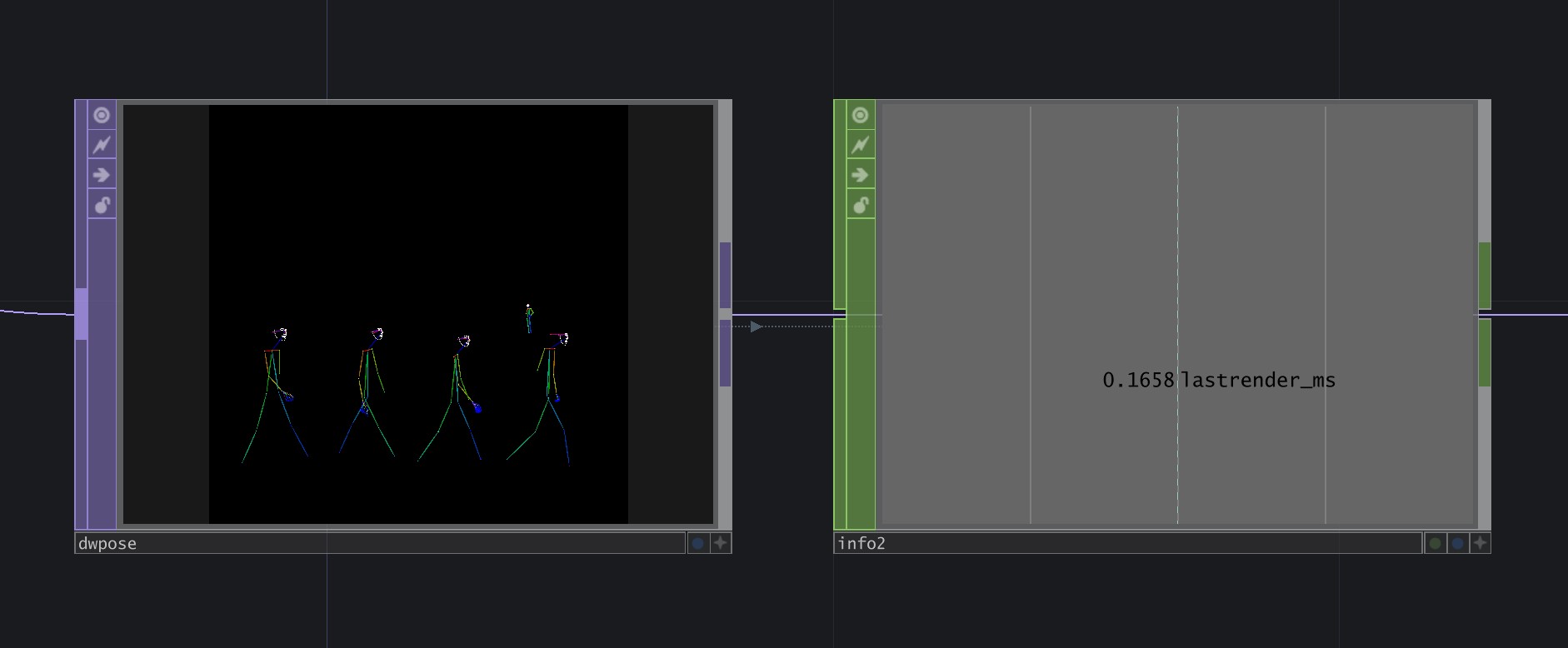
Measured on RTX 4090 Laptop, Windows 11, single input with 4+ people, inference time is sub-millisecond. Mileage may vary.
License
MIT — see LICENSE.
The vendored TouchDesigner Custom Operator SDK headers under
third_party/derivative/ remain Derivative Inc.'s property and are
distributed under their Shared Use License.
Acknowledgements
- DWPose by IDEA-Research — the underlying whole-body pose model
yzd-v/DWPose— the ONNX model release used by this plugincontrolnet_auxby HuggingFace — the reference Python renderer this plugin's CUDA rasterizer matches byte-for-byte- CMU OpenPose — the original 18-point body keypoint convention + color palette
- Derivative Inc. — TouchDesigner and the Custom Operator C++ API
Contributors

2 commits
Similar repos


Languages
C++
72.4%
Cuda
13.7%
CMake
5.5%
Batchfile
4.4%
C
3.9%
README
td-dwpose
A standalone TouchDesigner Custom Operator TOP for DWPose whole-body pose detection. Outputs an OpenPose-format stick-figure suitable for ControlNet conditioning, runs entirely on the GPU via TensorRT 10.
Body skeleton, both hands (21 keypoints each), and 68 face
landmarks are detected per person, multi-person scenes work out of the
box, and the rendered stick-figure matches controlnet_aux's output
byte-for-byte so any SD ControlNet OpenPose model can consume it
directly.
Contents
- Requirements
- Build from source
- Install into TouchDesigner
- Usage
- Parameters
- Info CHOP channels
- Architecture
- Performance
- License
- Acknowledgements
Requirements
System
- OS: Windows 10/11 x64 (TouchDesigner Custom Operator plugins are Windows-only at present)
- GPU: NVIDIA, compute capability 7.5 or newer (Turing / Ampere / Ada / Hopper / Blackwell). Tested primarily on RTX 4090. Lower-tier Ada / Ampere cards work but expect proportionally lower frame rates.
- TouchDesigner: 2023.30000 or newer (any build that supports the C++ Custom Operator API).
Build dependencies
- Visual Studio 2022 with the Desktop development with C++ workload (provides MSVC 14.36+, the Windows 10/11 SDK, and CMake)
- CUDA Toolkit 13.x — install to the default location
(
C:\Program Files\NVIDIA GPU Computing Toolkit\CUDA\v13.2\). Older CUDA 12.x will require small CMake edits (replacecudart64_13references withcudart64_12). - TensorRT 10.x — download the standalone Windows zip from
NVIDIA Developer
and extract somewhere stable (e.g.
C:\src\TensorRT-10.16.1.11). Set%TENSORRT_ROOT%to that path before building. - Ninja (recommended) — bundled with VS 2022's CMake. The build
scripts use
-G Ninjaby default.
Build from source
From a regular PowerShell or cmd.exe window in the repo root:
:: 1. Set TensorRT path (adjust to your install location)
set TENSORRT_ROOT=C:\src\TensorRT-10.16.1.11

:: 2. Configure + build the plugin
build.cmd configure
build.cmd build

:: 3. Stage runtime DLLs into ./plugin/ (CUDA + TensorRT)
stage.cmd "C:\Program Files\NVIDIA GPU Computing Toolkit\CUDA\v13.2\bin\x64" "%TENSORRT_ROOT%"
After a successful build + stage, plugin/ contains:
td_dwpose_top.dll— the TouchDesigner plugin entry pointdwpose_worker.dll— the TensorRT/CUDA worker (loaded by the entry point with restricted DLL search; see Architecture)nvinfer_*.dll,nvonnxparser_10.dll,cudart64_13.dll, … — CUDA + TensorRT runtime libraries staged from your install
build.cmd clean wipes build/ and reconfigures from scratch. Use
this when you change CMake options or update CUDA/TRT versions.
Notes on TensorRT version pinning
The DLLs you stage from %TENSORRT_ROOT%\bin\ must come from the same
TensorRT distribution that built the engines on disk. Mixing a
pip-installed tensorrt wheel with a standalone TRT install is the
single most common cause of Serialization assertion stdVersionRead == kSERIALIZATION_VERSION failed at engine load — even when both report
the same 10.x.y.z version string, the actual serialization bytes can
differ. If this happens, delete your *.engine files and let the
plugin rebuild them with the runtime that's actually loaded.
Install into TouchDesigner
After building, point TouchDesigner at plugin/:
- Open TouchDesigner. Edit → Preferences → set the Plugins
Folder field to the absolute path of this repo's
plugin/folder, or copyplugin/*to your user plugins directory:%USERPROFILE%\Documents\Derivative\Plugins\. - Restart TouchDesigner so the plugin loader picks up the new DLLs.
- In any network, press
Tabto open the OP Create dialog. Under Custom → TOP you should see DWPose.
If you don't see it, check the Textport for plugin load errors and see Troubleshooting.
Usage
- Drop a DWPose TOP into your network.
- Wire any RGBA TOP into its first input (a
Movie File In TOP, webcam viaVideo Device In TOP, NDI feed, etc.). - Set the Engines Folder parameter to a writable path, e.g.
C:/Users/you/td-dwpose-engines. (Engine setup instructions are pending verification — open an issue if you'd like to use this before they land.) - Drop an Info CHOP and set its
OPparameter to the DWPose TOP to monitor status, performance, and per-frame keypoints. Wait forstatus == 3 (ready). - Wire the DWPose TOP's output into your downstream pipeline (an OpenPose ControlNet TOP, a screen output, a recorder — any TOP consumer). Output is RGBA8 with the OpenPose-style stick-figure on a black background.
Wiring to an SD ControlNet pipeline
The DWPose TOP's output is a drop-in replacement for any
controlnet_aux.OpenposeDetector(...)-rendered conditioning image.
The body skeleton uses the canonical 18-point CMU OpenPose color
palette; hand and face landmarks follow the
controlnet_aux/dwpose/util.py convention. Any SD ControlNet
checkpoint trained on lllyasviel's annotator (lllyasviel/control_v11p_sd15_openpose,
thibaud/controlnet-sd21-openposev2-diffusers, and similar) can
consume the output directly.
Parameters
| Parameter | Type | Default | Notes |
|---|---|---|---|
| Engines Folder | Folder path | (empty) | Required. Writable directory where the runner stores yolox.engine, dwpose.engine, and the cached *.onnx source models. Set this to a stable per-machine location; engines are GPU + TRT version specific so don't share across machines. |
| Reload | Pulse | — | Re-runs engine discovery + load. Pulse this after editing files in the engines folder, swapping models, or after a TRT version change. |
| Ordered Draw | Toggle | OFF | When ON, body limbs draw in controlnet_aux's outer-by-limb order so cross-person arm overlaps are depth-consistent. When OFF (default), all limbs dispatch in a single CUDA pass — slightly faster (~1–2 ms savings on 4K with multiple bodies), at the cost of non-deterministic overlap z-order between people. The default favors throughput; flip ON only if you have multi-person scenes where arm-over-arm depth matters visually. |
Info CHOP channels
| Channel | Meaning |
|---|---|
status | Runner state: 0 idle · 1 downloading ONNX · 2 building engine · 3 ready · 4 error |
progress | 0.0–1.0 within the current status phase |
num_persons | Detected persons in the current frame |
infer_ms | YOLOX + DWPose inference time, milliseconds |
ordered | Live mirror of the Ordered Draw toggle |
lastrender_ms | Stick-figure rasterizer time, milliseconds (includes a cudaStreamSynchronize so it's end-to-end render cost) |
kp00x … kp17x | OpenPose body keypoint X coords for person 0 (image-pixel space) |
kp00y … kp17y | OpenPose body keypoint Y coords for person 0 |
Body keypoint indices follow the OpenPose 18-point convention: 0 nose,
1 neck, 2-4 right arm, 5-7 left arm, 8-10 right leg, 11-13
left leg, 14-15 eyes, 16-17 ears. Channels report 0.0 for any
keypoint below the renderer's confidence gate (so what the CHOP
reports matches what the TOP draws).
The stick-figure render also includes hand (21 kp × 2) and face (68 landmarks) keypoints internally, but those are not currently surfaced on the Info CHOP — only the body 18 are. Open an issue if you need them exposed.
Architecture
td-dwpose is built as two DLLs:
td_dwpose_top.dll       (thin TouchDesigner plugin shim)
  ↓ loads via LoadLibraryExW with restricted search
dwpose_worker.dll       (owns all TensorRT, CUDA, ONNX-parser linkage)
The TOP shim has zero direct imports of nvinfer_10.dll,
nvonnxparser_10.dll, or any TRT symbol. It calls LoadLibraryExW
with LOAD_LIBRARY_SEARCH_DLL_LOAD_DIR | LOAD_LIBRARY_SEARCH_SYSTEM32
to load the worker, which restricts Windows' DLL dependency resolver
to the plugin/ folder + System32 — explicitly excluding
TouchDesigner's bin/ folder.
This is necessary because TouchDesigner ships its own
nvinfer_10.dll, and Windows' default DLL search would pick TD's
copy over the plugin's, which is often a different TensorRT version. The
restricted load forces our staged TRT runtime to win the search
deterministically.
A C ABI (runner/dwpose_worker_c.h) is the boundary between the
two DLLs. The TOP-side DWPoseRunner class is a thin facade over
this ABI, which is delay-loaded (/DELAYLOAD:dwpose_worker.dll) so
no TRT symbols resolve until after the manual LoadLibraryExW has
pinned the worker.
The worker contains:
- TensorRT runtime + ONNX parser
- CUDA pre-processing (resize + normalize for YOLOX / DWPose)
- CUDA stick-figure rasterizer (oriented ellipse polygons for body limbs, Bresenham-equivalent lines for hand finger chains, filled circles for keypoint dots)
- HuggingFace download (libcurl) and engine build orchestration
Performance
Measured on RTX 4090 Laptop, Windows 11, single input with 4+ people, inference time is sub-millisecond. Mileage may vary.
License
MIT — see LICENSE.
The vendored TouchDesigner Custom Operator SDK headers under
third_party/derivative/ remain Derivative Inc.'s property and are
distributed under their Shared Use License.
Acknowledgements
- DWPose by IDEA-Research — the underlying whole-body pose model
yzd-v/DWPose— the ONNX model release used by this plugincontrolnet_auxby HuggingFace — the reference Python renderer this plugin's CUDA rasterizer matches byte-for-byte- CMU OpenPose — the original 18-point body keypoint convention + color palette
- Derivative Inc. — TouchDesigner and the Custom Operator C++ API
Similar repos
Contributors
2 commits
Languages
C++
72.4%
Cuda
13.7%
CMake
5.5%
Batchfile
4.4%
C
3.9%