
Search and replace, TUI style. Mirror available on Codeberg.
See the codeREADME
swpui
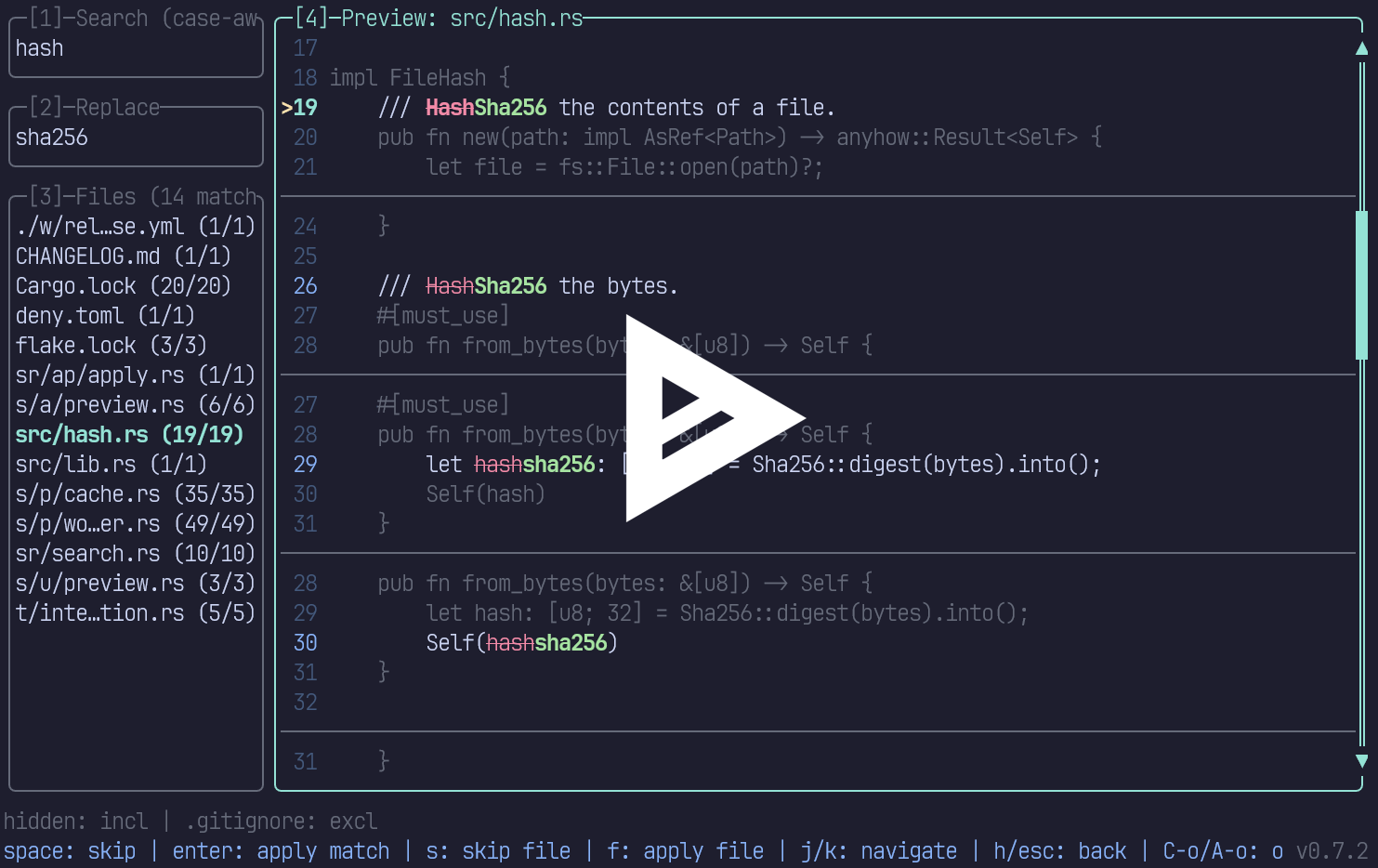



swpui (pronounced "swap UI") is a TUI utility to search and replace text, with a focus on ergonomics, speed and
case-awareness in source code.
Dual-licensed under MIT or Apache 2.0.
Installation
Via cargo
cargo install swpui
Via cargo-binstall
cargo binstall swpui
Via Nix (nixpkgs-unstable)
nix profile install nixpkgs#swpui
Or run without installing:
nix run nixpkgs#swpui
Pre-built binaries and install script
Head over to the releases page!
Usage
Launch the TUI
$ swp
Keybindings
Global
| Key | Action |
|---|---|
Tab | Next pane |
Shift+Tab | Previous pane |
Ctrl+r / Alt+r | Cycle match mode |
Ctrl+g / Alt+g | Toggle glob filter view |
Ctrl+o / Alt+o | Open options menu |
Ctrl+c | Quit |
Options Menu
| Key | Action |
|---|---|
r | Cycle match mode |
h | Toggle hidden files |
g | Toggle gitignored files |
Esc / Ctrl+o / Alt+o | Close options menu |
File List
| Key | Action |
|---|---|
j / Down | Next file |
k / Up | Previous file |
l / Enter / Right | Focus preview pane |
s / Space | Skip all matches in file (toggle) |
f | Apply replacement to file |
a | Apply replacement to all files |
q | Quit |
Preview
| Key | Action |
|---|---|
j / Down | Next match |
k / Up | Previous match |
Space | Skip selected match (toggle) |
Enter | Apply replacement for selected match |
h / Esc / Left | Back to file list |
s | Skip all matches in file (toggle) |
f | Apply replacement to file |
q | Quit |
Input Panes
| Key | Action |
|---|---|
Esc | Focus file list |
Capture groups
In regex mode, the replacement template can reference capture groups from the search pattern using $0 through $9:
$0expands to the entire match.$1-$9expand to the corresponding capture groups (parenthesized sub-expressions in the pattern).$$produces a literal$.- References to groups that did not participate in the match expand to an empty string.
For example, searching for (\w+)_(\w+) and replacing with $2_$1 swaps the two halves of each snake_case pair.
Glob filters
Press Ctrl+g / Alt+g to switch to the glob filters view. The search and replace fields are hidden in favor of a
field for and "include" and "exclude" globs list. Each input takes a comma-separated list of globs with
gitignore matching semantics (same as ripgrep's -g flag).
- Include: when non-empty, only files matching at least one include glob are searched.
- Exclude: files matching any exclude glob are never searched.
Filters combine with the hidden/gitignore options and .swpignore files (an include glob does not re-include an ignored
file). Active filters are shown in the status line at the bottom.
Configuration
Default values for the options can be persisted in a swpui.toml (or .swpui.toml) file. On startup, swpui looks for
them in:
- The user config directory (
~/.config/swpui/on Linux and macOS,%APPDATA%\beeb\swpui\on Windows). - Each directory from the filesystem root down to the directory where
swpuiwas launched.
Settings closer to the working directory override settings from parents, and any field omitted from a file falls back to the value from the next layer up, ultimately defaulting to the built-in defaults shown below:
[options]
match-mode = "case-aware" # case-aware | literal | regex | regex-multiline
include-hidden = true
include-gitignored = false
include-globs = [] # e.g. ["src/**", "*.{rs,toml}"]
exclude-globs = [] # e.g. ["*_test.rs"]
Custom ignore file
In addition to .gitignore and .ignore files, swpui honors .swpignore files. These use the same
gitignore syntax and are scoped per-directory: a .swpignore placed in any
directory applies to that directory and its descendants.
Features
- Case-aware replacement
- Regex support (incl. multiline)
- Multithreaded search
- Respects (git)ignore files
- Batch actions
- Capture groups replacement
- Toggle hidden files
- Toggle gitignored files
- Custom
.swpignorefiles - Mouse support
- Glob to include/exclude files
Credits
This tool was inspired by serpl, thanks for the great idea! It would also not have been possible without the amazing work put into ratatui and rat-widget, thank you! Finally, a massive thanks to the creator of ripgrep for their awesome work on ignore and regex.
Contributors

112 commits

15 commits
Similar repos


Languages
Rust
99.3%
Search and replace, TUI style. Mirror available on Codeberg.
See the codeREADME
swpui
swpui (pronounced "swap UI") is a TUI utility to search and replace text, with a focus on ergonomics, speed and
case-awareness in source code.
Dual-licensed under MIT or Apache 2.0.
Installation
Via cargo
cargo install swpui
Via cargo-binstall
cargo binstall swpui
Via Nix (nixpkgs-unstable)
nix profile install nixpkgs#swpui
Or run without installing:
nix run nixpkgs#swpui
Pre-built binaries and install script
Head over to the releases page!
Usage
Launch the TUI
$ swp
Keybindings
Global
| Key | Action |
|---|---|
Tab | Next pane |
Shift+Tab | Previous pane |
Ctrl+r / Alt+r | Cycle match mode |
Ctrl+g / Alt+g | Toggle glob filter view |
Ctrl+o / Alt+o | Open options menu |
Ctrl+c | Quit |
Options Menu
| Key | Action |
|---|---|
r | Cycle match mode |
h | Toggle hidden files |
g | Toggle gitignored files |
Esc / Ctrl+o / Alt+o | Close options menu |
File List
| Key | Action |
|---|---|
j / Down | Next file |
k / Up | Previous file |
l / Enter / Right | Focus preview pane |
s / Space | Skip all matches in file (toggle) |
f | Apply replacement to file |
a | Apply replacement to all files |
q | Quit |
Preview
| Key | Action |
|---|---|
j / Down | Next match |
k / Up | Previous match |
Space | Skip selected match (toggle) |
Enter | Apply replacement for selected match |
h / Esc / Left | Back to file list |
s | Skip all matches in file (toggle) |
f | Apply replacement to file |
q | Quit |
Input Panes
| Key | Action |
|---|---|
Esc | Focus file list |
Capture groups
In regex mode, the replacement template can reference capture groups from the search pattern using $0 through $9:
$0expands to the entire match.$1-$9expand to the corresponding capture groups (parenthesized sub-expressions in the pattern).$$produces a literal$.- References to groups that did not participate in the match expand to an empty string.
For example, searching for (\w+)_(\w+) and replacing with $2_$1 swaps the two halves of each snake_case pair.
Glob filters
Press Ctrl+g / Alt+g to switch to the glob filters view. The search and replace fields are hidden in favor of a
field for and "include" and "exclude" globs list. Each input takes a comma-separated list of globs with
gitignore matching semantics (same as ripgrep's -g flag).
- Include: when non-empty, only files matching at least one include glob are searched.
- Exclude: files matching any exclude glob are never searched.
Filters combine with the hidden/gitignore options and .swpignore files (an include glob does not re-include an ignored
file). Active filters are shown in the status line at the bottom.
Configuration
Default values for the options can be persisted in a swpui.toml (or .swpui.toml) file. On startup, swpui looks for
them in:
- The user config directory (
~/.config/swpui/on Linux and macOS,%APPDATA%\beeb\swpui\on Windows). - Each directory from the filesystem root down to the directory where
swpuiwas launched.
Settings closer to the working directory override settings from parents, and any field omitted from a file falls back to the value from the next layer up, ultimately defaulting to the built-in defaults shown below:
[options]
match-mode = "case-aware" # case-aware | literal | regex | regex-multiline
include-hidden = true
include-gitignored = false
include-globs = [] # e.g. ["src/**", "*.{rs,toml}"]
exclude-globs = [] # e.g. ["*_test.rs"]
Custom ignore file
In addition to .gitignore and .ignore files, swpui honors .swpignore files. These use the same
gitignore syntax and are scoped per-directory: a .swpignore placed in any
directory applies to that directory and its descendants.
Features
- Case-aware replacement
- Regex support (incl. multiline)
- Multithreaded search
- Respects (git)ignore files
- Batch actions
- Capture groups replacement
- Toggle hidden files
- Toggle gitignored files
- Custom
.swpignorefiles - Mouse support
- Glob to include/exclude files
Credits
This tool was inspired by serpl, thanks for the great idea! It would also not have been possible without the amazing work put into ratatui and rat-widget, thank you! Finally, a massive thanks to the creator of ripgrep for their awesome work on ignore and regex.
Similar repos
Contributors
112 commits
15 commits
Languages
Rust
99.3%