Morphe android app patches (for apps that I use) - stable releases
Java
162
60 commits
updated Oct 13, 2026
 bearinmind patches
I'll continue to support patches for apps I use & apps that I get requests for (either for specific features or premium unlocking). Below is a short description of how to install my patches on morphe!
Install Morphe Manager if you have not yet: https://morphe.software
Click here to add bearinmind patches to Morphe Manager
Select the app you want to patch inside Morphe Manager, follow all instructions shown.
v1.7.6 •
main• 22 patches total
 Google Maps ->
  Ungoogled Maps • 22 patches
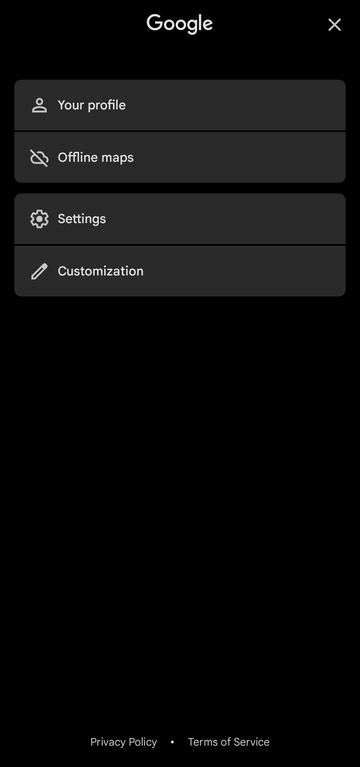
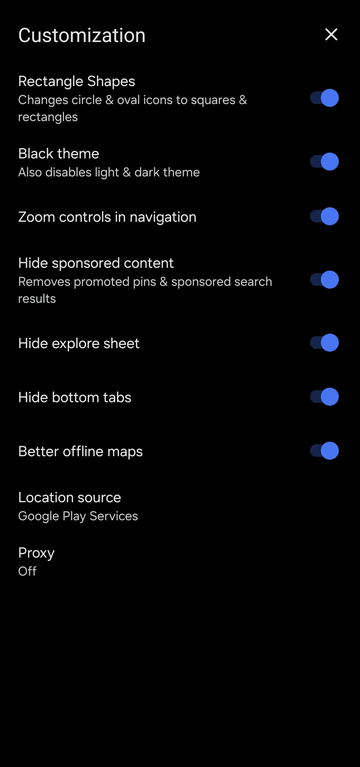
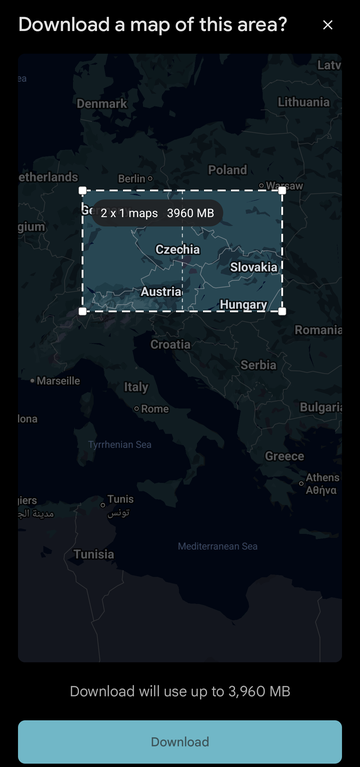
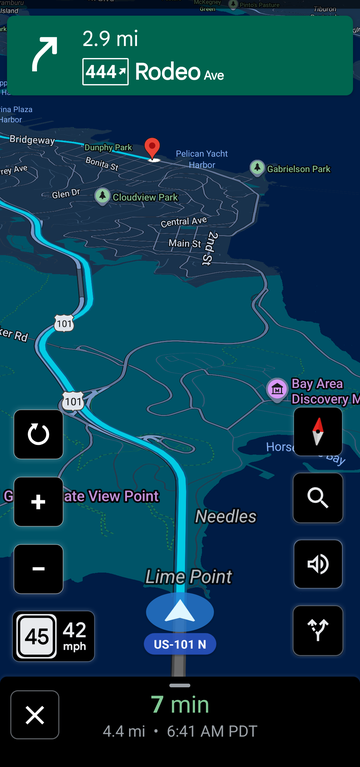
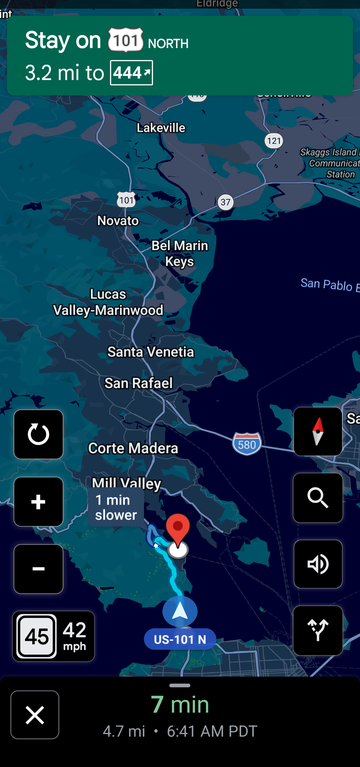
Supported version(s): 26.36.04.973607363
| Patch | Description | Options |
|---|---|---|
| 120 refresh rate | Lifts the 60 Hz limit Maps puts on itself, on the app and on the map, so it can run at your screen's full refresh rate (such as 120 Hz). Uses more battery, most of all while navigating. Off by default: switch it on on the Customization screen. | |
| Account sheet cleanup | Removes the "More from this app" label from the account sheet, and keeps the sheet open when you come back from Settings or Customization or tap "Your profile", instead of dropping back to the map. | |
| Add microG support | Builds microG Maps, a separate app (org.ungoogled.android.apps.maps.microg) that signs in to your Google account through microG: saved places and lists, Timeline, location sharing, contributions and push messages. Remove sign-in prompts, Trim account menu and Remove permissions are left out of this build, Offline saved places keeps only its Local saved screen, which copies your account's saved lists to the phone (Pull from Google account), and its icon carries microG's C. Needs microG: MicroG-RE or ReVanced GmsCore. Not for root (mount) installs. | |
| Better offline maps | Reworks the offline area picker: zooming out really selects more instead of being shrunk to Google's size cap, the box can be resized by dragging its edges and corners, a large area is split into several downloads whose true total size is shown, and areas already downloaded are drawn on the map. Can be turned off on the Customization screen. | |
| Black theme | AMOLED-black theme. Pins Maps' own dark mode and its separate navigation colour scheme, and remaps colour resources, drawable fills and draw-time paints so no surface is left grey. | |
| Blue pin | Chromium-coloured flat map pin on every in-app product logo and the search bar's leading icon. | |
| Bypass Play Services checks | Makes Maps' bundled Play services signature and availability checks always pass, so it runs re-signed and with Play services disabled or absent, and lets it load tiles, search and routing by sending Google's own package and certificate in the identity headers the Maps backend checks. Where Play services rejects the re-signed app, Maps degrades instead of crashing. | |
| Change app name | Sets the launcher and in-app app name. | • App name |
| Change package name | Installs alongside stock Google Maps under its own package name. On by default, because stock Maps comes built into most phones and cannot be replaced by a patched copy. | • Package name |
| Customization screen | Adds a Customization row under Settings on the account sheet, with switches for the patches here that can be turned back off inside the app. | |
| Hide ads and clutter | Hides promoted map pins and "Sponsored" search results, Gemini's AI summaries ("Know before you go" and the review summary), the row of businesses under an address on its place sheet, the home tab's Explore feed and the Explore / Contribute / You tabs. Each can be switched back on on the Customization screen. | |
| Legacy icon | Uses the flat multicolour pin Maps had before the 2025 gradient icon as the launcher icon and on the screen Maps opens with. With Add microG support, microG's C sits in the pin's circle. | |
| Location provider toggle | Adds a Location source choice to the Customization screen: Android's own location providers, or Google Play services' fused provider. With Android, Play services is never asked for a location. Play services is never used while it is missing or disabled, so location keeps working on phones without it. Also keeps the network (Wi-Fi/cell) provider registered when no fused provider answers, instead of GPS only, so a fix does not go stale indoors. | • Default to Play services location |
| Offline saved places | Save places without a Google account, kept only on the phone: Save opens Maps' own "Place saved" sheet (Want to go, Travel plans, Starred places, Favorites, your own lists, a note), and a "Local saved" row on the account sheet rebuilds Maps' You tab -- your recent places, your lists and labels (Home, Work, your own) -- with export and import (backup file, KML, Google Takeout's saved lists and Saved Places.json, several files or the whole Takeout .zip at once). It also has a Timeline: where the phone has been, grouped into days and visits, kept only on the phone, with GPX export. Recording is off until switched on there; it shows a notification while it runs. With Add microG support, Maps' own Save keeps syncing to your account and Local saved instead copies the account's saved lists to the phone (Pull from Google account). | |
| Power saving mode | Brings the Pixel-only power saving mode to every phone: while driving with navigation, press the power button and Maps shows only key information such as the next turn on a black screen. Turn it on or off in Settings > Navigation > Power saving mode. Pixels that have it built in keep Google's own version unless Power saving mode is turned on in Power Saving Options, a row on the account sheet under Customization, which also has: a navigation button that opens the power saving screen without locking the phone, switching to it by itself when idle, a speedometer on it, a lower frame rate, and its black map in navigation or all over Maps. | |
| Proxy | Adds a Proxy screen to Customization that sends Maps' own traffic, map data included, through an HTTP proxy -- for example Orbot's (127.0.0.1:8118) to use Tor. Map data never falls back to a direct connection: if the proxy stops, Maps stops loading. Needs a recent Play services network engine (Cronet); Maps warns when it cannot take the proxy. | |
| Rectangle shapes | Squares off rounded corners across the UI, including the two round navigation buttons. | |
| Remove permissions | Removes permissions that only serve Google-account features or Google's data collection: background location, physical activity, contacts, microphone (voice search stops working), camera (Lens and Live View stop working), car speed, advertising ID, push messages and Google services settings. Left out with Add microG support, whose account features need them. | |
| Remove sign-in prompts | Removes Google's sign-in prompts: the first-launch "Make it your map" page, the search screen's "Tired of typing?" card and the account sheet's "Sign in" pill. Tapping "Your profile" (or the pill, where it still shows) answers with a "Can't sign in" toast instead of nothing. Left out with Add microG support, which signs in. | |
| Remove telemetry | Points the Firebase Installations and Play services compliance check-ins at an unresolvable host, stops every ad impression and click ping from being sent, and deregisters Google's logging, performance-monitoring, survey and Location History libraries and the on-device federated-learning services. With Add microG support, Firebase Installations and Location History are left alone, so Timeline, account sync and push messages keep working. | |
| Trim account menu | Removes Your Timeline, Location sharing, Your data in Maps and Help & feedback from the account sheet. Left out with Add microG support, whose account features need them. | |
| Zoom controls in navigation | Adds +, − and reset tiles during turn-by-turn that change the navigation zoom while the camera keeps following the car. |
To build bearinmind patches, follow the Morphe documentation.
Open up an issue request and I'll do my best to fulfil your feature ideas for any specific apps you ask for, I enjoy working on random things so just ask!
Always use Semantic commit (https://kapeli.com/cheat_sheets/Semantic_Commits.docset/Contents/Resources/Documents/index) messages. To keep it simple use only 3 commit message types: feat: / fix: / chore: Commits of fix: and feat: will automatically generate new pre-releases and chore: will not create a new release.
feat:/fix: make pre-releases on dev, and stable releases on main.
Morphe android app patches (for apps that I use) - stable releases
Java
162
60 commits
updated Oct 13, 2026
bearinmind patches
I'll continue to support patches for apps I use & apps that I get requests for (either for specific features or premium unlocking). Below is a short description of how to install my patches on morphe!
Install Morphe Manager if you have not yet: https://morphe.software
Click here to add bearinmind patches to Morphe Manager
Select the app you want to patch inside Morphe Manager, follow all instructions shown.
v1.7.6 •
main• 22 patches total
Google Maps -> Ungoogled Maps • 22 patches
Supported version(s): 26.36.04.973607363
| Patch | Description | Options |
|---|---|---|
| 120 refresh rate | Lifts the 60 Hz limit Maps puts on itself, on the app and on the map, so it can run at your screen's full refresh rate (such as 120 Hz). Uses more battery, most of all while navigating. Off by default: switch it on on the Customization screen. | |
| Account sheet cleanup | Removes the "More from this app" label from the account sheet, and keeps the sheet open when you come back from Settings or Customization or tap "Your profile", instead of dropping back to the map. | |
| Add microG support | Builds microG Maps, a separate app (org.ungoogled.android.apps.maps.microg) that signs in to your Google account through microG: saved places and lists, Timeline, location sharing, contributions and push messages. Remove sign-in prompts, Trim account menu and Remove permissions are left out of this build, Offline saved places keeps only its Local saved screen, which copies your account's saved lists to the phone (Pull from Google account), and its icon carries microG's C. Needs microG: MicroG-RE or ReVanced GmsCore. Not for root (mount) installs. | |
| Better offline maps | Reworks the offline area picker: zooming out really selects more instead of being shrunk to Google's size cap, the box can be resized by dragging its edges and corners, a large area is split into several downloads whose true total size is shown, and areas already downloaded are drawn on the map. Can be turned off on the Customization screen. | |
| Black theme | AMOLED-black theme. Pins Maps' own dark mode and its separate navigation colour scheme, and remaps colour resources, drawable fills and draw-time paints so no surface is left grey. | |
| Blue pin | Chromium-coloured flat map pin on every in-app product logo and the search bar's leading icon. | |
| Bypass Play Services checks | Makes Maps' bundled Play services signature and availability checks always pass, so it runs re-signed and with Play services disabled or absent, and lets it load tiles, search and routing by sending Google's own package and certificate in the identity headers the Maps backend checks. Where Play services rejects the re-signed app, Maps degrades instead of crashing. | |
| Change app name | Sets the launcher and in-app app name. | • App name |
| Change package name | Installs alongside stock Google Maps under its own package name. On by default, because stock Maps comes built into most phones and cannot be replaced by a patched copy. | • Package name |
| Customization screen | Adds a Customization row under Settings on the account sheet, with switches for the patches here that can be turned back off inside the app. | |
| Hide ads and clutter | Hides promoted map pins and "Sponsored" search results, Gemini's AI summaries ("Know before you go" and the review summary), the row of businesses under an address on its place sheet, the home tab's Explore feed and the Explore / Contribute / You tabs. Each can be switched back on on the Customization screen. | |
| Legacy icon | Uses the flat multicolour pin Maps had before the 2025 gradient icon as the launcher icon and on the screen Maps opens with. With Add microG support, microG's C sits in the pin's circle. | |
| Location provider toggle | Adds a Location source choice to the Customization screen: Android's own location providers, or Google Play services' fused provider. With Android, Play services is never asked for a location. Play services is never used while it is missing or disabled, so location keeps working on phones without it. Also keeps the network (Wi-Fi/cell) provider registered when no fused provider answers, instead of GPS only, so a fix does not go stale indoors. | • Default to Play services location |
| Offline saved places | Save places without a Google account, kept only on the phone: Save opens Maps' own "Place saved" sheet (Want to go, Travel plans, Starred places, Favorites, your own lists, a note), and a "Local saved" row on the account sheet rebuilds Maps' You tab -- your recent places, your lists and labels (Home, Work, your own) -- with export and import (backup file, KML, Google Takeout's saved lists and Saved Places.json, several files or the whole Takeout .zip at once). It also has a Timeline: where the phone has been, grouped into days and visits, kept only on the phone, with GPX export. Recording is off until switched on there; it shows a notification while it runs. With Add microG support, Maps' own Save keeps syncing to your account and Local saved instead copies the account's saved lists to the phone (Pull from Google account). | |
| Power saving mode | Brings the Pixel-only power saving mode to every phone: while driving with navigation, press the power button and Maps shows only key information such as the next turn on a black screen. Turn it on or off in Settings > Navigation > Power saving mode. Pixels that have it built in keep Google's own version unless Power saving mode is turned on in Power Saving Options, a row on the account sheet under Customization, which also has: a navigation button that opens the power saving screen without locking the phone, switching to it by itself when idle, a speedometer on it, a lower frame rate, and its black map in navigation or all over Maps. | |
| Proxy | Adds a Proxy screen to Customization that sends Maps' own traffic, map data included, through an HTTP proxy -- for example Orbot's (127.0.0.1:8118) to use Tor. Map data never falls back to a direct connection: if the proxy stops, Maps stops loading. Needs a recent Play services network engine (Cronet); Maps warns when it cannot take the proxy. | |
| Rectangle shapes | Squares off rounded corners across the UI, including the two round navigation buttons. | |
| Remove permissions | Removes permissions that only serve Google-account features or Google's data collection: background location, physical activity, contacts, microphone (voice search stops working), camera (Lens and Live View stop working), car speed, advertising ID, push messages and Google services settings. Left out with Add microG support, whose account features need them. | |
| Remove sign-in prompts | Removes Google's sign-in prompts: the first-launch "Make it your map" page, the search screen's "Tired of typing?" card and the account sheet's "Sign in" pill. Tapping "Your profile" (or the pill, where it still shows) answers with a "Can't sign in" toast instead of nothing. Left out with Add microG support, which signs in. | |
| Remove telemetry | Points the Firebase Installations and Play services compliance check-ins at an unresolvable host, stops every ad impression and click ping from being sent, and deregisters Google's logging, performance-monitoring, survey and Location History libraries and the on-device federated-learning services. With Add microG support, Firebase Installations and Location History are left alone, so Timeline, account sync and push messages keep working. | |
| Trim account menu | Removes Your Timeline, Location sharing, Your data in Maps and Help & feedback from the account sheet. Left out with Add microG support, whose account features need them. | |
| Zoom controls in navigation | Adds +, − and reset tiles during turn-by-turn that change the navigation zoom while the camera keeps following the car. |
To build bearinmind patches, follow the Morphe documentation.
Open up an issue request and I'll do my best to fulfil your feature ideas for any specific apps you ask for, I enjoy working on random things so just ask!
Always use Semantic commit (https://kapeli.com/cheat_sheets/Semantic_Commits.docset/Contents/Resources/Documents/index) messages. To keep it simple use only 3 commit message types: feat: / fix: / chore: Commits of fix: and feat: will automatically generate new pre-releases and chore: will not create a new release.
feat:/fix: make pre-releases on dev, and stable releases on main.





