
True-black dark mode for every website, without breaking it. Free, open-source Chrome extension.
See the codeSee what people are saying
README
OLED Night
True-black dark mode for every website, without breaking it.
Free and open-source Chrome extension · Firefox desktop preview · readable text · images untouched · per-site control
Download latest ZIP · Chrome Web Store extension · Chrome Web Store theme · Website · Install guide · Report a site
Why
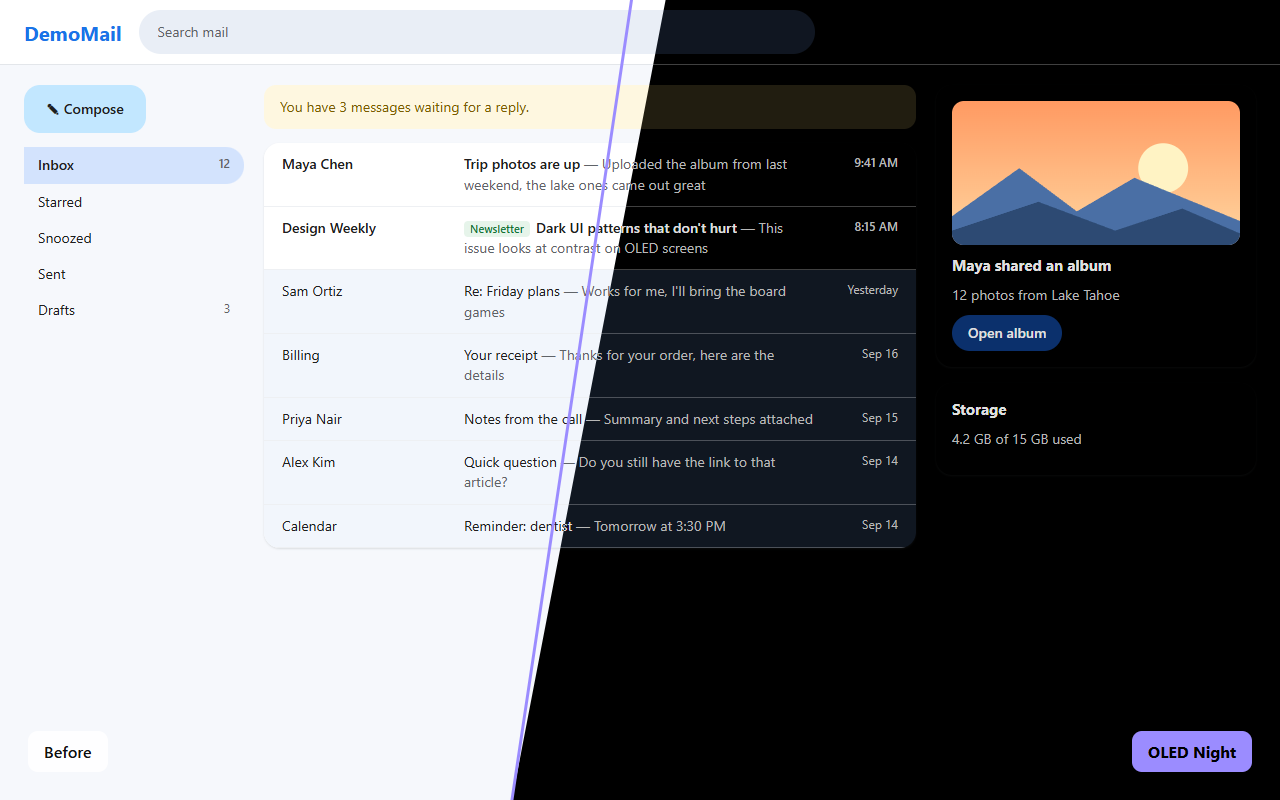
I've got an OLED monitor, and I wanted every site to be black. Not dark grey. Actually black, so the pixels are off.
Every dark mode extension I tried either left everything grey, or made sites dark and broke them: text I couldn't read, random white boxes, weird white gradients around chat boxes, charts turning into blank white shapes, Amazon photos turning into black squares. Some even made Gmail and ChatGPT lag. So I made my own. Every time a site broke, I fixed it and added a test so it stays fixed.
Features
- True
#000black backgrounds. Cards and panels keep a subtle lift so layouts stay readable. - Images untouched. Photos, video and art keep their colors. Image dimming is optional.
- Readable text, with emphasis kept. Primary, secondary and muted text stay distinct, and Gmail's read and unread emails stay easy to tell apart.
- Respects dark sites. On a site that's already dark, it only deepens its greys to true black.
- Modern web apps. Charts, web components, embedded chat widgets and frames, and modern CSS colors (
oklch,lab,color()). - No white flash, and no lag. Pages go black before they draw, and updates are batched.
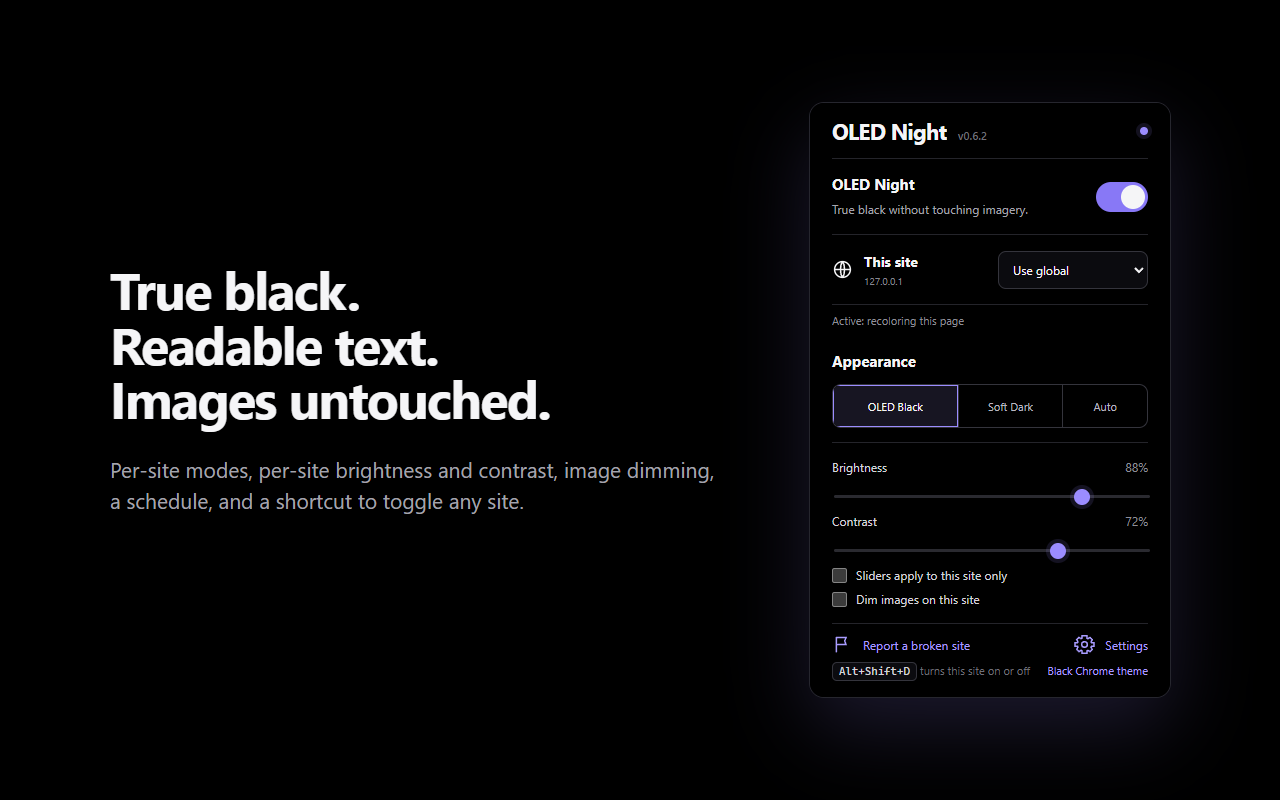
- Per-site modes: automatic, full recolor, deepen blacks only, invert (canvas apps), or off. Each site can also have its own brightness, contrast and image dimming.
- Schedule, keyboard shortcut (Alt+Shift+D), settings backup, and a "report a broken site" button.
- Private. No servers, no analytics, no tracking. See the privacy policy.
Install
Install the OLED Night extension from the Chrome Web Store. For a matching black browser window, install the OLED Night Chrome theme too. Store installs update automatically.
Manual install:
Download oled-night.zip, unzip it into a folder you'll keep, open chrome://extensions, turn on Developer mode, and click Load unpacked on that folder. Full steps, including Edge and updating, are in INSTALL.md. To hear about new versions, click Watch → Custom → Releases at the top of this page.
Want Chrome itself black too? The extension darkens websites, but only a theme can change Chrome's own window. Grab oled-night-theme.zip and load it the same way. See theme/README.md.
Firefox desktop: A Firefox build is available from the source and CI artifacts. See Firefox installation. It currently installs temporarily for testing; Mozilla signing and a public Add-ons listing are still pending. The Chrome theme is not compatible with Firefox.
Using it
Click the toolbar icon on any site:
| Site mode | What it does |
|---|---|
| Use global | Follows the main switch |
| On (automatic) | Recolors light sites; on dark sites, only deepens their blacks |
| Full recolor | Always recolors, even if the site looks dark |
| Deepen blacks only | Only pushes the darkest greys to true black |
| Invert | For canvas apps (Sheets, Figma): flips the page, then flips images back |
| Off | Never touches the site |
If a site still looks wrong, click Report a broken site in the popup and open an issue with the saved file and a screenshot.
How it works
OLED Night doesn't run one filter over the whole page. It works out a color for each element on its own: backgrounds, text, borders, SVG icons, chart fills, gradients, shadows and ::before/::after. It keeps each text's original emphasis and remembers what was originally behind it. Every update reads all the styles it needs first and writes the changes after, so a batch costs a single style recalculation. Brightness and contrast are CSS variables, so moving a slider never re-scans the page.
| File | Role |
|---|---|
settings.js | Shared settings model: defaults, site modes, per-site tuning, schedule |
color-utils.js | Color parsing (every CSS color syntax) and mapping rules |
content.js | Page engine: batched recoloring, change tracking, shadow roots, invert mode, reports |
background.js | Keyboard shortcut and the experimental closed-component option |
popup.*, options.* | Toolbar popup and settings page |
docs/ | The project website (GitHub Pages) |
Development
No build step. Load the folder with Load unpacked, then:
for t in tests/*.test.js; do node "$t"; done   # unit tests
node tests/e2e/run.mjs                          # real extension in headless Chrome, 46 checks
node tools/package.mjs                          # dist/ zips for the extension and the theme
node tools/store-assets.mjs                     # screenshots for the README and website
See CONTRIBUTING.md and CHANGELOG.md.
License
GPL-3.0. You're free to use, study, change and share OLED Night. If you distribute a modified version, or charge for it, you must release its full source code under the same license and keep the original credit. Copyright © 2026 Brandon (bc1224). Versions up to 0.6.3 were released under MIT.
Contributors

17 commits
Similar repos


Languages
JavaScript
78.8%
HTML
14.0%
CSS
4.7%
Python
2.6%
True-black dark mode for every website, without breaking it. Free, open-source Chrome extension.
See the codeSee what people are saying
README
OLED Night
True-black dark mode for every website, without breaking it.
Free and open-source Chrome extension · Firefox desktop preview · readable text · images untouched · per-site control
Download latest ZIP · Chrome Web Store extension · Chrome Web Store theme · Website · Install guide · Report a site
Why
I've got an OLED monitor, and I wanted every site to be black. Not dark grey. Actually black, so the pixels are off.
Every dark mode extension I tried either left everything grey, or made sites dark and broke them: text I couldn't read, random white boxes, weird white gradients around chat boxes, charts turning into blank white shapes, Amazon photos turning into black squares. Some even made Gmail and ChatGPT lag. So I made my own. Every time a site broke, I fixed it and added a test so it stays fixed.
Features
- True
#000black backgrounds. Cards and panels keep a subtle lift so layouts stay readable. - Images untouched. Photos, video and art keep their colors. Image dimming is optional.
- Readable text, with emphasis kept. Primary, secondary and muted text stay distinct, and Gmail's read and unread emails stay easy to tell apart.
- Respects dark sites. On a site that's already dark, it only deepens its greys to true black.
- Modern web apps. Charts, web components, embedded chat widgets and frames, and modern CSS colors (
oklch,lab,color()). - No white flash, and no lag. Pages go black before they draw, and updates are batched.
- Per-site modes: automatic, full recolor, deepen blacks only, invert (canvas apps), or off. Each site can also have its own brightness, contrast and image dimming.
- Schedule, keyboard shortcut (Alt+Shift+D), settings backup, and a "report a broken site" button.
- Private. No servers, no analytics, no tracking. See the privacy policy.
Install
Install the OLED Night extension from the Chrome Web Store. For a matching black browser window, install the OLED Night Chrome theme too. Store installs update automatically.
Manual install:
Download oled-night.zip, unzip it into a folder you'll keep, open chrome://extensions, turn on Developer mode, and click Load unpacked on that folder. Full steps, including Edge and updating, are in INSTALL.md. To hear about new versions, click Watch → Custom → Releases at the top of this page.
Want Chrome itself black too? The extension darkens websites, but only a theme can change Chrome's own window. Grab oled-night-theme.zip and load it the same way. See theme/README.md.
Firefox desktop: A Firefox build is available from the source and CI artifacts. See Firefox installation. It currently installs temporarily for testing; Mozilla signing and a public Add-ons listing are still pending. The Chrome theme is not compatible with Firefox.
Using it
Click the toolbar icon on any site:
| Site mode | What it does |
|---|---|
| Use global | Follows the main switch |
| On (automatic) | Recolors light sites; on dark sites, only deepens their blacks |
| Full recolor | Always recolors, even if the site looks dark |
| Deepen blacks only | Only pushes the darkest greys to true black |
| Invert | For canvas apps (Sheets, Figma): flips the page, then flips images back |
| Off | Never touches the site |
If a site still looks wrong, click Report a broken site in the popup and open an issue with the saved file and a screenshot.
How it works
OLED Night doesn't run one filter over the whole page. It works out a color for each element on its own: backgrounds, text, borders, SVG icons, chart fills, gradients, shadows and ::before/::after. It keeps each text's original emphasis and remembers what was originally behind it. Every update reads all the styles it needs first and writes the changes after, so a batch costs a single style recalculation. Brightness and contrast are CSS variables, so moving a slider never re-scans the page.
| File | Role |
|---|---|
settings.js | Shared settings model: defaults, site modes, per-site tuning, schedule |
color-utils.js | Color parsing (every CSS color syntax) and mapping rules |
content.js | Page engine: batched recoloring, change tracking, shadow roots, invert mode, reports |
background.js | Keyboard shortcut and the experimental closed-component option |
popup.*, options.* | Toolbar popup and settings page |
docs/ | The project website (GitHub Pages) |
Development
No build step. Load the folder with Load unpacked, then:
for t in tests/*.test.js; do node "$t"; done   # unit tests
node tests/e2e/run.mjs                          # real extension in headless Chrome, 46 checks
node tools/package.mjs                          # dist/ zips for the extension and the theme
node tools/store-assets.mjs                     # screenshots for the README and website
See CONTRIBUTING.md and CHANGELOG.md.
License
GPL-3.0. You're free to use, study, change and share OLED Night. If you distribute a modified version, or charge for it, you must release its full source code under the same license and keep the original credit. Copyright © 2026 Brandon (bc1224). Versions up to 0.6.3 were released under MIT.
Similar repos
Contributors
17 commits
Languages
JavaScript
78.8%
HTML
14.0%
CSS
4.7%
Python
2.6%