
A professional-grade interface for Qwen3-TTS, designed to unlock the model's full potential with fine-grained control and intuitive workflows.
Python
293
48 commits
updated Mar 30, 2026
README
Qwen3-TTS Studio
A professional-grade interface for Qwen3-TTS, designed to unlock the model's full potential with fine-grained control and intuitive workflows.
This model enables Qwen3-TTS Instant voice cloning, If you want a serious finetuning, use https://github.com/bc-dunia/qwen3-TTS-finetune-studio
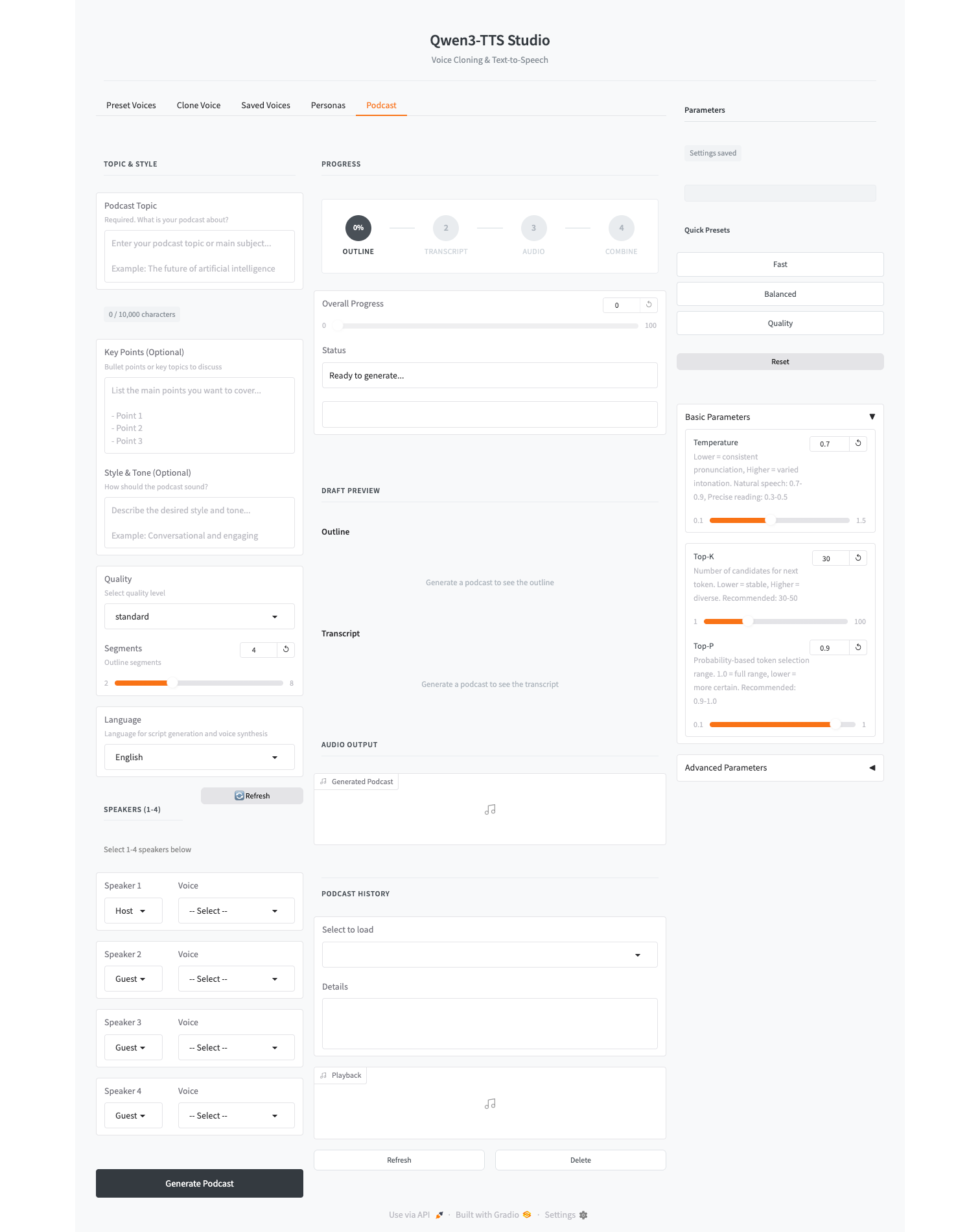
Why This Project?
Qwen3-TTS is a powerful text-to-speech model, but using it directly requires dealing with complex parameters, manual prompt engineering, and repetitive boilerplate code. Qwen3-TTS Studio was created to solve these problems:
- Fine-tuned Control: Easily adjust temperature, top-k, top-p, and other parameters with real-time presets (Fast / Balanced / Quality)
- Better Results: Optimized default settings and automatic token management to avoid common issues like silent audio or distorted output
- Intuitive UI/UX: Clean, modern interface that makes voice generation accessible to everyone
- Automated Podcasts: Generate complete podcasts from just a topic - AI writes the script, assigns voices, and synthesizes audio automatically
Features
Voice Generation
- Voice Clone: Clone any voice with multiple audio samples for higher quality
- Multi-sample support with automatic quality analysis (duration, SNR)
- Weighted embedding combination for more consistent results
- Auto-transcription via OpenAI Whisper API
- Cross-lingual pronunciation toggle for mixed-language content
- Custom Voice: 9 preset voices with style control (Vivian, Serena, Ryan, etc.)
- Voice Design: Describe your desired voice in natural language
- 10 Language Support: Korean, English, Chinese, Japanese, German, French, Russian, Portuguese, Spanish, Italian
Podcast Generation
- One-Click Podcasts: Enter a topic, get a complete podcast
- Custom Script Input: Write your own dialogue script instead of relying on AI generation
- AI Script Writing: LLM-powered outline and transcript generation
- Multi-Provider LLM Support: OpenAI, Ollama, OpenRouter, and Claude (Anthropic API)
- Multi-Speaker Support: Assign different voices to each speaker
- Custom Personas: Create and save speaker personalities
Quality of Life
- Parameter Presets: Quick presets for different use cases
- Unified History Tab: Browse, search, and replay all past generations in one place
- Enriched Dropdowns: Voice selectors display name, model, and description at a glance
- Auto-Save Settings: Your preferences persist across sessions
- Real-time Feedback: Character count, generation time, and status indicators
Requirements
- Python 3.12+
- macOS (MPS) / Linux (CUDA)
- 16GB+ RAM
openaiPython package (for podcast LLM client)- For podcast script generation, configure one provider:
- Ollama (local): no external API key required
- OpenAI:
OPENAI_API_KEY - OpenRouter:
OPENROUTER_API_KEY - Claude (direct):
ANTHROPIC_API_KEY
Installation
1. Clone Repository
git clone https://github.com/bc-dunia/qwen3-TTS-studio.git
cd qwen3-TTS-studio
2. Create Virtual Environment
conda create -n qwen3-tts python=3.12 -y
conda activate qwen3-tts
3. Install Dependencies
pip install -r requirements.txt
For CUDA users:
pip install -U flash-attn --no-build-isolation
Notes:
- FlashAttention is attempted automatically on CUDA when available.
- If FlashAttention initialization fails (for example, CUDA/toolkit mismatch), the app automatically falls back to default attention.
4. Download Models
Download models from HuggingFace or ModelScope.
HuggingFace (Recommended)
pip install -U huggingface_hub

# Required models
hf download Qwen/Qwen3-TTS-Tokenizer-12Hz --local-dir ./Qwen3-TTS-Tokenizer-12Hz
hf download Qwen/Qwen3-TTS-12Hz-1.7B-Base --local-dir ./Qwen3-TTS-12Hz-1.7B-Base
hf download Qwen/Qwen3-TTS-12Hz-1.7B-CustomVoice --local-dir ./Qwen3-TTS-12Hz-1.7B-CustomVoice

# Optional models
hf download Qwen/Qwen3-TTS-12Hz-0.6B-Base --local-dir ./Qwen3-TTS-12Hz-0.6B-Base
hf download Qwen/Qwen3-TTS-12Hz-0.6B-CustomVoice --local-dir ./Qwen3-TTS-12Hz-0.6B-CustomVoice
hf download Qwen/Qwen3-TTS-12Hz-1.7B-VoiceDesign --local-dir ./Qwen3-TTS-12Hz-1.7B-VoiceDesign
ModelScope (For users in China)
pip install -U modelscope

modelscope download --model Qwen/Qwen3-TTS-Tokenizer-12Hz --local_dir ./Qwen3-TTS-Tokenizer-12Hz
modelscope download --model Qwen/Qwen3-TTS-12Hz-1.7B-Base --local_dir ./Qwen3-TTS-12Hz-1.7B-Base
modelscope download --model Qwen/Qwen3-TTS-12Hz-1.7B-CustomVoice --local_dir ./Qwen3-TTS-12Hz-1.7B-CustomVoice
5. Environment Variables
Create a .env file (choose based on provider):
OPENAI_API_KEY=your_openai_api_key_here
OPENROUTER_API_KEY=your_openrouter_api_key_here
ANTHROPIC_API_KEY=your_anthropic_api_key_here
Notes:
- If you use Ollama, API key is not required (default local endpoint:
http://localhost:11434/v1). - Claude provider uses Anthropic's official Messages API directly.
- You can also enter provider/model/base URL/API key directly in the Podcast tab under LLM Provider.
- Optional runtime env vars:
QWEN_TTS_DEVICEto force device selection (for example:mps,cuda:0,cpu)QWEN_TTS_MIN_NEW_TOKENSto adjust minimum generation length (default:60)QWEN_TTS_ALLOW_OLD=1to bypass the minimumqwen-ttsversion gate (not recommended)
OpenRouter model options (examples in UI presets):
google/gemini-2.5-flashgoogle/gemini-2.5-proanthropic/claude-sonnet-4.5openai/gpt-5.2openai/gpt-5.3-codexdeepseek/deepseek-r1
Usage
Start Server
python qwen_tts_ui.py
Open http://127.0.0.1:7860 in your browser.
Run with Docker
Build image:
docker build -t qwen3-tts-studio .
Run container:
docker run --rm -it -p 7860:7860 \
  -v "$(pwd)/Qwen3-TTS-Tokenizer-12Hz:/app/Qwen3-TTS-Tokenizer-12Hz" \
  -v "$(pwd)/Qwen3-TTS-12Hz-1.7B-CustomVoice:/app/Qwen3-TTS-12Hz-1.7B-CustomVoice" \
  -v "$(pwd)/Qwen3-TTS-12Hz-1.7B-Base:/app/Qwen3-TTS-12Hz-1.7B-Base" \
  qwen3-tts-studio
Then open http://127.0.0.1:7860.
Notes:
qwen_tts_ui.pynow readsGRADIO_SERVER_NAMEandGRADIO_SERVER_PORT; Docker image sets these to0.0.0.0:7860.- If you use other model variants (0.6B, VoiceDesign), mount those directories the same way.
- Podcast features (LLM providers) are optional. If you use the Podcast tab, pass your keys via env vars or
--env-file .env. - The container runs as a non-root user (
appuser). Ensure your mounted model/tokenizer folders are readable by non-root users.- If you see an error about missing
speech_tokenizer/model.safetensorsand write permission, copy the tokenizer weights into the model folder on the host (or run the container with a user that can write to the bind-mounted model directory).
- If you see an error about missing
- macOS note: Docker containers run Linux, so MPS acceleration is not available inside Docker (CPU only). For best performance on Mac, run natively (non-Docker).
- If the container exits while loading models, increase Docker Desktop memory allocation and/or use a smaller model (0.6B).
Docker Smoke Test (Optional)
This performs an end-to-end TTS run inside Docker and writes a WAV file to the host.
mkdir -p _docker_smoke_out

docker run --rm -i -e QWEN_TTS_DEVICE=cpu \
  -v "$(pwd)/Qwen3-TTS-Tokenizer-12Hz:/app/Qwen3-TTS-Tokenizer-12Hz" \
  -v "$(pwd)/Qwen3-TTS-12Hz-0.6B-CustomVoice:/app/Qwen3-TTS-12Hz-0.6B-CustomVoice" \
  -v "$(pwd)/_docker_smoke_out:/out" \
  qwen3-tts-studio python - <<'PY'
from pathlib import Path
import numpy as np
import soundfile as sf

from audio.generator import generate_dialogue_audio
from podcast.models import Dialogue, Speaker, SpeakerProfile

out = Path("/out/docker_smoke_ryan.wav")

params = {
    "model_name": "0.6B-CustomVoice",
    "temperature": 0.3,
    "top_k": 50,
    "top_p": 0.85,
    "repetition_penalty": 1.0,
    "max_new_tokens": 1024,
    "subtalker_temperature": 0.3,
    "subtalker_top_k": 50,
    "subtalker_top_p": 0.85,
    "language": "en",
    "instruct": None,
}

profile = SpeakerProfile(
    speakers=[Speaker(name="Tester", voice_id="ryan", role="Host", type="preset")]
)
dialogue = Dialogue(
    speaker="Tester",
    text="Hello, this is a Docker smoke test for Qwen three TTS.",
)

path = generate_dialogue_audio(dialogue, profile, params, out)

audio, sr = sf.read(path, dtype="float32")
if audio.ndim > 1:
    audio = audio.mean(axis=1)

dur = len(audio) / sr
rms = float(np.sqrt(np.mean(audio * audio)))
peak = float(np.max(np.abs(audio)))

print("WROTE", path)
print("SR", sr, "DUR_SEC", round(dur, 3), "RMS", round(rms, 6), "PEAK", round(peak, 6))
assert out.stat().st_size > 44
assert dur > 0.2
assert peak > 0.003
print("SMOKE_OK")
PY
You should see SMOKE_OK and a file at _docker_smoke_out/docker_smoke_ryan.wav.
Use Prebuilt Image from GHCR
Pull the prebuilt image from GitHub Container Registry:
docker pull ghcr.io/bc-dunia/qwen3-tts-studio:latest
Run the container:
docker run --rm -it -p 7860:7860 \
  -v "$(pwd)/Qwen3-TTS-Tokenizer-12Hz:/app/Qwen3-TTS-Tokenizer-12Hz" \
  -v "$(pwd)/Qwen3-TTS-12Hz-1.7B-CustomVoice:/app/Qwen3-TTS-12Hz-1.7B-CustomVoice" \
  -v "$(pwd)/Qwen3-TTS-12Hz-1.7B-Base:/app/Qwen3-TTS-12Hz-1.7B-Base" \
  ghcr.io/bc-dunia/qwen3-tts-studio:latest
Then open http://127.0.0.1:7860.
Notes:
- Models are mounted at runtime and not bundled in the image. Mount the same directories as shown above.
- Podcast features (LLM providers) are optional. If you use the Podcast tab, pass your keys via env vars or
--env-file .env. - On Apple Silicon/ARM64, if you see
no matching manifest for linux/arm64/v8, use--platform linux/amd64in bothdocker pullanddocker run. - For reproducible deployments, pin a release tag (for example:
ghcr.io/bc-dunia/qwen3-tts-studio:0.1.7). - If you use other model variants (0.6B, VoiceDesign), mount those directories the same way.
Available Models
| Model | Features | Size |
|---|---|---|
| 1.7B-CustomVoice | 9 preset voices + style control | 4.2GB |
| 1.7B-Base | Voice Clone (3-sec sample) | 4.2GB |
| 1.7B-VoiceDesign | Natural language voice design | 4.2GB |
| 0.6B-CustomVoice | 9 preset voices (lightweight) | 2.3GB |
| 0.6B-Base | Voice Clone (lightweight) | 2.3GB |
Preset Voices
| Speaker | Description | Native Language |
|---|---|---|
| Vivian | Bright, slightly sharp young female | Chinese |
| Serena | Warm, soft young female | Chinese |
| Ryan | Dynamic male with strong rhythm | English |
| Aiden | Bright American male, clear midrange | English |
| Ono Anna | Lively Japanese female | Japanese |
| Sohee | Warm Korean female, rich emotion | Korean |
Project Structure
qwen3-TTS-studio/
├── qwen_tts_ui.py              # Main entry point
├── config.py                   # Configuration
│
├── ui/                         # UI Components
│   ├── content_input.py        # Content input section
│   ├── draft_editor.py         # Draft editing
│   ├── draft_preview.py        # Outline/transcript preview
│   ├── persona.py              # Persona management UI
│   ├── progress.py             # Progress indicators
│   └── voice_cards.py          # Voice selection cards
│
├── podcast/                    # Podcast Generation
│   ├── orchestrator.py         # Main orchestration
│   ├── models.py               # Pydantic models
│   ├── outline.py              # AI outline generation
│   ├── transcript.py           # AI transcript generation
│   ├── script_parser.py        # Custom script parsing
│   ├── prompts.py              # LLM prompts
│   └── session.py              # Session management
│
├── audio/                      # Audio Processing
│   ├── generator.py            # TTS generation
│   ├── batch.py                # Batch processing
│   ├── combiner.py             # Audio concatenation
│   ├── embedding_utils.py      # Multi-sample voice embedding
│   └── model_loader.py         # Model loading
│
└── storage/                    # Data Persistence
    ├── history.py              # Podcast history
    ├── persona.py              # Persona storage
    ├── persona_models.py       # Persona models
    └── voice.py                # Voice management
Acknowledgments
This project is built on top of the excellent Qwen3-TTS model by Alibaba Qwen team.
- HuggingFace: https://huggingface.co/collections/Qwen/qwen3-tts
- ModelScope: https://modelscope.cn/collections/Qwen/Qwen3-TTS
- Paper: https://arxiv.org/abs/2601.15621
- Blog: https://qwen.ai/blog?id=qwen3tts-0115
License
This project uses Qwen3-TTS models. Please refer to the Qwen3-TTS License for model usage terms.
Contributors

48 commits
Similar repos


Languages
Python
99.4%
A professional-grade interface for Qwen3-TTS, designed to unlock the model's full potential with fine-grained control and intuitive workflows.
Python
293
48 commits
updated Mar 30, 2026
README
Qwen3-TTS Studio
A professional-grade interface for Qwen3-TTS, designed to unlock the model's full potential with fine-grained control and intuitive workflows.
This model enables Qwen3-TTS Instant voice cloning, If you want a serious finetuning, use https://github.com/bc-dunia/qwen3-TTS-finetune-studio
Why This Project?
Qwen3-TTS is a powerful text-to-speech model, but using it directly requires dealing with complex parameters, manual prompt engineering, and repetitive boilerplate code. Qwen3-TTS Studio was created to solve these problems:
- Fine-tuned Control: Easily adjust temperature, top-k, top-p, and other parameters with real-time presets (Fast / Balanced / Quality)
- Better Results: Optimized default settings and automatic token management to avoid common issues like silent audio or distorted output
- Intuitive UI/UX: Clean, modern interface that makes voice generation accessible to everyone
- Automated Podcasts: Generate complete podcasts from just a topic - AI writes the script, assigns voices, and synthesizes audio automatically
Features
Voice Generation
- Voice Clone: Clone any voice with multiple audio samples for higher quality
- Multi-sample support with automatic quality analysis (duration, SNR)
- Weighted embedding combination for more consistent results
- Auto-transcription via OpenAI Whisper API
- Cross-lingual pronunciation toggle for mixed-language content
- Custom Voice: 9 preset voices with style control (Vivian, Serena, Ryan, etc.)
- Voice Design: Describe your desired voice in natural language
- 10 Language Support: Korean, English, Chinese, Japanese, German, French, Russian, Portuguese, Spanish, Italian
Podcast Generation
- One-Click Podcasts: Enter a topic, get a complete podcast
- Custom Script Input: Write your own dialogue script instead of relying on AI generation
- AI Script Writing: LLM-powered outline and transcript generation
- Multi-Provider LLM Support: OpenAI, Ollama, OpenRouter, and Claude (Anthropic API)
- Multi-Speaker Support: Assign different voices to each speaker
- Custom Personas: Create and save speaker personalities
Quality of Life
- Parameter Presets: Quick presets for different use cases
- Unified History Tab: Browse, search, and replay all past generations in one place
- Enriched Dropdowns: Voice selectors display name, model, and description at a glance
- Auto-Save Settings: Your preferences persist across sessions
- Real-time Feedback: Character count, generation time, and status indicators
Requirements
- Python 3.12+
- macOS (MPS) / Linux (CUDA)
- 16GB+ RAM
openaiPython package (for podcast LLM client)- For podcast script generation, configure one provider:
- Ollama (local): no external API key required
- OpenAI:
OPENAI_API_KEY - OpenRouter:
OPENROUTER_API_KEY - Claude (direct):
ANTHROPIC_API_KEY
Installation
1. Clone Repository
git clone https://github.com/bc-dunia/qwen3-TTS-studio.git
cd qwen3-TTS-studio
2. Create Virtual Environment
conda create -n qwen3-tts python=3.12 -y
conda activate qwen3-tts
3. Install Dependencies
pip install -r requirements.txt
For CUDA users:
pip install -U flash-attn --no-build-isolation
Notes:
- FlashAttention is attempted automatically on CUDA when available.
- If FlashAttention initialization fails (for example, CUDA/toolkit mismatch), the app automatically falls back to default attention.
4. Download Models
Download models from HuggingFace or ModelScope.
HuggingFace (Recommended)
pip install -U huggingface_hub

# Required models
hf download Qwen/Qwen3-TTS-Tokenizer-12Hz --local-dir ./Qwen3-TTS-Tokenizer-12Hz
hf download Qwen/Qwen3-TTS-12Hz-1.7B-Base --local-dir ./Qwen3-TTS-12Hz-1.7B-Base
hf download Qwen/Qwen3-TTS-12Hz-1.7B-CustomVoice --local-dir ./Qwen3-TTS-12Hz-1.7B-CustomVoice

# Optional models
hf download Qwen/Qwen3-TTS-12Hz-0.6B-Base --local-dir ./Qwen3-TTS-12Hz-0.6B-Base
hf download Qwen/Qwen3-TTS-12Hz-0.6B-CustomVoice --local-dir ./Qwen3-TTS-12Hz-0.6B-CustomVoice
hf download Qwen/Qwen3-TTS-12Hz-1.7B-VoiceDesign --local-dir ./Qwen3-TTS-12Hz-1.7B-VoiceDesign
ModelScope (For users in China)
pip install -U modelscope

modelscope download --model Qwen/Qwen3-TTS-Tokenizer-12Hz --local_dir ./Qwen3-TTS-Tokenizer-12Hz
modelscope download --model Qwen/Qwen3-TTS-12Hz-1.7B-Base --local_dir ./Qwen3-TTS-12Hz-1.7B-Base
modelscope download --model Qwen/Qwen3-TTS-12Hz-1.7B-CustomVoice --local_dir ./Qwen3-TTS-12Hz-1.7B-CustomVoice
5. Environment Variables
Create a .env file (choose based on provider):
OPENAI_API_KEY=your_openai_api_key_here
OPENROUTER_API_KEY=your_openrouter_api_key_here
ANTHROPIC_API_KEY=your_anthropic_api_key_here
Notes:
- If you use Ollama, API key is not required (default local endpoint:
http://localhost:11434/v1). - Claude provider uses Anthropic's official Messages API directly.
- You can also enter provider/model/base URL/API key directly in the Podcast tab under LLM Provider.
- Optional runtime env vars:
QWEN_TTS_DEVICEto force device selection (for example:mps,cuda:0,cpu)QWEN_TTS_MIN_NEW_TOKENSto adjust minimum generation length (default:60)QWEN_TTS_ALLOW_OLD=1to bypass the minimumqwen-ttsversion gate (not recommended)
OpenRouter model options (examples in UI presets):
google/gemini-2.5-flashgoogle/gemini-2.5-proanthropic/claude-sonnet-4.5openai/gpt-5.2openai/gpt-5.3-codexdeepseek/deepseek-r1
Usage
Start Server
python qwen_tts_ui.py
Open http://127.0.0.1:7860 in your browser.
Run with Docker
Build image:
docker build -t qwen3-tts-studio .
Run container:
docker run --rm -it -p 7860:7860 \
  -v "$(pwd)/Qwen3-TTS-Tokenizer-12Hz:/app/Qwen3-TTS-Tokenizer-12Hz" \
  -v "$(pwd)/Qwen3-TTS-12Hz-1.7B-CustomVoice:/app/Qwen3-TTS-12Hz-1.7B-CustomVoice" \
  -v "$(pwd)/Qwen3-TTS-12Hz-1.7B-Base:/app/Qwen3-TTS-12Hz-1.7B-Base" \
  qwen3-tts-studio
Then open http://127.0.0.1:7860.
Notes:
qwen_tts_ui.pynow readsGRADIO_SERVER_NAMEandGRADIO_SERVER_PORT; Docker image sets these to0.0.0.0:7860.- If you use other model variants (0.6B, VoiceDesign), mount those directories the same way.
- Podcast features (LLM providers) are optional. If you use the Podcast tab, pass your keys via env vars or
--env-file .env. - The container runs as a non-root user (
appuser). Ensure your mounted model/tokenizer folders are readable by non-root users.- If you see an error about missing
speech_tokenizer/model.safetensorsand write permission, copy the tokenizer weights into the model folder on the host (or run the container with a user that can write to the bind-mounted model directory).
- If you see an error about missing
- macOS note: Docker containers run Linux, so MPS acceleration is not available inside Docker (CPU only). For best performance on Mac, run natively (non-Docker).
- If the container exits while loading models, increase Docker Desktop memory allocation and/or use a smaller model (0.6B).
Docker Smoke Test (Optional)
This performs an end-to-end TTS run inside Docker and writes a WAV file to the host.
mkdir -p _docker_smoke_out

docker run --rm -i -e QWEN_TTS_DEVICE=cpu \
  -v "$(pwd)/Qwen3-TTS-Tokenizer-12Hz:/app/Qwen3-TTS-Tokenizer-12Hz" \
  -v "$(pwd)/Qwen3-TTS-12Hz-0.6B-CustomVoice:/app/Qwen3-TTS-12Hz-0.6B-CustomVoice" \
  -v "$(pwd)/_docker_smoke_out:/out" \
  qwen3-tts-studio python - <<'PY'
from pathlib import Path
import numpy as np
import soundfile as sf

from audio.generator import generate_dialogue_audio
from podcast.models import Dialogue, Speaker, SpeakerProfile

out = Path("/out/docker_smoke_ryan.wav")

params = {
    "model_name": "0.6B-CustomVoice",
    "temperature": 0.3,
    "top_k": 50,
    "top_p": 0.85,
    "repetition_penalty": 1.0,
    "max_new_tokens": 1024,
    "subtalker_temperature": 0.3,
    "subtalker_top_k": 50,
    "subtalker_top_p": 0.85,
    "language": "en",
    "instruct": None,
}

profile = SpeakerProfile(
    speakers=[Speaker(name="Tester", voice_id="ryan", role="Host", type="preset")]
)
dialogue = Dialogue(
    speaker="Tester",
    text="Hello, this is a Docker smoke test for Qwen three TTS.",
)

path = generate_dialogue_audio(dialogue, profile, params, out)

audio, sr = sf.read(path, dtype="float32")
if audio.ndim > 1:
    audio = audio.mean(axis=1)

dur = len(audio) / sr
rms = float(np.sqrt(np.mean(audio * audio)))
peak = float(np.max(np.abs(audio)))

print("WROTE", path)
print("SR", sr, "DUR_SEC", round(dur, 3), "RMS", round(rms, 6), "PEAK", round(peak, 6))
assert out.stat().st_size > 44
assert dur > 0.2
assert peak > 0.003
print("SMOKE_OK")
PY
You should see SMOKE_OK and a file at _docker_smoke_out/docker_smoke_ryan.wav.
Use Prebuilt Image from GHCR
Pull the prebuilt image from GitHub Container Registry:
docker pull ghcr.io/bc-dunia/qwen3-tts-studio:latest
Run the container:
docker run --rm -it -p 7860:7860 \
  -v "$(pwd)/Qwen3-TTS-Tokenizer-12Hz:/app/Qwen3-TTS-Tokenizer-12Hz" \
  -v "$(pwd)/Qwen3-TTS-12Hz-1.7B-CustomVoice:/app/Qwen3-TTS-12Hz-1.7B-CustomVoice" \
  -v "$(pwd)/Qwen3-TTS-12Hz-1.7B-Base:/app/Qwen3-TTS-12Hz-1.7B-Base" \
  ghcr.io/bc-dunia/qwen3-tts-studio:latest
Then open http://127.0.0.1:7860.
Notes:
- Models are mounted at runtime and not bundled in the image. Mount the same directories as shown above.
- Podcast features (LLM providers) are optional. If you use the Podcast tab, pass your keys via env vars or
--env-file .env. - On Apple Silicon/ARM64, if you see
no matching manifest for linux/arm64/v8, use--platform linux/amd64in bothdocker pullanddocker run. - For reproducible deployments, pin a release tag (for example:
ghcr.io/bc-dunia/qwen3-tts-studio:0.1.7). - If you use other model variants (0.6B, VoiceDesign), mount those directories the same way.
Available Models
| Model | Features | Size |
|---|---|---|
| 1.7B-CustomVoice | 9 preset voices + style control | 4.2GB |
| 1.7B-Base | Voice Clone (3-sec sample) | 4.2GB |
| 1.7B-VoiceDesign | Natural language voice design | 4.2GB |
| 0.6B-CustomVoice | 9 preset voices (lightweight) | 2.3GB |
| 0.6B-Base | Voice Clone (lightweight) | 2.3GB |
Preset Voices
| Speaker | Description | Native Language |
|---|---|---|
| Vivian | Bright, slightly sharp young female | Chinese |
| Serena | Warm, soft young female | Chinese |
| Ryan | Dynamic male with strong rhythm | English |
| Aiden | Bright American male, clear midrange | English |
| Ono Anna | Lively Japanese female | Japanese |
| Sohee | Warm Korean female, rich emotion | Korean |
Project Structure
qwen3-TTS-studio/
├── qwen_tts_ui.py              # Main entry point
├── config.py                   # Configuration
│
├── ui/                         # UI Components
│   ├── content_input.py        # Content input section
│   ├── draft_editor.py         # Draft editing
│   ├── draft_preview.py        # Outline/transcript preview
│   ├── persona.py              # Persona management UI
│   ├── progress.py             # Progress indicators
│   └── voice_cards.py          # Voice selection cards
│
├── podcast/                    # Podcast Generation
│   ├── orchestrator.py         # Main orchestration
│   ├── models.py               # Pydantic models
│   ├── outline.py              # AI outline generation
│   ├── transcript.py           # AI transcript generation
│   ├── script_parser.py        # Custom script parsing
│   ├── prompts.py              # LLM prompts
│   └── session.py              # Session management
│
├── audio/                      # Audio Processing
│   ├── generator.py            # TTS generation
│   ├── batch.py                # Batch processing
│   ├── combiner.py             # Audio concatenation
│   ├── embedding_utils.py      # Multi-sample voice embedding
│   └── model_loader.py         # Model loading
│
└── storage/                    # Data Persistence
    ├── history.py              # Podcast history
    ├── persona.py              # Persona storage
    ├── persona_models.py       # Persona models
    └── voice.py                # Voice management
Acknowledgments
This project is built on top of the excellent Qwen3-TTS model by Alibaba Qwen team.
- HuggingFace: https://huggingface.co/collections/Qwen/qwen3-tts
- ModelScope: https://modelscope.cn/collections/Qwen/Qwen3-TTS
- Paper: https://arxiv.org/abs/2601.15621
- Blog: https://qwen.ai/blog?id=qwen3tts-0115
License
This project uses Qwen3-TTS models. Please refer to the Qwen3-TTS License for model usage terms.
Similar repos
Contributors
48 commits
Languages
Python
99.4%