
Free, open-source desktop app (Windows, Linux, macOS) that converts images to WebP, AVIF, JPEG XL and HEIC, with every still-image option of the official encoders (cwebp, avifenc, cjxl, heif-enc) as labelled controls.
See the codeSee what people are saying
README
Skidbladnir



Skidbladnir makes image files smaller by converting them to the modern formats: WebP, AVIF, JPEG XL and HEIC. It is for anyone who wants smaller images for a website, an archive or a photo library without learning four command-line tools. Pick your files, see the result beside the original, then convert one image, a batch or a whole folder.
Free and open source · Windows, macOS (experimental) and Linux · converts on your computer; the only network request is the in-app update check
Download · Which file to pick · Project page
Each of these formats has an official encoder, and each one is a command-line tool with dozens of options that are easy to forget and easy to get wrong. Skidbladnir puts those options in a window, each labelled with the flag it sets, instead of a single quality slider.
For a still image, every option of cwebp, avifenc (with libaom), cjxl and
heif-enc (with Kvazaar) is a control in the window, and Skidbladnir writes the same bytes
as those tools built from the same library versions, checked in CI against the real tools,
with the exceptions listed under What "every option" means.
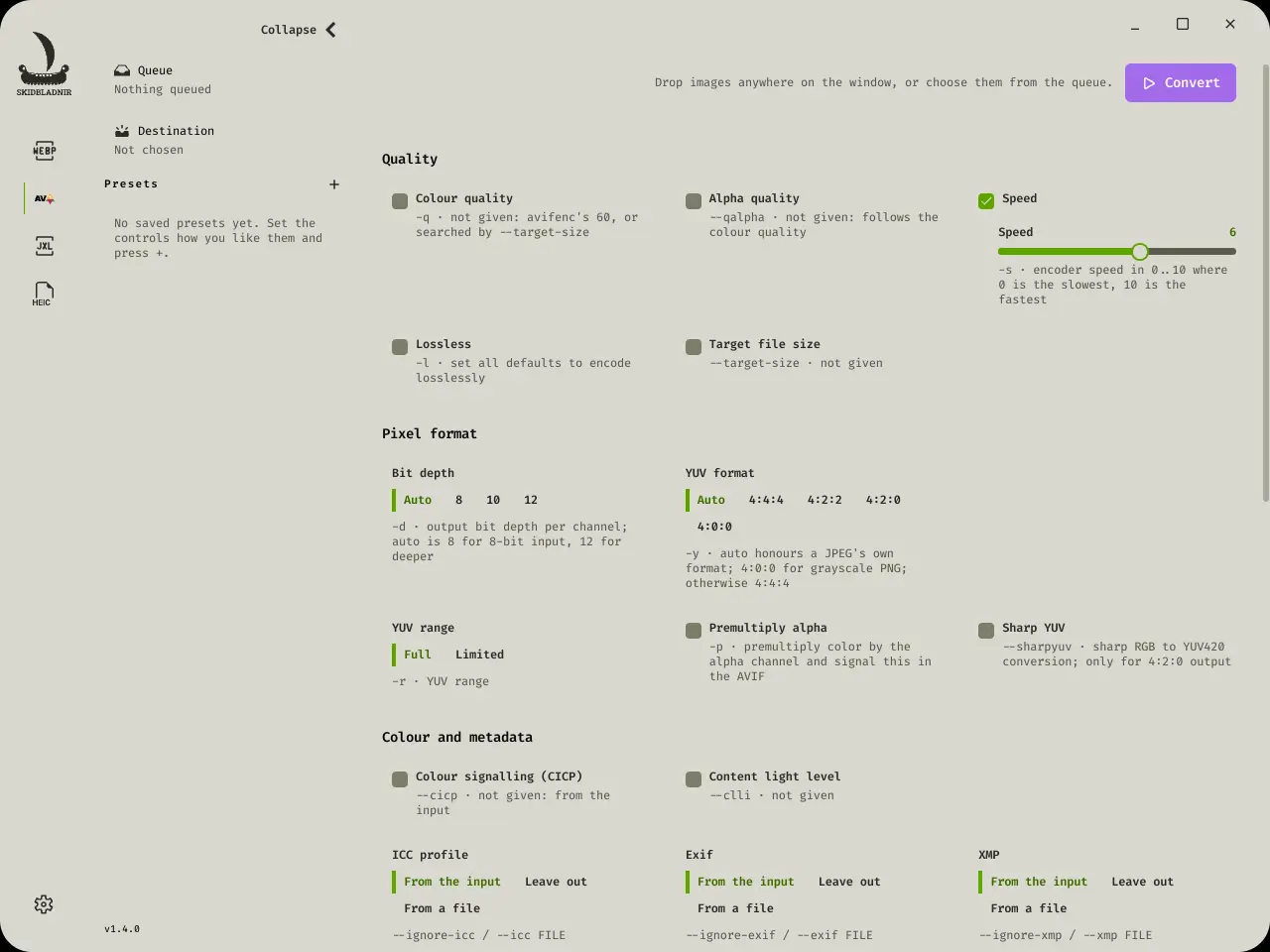
AVIF selected: avifenc's options, each labelled with its flag.
With WebP selected: the whole panel, and a preview
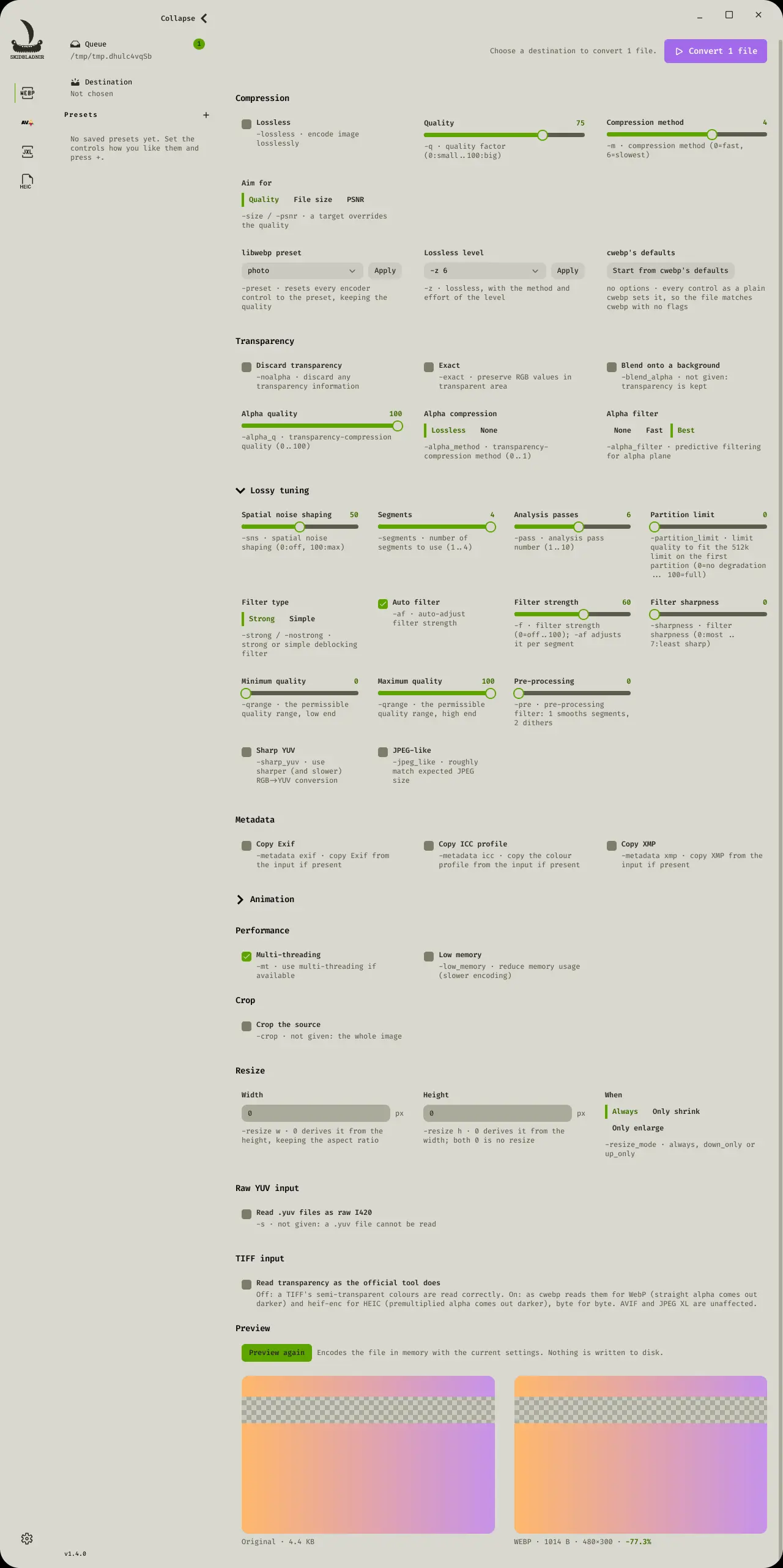
WebP selected, with a file previewed: every cwebp option, each labelled with its flag.
Features
Input formats
- PNG, JPEG (including Photoshop's CMYK), TIFF, AVIF, JPEG XL and HEIC, as still images
- WebP and GIF, still or animated
- PNM: binary PGM, PPM and PAM (8 or 16 bits, with or without alpha), and PFM floating-point images
- Y4M video frames (the first frame): any chroma format, 8 to 16 bits, with or without alpha
- PGX, the JPEG 2000 test format (gray, 1 to 16 bits)
- OpenEXR (
.exr): half or float RGB, RGBA or gray, any channel layer, every compression but HTJ2K - Raw YUV (
.yuv): bare 8-bit I420 planes, at the size you give, ascwebp -sreads them - SVG (and gzip-compressed
.svgz), drawn at its own size, or straight at the size a resize asks for (only the crop, if there is one) so its edges stay sharp, with its transparency kept; text in the system's fonts, and only images embedded in the file (one it links to is never opened) - Each file's format is recognised from its contents, not its extension (except raw YUV, which has no header to recognise). An AVIF's crop, rotation and mirror are applied, so a sideways-stored portrait converts upright, and tiled (grid) AVIFs, as some cameras write large captures, are decoded whole.
Output formats, each with its reference encoder's whole command line for a still image
| Format | Reference tool | Encoder in the app | Byte-for-byte parity, tested |
|---|---|---|---|
| WebP | cwebp 1.6.0 | libwebp 1.6.0 | 3,091 cases: every option, its no-option defaults, through PNG (every colour type, gamma), JPEG, TIFF (including premultiplied alpha, and straight alpha read as cwebp reads it on request), WebP and PNM files, raw YUV (-s), and -metadata |
| Animated WebP | img2webp, gif2webp and webpmux 1.6.0 | libwebp 1.6.0 | 215 cases: animated WebP and GIF input, every Skidbladnir setting those tools can express, their -mixed, -min_size, -kmin/-kmax, -loop, -loop_compatibility and -d for every frame, img2webp's frame options (-lossy/-lossless, -q, -m, -exact/-noexact, -d) changed from any frame on, and metadata (gif2webp -metadata, webpmux -set) |
| AVIF | avifenc 1.4.2 | libavif 1.4.2 + libaom 3.15.1 | 231 cases: every option, PNG inputs, JPEG and Y4M input |
| JPEG XL | cjxl 0.12.0 | libjxl 0.12.0 | 551 cases: every option, PNG, PNM, PFM, PGX, EXR, still-GIF and JPEG XL inputs, JPEG recompression and decoding |
| HEIC | heif-enc -e kvazaar 1.23.5 | libheif 1.23.5 + Kvazaar 2.3.2 | 182 cases: every option, PNG, JPEG, TIFF (RGB, straight alpha, and premultiplied alpha read as heif-enc reads it on request), WebP, HEIC and 8-bit 4:2:0 Y4M inputs |
That is 4,270 cases in all. CI runs every one of them on Linux x86-64, Linux ARM64 and
macOS with Apple silicon, and on Windows all of WebP's, animated WebP's and nearly all of
JPEG XL's (not yet AVIF's or HEIC's), for every pull request and every push to master.
The GPL edition writes HEIC with x265 instead, adding heif-enc's -L
lossless, 4:4:4 and 4:2:2 chroma, 10-bit output, x265's main tuning controls and any
other x265 parameter (-p x265:KEY=VALUE); its HEIC is checked by decoding, not byte for
byte against a reference.
- WebP: lossless and near-lossless,
-exact, the libwebp presets and-zlossless levels, targets by size or PSNR, every lossy tuning control (SNS, segments, filter type, strength, sharpness and auto-filter, passes, quality range, pre-processing, partition limit, JPEG-like), alpha quality, method and filtering,-noalpha,-blend_alpha, and-metadata. - AVIF: colour and alpha quality (or leave them to
avifenc), speed, lossless, 8, 10 or 12 bits and the 16-bit depth extension, 4:4:4, 4:2:2, 4:2:0 or 4:0:0, sharp YUV, premultiplied alpha, CICP and range, target size, progressive layers, grids, tiling, scaling, quantizers, libaom's own options, pixel aspect, clean aperture, rotation, mirroring, content light level, and ICC, Exif and XMP from the input, left out or from a file. - JPEG XL: distance or quality, alpha distance, effort (up to 11), lossless JPEG
recompression — a JPEG repacked typically about 20% smaller (libjxl's figure) and
rebuildable bit for bit, and the default for JPEG input — and every one of
cjxl's modular, progressive, filter, colour-space, metadata and container options. - HEIC, the format iPhones use: quality, Kvazaar's lossless coding, chroma
downsampling, the colour-profile presets and custom code points, thumbnails, alpha and
premultiplied alpha, rotation and mirroring, tiles, 360° projection, a description,
compatible brands and the compact
miniformat. - Metadata: a photo's ICC colour profile, Exif and XMP are kept as each reference
tool keeps them: in WebP when you ask, as
cwebp -metadatadoes (off by default, as incwebp); in AVIF, JPEG XL and HEIC by default, asavifenc,cjxlandheif-encdo, with each kind switchable off. - Crop and resize (with
-resize_mode), shared by every format.
Workflow
- Preview the result beside the original, in any format, before anything is written to disk. AVIF and JPEG XL previews are decoded in Rust, so they show on every platform.
- Animated WebP or GIF in, animated WebP out: every frame, its timing and its loop count
kept (or a loop count of your own), every WebP setting applied to each frame, the
animation encoder's keyframe spacing, mixed lossy/lossless and minimum-size options,
and a preview of the animation first.
A GIF converts as
gif2webpconverts it, across disposal methods, transparency, timing and loop counts, keeping its ICC profile and XMP when you ask, asgif2webp -metadatadoes. - Drop files onto the window (any it cannot read are set aside), or convert a whole folder, optionally with its subfolders, recreating their structure in the destination.
- Batch conversion with progress per file, and a Cancel button that never leaves a half-written image behind.
- The original and converted sizes, and the dimensions produced, reported after each conversion; and what an existing WebP already is: size, lossy or lossless, alpha, animated.
- Each format keeps its own settings while you try another. Settings and the destination are remembered between launches, and you can save named presets of your own.
- Every control shows the flag it sets, with the expert ones in folding sections. The whole window works from the keyboard, and every control is labelled for a screen reader.
- Your source image is never overwritten, and every write goes through a temporary file,
so a failed conversion cannot damage a file that was already there. Before a run, the
window warns when two queued files would be written to the same name (
photo.pngandphoto.jpgboth becomephoto.webp) and when outputs are already in the destination. Those are replaced, ascwebp -owould replace them, unless you turn off Replace existing files in the app settings, which keeps them and skips those inputs. - About and licences, in the app settings, shows the version, the edition and its licence, and the licence texts and third-party notices the app carries.
Install
Download the file for your computer from the
latest release
(<version> is the release's version number):
| Your computer | File to download |
|---|---|
| Windows 10 or 11, 64-bit | Skidbladnir_<version>_x64-setup.exe |
| Mac with Apple silicon (M1 or later), experimental | Skidbladnir_<version>_aarch64.dmg |
| Mac with an Intel processor, experimental | Skidbladnir_<version>_x64.dmg |
| Ubuntu 22.04 or later, Debian 12 or later, Linux Mint 21 or later, and distributions based on them | Skidbladnir_<version>_amd64.deb |
| Fedora, openSUSE and other RPM-based distributions with glibc 2.35 or later | Skidbladnir_<version>_x86_64.rpm |
| Any other 64-bit Linux with glibc 2.35 or later | Skidbladnir_<version>_amd64.AppImage |
| Linux on 64-bit ARM (a Raspberry Pi 4 or 5 on a 64-bit system, ARM laptops and servers), glibc 2.35 or later | Skidbladnir_<version>_arm64.deb, Skidbladnir_<version>_aarch64.rpm or Skidbladnir_<version>_aarch64.AppImage, as above |
Not sure which edition? Download the standard edition: the files above, named
Skidbladnir_… with an underscore. Choose the GPL edition, the same files named
Skidbladnir-GPL_…, only if you write HEIC and want the x265 encoder: heif-enc -L
lossless, 4:4:4 and 4:2:2 chroma, 10-bit, x265's preset and tune, its main tuning
controls, and any other x265 parameter. Both are free. The licence matters only if you
redistribute the app; Editions has the details. On ARM Linux the GPL
edition's x265 runs without its assembly (it cannot be linked into the shared libheif
there), so its HEIC encodes are slower; the files are the same.
The release page lists other files too; they are not installers. The .app.tar.gz files
are for the in-app updater on a Mac. Skidbladnir-<version>-source.tar.gz is the complete
source with every submodule; GitHub's own "Source code" archives leave the submodules out.
There are no builds for 32-bit systems or Windows on ARM. Windows on ARM can run x64 programs through emulation, but nobody has tried Skidbladnir there. Status says which builds have been run, and how.
Opening it the first time
The installers are not code-signed yet, so Windows and macOS warn before they open an app from a developer they cannot identify. This is what to expect, and how to get past it.
Windows. Your browser may warn that the file is not commonly downloaded. Keep it
anyway. In Edge, open the ... (More actions) menu beside the download, choose
Keep, then Show more > Keep anyway. In Chrome, choose Keep or Download
suspicious file. When you run the installer, SmartScreen shows Windows protected your
PC: click More info, then Run anyway. Skidbladnir installs for your account
only, in %LOCALAPPDATA%\Skidbladnir, without administrator rights. If Microsoft's
WebView2 runtime is missing (Windows 10 and 11 normally have it), the installer downloads
it. If Smart App Control is turned on (Windows Security > App & browser control),
Windows blocks unsigned apps and offers no exception, so Skidbladnir cannot be installed
on that PC until it is signed.
macOS (experimental). The macOS builds are new: CI builds them and runs the test suite
on macOS, but nobody has opened the app on a real Mac yet, so please
report problems. Open the .dmg,
drag Skidbladnir into Applications, and open it from there.
-
On macOS 15 (Sequoia) or later, the first time you open it, macOS says it cannot verify the app. Click Done, open System Settings > Privacy & Security, scroll down, click Open Anyway beside the message about Skidbladnir, and confirm.
-
On macOS 14 or earlier, right-click (or Control-click) Skidbladnir in Applications, choose Open, then choose Open again.
-
If macOS says that Skidbladnir is damaged and can't be opened, there is no Open Anyway button. Remove the quarantine flag your browser set, in Terminal, then open it again:
xattr -dr com.apple.quarantine /Applications/Skidbladnir.app
Linux. Both packages need glibc 2.35 or later: Ubuntu 22.04, Debian 12 or newer.
- The
.deb(Ubuntu, Debian, Linux Mint): in the folder you downloaded it to, runsudo apt install ./Skidbladnir_<version>_amd64.deb. apt installs what it needs (xkbcommon and the Vulkan loader for the window, and WebKitGTK and GTK for the webview window it falls back to) and adds Skidbladnir to your applications menu. - The AppImage (any distribution): run
chmod +x Skidbladnir_<version>_amd64.AppImage, then./Skidbladnir_<version>_amd64.AppImage. It adds no menu entry. It needs FUSE: afusermount3orfusermountprogram (thefuse3orfusepackage) and/dev/fuse; libfuse2 is not needed. Where FUSE is not available, run it with--appimage-extract-and-run.
Checking a download
The release page lists a SHA-256 checksum beside each file. Work out the checksum of the file you downloaded and compare the two:
- Linux:
sha256sum Skidbladnir_<version>_amd64.deb - macOS:
shasum -a 256 Skidbladnir_<version>_aarch64.dmg - Windows, in PowerShell:
Get-FileHash .\Skidbladnir_<version>_x64-setup.exe(it uses SHA-256 unless told otherwise)
If they differ, the file is not the one the release published: delete it and download it again.
Updates
Once installed, Skidbladnir checks for a newer release each time it starts and offers it
in a banner; nothing is downloaded until you click Install and restart, and every
update is verified against the project's signing key before it is installed. A .deb
install updates with a .deb and an .rpm install with an .rpm (each asks for your
password to do it); an AppImage, the
Windows installer and the macOS app update themselves in place. Each edition updates only
to the same edition; to switch, install the other one over it. Releases before 0.8.0
have no updater, so moving off them is a manual download, once.
Privacy
Skidbladnir has no telemetry and no analytics, and your images never leave your
computer. The app makes one network request of its own: when it starts, it fetches a
small update manifest (latest.json, or latest-gpl.json for the GPL edition) from
raw.githubusercontent.com. Like any web request, that shows GitHub your IP address;
nothing about you or your files is sent. An update is downloaded from GitHub, and
installed, only when you click Install and restart.
Editions
The two editions are the same app except for how they write HEIC, and so for their licence:
Standard (Skidbladnir_*) | GPL (Skidbladnir-GPL_*) | |
|---|---|---|
| HEIC encoder | Kvazaar (BSD-3-Clause) | x265 (GPL-2.0-or-later) |
| HEIC controls | every heif-enc option Kvazaar honours | those, plus -L lossless, 4:4:4 and 4:2:2 chroma, 10-bit, and x265's preset, tune, TU depth, AQ, psy-rd/psy-rdoq, deblock and SAO as controls, with any other -p x265: parameter by name |
| HEIC checked | byte for byte against heif-enc -e kvazaar | by decoding |
| Licence of the build | ISC; ships libheif/libde265 as a separate, replaceable LGPL-3.0 library | GPL-3.0-or-later, as a whole |
The GPL edition exists for people who want x265, the HEVC encoder a default heif-enc
build uses, and x265 is GPL: an app that ships it is distributed under the GPL.
Skidbladnir's own source is ISC either way. Everything but HEIC output — WebP, AVIF,
JPEG XL, and HEIC input — is identical in both. In both, libheif ships as a separate
shared library beside the app, with its codec plugins switched off, so the standard
edition can never pick up x265 from your system.
Each release attaches Skidbladnir-<version>-source.tar.gz, the complete source with
every submodule, which is what the GPL edition's licence requires to be offered with it.
The Rust crates and npm packages it compiles in are pinned by Cargo.lock and
frontend/package-lock.json in that archive, and published unmodified on crates.io and
npmjs.com.
What "every option" means
The claim is tested, not assumed: for each format, a test runs the reference tool and
Skidbladnir on the same input with the same options, across the whole option surface and
across the inputs the tool reads differently (PNG colour types and chunks, JPEG chroma
samplings, CMYK, metadata), and requires identical bytes. CI builds each reference from the
same source as the library the app links (scripts/build-reference-tools.sh). Precisely:
- Still images, and animated WebP out of an animated WebP or a GIF, as
img2webpandgif2webpwrite it, including their keyframe (-kmin/-kmax),-mixed,-min_size,-loopand-loop_compatibilityoptions andimg2webp -dfor every frame. A different quality or duration for each frame is not offered yet. Neither are other options about more than one image: animated AVIF, HEIC or JPEG XL, image sequences,avifenc --layeredand grids assembled from several files,heif-encwith several inputs or-Ttiled input, andcjxlfrom an animated GIF or APNG. They are queued in ROADMAP.md, Phase 8. - The input formats Skidbladnir reads: PNG, JPEG, TIFF, WebP, AVIF, JPEG XL, HEIC,
GIF, PNM/PAM, PFM, PGX, Y4M, SVG, EXR and raw YUV. Raw YUV is read as
cwebp -sreads it: into WebP as its planes are, byte for byte, and converted to RGB by libwebp for the other formats, whose tools do not read it. EXR is read ascjxlreads it — linear light, its premultiplied alpha, chromaticities and white luminance, and its other channels kept as named extra channels — and matched byte for byte. Onlycjxlreads EXR, so for the other formats it is given the sRGB curve, clipped at white. A JPEG XL converted to JPEG XL is decoded by libjxl ascjxldecodes it — its own colour, extra channels, Exif (orientation reset, as the pixels are turned upright), XMP, IPTC and its other boxes — and matched byte for byte, except that a JPEG XL of several frames or layers is converted from its pixels. (heif-enc --rawcannot write a HEIC in this build, so there is nothing of it to match.) None of them reads SVG, so an SVG has no reference to match: it is drawn byresvg.cjxlreads only 8- and 16-bit PGX at the right brightness (a 12-bit file comes out at a sixteenth of it), so those two depths are matched byte for byte and the others are read as meant. A Y4M is read byavifenc's own reader and encoded to AVIF as its planes are, and an 8-bit 4:2:0 one goes to HEIC asheif-encreads it.heif-encreads every other Y4M as if it were 8-bit 4:2:0 too, garbling it, so those are converted to RGB (BT.601) for HEIC instead, as they are for WebP and JPEG XL, which no reference tool reads Y4M for. PNM is read the waycwebpreads it for WebP and the waycjxlreads it for JPEG XL (at its own bit depth); PFM is read ascjxlreads it, and onlycjxlreads PFM, so PFM to another format has no reference to match. JPEG is read through libjpeg-turbo 3.2.0, the way each tool reads it — includingavifenc's andheif-enc's copying of a JPEG's own YCbCr planes — and PNG by libpng 1.6's rules, includingcwebp's gamma correction. For WebP, 16-bit files are reduced to 8 bits the waycwebp's libpng or libtiff reduces them, a WebP source takescwebp's route straight to YUV, and a TIFF with premultiplied (associated) alpha is un-multiplied ascwebpun-multiplies it. A tool linked against a different libjpeg or libpng can decode the same file differently. - The same encoders, built the same way: libwebp 1.6.0, libavif 1.4.2 with libaom
3.15.1, libjxl 0.12.0, libheif 1.23.5 with Kvazaar 2.3.2. Another version of a tool
writes other bytes, as it would against itself. The app's libavif and the reference
avifencare both built without libyuv. A packagedavifenc(Homebrew, most Linux distributions) usually links libyuv, which converts RGB to YUV differently, so it writes other bytes even at libavif 1.4.2. - Tested on Linux x86-64 and macOS on Apple silicon. CI builds the reference tools and runs the parity tests on both, so the encoders' x86 and ARM code paths are each held to the tools. The Windows build and the Intel Mac build link the same sources, but no reference tool runs on those, so identical bytes there are expected, not tested.
- AVIF with libaom,
avifenc's default codec:-c rav1eand-c svtare not built in. JPEG gain-map conversion needsavifencbuilt with libxml2, which it is not by default, and is not offered. - HEIC with Kvazaar in the standard edition, the BSD-licensed HEVC encoder; the
default
heif-encbuild uses x265, which is GPL, and is the GPL edition's encoder.heif-enc -Lfails with Kvazaar, so lossless is Kvazaar's own (-p lossless=true), and 16-bit PNGs, whichheif-enchands Kvazaar at 10 bits and Kvazaar refuses, are encoded from their high bytes instead. The GPL edition's x265 output is checked by decoding it, not byte for byte. - WebP's starting settings. Until you change them, the WebP controls start from
Skidbladnir's own long-standing defaults (
-af -alpha_filter best -pass 6 -mt), not from whatcwebpdoes with no flags. To start wherecwebpstarts, click Start from cwebp's defaults in the WebP panel (tested againstcwebpgiven no options at all), then set the flags you use. - Options that change how a tool runs but not the file — verbosity, timing, benchmarks,
printing statistics — have no control, and neither do
cwebp's dump and map outputs.
Where a tool refuses an input — cwebp a CMYK JPEG, heif-enc an RGB-coded one —
Skidbladnir converts it anyway. Two tools misread a TIFF's transparency, and by default
Skidbladnir reads it correctly instead, keeping the colours the file means:
- Straight (unassociated) alpha, to WebP:
cwebpreads such a TIFF premultiplied, through libtiff, and darkens its semi-transparent pixels. - Premultiplied (associated) alpha, to HEIC:
heif-enctakes that alpha as straight, so its HEIC is darker where the image is semi-transparent. (Skidbladnir un-multiplies it, ascwebpdoes.)
To get the tools' results instead, turn on TIFF input → Read transparency as the
official tool does: both are then reproduced byte for byte (tested against cwebp and
heif-enc). avifenc and cjxl do not read TIFF, so AVIF and JPEG XL are unaffected.
Besides the byte comparisons, the output is decoded with each format's own tools. AVIF is
decoded with libavif's avifdec, and the tests measure how close the pixels come back and
check that transparency survives. JPEG XL is decoded with libjxl's djxl, which must
decode it at the right size and alpha, a lossless file exactly, and rebuild a recompressed
JPEG byte for byte. HEIC is decoded with libheif's heif-dec and heif-info, from a
separate build; that is how the GPL edition's x265 output is checked. Metadata is checked
against cwebp itself and with avifdec, djxl and heif-info. AVIF input is checked
against avifdec across 17 colour encodings (bit depths, chroma subsampling, range,
colour matrices, alpha), and JPEG XL input against djxl.
How it compares
As each project describes itself on its own page, checked on 1 October 2026. "Not stated" means its page does not say, not that it cannot.
| Runs as | Batch | Writes | Encoder options | Byte parity with the reference tools | |
|---|---|---|---|---|---|
| Skidbladnir | desktop app: Windows, macOS, Linux (x86-64 and ARM64) | yes, files or whole folders | WebP, AVIF, JPEG XL, HEIC | every option of cwebp, avifenc, cjxl and heif-enc for a still image | yes, tested: 4,270 cases (above) |
| Squoosh | web app in the browser (installable), nothing uploaded | not stated | MozJPEG, WebP, AVIF, JPEG XL, OxiPNG, QOI, WebP 2 (its codec list); no HEIC | not stated | not stated |
| XnConvert | desktop app: Windows, macOS, Linux; free for private or educational use, paid in a company | yes | about 70 formats, including WebP, AVIF, JPEG XL and HEIC | not stated | not stated |
| Converseen | desktop app on ImageMagick: Windows, Linux, macOS, FreeBSD; GPL-3.0 | yes | over 100 formats, including WebP, AVIF and HEIC; JPEG XL not mentioned | not stated | not stated |
| The reference command-line tools | command line | by scripting | one format each | all of them, by definition | they are the reference |
Build from source
Requires a stable Rust toolchain, Node.js and npm, nasm — libaom, libjpeg-turbo and
the AV1 decoder assemble their SIMD code with it, and x265 in the GPL edition (Arch:
nasm; Debian/Ubuntu: nasm; macOS: brew install nasm; Windows: choco install nasm)
— and CMake with a C++ compiler, which build libjxl, libavif with libaom, and
libjpeg-turbo from source so they are linked statically. Clone with
--recurse-submodules: those sources are pinned under third_party/. HEIC needs libheif,
built with scripts/build-libheif.sh from the same pinned sources into build/libheif;
without that build, the system libheif is linked instead. On Linux you also need
the development headers of webkit2gtk-4.1, and of xkbcommon (with xkbcommon-x11), xcb,
Wayland, fontconfig and FreeType for the gpui window.
npm --prefix frontend install        # also installs the Tauri CLI
cd src-tauri && ../frontend/node_modules/.bin/tauri build --no-bundle
Run it with ../frontend/node_modules/.bin/tauri dev from src-tauri/, which starts the
Nuxt dev server and the window together. Release builds must go through tauri build
rather than cargo build --release: the custom-protocol feature that embeds the
frontend is only enabled by the former.
Without CMake, the build links the system libjxl, libavif and libjpeg through
pkg-config instead, and says so. Set SKIDBLADNIR_LIBJXL, SKIDBLADNIR_LIBAVIF or
SKIDBLADNIR_LIBJPEG to vendored to insist on the static build, or to system to insist
on the system library.
The GPL edition is the gpl feature (or full, every optional feature), with a libheif
built around x265 into build/libheif-gpl. The build refuses to link either edition
against the other's libheif.
scripts/build-libheif.sh --edition gpl
cd src-tauri && ../frontend/node_modules/.bin/tauri build --features gpl --config tauri.gpl.conf.json
tauri.gpl.conf.json (and on Windows tauri.gpl.windows.conf.json too) bundles x265's
libheif, the GPL edition's notices and the GPL text, and points the updater at the GPL
edition's releases.
The encoders are the libraries themselves, linked into the binary — there is no command-line tool to download and no subprocess.
Checking a build
cargo test --workspace     # includes the encoder-parity tests
scripts/smoke-test.sh      # drives the webview window: renders, IPC, a real conversion
scripts/a11y-audit.sh      # axe-core against the live webview window
scripts/gpui-smoke.sh      # opens the gpui window and converts to every format
The parity tests compare each encoder with its reference tool and need them built from
the same sources as the libraries the app links, reading JPEG through the same
libjpeg-turbo: scripts/build-reference-tools.sh builds cwebp, img2webp, gif2webp,
avifenc, cjxl and heif-enc and prints the SKIDBLADNIR_REFERENCE_* variables that
point the tests at them. The decoding checks use libavif's avifdec and avifenc,
libjxl's djxl and libheif's heif-dec and heif-info from PATH. Missing tools make
the tests say so and skip rather than pass quietly; set SKIDBLADNIR_REQUIRE_PARITY=1 to turn a skip
into a failure.
The two scripts need tauri-driver (cargo install tauri-driver) and WebKitWebDriver
(webkit2gtk-driver on Debian/Ubuntu, webkitgtk-6.0 on Arch). They skip, loudly, when
those are missing.
Status
Skidbladnir is a Rust + Tauri 2 app for Windows, Linux and macOS, and it builds and
passes its tests on all three in CI. Since 1.3.0 its window is drawn natively with
gpui (crates/skidbladnir-gpui): the same window, control for
control, in about a third of the memory and starting about 30% sooner. The Nuxt +
Tailwind webview window it replaces is still built in. It opens when the app is started
with SKIDBLADNIR_UI=webview, or by itself when the gpui window cannot start (on a
machine with no GPU driver it can use, say). Releases are
stable from 1.0.0; the ones before it were prereleases. The work queue lives in
ROADMAP.md.
Skidbladnir used to be an Electron app for Windows. That app has been retired: its last
binary release is v0.4.3
(2019), and its last source is the
electron-final tag.
Known gaps:
- macOS is experimental. The
.dmgs (Apple silicon and Intel) are built by CI, and the test suite runs on macOS, but nobody has yet opened the app on a real Mac. The standard edition's Windows installer is installed and exercised by CI on every change, and the Linux app (both editions) is launched and driven by CI on every change, though not from its.debor AppImage. Each release's.debis installed by CI on Ubuntu 22.04 and Debian 12, and its.rpmon the latest Fedora, on x86-64 and ARM64 alike, and checked to find every library it needs; the ARM64 app itself has not been launched. The published 0.5.0.deband AppImage were run through that release's smoke test by hand. - The app is not code-signed on any platform; Opening it the first time shows how to get past each system's warning.
- An AVIF, JPEG XL or HEIC encode cannot be cancelled mid-file: none of those encoders reports progress, so Cancel takes effect when the current file finishes (which is then discarded, not written).
- An animated AVIF, JPEG XL or HEIC is read as one still image: its primary image or first frame.
- Animated AVIF, JPEG XL and HEIC are not written (see below), so an animation's metadata
is kept in animated WebP only: a GIF's ICC profile and XMP as
gif2webp -metadatakeeps them, an animated WebP's ICC profile, Exif and XMP aswebpmux -setwould set them. - An animation (animated WebP or GIF) converts to WebP only. AVIF, JPEG XL and HEIC output refuse it by name rather than keeping just the first frame, because those encoders write still images here. A target size or PSNR applies to each frame of an animation, not to the whole file.
- JPEG XL files open in Safari, and in Firefox and Chrome as each enables it by default; until then, most web pages cannot show them. The long-promised JPEG 2000 was dropped as a goal; it has no momentum outside medical and archival imaging.
- The standard edition writes HEIC 8-bit 4:2:0 only (Kvazaar), so its lossless coding is
lossless after the conversion to 4:2:0, as with
heif-enc;-Llossless, 4:4:4 and 10-bit take the GPL edition. Neither writes 12-bit HEIC. - HEVC patents. HEIC is HEVC (H.265) inside HEIF, and HEVC is covered by patents licensed through patent pools such as Access Advance and Via LA. Skidbladnir includes open-source HEVC software: Kvazaar (x265 in the GPL edition) to write HEIC, and libde265 to read it. The project holds no HEVC patent licence and passes none on. Whether you need one depends on where you are and what you do with the files; this is not legal advice.
Acknowledgements
Skidbladnir is a window around other people's encoders, and is only as good as they are: libwebp (the WebM project, Google), libavif and libaom (the Alliance for Open Media), libjxl (the JPEG XL authors), libheif and libde265 (struktur AG), Kvazaar (Ultra Video Group, Tampere University), x265 (MulticoreWare) and libjpeg-turbo (which includes the work of the Independent JPEG Group). The decoders are rav1d through avif-decode, and jxl-oxide. The window is Tauri, Nuxt, Nuxt UI and Tailwind CSS, set in Fira Code, with icons from the collections THIRD-PARTY-NOTICES.md credits.
Skidbladnir is an independent project. It is not affiliated with, sponsored or endorsed by Google, the Alliance for Open Media, the JPEG committee, Apple, Microsoft, or any of the projects above. WebP, AVIF, JPEG XL, HEIC and the other names here are used only to say which formats and tools it works with; they belong to their owners.
License
Skidbladnir's own code is ISC (LICENSE), as declared in the workspace
Cargo.toml, apart from code adapted from the encoders, which keeps its licence:
crates/skidbladnir-encode/native/avif_shim.c carries portions of libavif's avifenc
under BSD-2-Clause.
The standard edition's own code is ISC; the libraries it ships keep their licences, including LGPL-3.0 for libheif and libde265, which ship as a separate shared library you may replace with your own build. The GPL edition's builds include x265, so each of them is distributed as a whole under the GNU GPL, version 3 or later (LICENSES/GPL-3.0.txt); see Editions.
The native libraries each edition ships, the JavaScript packages in its webview window and the Rust crates compiled into it, with their licences, are listed in THIRD-PARTY-NOTICES.md and THIRD-PARTY-NOTICES-GPL.md, and every installer carries its own edition's copy with its licence texts.
Similar repos


Languages
Rust
79.7%
Vue
7.6%
Shell
4.3%
C
4.0%
Python
2.6%
TypeScript
1.1%
Free, open-source desktop app (Windows, Linux, macOS) that converts images to WebP, AVIF, JPEG XL and HEIC, with every still-image option of the official encoders (cwebp, avifenc, cjxl, heif-enc) as labelled controls.
See the codeSee what people are saying
README
Skidbladnir
Skidbladnir makes image files smaller by converting them to the modern formats: WebP, AVIF, JPEG XL and HEIC. It is for anyone who wants smaller images for a website, an archive or a photo library without learning four command-line tools. Pick your files, see the result beside the original, then convert one image, a batch or a whole folder.
Free and open source · Windows, macOS (experimental) and Linux · converts on your computer; the only network request is the in-app update check
Download · Which file to pick · Project page
Each of these formats has an official encoder, and each one is a command-line tool with dozens of options that are easy to forget and easy to get wrong. Skidbladnir puts those options in a window, each labelled with the flag it sets, instead of a single quality slider.
For a still image, every option of cwebp, avifenc (with libaom), cjxl and
heif-enc (with Kvazaar) is a control in the window, and Skidbladnir writes the same bytes
as those tools built from the same library versions, checked in CI against the real tools,
with the exceptions listed under What "every option" means.
AVIF selected: avifenc's options, each labelled with its flag.
With WebP selected: the whole panel, and a preview
WebP selected, with a file previewed: every cwebp option, each labelled with its flag.
Features
Input formats
- PNG, JPEG (including Photoshop's CMYK), TIFF, AVIF, JPEG XL and HEIC, as still images
- WebP and GIF, still or animated
- PNM: binary PGM, PPM and PAM (8 or 16 bits, with or without alpha), and PFM floating-point images
- Y4M video frames (the first frame): any chroma format, 8 to 16 bits, with or without alpha
- PGX, the JPEG 2000 test format (gray, 1 to 16 bits)
- OpenEXR (
.exr): half or float RGB, RGBA or gray, any channel layer, every compression but HTJ2K - Raw YUV (
.yuv): bare 8-bit I420 planes, at the size you give, ascwebp -sreads them - SVG (and gzip-compressed
.svgz), drawn at its own size, or straight at the size a resize asks for (only the crop, if there is one) so its edges stay sharp, with its transparency kept; text in the system's fonts, and only images embedded in the file (one it links to is never opened) - Each file's format is recognised from its contents, not its extension (except raw YUV, which has no header to recognise). An AVIF's crop, rotation and mirror are applied, so a sideways-stored portrait converts upright, and tiled (grid) AVIFs, as some cameras write large captures, are decoded whole.
Output formats, each with its reference encoder's whole command line for a still image
| Format | Reference tool | Encoder in the app | Byte-for-byte parity, tested |
|---|---|---|---|
| WebP | cwebp 1.6.0 | libwebp 1.6.0 | 3,091 cases: every option, its no-option defaults, through PNG (every colour type, gamma), JPEG, TIFF (including premultiplied alpha, and straight alpha read as cwebp reads it on request), WebP and PNM files, raw YUV (-s), and -metadata |
| Animated WebP | img2webp, gif2webp and webpmux 1.6.0 | libwebp 1.6.0 | 215 cases: animated WebP and GIF input, every Skidbladnir setting those tools can express, their -mixed, -min_size, -kmin/-kmax, -loop, -loop_compatibility and -d for every frame, img2webp's frame options (-lossy/-lossless, -q, -m, -exact/-noexact, -d) changed from any frame on, and metadata (gif2webp -metadata, webpmux -set) |
| AVIF | avifenc 1.4.2 | libavif 1.4.2 + libaom 3.15.1 | 231 cases: every option, PNG inputs, JPEG and Y4M input |
| JPEG XL | cjxl 0.12.0 | libjxl 0.12.0 | 551 cases: every option, PNG, PNM, PFM, PGX, EXR, still-GIF and JPEG XL inputs, JPEG recompression and decoding |
| HEIC | heif-enc -e kvazaar 1.23.5 | libheif 1.23.5 + Kvazaar 2.3.2 | 182 cases: every option, PNG, JPEG, TIFF (RGB, straight alpha, and premultiplied alpha read as heif-enc reads it on request), WebP, HEIC and 8-bit 4:2:0 Y4M inputs |
That is 4,270 cases in all. CI runs every one of them on Linux x86-64, Linux ARM64 and
macOS with Apple silicon, and on Windows all of WebP's, animated WebP's and nearly all of
JPEG XL's (not yet AVIF's or HEIC's), for every pull request and every push to master.
The GPL edition writes HEIC with x265 instead, adding heif-enc's -L
lossless, 4:4:4 and 4:2:2 chroma, 10-bit output, x265's main tuning controls and any
other x265 parameter (-p x265:KEY=VALUE); its HEIC is checked by decoding, not byte for
byte against a reference.
- WebP: lossless and near-lossless,
-exact, the libwebp presets and-zlossless levels, targets by size or PSNR, every lossy tuning control (SNS, segments, filter type, strength, sharpness and auto-filter, passes, quality range, pre-processing, partition limit, JPEG-like), alpha quality, method and filtering,-noalpha,-blend_alpha, and-metadata. - AVIF: colour and alpha quality (or leave them to
avifenc), speed, lossless, 8, 10 or 12 bits and the 16-bit depth extension, 4:4:4, 4:2:2, 4:2:0 or 4:0:0, sharp YUV, premultiplied alpha, CICP and range, target size, progressive layers, grids, tiling, scaling, quantizers, libaom's own options, pixel aspect, clean aperture, rotation, mirroring, content light level, and ICC, Exif and XMP from the input, left out or from a file. - JPEG XL: distance or quality, alpha distance, effort (up to 11), lossless JPEG
recompression — a JPEG repacked typically about 20% smaller (libjxl's figure) and
rebuildable bit for bit, and the default for JPEG input — and every one of
cjxl's modular, progressive, filter, colour-space, metadata and container options. - HEIC, the format iPhones use: quality, Kvazaar's lossless coding, chroma
downsampling, the colour-profile presets and custom code points, thumbnails, alpha and
premultiplied alpha, rotation and mirroring, tiles, 360° projection, a description,
compatible brands and the compact
miniformat. - Metadata: a photo's ICC colour profile, Exif and XMP are kept as each reference
tool keeps them: in WebP when you ask, as
cwebp -metadatadoes (off by default, as incwebp); in AVIF, JPEG XL and HEIC by default, asavifenc,cjxlandheif-encdo, with each kind switchable off. - Crop and resize (with
-resize_mode), shared by every format.
Workflow
- Preview the result beside the original, in any format, before anything is written to disk. AVIF and JPEG XL previews are decoded in Rust, so they show on every platform.
- Animated WebP or GIF in, animated WebP out: every frame, its timing and its loop count
kept (or a loop count of your own), every WebP setting applied to each frame, the
animation encoder's keyframe spacing, mixed lossy/lossless and minimum-size options,
and a preview of the animation first.
A GIF converts as
gif2webpconverts it, across disposal methods, transparency, timing and loop counts, keeping its ICC profile and XMP when you ask, asgif2webp -metadatadoes. - Drop files onto the window (any it cannot read are set aside), or convert a whole folder, optionally with its subfolders, recreating their structure in the destination.
- Batch conversion with progress per file, and a Cancel button that never leaves a half-written image behind.
- The original and converted sizes, and the dimensions produced, reported after each conversion; and what an existing WebP already is: size, lossy or lossless, alpha, animated.
- Each format keeps its own settings while you try another. Settings and the destination are remembered between launches, and you can save named presets of your own.
- Every control shows the flag it sets, with the expert ones in folding sections. The whole window works from the keyboard, and every control is labelled for a screen reader.
- Your source image is never overwritten, and every write goes through a temporary file,
so a failed conversion cannot damage a file that was already there. Before a run, the
window warns when two queued files would be written to the same name (
photo.pngandphoto.jpgboth becomephoto.webp) and when outputs are already in the destination. Those are replaced, ascwebp -owould replace them, unless you turn off Replace existing files in the app settings, which keeps them and skips those inputs. - About and licences, in the app settings, shows the version, the edition and its licence, and the licence texts and third-party notices the app carries.
Install
Download the file for your computer from the
latest release
(<version> is the release's version number):
| Your computer | File to download |
|---|---|
| Windows 10 or 11, 64-bit | Skidbladnir_<version>_x64-setup.exe |
| Mac with Apple silicon (M1 or later), experimental | Skidbladnir_<version>_aarch64.dmg |
| Mac with an Intel processor, experimental | Skidbladnir_<version>_x64.dmg |
| Ubuntu 22.04 or later, Debian 12 or later, Linux Mint 21 or later, and distributions based on them | Skidbladnir_<version>_amd64.deb |
| Fedora, openSUSE and other RPM-based distributions with glibc 2.35 or later | Skidbladnir_<version>_x86_64.rpm |
| Any other 64-bit Linux with glibc 2.35 or later | Skidbladnir_<version>_amd64.AppImage |
| Linux on 64-bit ARM (a Raspberry Pi 4 or 5 on a 64-bit system, ARM laptops and servers), glibc 2.35 or later | Skidbladnir_<version>_arm64.deb, Skidbladnir_<version>_aarch64.rpm or Skidbladnir_<version>_aarch64.AppImage, as above |
Not sure which edition? Download the standard edition: the files above, named
Skidbladnir_… with an underscore. Choose the GPL edition, the same files named
Skidbladnir-GPL_…, only if you write HEIC and want the x265 encoder: heif-enc -L
lossless, 4:4:4 and 4:2:2 chroma, 10-bit, x265's preset and tune, its main tuning
controls, and any other x265 parameter. Both are free. The licence matters only if you
redistribute the app; Editions has the details. On ARM Linux the GPL
edition's x265 runs without its assembly (it cannot be linked into the shared libheif
there), so its HEIC encodes are slower; the files are the same.
The release page lists other files too; they are not installers. The .app.tar.gz files
are for the in-app updater on a Mac. Skidbladnir-<version>-source.tar.gz is the complete
source with every submodule; GitHub's own "Source code" archives leave the submodules out.
There are no builds for 32-bit systems or Windows on ARM. Windows on ARM can run x64 programs through emulation, but nobody has tried Skidbladnir there. Status says which builds have been run, and how.
Opening it the first time
The installers are not code-signed yet, so Windows and macOS warn before they open an app from a developer they cannot identify. This is what to expect, and how to get past it.
Windows. Your browser may warn that the file is not commonly downloaded. Keep it
anyway. In Edge, open the ... (More actions) menu beside the download, choose
Keep, then Show more > Keep anyway. In Chrome, choose Keep or Download
suspicious file. When you run the installer, SmartScreen shows Windows protected your
PC: click More info, then Run anyway. Skidbladnir installs for your account
only, in %LOCALAPPDATA%\Skidbladnir, without administrator rights. If Microsoft's
WebView2 runtime is missing (Windows 10 and 11 normally have it), the installer downloads
it. If Smart App Control is turned on (Windows Security > App & browser control),
Windows blocks unsigned apps and offers no exception, so Skidbladnir cannot be installed
on that PC until it is signed.
macOS (experimental). The macOS builds are new: CI builds them and runs the test suite
on macOS, but nobody has opened the app on a real Mac yet, so please
report problems. Open the .dmg,
drag Skidbladnir into Applications, and open it from there.
-
On macOS 15 (Sequoia) or later, the first time you open it, macOS says it cannot verify the app. Click Done, open System Settings > Privacy & Security, scroll down, click Open Anyway beside the message about Skidbladnir, and confirm.
-
On macOS 14 or earlier, right-click (or Control-click) Skidbladnir in Applications, choose Open, then choose Open again.
-
If macOS says that Skidbladnir is damaged and can't be opened, there is no Open Anyway button. Remove the quarantine flag your browser set, in Terminal, then open it again:
xattr -dr com.apple.quarantine /Applications/Skidbladnir.app
Linux. Both packages need glibc 2.35 or later: Ubuntu 22.04, Debian 12 or newer.
- The
.deb(Ubuntu, Debian, Linux Mint): in the folder you downloaded it to, runsudo apt install ./Skidbladnir_<version>_amd64.deb. apt installs what it needs (xkbcommon and the Vulkan loader for the window, and WebKitGTK and GTK for the webview window it falls back to) and adds Skidbladnir to your applications menu. - The AppImage (any distribution): run
chmod +x Skidbladnir_<version>_amd64.AppImage, then./Skidbladnir_<version>_amd64.AppImage. It adds no menu entry. It needs FUSE: afusermount3orfusermountprogram (thefuse3orfusepackage) and/dev/fuse; libfuse2 is not needed. Where FUSE is not available, run it with--appimage-extract-and-run.
Checking a download
The release page lists a SHA-256 checksum beside each file. Work out the checksum of the file you downloaded and compare the two:
- Linux:
sha256sum Skidbladnir_<version>_amd64.deb - macOS:
shasum -a 256 Skidbladnir_<version>_aarch64.dmg - Windows, in PowerShell:
Get-FileHash .\Skidbladnir_<version>_x64-setup.exe(it uses SHA-256 unless told otherwise)
If they differ, the file is not the one the release published: delete it and download it again.
Updates
Once installed, Skidbladnir checks for a newer release each time it starts and offers it
in a banner; nothing is downloaded until you click Install and restart, and every
update is verified against the project's signing key before it is installed. A .deb
install updates with a .deb and an .rpm install with an .rpm (each asks for your
password to do it); an AppImage, the
Windows installer and the macOS app update themselves in place. Each edition updates only
to the same edition; to switch, install the other one over it. Releases before 0.8.0
have no updater, so moving off them is a manual download, once.
Privacy
Skidbladnir has no telemetry and no analytics, and your images never leave your
computer. The app makes one network request of its own: when it starts, it fetches a
small update manifest (latest.json, or latest-gpl.json for the GPL edition) from
raw.githubusercontent.com. Like any web request, that shows GitHub your IP address;
nothing about you or your files is sent. An update is downloaded from GitHub, and
installed, only when you click Install and restart.
Editions
The two editions are the same app except for how they write HEIC, and so for their licence:
Standard (Skidbladnir_*) | GPL (Skidbladnir-GPL_*) | |
|---|---|---|
| HEIC encoder | Kvazaar (BSD-3-Clause) | x265 (GPL-2.0-or-later) |
| HEIC controls | every heif-enc option Kvazaar honours | those, plus -L lossless, 4:4:4 and 4:2:2 chroma, 10-bit, and x265's preset, tune, TU depth, AQ, psy-rd/psy-rdoq, deblock and SAO as controls, with any other -p x265: parameter by name |
| HEIC checked | byte for byte against heif-enc -e kvazaar | by decoding |
| Licence of the build | ISC; ships libheif/libde265 as a separate, replaceable LGPL-3.0 library | GPL-3.0-or-later, as a whole |
The GPL edition exists for people who want x265, the HEVC encoder a default heif-enc
build uses, and x265 is GPL: an app that ships it is distributed under the GPL.
Skidbladnir's own source is ISC either way. Everything but HEIC output — WebP, AVIF,
JPEG XL, and HEIC input — is identical in both. In both, libheif ships as a separate
shared library beside the app, with its codec plugins switched off, so the standard
edition can never pick up x265 from your system.
Each release attaches Skidbladnir-<version>-source.tar.gz, the complete source with
every submodule, which is what the GPL edition's licence requires to be offered with it.
The Rust crates and npm packages it compiles in are pinned by Cargo.lock and
frontend/package-lock.json in that archive, and published unmodified on crates.io and
npmjs.com.
What "every option" means
The claim is tested, not assumed: for each format, a test runs the reference tool and
Skidbladnir on the same input with the same options, across the whole option surface and
across the inputs the tool reads differently (PNG colour types and chunks, JPEG chroma
samplings, CMYK, metadata), and requires identical bytes. CI builds each reference from the
same source as the library the app links (scripts/build-reference-tools.sh). Precisely:
- Still images, and animated WebP out of an animated WebP or a GIF, as
img2webpandgif2webpwrite it, including their keyframe (-kmin/-kmax),-mixed,-min_size,-loopand-loop_compatibilityoptions andimg2webp -dfor every frame. A different quality or duration for each frame is not offered yet. Neither are other options about more than one image: animated AVIF, HEIC or JPEG XL, image sequences,avifenc --layeredand grids assembled from several files,heif-encwith several inputs or-Ttiled input, andcjxlfrom an animated GIF or APNG. They are queued in ROADMAP.md, Phase 8. - The input formats Skidbladnir reads: PNG, JPEG, TIFF, WebP, AVIF, JPEG XL, HEIC,
GIF, PNM/PAM, PFM, PGX, Y4M, SVG, EXR and raw YUV. Raw YUV is read as
cwebp -sreads it: into WebP as its planes are, byte for byte, and converted to RGB by libwebp for the other formats, whose tools do not read it. EXR is read ascjxlreads it — linear light, its premultiplied alpha, chromaticities and white luminance, and its other channels kept as named extra channels — and matched byte for byte. Onlycjxlreads EXR, so for the other formats it is given the sRGB curve, clipped at white. A JPEG XL converted to JPEG XL is decoded by libjxl ascjxldecodes it — its own colour, extra channels, Exif (orientation reset, as the pixels are turned upright), XMP, IPTC and its other boxes — and matched byte for byte, except that a JPEG XL of several frames or layers is converted from its pixels. (heif-enc --rawcannot write a HEIC in this build, so there is nothing of it to match.) None of them reads SVG, so an SVG has no reference to match: it is drawn byresvg.cjxlreads only 8- and 16-bit PGX at the right brightness (a 12-bit file comes out at a sixteenth of it), so those two depths are matched byte for byte and the others are read as meant. A Y4M is read byavifenc's own reader and encoded to AVIF as its planes are, and an 8-bit 4:2:0 one goes to HEIC asheif-encreads it.heif-encreads every other Y4M as if it were 8-bit 4:2:0 too, garbling it, so those are converted to RGB (BT.601) for HEIC instead, as they are for WebP and JPEG XL, which no reference tool reads Y4M for. PNM is read the waycwebpreads it for WebP and the waycjxlreads it for JPEG XL (at its own bit depth); PFM is read ascjxlreads it, and onlycjxlreads PFM, so PFM to another format has no reference to match. JPEG is read through libjpeg-turbo 3.2.0, the way each tool reads it — includingavifenc's andheif-enc's copying of a JPEG's own YCbCr planes — and PNG by libpng 1.6's rules, includingcwebp's gamma correction. For WebP, 16-bit files are reduced to 8 bits the waycwebp's libpng or libtiff reduces them, a WebP source takescwebp's route straight to YUV, and a TIFF with premultiplied (associated) alpha is un-multiplied ascwebpun-multiplies it. A tool linked against a different libjpeg or libpng can decode the same file differently. - The same encoders, built the same way: libwebp 1.6.0, libavif 1.4.2 with libaom
3.15.1, libjxl 0.12.0, libheif 1.23.5 with Kvazaar 2.3.2. Another version of a tool
writes other bytes, as it would against itself. The app's libavif and the reference
avifencare both built without libyuv. A packagedavifenc(Homebrew, most Linux distributions) usually links libyuv, which converts RGB to YUV differently, so it writes other bytes even at libavif 1.4.2. - Tested on Linux x86-64 and macOS on Apple silicon. CI builds the reference tools and runs the parity tests on both, so the encoders' x86 and ARM code paths are each held to the tools. The Windows build and the Intel Mac build link the same sources, but no reference tool runs on those, so identical bytes there are expected, not tested.
- AVIF with libaom,
avifenc's default codec:-c rav1eand-c svtare not built in. JPEG gain-map conversion needsavifencbuilt with libxml2, which it is not by default, and is not offered. - HEIC with Kvazaar in the standard edition, the BSD-licensed HEVC encoder; the
default
heif-encbuild uses x265, which is GPL, and is the GPL edition's encoder.heif-enc -Lfails with Kvazaar, so lossless is Kvazaar's own (-p lossless=true), and 16-bit PNGs, whichheif-enchands Kvazaar at 10 bits and Kvazaar refuses, are encoded from their high bytes instead. The GPL edition's x265 output is checked by decoding it, not byte for byte. - WebP's starting settings. Until you change them, the WebP controls start from
Skidbladnir's own long-standing defaults (
-af -alpha_filter best -pass 6 -mt), not from whatcwebpdoes with no flags. To start wherecwebpstarts, click Start from cwebp's defaults in the WebP panel (tested againstcwebpgiven no options at all), then set the flags you use. - Options that change how a tool runs but not the file — verbosity, timing, benchmarks,
printing statistics — have no control, and neither do
cwebp's dump and map outputs.
Where a tool refuses an input — cwebp a CMYK JPEG, heif-enc an RGB-coded one —
Skidbladnir converts it anyway. Two tools misread a TIFF's transparency, and by default
Skidbladnir reads it correctly instead, keeping the colours the file means:
- Straight (unassociated) alpha, to WebP:
cwebpreads such a TIFF premultiplied, through libtiff, and darkens its semi-transparent pixels. - Premultiplied (associated) alpha, to HEIC:
heif-enctakes that alpha as straight, so its HEIC is darker where the image is semi-transparent. (Skidbladnir un-multiplies it, ascwebpdoes.)
To get the tools' results instead, turn on TIFF input → Read transparency as the
official tool does: both are then reproduced byte for byte (tested against cwebp and
heif-enc). avifenc and cjxl do not read TIFF, so AVIF and JPEG XL are unaffected.
Besides the byte comparisons, the output is decoded with each format's own tools. AVIF is
decoded with libavif's avifdec, and the tests measure how close the pixels come back and
check that transparency survives. JPEG XL is decoded with libjxl's djxl, which must
decode it at the right size and alpha, a lossless file exactly, and rebuild a recompressed
JPEG byte for byte. HEIC is decoded with libheif's heif-dec and heif-info, from a
separate build; that is how the GPL edition's x265 output is checked. Metadata is checked
against cwebp itself and with avifdec, djxl and heif-info. AVIF input is checked
against avifdec across 17 colour encodings (bit depths, chroma subsampling, range,
colour matrices, alpha), and JPEG XL input against djxl.
How it compares
As each project describes itself on its own page, checked on 1 October 2026. "Not stated" means its page does not say, not that it cannot.
| Runs as | Batch | Writes | Encoder options | Byte parity with the reference tools | |
|---|---|---|---|---|---|
| Skidbladnir | desktop app: Windows, macOS, Linux (x86-64 and ARM64) | yes, files or whole folders | WebP, AVIF, JPEG XL, HEIC | every option of cwebp, avifenc, cjxl and heif-enc for a still image | yes, tested: 4,270 cases (above) |
| Squoosh | web app in the browser (installable), nothing uploaded | not stated | MozJPEG, WebP, AVIF, JPEG XL, OxiPNG, QOI, WebP 2 (its codec list); no HEIC | not stated | not stated |
| XnConvert | desktop app: Windows, macOS, Linux; free for private or educational use, paid in a company | yes | about 70 formats, including WebP, AVIF, JPEG XL and HEIC | not stated | not stated |
| Converseen | desktop app on ImageMagick: Windows, Linux, macOS, FreeBSD; GPL-3.0 | yes | over 100 formats, including WebP, AVIF and HEIC; JPEG XL not mentioned | not stated | not stated |
| The reference command-line tools | command line | by scripting | one format each | all of them, by definition | they are the reference |
Build from source
Requires a stable Rust toolchain, Node.js and npm, nasm — libaom, libjpeg-turbo and
the AV1 decoder assemble their SIMD code with it, and x265 in the GPL edition (Arch:
nasm; Debian/Ubuntu: nasm; macOS: brew install nasm; Windows: choco install nasm)
— and CMake with a C++ compiler, which build libjxl, libavif with libaom, and
libjpeg-turbo from source so they are linked statically. Clone with
--recurse-submodules: those sources are pinned under third_party/. HEIC needs libheif,
built with scripts/build-libheif.sh from the same pinned sources into build/libheif;
without that build, the system libheif is linked instead. On Linux you also need
the development headers of webkit2gtk-4.1, and of xkbcommon (with xkbcommon-x11), xcb,
Wayland, fontconfig and FreeType for the gpui window.
npm --prefix frontend install        # also installs the Tauri CLI
cd src-tauri && ../frontend/node_modules/.bin/tauri build --no-bundle
Run it with ../frontend/node_modules/.bin/tauri dev from src-tauri/, which starts the
Nuxt dev server and the window together. Release builds must go through tauri build
rather than cargo build --release: the custom-protocol feature that embeds the
frontend is only enabled by the former.
Without CMake, the build links the system libjxl, libavif and libjpeg through
pkg-config instead, and says so. Set SKIDBLADNIR_LIBJXL, SKIDBLADNIR_LIBAVIF or
SKIDBLADNIR_LIBJPEG to vendored to insist on the static build, or to system to insist
on the system library.
The GPL edition is the gpl feature (or full, every optional feature), with a libheif
built around x265 into build/libheif-gpl. The build refuses to link either edition
against the other's libheif.
scripts/build-libheif.sh --edition gpl
cd src-tauri && ../frontend/node_modules/.bin/tauri build --features gpl --config tauri.gpl.conf.json
tauri.gpl.conf.json (and on Windows tauri.gpl.windows.conf.json too) bundles x265's
libheif, the GPL edition's notices and the GPL text, and points the updater at the GPL
edition's releases.
The encoders are the libraries themselves, linked into the binary — there is no command-line tool to download and no subprocess.
Checking a build
cargo test --workspace     # includes the encoder-parity tests
scripts/smoke-test.sh      # drives the webview window: renders, IPC, a real conversion
scripts/a11y-audit.sh      # axe-core against the live webview window
scripts/gpui-smoke.sh      # opens the gpui window and converts to every format
The parity tests compare each encoder with its reference tool and need them built from
the same sources as the libraries the app links, reading JPEG through the same
libjpeg-turbo: scripts/build-reference-tools.sh builds cwebp, img2webp, gif2webp,
avifenc, cjxl and heif-enc and prints the SKIDBLADNIR_REFERENCE_* variables that
point the tests at them. The decoding checks use libavif's avifdec and avifenc,
libjxl's djxl and libheif's heif-dec and heif-info from PATH. Missing tools make
the tests say so and skip rather than pass quietly; set SKIDBLADNIR_REQUIRE_PARITY=1 to turn a skip
into a failure.
The two scripts need tauri-driver (cargo install tauri-driver) and WebKitWebDriver
(webkit2gtk-driver on Debian/Ubuntu, webkitgtk-6.0 on Arch). They skip, loudly, when
those are missing.
Status
Skidbladnir is a Rust + Tauri 2 app for Windows, Linux and macOS, and it builds and
passes its tests on all three in CI. Since 1.3.0 its window is drawn natively with
gpui (crates/skidbladnir-gpui): the same window, control for
control, in about a third of the memory and starting about 30% sooner. The Nuxt +
Tailwind webview window it replaces is still built in. It opens when the app is started
with SKIDBLADNIR_UI=webview, or by itself when the gpui window cannot start (on a
machine with no GPU driver it can use, say). Releases are
stable from 1.0.0; the ones before it were prereleases. The work queue lives in
ROADMAP.md.
Skidbladnir used to be an Electron app for Windows. That app has been retired: its last
binary release is v0.4.3
(2019), and its last source is the
electron-final tag.
Known gaps:
- macOS is experimental. The
.dmgs (Apple silicon and Intel) are built by CI, and the test suite runs on macOS, but nobody has yet opened the app on a real Mac. The standard edition's Windows installer is installed and exercised by CI on every change, and the Linux app (both editions) is launched and driven by CI on every change, though not from its.debor AppImage. Each release's.debis installed by CI on Ubuntu 22.04 and Debian 12, and its.rpmon the latest Fedora, on x86-64 and ARM64 alike, and checked to find every library it needs; the ARM64 app itself has not been launched. The published 0.5.0.deband AppImage were run through that release's smoke test by hand. - The app is not code-signed on any platform; Opening it the first time shows how to get past each system's warning.
- An AVIF, JPEG XL or HEIC encode cannot be cancelled mid-file: none of those encoders reports progress, so Cancel takes effect when the current file finishes (which is then discarded, not written).
- An animated AVIF, JPEG XL or HEIC is read as one still image: its primary image or first frame.
- Animated AVIF, JPEG XL and HEIC are not written (see below), so an animation's metadata
is kept in animated WebP only: a GIF's ICC profile and XMP as
gif2webp -metadatakeeps them, an animated WebP's ICC profile, Exif and XMP aswebpmux -setwould set them. - An animation (animated WebP or GIF) converts to WebP only. AVIF, JPEG XL and HEIC output refuse it by name rather than keeping just the first frame, because those encoders write still images here. A target size or PSNR applies to each frame of an animation, not to the whole file.
- JPEG XL files open in Safari, and in Firefox and Chrome as each enables it by default; until then, most web pages cannot show them. The long-promised JPEG 2000 was dropped as a goal; it has no momentum outside medical and archival imaging.
- The standard edition writes HEIC 8-bit 4:2:0 only (Kvazaar), so its lossless coding is
lossless after the conversion to 4:2:0, as with
heif-enc;-Llossless, 4:4:4 and 10-bit take the GPL edition. Neither writes 12-bit HEIC. - HEVC patents. HEIC is HEVC (H.265) inside HEIF, and HEVC is covered by patents licensed through patent pools such as Access Advance and Via LA. Skidbladnir includes open-source HEVC software: Kvazaar (x265 in the GPL edition) to write HEIC, and libde265 to read it. The project holds no HEVC patent licence and passes none on. Whether you need one depends on where you are and what you do with the files; this is not legal advice.
Acknowledgements
Skidbladnir is a window around other people's encoders, and is only as good as they are: libwebp (the WebM project, Google), libavif and libaom (the Alliance for Open Media), libjxl (the JPEG XL authors), libheif and libde265 (struktur AG), Kvazaar (Ultra Video Group, Tampere University), x265 (MulticoreWare) and libjpeg-turbo (which includes the work of the Independent JPEG Group). The decoders are rav1d through avif-decode, and jxl-oxide. The window is Tauri, Nuxt, Nuxt UI and Tailwind CSS, set in Fira Code, with icons from the collections THIRD-PARTY-NOTICES.md credits.
Skidbladnir is an independent project. It is not affiliated with, sponsored or endorsed by Google, the Alliance for Open Media, the JPEG committee, Apple, Microsoft, or any of the projects above. WebP, AVIF, JPEG XL, HEIC and the other names here are used only to say which formats and tools it works with; they belong to their owners.
License
Skidbladnir's own code is ISC (LICENSE), as declared in the workspace
Cargo.toml, apart from code adapted from the encoders, which keeps its licence:
crates/skidbladnir-encode/native/avif_shim.c carries portions of libavif's avifenc
under BSD-2-Clause.
The standard edition's own code is ISC; the libraries it ships keep their licences, including LGPL-3.0 for libheif and libde265, which ship as a separate shared library you may replace with your own build. The GPL edition's builds include x265, so each of them is distributed as a whole under the GNU GPL, version 3 or later (LICENSES/GPL-3.0.txt); see Editions.
The native libraries each edition ships, the JavaScript packages in its webview window and the Rust crates compiled into it, with their licences, are listed in THIRD-PARTY-NOTICES.md and THIRD-PARTY-NOTICES-GPL.md, and every installer carries its own edition's copy with its licence texts.
Similar repos
Languages
Rust
79.7%
Vue
7.6%
Shell
4.3%
C
4.0%
Python
2.6%
TypeScript
1.1%