
Command line artificial intelligence - Context engineering for terminal powerusers
Go
145
925 commits
updated Oct 3, 2026
See what people are saying
README
Command Line Artificial Intelligence


Test coverage: 81.740% 😍👌
clai (/klaɪ/, like "cli" in "climate") is a command line context-feeder for any ai task.

Get started
Installing:
curl -fsSL https://raw.githubusercontent.com/baalimago/clai/main/setup.sh | sh
You can also install via go:
go install github.com/baalimago/clai@latest
Then run:
clai | clai query Please give a concise explanation of clai
Either run bare clai (or clai <command> -h) or look at the examples for how to use clai.
Prompt text starting with - is read as a flag, so pass it after --: clai q -- -why does this fail.
If you have time, you can also check out this blogpost for a slightly more structured introduction on how to use Clai efficiently.
Install Glow for formatted markdown output when querying text responses.
Use clai as a Go library
Embed the agent loop in a Go program with github.com/baalimago/clai/pkg/agent:
// Supports strucutred output via types
// Support all things the CLI does
review, err := agent.NewTyped[Review](agent.WithModel("gpt-5.2")).Query(ctx, chat)
The agent runs silent and returns typed errors. See pkg/agent for the option surface, the command ban list and the token stoploss, and pkg/tools for the tool catalog.
Features
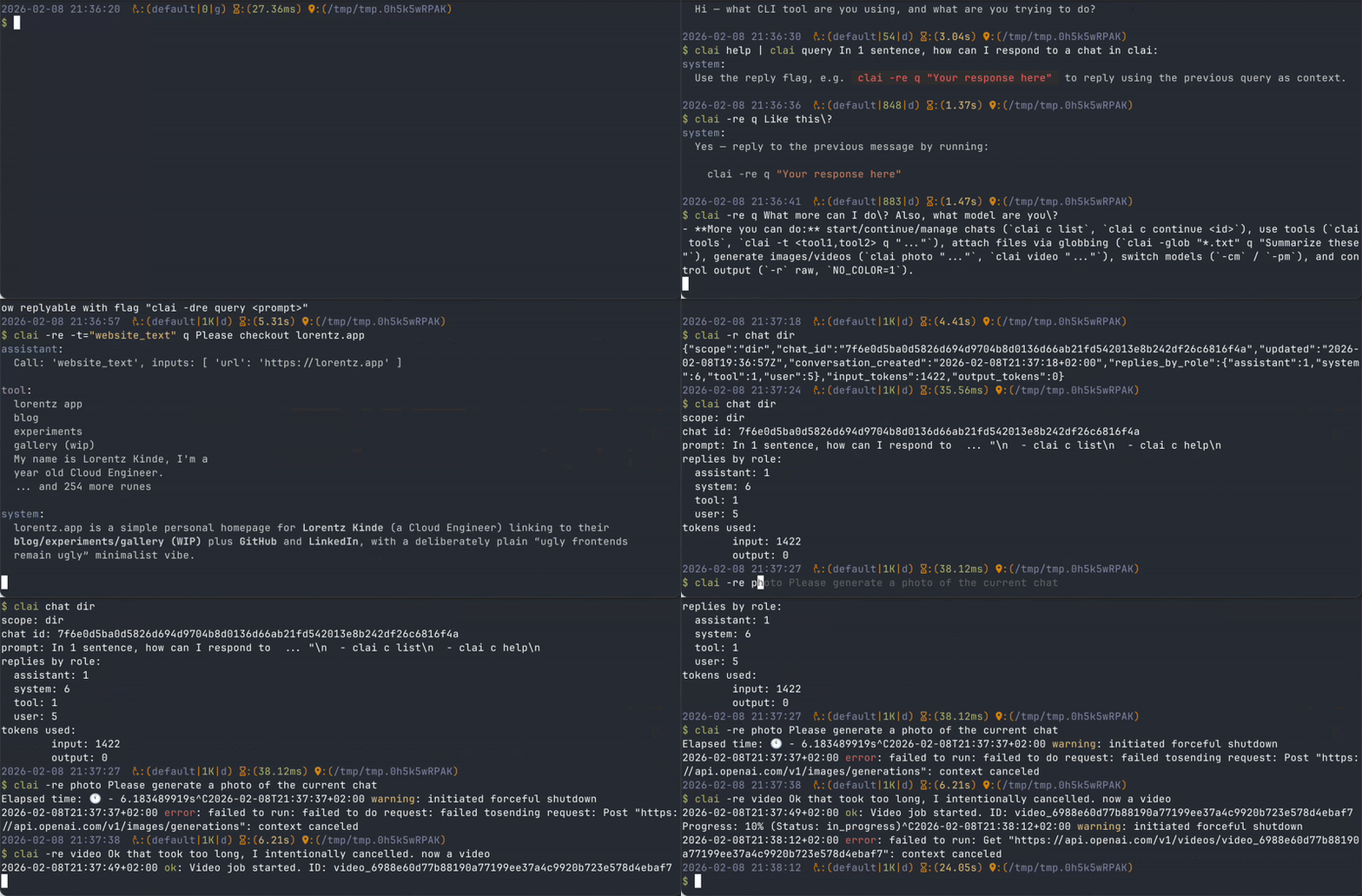
- Shell context injection - Inject shell context into the system prompt via configurable templates.
- Seamless conversation import - Ran out of session? Continue in clai!
- Agent Skills - Import skills from custom global directories, or project-level
.agents/skills. - Profiles - Pre-prompted profiles enabling customized workflows and agents.
- MCP client support - Add any MCP server you'd like by pasting their configuration.
- Unix-like - Clai follows the unix philosophy and works with data piped in and out.
All of these features are easily combined and tweaked, empowering users to accomplish very diverse use cases. See examples for additional info.
Supported vendors
| Vendor | Environment Variable | Models |
|---|---|---|
| Berget AI | BERGET_API_KEY | Text models, use prefix berget: |
| OpenRouter | OPENROUTER_API_KEY | Text models, use prefix or: |
| Mistral | MISTRAL_API_KEY | Text models |
| OpenAI | OPENAI_API_KEY | Text models, photo models |
| Anthropic | ANTHROPIC_API_KEY | Text models |
| Gemini | GEMINI_API_KEY | Text models, photo models |
| HuggingFace | HF_API_KEY | Text models, use prefix hf: |
| xAi | XAI_API_KEY | Text models |
| Inception | INCEPTION_API_KEY | Text models |
| DeepSeek | DEEPSEEK_API_KEY | Text models, key is optional, no prefix (defaults to deepseek-chat) |
| Ollama | OLLAMA_API_KEY | Use format ollama: (defaults to llama3), server defaults to localhost:11434 |
Shell completions are also available:
# bash
mkdir -p ~/.local/share/bash-completion/completions
clai completion bash > ~/.local/share/bash-completion/completions/clai
# zsh
mkdir -p ~/.zsh/completions
clai completion zsh > ~/.zsh/completions/_clai
For zsh, ensure your fpath includes the completions directory before compinit, for example:
fpath=(~/.zsh/completions $fpath)
autoload -Uz compinit && compinit
Then restart your shell or reload your shell configuration.
Significant stargazers

355 followers · starred Nov 2025

56 followers · starred Nov 2025

39 followers · starred May 2026

67 followers · starred Jun 2024
Similar repos


Languages
Go
99.9%
Command line artificial intelligence - Context engineering for terminal powerusers
Go
145
925 commits
updated Oct 3, 2026
See what people are saying
README
Command Line Artificial Intelligence
Test coverage: 81.740% 😍👌
clai (/klaɪ/, like "cli" in "climate") is a command line context-feeder for any ai task.
Get started
Installing:
curl -fsSL https://raw.githubusercontent.com/baalimago/clai/main/setup.sh | sh
You can also install via go:
go install github.com/baalimago/clai@latest
Then run:
clai | clai query Please give a concise explanation of clai
Either run bare clai (or clai <command> -h) or look at the examples for how to use clai.
Prompt text starting with - is read as a flag, so pass it after --: clai q -- -why does this fail.
If you have time, you can also check out this blogpost for a slightly more structured introduction on how to use Clai efficiently.
Install Glow for formatted markdown output when querying text responses.
Use clai as a Go library
Embed the agent loop in a Go program with github.com/baalimago/clai/pkg/agent:
// Supports strucutred output via types
// Support all things the CLI does
review, err := agent.NewTyped[Review](agent.WithModel("gpt-5.2")).Query(ctx, chat)
The agent runs silent and returns typed errors. See pkg/agent for the option surface, the command ban list and the token stoploss, and pkg/tools for the tool catalog.
Features
- Shell context injection - Inject shell context into the system prompt via configurable templates.
- Seamless conversation import - Ran out of session? Continue in clai!
- Agent Skills - Import skills from custom global directories, or project-level
.agents/skills. - Profiles - Pre-prompted profiles enabling customized workflows and agents.
- MCP client support - Add any MCP server you'd like by pasting their configuration.
- Unix-like - Clai follows the unix philosophy and works with data piped in and out.
All of these features are easily combined and tweaked, empowering users to accomplish very diverse use cases. See examples for additional info.
Supported vendors
| Vendor | Environment Variable | Models |
|---|---|---|
| Berget AI | BERGET_API_KEY | Text models, use prefix berget: |
| OpenRouter | OPENROUTER_API_KEY | Text models, use prefix or: |
| Mistral | MISTRAL_API_KEY | Text models |
| OpenAI | OPENAI_API_KEY | Text models, photo models |
| Anthropic | ANTHROPIC_API_KEY | Text models |
| Gemini | GEMINI_API_KEY | Text models, photo models |
| HuggingFace | HF_API_KEY | Text models, use prefix hf: |
| xAi | XAI_API_KEY | Text models |
| Inception | INCEPTION_API_KEY | Text models |
| DeepSeek | DEEPSEEK_API_KEY | Text models, key is optional, no prefix (defaults to deepseek-chat) |
| Ollama | OLLAMA_API_KEY | Use format ollama: (defaults to llama3), server defaults to localhost:11434 |
Shell completions are also available:
# bash
mkdir -p ~/.local/share/bash-completion/completions
clai completion bash > ~/.local/share/bash-completion/completions/clai
# zsh
mkdir -p ~/.zsh/completions
clai completion zsh > ~/.zsh/completions/_clai
For zsh, ensure your fpath includes the completions directory before compinit, for example:
fpath=(~/.zsh/completions $fpath)
autoload -Uz compinit && compinit
Then restart your shell or reload your shell configuration.
Similar repos
Significant stargazers
355 followers · starred Nov 2025
56 followers · starred Nov 2025
39 followers · starred May 2026
67 followers · starred Jun 2024
Languages
Go
99.9%