
Azim Ospanov 1,2, Zijin Feng 1, Jiacheng Sun 1, Haoli Bai 1, Xin Shen 3, Farzan Farnia 2
1 Huawei Foundation Model Department, 2 The Chinese University of Hong Kong, 3 Celia Team
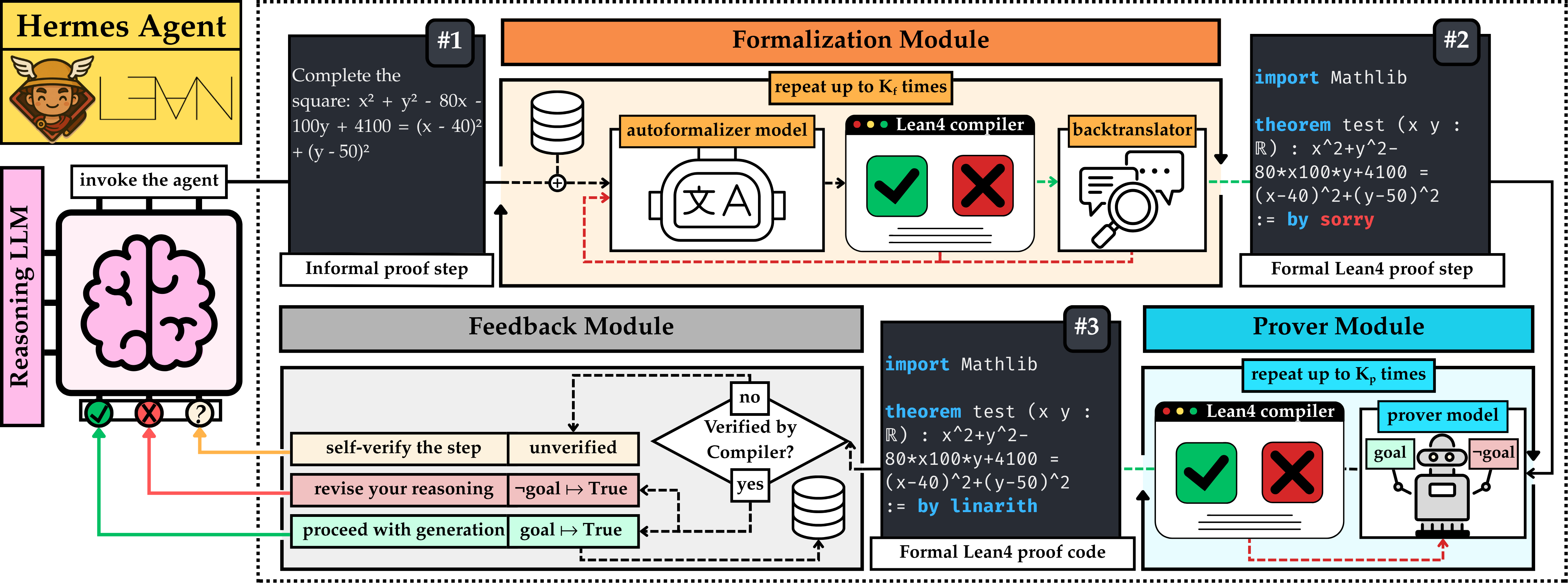
This repository accompanies "HERMES: Towards Efficient and Verifiable Mathematical Reasoning in LLMs" work published at ICML 2026. The codebase contains the agent implemented with LangChain and additional documentation on how to set it up with Lean4. The high-level overview of the method is below:
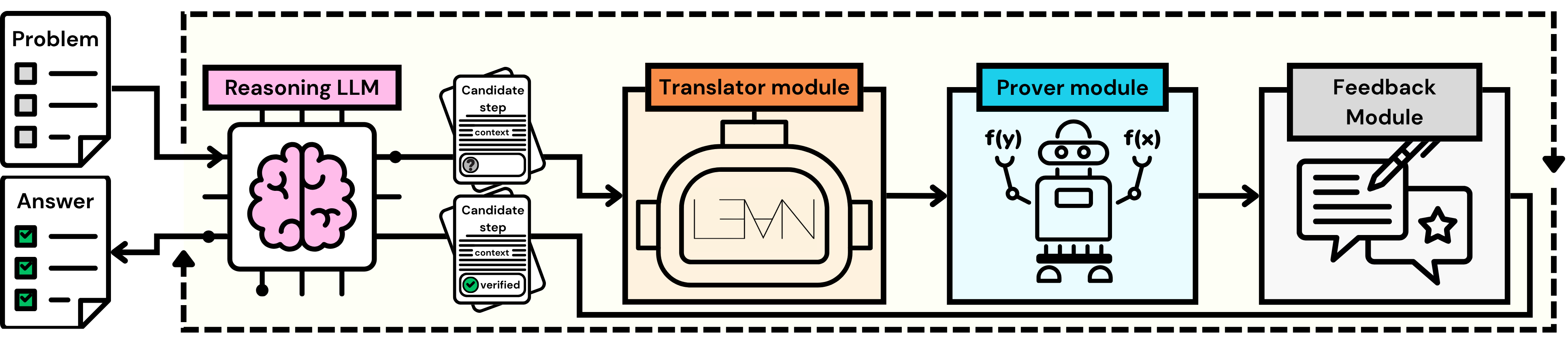
Hermes is a single-step formal verifier designed to be plugged into a general-purpose
LLM agent (e.g. via LangGraph). It exposes one
tool — verify_one_mathematical_step — that takes an English-language proof step, autoformalizes
it into Lean 4, attempts a formal proof, and returns one of three labels back to the agent:
| Label | Meaning |
|---|---|
**CORRECT** | The step was successfully proven in Lean 4. |
**INCORRECT** | Lean 4 proved the negation of the step (i.e. the agent hallucinated). |
**VERIFICATION FAILURE** | Lean 4 was unable to prove or disprove the step (inconclusive). |
The goal is to let any base model "tool-call" Hermes whenever it is about to make a non-trivial mathematical claim, so hallucinated arithmetic and algebra can be caught before they propagate through the rest of the reasoning trace.
Accuracy (%) of different reasoning models under four inference strategies: zero-shot CoT (@1), majority vote (@5), reward-model selection (Best-of-5), and HERMES (@1 and @5). Results are reported on four benchmarks: MATH500 (MATH), AIME'25 (AIME), CollegeMath (CM), and HARDMath2 (HM2). The best and second-best results are bolded and underlined, respectively.
| Method | Qwen3-8B | OpenAI o3-mini | DeepSeek-V3.2 | |||||||||
|---|---|---|---|---|---|---|---|---|---|---|---|---|
| MATH | AIME | CM | HM2 | MATH | AIME | CM | HM2 | MATH | AIME | CM | HM2 | |
| CoT@1 | 84.8 | 20.0 | 69.1 | 4.3 | 95.8 | 63.3 | 75.2 | 23.2 | 95.8 | 50.0 | 79.8 | 25.6 |
| CoT@5+Majority | 87.0 | 16.7 | 70.3 | 4.7 | 96.8 | 70.0 | 76.0 | 22.7 | 97.6 | 60.0 | 80.8 | 26.1 |
| CoT@5+Skywork | 91.0 | 30.0 | 72.0 | 5.7 | 96.8 | 83.3 | 76.1 | 29.4 | 97.4 | 53.3 | 80.4 | 30.8 |
| CoT@5+ArmoRM | 88.6 | 30.0 | 72.4 | 5.2 | 96.2 | 76.7 | 76.1 | 28.4 | 97.2 | 53.3 | 80.3 | 28.4 |
| CoT@5+Shepherd | 87.8 | 23.3 | 70.2 | 5.7 | 96.4 | 80.0 | 75.7 | 25.6 | 97.0 | 60.0 | 80.4 | 27.8 |
| CoT@5+RLHFlow | 84.0 | 20.0 | 69.4 | 5.7 | 95.8 | 70.0 | 75.9 | 28.4 | 97.2 | 60.0 | 80.3 | 24.6 |
| Lean-based methods | ||||||||||||
| CoT@5+Safe | 89.4 | 23.3 | 72.4 | 5.7 | 96.0 | 83.3 | 75.7 | 26.1 | 96.2 | 56.7 | 80.0 | 28.9 |
| CoT@5+Safe* | 89.4 | 23.3 | 72.5 | 6.2 | 96.8 | 83.3 | 75.8 | 25.6 | 96.6 | 60.0 | 80.1 | 30.3 |
| HERMES @1 | 91.2 | 30.0 | 73.0 | 6.6 | 97.2 | 86.7 | 78.9 | 31.3 | 98.4 | 70.0 | 83.3 | 33.6 |
| HERMES@5 +Majority | 93.0 | 33.3 | 75.8 | 7.6 | 97.0 | 86.7 | 79.4 | 31.8 | 98.6 | 76.7 | 85.2 | 35.1 |
| HERMES@5 +Skywork | 94.6 | 43.3 | 77.4 | 10.0 | 97.0 | 86.7 | 79.2 | 31.3 | 98.2 | 80.0 | 84.0 | 36.5 |
Note on reward-model integration. This repository ships only the Hermes verifier and agent loop. The reward-model rows above (
+Skywork,+ArmoRM,+Shepherd,+RLHFlow, etc.) score Hermes-generated CoT traces with an external reward model, which is a separate pipeline that is not included here. To reproduce those numbers, generate@5CoT samples with Hermes and then score / select among them following the instructions in each reward model's own documentation
Optionally, Hermes also keeps an embedding-backed memory of previously verified claims
(HuggingFaceEmbeddings + langgraph.store.memory.InMemoryStore), so subsequent calls can
pull in relevant prerequisites as Lean-side context.
HERMES/
├── hermes.py                  # HermesReasoner tool (the public entry point)
├── demo.py                    # End-to-end demo: DeepSeek-V4 reasoning LLM + Hermes on one problem
├── utils.py                   # Soft timeouts + scheduler helpers
├── multithread_support.py     # Process-based timeouts (legacy helper)
├── test_repl.py               # Smoke test that the Lean 4 REPL is reachable
├── setup.json                 # Selects translator / prover config files
├── repl                       # Directory containing the REPL for running Lean 4 code
├── configs/
│   ├── lean4_server.py        # Lean4ServerScheduler settings
│   ├── translators/           # Autoformalizer model configs (e.g. DeepSeek)
│   └── provers/               # Prover model configs (e.g. DeepSeek)
├── prompts/                   # Prompt templates (zero-shot CoT, formalize, check_answer)
├── models/                    # Translator / prover / auxiliary LLM wrappers
│   ├── translator_model.py
│   ├── prover_model.py
│   ├── backtranslator.py
│   ├── auxiliary_llm.py
│   ├── base_llm.py
│   ├── llm_client.py
│   └── answer_verifier.py
├── prover/                    # Lean 4 REPL bridge + workers (adapted from Goedel-Prover-V2)
│   ├── lean/                  # verifier.py, proof.py, ast_parser.py
│   ├── workers/               # ProcessScheduler etc.
│   ├── algorithms/            # Sampling / RMaxTS search strategies
│   ├── summarize.py
│   └── utils.py
├── utils/
│   └── models.py              # Legacy vLLM / OpenAI helpers
├── requirements.txt
├── LICENSE
└── README.md
resource.RLIMIT_AS and
killall; macOS / Windows are not officially supported but may work for the Python side)../repl toolchain.DEEPSEEK_API_KEY env var) or OpenAI, orvllm serve <model> --host 0.0.0.0 --port 2000).Follow the official Lean 4 install guide
(elan is the recommended way). Pin the toolchain to the version expected by your prover/translator model.
Clone and build REPL:
git clone https://github.com/aziksh-ospanov/repl.git
cd repl
lake build
Quick sanity check that the Python layer can talk to Lean:
python test_repl.py
python -m venv .venv && source .venv/bin/activate
pip install -r requirements.txt
Note:
vllm/torchare only needed if you host the translator or prover models locally. If you only call hosted APIs (DeepSeek, OpenAI), you can comment those lines out inrequirements.txt.
For the included DeepSeek configs:
export DEEPSEEK_API_KEY="sk-..."
The simplest entry point is demo.py, which builds a langgraph ReAct agent driven by
DeepSeek Chat and hands it the Hermes tool:
export DEEPSEEK_API_KEY="sk-..."
python demo.py
By default the demo asks the agent to "Prove that 2+2=4" — Hermes should report **CORRECT**
and the agent should refuse / correct itself.
To run on your own problem, edit the problem = '...' string at the bottom of demo.py. Note that agent returns a conversation between an agent and Lean, make sure to customize your own wrappers to extract necessary outputs.
HermesReasoner is a standard langchain_core.tools.BaseTool, so it drops into any
LangChain / LangGraph agent the same way as a built-in tool.
from langgraph.prebuilt import create_react_agent
from langchain_deepseek import ChatDeepSeek

from prover.utils import load_config
from prover.lean.verifier import Lean4ServerScheduler
from hermes import HermesReasoner

lean4server_cfg = load_config('configs/lean4_server.py')

scheduler = Lean4ServerScheduler(
    max_concurrent_requests=lean4server_cfg.get("lean_max_concurrent_requests", 4),
    timeout=lean4server_cfg.get("lean_timeout", 120),
    memory_limit=lean4server_cfg.get("lean_memory_limit", 10),
    name=lean4server_cfg.get("name", 'test-server'),
)

reasoner = HermesReasoner(
    scheduler=scheduler,
    translator_config='configs/translators/deepseek_v4_flash.py',
    prover_config='configs/provers/deepseek_v4_flash.py',
    embedding_model=None,       # set to a HuggingFaceEmbeddings(...) to enable memory
    user_id='abc123',
)

agent = create_react_agent(
    model=ChatDeepSeek(model='deepseek-chat', temperature=0.95, max_tokens=8192),
    tools=[reasoner],
    prompt="You are a careful mathematician. Verify every critical step with `verify_one_mathematical_step`.",
)

try:
    result = agent.invoke(
        {"messages": [{"role": "user", "content": "Prove that the sum of the first n odd integers is n^2."}]},
        {"recursion_limit": 100},
    )
    print(result)
finally:
    scheduler.close()
setup.json selects which translator and prover configs are loaded by demo.py:
{
  "translator": "configs/translators/deepseek_v4_flash.py",
  "prover":     "configs/provers/deepseek_v4_flash.py"
}
Each config is an importable Python file that exposes a handful of module-level
variables (model_path, model_args, api_key, base_url, api_mode, port,
pass_k, translation_prompt / theorem_prompt, …). To swap in a different model:
configs/translators/deepseek_v4_flash.py, set api_mode = True, base_url to the
full URL, and update model_path to the model identifier.api_mode = False, base_url = '0.0.0.0' (or your host),
port = 2000 (or whichever port vllm serve is listening on), and model_path to the
identifier you served.The same pattern applies to provers under configs/provers/.
Lean-side settings (concurrency, per-call timeout, RSS limit) live in
configs/lean4_server.py.
When you pass an embedding_model to HermesReasoner, every successfully verified step is
summarized into a single claim and stored in a langgraph in-memory vector store. On
subsequent calls, the top-k semantically related claims are prepended to problem statement, letting downstream proofs reuse earlier results.
from langchain_huggingface.embeddings import HuggingFaceEmbeddings

embedding_model = HuggingFaceEmbeddings(
    model_name="Qwen/Qwen3-Embedding-0.6B",
    model_kwargs={'device': 'cuda:0'},
    encode_kwargs={"normalize_embeddings": True},
)

reasoner = HermesReasoner(
    scheduler=scheduler,
    translator_config='configs/translators/deepseek_v4_flash.py',
    prover_config='configs/provers/deepseek_v4_flash.py',
    embedding_model=embedding_model,
    user_id='abc123',
)
SCHEDULER FAILURE printed and tool returns VERIFICATION FAILURE — the
Lean4ServerScheduler was not passed in (or has already been closed). Make sure scheduler= is set on HermesReasoner and that scheduler.close() runs in a finally block after the agent finishes.lake exe repl errors / FileNotFoundError — the Lean REPL workspace
(default ./repl/) is not present. Adjust DEFAULT_LEAN_WORKSPACE in prover/lean/verifier.py if your layout differs.n > 1 errors — the DeepSeek hosted API only supports n=1. The translator/prover wrappers detect api.deepseek.com and loop internally; if you hit this against another endpoint, set api_mode=True in your config.AuxiliaryLLM requires model_path ValueError — happens when the auxiliary-LLM config (used for backtranslation / memory summarization) isn't resolvable. Either set auxiliary_llm_config=... on HermesReasoner explicitly, or make sure your translator config has a valid model_path.@inproceedings{
ospanov2026hermes,
title={{HERMES}: Towards Efficient and Verifiable Mathematical Reasoning in {LLM}s},
author={Azim Ospanov and Zijin Feng and Jiacheng Sun and Haoli Bai and SHEN XIN and Farzan Farnia},
booktitle={Forty-third International Conference on Machine Learning},
year={2026},
url={https://openreview.net/forum?id=w7BZcUc0fJ}
}
Released under the MIT License.
Azim Ospanov 1,2, Zijin Feng 1, Jiacheng Sun 1, Haoli Bai 1, Xin Shen 3, Farzan Farnia 2
1 Huawei Foundation Model Department, 2 The Chinese University of Hong Kong, 3 Celia Team
This repository accompanies "HERMES: Towards Efficient and Verifiable Mathematical Reasoning in LLMs" work published at ICML 2026. The codebase contains the agent implemented with LangChain and additional documentation on how to set it up with Lean4. The high-level overview of the method is below:
Hermes is a single-step formal verifier designed to be plugged into a general-purpose
LLM agent (e.g. via LangGraph). It exposes one
tool — verify_one_mathematical_step — that takes an English-language proof step, autoformalizes
it into Lean 4, attempts a formal proof, and returns one of three labels back to the agent:
| Label | Meaning |
|---|---|
**CORRECT** | The step was successfully proven in Lean 4. |
**INCORRECT** | Lean 4 proved the negation of the step (i.e. the agent hallucinated). |
**VERIFICATION FAILURE** | Lean 4 was unable to prove or disprove the step (inconclusive). |
The goal is to let any base model "tool-call" Hermes whenever it is about to make a non-trivial mathematical claim, so hallucinated arithmetic and algebra can be caught before they propagate through the rest of the reasoning trace.
Accuracy (%) of different reasoning models under four inference strategies: zero-shot CoT (@1), majority vote (@5), reward-model selection (Best-of-5), and HERMES (@1 and @5). Results are reported on four benchmarks: MATH500 (MATH), AIME'25 (AIME), CollegeMath (CM), and HARDMath2 (HM2). The best and second-best results are bolded and underlined, respectively.
| Method | Qwen3-8B | OpenAI o3-mini | DeepSeek-V3.2 | |||||||||
|---|---|---|---|---|---|---|---|---|---|---|---|---|
| MATH | AIME | CM | HM2 | MATH | AIME | CM | HM2 | MATH | AIME | CM | HM2 | |
| CoT@1 | 84.8 | 20.0 | 69.1 | 4.3 | 95.8 | 63.3 | 75.2 | 23.2 | 95.8 | 50.0 | 79.8 | 25.6 |
| CoT@5+Majority | 87.0 | 16.7 | 70.3 | 4.7 | 96.8 | 70.0 | 76.0 | 22.7 | 97.6 | 60.0 | 80.8 | 26.1 |
| CoT@5+Skywork | 91.0 | 30.0 | 72.0 | 5.7 | 96.8 | 83.3 | 76.1 | 29.4 | 97.4 | 53.3 | 80.4 | 30.8 |
| CoT@5+ArmoRM | 88.6 | 30.0 | 72.4 | 5.2 | 96.2 | 76.7 | 76.1 | 28.4 | 97.2 | 53.3 | 80.3 | 28.4 |
| CoT@5+Shepherd | 87.8 | 23.3 | 70.2 | 5.7 | 96.4 | 80.0 | 75.7 | 25.6 | 97.0 | 60.0 | 80.4 | 27.8 |
| CoT@5+RLHFlow | 84.0 | 20.0 | 69.4 | 5.7 | 95.8 | 70.0 | 75.9 | 28.4 | 97.2 | 60.0 | 80.3 | 24.6 |
| Lean-based methods | ||||||||||||
| CoT@5+Safe | 89.4 | 23.3 | 72.4 | 5.7 | 96.0 | 83.3 | 75.7 | 26.1 | 96.2 | 56.7 | 80.0 | 28.9 |
| CoT@5+Safe* | 89.4 | 23.3 | 72.5 | 6.2 | 96.8 | 83.3 | 75.8 | 25.6 | 96.6 | 60.0 | 80.1 | 30.3 |
| HERMES @1 | 91.2 | 30.0 | 73.0 | 6.6 | 97.2 | 86.7 | 78.9 | 31.3 | 98.4 | 70.0 | 83.3 | 33.6 |
| HERMES@5 +Majority | 93.0 | 33.3 | 75.8 | 7.6 | 97.0 | 86.7 | 79.4 | 31.8 | 98.6 | 76.7 | 85.2 | 35.1 |
| HERMES@5 +Skywork | 94.6 | 43.3 | 77.4 | 10.0 | 97.0 | 86.7 | 79.2 | 31.3 | 98.2 | 80.0 | 84.0 | 36.5 |
Note on reward-model integration. This repository ships only the Hermes verifier and agent loop. The reward-model rows above (
+Skywork,+ArmoRM,+Shepherd,+RLHFlow, etc.) score Hermes-generated CoT traces with an external reward model, which is a separate pipeline that is not included here. To reproduce those numbers, generate@5CoT samples with Hermes and then score / select among them following the instructions in each reward model's own documentation
Optionally, Hermes also keeps an embedding-backed memory of previously verified claims
(HuggingFaceEmbeddings + langgraph.store.memory.InMemoryStore), so subsequent calls can
pull in relevant prerequisites as Lean-side context.
HERMES/
├── hermes.py                  # HermesReasoner tool (the public entry point)
├── demo.py                    # End-to-end demo: DeepSeek-V4 reasoning LLM + Hermes on one problem
├── utils.py                   # Soft timeouts + scheduler helpers
├── multithread_support.py     # Process-based timeouts (legacy helper)
├── test_repl.py               # Smoke test that the Lean 4 REPL is reachable
├── setup.json                 # Selects translator / prover config files
├── repl                       # Directory containing the REPL for running Lean 4 code
├── configs/
│   ├── lean4_server.py        # Lean4ServerScheduler settings
│   ├── translators/           # Autoformalizer model configs (e.g. DeepSeek)
│   └── provers/               # Prover model configs (e.g. DeepSeek)
├── prompts/                   # Prompt templates (zero-shot CoT, formalize, check_answer)
├── models/                    # Translator / prover / auxiliary LLM wrappers
│   ├── translator_model.py
│   ├── prover_model.py
│   ├── backtranslator.py
│   ├── auxiliary_llm.py
│   ├── base_llm.py
│   ├── llm_client.py
│   └── answer_verifier.py
├── prover/                    # Lean 4 REPL bridge + workers (adapted from Goedel-Prover-V2)
│   ├── lean/                  # verifier.py, proof.py, ast_parser.py
│   ├── workers/               # ProcessScheduler etc.
│   ├── algorithms/            # Sampling / RMaxTS search strategies
│   ├── summarize.py
│   └── utils.py
├── utils/
│   └── models.py              # Legacy vLLM / OpenAI helpers
├── requirements.txt
├── LICENSE
└── README.md
resource.RLIMIT_AS and
killall; macOS / Windows are not officially supported but may work for the Python side)../repl toolchain.DEEPSEEK_API_KEY env var) or OpenAI, orvllm serve <model> --host 0.0.0.0 --port 2000).Follow the official Lean 4 install guide
(elan is the recommended way). Pin the toolchain to the version expected by your prover/translator model.
Clone and build REPL:
git clone https://github.com/aziksh-ospanov/repl.git
cd repl
lake build
Quick sanity check that the Python layer can talk to Lean:
python test_repl.py
python -m venv .venv && source .venv/bin/activate
pip install -r requirements.txt
Note:
vllm/torchare only needed if you host the translator or prover models locally. If you only call hosted APIs (DeepSeek, OpenAI), you can comment those lines out inrequirements.txt.
For the included DeepSeek configs:
export DEEPSEEK_API_KEY="sk-..."
The simplest entry point is demo.py, which builds a langgraph ReAct agent driven by
DeepSeek Chat and hands it the Hermes tool:
export DEEPSEEK_API_KEY="sk-..."
python demo.py
By default the demo asks the agent to "Prove that 2+2=4" — Hermes should report **CORRECT**
and the agent should refuse / correct itself.
To run on your own problem, edit the problem = '...' string at the bottom of demo.py. Note that agent returns a conversation between an agent and Lean, make sure to customize your own wrappers to extract necessary outputs.
HermesReasoner is a standard langchain_core.tools.BaseTool, so it drops into any
LangChain / LangGraph agent the same way as a built-in tool.
from langgraph.prebuilt import create_react_agent
from langchain_deepseek import ChatDeepSeek

from prover.utils import load_config
from prover.lean.verifier import Lean4ServerScheduler
from hermes import HermesReasoner

lean4server_cfg = load_config('configs/lean4_server.py')

scheduler = Lean4ServerScheduler(
    max_concurrent_requests=lean4server_cfg.get("lean_max_concurrent_requests", 4),
    timeout=lean4server_cfg.get("lean_timeout", 120),
    memory_limit=lean4server_cfg.get("lean_memory_limit", 10),
    name=lean4server_cfg.get("name", 'test-server'),
)

reasoner = HermesReasoner(
    scheduler=scheduler,
    translator_config='configs/translators/deepseek_v4_flash.py',
    prover_config='configs/provers/deepseek_v4_flash.py',
    embedding_model=None,       # set to a HuggingFaceEmbeddings(...) to enable memory
    user_id='abc123',
)

agent = create_react_agent(
    model=ChatDeepSeek(model='deepseek-chat', temperature=0.95, max_tokens=8192),
    tools=[reasoner],
    prompt="You are a careful mathematician. Verify every critical step with `verify_one_mathematical_step`.",
)

try:
    result = agent.invoke(
        {"messages": [{"role": "user", "content": "Prove that the sum of the first n odd integers is n^2."}]},
        {"recursion_limit": 100},
    )
    print(result)
finally:
    scheduler.close()
setup.json selects which translator and prover configs are loaded by demo.py:
{
  "translator": "configs/translators/deepseek_v4_flash.py",
  "prover":     "configs/provers/deepseek_v4_flash.py"
}
Each config is an importable Python file that exposes a handful of module-level
variables (model_path, model_args, api_key, base_url, api_mode, port,
pass_k, translation_prompt / theorem_prompt, …). To swap in a different model:
configs/translators/deepseek_v4_flash.py, set api_mode = True, base_url to the
full URL, and update model_path to the model identifier.api_mode = False, base_url = '0.0.0.0' (or your host),
port = 2000 (or whichever port vllm serve is listening on), and model_path to the
identifier you served.The same pattern applies to provers under configs/provers/.
Lean-side settings (concurrency, per-call timeout, RSS limit) live in
configs/lean4_server.py.
When you pass an embedding_model to HermesReasoner, every successfully verified step is
summarized into a single claim and stored in a langgraph in-memory vector store. On
subsequent calls, the top-k semantically related claims are prepended to problem statement, letting downstream proofs reuse earlier results.
from langchain_huggingface.embeddings import HuggingFaceEmbeddings

embedding_model = HuggingFaceEmbeddings(
    model_name="Qwen/Qwen3-Embedding-0.6B",
    model_kwargs={'device': 'cuda:0'},
    encode_kwargs={"normalize_embeddings": True},
)

reasoner = HermesReasoner(
    scheduler=scheduler,
    translator_config='configs/translators/deepseek_v4_flash.py',
    prover_config='configs/provers/deepseek_v4_flash.py',
    embedding_model=embedding_model,
    user_id='abc123',
)
SCHEDULER FAILURE printed and tool returns VERIFICATION FAILURE — the
Lean4ServerScheduler was not passed in (or has already been closed). Make sure scheduler= is set on HermesReasoner and that scheduler.close() runs in a finally block after the agent finishes.lake exe repl errors / FileNotFoundError — the Lean REPL workspace
(default ./repl/) is not present. Adjust DEFAULT_LEAN_WORKSPACE in prover/lean/verifier.py if your layout differs.n > 1 errors — the DeepSeek hosted API only supports n=1. The translator/prover wrappers detect api.deepseek.com and loop internally; if you hit this against another endpoint, set api_mode=True in your config.AuxiliaryLLM requires model_path ValueError — happens when the auxiliary-LLM config (used for backtranslation / memory summarization) isn't resolvable. Either set auxiliary_llm_config=... on HermesReasoner explicitly, or make sure your translator config has a valid model_path.@inproceedings{
ospanov2026hermes,
title={{HERMES}: Towards Efficient and Verifiable Mathematical Reasoning in {LLM}s},
author={Azim Ospanov and Zijin Feng and Jiacheng Sun and Haoli Bai and SHEN XIN and Farzan Farnia},
booktitle={Forty-third International Conference on Machine Learning},
year={2026},
url={https://openreview.net/forum?id=w7BZcUc0fJ}
}
Released under the MIT License.






