A tool to run web applications on AWS Lambda
AWS Lambda Web Adapter allows developers to build web apps (http api) with familiar frameworks (e.g. Express.js, Next.js, Flask, SpringBoot, ASP.NET and Laravel, anything speaks HTTP 1.1/1.0) and run it on AWS Lambda. The same docker image can run on AWS Lambda, Amazon EC2, AWS Fargate, and local computers.
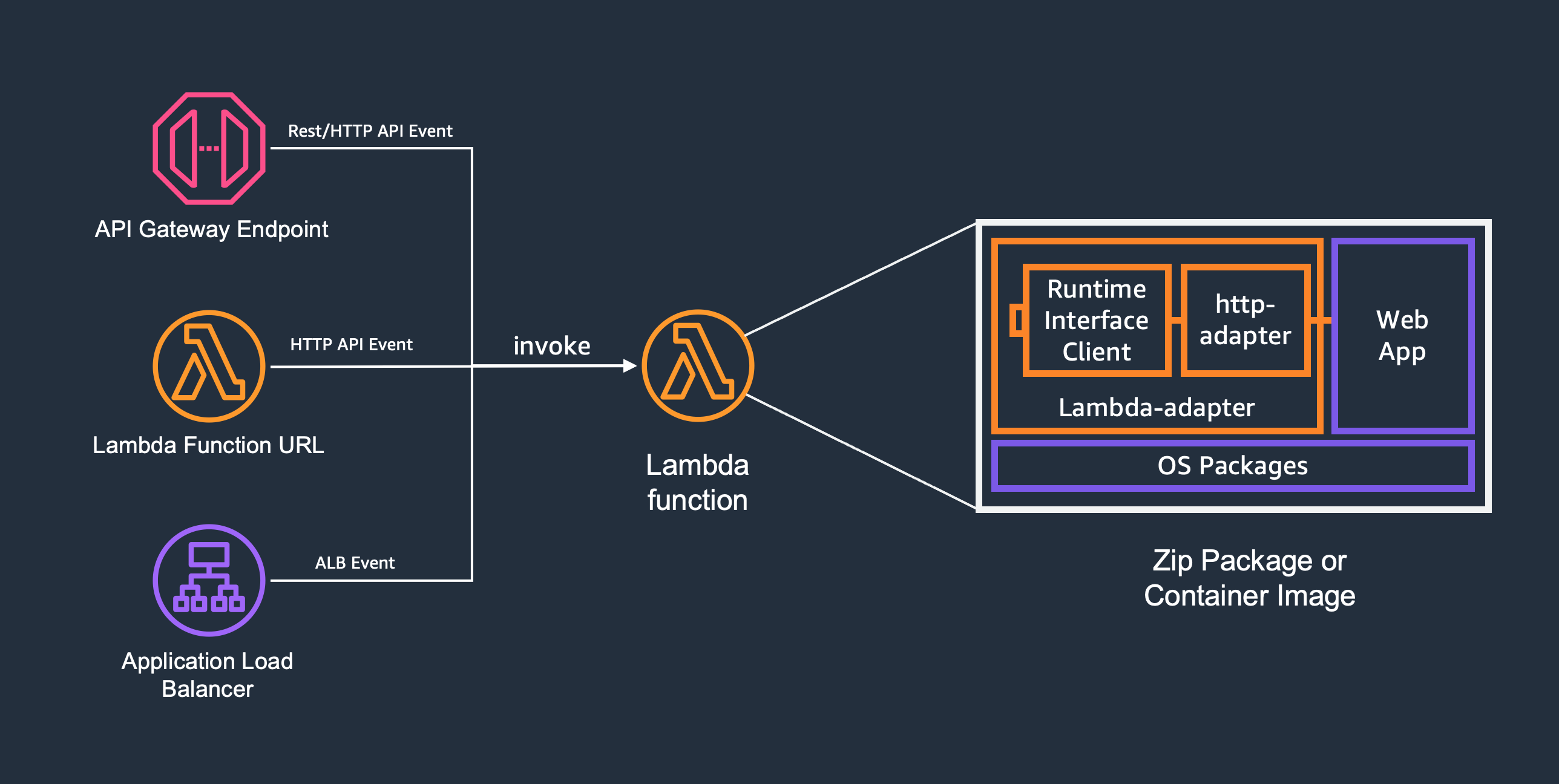
Add one line to your Dockerfile:
COPY --from=public.ecr.aws/awsguru/aws-lambda-adapter:1.1.0 /lambda-adapter /opt/extensions/lambda-adapter
Pre-compiled multi-arch images (x86_64 and arm64) are available at public.ecr.aws/awsguru/aws-lambda-adapter. Non-AWS base images may be used since the Runtime Interface Client ships with the Lambda Web Adapter.
arn:aws:lambda:${AWS::Region}:753240598075:layer:LambdaAdapterLayerX86:30arn:aws:lambda:${AWS::Region}:753240598075:layer:LambdaAdapterLayerArm64:30AWS_LAMBDA_EXEC_WRAPPER to /opt/bootstraprun.sh👉 Zip Packages guide (includes AWS China region ARNs and Windows caveats)
The readiness check port/path and traffic port can be configured using environment variables. These environment variables can be defined either within docker file or as Lambda function configuration.
| Environment Variable | Description | Default |
|---|---|---|
| AWS_LWA_PORT | traffic port (falls back to PORT) | "8080" |
| AWS_LWA_READINESS_CHECK_PORT | readiness check port | AWS_LWA_PORT |
| AWS_LWA_READINESS_CHECK_PATH | readiness check path | "/" |
| AWS_LWA_READINESS_CHECK_PROTOCOL | readiness check protocol: "http" or "tcp" | "http" |
| AWS_LWA_READINESS_CHECK_HEALTHY_STATUS | HTTP status codes considered healthy (e.g., "200-399") | "100-499" |
| AWS_LWA_ASYNC_INIT | enable asynchronous initialization for long initialization functions; ignored under SnapStart and Provisioned Concurrency | "false" |
| AWS_LWA_REMOVE_BASE_PATH | base path to remove from the request path; strips exactly one leading occurrence on a segment boundary (with /api: /api/api/order->/api/order, /apiorder unchanged; trailing slash normalized) | None |
| AWS_LWA_ENABLE_COMPRESSION | enable gzip/br compression for response body (buffered mode only) | "false" |
| AWS_LWA_INVOKE_MODE | Lambda function invoke mode: "buffered" or "response_stream" | "buffered" |
| AWS_LWA_PASS_THROUGH_PATH | the path for receiving event payloads from non-http triggers | "/events" |
| AWS_LWA_AUTHORIZATION_SOURCE | a header name to be replaced to Authorization | None |
| AWS_LWA_ERROR_STATUS_CODES | HTTP status codes that will cause Lambda invocations to fail (e.g. "500,502-504") | None |
| AWS_LWA_LAMBDA_RUNTIME_API_PROXY | overwrites AWS_LAMBDA_RUNTIME_API to allow proxying request | None |
| AWS_LWA_SNAPSTART_BEFORE_CHECKPOINT_PATH | inner-app path the adapter POSTs to before a SnapStart snapshot (drain resources) | None |
| AWS_LWA_SNAPSTART_AFTER_RESTORE_PATH | inner-app path the adapter POSTs to after a SnapStart restore (reconnect/reseed) | None |
| AWS_LWA_POOL_IDLE_TIMEOUT_SECONDS | idle keep-alive (seconds, fractional allowed) for the adapter's connection to your app; 0 turns connection reuse off entirely | "4" |
| AWS_LWA_READINESS_CHECK_TIMEOUT_SECONDS | seconds (fractional allowed, e.g. 0.5) to wait for the app to report ready (cold-start init and after a SnapStart restore); on expiry the adapter FAILS (init fails and the runtime never starts; a restore fails) rather than serving. Unset, 0, or negative all mean wait indefinitely (a set-but-<=0 or malformed value is ignored with a warning). async_init keeps its own ~9.8s bound | unset / <=0 (unbounded) |
Deprecation Notice: The following non-namespaced environment variables are deprecated and will be removed in version 2.0:
HOST,READINESS_CHECK_PORT,READINESS_CHECK_PATH,READINESS_CHECK_PROTOCOL,REMOVE_BASE_PATH,ASYNC_INIT. Please migrate to theAWS_LWA_prefixed versions. Note:PORTis not deprecated and remains a supported fallback forAWS_LWA_PORT.Additionally,
AWS_LWA_READINESS_CHECK_MIN_UNHEALTHY_STATUShas been removed in 1.0. UseAWS_LWA_READINESS_CHECK_HEALTHY_STATUSinstead.
When your function uses Lambda SnapStart, the adapter can notify your web application at the snapshot boundary so it can drain and re-establish state (database connections, cached DNS, PRNG seeds, unique identifiers). Both hooks are opt-in and independent.
| Variable | When the adapter calls it | Use it to |
|---|---|---|
AWS_LWA_SNAPSTART_BEFORE_CHECKPOINT_PATH | Before the snapshot is taken | Drain/close resources that won't survive the snapshot |
AWS_LWA_SNAPSTART_AFTER_RESTORE_PATH | After restore, before serving traffic | Reconnect, refresh credentials, reseed randomness, regenerate unique IDs |
Each hook is an empty POST; your application must respond with a 2xx status.
A non-2xx response or a connection failure fails the SnapStart phase
(initialization for the before-checkpoint hook, restore for the after-restore hook)
instead of serving traffic against an improperly prepared application. The adapter
does not impose its own deadline on a hook — Lambda bounds both phases. Note that
Lambda allows the whole Restore phase only
10 seconds,
not your function timeout: the after-restore hook and the readiness check that follows
it share that window, and overrunning it fails the restore with
Lambda.SnapStartTimeoutException.
After restore, the adapter also automatically refreshes its own HTTP connection
to your application, so it never reuses a connection captured in the snapshot, and
then re-runs the readiness check before admitting traffic. By default this wait is
unbounded; set AWS_LWA_READINESS_CHECK_TIMEOUT_SECONDS (fractional seconds allowed)
to bound it, in which case a restore whose application does not report ready within
that timeout fails. A value above the 10-second Restore limit cannot take effect on
a restore — Lambda times the phase out first.
These hook paths are control-plane operations. External requests (via API Gateway or ALB) that target a configured hook path receive
403 Forbiddenand are never forwarded to your application, so choose paths your normal traffic does not use.Warning: that guard exists only while the adapter is in the request path — that is, when your application runs on Lambda behind the adapter. The hook routes are ordinary application routes that mutate state, so if you run the same image or application without the adapter (Amazon ECS, Amazon EKS, a local Docker host), they are reachable and unauthenticated. Don't expose them publicly in those deployments, or protect them yourself.
See the FastAPI with SnapStart example for a complete, deployable application.
👉 Examples organized by language
This project was inspired by several community projects.
All environment variables now use the AWS_LWA_ prefix. The old non-prefixed names still work but are deprecated and will be removed in version 2.0.
| Old (Deprecated) | New |
|---|---|
READINESS_CHECK_PORT | AWS_LWA_READINESS_CHECK_PORT |
READINESS_CHECK_PATH | AWS_LWA_READINESS_CHECK_PATH |
READINESS_CHECK_PROTOCOL | AWS_LWA_READINESS_CHECK_PROTOCOL |
REMOVE_BASE_PATH | AWS_LWA_REMOVE_BASE_PATH |
ASYNC_INIT | AWS_LWA_ASYNC_INIT |
Note:
PORTis not deprecated and remains a supported fallback forAWS_LWA_PORT.
AWS_LWA_READINESS_CHECK_MIN_UNHEALTHY_STATUS has been removed. Use AWS_LWA_READINESS_CHECK_HEALTHY_STATUS instead, which accepts comma-separated codes and ranges:
# Old
AWS_LWA_READINESS_CHECK_MIN_UNHEALTHY_STATUS=400

# New (equivalent)
AWS_LWA_READINESS_CHECK_HEALTHY_STATUS=100-399
Several projects also provide similar capabilities as language specific packages/frameworks.
See SECURITY for vulnerability reporting and CONTRIBUTING for more information.
This project is licensed under the Apache-2.0 License.
(top 24 of 34)
446 followers · starred Oct 2024
335 followers · starred Apr 2023
972 followers · starred Feb 2023
398 followers · starred Jun 2023
A tool to run web applications on AWS Lambda
AWS Lambda Web Adapter allows developers to build web apps (http api) with familiar frameworks (e.g. Express.js, Next.js, Flask, SpringBoot, ASP.NET and Laravel, anything speaks HTTP 1.1/1.0) and run it on AWS Lambda. The same docker image can run on AWS Lambda, Amazon EC2, AWS Fargate, and local computers.
Add one line to your Dockerfile:
COPY --from=public.ecr.aws/awsguru/aws-lambda-adapter:1.1.0 /lambda-adapter /opt/extensions/lambda-adapter
Pre-compiled multi-arch images (x86_64 and arm64) are available at public.ecr.aws/awsguru/aws-lambda-adapter. Non-AWS base images may be used since the Runtime Interface Client ships with the Lambda Web Adapter.
arn:aws:lambda:${AWS::Region}:753240598075:layer:LambdaAdapterLayerX86:30arn:aws:lambda:${AWS::Region}:753240598075:layer:LambdaAdapterLayerArm64:30AWS_LAMBDA_EXEC_WRAPPER to /opt/bootstraprun.sh👉 Zip Packages guide (includes AWS China region ARNs and Windows caveats)
The readiness check port/path and traffic port can be configured using environment variables. These environment variables can be defined either within docker file or as Lambda function configuration.
| Environment Variable | Description | Default |
|---|---|---|
| AWS_LWA_PORT | traffic port (falls back to PORT) | "8080" |
| AWS_LWA_READINESS_CHECK_PORT | readiness check port | AWS_LWA_PORT |
| AWS_LWA_READINESS_CHECK_PATH | readiness check path | "/" |
| AWS_LWA_READINESS_CHECK_PROTOCOL | readiness check protocol: "http" or "tcp" | "http" |
| AWS_LWA_READINESS_CHECK_HEALTHY_STATUS | HTTP status codes considered healthy (e.g., "200-399") | "100-499" |
| AWS_LWA_ASYNC_INIT | enable asynchronous initialization for long initialization functions; ignored under SnapStart and Provisioned Concurrency | "false" |
| AWS_LWA_REMOVE_BASE_PATH | base path to remove from the request path; strips exactly one leading occurrence on a segment boundary (with /api: /api/api/order->/api/order, /apiorder unchanged; trailing slash normalized) | None |
| AWS_LWA_ENABLE_COMPRESSION | enable gzip/br compression for response body (buffered mode only) | "false" |
| AWS_LWA_INVOKE_MODE | Lambda function invoke mode: "buffered" or "response_stream" | "buffered" |
| AWS_LWA_PASS_THROUGH_PATH | the path for receiving event payloads from non-http triggers | "/events" |
| AWS_LWA_AUTHORIZATION_SOURCE | a header name to be replaced to Authorization | None |
| AWS_LWA_ERROR_STATUS_CODES | HTTP status codes that will cause Lambda invocations to fail (e.g. "500,502-504") | None |
| AWS_LWA_LAMBDA_RUNTIME_API_PROXY | overwrites AWS_LAMBDA_RUNTIME_API to allow proxying request | None |
| AWS_LWA_SNAPSTART_BEFORE_CHECKPOINT_PATH | inner-app path the adapter POSTs to before a SnapStart snapshot (drain resources) | None |
| AWS_LWA_SNAPSTART_AFTER_RESTORE_PATH | inner-app path the adapter POSTs to after a SnapStart restore (reconnect/reseed) | None |
| AWS_LWA_POOL_IDLE_TIMEOUT_SECONDS | idle keep-alive (seconds, fractional allowed) for the adapter's connection to your app; 0 turns connection reuse off entirely | "4" |
| AWS_LWA_READINESS_CHECK_TIMEOUT_SECONDS | seconds (fractional allowed, e.g. 0.5) to wait for the app to report ready (cold-start init and after a SnapStart restore); on expiry the adapter FAILS (init fails and the runtime never starts; a restore fails) rather than serving. Unset, 0, or negative all mean wait indefinitely (a set-but-<=0 or malformed value is ignored with a warning). async_init keeps its own ~9.8s bound | unset / <=0 (unbounded) |
Deprecation Notice: The following non-namespaced environment variables are deprecated and will be removed in version 2.0:
HOST,READINESS_CHECK_PORT,READINESS_CHECK_PATH,READINESS_CHECK_PROTOCOL,REMOVE_BASE_PATH,ASYNC_INIT. Please migrate to theAWS_LWA_prefixed versions. Note:PORTis not deprecated and remains a supported fallback forAWS_LWA_PORT.Additionally,
AWS_LWA_READINESS_CHECK_MIN_UNHEALTHY_STATUShas been removed in 1.0. UseAWS_LWA_READINESS_CHECK_HEALTHY_STATUSinstead.
When your function uses Lambda SnapStart, the adapter can notify your web application at the snapshot boundary so it can drain and re-establish state (database connections, cached DNS, PRNG seeds, unique identifiers). Both hooks are opt-in and independent.
| Variable | When the adapter calls it | Use it to |
|---|---|---|
AWS_LWA_SNAPSTART_BEFORE_CHECKPOINT_PATH | Before the snapshot is taken | Drain/close resources that won't survive the snapshot |
AWS_LWA_SNAPSTART_AFTER_RESTORE_PATH | After restore, before serving traffic | Reconnect, refresh credentials, reseed randomness, regenerate unique IDs |
Each hook is an empty POST; your application must respond with a 2xx status.
A non-2xx response or a connection failure fails the SnapStart phase
(initialization for the before-checkpoint hook, restore for the after-restore hook)
instead of serving traffic against an improperly prepared application. The adapter
does not impose its own deadline on a hook — Lambda bounds both phases. Note that
Lambda allows the whole Restore phase only
10 seconds,
not your function timeout: the after-restore hook and the readiness check that follows
it share that window, and overrunning it fails the restore with
Lambda.SnapStartTimeoutException.
After restore, the adapter also automatically refreshes its own HTTP connection
to your application, so it never reuses a connection captured in the snapshot, and
then re-runs the readiness check before admitting traffic. By default this wait is
unbounded; set AWS_LWA_READINESS_CHECK_TIMEOUT_SECONDS (fractional seconds allowed)
to bound it, in which case a restore whose application does not report ready within
that timeout fails. A value above the 10-second Restore limit cannot take effect on
a restore — Lambda times the phase out first.
These hook paths are control-plane operations. External requests (via API Gateway or ALB) that target a configured hook path receive
403 Forbiddenand are never forwarded to your application, so choose paths your normal traffic does not use.Warning: that guard exists only while the adapter is in the request path — that is, when your application runs on Lambda behind the adapter. The hook routes are ordinary application routes that mutate state, so if you run the same image or application without the adapter (Amazon ECS, Amazon EKS, a local Docker host), they are reachable and unauthenticated. Don't expose them publicly in those deployments, or protect them yourself.
See the FastAPI with SnapStart example for a complete, deployable application.
👉 Examples organized by language
This project was inspired by several community projects.
All environment variables now use the AWS_LWA_ prefix. The old non-prefixed names still work but are deprecated and will be removed in version 2.0.
| Old (Deprecated) | New |
|---|---|
READINESS_CHECK_PORT | AWS_LWA_READINESS_CHECK_PORT |
READINESS_CHECK_PATH | AWS_LWA_READINESS_CHECK_PATH |
READINESS_CHECK_PROTOCOL | AWS_LWA_READINESS_CHECK_PROTOCOL |
REMOVE_BASE_PATH | AWS_LWA_REMOVE_BASE_PATH |
ASYNC_INIT | AWS_LWA_ASYNC_INIT |
Note:
PORTis not deprecated and remains a supported fallback forAWS_LWA_PORT.
AWS_LWA_READINESS_CHECK_MIN_UNHEALTHY_STATUS has been removed. Use AWS_LWA_READINESS_CHECK_HEALTHY_STATUS instead, which accepts comma-separated codes and ranges:
# Old
AWS_LWA_READINESS_CHECK_MIN_UNHEALTHY_STATUS=400

# New (equivalent)
AWS_LWA_READINESS_CHECK_HEALTHY_STATUS=100-399
Several projects also provide similar capabilities as language specific packages/frameworks.
See SECURITY for vulnerability reporting and CONTRIBUTING for more information.
This project is licensed under the Apache-2.0 License.
(top 24 of 34)
446 followers · starred Oct 2024
335 followers · starred Apr 2023
972 followers · starred Feb 2023
398 followers · starred Jun 2023