
File-based message queue for local agent-to-agent communication (Maildir-style)
See the codeREADME
Agent Message Queue (AMQ)
Messaging between coding agents.



AMQ lets two coding agents exchange messages through a shared directory. One agent asks for a review; the other reads the message and replies in the same thread. Messages are plain files, so the local queue needs no messaging server or database—and you do not have to relay each request yourself.
Try the queue in a fresh shell on macOS. This example uses two mailbox names; it does not start agents. Other installation methods →
brew install avivsinai/tap/amq
amq init --root .agent-mail/demo --agents alice,bob  # Create two mailboxes for demo.
amq send --root .agent-mail/demo --me alice --to bob --body "Please review the parser."
amq drain --root .agent-mail/demo --me bob --include-body
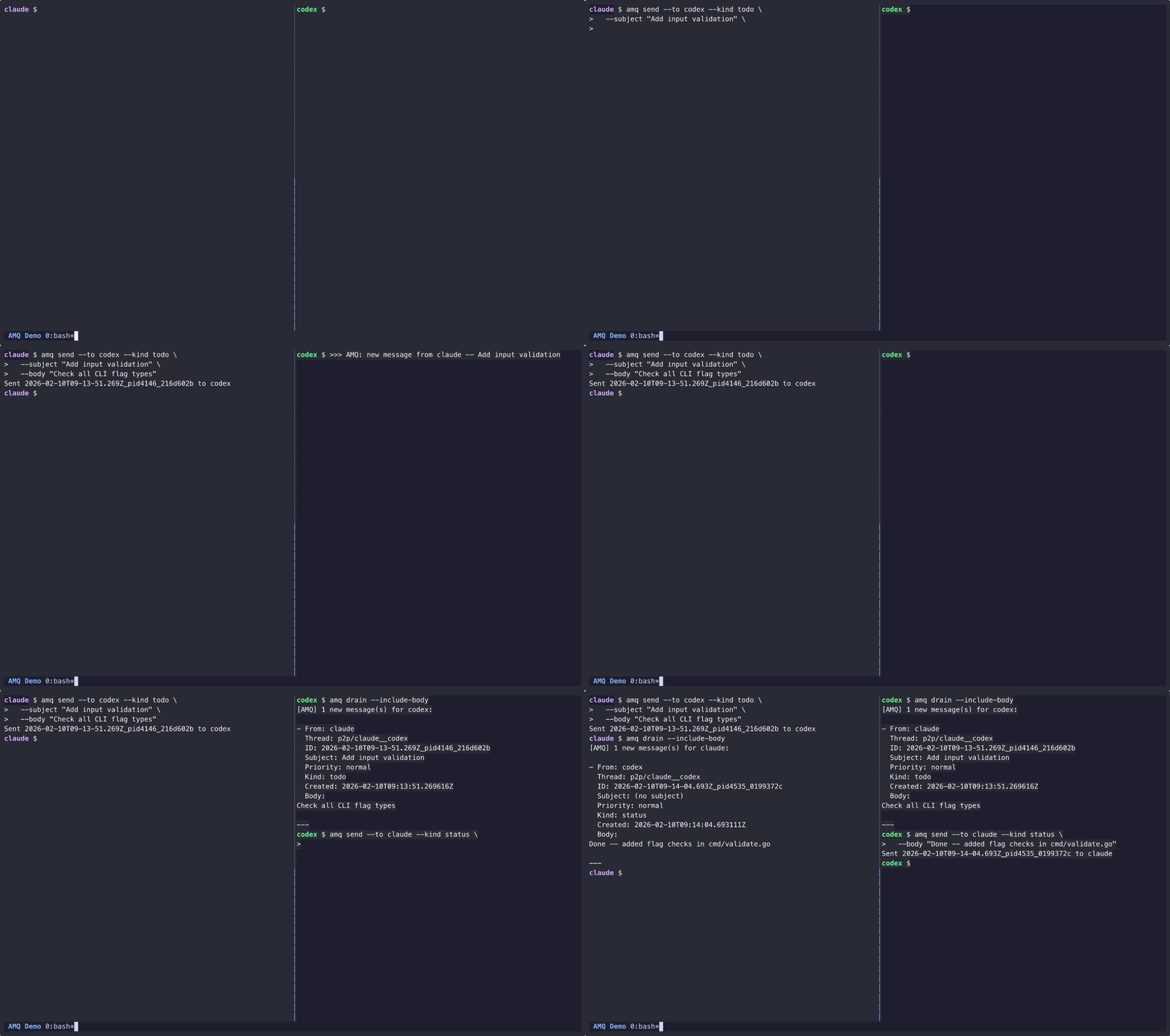
- Keep the conversation together. Reply in threads, attach context, and route messages between sessions or projects.
- Know what happened to a message. Receipts distinguish a queued message from one the recipient drained.
- Bring your own agents. Use the CLI from agent tools or scripts; optional wake notifications prompt running agents to check their inboxes.
- Keep control of the workflow. AMQ handles messages. You and your orchestration tools own tasks, worktrees, permissions, and merges.
Getting started
This walkthrough connects Claude Code and Codex CLI on one machine.
Install both agent CLIs and put claude and codex on PATH first.
Use macOS or Linux; on Windows, use WSL with the Linux binary for this
terminal workflow. Native Windows supports the core queue; see the
platform matrix.
1. Install the binary
On macOS:
brew install avivsinai/tap/amq
Or on macOS/Linux, review and run the installer:
curl -fsSL https://raw.githubusercontent.com/avivsinai/agent-message-queue/main/scripts/install.sh | bash
The script installs to a user-local directory without sudo and checks the
release checksum before extraction. Confirm the install with amq --version.
See Installation for manual downloads and source builds.
2. Install Skill
Install the agent instructions so each agent knows how to use AMQ:
npx skills add avivsinai/agent-message-queue -g -y
Restart the agents after installing. Other skill installation methods are available if you do not use npm.
3. Set up the project
In the repository where the agents will work:
amq setup
Select the agents and launcher, then confirm the preview. Setup writes the project configuration and creates the default session and its mailboxes.
4. Start both agents
amq launch
The first launch asks you to trust the launch plan. With tmux, cmux, or
ghostty, AMQ starts the agents in that terminal app. With the commands
backend, it prints one command per agent and exits with code 6 (action
required). Paste each complete command into a separate terminal; do not
shorten or rebuild it.
Start both agents before sending the first message. Messages that arrive
before a recipient's wake starts remain unread but do not trigger that new
wake. The recipient can still get them with amq drain --include-body.
Control a session from Buzz
Inside a running Claude Code or Codex session, type /amq-remote. The first
time, import that session's agent into Buzz Desktop. Each session has its own
agent; the ACP model amq-remote:<name> selects it. DM that agent from the
Buzz app or Desktop, and the DM runs in that session.
/amq-remote off disconnects it. See amq-remote.
5. Exchange a message
Ask Claude to run this command through its shell tool:
amq send --to codex --subject "Hello" --body "Can you see this?"
Ask Codex to check its inbox if it has not already responded to the notification:
amq list --new
amq drain --include-body
list previews new messages. drain reads them, moves them out of the new
inbox, and writes receipts. The output includes the sender and message body.
To reply in the same thread, use the ID from that output:
amq reply --id "<message-id>" --body "Yes, I can see it."
The launched agents already have their identity and session set. You do not
need to repeat --me or --root inside those sessions.
How it works
Each agent has an inbox and an outbox under a local queue root. A message contains a JSON header and a Markdown body. AMQ writes and syncs a temporary file, then publishes it with a rename: a reader sees a complete message or no message, not a partly written body.
A session is a separate queue. Routing checks help prevent a shell pinned to one session from changing another by mistake. A wake notification asks an agent to check its inbox; it is not evidence that the agent read or completed the request. See routing and message tracing for those contracts.
AMQ is for local agent coordination, not a distributed broker. The optional bridge companion exchanges messages between hosts; each host keeps control of its own queue.
Remote
The optional remote companion connects a running
session to its own Buzz agent. The default path is the session mailbox: a DM
arrives as an AMQ message from buzz, and the agent's reply is the answer.
--native and the relay are the other paths. It is a separate binary: amq
gains no socket. The Homebrew amq formula installs amq, amq-acp, and
amq-remote. Commands, flags, and exit codes are in that README. The design is
the remote-control ADR; pinned seams are
the compatibility manifest.
Documentation
| I want to… | Read |
|---|---|
| Install, update, or use another platform | Installation |
| Run agent pairs, isolate sessions, or supervise notifications | Co-op operations |
| Look up a command or flag | CLI reference |
| Diagnose delivery or wake problems | Wake operations · Trace |
| Attach to a running harness session | amq-remote |
| Build an integration or understand the design | Documentation index |
| Understand the trust model | Security |
Building on AMQ? Use the adapter contract, launch API, and extension metadata. amq-squad is a role-aware team launcher built on these primitives.
Contributing
See the contribution guide for development and review.
Contributor clones should install the git hooks
(./scripts/install-hooks.sh) so pushes run the static checks locally.
Use GitHub issues
for questions and bug reports. Follow the code of conduct
and report security issues through the security policy.
License
MIT.
Significant stargazers

103 followers · starred Apr 2026
Similar repos


Languages
Go
96.2%
Shell
2.5%
File-based message queue for local agent-to-agent communication (Maildir-style)
See the codeREADME
Agent Message Queue (AMQ)
Messaging between coding agents.
AMQ lets two coding agents exchange messages through a shared directory. One agent asks for a review; the other reads the message and replies in the same thread. Messages are plain files, so the local queue needs no messaging server or database—and you do not have to relay each request yourself.
Try the queue in a fresh shell on macOS. This example uses two mailbox names; it does not start agents. Other installation methods →
brew install avivsinai/tap/amq
amq init --root .agent-mail/demo --agents alice,bob  # Create two mailboxes for demo.
amq send --root .agent-mail/demo --me alice --to bob --body "Please review the parser."
amq drain --root .agent-mail/demo --me bob --include-body
- Keep the conversation together. Reply in threads, attach context, and route messages between sessions or projects.
- Know what happened to a message. Receipts distinguish a queued message from one the recipient drained.
- Bring your own agents. Use the CLI from agent tools or scripts; optional wake notifications prompt running agents to check their inboxes.
- Keep control of the workflow. AMQ handles messages. You and your orchestration tools own tasks, worktrees, permissions, and merges.
Getting started
This walkthrough connects Claude Code and Codex CLI on one machine.
Install both agent CLIs and put claude and codex on PATH first.
Use macOS or Linux; on Windows, use WSL with the Linux binary for this
terminal workflow. Native Windows supports the core queue; see the
platform matrix.
1. Install the binary
On macOS:
brew install avivsinai/tap/amq
Or on macOS/Linux, review and run the installer:
curl -fsSL https://raw.githubusercontent.com/avivsinai/agent-message-queue/main/scripts/install.sh | bash
The script installs to a user-local directory without sudo and checks the
release checksum before extraction. Confirm the install with amq --version.
See Installation for manual downloads and source builds.
2. Install Skill
Install the agent instructions so each agent knows how to use AMQ:
npx skills add avivsinai/agent-message-queue -g -y
Restart the agents after installing. Other skill installation methods are available if you do not use npm.
3. Set up the project
In the repository where the agents will work:
amq setup
Select the agents and launcher, then confirm the preview. Setup writes the project configuration and creates the default session and its mailboxes.
4. Start both agents
amq launch
The first launch asks you to trust the launch plan. With tmux, cmux, or
ghostty, AMQ starts the agents in that terminal app. With the commands
backend, it prints one command per agent and exits with code 6 (action
required). Paste each complete command into a separate terminal; do not
shorten or rebuild it.
Start both agents before sending the first message. Messages that arrive
before a recipient's wake starts remain unread but do not trigger that new
wake. The recipient can still get them with amq drain --include-body.
Control a session from Buzz
Inside a running Claude Code or Codex session, type /amq-remote. The first
time, import that session's agent into Buzz Desktop. Each session has its own
agent; the ACP model amq-remote:<name> selects it. DM that agent from the
Buzz app or Desktop, and the DM runs in that session.
/amq-remote off disconnects it. See amq-remote.
5. Exchange a message
Ask Claude to run this command through its shell tool:
amq send --to codex --subject "Hello" --body "Can you see this?"
Ask Codex to check its inbox if it has not already responded to the notification:
amq list --new
amq drain --include-body
list previews new messages. drain reads them, moves them out of the new
inbox, and writes receipts. The output includes the sender and message body.
To reply in the same thread, use the ID from that output:
amq reply --id "<message-id>" --body "Yes, I can see it."
The launched agents already have their identity and session set. You do not
need to repeat --me or --root inside those sessions.
How it works
Each agent has an inbox and an outbox under a local queue root. A message contains a JSON header and a Markdown body. AMQ writes and syncs a temporary file, then publishes it with a rename: a reader sees a complete message or no message, not a partly written body.
A session is a separate queue. Routing checks help prevent a shell pinned to one session from changing another by mistake. A wake notification asks an agent to check its inbox; it is not evidence that the agent read or completed the request. See routing and message tracing for those contracts.
AMQ is for local agent coordination, not a distributed broker. The optional bridge companion exchanges messages between hosts; each host keeps control of its own queue.
Remote
The optional remote companion connects a running
session to its own Buzz agent. The default path is the session mailbox: a DM
arrives as an AMQ message from buzz, and the agent's reply is the answer.
--native and the relay are the other paths. It is a separate binary: amq
gains no socket. The Homebrew amq formula installs amq, amq-acp, and
amq-remote. Commands, flags, and exit codes are in that README. The design is
the remote-control ADR; pinned seams are
the compatibility manifest.
Documentation
| I want to… | Read |
|---|---|
| Install, update, or use another platform | Installation |
| Run agent pairs, isolate sessions, or supervise notifications | Co-op operations |
| Look up a command or flag | CLI reference |
| Diagnose delivery or wake problems | Wake operations · Trace |
| Attach to a running harness session | amq-remote |
| Build an integration or understand the design | Documentation index |
| Understand the trust model | Security |
Building on AMQ? Use the adapter contract, launch API, and extension metadata. amq-squad is a role-aware team launcher built on these primitives.
Contributing
See the contribution guide for development and review.
Contributor clones should install the git hooks
(./scripts/install-hooks.sh) so pushes run the static checks locally.
Use GitHub issues
for questions and bug reports. Follow the code of conduct
and report security issues through the security policy.
License
MIT.
Similar repos
Significant stargazers
103 followers · starred Apr 2026
Languages
Go
96.2%
Shell
2.5%