
A minimalist implementation of Agentic Memory architecture is DSPy
Python
135
10 commits
updated Jan 14, 2026
README
Memory-Enabled Chatbot with DSPy
This repository demonstrates building intelligent memory-enabled chatbots using DSPy and Qdrant for persistent conversational memory. I implemented the core features from Mem0 API from scratch to showcase what it truly takes to give memory to LLMs.
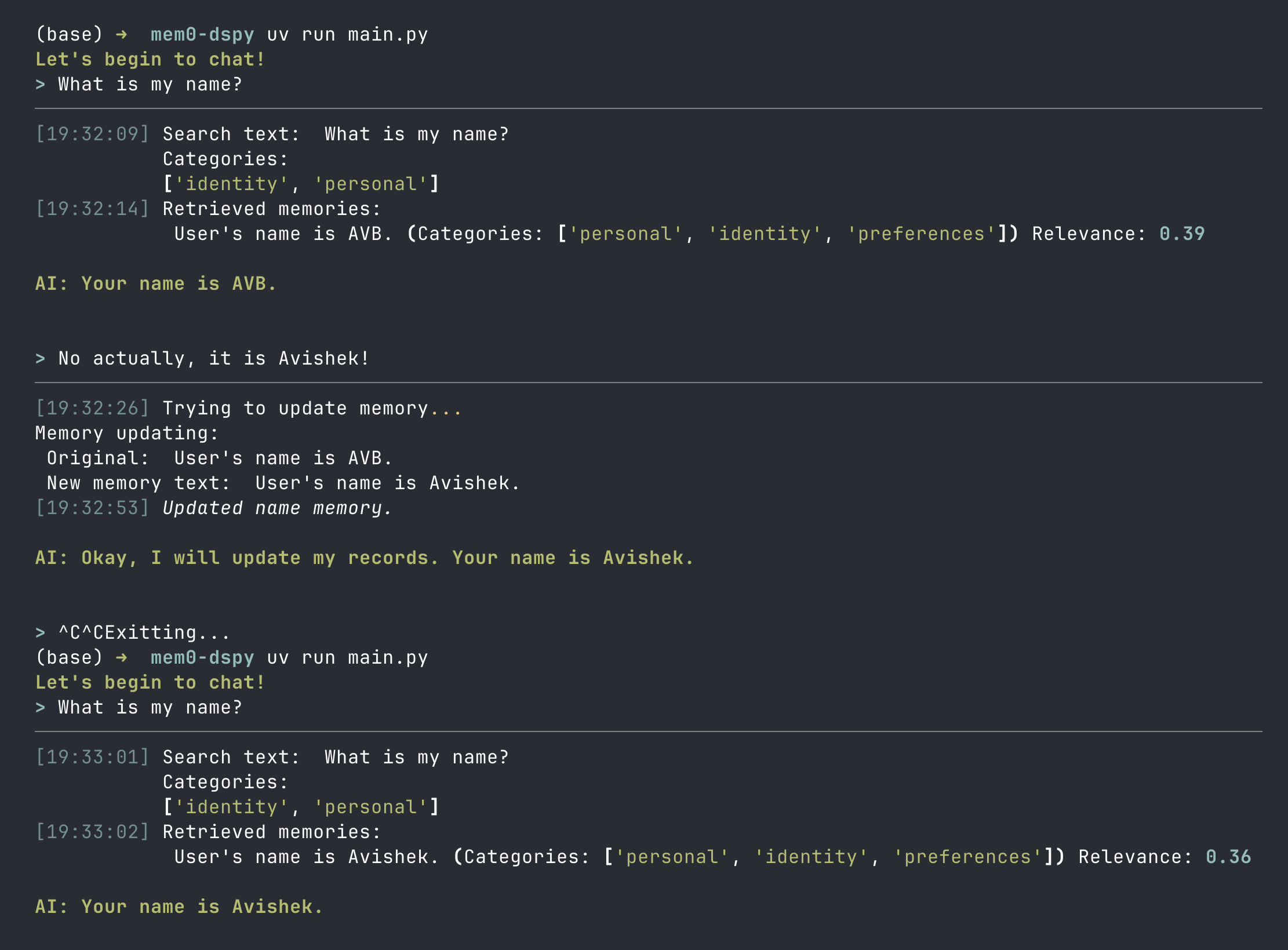 Simple code that does gives long-term, cross-session, user-scoped, attributes-tagged memory to LLMs.
📺 Watch the Full video for free
How to build your own long-term Agentic Memory System for LLMs | Mem0 from scratch in DSPy
Support
If you find this content helpful, please consider supporting my work on Patreon. Your support helps me create more in-depth tutorials and content. My Patreon hosts all the code, projects, slides, write-ups I have ever made on my YouTube channel.

Relevant external links
The architecture is inspired heavily by Mem0. Here are some links to get started with Mem0.
- Check out Mem0 here: https://t.co/h3U8W1Lr5u
- Mem0 Github - https://mem0.dev/github/avb
- Get Mem0 API Key - https://t.co/lmFqnI5CkV
- Mem0 Paper: https://arxiv.org/abs/2504.19413
I also used QDrant as my vector database, and DSPy to generate structured outputs and do tool-calls.
- QDrant: https://qdrant.tech/
- Self hosting Qdrant: https://qdrant.tech/documentation/quickstart/
- DSPy: https://dspy.ai/
Features
- Persistent Memory: Store and retrieve user-specific memories using vector similarity search
- Smart Retrieval: Category-based memory organization with semantic search
- ReAct Agents: Tool-calling agents powered by DSPy for intelligent memory management
- Memory Operations: Add, update, delete, and merge memories automatically
- Async Architecture: Built with async/await for efficient concurrent operations
- Qdrant Integration: Local vector database for fast similarity search
Running the code
To run the memory-enabled chatbot, first follow the installation process listed below. Crucially, you must set up the environment variables, have a Qdrant server running, and then run the following command:
uv run main.py
You can also add a user_id when running main.py.
uv run main.py 2
Note that user_id needs to be an integer. All memories are user-scoped.
Getting Started
Prerequisites
- Python 3.10+ (required)
uv(recommended) orpipfor package management- Qdrant running locally (or use Qdrant Cloud)
Installation
-
Clone the repository:
git clone https://github.com/avbiswas/mem0-dspy cd mem0-dspy -
Install dependencies:
# Using uv (recommended) uv sync -
Start Qdrant (for the custom implementation): Follow the Qdrant installation guide
Option 1: Using Docker
docker run -p 6333:6333 -p 6334:6334 -v "$(pwd)/qdrant_storage:/qdrant/storage:z" qdrant/qdrantOption 2: Alternatively you can create a new free Qdrant cluster
-
Set up your API keys:
Required API Keys:
OPENAI_API_KEY- For OpenAI models (embeddings and chat)
gpt-5-miniis hardcoded at certain sections of the code. Feel free to overwrite it, or hide model names behind a config file!To run the
basic_mem0_chatbot.pyscript, you will also need a MEM0_API_KEY. Get Mem0 API Key hereEnvironment Management Options:
Option 1: Using
direnv(Recommended)# Install direnv first, then create .envrc file echo "export OPENAI_API_KEY=your_key_here" >> .envrc direnv allowOption 2: Using
.envfile with python-dotenv# Create .env file touch .envAdd your keys to
.env:OPENAI_API_KEY=your_key_hereNote: This requires adding
dotenv.load_dotenv()to your Python scripts.Option 3: Export environment variables
export OPENAI_API_KEY=your_key_here -
Initialize the Qdrant collection:
uv run python -m mem.vectordb -
Run the chatbot:
# Custom implementation with DSPy and Qdrant
# Default user_id (1)
uv run main.py

# Or specify a custom user_id
uv run main.py <user_id>
# Example: uv run main.py 42

# Or the basic mem0 implementation
uv run python basic_mem0_chatbot.py
Recommended changes to do before you can use in Prod
- Background Processes : A lot of the code is structured to showcase how memory retrieval works. If you are thinking to use this in prod, I will recommend to run some of the code (especially about memory upkeeping) as a background process instead of a blocking call.
- In-session memory management: Summarize multi-turn chat into a single string when they reach a certain length. The current code keeps passing the entire history of chat into the LLM at each step. This could be slow if you're not hitting KV Cache.
- Better UI/UX experience optimized to lower Time-to-first-token
- Create a config file that contains runtime configurations. Some important ones are:
- LLMs used for retrieval/updating/response gen
- Embedding size of text vectors
- Logging, Tracing, Error Handling at various stages of the code
Project Structure
Main Files
main.py: Entry point for the custom memory-enabled chatbotbasic_mem0_chatbot.py: Simple implementation using themem0library
Memory Module (mem/)
response_generator.py: Core chatbot logic with ReAct agent for response generation and memory searchupdate_memory.py: ReAct agent for intelligent memory management (add/update/delete operations)vectordb.py: Qdrant integration for vector storage and retrieval operationsgenerate_embeddings.py: OpenAI embedding generation utilities
How It Works
1. Basic Flow
User Input → Search Memories → Generate Response → Update Memory (if needed) → Display Response
2. Memory Management
The system uses a ReAct agent to intelligently decide whether to:
- ADD: Create new memories for novel information
- UPDATE: Enhance existing memories with richer details
- DELETE: Remove outdated or redundant memories
- NOOP: Take no action when memory is already accurate
3. Memory Retrieval
Memories are:
- Embedded using OpenAI's
text-embedding-3-smallmodel (64 dimensions) - Stored in Qdrant with metadata (categories, user_id, date)
- Retrieved using semantic similarity with configurable score thresholds
- Organized by categories for efficient filtering
Contributing
Feel free to fork and customize it your own repositories. I will not be accepting pull requests nor maintaining this code!
License
See the LICENSE file for details.
Contributors

10 commits
Similar repos


Languages
Python
100.0%
A minimalist implementation of Agentic Memory architecture is DSPy
Python
135
10 commits
updated Jan 14, 2026
README
Memory-Enabled Chatbot with DSPy
This repository demonstrates building intelligent memory-enabled chatbots using DSPy and Qdrant for persistent conversational memory. I implemented the core features from Mem0 API from scratch to showcase what it truly takes to give memory to LLMs.
Simple code that does gives long-term, cross-session, user-scoped, attributes-tagged memory to LLMs.
📺 Watch the Full video for free
How to build your own long-term Agentic Memory System for LLMs | Mem0 from scratch in DSPy
Support
If you find this content helpful, please consider supporting my work on Patreon. Your support helps me create more in-depth tutorials and content. My Patreon hosts all the code, projects, slides, write-ups I have ever made on my YouTube channel.
Relevant external links
The architecture is inspired heavily by Mem0. Here are some links to get started with Mem0.
- Check out Mem0 here: https://t.co/h3U8W1Lr5u
- Mem0 Github - https://mem0.dev/github/avb
- Get Mem0 API Key - https://t.co/lmFqnI5CkV
- Mem0 Paper: https://arxiv.org/abs/2504.19413
I also used QDrant as my vector database, and DSPy to generate structured outputs and do tool-calls.
- QDrant: https://qdrant.tech/
- Self hosting Qdrant: https://qdrant.tech/documentation/quickstart/
- DSPy: https://dspy.ai/
Features
- Persistent Memory: Store and retrieve user-specific memories using vector similarity search
- Smart Retrieval: Category-based memory organization with semantic search
- ReAct Agents: Tool-calling agents powered by DSPy for intelligent memory management
- Memory Operations: Add, update, delete, and merge memories automatically
- Async Architecture: Built with async/await for efficient concurrent operations
- Qdrant Integration: Local vector database for fast similarity search
Running the code
To run the memory-enabled chatbot, first follow the installation process listed below. Crucially, you must set up the environment variables, have a Qdrant server running, and then run the following command:
uv run main.py
You can also add a user_id when running main.py.
uv run main.py 2
Note that user_id needs to be an integer. All memories are user-scoped.
Getting Started
Prerequisites
- Python 3.10+ (required)
uv(recommended) orpipfor package management- Qdrant running locally (or use Qdrant Cloud)
Installation
-
Clone the repository:
git clone https://github.com/avbiswas/mem0-dspy cd mem0-dspy -
Install dependencies:
# Using uv (recommended) uv sync -
Start Qdrant (for the custom implementation): Follow the Qdrant installation guide
Option 1: Using Docker
docker run -p 6333:6333 -p 6334:6334 -v "$(pwd)/qdrant_storage:/qdrant/storage:z" qdrant/qdrantOption 2: Alternatively you can create a new free Qdrant cluster
-
Set up your API keys:
Required API Keys:
OPENAI_API_KEY- For OpenAI models (embeddings and chat)
gpt-5-miniis hardcoded at certain sections of the code. Feel free to overwrite it, or hide model names behind a config file!To run the
basic_mem0_chatbot.pyscript, you will also need a MEM0_API_KEY. Get Mem0 API Key hereEnvironment Management Options:
Option 1: Using
direnv(Recommended)# Install direnv first, then create .envrc file echo "export OPENAI_API_KEY=your_key_here" >> .envrc direnv allowOption 2: Using
.envfile with python-dotenv# Create .env file touch .envAdd your keys to
.env:OPENAI_API_KEY=your_key_hereNote: This requires adding
dotenv.load_dotenv()to your Python scripts.Option 3: Export environment variables
export OPENAI_API_KEY=your_key_here -
Initialize the Qdrant collection:
uv run python -m mem.vectordb -
Run the chatbot:
# Custom implementation with DSPy and Qdrant
# Default user_id (1)
uv run main.py

# Or specify a custom user_id
uv run main.py <user_id>
# Example: uv run main.py 42

# Or the basic mem0 implementation
uv run python basic_mem0_chatbot.py
Recommended changes to do before you can use in Prod
- Background Processes : A lot of the code is structured to showcase how memory retrieval works. If you are thinking to use this in prod, I will recommend to run some of the code (especially about memory upkeeping) as a background process instead of a blocking call.
- In-session memory management: Summarize multi-turn chat into a single string when they reach a certain length. The current code keeps passing the entire history of chat into the LLM at each step. This could be slow if you're not hitting KV Cache.
- Better UI/UX experience optimized to lower Time-to-first-token
- Create a config file that contains runtime configurations. Some important ones are:
- LLMs used for retrieval/updating/response gen
- Embedding size of text vectors
- Logging, Tracing, Error Handling at various stages of the code
Project Structure
Main Files
main.py: Entry point for the custom memory-enabled chatbotbasic_mem0_chatbot.py: Simple implementation using themem0library
Memory Module (mem/)
response_generator.py: Core chatbot logic with ReAct agent for response generation and memory searchupdate_memory.py: ReAct agent for intelligent memory management (add/update/delete operations)vectordb.py: Qdrant integration for vector storage and retrieval operationsgenerate_embeddings.py: OpenAI embedding generation utilities
How It Works
1. Basic Flow
User Input → Search Memories → Generate Response → Update Memory (if needed) → Display Response
2. Memory Management
The system uses a ReAct agent to intelligently decide whether to:
- ADD: Create new memories for novel information
- UPDATE: Enhance existing memories with richer details
- DELETE: Remove outdated or redundant memories
- NOOP: Take no action when memory is already accurate
3. Memory Retrieval
Memories are:
- Embedded using OpenAI's
text-embedding-3-smallmodel (64 dimensions) - Stored in Qdrant with metadata (categories, user_id, date)
- Retrieved using semantic similarity with configurable score thresholds
- Organized by categories for efficient filtering
Contributing
Feel free to fork and customize it your own repositories. I will not be accepting pull requests nor maintaining this code!
License
See the LICENSE file for details.
Similar repos
Contributors
10 commits
Languages
Python
100.0%