avast/android-butterknife-zelezny

Android Studio plug-in for generating ButterKnife injections from selected layout XML.

Java

3,346

65 commits

updated Feb 26, 2018

See the code

README

ButterKnifeZelezny

Simple plug-in for Android Studio/IDEA that allows one-click creation of Butterknife view injections.

How to install

  • in Android Studio: go to Preferences → Plugins → Browse repositories and search for ButterKnife Zelezny

or

  • download it and install via Preferences → Plugins → Install plugin from disk
How to use it

  1. Make sure you have latest Butterknife lib on your classpath
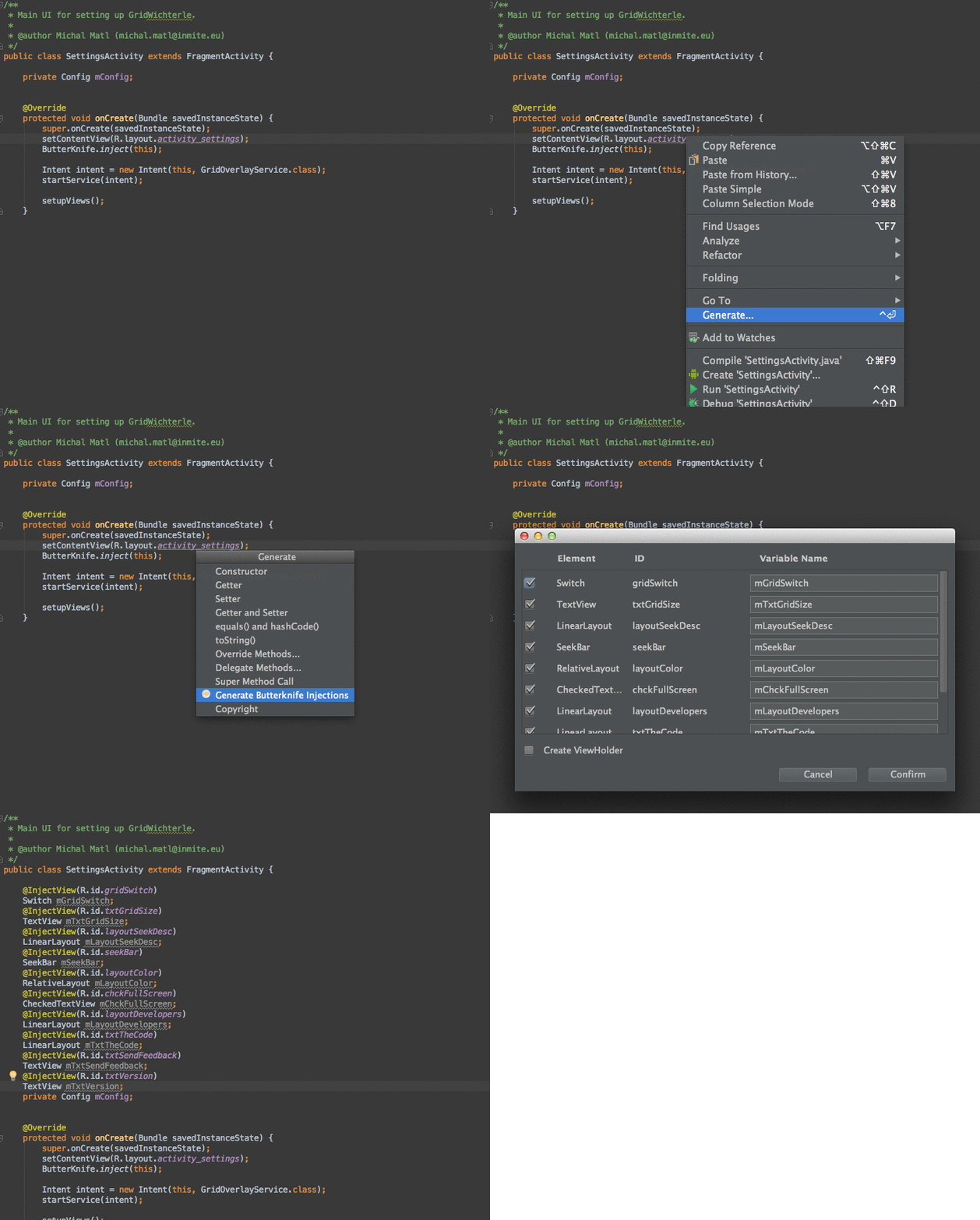
  2. Right click on usage of desired layout reference (e.g. R.layout.main in your Activity or Fragment), then Generate and Generate ButterKnife Injections
  3. Pick injections you want, you also have an option to create ViewHolder for adapters.
  4. Click Confirm and enjoy injections in your code with no work!

Contributing

Pull requests are welcomed!

Common issue: The plugin is not working after I updated to new Android Studio

  • AS promts you to update plugins after update, you need to update them before using
  • Make sure you have Butterknife on your classpath
  • Make sure that your cursor is placed on a layout ID in a class having one of these types: Activity, Fragment, custom View or Adapter

Why 'Zelezny'?

Jan Železný is a famous Czech javelin thrower, Olympic champion and world record holder. With Zelezny's javelin, your butter knife will be much sharper!

See our other Czech personalities who help with #AndroidDev.

avast/android-butterknife-zelezny

Android Studio plug-in for generating ButterKnife injections from selected layout XML.

Java

3,346

65 commits

updated Feb 26, 2018

See the code

README

ButterKnifeZelezny

Simple plug-in for Android Studio/IDEA that allows one-click creation of Butterknife view injections.

How to install

  • in Android Studio: go to Preferences → Plugins → Browse repositories and search for ButterKnife Zelezny

or

  • download it and install via Preferences → Plugins → Install plugin from disk

How to use it

  1. Make sure you have latest Butterknife lib on your classpath
  2. Right click on usage of desired layout reference (e.g. R.layout.main in your Activity or Fragment), then Generate and Generate ButterKnife Injections
  3. Pick injections you want, you also have an option to create ViewHolder for adapters.
  4. Click Confirm and enjoy injections in your code with no work!

Contributing

Pull requests are welcomed!

Common issue: The plugin is not working after I updated to new Android Studio

  • AS promts you to update plugins after update, you need to update them before using
  • Make sure you have Butterknife on your classpath
  • Make sure that your cursor is placed on a layout ID in a class having one of these types: Activity, Fragment, custom View or Adapter

Why 'Zelezny'?

Jan Železný is a famous Czech javelin thrower, Olympic champion and world record holder. With Zelezny's javelin, your butter knife will be much sharper!

See our other Czech personalities who help with #AndroidDev.

Significant stargazers

Yigit Boyar

3,448 followers · starred Jan 2014

Iñaki Villar

290 followers · starred Feb 2014