Javascript library for precise tracking of facial features via Constrained Local Models
JavaScript
6,500
219 commits
updated Jan 10, 2020

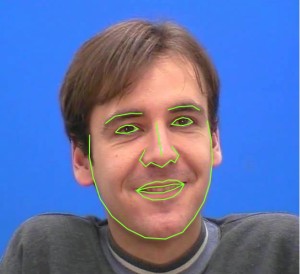
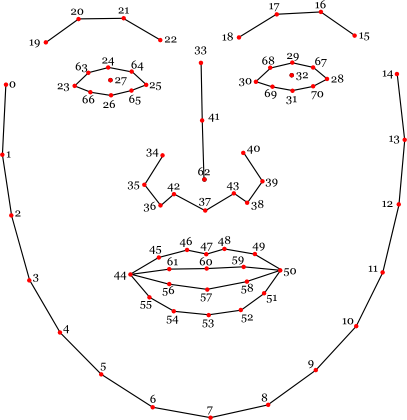
clmtrackr is a javascript library for fitting facial models to faces in videos or images. It currently is an implementation of constrained local models fitted by regularized landmark mean-shift, as described in Jason M. Saragih's paper. clmtrackr tracks a face and outputs the coordinate positions of the face model as an array, following the numbering of the model below:
The library provides some generic face models that were trained on the MUCT database and some additional self-annotated images. Check out clmtools for building your own models.
For tracking in video, it is recommended to use a browser with WebGL support, though the library should work on any modern browser.
For some more information about Constrained Local Models, take a look at Xiaoguang Yan's excellent tutorial, which was of great help in implementing this library.
Download the minified library clmtrackr.js, and include it in your webpage.
/* clmtrackr libraries */
<script src="js/clmtrackr.js"></script>
The following code initiates the clmtrackr with the default model (see the reference for some alternative models), and starts the tracker running on a video element.
<video id="inputVideo" width="400" height="300" autoplay loop>
  <source src="./media/somevideo.ogv" type="video/ogg"/>
</video>
<script type="text/javascript">
  var videoInput = document.getElementById('inputVideo');

  var ctracker = new clm.tracker();
  ctracker.init();
  ctracker.start(videoInput);
</script>
You can now get the positions of the tracked facial features as an array via getCurrentPosition():
<script type="text/javascript">
  function positionLoop() {
    requestAnimationFrame(positionLoop);
    var positions = ctracker.getCurrentPosition();
    // positions = [[x_0, y_0], [x_1,y_1], ... ]
    // do something with the positions ...
  }
  positionLoop();
</script>
You can also use the built in function draw() to draw the tracked facial model on a canvas :
<canvas id="drawCanvas" width="400" height="300"></canvas>
<script type="text/javascript">
  var canvasInput = document.getElementById('drawCanvas');
  var cc = canvasInput.getContext('2d');
  function drawLoop() {
    requestAnimationFrame(drawLoop);
    cc.clearRect(0, 0, canvasInput.width, canvasInput.height);
    ctracker.draw(canvasInput);
  }
  drawLoop();
</script>
See the complete example here.
First, install node.js with npm.
In the root directory of clmtrackr, run npm install then run npm run build. This will create clmtrackr.js and clmtrackr.module.js in build folder.
To test the examples locally, you need to run a local server. One easy way to do this is to install http-server, a small node.js utility: npm install -g http-server. Then run http-server in the root of clmtrackr and go to https://localhost:8080/examples in your browser.
clmtrackr is distributed under the MIT License
Overall
Maintained
Code review
npm
Latest release
Releases this year
(top 24 of 34)
411 followers · starred May 2015
683 followers · starred Jun 2018
87 followers · starred May 2014
479 followers · starred Mar 2017
Javascript library for precise tracking of facial features via Constrained Local Models
JavaScript
6,500
219 commits
updated Jan 10, 2020
clmtrackr is a javascript library for fitting facial models to faces in videos or images. It currently is an implementation of constrained local models fitted by regularized landmark mean-shift, as described in Jason M. Saragih's paper. clmtrackr tracks a face and outputs the coordinate positions of the face model as an array, following the numbering of the model below:
The library provides some generic face models that were trained on the MUCT database and some additional self-annotated images. Check out clmtools for building your own models.
For tracking in video, it is recommended to use a browser with WebGL support, though the library should work on any modern browser.
For some more information about Constrained Local Models, take a look at Xiaoguang Yan's excellent tutorial, which was of great help in implementing this library.
Download the minified library clmtrackr.js, and include it in your webpage.
/* clmtrackr libraries */
<script src="js/clmtrackr.js"></script>
The following code initiates the clmtrackr with the default model (see the reference for some alternative models), and starts the tracker running on a video element.
<video id="inputVideo" width="400" height="300" autoplay loop>
  <source src="./media/somevideo.ogv" type="video/ogg"/>
</video>
<script type="text/javascript">
  var videoInput = document.getElementById('inputVideo');

  var ctracker = new clm.tracker();
  ctracker.init();
  ctracker.start(videoInput);
</script>
You can now get the positions of the tracked facial features as an array via getCurrentPosition():
<script type="text/javascript">
  function positionLoop() {
    requestAnimationFrame(positionLoop);
    var positions = ctracker.getCurrentPosition();
    // positions = [[x_0, y_0], [x_1,y_1], ... ]
    // do something with the positions ...
  }
  positionLoop();
</script>
You can also use the built in function draw() to draw the tracked facial model on a canvas :
<canvas id="drawCanvas" width="400" height="300"></canvas>
<script type="text/javascript">
  var canvasInput = document.getElementById('drawCanvas');
  var cc = canvasInput.getContext('2d');
  function drawLoop() {
    requestAnimationFrame(drawLoop);
    cc.clearRect(0, 0, canvasInput.width, canvasInput.height);
    ctracker.draw(canvasInput);
  }
  drawLoop();
</script>
See the complete example here.
First, install node.js with npm.
In the root directory of clmtrackr, run npm install then run npm run build. This will create clmtrackr.js and clmtrackr.module.js in build folder.
To test the examples locally, you need to run a local server. One easy way to do this is to install http-server, a small node.js utility: npm install -g http-server. Then run http-server in the root of clmtrackr and go to https://localhost:8080/examples in your browser.
clmtrackr is distributed under the MIT License
Overall
Maintained
Code review
npm
Latest release
Releases this year
(top 24 of 34)
411 followers · starred May 2015
683 followers · starred Jun 2018
87 followers · starred May 2014
479 followers · starred Mar 2017



