
AI-agent load & soak testing for MCP servers: parallel tool calls, capacity, leaks, restarts and rolling deploys, with per-tool PASS/FAIL in CI.
Go
0
62 commits
updated Oct 3, 2026
See what people are saying
README

AI-agent load & soak testing for MCP
Find out how your MCP server holds up under real AI-agent traffic: parallel tool calls, rolling deploys, restarts and leaks — before your users do.






Install · Quickstart · What it finds · Docs · Compare
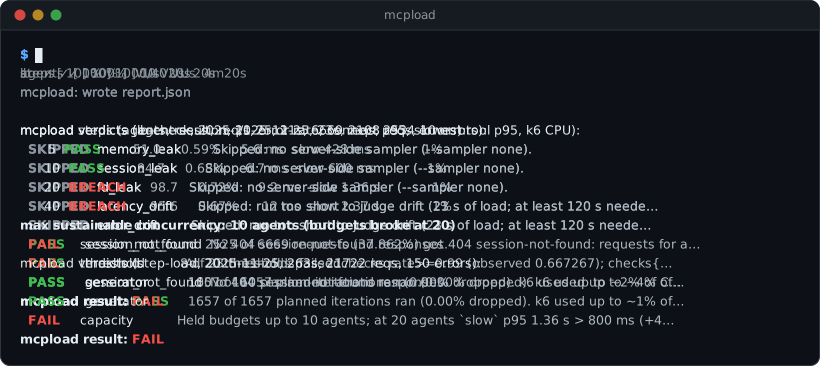
mcpload runs simulated AI agents against your MCP server. Each agent opens its own session, lists tools, calls several tools in parallel, builds the next call from the last result, and answers the server's own questions mid-call. mcpload measures every tool separately, watches the server over time, and ends every run with PASS or FAIL and a sentence saying why.
Install
macOS and Linux:
curl -fsSL https://raw.githubusercontent.com/atul121001/mcpload/main/install.sh | sh
Windows (PowerShell):
irm https://raw.githubusercontent.com/atul121001/mcpload/main/install.ps1 | iex
Homebrew: brew install atul121001/tap/mcpload · Docker: docker run --rm -v "$PWD:/work" ghcr.io/atul121001/mcpload run --url <url>
mcpload is one self-contained program. The scripts verify its SHA-256 checksum and need no admin rights; run them again to upgrade. Manual downloads and building from source: install guide.
Quickstart
mcpload ships with demo MCP servers, some healthy and some broken on purpose, so you can see a PASS and a FAIL in about two minutes. You need Docker running.
mcpload demo up # 11 demo servers on 127.0.0.1:3001-3011 (first run pulls the images)
1. A healthy server passes. 10 agents for 20 seconds:
mcpload run --url http://localhost:3001/mcp --duration 20s --html report.html
  PASS     session_not_found  No 404 session-not-found responses.
  PASS     threshold          All 20 thresholds passed.
mcpload result: PASS
2. A load balancer without sticky sessions fails.
mcpload run --url http://localhost:3004/mcp --scenario lb-check --duration 20s
  FAIL     session_not_found  2525 of 6669 requests (37.862%) got 404 session-not-found: requests for an
                              Mcp-Session-Id reached a replica that does not hold the session ...
mcpload result: FAIL
3. How many agents can it take? Step the load up until the budgets break:
mcpload capacity --url http://localhost:3008/mcp --from 5 --to 40 --step-duration 15s --env MCP_TIMEOUT=1s
max sustainable concurrency: 10 agents (budgets broke at 20)
Estimated sustainable capacity: ~11 agents (between 10 (held) and 20 (broke) ...)
Open report.html for per-tool timings, then mcpload demo down. Ready for your own server? Start with Test your own server (staging first, and only servers you're allowed to test).
What it finds
You can reproduce every row below with the bundled demo servers. The messages are mcpload's own, shortened.
| Failure | What mcpload tells you |
|---|---|
🔀 Sessions lost behind a load balancer--scenario lb-check | FAIL 2525 of 6669 requests (37.862%) got 404 session-not-found: requests reached a replica that does not hold the session |
🚦 Rolling deploys that hang clients--scenario version-skew | FAIL 90 of 180 requests (50.0%) failed on a replica running a different build; 90 hung for a median 5 s |
🔁 Restarts: recovery, lost and duplicated calls--chaos-restart, --calls-url | PASS after the restart, 20 agents reconnected within 1.9 s and errors were under 1% after 1.4 s. FAIL call_integrity 6 tool calls ran twice (client retries) |
📈 Memory and session leaks--scenario soak with a sampler | FAIL RSS grew 64.14 MiB/min (R²=1.00) under constant load and did not recover in cool-down |
🧱 The breaking pointmcpload capacity | max sustainable concurrency: 10 agents (budgets broke at 20); estimated ~11 agents |
🐢 One slow tool starving the others--scenario isolation | FAIL fast p95 38 ms alone → 936 ms next to slow (×24.6): every tool waits behind it |
✋ Cancelled work that keeps running--env CANCEL_RATE=0.3 | FAIL the server kept running slow for a median 1.75 s after 44 cancels: cancelled work still uses capacity |
📉 Regressions against mainmcpload compare | search p95 5.4 ms → 364 ms (+6606%, +359 ms) |
🧾 Business flows over budget--workload flows.yaml | FAIL flow lookup-orders p95 2.11 s > 2 s budget |
It also checks long-lived sessions, OAuth token refresh under load, sampling and elicitation answered mid-call, initialize floods, and whether the load generator itself was the bottleneck. All checks: Scenarios and verdicts.
A leak, as mcpload shows it
Memory of the leaking demo server during a 6-minute soak. It climbs under steady load and stays up after the load stops (the blue cool-down area):
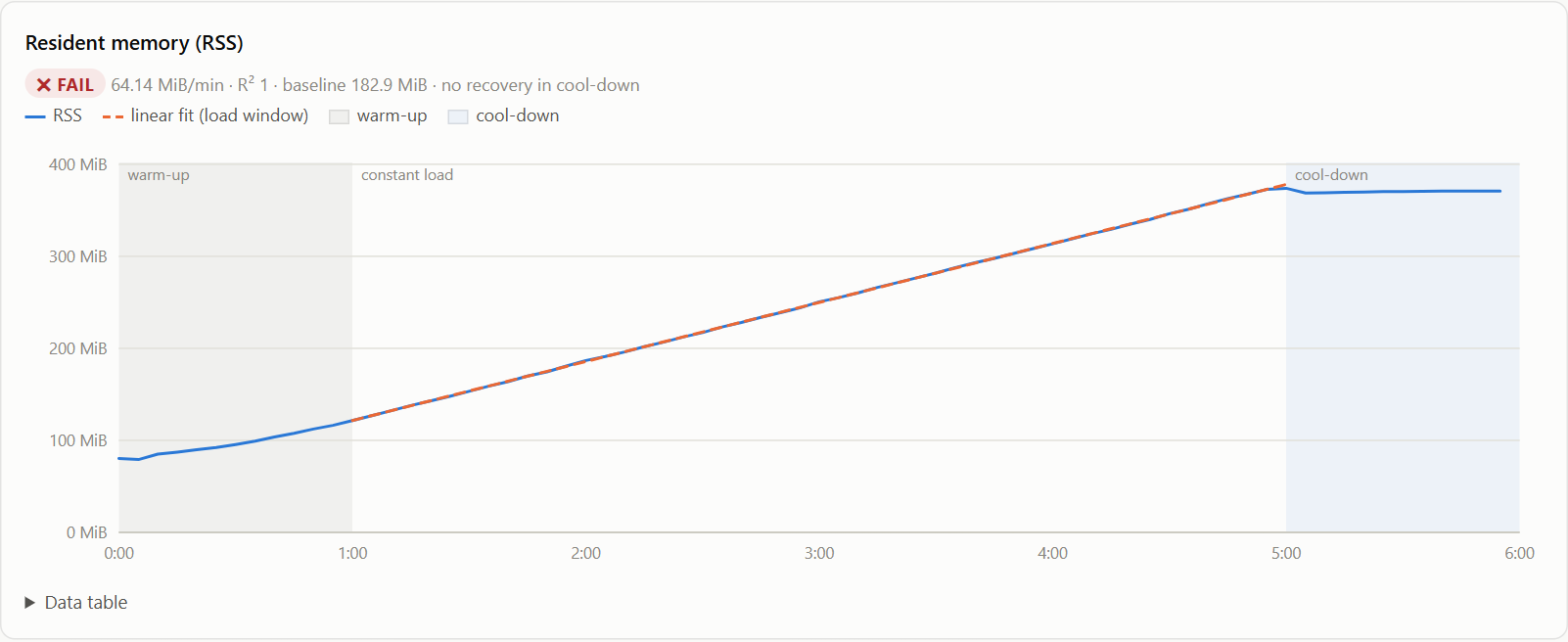
  FAIL     memory_leak        RSS grew 64.14 MiB/min (R²=1.00) under constant load, above the 1 MiB/min limit,
                              and did not recover in cool-down (187.85 MiB above the post-warm-up baseline).
  FAIL     session_leak       Active sessions grew 60.00/min (R²=1.00) under constant load, above the 0.5/min
                              limit, and did not recover in cool-down.
  PASS     fd_leak            Open file descriptors flat under constant load.
  PASS     latency_drift      Client p95 stable.
  PASS     threshold          All 17 thresholds passed.
mcpload result: FAIL
Every speed budget passed. A leak like this doesn't show up in a short test; it shows up in production, hours later.
A capacity run, step by step
mcpload capacity steps (p95/p99: all tools/call; errors: all requests):
  Agents     p95     p99  Errors             req/s  Slowest tool p95
       5  306 ms  413 ms  0.31%               42.2  slow 529 ms
      10  513 ms  643 ms  0.41%               78.7  slow 673 ms
      20  849 ms  941 ms  1.38% timeout 8    108.3  slow 966 ms       <- breaks budget: `slow` error rate 6.93% > 1%, all `timeout` (+5 more)
      40  984 ms  997 ms  7.06% timeout 153  148.8  flaky 989 ms      over budget: `slow` error rate 68.39% > 1%, all `timeout` (+8 more)
max sustainable concurrency: 10 agents (budgets broke at 20)
More in Find your capacity.
Why mcpload
A classic load test sends a request, waits, and sends the next. An agent works like this:
open session ─► list tools
   ─► search ┐
   ─► fetch  ├─ at the same time
   ─► fetch  ┘
   ─► pause to decide ─► call tools built from those results ─► pause ─► ...
   ─► close session
It keeps a session open, fans out tool calls, and each step depends on the one before. The bugs that hurt agents (sessions lost between replicas, a shared pool that one slow tool fills up, memory that grows per session) only show up under that kind of traffic, usually after an hour or during a deploy.
| The question | Tools built for it |
|---|---|
| Does my server work? One client, one request at a time. | MCP Inspector, MCPJam |
| Does the agent pick the right tool and finish the task? | mcp-eval, mcpbr, agent eval platforms |
| How fast is one endpoint under load? | JMeter, Locust, Gatling, Artillery |
| Will it hold up when many real agents use it, for hours? | mcpload |
Side by side with the JMeter MCP plugin, xk6-mcp and mcp-bench, and when to use something else: How mcpload compares.
Use it in CI
The GitHub Action runs the test, fails the build on a budget breach or a regression against main, and posts a per-tool table on the pull request.
# a step in your workflow, after your MCP server has started
- uses: atul121001/mcpload-action@v1
  with:
    url: http://localhost:8080/mcp
    wait-ready: 2m              # wait until the server answers an MCP handshake
    p95-ms: '800'               # per-tool budget
    baseline-branch: main       # compare each tool with main's last run (needs actions: read)
    comment-on-pr: 'true'
Full workflow, permissions and noise floors: Use mcpload in CI.
Commands
| Command | What it does |
|---|---|
mcpload run | Run a test (default scenario: agent-session) and end with PASS or FAIL. Add --scenario soak, --workload flows.yaml, --html report.html |
mcpload capacity | Step the number of agents up; report the breaking point and an estimated capacity |
mcpload compare | Per-tool Δ between two reports; exit 1 on a real regression |
mcpload demo | up, down, status, logs for the local demo servers |
mcpload render, validate | Re-render a report.json as HTML, or check it against the schema |
Exit codes: 0 pass, 1 fail, 2 the test couldn't run. Every flag: CLI reference.
Documentation
- Install and try it · Test your own server · Run with Docker
- Scenarios and verdicts · Find your capacity · Workload profiles
- Use mcpload in CI · Advanced: custom scenarios and metrics
- How it compares · FAQ · Architecture · Calibration · Roadmap
All pages: docs/.
Status
Early release (v0.4). Commands and options may change before 1.0. Today mcpload tests remote servers over streamable HTTP (not stdio or SSE) and tools (not resources or prompts); its agents follow scripted plans rather than a real LLM, so runs are repeatable and free. Feedback and bug reports are welcome in issues.
Contributing
Issues and pull requests are welcome. See CONTRIBUTING.md for the development setup and the ground rules (every verdict must fire on a broken demo server and stay quiet on a healthy one).
Security
Only load-test servers you own or have written permission to test. To report a vulnerability, see SECURITY.md; what mcpload does and doesn't protect against is in the threat model. The demo servers are intentionally vulnerable and bind to 127.0.0.1 only.
License
Apache-2.0. Made by Atul Mishra.
Similar repos


Languages
Go
60.3%
HTML
20.6%
JavaScript
16.8%
AI-agent load & soak testing for MCP servers: parallel tool calls, capacity, leaks, restarts and rolling deploys, with per-tool PASS/FAIL in CI.
Go
0
62 commits
updated Oct 3, 2026
See what people are saying
README
AI-agent load & soak testing for MCP
Find out how your MCP server holds up under real AI-agent traffic: parallel tool calls, rolling deploys, restarts and leaks — before your users do.
Install · Quickstart · What it finds · Docs · Compare
mcpload runs simulated AI agents against your MCP server. Each agent opens its own session, lists tools, calls several tools in parallel, builds the next call from the last result, and answers the server's own questions mid-call. mcpload measures every tool separately, watches the server over time, and ends every run with PASS or FAIL and a sentence saying why.
Install
macOS and Linux:
curl -fsSL https://raw.githubusercontent.com/atul121001/mcpload/main/install.sh | sh
Windows (PowerShell):
irm https://raw.githubusercontent.com/atul121001/mcpload/main/install.ps1 | iex
Homebrew: brew install atul121001/tap/mcpload · Docker: docker run --rm -v "$PWD:/work" ghcr.io/atul121001/mcpload run --url <url>
mcpload is one self-contained program. The scripts verify its SHA-256 checksum and need no admin rights; run them again to upgrade. Manual downloads and building from source: install guide.
Quickstart
mcpload ships with demo MCP servers, some healthy and some broken on purpose, so you can see a PASS and a FAIL in about two minutes. You need Docker running.
mcpload demo up # 11 demo servers on 127.0.0.1:3001-3011 (first run pulls the images)
1. A healthy server passes. 10 agents for 20 seconds:
mcpload run --url http://localhost:3001/mcp --duration 20s --html report.html
  PASS     session_not_found  No 404 session-not-found responses.
  PASS     threshold          All 20 thresholds passed.
mcpload result: PASS
2. A load balancer without sticky sessions fails.
mcpload run --url http://localhost:3004/mcp --scenario lb-check --duration 20s
  FAIL     session_not_found  2525 of 6669 requests (37.862%) got 404 session-not-found: requests for an
                              Mcp-Session-Id reached a replica that does not hold the session ...
mcpload result: FAIL
3. How many agents can it take? Step the load up until the budgets break:
mcpload capacity --url http://localhost:3008/mcp --from 5 --to 40 --step-duration 15s --env MCP_TIMEOUT=1s
max sustainable concurrency: 10 agents (budgets broke at 20)
Estimated sustainable capacity: ~11 agents (between 10 (held) and 20 (broke) ...)
Open report.html for per-tool timings, then mcpload demo down. Ready for your own server? Start with Test your own server (staging first, and only servers you're allowed to test).
What it finds
You can reproduce every row below with the bundled demo servers. The messages are mcpload's own, shortened.
| Failure | What mcpload tells you |
|---|---|
🔀 Sessions lost behind a load balancer--scenario lb-check | FAIL 2525 of 6669 requests (37.862%) got 404 session-not-found: requests reached a replica that does not hold the session |
🚦 Rolling deploys that hang clients--scenario version-skew | FAIL 90 of 180 requests (50.0%) failed on a replica running a different build; 90 hung for a median 5 s |
🔁 Restarts: recovery, lost and duplicated calls--chaos-restart, --calls-url | PASS after the restart, 20 agents reconnected within 1.9 s and errors were under 1% after 1.4 s. FAIL call_integrity 6 tool calls ran twice (client retries) |
📈 Memory and session leaks--scenario soak with a sampler | FAIL RSS grew 64.14 MiB/min (R²=1.00) under constant load and did not recover in cool-down |
🧱 The breaking pointmcpload capacity | max sustainable concurrency: 10 agents (budgets broke at 20); estimated ~11 agents |
🐢 One slow tool starving the others--scenario isolation | FAIL fast p95 38 ms alone → 936 ms next to slow (×24.6): every tool waits behind it |
✋ Cancelled work that keeps running--env CANCEL_RATE=0.3 | FAIL the server kept running slow for a median 1.75 s after 44 cancels: cancelled work still uses capacity |
📉 Regressions against mainmcpload compare | search p95 5.4 ms → 364 ms (+6606%, +359 ms) |
🧾 Business flows over budget--workload flows.yaml | FAIL flow lookup-orders p95 2.11 s > 2 s budget |
It also checks long-lived sessions, OAuth token refresh under load, sampling and elicitation answered mid-call, initialize floods, and whether the load generator itself was the bottleneck. All checks: Scenarios and verdicts.
A leak, as mcpload shows it
Memory of the leaking demo server during a 6-minute soak. It climbs under steady load and stays up after the load stops (the blue cool-down area):
  FAIL     memory_leak        RSS grew 64.14 MiB/min (R²=1.00) under constant load, above the 1 MiB/min limit,
                              and did not recover in cool-down (187.85 MiB above the post-warm-up baseline).
  FAIL     session_leak       Active sessions grew 60.00/min (R²=1.00) under constant load, above the 0.5/min
                              limit, and did not recover in cool-down.
  PASS     fd_leak            Open file descriptors flat under constant load.
  PASS     latency_drift      Client p95 stable.
  PASS     threshold          All 17 thresholds passed.
mcpload result: FAIL
Every speed budget passed. A leak like this doesn't show up in a short test; it shows up in production, hours later.
A capacity run, step by step
mcpload capacity steps (p95/p99: all tools/call; errors: all requests):
  Agents     p95     p99  Errors             req/s  Slowest tool p95
       5  306 ms  413 ms  0.31%               42.2  slow 529 ms
      10  513 ms  643 ms  0.41%               78.7  slow 673 ms
      20  849 ms  941 ms  1.38% timeout 8    108.3  slow 966 ms       <- breaks budget: `slow` error rate 6.93% > 1%, all `timeout` (+5 more)
      40  984 ms  997 ms  7.06% timeout 153  148.8  flaky 989 ms      over budget: `slow` error rate 68.39% > 1%, all `timeout` (+8 more)
max sustainable concurrency: 10 agents (budgets broke at 20)
More in Find your capacity.
Why mcpload
A classic load test sends a request, waits, and sends the next. An agent works like this:
open session ─► list tools
   ─► search ┐
   ─► fetch  ├─ at the same time
   ─► fetch  ┘
   ─► pause to decide ─► call tools built from those results ─► pause ─► ...
   ─► close session
It keeps a session open, fans out tool calls, and each step depends on the one before. The bugs that hurt agents (sessions lost between replicas, a shared pool that one slow tool fills up, memory that grows per session) only show up under that kind of traffic, usually after an hour or during a deploy.
| The question | Tools built for it |
|---|---|
| Does my server work? One client, one request at a time. | MCP Inspector, MCPJam |
| Does the agent pick the right tool and finish the task? | mcp-eval, mcpbr, agent eval platforms |
| How fast is one endpoint under load? | JMeter, Locust, Gatling, Artillery |
| Will it hold up when many real agents use it, for hours? | mcpload |
Side by side with the JMeter MCP plugin, xk6-mcp and mcp-bench, and when to use something else: How mcpload compares.
Use it in CI
The GitHub Action runs the test, fails the build on a budget breach or a regression against main, and posts a per-tool table on the pull request.
# a step in your workflow, after your MCP server has started
- uses: atul121001/mcpload-action@v1
  with:
    url: http://localhost:8080/mcp
    wait-ready: 2m              # wait until the server answers an MCP handshake
    p95-ms: '800'               # per-tool budget
    baseline-branch: main       # compare each tool with main's last run (needs actions: read)
    comment-on-pr: 'true'
Full workflow, permissions and noise floors: Use mcpload in CI.
Commands
| Command | What it does |
|---|---|
mcpload run | Run a test (default scenario: agent-session) and end with PASS or FAIL. Add --scenario soak, --workload flows.yaml, --html report.html |
mcpload capacity | Step the number of agents up; report the breaking point and an estimated capacity |
mcpload compare | Per-tool Δ between two reports; exit 1 on a real regression |
mcpload demo | up, down, status, logs for the local demo servers |
mcpload render, validate | Re-render a report.json as HTML, or check it against the schema |
Exit codes: 0 pass, 1 fail, 2 the test couldn't run. Every flag: CLI reference.
Documentation
- Install and try it · Test your own server · Run with Docker
- Scenarios and verdicts · Find your capacity · Workload profiles
- Use mcpload in CI · Advanced: custom scenarios and metrics
- How it compares · FAQ · Architecture · Calibration · Roadmap
All pages: docs/.
Status
Early release (v0.4). Commands and options may change before 1.0. Today mcpload tests remote servers over streamable HTTP (not stdio or SSE) and tools (not resources or prompts); its agents follow scripted plans rather than a real LLM, so runs are repeatable and free. Feedback and bug reports are welcome in issues.
Contributing
Issues and pull requests are welcome. See CONTRIBUTING.md for the development setup and the ground rules (every verdict must fire on a broken demo server and stay quiet on a healthy one).
Security
Only load-test servers you own or have written permission to test. To report a vulnerability, see SECURITY.md; what mcpload does and doesn't protect against is in the threat model. The demo servers are intentionally vulnerable and bind to 127.0.0.1 only.
License
Apache-2.0. Made by Atul Mishra.
Similar repos
Languages
Go
60.3%
HTML
20.6%
JavaScript
16.8%