🖥️ Automated Configuration, Preferences and Software Installation for macOS
Shell
1,362
442 commits
updated Aug 27, 2026
I will update your MacOS machine with Better™ system defaults, preferences, software configuration and even auto-install some handy development tools and apps that my developer friends find helpful.
You don't need to install or configure anything upfront! This works with a brand-new machine from the factory as well as an existing machine that you've been working with for years.
Don't you hate getting a new laptop or joining a new team and then spending a whole day setting up your system preferences and tools? Me too. That's why we automate; we did it once and we don't want to have to do it again.
\[^_^]/ - This started as Adam Eivy's MacOS shell configuration dotfiles but has grown to a multi-developer platform for machine configuration.
When I finish with your machine, you will be able to look at your command-line in full-screen mode like this (running iTerm):
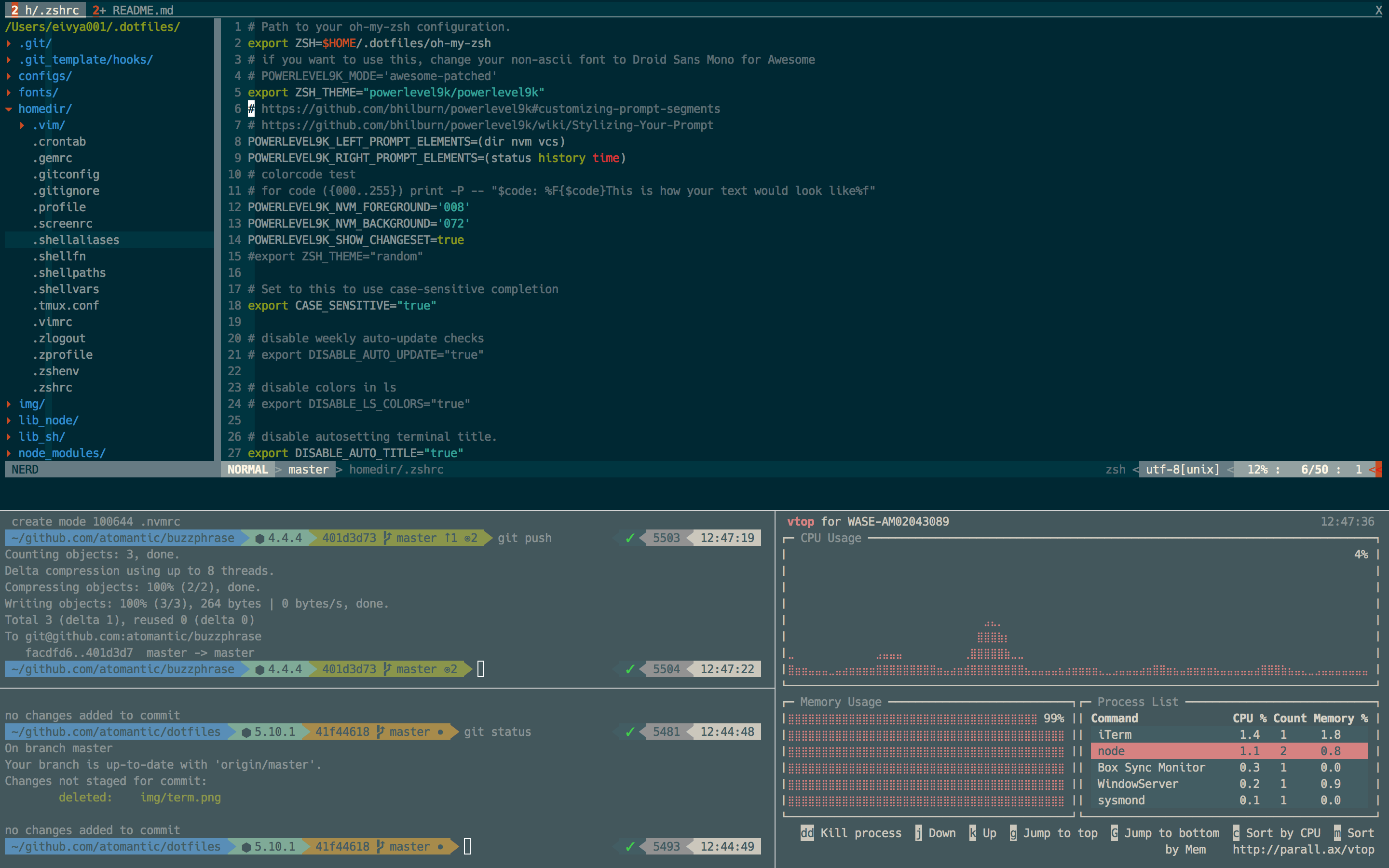
Check out how your shell prompt includes the full path, node.js version & the working git branch along with a lot of other info!
We use powerlevel10k for command prompt, so customization of what you want is easily changable in ./.zshrc
The top terminal is using vim as a full replacement IDE.
The bottom left two are git terminals.
The bottom right is running vtop
To launch fullscreen, hit Command + Enter in iTerm, then use Command + d and Command + D to create split panes.
\[._.]/ - I'm so excited I just binaried in my pants!
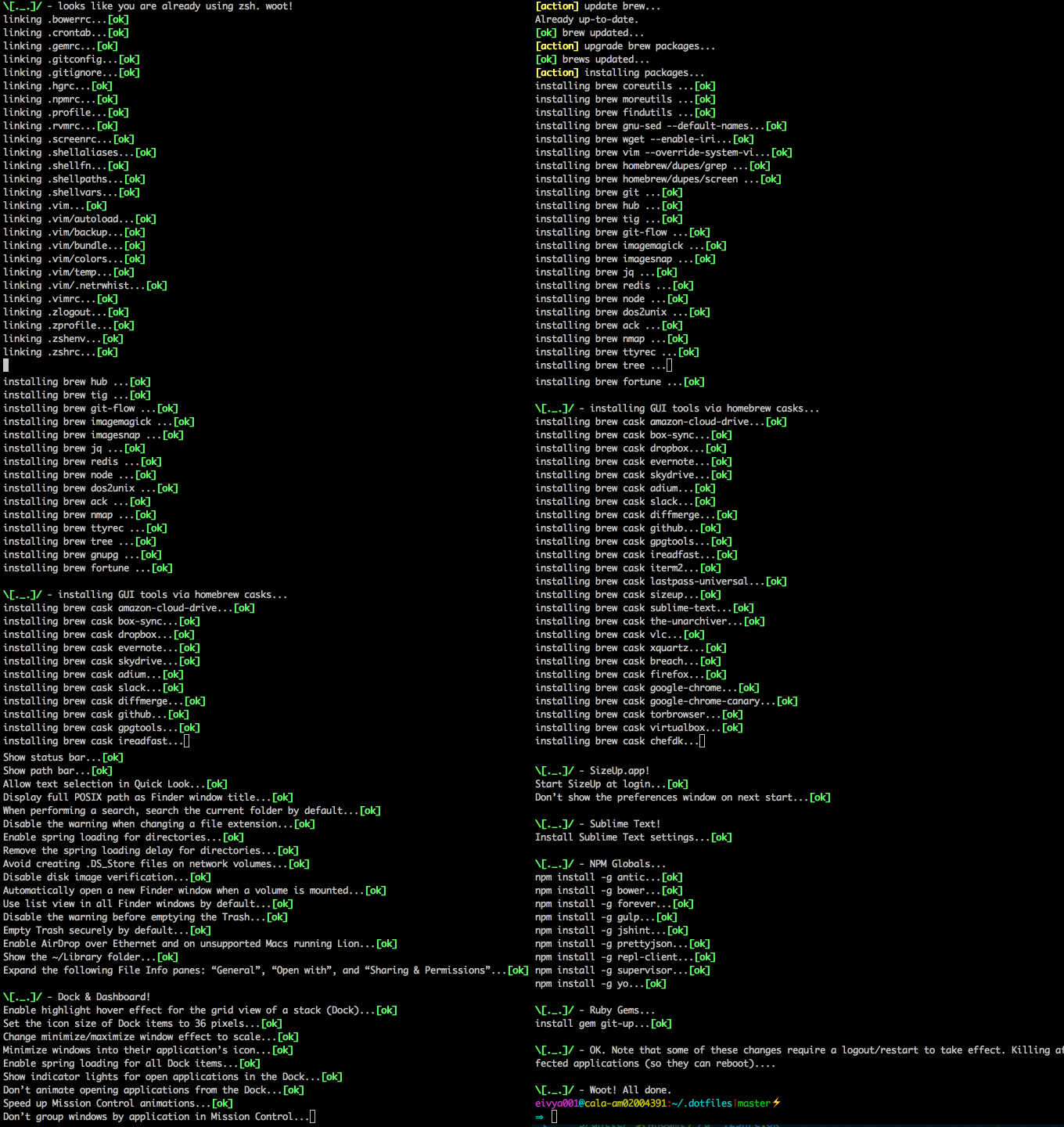
Note: I recommend forking this repo in case you don't like anything I do and want to set your own preferences (and pull request them!)
☢️ REVIEW WHAT THIS SCRIPT DOES PRIOR TO RUNNING It's always a good idea to review arbitrary code from the internet before running it on your machine with sudo power! You are responsible for everything this script does to your machine (see LICENSE) The creator of this repo has a high tolerance for nuking his machine and starting over. If you have a low tolerance for this, proceed with caution.
git clone --recurse-submodules https://github.com/atomantic/dotfiles ~/.dotfiles
cd ~/.dotfiles;
# run this using terminal (not iTerm, lest iTerm settings get discarded on exit)
./install.sh
install.sh doesinstall.sh is the single entry point for setting up a machine. It is interactive (it asks before each major step) and idempotent (safe to run again and again — re-run it any time you want to pick up new config or software). When you run it, it will:
~/.dotfiles_backup/<timestamp>/ (restore later with ./restore.sh).homedir/ into your $HOME (.zshrc, .vimrc, .gitconfig, .shellaliases, .shellfn, etc.).~/.gitconfig.local — kept out of version control and pulled into ~/.gitconfig via [include], so your personal info never lands in the repo./etc/hosts using StevenBlack/hosts (add your own entries in configs/hosts.local).Every prompt can be declined, so you can run it just to apply the parts you want. To upgrade an existing install later, use ./update.sh instead — it pulls the latest code and then runs install.sh for you.
Some settings are specific to one machine (work tools, proprietary config) and must not be committed or synced to your other machines. Keep them in these untracked override files — install.sh seeds them and then never touches them again, and they are git-ignored so they can't be committed:
| File | Loaded by | Use it for |
|---|---|---|
~/.gitconfig.local | [include] in ~/.gitconfig | git identity + any per-machine git config |
~/.gitignore.local | git's core.excludesfile (seeded from the shared homedir/.gitignore baseline) | global ignore entries, e.g. internal tool directories |
~/.zshrc.local | source at the end of ~/.zshrc | machine-local shell config, PATH entries, completions |
Edit these freely — they belong to you. The tracked files in homedir/ stay clean, so git pull / ./update.sh never conflicts with your local customizations. (~/.gitignore.local is a one-time copy of the shared baseline plus your additions; if the baseline changes later you can re-copy the top section.)
Command + , to open preferences. Under Profiles > Colors, select "Load Presets" and choose the Solarized Dark Patch scheme. If it isn't there for some reason, import it from ~/.dotfiles/configs -- you may also need to select the Hack font and check the box for non-ascii font and set to Roboto Mono For Powerline (I've had mixed results for automating these settings--love a pull request that improves this)Note: if you have problems cloning the submodules behind proxy, you can use this command to convert
git://tohttps://:git config --global url.https://github.com/.insteadOf git://github.com/
Note: I regularly add new configurations and software, so this repo keeps growing and optimizing. To pull those changes into an existing install at any time, run
./update.sh.
If you have existing dotfiles for configuring git, zsh, vim, etc, these will be backed-up into ~/.dotfiles_backup/$(date +"%Y.%m.%d.%H.%M.%S") and replaced with the files from this project. You can restore your original dotfiles by using ./restore.sh $RESTOREDATE where $RESTOREDATE is the date folder name you want to restore.
The restore script does not currently restore system settings--only your original dotfiles. To restore system settings, you'll need to manually undo what you don't like (so don't forget to fork, review, tweak)
Use install.sh for the first-time setup on a machine; use update.sh to upgrade an existing install to the latest version of this repo. To update, just run:
cd ~/.dotfiles
./update.sh
update.sh upgrades you safely, in this order:
homedir/.gitconfig into the untracked ~/.gitconfig.local). These run before the pull when needed, so the pull stays conflict-free, and each is a no-op when it doesn't apply.main, then pulls with git pull --rebase --autostash and updates submodules.install.sh — interactively, to apply any new config, symlinks, and software prompts.It is idempotent — safe to run as often as you like — and any file it has to replace is backed up under ~/.dotfiles_backup/<timestamp>/ first (restore with ./restore.sh). If the pull hits a conflict it can't resolve, update.sh stops and tells you how to recover rather than leaving a half-applied update.
3.0.0 brings huge changes. If you have made any modifications (and didn't make your own fork), you will want to backup your dotfiles prior to running git-up or git pull on ~/.dotfiles.
Do the following to upgrade your ~/.dotfiles safely:
cp -R ~/.dotfiles ~/.dotfiles_oldcd ~/.dotfilesgit up or git pullrm -rf .vim (now lives in homedir/.vim)install.sh and the software/ directory to make sure all the software you want is installedhomedir/* for any changes you want to port from ./dotfiles_oldinstall.sh againI am moving away from using Atom and instead using vim as my IDE. I use Vundle to manage vim plugins (instead of pathogen). Vundle is better in many ways and is compatible with pathogen plugins. Additionally, vundle will manage and install its own plugins so we don't have to use git submodules for all of them.
You can cron ~/.crontab if you want to add my nightly cron software updates.
\[0_0]/ - Note that this may wake you in the morning to compatibility issues so use only if you like being on the edge
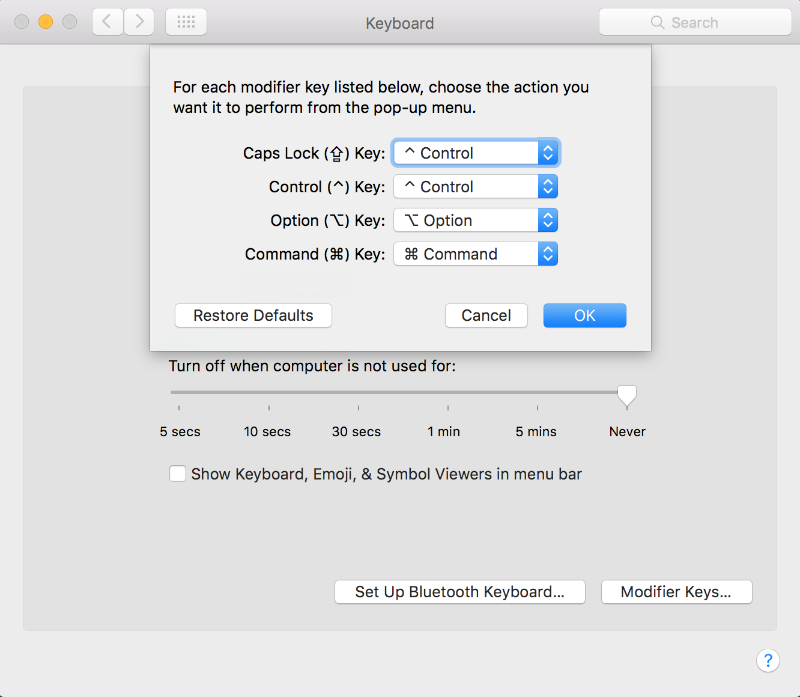
This project changes a number of settings and configures software on MacOS. Here is the current list:
The following will only happen if you agree on the prompt
overwrite your /etc/hosts file using the StevenBlack/hosts project. Add custom entries in ./configs/hosts.local.
configure your git identity (name, email, github username). Your identity is written to ~/.gitconfig.local — an untracked file that the committed ~/.gitconfig pulls in via [include]. This keeps your personal info out of version control, so git pull on the dotfiles repo stays clean and you never risk committing your identity. Edit ~/.gitconfig.local any time to change it. For multiple identities (e.g. work vs. personal), add an includeIf block to ~/.gitconfig, for example:
[includeIf "gitdir:~/work/"]
  path = ~/.gitconfig.work
^ + `)Prevent Time Machine from prompting to use new hard drives as backup volume
Audit conservative exclusions for regenerable caches, downloaded models, and
developer build products (install.sh prompts to run this, or run it directly):
./scripts/setup-timemachine-exclusions.sh
Apply missing fixed-path exclusions after reviewing the report:
./scripts/setup-timemachine-exclusions.sh --apply
Applying exclusions requires Terminal to have Full Disk Access. The script is
idempotent and discovers node_modules, Swift .build, pnpm, Turbo, and Parcel
caches under common source roots. It deliberately preserves source, Git
worktrees, virtual environments, conversations, generated media, Xcode
archives, simulator device data, and cloud-synced user files.
Exclusions limit future backup growth but do not delete existing Time Machine history. Time Machine also needs enough free space on the source Data volume to create a local APFS snapshot before a backup can begin.
homebrew, fontconfig, git, nvm (node + npm), and zsh (latest) are all installed inside the install.sh as foundational software.
Additional software is configured in simple list files within the software/ directory and can be customized in your own fork/branch:
software/brew.list - Homebrew utilities and command-line toolssoftware/cask.list - Homebrew desktop applications (GUI apps)software/npm.list - Global NPM packagessoftware/mas.list - Mac App Store applicationssoftware/gem.list - Ruby gemsEach file contains one package per line, with # for comments.
You can add additional Homebrew packages by creating a .BrewFile in the homedir/ directory. This file should contain one package per line, with comments starting with #.
Example .BrewFile:
# Additional Homebrew packages
htop
neofetch
ripgrep
fd
exa
When running the installation script, you'll be prompted for each software type:
Each prompt allows you to choose whether to install that category of software or skip it.
This project is licensed under ISC. Please fork, contribute and share.
Contributions are always welcome in the form of pull requests with explanatory comments.
Please refer to the Contributor Covenant

More here: https://adameivy.com
Warning: The creator of this repo is not responsible if your machine ends up in a state you are not happy with. If you are concerned, look at the code to review everything this will do to your machine :)
486 followers · starred Jul 2018
14 followers · starred Jun 2018
150 followers · starred Aug 2019
184 followers · starred Apr 2021
🖥️ Automated Configuration, Preferences and Software Installation for macOS
Shell
1,362
442 commits
updated Aug 27, 2026
I will update your MacOS machine with Better™ system defaults, preferences, software configuration and even auto-install some handy development tools and apps that my developer friends find helpful.
You don't need to install or configure anything upfront! This works with a brand-new machine from the factory as well as an existing machine that you've been working with for years.
Don't you hate getting a new laptop or joining a new team and then spending a whole day setting up your system preferences and tools? Me too. That's why we automate; we did it once and we don't want to have to do it again.
\[^_^]/ - This started as Adam Eivy's MacOS shell configuration dotfiles but has grown to a multi-developer platform for machine configuration.
When I finish with your machine, you will be able to look at your command-line in full-screen mode like this (running iTerm):
Check out how your shell prompt includes the full path, node.js version & the working git branch along with a lot of other info!
We use powerlevel10k for command prompt, so customization of what you want is easily changable in ./.zshrc
The top terminal is using vim as a full replacement IDE.
The bottom left two are git terminals.
The bottom right is running vtop
To launch fullscreen, hit Command + Enter in iTerm, then use Command + d and Command + D to create split panes.
\[._.]/ - I'm so excited I just binaried in my pants!
Note: I recommend forking this repo in case you don't like anything I do and want to set your own preferences (and pull request them!)
☢️ REVIEW WHAT THIS SCRIPT DOES PRIOR TO RUNNING It's always a good idea to review arbitrary code from the internet before running it on your machine with sudo power! You are responsible for everything this script does to your machine (see LICENSE) The creator of this repo has a high tolerance for nuking his machine and starting over. If you have a low tolerance for this, proceed with caution.
git clone --recurse-submodules https://github.com/atomantic/dotfiles ~/.dotfiles
cd ~/.dotfiles;
# run this using terminal (not iTerm, lest iTerm settings get discarded on exit)
./install.sh
install.sh doesinstall.sh is the single entry point for setting up a machine. It is interactive (it asks before each major step) and idempotent (safe to run again and again — re-run it any time you want to pick up new config or software). When you run it, it will:
~/.dotfiles_backup/<timestamp>/ (restore later with ./restore.sh).homedir/ into your $HOME (.zshrc, .vimrc, .gitconfig, .shellaliases, .shellfn, etc.).~/.gitconfig.local — kept out of version control and pulled into ~/.gitconfig via [include], so your personal info never lands in the repo./etc/hosts using StevenBlack/hosts (add your own entries in configs/hosts.local).Every prompt can be declined, so you can run it just to apply the parts you want. To upgrade an existing install later, use ./update.sh instead — it pulls the latest code and then runs install.sh for you.
Some settings are specific to one machine (work tools, proprietary config) and must not be committed or synced to your other machines. Keep them in these untracked override files — install.sh seeds them and then never touches them again, and they are git-ignored so they can't be committed:
| File | Loaded by | Use it for |
|---|---|---|
~/.gitconfig.local | [include] in ~/.gitconfig | git identity + any per-machine git config |
~/.gitignore.local | git's core.excludesfile (seeded from the shared homedir/.gitignore baseline) | global ignore entries, e.g. internal tool directories |
~/.zshrc.local | source at the end of ~/.zshrc | machine-local shell config, PATH entries, completions |
Edit these freely — they belong to you. The tracked files in homedir/ stay clean, so git pull / ./update.sh never conflicts with your local customizations. (~/.gitignore.local is a one-time copy of the shared baseline plus your additions; if the baseline changes later you can re-copy the top section.)
Command + , to open preferences. Under Profiles > Colors, select "Load Presets" and choose the Solarized Dark Patch scheme. If it isn't there for some reason, import it from ~/.dotfiles/configs -- you may also need to select the Hack font and check the box for non-ascii font and set to Roboto Mono For Powerline (I've had mixed results for automating these settings--love a pull request that improves this)Note: if you have problems cloning the submodules behind proxy, you can use this command to convert
git://tohttps://:git config --global url.https://github.com/.insteadOf git://github.com/
Note: I regularly add new configurations and software, so this repo keeps growing and optimizing. To pull those changes into an existing install at any time, run
./update.sh.
If you have existing dotfiles for configuring git, zsh, vim, etc, these will be backed-up into ~/.dotfiles_backup/$(date +"%Y.%m.%d.%H.%M.%S") and replaced with the files from this project. You can restore your original dotfiles by using ./restore.sh $RESTOREDATE where $RESTOREDATE is the date folder name you want to restore.
The restore script does not currently restore system settings--only your original dotfiles. To restore system settings, you'll need to manually undo what you don't like (so don't forget to fork, review, tweak)
Use install.sh for the first-time setup on a machine; use update.sh to upgrade an existing install to the latest version of this repo. To update, just run:
cd ~/.dotfiles
./update.sh
update.sh upgrades you safely, in this order:
homedir/.gitconfig into the untracked ~/.gitconfig.local). These run before the pull when needed, so the pull stays conflict-free, and each is a no-op when it doesn't apply.main, then pulls with git pull --rebase --autostash and updates submodules.install.sh — interactively, to apply any new config, symlinks, and software prompts.It is idempotent — safe to run as often as you like — and any file it has to replace is backed up under ~/.dotfiles_backup/<timestamp>/ first (restore with ./restore.sh). If the pull hits a conflict it can't resolve, update.sh stops and tells you how to recover rather than leaving a half-applied update.
3.0.0 brings huge changes. If you have made any modifications (and didn't make your own fork), you will want to backup your dotfiles prior to running git-up or git pull on ~/.dotfiles.
Do the following to upgrade your ~/.dotfiles safely:
cp -R ~/.dotfiles ~/.dotfiles_oldcd ~/.dotfilesgit up or git pullrm -rf .vim (now lives in homedir/.vim)install.sh and the software/ directory to make sure all the software you want is installedhomedir/* for any changes you want to port from ./dotfiles_oldinstall.sh againI am moving away from using Atom and instead using vim as my IDE. I use Vundle to manage vim plugins (instead of pathogen). Vundle is better in many ways and is compatible with pathogen plugins. Additionally, vundle will manage and install its own plugins so we don't have to use git submodules for all of them.
You can cron ~/.crontab if you want to add my nightly cron software updates.
\[0_0]/ - Note that this may wake you in the morning to compatibility issues so use only if you like being on the edge
This project changes a number of settings and configures software on MacOS. Here is the current list:
The following will only happen if you agree on the prompt
overwrite your /etc/hosts file using the StevenBlack/hosts project. Add custom entries in ./configs/hosts.local.
configure your git identity (name, email, github username). Your identity is written to ~/.gitconfig.local — an untracked file that the committed ~/.gitconfig pulls in via [include]. This keeps your personal info out of version control, so git pull on the dotfiles repo stays clean and you never risk committing your identity. Edit ~/.gitconfig.local any time to change it. For multiple identities (e.g. work vs. personal), add an includeIf block to ~/.gitconfig, for example:
[includeIf "gitdir:~/work/"]
  path = ~/.gitconfig.work
^ + `)Prevent Time Machine from prompting to use new hard drives as backup volume
Audit conservative exclusions for regenerable caches, downloaded models, and
developer build products (install.sh prompts to run this, or run it directly):
./scripts/setup-timemachine-exclusions.sh
Apply missing fixed-path exclusions after reviewing the report:
./scripts/setup-timemachine-exclusions.sh --apply
Applying exclusions requires Terminal to have Full Disk Access. The script is
idempotent and discovers node_modules, Swift .build, pnpm, Turbo, and Parcel
caches under common source roots. It deliberately preserves source, Git
worktrees, virtual environments, conversations, generated media, Xcode
archives, simulator device data, and cloud-synced user files.
Exclusions limit future backup growth but do not delete existing Time Machine history. Time Machine also needs enough free space on the source Data volume to create a local APFS snapshot before a backup can begin.
homebrew, fontconfig, git, nvm (node + npm), and zsh (latest) are all installed inside the install.sh as foundational software.
Additional software is configured in simple list files within the software/ directory and can be customized in your own fork/branch:
software/brew.list - Homebrew utilities and command-line toolssoftware/cask.list - Homebrew desktop applications (GUI apps)software/npm.list - Global NPM packagessoftware/mas.list - Mac App Store applicationssoftware/gem.list - Ruby gemsEach file contains one package per line, with # for comments.
You can add additional Homebrew packages by creating a .BrewFile in the homedir/ directory. This file should contain one package per line, with comments starting with #.
Example .BrewFile:
# Additional Homebrew packages
htop
neofetch
ripgrep
fd
exa
When running the installation script, you'll be prompted for each software type:
Each prompt allows you to choose whether to install that category of software or skip it.
This project is licensed under ISC. Please fork, contribute and share.
Contributions are always welcome in the form of pull requests with explanatory comments.
Please refer to the Contributor Covenant
More here: https://adameivy.com
Warning: The creator of this repo is not responsible if your machine ends up in a state you are not happy with. If you are concerned, look at the code to review everything this will do to your machine :)
486 followers · starred Jul 2018
14 followers · starred Jun 2018
150 followers · starred Aug 2019
184 followers · starred Apr 2021



