
Markdown Preview + Community Features
See the codeREADME
Project status
Atom is virtually dead, it's getting more broken each release, and since recently I can't publish new package versions. I have neither time nor patience to deal with that. I'm switching to VSCode and markdown-preview-enchanced.
As of May, 25th 2022, this project is officially unmaintained. Create an issue and ping @lierdakil if you want to and can take over.
Markdown Preview Plus (MPP)




Markdown Preview Plus (MPP) is a fork of Markdown Preview that provides a real-time preview of markdown documents. (Note: This is not the Chrome browser extension of the same name, which can be found here).
Should you have any problems while installing or using MPP please open up a new issue.
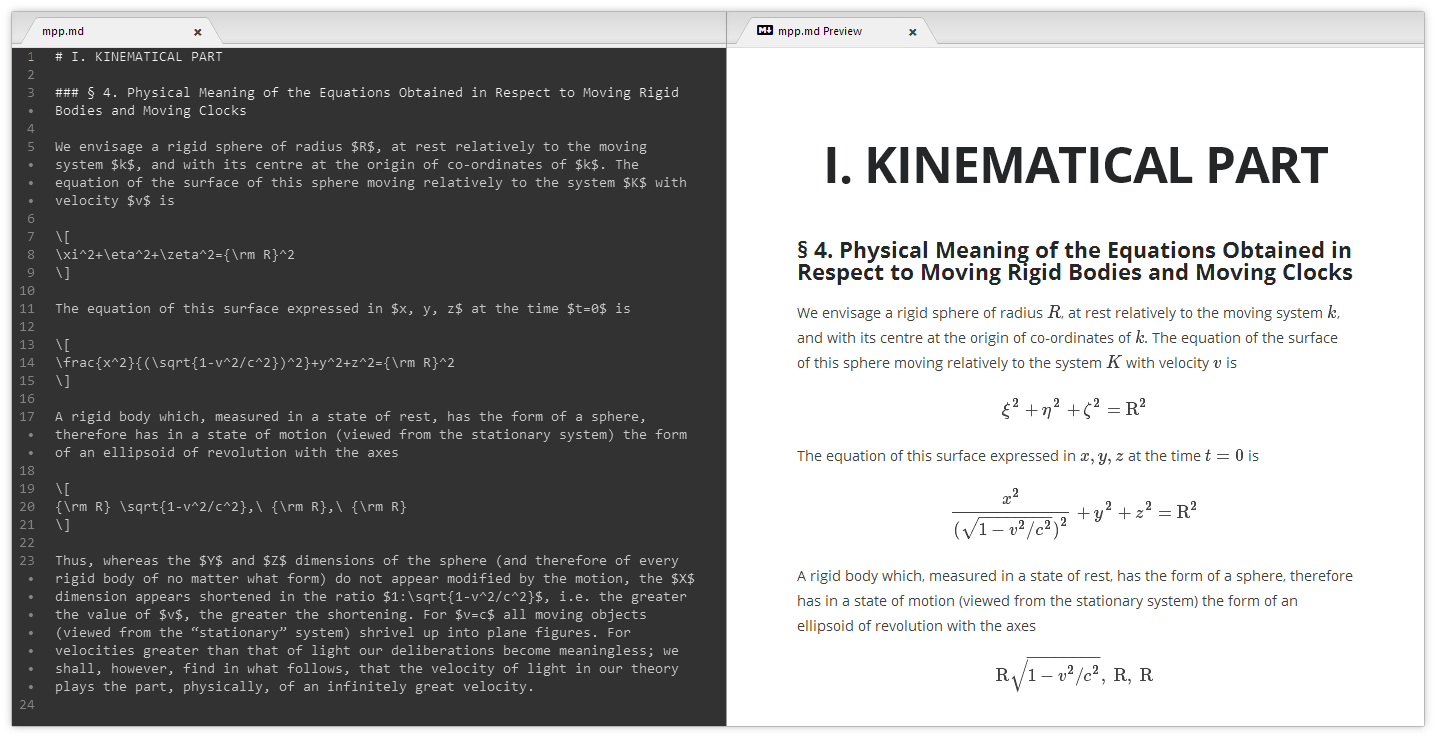
Features
We also have a more detailed description of features.
- Quickly open a preview of any markdown with
ctrl-shift-m - Math rendering with persistent macro support, toggled with
ctrl-shift-x - Optionally use pandoc with citation support
- Live reload while editing
- On demand synchronization
- And many more...
Installation
Long instructions can be found here. In short steps:
- Search for and install
markdown-preview-plusin Atom's Settings view. - Search for and disable the built-in package
markdown-preview. - (Optional) Install and enable Pandoc.
Usage
Please see options for further details on configuring MPP and math for more details on math rendering. For basic usage:
- Toggle Preview:
ctrl-shift-m - Toggle Math Rendering:
ctrl-shift-x
Contributing
See CONTRIBUTING.md.
Also of interest might be issues marked as "help wanted"
License
Markdown Preview Plus (MPP) is released under the MIT license.
Contributors
(top 30 of 47)




Similar repos


Languages
TypeScript
96.0%
Less
3.5%
Markdown Preview + Community Features
See the codeREADME
Project status
Atom is virtually dead, it's getting more broken each release, and since recently I can't publish new package versions. I have neither time nor patience to deal with that. I'm switching to VSCode and markdown-preview-enchanced.
As of May, 25th 2022, this project is officially unmaintained. Create an issue and ping @lierdakil if you want to and can take over.
Markdown Preview Plus (MPP)
Markdown Preview Plus (MPP) is a fork of Markdown Preview that provides a real-time preview of markdown documents. (Note: This is not the Chrome browser extension of the same name, which can be found here).
Should you have any problems while installing or using MPP please open up a new issue.
Features
We also have a more detailed description of features.
- Quickly open a preview of any markdown with
ctrl-shift-m - Math rendering with persistent macro support, toggled with
ctrl-shift-x - Optionally use pandoc with citation support
- Live reload while editing
- On demand synchronization
- And many more...
Installation
Long instructions can be found here. In short steps:
- Search for and install
markdown-preview-plusin Atom's Settings view. - Search for and disable the built-in package
markdown-preview. - (Optional) Install and enable Pandoc.
Usage
Please see options for further details on configuring MPP and math for more details on math rendering. For basic usage:
- Toggle Preview:
ctrl-shift-m - Toggle Math Rendering:
ctrl-shift-x
Contributing
See CONTRIBUTING.md.
Also of interest might be issues marked as "help wanted"
License
Markdown Preview Plus (MPP) is released under the MIT license.
Similar repos
Contributors
(top 30 of 47)
Languages
TypeScript
96.0%
Less
3.5%