
README
ICL - Interactive Common Lisp




ICL is an enhanced REPL for Common Lisp. It provides a modern interactive experience with readline-style editing, persistent history, tab completion, and an extensible command system. ICL works in your terminal, in a web browser with package browsing and data visualization, or integrated with Emacs via SLY/SLIME.
Terminal REPL

Syntax highlighting, paren matching, tab completion, paredit mode, and interactive inspector
Browser REPL
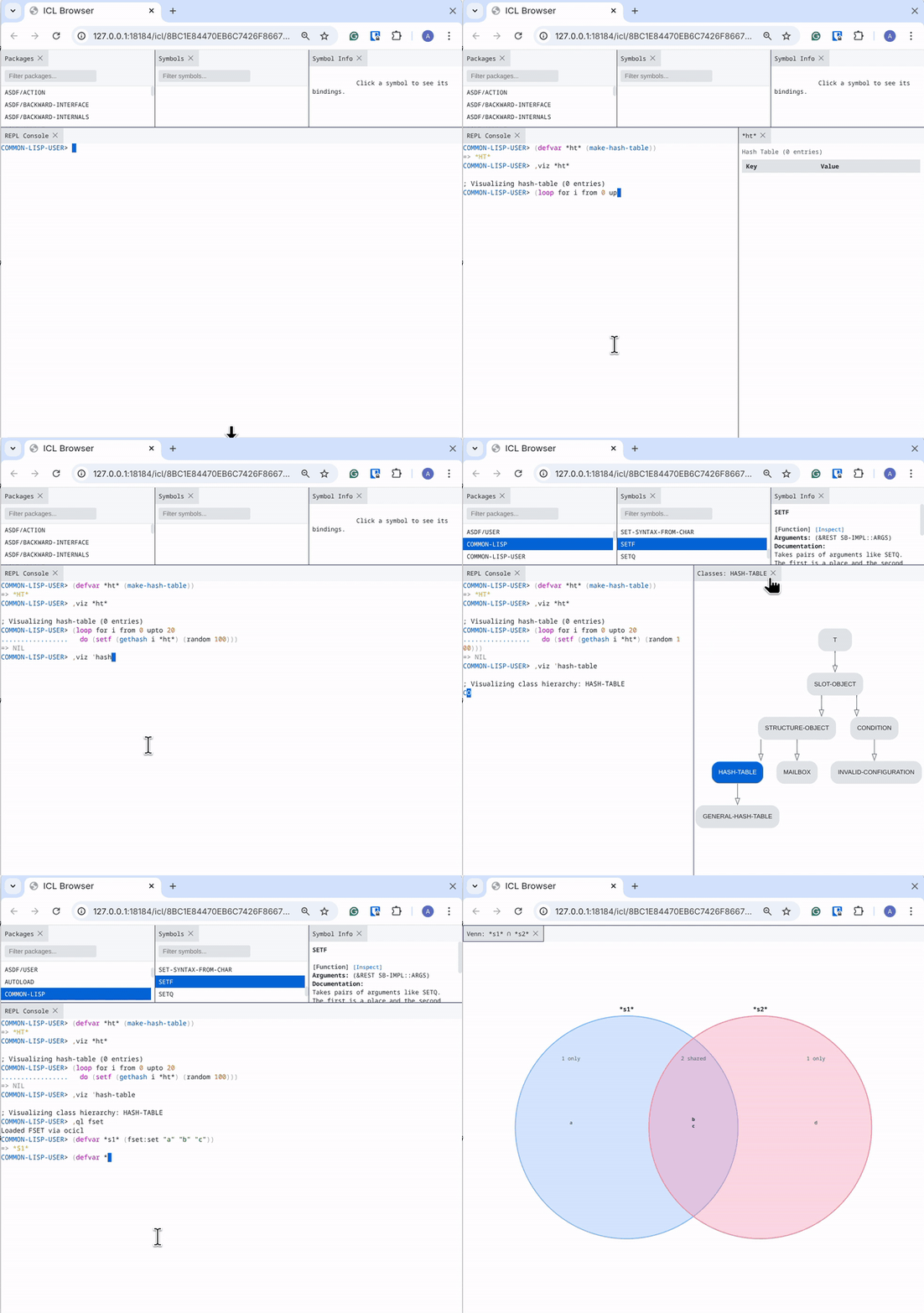
Package browser, symbol inspector, data visualization, and class hierarchy graphs
Notebooks
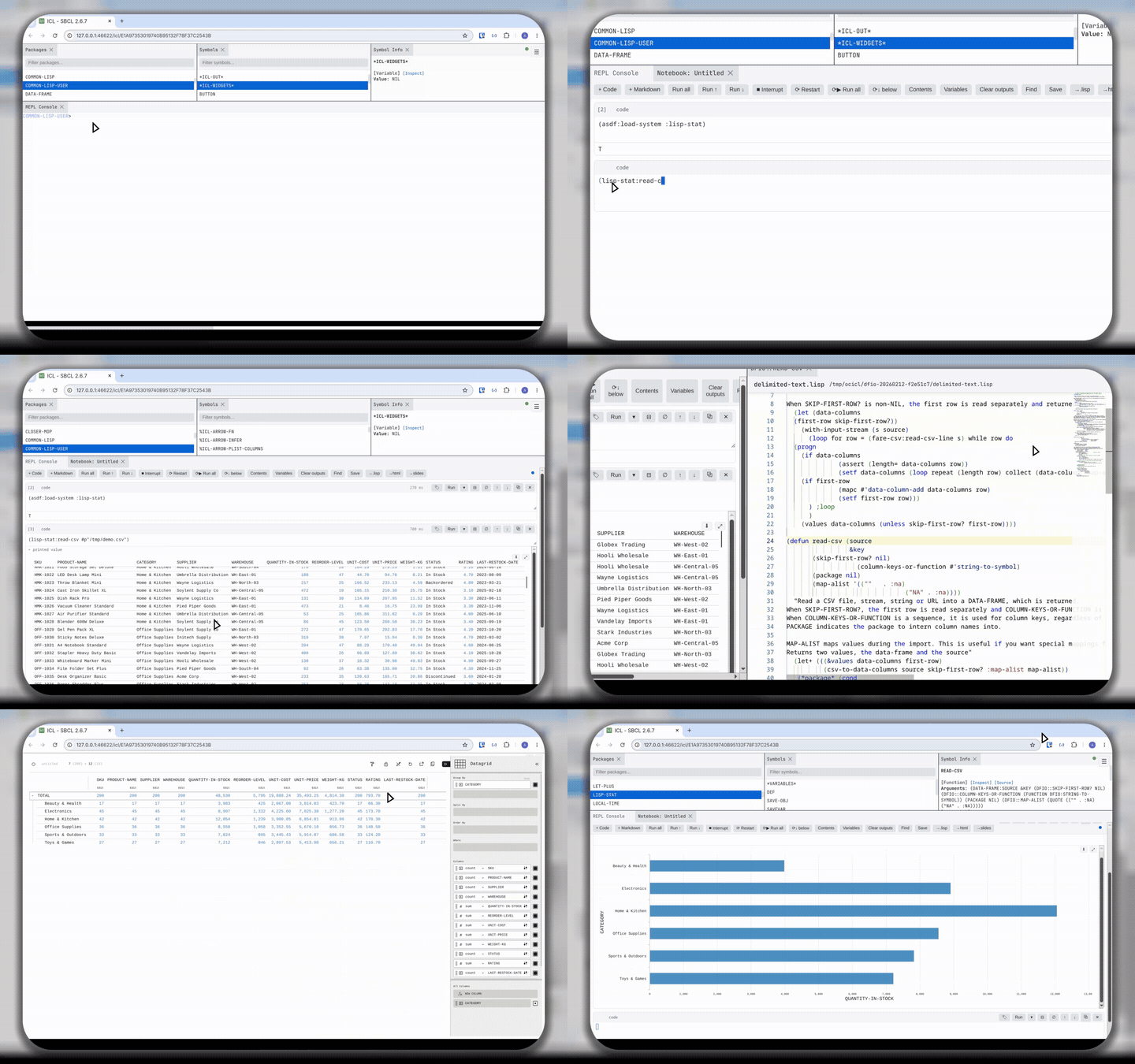
Jupyter-style notebooks with the full ICL editor per cell, rich outputs, interactive pivot tables, and reactive widgets
ICL includes a Jupyter-style notebook that runs in the browser interface. Open one with the ,notebook command or the --notebook flag:
icl --notebook                    # new, empty notebook
icl --notebook analysis.iclnb     # open an existing notebook
icl --notebook data.csv           # scaffold a notebook that loads the data file
,notebook                 ; new notebook (browser starts if needed)
,notebook analysis.iclnb  ; open a saved notebook (Tab completes filenames)
Data-file templates. Pointing --notebook (or -b) at a data file scaffolds
a fresh notebook wired to load it, chosen by the file's extension, and saves it as a
sibling .iclnb (your data file is never touched). csv and tsv ship built-in
(they load Lisp-Stat and read-csv the file into *df*).
Register your own for any extension in ~/.iclrc:
(icl:register-notebook-template "json"
  ;; A template is a function of the data file's pathname returning a list of
  ;; cell specs, each a plist (:kind :code|:markdown :source STRING).
  (lambda (path)
    (list (list :kind :code
                :source (format nil "(defparameter *data* (load-json ~S))"
                                (namestring path))))))
Notebooks can also be run headlessly (papermill-style) — parameterize and execute without a browser, then save the result:
icl --notebook report.iclnb --execute --param region=West -o report-west.iclnb
--param NAME=VALUE (repeatable) overrides bindings before the run, so
parameters declared with defvar pick up the override.
Highlights:
- The real ICL editor in every code cell - paredit, auto-indent, syntax highlighting, completion, inline hints, and click-to-inspect symbols, not a plain text box.
- Multi-form cells - a cell may hold several forms; all are evaluated and the last is the cell's value.
- Rich output - a returned hash-table renders as a table, a Vega-Lite spec as a chart, a Mermaid string as a diagram, plus SVG/HTML/JSON/images.
(display obj)emits several rich outputs from one cell; diagrams fit to width with scroll-to-zoom and drag-to-pan; each code cell shows its execution time. - Interactive tables - a list of plists/alists (or a Lisp-Stat
data-frame) renders as a sortable, filterable, pivotable grid, powered by Apache Arrow and Perspective (bundled, so it works fully offline). Drag columns into Group By to pivot and aggregate, or switch the same data to a bar / line / scatter / heatmap / treemap chart from the viewer settings — no chart spec needed. Column types are preserved, the layout is saved with the notebook, and any output can be maximized to fill the window (Escrestores). - Interactive widgets -
(slider 'n :min 0 :max 100),(dropdown 'r choices),(checkbox 'b),(text-input 's),(button 'go)bind a control to a symbol; changing it re-runs the cells that reference the symbol (reactive, no callbacks). - Markdown cells with GitHub-flavored tables, KaTeX math (
$…$,$$…$$), and> [!NOTE]/WARNING/TIPadmonitions. - Run keys -
Shift-Enterruns and advances,Alt-Enterruns and inserts a cell below,Ctrl-Enterruns in place; plainEnterinserts a newline. Toolbar adds Run-above / Run-below and Restart-&-run-below. - Command mode - press
Esc, thenj/kto move the selection,a/bto insert,ddto delete,m/yto switch markdown/code. - Cell tags & collapse - tag cells (
parameters,hide-input,slide, …); collapse a cell's input to show only its output. - Navigate & inspect - table of contents from markdown headings, find & replace across cells (
Ctrl-F), a variable inspector of everything the notebook has defined, and(out N)to reuse an earlier cell's value. - Manage the kernel - interrupt a running cell, restart the backend image, or Restart & Run All.
- Save & export - notebooks are plain-text
.iclnbs-expressions; download any output (grid → CSV, chart → SVG), and export to a self-contained HTML file, a reveal.js slide deck (driven by slide tags), or a loadable jupytext-style.lisp. Grids/charts are snapshotted so they render in the exported files.
Interactive data views (Perspective)
Tabular values — a list of plists/alists, or a Lisp-Stat data-frame — are
encoded as typed Apache Arrow and handed to an embedded
Perspective view. Perspective and its WebAssembly
engine are bundled (Apache-2.0), so everything works fully offline. All of the
following is point-and-click in the view's settings panel — no chart spec, and the
same configuration drives whichever visualization you pick:
- Visualizations — pivot Datagrid (with tree row/column groups and expand/collapse), Y/X Bar (grouped & stacked), Column, Y Line, Y Area, Y/XY Scatter (with color & size encodings), Heatmap, Treemap, Sunburst, and financial Candlestick / OHLC.
- Pivot — Group By (row pivots) and Split By (column pivots), nested to any depth.
- Aggregate — sum, mean, count, count-distinct, min, max, median, first/last, and more, per value column.
- Filter & sort — multiple per-column filter predicates and multi-column sorting.
- Computed columns — derive new columns with Perspective's expression language.
- Column control — show/hide and reorder columns; column types are preserved (numbers stay numeric, so aggregation is exact).
- Themes — light/dark, following the notebook.
- Persisted & resizable — the view configuration is saved with the notebook, and any output can be maximized to fill the window (
Escrestores).
See examples/notebook-tour.iclnb for a guided tour, and
examples/arrow-tables.iclnb for table/pivot examples.
Flame Graph Profiling
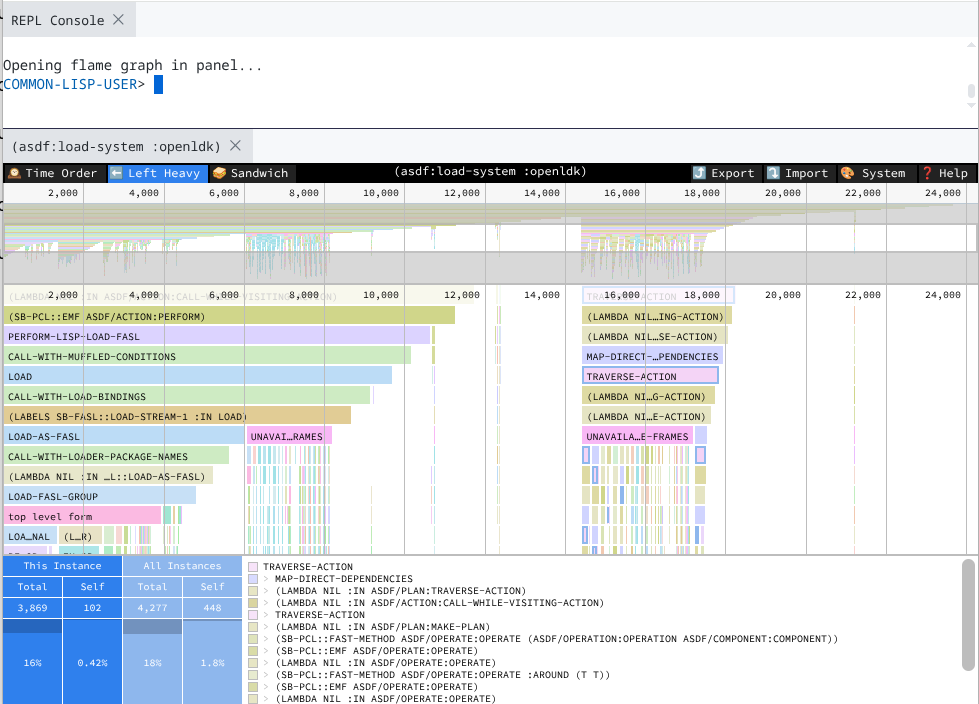
Interactive Speedscope flame graphs for performance profiling (SBCL only)
Profile any expression with ,flame and explore the results in an interactive Speedscope visualization. Switch between Time Order, Left Heavy, and Sandwich views to identify performance bottlenecks.
Emacs Integration
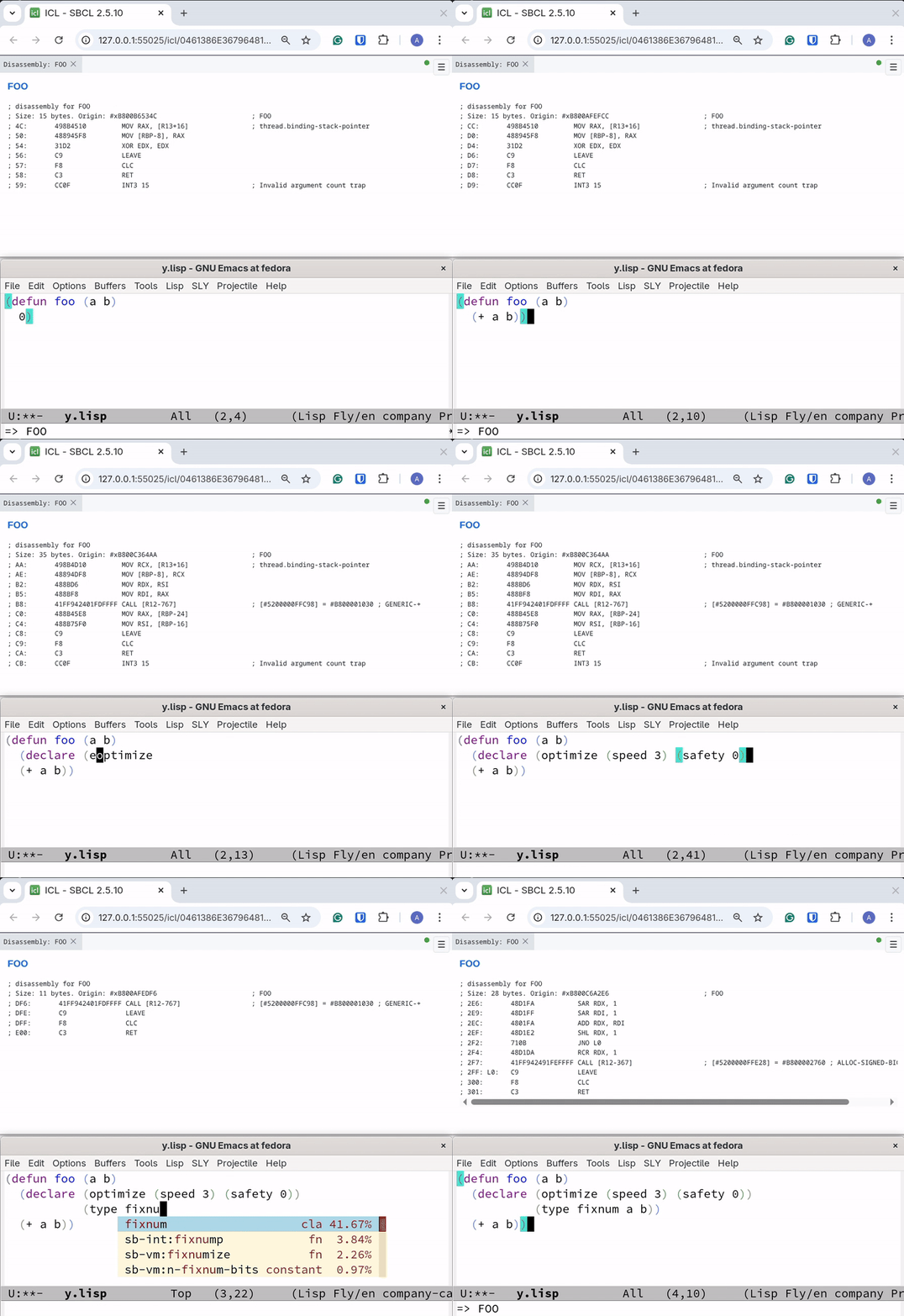
Synchronized browser visualization with SLY/SLIME - updates on C-x C-e, C-c C-c, and REPL input
Features
- Syntax highlighting - Colorized input with distinct colors for keywords, strings, comments, numbers, and symbols
- Parenthesis matching - Real-time highlighting of matching parentheses as you type
- Paredit mode - Structural editing with auto-close parens, safe deletion, and sexp navigation
- Multi-line input - Automatically detects incomplete expressions with smart indentation
- Persistent history - Command history saved across sessions
- Tab completion - Complete symbols, package-qualified names, and keywords
- Command system - Built-in commands prefixed with comma (e.g.,
,help) - Multiple Lisp support - Works with SBCL, CCL, ECL, CLISP, ABCL, Clasp, and Roswell
- Error backtraces - Automatic backtrace capture with
,btcommand to view stack traces - Thread inspection - List and inspect threads in the inferior Lisp
- Documentation lookup - Quick access to function docs and apropos search
- Interactive object inspector - TUI for exploring objects with keyboard navigation
- Tracing - Enable/disable function tracing
- Source location - Find where functions are defined
- Terminal-aware colors - Automatically detects light/dark terminal background
- AI integration - Use
,explainto get AI-powered explanations of code, errors, and results - Browser interface - Web UI with package browser, symbol list, inspector, and xterm.js terminal
- Notebooks - Browser notebooks with the full ICL editor per cell, multi-form evaluation, rich outputs (charts, interactive pivot tables, diagrams), markdown with KaTeX math,
display(), command-mode shortcuts, and export to HTML /.lisp - Data visualization - Visualize hash tables, classes, sets, SVG, HTML, JSON, Vega-Lite charts, Mermaid diagrams, regex railroad diagrams, and function disassembly
- Custom visualizations - Define
icl-runtime:visualizemethods for your own classes - Flame graph profiling - Interactive Speedscope visualizations for performance analysis (SBCL)
- Code coverage - HTML coverage reports via sb-cover (SBCL)
- Emacs integration - Works with SLY/SLIME for synchronized browser visualization
Installation
Fedora / RPM-based Systems
Add the ICL repository and install:
sudo dnf config-manager addrepo --from-repofile=https://atgreen.github.io/icl/rpm-repo/icl.repo
sudo dnf install icl
The RPM packages are GPG-signed. The signing key is imported automatically by dnf on first install.
Debian / Ubuntu
Add the ICL repository and install:
curl -fsSL https://atgreen.github.io/icl/deb-repo/icl-archive-keyring.gpg | sudo tee /usr/share/keyrings/icl-archive-keyring.asc > /dev/null
echo "deb [signed-by=/usr/share/keyrings/icl-archive-keyring.asc] https://atgreen.github.io/icl/deb-repo stable main" | sudo tee /etc/apt/sources.list.d/icl.list
sudo apt update
sudo apt install icl
The DEB packages are GPG-signed. The signing key is imported in the first step above.
Pre-built Binaries
Download from GitHub Releases:
| Platform | Formats |
|---|---|
| Linux | RPM, DEB, tarball |
| macOS | tarball (arm64, amd64) |
| Windows | ZIP, EXE installer, MSI installer, Chocolatey |
Roswell users can install with:
ros install atgreen/icl
cd ~/.roswell/local-projects/atgreen/icl
ocicl install
ICL depends on libraries that aren't published to Quicklisp/Ultralisp, so the
ocicl step is required to fetch them — ros install alone
will not produce a working icl.
Building from Source
git clone https://github.com/atgreen/icl.git
cd icl
ocicl install
make
Requires SBCL, ocicl, and libfixposix-devel.
Usage
Start ICL (auto-detects available Lisp):
icl
Specify a Lisp implementation:
icl --lisp ccl
icl --lisp ecl
icl --lisp roswell  # Use Roswell's managed environment
Evaluate an expression and exit:
icl -e '(+ 1 2 3)'
Load a file before starting the REPL:
icl -l init.lisp
Connect to an existing Slynk server:
icl --connect localhost:4005
Skip loading config file:
icl --no-config
Start with browser interface (opens IDE alongside terminal REPL):
icl -b
Open a browser notebook (a new one, an existing .iclnb file, or a data file
scaffolded from its extension template):
icl --notebook
icl --notebook analysis.iclnb
icl --notebook data.csv
Emacs Integration
ICL ships an Emacs helper for SLY or SLIME that launches the browser REPL and syncs visualizations with evals.
Minimal setup (adjust the path for your install):
(add-to-list 'load-path "/path/to/icl/emacs")
(require 'icl)
Commands:
M-x icl— start ICL browser connected to the current SLY/SLIME sessionM-x icl-stop— stop the ICL processM-x icl-restart— restart ICL
If you have both SLY and SLIME installed, ICL prefers SLY by default. You can override this:
(setq icl-backend 'slime) ;; or 'sly or 'auto
If you install the package via RPM/DEB/Windows installer, the Emacs
files are placed in a standard site-lisp directory and you can just
(require 'icl).
Packaging Notes (RPM/DEB/Windows)
Suggested install locations for Emacs files:
- RPM:
%{_datadir}/emacs/site-lisp/icl/icl.elandicl-autoloads.el - DEB:
/usr/share/emacs/site-lisp/icl/icl.elandicl-autoloads.el - Windows:
<INSTALL>/share/emacs/site-lisp/icl/icl.elandicl-autoloads.el
For packaging, include icl-autoloads.el and add the site-lisp path to
Emacs’ load-path (via site-start.d or the installer), then users can:
(require 'icl)
Commands
Commands are prefixed with a comma. Type ,help for a full list.
Navigation
| Command | Description |
|---|---|
,cd <package> | Change current package |
,pwd | Show current package |
,ls [filter] | List symbols (filters: functions, macros, variables, classes) |
Documentation
| Command | Description |
|---|---|
,doc <symbol> | Show documentation |
,describe <symbol> | Full description of symbol |
,apropos <pattern> | Search for matching symbols |
,arglist <function> | Show function arguments |
,source <symbol> | View source in Monaco editor panel |
,edit <symbol> | Open source in $EDITOR (alias: ,ed) |
Cross-Reference (Xref)
| Command | Description |
|---|---|
,callers <symbol> | Show functions that call symbol (alias: ,xc) |
,callees <symbol> | Show functions called by symbol (alias: ,xe) |
,references <symbol> | Show code that references variable (alias: ,xr) |
Inspection
| Command | Description |
|---|---|
,inspect <expr> | Interactive object inspector (alias: ,i) |
,i | Inspect last result (*) |
,inspect-static <expr> | Non-interactive inspection output |
,slots <expr> | Show slots of a class instance |
The interactive inspector (,i or ,inspect) provides a TUI for exploring objects:
| Key | Action |
|---|---|
↑/↓ or j/k | Navigate entries |
Enter | Drill into selected entry |
b or Backspace | Go back to parent object |
q or Escape | Quit inspector |
Macros
| Command | Description |
|---|---|
,macroexpand <form> | Expand macro once |
,macroexpand-all <form> | Fully expand all macros |
Development
| Command | Description |
|---|---|
,load-system <name> | Load system via ocicl/Quicklisp/ASDF (alias: ,ql) |
,libyear | Show dependency freshness metric (requires ocicl) |
,changes [system] | Show LLM-generated changelogs (requires ocicl) |
,time <form> | Time expression evaluation |
,load <file> | Load a Lisp file |
,compile-file <file> | Compile a file |
,disassemble <fn> | Disassemble a function |
Data / SQL
| Command | Description |
|---|---|
,sql <query> | Query data with DuckDB — CSV/Parquet/JSON files, session data frames, and attached databases. Runs in the backend: prints a table and leaves the result (a list of plists) in *, usable by your next form (-o NAME also binds *NAME*). In a notebook cell it returns rows that render as an interactive grid. |
,attach NAME TYPE CONNINFO | Attach a SQLite / Postgres / DuckDB database so ,sql can query it as NAME.table (joinable with files and data frames). No args lists attachments. |
,sql needs the duckdb CLI on PATH; the sqlite/postgres
extensions auto-install on first use. Attach databases in three scopes:
;; Global, in ~/.iclrc:
(icl:register-sql-source "cache" :sqlite "/var/tmp/cache.db")
(icl:register-sql-source "pg" :postgres "host=localhost dbname=app user=me")
;; Terminal, for this session:
,attach cache sqlite /var/tmp/cache.db

;; Notebook-local: an ,attach CELL, saved with the .iclnb and scoped to it:
,attach pg postgres host=localhost dbname=app user=me
,sql SELECT u.name, o.total
     FROM pg.public.users u JOIN cache.orders o USING (user_id)
Conninfo may use ${ENV_VARS}; passwords come from the environment (PGPASSWORD)
or ~/.pgpass, never the notebook file.
Parameterize with Lisp values. ${LISP-FORM} inside a query is evaluated in
the backend and spliced as a SQL literal — numbers inline, strings quoted, lists
as (a, b) for IN (always a literal, so a string value can't inject SQL):
(defparameter *min-age* 40)
,sql SELECT * FROM 'people.csv' WHERE age > ${*min-age*}
,sql SELECT * FROM 'people.csv' WHERE city IN ${(list "London" "NYC")}
Debugging
| Command | Description |
|---|---|
,bt | Show backtrace from last error |
,step <form> | Show traced function calls during evaluation |
,threads | List all threads in inferior Lisp |
,trace <function> | Enable tracing |
,untrace <function> | Disable tracing |
,untrace-all | Disable all tracing |
Profiling (SBCL only)
| Command | Description |
|---|---|
,profile <form> | Profile a form with the statistical profiler |
,profile-start | Start ongoing profiling |
,profile-stop | Stop profiling and show results |
,profile-reset | Reset profiler data |
,flame <form> | Profile and show interactive flame graph in browser |
,cover-ql <system> | Load system with code coverage instrumentation |
,cover-load <path> | Load file with code coverage instrumentation |
,cover-report | Generate and display HTML coverage report |
,cover-reset | Clear all coverage data |
The ,flame command (aliases: ,flamegraph, ,fg) profiles the expression and opens an interactive Speedscope flame graph in the browser. Requires browser mode (,browser or icl -b).
The ,cover-* commands use SBCL's sb-cover for code coverage analysis. Load code with ,cover-ql or ,cover-load, run your tests, then ,cover-report to view coverage in a Monaco editor panel with expression-level highlighting:
- Green - Executed code
- Red - Not executed
- Yellow - Partial branch coverage (only one branch taken)
Aliases: ,cql for ,cover-ql, ,cl for ,cover-load.
Source Viewer
The ,source command opens a Monaco editor panel in the browser with:
- Common Lisp syntax highlighting - Keywords, special variables, constants, and lambda list markers
- Hover documentation - Hold mouse over any symbol to see its arglist and docstring
- Multiple definitions - Dropdown selector when a symbol has multiple definitions (e.g., function and compiler-macro)
- Send to REPL - Right-click → "Send Top-Level Form to REPL" or press Ctrl+Enter
- Search - Right-click → "Find..." or Ctrl+F when editor has focus
The Symbol Info panel also includes a [Source] link next to [Inspect] for functions, providing quick access to source code.
Browser Visualization
| Command | Description |
|---|---|
,browser | Start browser-based IDE interface |
,notebook [file] | Open a browser notebook (optionally an existing .iclnb file) |
,viz <expr> | Visualize data in browser (class hierarchies, hash-tables, images, JSON, and more) |
The ,viz command automatically detects the type and displays an appropriate visualization:
- Class names:
'standard-object→ interactive class hierarchy graph with slots - Hash-tables:
*my-ht*→ key-value table - FSet collections: sets, maps, and bags with appropriate displays
- JSON strings:
"{\"key\": \"value\"}"→ syntax-highlighted, pretty-printed JSON - Image byte arrays: PNG, JPEG, GIF, WebP data → displayed inline
- SVG strings:
"<svg>...</svg>"→ rendered SVG graphics - HTML strings:
"<!DOCTYPE html>..."→ rendered in sandboxed iframe - Functions:
#'mapcar→ disassembly output with theme-aware styling
Venn Diagrams for FSet Sets
Visualize one or more FSet sets as Venn diagrams:
,viz *fruits*                    ; Single set as circle with members
,viz *fruits* *red-things*       ; Two-set Venn diagram showing overlap
,viz *set-a* *set-b* *set-c*     ; Three-set Venn diagram
- Single set: Circle displaying members inside
- Two sets: Classic Venn diagram with left-only, intersection, and right-only regions
- Three sets: Triangle arrangement showing all 7 regions with counts
Venn diagrams automatically refresh after each REPL evaluation to reflect data changes.
Class Hierarchy Graph
The class hierarchy graph supports interactive exploration:
- Click a node to see available subclasses and add them one at a time
- Hover over a node to highlight all ancestor classes up to the root
- Drag to pan, scroll to zoom the graph
Images
Visualize image data stored in byte arrays:
;; Load an image file into a byte vector
(defvar *img* (alexandria:read-file-into-byte-vector #P"photo.png"))
,viz *img*
Supported formats (detected by magic bytes): PNG, JPEG, GIF, WebP.
JSON and Code
JSON strings are automatically pretty-printed with syntax highlighting:
(defvar *data* "{\"name\": \"Alice\", \"scores\": [95, 87, 92]}")
,viz *data*
All visualization panels auto-refresh after REPL evaluations.
Custom Visualizations
Define methods on icl-runtime:visualize to create custom visualizations for your own classes:
;; Visualize a game board as HTML
(defmethod icl-runtime:visualize ((obj my-game-state))
  (list :html (render-board-html obj)))

;; Visualize data as SVG chart
(defmethod icl-runtime:visualize ((obj my-data-series))
  (list :svg (generate-chart-svg obj)))

;; Visualize config as JSON
(defmethod icl-runtime:visualize ((obj my-config))
  (list :json (serialize-to-json obj)))

;; Visualize metrics as Vega-Lite bar chart
(defmethod icl-runtime:visualize ((obj my-metrics))
  (list :vega-lite
        (format nil "{\"$schema\":\"https://vega.github.io/schema/vega-lite/v6.json\",
                      \"data\":{\"values\":~A},
                      \"mark\":\"bar\",
                      \"encoding\":{\"x\":{\"field\":\"name\",\"type\":\"nominal\"},
                                    \"y\":{\"field\":\"value\",\"type\":\"quantitative\"}}}"
                (metrics-to-json obj))))
Supported visualization types:
(:html string)- Render HTML in sandboxed iframe(:svg string)- Render SVG graphics(:json string)- Syntax-highlighted JSON(:vega-lite spec-string)- Render Vega-Lite chart(:mermaid definition-string)- Render Mermaid diagram(:regexp pattern-string)- Render regex railroad diagram via Regulex(:image-base64 mime-type base64-string)- Image from base64 data
Return NIL from your method to fall back to ICL's built-in type detection.
See examples/vega.lisp for Vega-Lite, examples/mermaid.lisp for Mermaid diagrams, and examples/regexp.lisp for regex visualization.
Library Integration
Libraries can provide visualizations that work even when loaded before ICL connects (e.g., when attaching ICL to a running Lisp from Emacs). Define a REGISTER-ICL-VIZ function in your package:
(in-package :my-library)

(defun register-icl-viz ()
  "Called by ICL to register visualizations for this library."
  (defmethod icl-runtime:visualize ((obj my-data-structure))
    (list :mermaid (my-struct-to-mermaid obj)))
  (defmethod icl-runtime:visualize ((obj my-config))
    (list :json (config-to-json obj))))
ICL automatically discovers and calls REGISTER-ICL-VIZ in all packages when ,viz is invoked. The icl-runtime package is guaranteed to exist when your function is called. Each package is only processed once per session.
Security
Custom visualizations are protected with multiple layers of security:
| Type | Security Measures |
|---|---|
| HTML | Sanitized server-side (scripts and event handlers removed), rendered in sandboxed iframe |
| Mermaid | Rendered in strict mode (click handlers and JavaScript disabled) |
| Vega-Lite | Expression functions disabled, AST-based evaluation only |
| SVG | Protected by CSP (inline scripts and event handlers blocked) |
The browser interface also enforces:
- Content Security Policy (CSP) - Blocks inline scripts and restricts resource loading
- WebSocket origin validation - Only accepts connections from localhost
- X-Frame-Options: DENY - Prevents clickjacking
These protections ensure that loading untrusted Lisp libraries with custom visualize methods cannot execute arbitrary JavaScript in your browser.
To disable these restrictions (for trusted code that requires JavaScript in visualizations), use:
icl -b --unsafe-visualizations
Configuration
| Command | Description |
|---|---|
,show-config | Show config file location and customization options |
,reload-config | Reload config file |
,paredit [on/off] | Toggle paredit structural editing mode |
Session
| Command | Description |
|---|---|
,help | Show all commands |
,info | Show session information |
,history | Show value history variables |
,lisp [name] | Show or switch Lisp backend |
,clear | Clear terminal |
,quit | Exit ICL |
AI Integration
| Command | Description |
|---|---|
,explain | Explain last result or error using AI |
,explain <code> | Explain specific code |
,ai-cli [name] | Show or set AI backend (gemini, claude, codex) |
The ,explain command uses an AI CLI (auto-detected from PATH) to provide explanations of Lisp code, errors, and results. When using Gemini or Claude CLI, ICL provides an MCP server that gives the AI read-only access to the live Lisp environment - it can query documentation, describe symbols, and search for functions, but cannot execute any code.
Requires one of: Gemini CLI, Claude CLI, or Codex CLI
History Variables
ICL maintains history of recent values and inputs:
| Variable | Description |
|---|---|
icl:_ / icl:icl-* | Last result |
icl:__ / icl:icl-** | Second-to-last result |
icl:___ / icl:icl-*** | Third-to-last result |
icl:icl-+ | Last input form |
icl:icl-/ | Last returned values (all values) |
Configuration
ICL loads a config file on startup (unless --no-config is specified). This file can contain any Common Lisp code.
Config file locations:
- Linux/macOS:
$XDG_CONFIG_HOME/icl/config.lisp(default:~/.config/icl/config.lisp) - Windows:
%APPDATA%\icl\config.lisp
History file locations:
- Linux/macOS:
$XDG_STATE_HOME/icl/history(default:~/.local/state/icl/history) - Windows:
%LOCALAPPDATA%\icl\history
Use ,show-config to see the actual paths on your system.
Configuration Variables
| Variable | Description |
|---|---|
*default-lisp* | Lisp implementation to use (:sbcl, :ccl, :ecl, :clisp, :abcl, :clasp, :roswell) |
*prompt-string* | Prompt format string (default: "~A> ") |
*result-prefix* | Prefix for results (default: "=> ") |
*colors-enabled* | Enable syntax coloring (default: t) |
*history-size* | Maximum history entries (default: 1000) |
*paredit-mode* | Enable structural editing (default: nil) |
*ai-cli* | AI CLI for ,explain (:gemini, :claude, :codex, or :auto) |
Customizing Lisp Invocation
Use configure-lisp to customize how ICL invokes a Lisp implementation:
(icl:configure-lisp impl &key program args eval-arg)
:program- Path to the executable:args- List of command-line arguments:eval-arg- The eval flag (e.g.,"--eval")
Example Config File
;; Use CCL instead of SBCL
(setf icl:*default-lisp* :ccl)

;; Custom SBCL with more memory
(icl:configure-lisp :sbcl
  :program "/opt/sbcl/bin/sbcl"
  :args '("--dynamic-space-size" "8192"))

;; Enable paredit mode
(setf icl:*paredit-mode* t)

;; Custom prompt
(setf icl:*prompt-string* "λ ~A> ")

;; Load commonly used systems
(asdf:load-system :alexandria)

;; Define custom utilities
(defun reload ()
  (asdf:load-system :my-project :force t))
Keyboard Shortcuts
| Key | Description |
|---|---|
Enter | Submit a complete form only at the end of the buffer; otherwise insert newline |
Alt+Enter | Always insert newline (works in most terminals) |
Shift+Enter | Always insert newline (requires kitty keyboard protocol) |
Tab | Complete symbol or show completion menu |
Ctrl+A / Home | Move to beginning of line |
Ctrl+E / End | Move to end of line |
Ctrl+F | Forward character |
Ctrl+B | Backward character |
Ctrl+N | Next line (in multi-line input) |
Ctrl+P | Previous line (in multi-line input) |
Ctrl+K | Kill to end of line |
Ctrl+O | Open line (insert newline, cursor stays) |
Ctrl+T | Transpose characters |
Ctrl+U | Clear entire line |
Alt+D | Kill word forward |
Alt+Backspace | Kill word backward |
Ctrl+L | Clear screen |
Ctrl+D | Delete character at cursor, or EOF if line empty (Emacs-style) |
Ctrl+Z | Undo |
Ctrl+Y | Redo |
Ctrl+C | Cancel current input |
Ctrl+\ | Suspend process |
Ctrl+R | Reverse history search (substring match) |
Ctrl+G | Cancel search |
Up/Down | Navigate history (on first/last line) or move cursor |
Alt+P | History search backward (prefix match) |
Alt+N | History search forward (prefix match) |
Alt+Q | Reindent current form |
Alt+F | Forward sexp (paredit mode only) |
Alt+B | Backward sexp (paredit mode only) |
Ctrl+X | Cut the selection to the clipboard |
| Mouse drag | Select text; releasing copies the selection to the clipboard |
Notes:
- Enter only submits a complete form when the cursor is at the end of the buffer; otherwise it inserts a newline, including in paredit mode
- With an active selection, Enter cancels the selection without changing the text, then applies the same rule
- Drag with the left mouse button to select; on release the selection is copied to the clipboard (via OSC 52 and, when available,
wl-copy/xclip/pbcopy) and stays highlighted until the next edit or cursor move. Typing, paste, or Backspace/Delete replaces the selection;Ctrl+Xcuts it. - Because ICL tracks the mouse for selection, use your terminal's modifier (usually hold
Shift) for its own native selection and scrollback. - Use Alt+Enter in gnome-terminal and most other terminals. Shift+Enter only works in terminals with kitty keyboard protocol support (kitty, WezTerm, Alacritty, etc.).
Environment Variables
| Variable | Description |
|---|---|
ICL_SLYNK_PATH | Override path to Slynk directory |
ICL_ASDF_PATH | Override path to bundled ASDF (for backends without ASDF) |
ICL_BACKGROUND | Override terminal background detection (dark or light) |
NO_COLOR | When set to any non-empty value, disables colored output (see no-color.org) |
Supported Lisp Implementations
ICL aims to support multiple Common Lisp implementations. SBCL is the primary development and testing platform.
| Implementation | Status |
|---|---|
| SBCL | Tested |
| CCL | Tested |
| ECL | Tested |
| ABCL | Tested |
| Roswell | Tested |
| Clasp | Untested |
| CLISP | Experimental |
Architecture
ICL operates as a frontend that communicates with a backend Lisp process via the Slynk protocol (from SLY). This architecture allows ICL to work with any Common Lisp implementation, provide consistent features regardless of backend, and connect to remote Lisp processes.
flowchart LR
    subgraph Clients
        Terminal
        Browser
        Emacs["Emacs"]
        AI["AI CLIs"]
    end

    subgraph ICL
        direction TB
        Web["Web Server"]
        MCP["MCP Server"]
        Client["Slynk Client"]
    end

    subgraph Lisp ["Lisp Image"]
        Server["Slynk Server"]
    end

    Terminal ---|stdin/stdout| ICL
    Browser ---|HTTP/WS| Web
    AI ---|HTTP| MCP
    Client & Emacs ---|Slynk| Server
All connections use randomly-assigned ports on localhost. When ICL starts an inferior Lisp, it finds an available port and configures Slynk to listen there. The browser interface (started with ,browser or icl -b) serves a Dockview-based IDE with package browser, symbol list, inspector panels, and class hierarchy visualization. The browser automatically closes when ICL terminates. The MCP server (started on-demand by ,explain) provides read-only AI tool integration.
License
MIT License. See LICENSE file for details.
Author
Anthony Green green@moxielogic.com
Contributors


Similar repos


README
ICL - Interactive Common Lisp
ICL is an enhanced REPL for Common Lisp. It provides a modern interactive experience with readline-style editing, persistent history, tab completion, and an extensible command system. ICL works in your terminal, in a web browser with package browsing and data visualization, or integrated with Emacs via SLY/SLIME.
Terminal REPL
Syntax highlighting, paren matching, tab completion, paredit mode, and interactive inspector
Browser REPL
Package browser, symbol inspector, data visualization, and class hierarchy graphs
Notebooks
Jupyter-style notebooks with the full ICL editor per cell, rich outputs, interactive pivot tables, and reactive widgets
ICL includes a Jupyter-style notebook that runs in the browser interface. Open one with the ,notebook command or the --notebook flag:
icl --notebook                    # new, empty notebook
icl --notebook analysis.iclnb     # open an existing notebook
icl --notebook data.csv           # scaffold a notebook that loads the data file
,notebook                 ; new notebook (browser starts if needed)
,notebook analysis.iclnb  ; open a saved notebook (Tab completes filenames)
Data-file templates. Pointing --notebook (or -b) at a data file scaffolds
a fresh notebook wired to load it, chosen by the file's extension, and saves it as a
sibling .iclnb (your data file is never touched). csv and tsv ship built-in
(they load Lisp-Stat and read-csv the file into *df*).
Register your own for any extension in ~/.iclrc:
(icl:register-notebook-template "json"
  ;; A template is a function of the data file's pathname returning a list of
  ;; cell specs, each a plist (:kind :code|:markdown :source STRING).
  (lambda (path)
    (list (list :kind :code
                :source (format nil "(defparameter *data* (load-json ~S))"
                                (namestring path))))))
Notebooks can also be run headlessly (papermill-style) — parameterize and execute without a browser, then save the result:
icl --notebook report.iclnb --execute --param region=West -o report-west.iclnb
--param NAME=VALUE (repeatable) overrides bindings before the run, so
parameters declared with defvar pick up the override.
Highlights:
- The real ICL editor in every code cell - paredit, auto-indent, syntax highlighting, completion, inline hints, and click-to-inspect symbols, not a plain text box.
- Multi-form cells - a cell may hold several forms; all are evaluated and the last is the cell's value.
- Rich output - a returned hash-table renders as a table, a Vega-Lite spec as a chart, a Mermaid string as a diagram, plus SVG/HTML/JSON/images.
(display obj)emits several rich outputs from one cell; diagrams fit to width with scroll-to-zoom and drag-to-pan; each code cell shows its execution time. - Interactive tables - a list of plists/alists (or a Lisp-Stat
data-frame) renders as a sortable, filterable, pivotable grid, powered by Apache Arrow and Perspective (bundled, so it works fully offline). Drag columns into Group By to pivot and aggregate, or switch the same data to a bar / line / scatter / heatmap / treemap chart from the viewer settings — no chart spec needed. Column types are preserved, the layout is saved with the notebook, and any output can be maximized to fill the window (Escrestores). - Interactive widgets -
(slider 'n :min 0 :max 100),(dropdown 'r choices),(checkbox 'b),(text-input 's),(button 'go)bind a control to a symbol; changing it re-runs the cells that reference the symbol (reactive, no callbacks). - Markdown cells with GitHub-flavored tables, KaTeX math (
$…$,$$…$$), and> [!NOTE]/WARNING/TIPadmonitions. - Run keys -
Shift-Enterruns and advances,Alt-Enterruns and inserts a cell below,Ctrl-Enterruns in place; plainEnterinserts a newline. Toolbar adds Run-above / Run-below and Restart-&-run-below. - Command mode - press
Esc, thenj/kto move the selection,a/bto insert,ddto delete,m/yto switch markdown/code. - Cell tags & collapse - tag cells (
parameters,hide-input,slide, …); collapse a cell's input to show only its output. - Navigate & inspect - table of contents from markdown headings, find & replace across cells (
Ctrl-F), a variable inspector of everything the notebook has defined, and(out N)to reuse an earlier cell's value. - Manage the kernel - interrupt a running cell, restart the backend image, or Restart & Run All.
- Save & export - notebooks are plain-text
.iclnbs-expressions; download any output (grid → CSV, chart → SVG), and export to a self-contained HTML file, a reveal.js slide deck (driven by slide tags), or a loadable jupytext-style.lisp. Grids/charts are snapshotted so they render in the exported files.
Interactive data views (Perspective)
Tabular values — a list of plists/alists, or a Lisp-Stat data-frame — are
encoded as typed Apache Arrow and handed to an embedded
Perspective view. Perspective and its WebAssembly
engine are bundled (Apache-2.0), so everything works fully offline. All of the
following is point-and-click in the view's settings panel — no chart spec, and the
same configuration drives whichever visualization you pick:
- Visualizations — pivot Datagrid (with tree row/column groups and expand/collapse), Y/X Bar (grouped & stacked), Column, Y Line, Y Area, Y/XY Scatter (with color & size encodings), Heatmap, Treemap, Sunburst, and financial Candlestick / OHLC.
- Pivot — Group By (row pivots) and Split By (column pivots), nested to any depth.
- Aggregate — sum, mean, count, count-distinct, min, max, median, first/last, and more, per value column.
- Filter & sort — multiple per-column filter predicates and multi-column sorting.
- Computed columns — derive new columns with Perspective's expression language.
- Column control — show/hide and reorder columns; column types are preserved (numbers stay numeric, so aggregation is exact).
- Themes — light/dark, following the notebook.
- Persisted & resizable — the view configuration is saved with the notebook, and any output can be maximized to fill the window (
Escrestores).
See examples/notebook-tour.iclnb for a guided tour, and
examples/arrow-tables.iclnb for table/pivot examples.
Flame Graph Profiling
Interactive Speedscope flame graphs for performance profiling (SBCL only)
Profile any expression with ,flame and explore the results in an interactive Speedscope visualization. Switch between Time Order, Left Heavy, and Sandwich views to identify performance bottlenecks.
Emacs Integration
Synchronized browser visualization with SLY/SLIME - updates on C-x C-e, C-c C-c, and REPL input
Features
- Syntax highlighting - Colorized input with distinct colors for keywords, strings, comments, numbers, and symbols
- Parenthesis matching - Real-time highlighting of matching parentheses as you type
- Paredit mode - Structural editing with auto-close parens, safe deletion, and sexp navigation
- Multi-line input - Automatically detects incomplete expressions with smart indentation
- Persistent history - Command history saved across sessions
- Tab completion - Complete symbols, package-qualified names, and keywords
- Command system - Built-in commands prefixed with comma (e.g.,
,help) - Multiple Lisp support - Works with SBCL, CCL, ECL, CLISP, ABCL, Clasp, and Roswell
- Error backtraces - Automatic backtrace capture with
,btcommand to view stack traces - Thread inspection - List and inspect threads in the inferior Lisp
- Documentation lookup - Quick access to function docs and apropos search
- Interactive object inspector - TUI for exploring objects with keyboard navigation
- Tracing - Enable/disable function tracing
- Source location - Find where functions are defined
- Terminal-aware colors - Automatically detects light/dark terminal background
- AI integration - Use
,explainto get AI-powered explanations of code, errors, and results - Browser interface - Web UI with package browser, symbol list, inspector, and xterm.js terminal
- Notebooks - Browser notebooks with the full ICL editor per cell, multi-form evaluation, rich outputs (charts, interactive pivot tables, diagrams), markdown with KaTeX math,
display(), command-mode shortcuts, and export to HTML /.lisp - Data visualization - Visualize hash tables, classes, sets, SVG, HTML, JSON, Vega-Lite charts, Mermaid diagrams, regex railroad diagrams, and function disassembly
- Custom visualizations - Define
icl-runtime:visualizemethods for your own classes - Flame graph profiling - Interactive Speedscope visualizations for performance analysis (SBCL)
- Code coverage - HTML coverage reports via sb-cover (SBCL)
- Emacs integration - Works with SLY/SLIME for synchronized browser visualization
Installation
Fedora / RPM-based Systems
Add the ICL repository and install:
sudo dnf config-manager addrepo --from-repofile=https://atgreen.github.io/icl/rpm-repo/icl.repo
sudo dnf install icl
The RPM packages are GPG-signed. The signing key is imported automatically by dnf on first install.
Debian / Ubuntu
Add the ICL repository and install:
curl -fsSL https://atgreen.github.io/icl/deb-repo/icl-archive-keyring.gpg | sudo tee /usr/share/keyrings/icl-archive-keyring.asc > /dev/null
echo "deb [signed-by=/usr/share/keyrings/icl-archive-keyring.asc] https://atgreen.github.io/icl/deb-repo stable main" | sudo tee /etc/apt/sources.list.d/icl.list
sudo apt update
sudo apt install icl
The DEB packages are GPG-signed. The signing key is imported in the first step above.
Pre-built Binaries
Download from GitHub Releases:
| Platform | Formats |
|---|---|
| Linux | RPM, DEB, tarball |
| macOS | tarball (arm64, amd64) |
| Windows | ZIP, EXE installer, MSI installer, Chocolatey |
Roswell users can install with:
ros install atgreen/icl
cd ~/.roswell/local-projects/atgreen/icl
ocicl install
ICL depends on libraries that aren't published to Quicklisp/Ultralisp, so the
ocicl step is required to fetch them — ros install alone
will not produce a working icl.
Building from Source
git clone https://github.com/atgreen/icl.git
cd icl
ocicl install
make
Requires SBCL, ocicl, and libfixposix-devel.
Usage
Start ICL (auto-detects available Lisp):
icl
Specify a Lisp implementation:
icl --lisp ccl
icl --lisp ecl
icl --lisp roswell  # Use Roswell's managed environment
Evaluate an expression and exit:
icl -e '(+ 1 2 3)'
Load a file before starting the REPL:
icl -l init.lisp
Connect to an existing Slynk server:
icl --connect localhost:4005
Skip loading config file:
icl --no-config
Start with browser interface (opens IDE alongside terminal REPL):
icl -b
Open a browser notebook (a new one, an existing .iclnb file, or a data file
scaffolded from its extension template):
icl --notebook
icl --notebook analysis.iclnb
icl --notebook data.csv
Emacs Integration
ICL ships an Emacs helper for SLY or SLIME that launches the browser REPL and syncs visualizations with evals.
Minimal setup (adjust the path for your install):
(add-to-list 'load-path "/path/to/icl/emacs")
(require 'icl)
Commands:
M-x icl— start ICL browser connected to the current SLY/SLIME sessionM-x icl-stop— stop the ICL processM-x icl-restart— restart ICL
If you have both SLY and SLIME installed, ICL prefers SLY by default. You can override this:
(setq icl-backend 'slime) ;; or 'sly or 'auto
If you install the package via RPM/DEB/Windows installer, the Emacs
files are placed in a standard site-lisp directory and you can just
(require 'icl).
Packaging Notes (RPM/DEB/Windows)
Suggested install locations for Emacs files:
- RPM:
%{_datadir}/emacs/site-lisp/icl/icl.elandicl-autoloads.el - DEB:
/usr/share/emacs/site-lisp/icl/icl.elandicl-autoloads.el - Windows:
<INSTALL>/share/emacs/site-lisp/icl/icl.elandicl-autoloads.el
For packaging, include icl-autoloads.el and add the site-lisp path to
Emacs’ load-path (via site-start.d or the installer), then users can:
(require 'icl)
Commands
Commands are prefixed with a comma. Type ,help for a full list.
Navigation
| Command | Description |
|---|---|
,cd <package> | Change current package |
,pwd | Show current package |
,ls [filter] | List symbols (filters: functions, macros, variables, classes) |
Documentation
| Command | Description |
|---|---|
,doc <symbol> | Show documentation |
,describe <symbol> | Full description of symbol |
,apropos <pattern> | Search for matching symbols |
,arglist <function> | Show function arguments |
,source <symbol> | View source in Monaco editor panel |
,edit <symbol> | Open source in $EDITOR (alias: ,ed) |
Cross-Reference (Xref)
| Command | Description |
|---|---|
,callers <symbol> | Show functions that call symbol (alias: ,xc) |
,callees <symbol> | Show functions called by symbol (alias: ,xe) |
,references <symbol> | Show code that references variable (alias: ,xr) |
Inspection
| Command | Description |
|---|---|
,inspect <expr> | Interactive object inspector (alias: ,i) |
,i | Inspect last result (*) |
,inspect-static <expr> | Non-interactive inspection output |
,slots <expr> | Show slots of a class instance |
The interactive inspector (,i or ,inspect) provides a TUI for exploring objects:
| Key | Action |
|---|---|
↑/↓ or j/k | Navigate entries |
Enter | Drill into selected entry |
b or Backspace | Go back to parent object |
q or Escape | Quit inspector |
Macros
| Command | Description |
|---|---|
,macroexpand <form> | Expand macro once |
,macroexpand-all <form> | Fully expand all macros |
Development
| Command | Description |
|---|---|
,load-system <name> | Load system via ocicl/Quicklisp/ASDF (alias: ,ql) |
,libyear | Show dependency freshness metric (requires ocicl) |
,changes [system] | Show LLM-generated changelogs (requires ocicl) |
,time <form> | Time expression evaluation |
,load <file> | Load a Lisp file |
,compile-file <file> | Compile a file |
,disassemble <fn> | Disassemble a function |
Data / SQL
| Command | Description |
|---|---|
,sql <query> | Query data with DuckDB — CSV/Parquet/JSON files, session data frames, and attached databases. Runs in the backend: prints a table and leaves the result (a list of plists) in *, usable by your next form (-o NAME also binds *NAME*). In a notebook cell it returns rows that render as an interactive grid. |
,attach NAME TYPE CONNINFO | Attach a SQLite / Postgres / DuckDB database so ,sql can query it as NAME.table (joinable with files and data frames). No args lists attachments. |
,sql needs the duckdb CLI on PATH; the sqlite/postgres
extensions auto-install on first use. Attach databases in three scopes:
;; Global, in ~/.iclrc:
(icl:register-sql-source "cache" :sqlite "/var/tmp/cache.db")
(icl:register-sql-source "pg" :postgres "host=localhost dbname=app user=me")
;; Terminal, for this session:
,attach cache sqlite /var/tmp/cache.db

;; Notebook-local: an ,attach CELL, saved with the .iclnb and scoped to it:
,attach pg postgres host=localhost dbname=app user=me
,sql SELECT u.name, o.total
     FROM pg.public.users u JOIN cache.orders o USING (user_id)
Conninfo may use ${ENV_VARS}; passwords come from the environment (PGPASSWORD)
or ~/.pgpass, never the notebook file.
Parameterize with Lisp values. ${LISP-FORM} inside a query is evaluated in
the backend and spliced as a SQL literal — numbers inline, strings quoted, lists
as (a, b) for IN (always a literal, so a string value can't inject SQL):
(defparameter *min-age* 40)
,sql SELECT * FROM 'people.csv' WHERE age > ${*min-age*}
,sql SELECT * FROM 'people.csv' WHERE city IN ${(list "London" "NYC")}
Debugging
| Command | Description |
|---|---|
,bt | Show backtrace from last error |
,step <form> | Show traced function calls during evaluation |
,threads | List all threads in inferior Lisp |
,trace <function> | Enable tracing |
,untrace <function> | Disable tracing |
,untrace-all | Disable all tracing |
Profiling (SBCL only)
| Command | Description |
|---|---|
,profile <form> | Profile a form with the statistical profiler |
,profile-start | Start ongoing profiling |
,profile-stop | Stop profiling and show results |
,profile-reset | Reset profiler data |
,flame <form> | Profile and show interactive flame graph in browser |
,cover-ql <system> | Load system with code coverage instrumentation |
,cover-load <path> | Load file with code coverage instrumentation |
,cover-report | Generate and display HTML coverage report |
,cover-reset | Clear all coverage data |
The ,flame command (aliases: ,flamegraph, ,fg) profiles the expression and opens an interactive Speedscope flame graph in the browser. Requires browser mode (,browser or icl -b).
The ,cover-* commands use SBCL's sb-cover for code coverage analysis. Load code with ,cover-ql or ,cover-load, run your tests, then ,cover-report to view coverage in a Monaco editor panel with expression-level highlighting:
- Green - Executed code
- Red - Not executed
- Yellow - Partial branch coverage (only one branch taken)
Aliases: ,cql for ,cover-ql, ,cl for ,cover-load.
Source Viewer
The ,source command opens a Monaco editor panel in the browser with:
- Common Lisp syntax highlighting - Keywords, special variables, constants, and lambda list markers
- Hover documentation - Hold mouse over any symbol to see its arglist and docstring
- Multiple definitions - Dropdown selector when a symbol has multiple definitions (e.g., function and compiler-macro)
- Send to REPL - Right-click → "Send Top-Level Form to REPL" or press Ctrl+Enter
- Search - Right-click → "Find..." or Ctrl+F when editor has focus
The Symbol Info panel also includes a [Source] link next to [Inspect] for functions, providing quick access to source code.
Browser Visualization
| Command | Description |
|---|---|
,browser | Start browser-based IDE interface |
,notebook [file] | Open a browser notebook (optionally an existing .iclnb file) |
,viz <expr> | Visualize data in browser (class hierarchies, hash-tables, images, JSON, and more) |
The ,viz command automatically detects the type and displays an appropriate visualization:
- Class names:
'standard-object→ interactive class hierarchy graph with slots - Hash-tables:
*my-ht*→ key-value table - FSet collections: sets, maps, and bags with appropriate displays
- JSON strings:
"{\"key\": \"value\"}"→ syntax-highlighted, pretty-printed JSON - Image byte arrays: PNG, JPEG, GIF, WebP data → displayed inline
- SVG strings:
"<svg>...</svg>"→ rendered SVG graphics - HTML strings:
"<!DOCTYPE html>..."→ rendered in sandboxed iframe - Functions:
#'mapcar→ disassembly output with theme-aware styling
Venn Diagrams for FSet Sets
Visualize one or more FSet sets as Venn diagrams:
,viz *fruits*                    ; Single set as circle with members
,viz *fruits* *red-things*       ; Two-set Venn diagram showing overlap
,viz *set-a* *set-b* *set-c*     ; Three-set Venn diagram
- Single set: Circle displaying members inside
- Two sets: Classic Venn diagram with left-only, intersection, and right-only regions
- Three sets: Triangle arrangement showing all 7 regions with counts
Venn diagrams automatically refresh after each REPL evaluation to reflect data changes.
Class Hierarchy Graph
The class hierarchy graph supports interactive exploration:
- Click a node to see available subclasses and add them one at a time
- Hover over a node to highlight all ancestor classes up to the root
- Drag to pan, scroll to zoom the graph
Images
Visualize image data stored in byte arrays:
;; Load an image file into a byte vector
(defvar *img* (alexandria:read-file-into-byte-vector #P"photo.png"))
,viz *img*
Supported formats (detected by magic bytes): PNG, JPEG, GIF, WebP.
JSON and Code
JSON strings are automatically pretty-printed with syntax highlighting:
(defvar *data* "{\"name\": \"Alice\", \"scores\": [95, 87, 92]}")
,viz *data*
All visualization panels auto-refresh after REPL evaluations.
Custom Visualizations
Define methods on icl-runtime:visualize to create custom visualizations for your own classes:
;; Visualize a game board as HTML
(defmethod icl-runtime:visualize ((obj my-game-state))
  (list :html (render-board-html obj)))

;; Visualize data as SVG chart
(defmethod icl-runtime:visualize ((obj my-data-series))
  (list :svg (generate-chart-svg obj)))

;; Visualize config as JSON
(defmethod icl-runtime:visualize ((obj my-config))
  (list :json (serialize-to-json obj)))

;; Visualize metrics as Vega-Lite bar chart
(defmethod icl-runtime:visualize ((obj my-metrics))
  (list :vega-lite
        (format nil "{\"$schema\":\"https://vega.github.io/schema/vega-lite/v6.json\",
                      \"data\":{\"values\":~A},
                      \"mark\":\"bar\",
                      \"encoding\":{\"x\":{\"field\":\"name\",\"type\":\"nominal\"},
                                    \"y\":{\"field\":\"value\",\"type\":\"quantitative\"}}}"
                (metrics-to-json obj))))
Supported visualization types:
(:html string)- Render HTML in sandboxed iframe(:svg string)- Render SVG graphics(:json string)- Syntax-highlighted JSON(:vega-lite spec-string)- Render Vega-Lite chart(:mermaid definition-string)- Render Mermaid diagram(:regexp pattern-string)- Render regex railroad diagram via Regulex(:image-base64 mime-type base64-string)- Image from base64 data
Return NIL from your method to fall back to ICL's built-in type detection.
See examples/vega.lisp for Vega-Lite, examples/mermaid.lisp for Mermaid diagrams, and examples/regexp.lisp for regex visualization.
Library Integration
Libraries can provide visualizations that work even when loaded before ICL connects (e.g., when attaching ICL to a running Lisp from Emacs). Define a REGISTER-ICL-VIZ function in your package:
(in-package :my-library)

(defun register-icl-viz ()
  "Called by ICL to register visualizations for this library."
  (defmethod icl-runtime:visualize ((obj my-data-structure))
    (list :mermaid (my-struct-to-mermaid obj)))
  (defmethod icl-runtime:visualize ((obj my-config))
    (list :json (config-to-json obj))))
ICL automatically discovers and calls REGISTER-ICL-VIZ in all packages when ,viz is invoked. The icl-runtime package is guaranteed to exist when your function is called. Each package is only processed once per session.
Security
Custom visualizations are protected with multiple layers of security:
| Type | Security Measures |
|---|---|
| HTML | Sanitized server-side (scripts and event handlers removed), rendered in sandboxed iframe |
| Mermaid | Rendered in strict mode (click handlers and JavaScript disabled) |
| Vega-Lite | Expression functions disabled, AST-based evaluation only |
| SVG | Protected by CSP (inline scripts and event handlers blocked) |
The browser interface also enforces:
- Content Security Policy (CSP) - Blocks inline scripts and restricts resource loading
- WebSocket origin validation - Only accepts connections from localhost
- X-Frame-Options: DENY - Prevents clickjacking
These protections ensure that loading untrusted Lisp libraries with custom visualize methods cannot execute arbitrary JavaScript in your browser.
To disable these restrictions (for trusted code that requires JavaScript in visualizations), use:
icl -b --unsafe-visualizations
Configuration
| Command | Description |
|---|---|
,show-config | Show config file location and customization options |
,reload-config | Reload config file |
,paredit [on/off] | Toggle paredit structural editing mode |
Session
| Command | Description |
|---|---|
,help | Show all commands |
,info | Show session information |
,history | Show value history variables |
,lisp [name] | Show or switch Lisp backend |
,clear | Clear terminal |
,quit | Exit ICL |
AI Integration
| Command | Description |
|---|---|
,explain | Explain last result or error using AI |
,explain <code> | Explain specific code |
,ai-cli [name] | Show or set AI backend (gemini, claude, codex) |
The ,explain command uses an AI CLI (auto-detected from PATH) to provide explanations of Lisp code, errors, and results. When using Gemini or Claude CLI, ICL provides an MCP server that gives the AI read-only access to the live Lisp environment - it can query documentation, describe symbols, and search for functions, but cannot execute any code.
Requires one of: Gemini CLI, Claude CLI, or Codex CLI
History Variables
ICL maintains history of recent values and inputs:
| Variable | Description |
|---|---|
icl:_ / icl:icl-* | Last result |
icl:__ / icl:icl-** | Second-to-last result |
icl:___ / icl:icl-*** | Third-to-last result |
icl:icl-+ | Last input form |
icl:icl-/ | Last returned values (all values) |
Configuration
ICL loads a config file on startup (unless --no-config is specified). This file can contain any Common Lisp code.
Config file locations:
- Linux/macOS:
$XDG_CONFIG_HOME/icl/config.lisp(default:~/.config/icl/config.lisp) - Windows:
%APPDATA%\icl\config.lisp
History file locations:
- Linux/macOS:
$XDG_STATE_HOME/icl/history(default:~/.local/state/icl/history) - Windows:
%LOCALAPPDATA%\icl\history
Use ,show-config to see the actual paths on your system.
Configuration Variables
| Variable | Description |
|---|---|
*default-lisp* | Lisp implementation to use (:sbcl, :ccl, :ecl, :clisp, :abcl, :clasp, :roswell) |
*prompt-string* | Prompt format string (default: "~A> ") |
*result-prefix* | Prefix for results (default: "=> ") |
*colors-enabled* | Enable syntax coloring (default: t) |
*history-size* | Maximum history entries (default: 1000) |
*paredit-mode* | Enable structural editing (default: nil) |
*ai-cli* | AI CLI for ,explain (:gemini, :claude, :codex, or :auto) |
Customizing Lisp Invocation
Use configure-lisp to customize how ICL invokes a Lisp implementation:
(icl:configure-lisp impl &key program args eval-arg)
:program- Path to the executable:args- List of command-line arguments:eval-arg- The eval flag (e.g.,"--eval")
Example Config File
;; Use CCL instead of SBCL
(setf icl:*default-lisp* :ccl)

;; Custom SBCL with more memory
(icl:configure-lisp :sbcl
  :program "/opt/sbcl/bin/sbcl"
  :args '("--dynamic-space-size" "8192"))

;; Enable paredit mode
(setf icl:*paredit-mode* t)

;; Custom prompt
(setf icl:*prompt-string* "λ ~A> ")

;; Load commonly used systems
(asdf:load-system :alexandria)

;; Define custom utilities
(defun reload ()
  (asdf:load-system :my-project :force t))
Keyboard Shortcuts
| Key | Description |
|---|---|
Enter | Submit a complete form only at the end of the buffer; otherwise insert newline |
Alt+Enter | Always insert newline (works in most terminals) |
Shift+Enter | Always insert newline (requires kitty keyboard protocol) |
Tab | Complete symbol or show completion menu |
Ctrl+A / Home | Move to beginning of line |
Ctrl+E / End | Move to end of line |
Ctrl+F | Forward character |
Ctrl+B | Backward character |
Ctrl+N | Next line (in multi-line input) |
Ctrl+P | Previous line (in multi-line input) |
Ctrl+K | Kill to end of line |
Ctrl+O | Open line (insert newline, cursor stays) |
Ctrl+T | Transpose characters |
Ctrl+U | Clear entire line |
Alt+D | Kill word forward |
Alt+Backspace | Kill word backward |
Ctrl+L | Clear screen |
Ctrl+D | Delete character at cursor, or EOF if line empty (Emacs-style) |
Ctrl+Z | Undo |
Ctrl+Y | Redo |
Ctrl+C | Cancel current input |
Ctrl+\ | Suspend process |
Ctrl+R | Reverse history search (substring match) |
Ctrl+G | Cancel search |
Up/Down | Navigate history (on first/last line) or move cursor |
Alt+P | History search backward (prefix match) |
Alt+N | History search forward (prefix match) |
Alt+Q | Reindent current form |
Alt+F | Forward sexp (paredit mode only) |
Alt+B | Backward sexp (paredit mode only) |
Ctrl+X | Cut the selection to the clipboard |
| Mouse drag | Select text; releasing copies the selection to the clipboard |
Notes:
- Enter only submits a complete form when the cursor is at the end of the buffer; otherwise it inserts a newline, including in paredit mode
- With an active selection, Enter cancels the selection without changing the text, then applies the same rule
- Drag with the left mouse button to select; on release the selection is copied to the clipboard (via OSC 52 and, when available,
wl-copy/xclip/pbcopy) and stays highlighted until the next edit or cursor move. Typing, paste, or Backspace/Delete replaces the selection;Ctrl+Xcuts it. - Because ICL tracks the mouse for selection, use your terminal's modifier (usually hold
Shift) for its own native selection and scrollback. - Use Alt+Enter in gnome-terminal and most other terminals. Shift+Enter only works in terminals with kitty keyboard protocol support (kitty, WezTerm, Alacritty, etc.).
Environment Variables
| Variable | Description |
|---|---|
ICL_SLYNK_PATH | Override path to Slynk directory |
ICL_ASDF_PATH | Override path to bundled ASDF (for backends without ASDF) |
ICL_BACKGROUND | Override terminal background detection (dark or light) |
NO_COLOR | When set to any non-empty value, disables colored output (see no-color.org) |
Supported Lisp Implementations
ICL aims to support multiple Common Lisp implementations. SBCL is the primary development and testing platform.
| Implementation | Status |
|---|---|
| SBCL | Tested |
| CCL | Tested |
| ECL | Tested |
| ABCL | Tested |
| Roswell | Tested |
| Clasp | Untested |
| CLISP | Experimental |
Architecture
ICL operates as a frontend that communicates with a backend Lisp process via the Slynk protocol (from SLY). This architecture allows ICL to work with any Common Lisp implementation, provide consistent features regardless of backend, and connect to remote Lisp processes.
flowchart LR
    subgraph Clients
        Terminal
        Browser
        Emacs["Emacs"]
        AI["AI CLIs"]
    end

    subgraph ICL
        direction TB
        Web["Web Server"]
        MCP["MCP Server"]
        Client["Slynk Client"]
    end

    subgraph Lisp ["Lisp Image"]
        Server["Slynk Server"]
    end

    Terminal ---|stdin/stdout| ICL
    Browser ---|HTTP/WS| Web
    AI ---|HTTP| MCP
    Client & Emacs ---|Slynk| Server
All connections use randomly-assigned ports on localhost. When ICL starts an inferior Lisp, it finds an available port and configures Slynk to listen there. The browser interface (started with ,browser or icl -b) serves a Dockview-based IDE with package browser, symbol list, inspector panels, and class hierarchy visualization. The browser automatically closes when ICL terminates. The MCP server (started on-demand by ,explain) provides read-only AI tool integration.
License
MIT License. See LICENSE file for details.
Author
Anthony Green green@moxielogic.com