
Build native Android apps in Common Lisp with Evergreen Compose.
Common Lisp
0
49 commits
updated Oct 5, 2026
See what people are saying
README
Evergreen Compose
Build Android apps in Evergreen Common Lisp, using Jetpack Compose and Material 3.
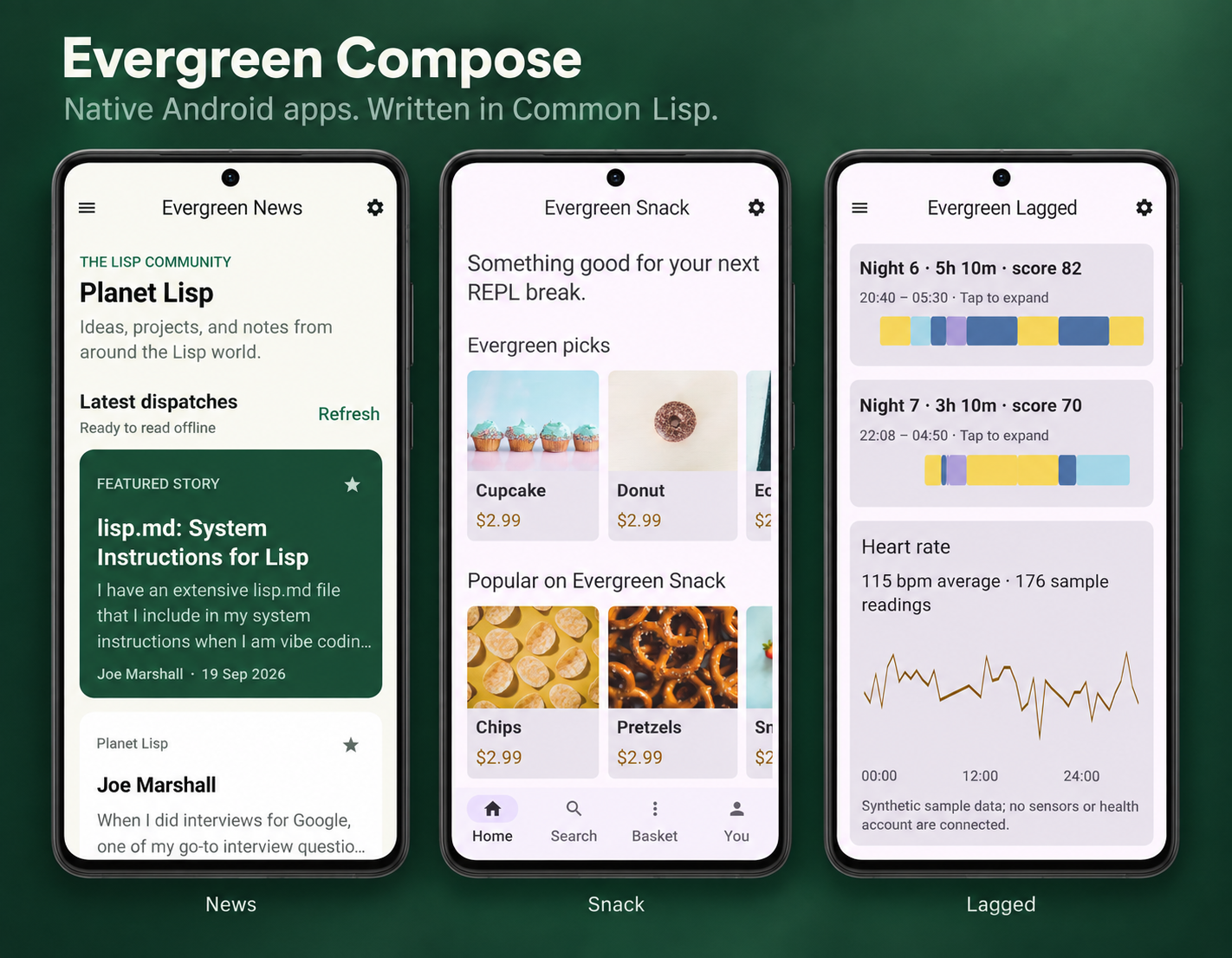
News · Snack · Lagged — three apps written in Common Lisp.
Version 0.0.1 is the first experimental baseline. See the changelog for capabilities and known limits.
Compose is the app model. Write UI trees, state and callbacks in Lisp.
Evergreen Compose supplies a shared, precompiled Android runtime. Application builds require
EGCL and egcl-target-android (runtime API 4), no JDK, Kotlin compiler, Gradle,
Android SDK or NDK. Runtime maintainers use those tools to build the shared bundle.
Develop inside the running app. Connect Emacs with SLY or icl to the phone's Lisp image through an ADB-forwarded Slynk port. Evaluate Lisp, inspect application state, and update the running UI without rebuilding or reinstalling the APK. See Live development with Slynk.
(defvar *count* 0)

(defun counter ()
  (evergreen-compose:ui :theme :children
    (list (evergreen-compose:ui :column :padding 24 :children
      (list (evergreen-compose:ui :button :id "counter"
                :text (format nil "Count: ~D" *count*)
                :on-click (lambda () (incf *count*))))))))

(defun android-main (window)
  (declare (ignore window))
  (evergreen-compose:run-compose-app #'counter))
A callback changes Lisp state; Evergreen Compose publishes a new tree. Compose handles layout, text, accessibility, focus, scrolling and animation on Android's UI thread. Scrolling does not call back into Lisp for each frame. Application callbacks run on the Lisp worker, so they cannot block Android's UI thread.
Start with the complete Hello Evergreen Compose app and its ASDF definition. The Compose guide explains components, callbacks, state, runtime extensions and packaging. Browse the 76 shared controls or build the interactive catalog app to try them on a phone.
Evergreen News is a fuller example with Common
Lisp articles, bookmarks, interests, and light/dark themes. It adapts the JetNews
sample layout with original Lisp content and illustrations. Build
evergreen-news/apk from its ASDF definition.
The six phone sample adaptations use the same shared runtime:
| App | Example | Try |
|---|---|---|
| Evergreen News | examples/evergreen-news | Articles, bookmarks, interests |
| Evergreen Chat | examples/evergreen-chat | Local messages, channels, attachments, profiles |
| Evergreen Snack | examples/evergreen-snack | Search, favourites, quantities, basket |
| Reply | examples/reply | Read, star, archive, draft, reply locally |
| Evergreen Lagged | examples/evergreen-lagged | Sleep periods, expandable stages, heart-rate chart |
| Evergreen Caster | examples/evergreen-caster | Follow shows, save episodes, queue, audio playback |
Each directory has a matching .asd; load it and make <directory-name>/apk
as in the Hello build below. All six save their selected application state in private storage across restarts.
Evergreen News refreshes Planet Lisp, caches article text, and preserves bookmarks.
Evergreen Caster accepts an HTTPS podcast RSS/Atom URL (initially defn), caches
show notes and selections, and streams publisher audio/video. It also includes
six original offline Common Lisp episodes with synthetic narration. Queue
advance uses Play next; downloaded audio and background playback are not included.
Chat conversations, Reply mail, Snack orders and Lagged health readings remain
sample data; local edits persist and no messages or orders are sent.
Phone layouts use native scrolling; tablet-specific adaptive layouts are not
yet ported. Upstream credits and asset terms accompany each sample.
Evergreen Sketchbook
Sketchbook is an original drawing sample:
finger/stylus ink, six colors, three brush sizes, undo/redo, a gallery, and named
sketches saved on the device. Its commented Lisp source owns all app logic. The
shared :drawing-pad control keeps active ink on the UI thread and reports
completed strokes to Lisp. Build evergreen-sketchbook/apk from its .asd.
Live development with Slynk
The app exposes its live Lisp image through Slynk, the protocol used by Emacs with SLY and icl. With Slynk enabled in your development build, launch the app and forward its port over ADB:
adb forward tcp:4005 tcp:4005
In Emacs, run M-x sly-connect, choose 127.0.0.1, and enter port 4005.
For a terminal REPL, connect with icl:
icl --connect 127.0.0.1:4005
You're evaluating code in the app's existing Lisp image, with its current state. The Compose host polls Slynk and refreshes the UI after serving requests.
Slynk is opt-in: include EGCL-enabled Slynk sources in the development APK
(the Slynk asset helper prepares them), along with an
egcl.env asset containing EG_COMPOSE_LIVE_REPL=4005. Declare these files as
ASDF file components so the APK builder includes them. The listener binds to
127.0.0.1 on the device; ADB makes it accessible from your development machine.
Build and run
On Fedora, install egcl-target-android from the EGCL package distribution; its
dependencies include matching EGCL and ADB. You also need this Evergreen Compose
distribution, including runtime/compose-v1/. No separate Quicklisp/ocicl setup
or dependency download is required to build an app.
The verified package pair is egcl / egcl-target-android
0.0.1-6.fc44.x86_64, containing egcl-apk-asdf and runtime
API 4. Fedora also installs a Java runtime, Python, Make and QEMU through
EGCL's package dependencies for its other workflows. Evergreen Compose's Lisp
APK builder does not invoke them. Other operating systems/package versions have
not been validated here.
From the extracted distribution or checkout:
EGCL_HEAP_MB=2048 egcl --no-init \
  --eval '(require :asdf)' \
  --eval '(asdf:load-asd (truename "evergreen-compose.asd"))' \
  --eval '(asdf:make "evergreen-compose/apk")'
This produces build/evergreen-compose.apk, signed with the local .egcl-apk-key. Keep that
private key to install future updates under the same identity. The larger heap
avoids a known EGCL allocation failure during APK ZIP/signing assembly.
The default demo uses the Hello app: a counter, text input, theme switch, dialog and scrolling list. The separate controls gallery demonstrates the full catalog.
ADB is optional deployment tooling, not a build dependency:
adb install --user 0 -r build/evergreen-compose.apk
adb shell am start --user 0 -n dev.egcl.compose.demo/android.app.NativeActivity
To build the independent example with its own application ID:
EGCL_HEAP_MB=2048 egcl --no-init \
  --eval '(require :asdf)' \
  --eval '(asdf:load-asd (truename "evergreen-compose-build.asd"))' \
  --eval '(asdf:load-system "evergreen-compose-build")' \
  --eval '(asdf:load-asd (truename "examples/hello/hello.asd"))' \
  --eval '(asdf:make "hello/apk")'
Once Evergreen Compose is registered in ASDF's source registry, another project needs only
:defsystem-depends-on ("evergreen-compose-build"), :class "evergreen-compose-build:compose-apk" and
its application assets. Framework sources and the runtime are included for it.
Validation
sh tools/check.sh                         # Portable protocol, state and example tests
XDG_CACHE_HOME=/tmp/evergreen-compose-cache egcl --no-init --load tests/asdf.lisp
sh tests/compose-no-toolchain.sh          # Fresh caches/environment; egcl-only PATH
shellcheck tools/*.sh tests/*.sh
sh tools/check-release.sh                # Complete CI/release archive and APK gate
The ASDF checks validate the distributed runtime's checksums and asset/load
consistency. They need egcl-target-android, but no SDK or JDK. Android-only
bridge tests are documented in the Compose guide.
Host checks cannot establish JNI, IME, lifecycle or device rendering behavior.
GitHub Actions runs the full archive/APK gate on pushes and pull requests. Release automation supports matching version tags and manual build/test modes; see release automation.
Runtime contributors preparing a distribution should follow Preparing a source release.
Contributing and project policies
Start with CONTRIBUTING.md for setup, validation and pull requests. Participation follows the Code of Conduct. Report suspected vulnerabilities through SECURITY.md. CITATION.cff provides citation metadata for research and published work.
License
Evergreen Compose uses the same license as Evergreen Common Lisp: GPL-3.0-or-later WITH Classpath-exception-2.0. See LICENSE, the Classpath Exception, and third-party notices.
Similar repos


Languages
Common Lisp
46.0%
Kotlin
42.6%
Python
7.0%
Shell
4.0%
Build native Android apps in Common Lisp with Evergreen Compose.
Common Lisp
0
49 commits
updated Oct 5, 2026
See what people are saying
README
Evergreen Compose
Build Android apps in Evergreen Common Lisp, using Jetpack Compose and Material 3.
News · Snack · Lagged — three apps written in Common Lisp.
Version 0.0.1 is the first experimental baseline. See the changelog for capabilities and known limits.
Compose is the app model. Write UI trees, state and callbacks in Lisp.
Evergreen Compose supplies a shared, precompiled Android runtime. Application builds require
EGCL and egcl-target-android (runtime API 4), no JDK, Kotlin compiler, Gradle,
Android SDK or NDK. Runtime maintainers use those tools to build the shared bundle.
Develop inside the running app. Connect Emacs with SLY or icl to the phone's Lisp image through an ADB-forwarded Slynk port. Evaluate Lisp, inspect application state, and update the running UI without rebuilding or reinstalling the APK. See Live development with Slynk.
(defvar *count* 0)

(defun counter ()
  (evergreen-compose:ui :theme :children
    (list (evergreen-compose:ui :column :padding 24 :children
      (list (evergreen-compose:ui :button :id "counter"
                :text (format nil "Count: ~D" *count*)
                :on-click (lambda () (incf *count*))))))))

(defun android-main (window)
  (declare (ignore window))
  (evergreen-compose:run-compose-app #'counter))
A callback changes Lisp state; Evergreen Compose publishes a new tree. Compose handles layout, text, accessibility, focus, scrolling and animation on Android's UI thread. Scrolling does not call back into Lisp for each frame. Application callbacks run on the Lisp worker, so they cannot block Android's UI thread.
Start with the complete Hello Evergreen Compose app and its ASDF definition. The Compose guide explains components, callbacks, state, runtime extensions and packaging. Browse the 76 shared controls or build the interactive catalog app to try them on a phone.
Evergreen News is a fuller example with Common
Lisp articles, bookmarks, interests, and light/dark themes. It adapts the JetNews
sample layout with original Lisp content and illustrations. Build
evergreen-news/apk from its ASDF definition.
The six phone sample adaptations use the same shared runtime:
| App | Example | Try |
|---|---|---|
| Evergreen News | examples/evergreen-news | Articles, bookmarks, interests |
| Evergreen Chat | examples/evergreen-chat | Local messages, channels, attachments, profiles |
| Evergreen Snack | examples/evergreen-snack | Search, favourites, quantities, basket |
| Reply | examples/reply | Read, star, archive, draft, reply locally |
| Evergreen Lagged | examples/evergreen-lagged | Sleep periods, expandable stages, heart-rate chart |
| Evergreen Caster | examples/evergreen-caster | Follow shows, save episodes, queue, audio playback |
Each directory has a matching .asd; load it and make <directory-name>/apk
as in the Hello build below. All six save their selected application state in private storage across restarts.
Evergreen News refreshes Planet Lisp, caches article text, and preserves bookmarks.
Evergreen Caster accepts an HTTPS podcast RSS/Atom URL (initially defn), caches
show notes and selections, and streams publisher audio/video. It also includes
six original offline Common Lisp episodes with synthetic narration. Queue
advance uses Play next; downloaded audio and background playback are not included.
Chat conversations, Reply mail, Snack orders and Lagged health readings remain
sample data; local edits persist and no messages or orders are sent.
Phone layouts use native scrolling; tablet-specific adaptive layouts are not
yet ported. Upstream credits and asset terms accompany each sample.
Evergreen Sketchbook
Sketchbook is an original drawing sample:
finger/stylus ink, six colors, three brush sizes, undo/redo, a gallery, and named
sketches saved on the device. Its commented Lisp source owns all app logic. The
shared :drawing-pad control keeps active ink on the UI thread and reports
completed strokes to Lisp. Build evergreen-sketchbook/apk from its .asd.
Live development with Slynk
The app exposes its live Lisp image through Slynk, the protocol used by Emacs with SLY and icl. With Slynk enabled in your development build, launch the app and forward its port over ADB:
adb forward tcp:4005 tcp:4005
In Emacs, run M-x sly-connect, choose 127.0.0.1, and enter port 4005.
For a terminal REPL, connect with icl:
icl --connect 127.0.0.1:4005
You're evaluating code in the app's existing Lisp image, with its current state. The Compose host polls Slynk and refreshes the UI after serving requests.
Slynk is opt-in: include EGCL-enabled Slynk sources in the development APK
(the Slynk asset helper prepares them), along with an
egcl.env asset containing EG_COMPOSE_LIVE_REPL=4005. Declare these files as
ASDF file components so the APK builder includes them. The listener binds to
127.0.0.1 on the device; ADB makes it accessible from your development machine.
Build and run
On Fedora, install egcl-target-android from the EGCL package distribution; its
dependencies include matching EGCL and ADB. You also need this Evergreen Compose
distribution, including runtime/compose-v1/. No separate Quicklisp/ocicl setup
or dependency download is required to build an app.
The verified package pair is egcl / egcl-target-android
0.0.1-6.fc44.x86_64, containing egcl-apk-asdf and runtime
API 4. Fedora also installs a Java runtime, Python, Make and QEMU through
EGCL's package dependencies for its other workflows. Evergreen Compose's Lisp
APK builder does not invoke them. Other operating systems/package versions have
not been validated here.
From the extracted distribution or checkout:
EGCL_HEAP_MB=2048 egcl --no-init \
  --eval '(require :asdf)' \
  --eval '(asdf:load-asd (truename "evergreen-compose.asd"))' \
  --eval '(asdf:make "evergreen-compose/apk")'
This produces build/evergreen-compose.apk, signed with the local .egcl-apk-key. Keep that
private key to install future updates under the same identity. The larger heap
avoids a known EGCL allocation failure during APK ZIP/signing assembly.
The default demo uses the Hello app: a counter, text input, theme switch, dialog and scrolling list. The separate controls gallery demonstrates the full catalog.
ADB is optional deployment tooling, not a build dependency:
adb install --user 0 -r build/evergreen-compose.apk
adb shell am start --user 0 -n dev.egcl.compose.demo/android.app.NativeActivity
To build the independent example with its own application ID:
EGCL_HEAP_MB=2048 egcl --no-init \
  --eval '(require :asdf)' \
  --eval '(asdf:load-asd (truename "evergreen-compose-build.asd"))' \
  --eval '(asdf:load-system "evergreen-compose-build")' \
  --eval '(asdf:load-asd (truename "examples/hello/hello.asd"))' \
  --eval '(asdf:make "hello/apk")'
Once Evergreen Compose is registered in ASDF's source registry, another project needs only
:defsystem-depends-on ("evergreen-compose-build"), :class "evergreen-compose-build:compose-apk" and
its application assets. Framework sources and the runtime are included for it.
Validation
sh tools/check.sh                         # Portable protocol, state and example tests
XDG_CACHE_HOME=/tmp/evergreen-compose-cache egcl --no-init --load tests/asdf.lisp
sh tests/compose-no-toolchain.sh          # Fresh caches/environment; egcl-only PATH
shellcheck tools/*.sh tests/*.sh
sh tools/check-release.sh                # Complete CI/release archive and APK gate
The ASDF checks validate the distributed runtime's checksums and asset/load
consistency. They need egcl-target-android, but no SDK or JDK. Android-only
bridge tests are documented in the Compose guide.
Host checks cannot establish JNI, IME, lifecycle or device rendering behavior.
GitHub Actions runs the full archive/APK gate on pushes and pull requests. Release automation supports matching version tags and manual build/test modes; see release automation.
Runtime contributors preparing a distribution should follow Preparing a source release.
Contributing and project policies
Start with CONTRIBUTING.md for setup, validation and pull requests. Participation follows the Code of Conduct. Report suspected vulnerabilities through SECURITY.md. CITATION.cff provides citation metadata for research and published work.
License
Evergreen Compose uses the same license as Evergreen Common Lisp: GPL-3.0-or-later WITH Classpath-exception-2.0. See LICENSE, the Classpath Exception, and third-party notices.
Similar repos
Languages
Common Lisp
46.0%
Kotlin
42.6%
Python
7.0%
Shell
4.0%