
README
Tuition
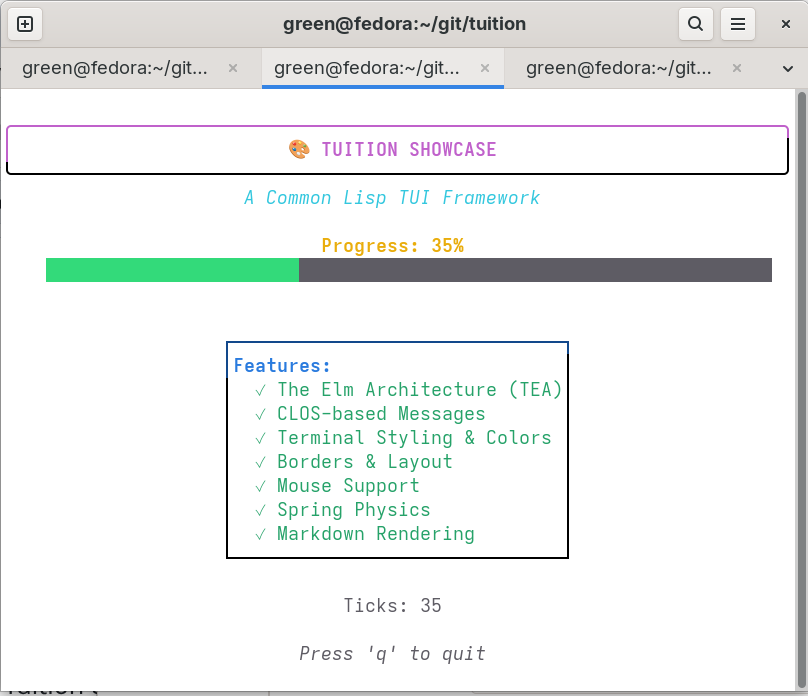


The fun, functional, and stateful way to build terminal apps in Common Lisp.
Based on The Elm Architecture (TEA). Built with CLOS.
Tuition is a Common Lisp library for building rich, responsive terminal user interfaces (TUIs). It blends the simplicity of TEA with the power of CLOS so you can model state clearly, react to events via generic methods, and render your UI as pure strings.
- Model — a CLOS object representing your application state
- Messages — CLOS classes describing events (keys, mouse, timers, custom)
- Update — generic methods that transform the model in response to messages
- View — a pure function that renders your model to a string
Tuition handles terminal concerns for you (raw mode, alternate screen, input decoding, cursor control) so you can stay focused on your application logic.
Concepts
- Model-View-Update: Keep state in a CLOS object, react to messages, and render a pure string view.
- Messages: Typed events (keys, mouse, timers, custom) dispatched via generic methods for clarity and extensibility.
- Commands: Functions that return messages asynchronously, enabling timers, I/O, and background work without blocking.
- Program: A managed loop that sets up the terminal, processes messages, runs commands, and refreshes the screen.
- Pure Rendering: Rendering returns strings; styling, layout, borders, and reflow are composition-friendly utilities.
- Components: Reusable widgets (spinner, progress, list, table, tree, filepicker, text input, textarea, viewport, paginator, stopwatch, timer, help, datepicker) that manage their own state and view.
- Zones: Named regions to map mouse coordinates to stable identifiers for hover/click interactions.
Features
- TEA-style architecture with CLOS: message-specialized
tui:update-message - Concurrent commands for non-blocking I/O and timers
- External program execution with full TUI suspension (exec-cmd)
- Keyboard and mouse input decoding (with modifiers and motion)
- Batched input processing for improved performance under rapid input
- Scroll event coalescing to prevent jumpy scrolling
- Terminal control (raw mode, alternate screen, cursor, clear)
- Styling utilities (bold/italic/underline/colors, adaptive colors)
- Layout helpers (horizontal/vertical joins, placement and alignment)
- Borders (normal, rounded, thick, double, block, ASCII, markdown) with title bars and drop shadows
- Overlay compositing with transparent shadow effects
- Reflow helpers (wrapping, truncation, ellipsizing, indentation)
- Built-in components: spinner, progress bar, list (paginated + filterable), table (with width/height fitting and overflow), tree (navigable, expand/collapse), filepicker, text input, textarea (soft-wrap, dynamic height, selection), viewport (with soft-wrap), paginator, stopwatch, timer, help, datepicker
- Native terminal (taskbar) progress bar via OSC 9;4
- Zones for advanced mouse interactions (define and query named regions)
Gallery
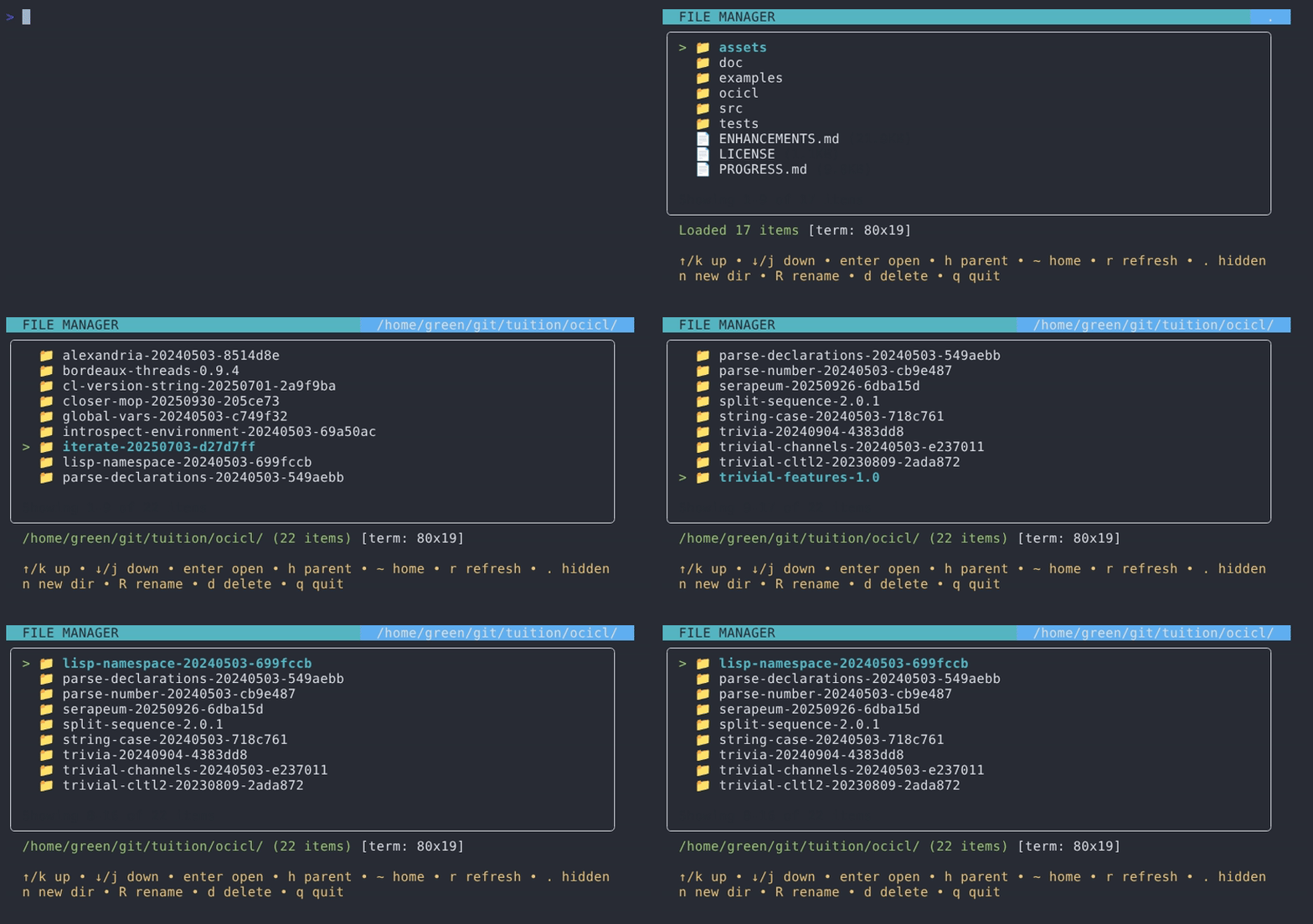
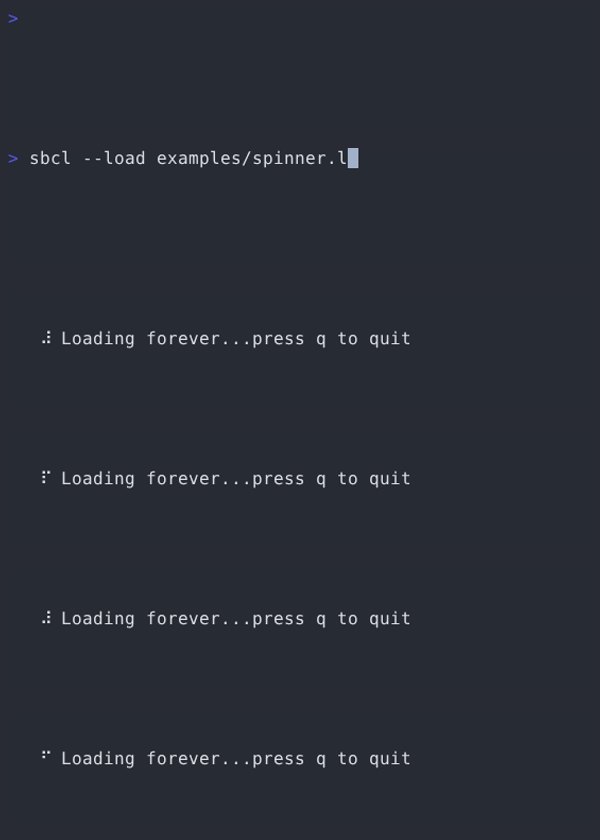
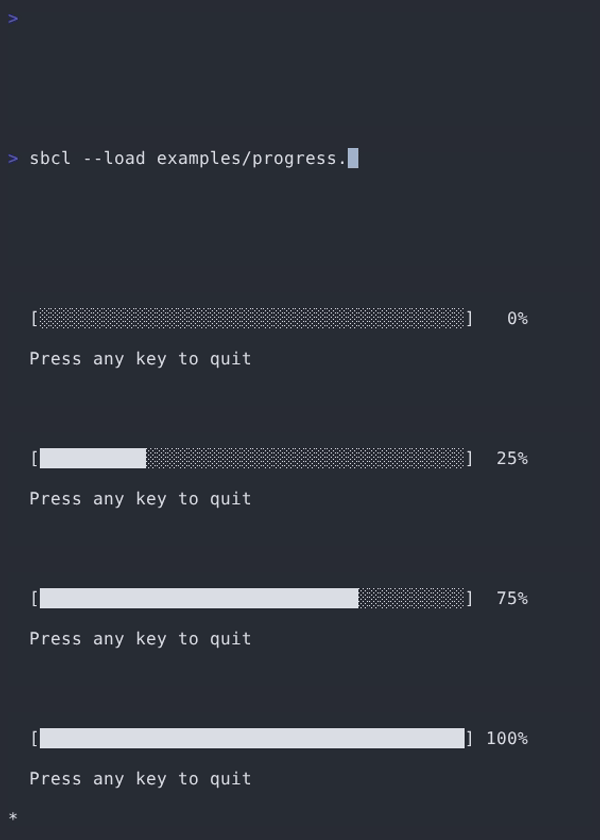
More GIFs/screenshots coming from the examples directory.
Quick Start
Hello, world
(defpackage #:hello-world
  (:use #:cl #:tuition))

(in-package #:hello-world)

(defclass hello-model () ())

(defmethod tui:init ((model hello-model))
  nil) ; no initial command

(defmethod tui:update-message ((model hello-model) (msg tui:key-msg))
  (declare (ignore msg))
  (values model (tui:quit-cmd)))

(defmethod tui:view ((model hello-model))
  (tui:bold "Hello, World! Press any key to exit."))

(defun main ()
  (tui:run (tui:make-program (make-instance 'hello-model))))
Interactive counter
(defpackage #:counter-demo
  (:use #:cl #:tuition))

(in-package #:counter-demo)

(defclass counter-model ()
  ((count :initform 0 :accessor count)))

(defmethod tui:init ((model counter-model)) nil)

(defmethod tui:update-message ((model counter-model) (msg tui:key-msg))
  (let ((key (tui:key-msg-key msg)))
    (cond
      ((and (characterp key) (char= key #\q))
       (values model (tui:quit-cmd)))
      ((and (characterp key) (char= key #\+))
       (incf (count model))
       (values model nil))
      ((and (characterp key) (char= key #\-))
       (decf (count model))
       (values model nil))
      (t (values model nil)))))

(defmethod tui:view ((model counter-model))
  (format nil "Count: ~D~%~%Press + to increment, - to decrement, q to quit"
          (count model)))

(defun main ()
  (tui:run (tui:make-program (make-instance 'counter-model))))
Tutorial
Bubble Tea-style programs are comprised of a model that describes your application state and three simple generic functions:
tui:init— returns an initial command (or NIL)tui:update(ortui:update-message) — transforms state in response to messagestui:view— renders your model to a string
See the Quick Start above for a minimal example and the examples/ directory for complete, runnable programs.
Core Concepts
Model
Your application state lives in a CLOS object:
(defclass my-app ()
  ((username :initarg :username :accessor username)
   (messages :initform '() :accessor messages)
   (input :initform "" :accessor input)))
Messages and Update
Events are message objects. Prefer specializing tui:update-message by message class for clarity and extensibility.
;; Built-in key message
(defmethod tui:update-message ((model my-app) (msg tui:key-msg))
  (let ((key (tui:key-msg-key msg)))
    (cond
      ((and (characterp key) (char= key #\q)) (values model (tui:quit-cmd)))
      (t (values model nil)))))

;; Custom message
(tui:defmessage data-loaded
  ((items :initarg :items :accessor items)))

(defmethod tui:update-message ((model my-app) (msg data-loaded))
  (setf (messages model) (items msg))
  (values model nil))

;; Optional fallback when no method matches
(defmethod tui:update ((model my-app) msg)
  (declare (ignore msg))
  (values model nil))
View
The view renders your model to a string. Tuition only needs a string; compose helpers however you like.
(defmethod tui:view ((model my-app))
  (let ((header (tui:bold "My Application"))
        (content (format nil "Messages: ~{~A~^, ~}" (messages model)))
        (footer (format nil "User: ~A" (username model))))
    (tui:join-vertical tui:+left+ header content footer)))
Commands
Commands are functions that return messages asynchronously.
;; Create a delayed message
(defun tick (seconds msg)
  (lambda ()
    (sleep seconds)
    msg))

;; Built-in helpers
(tui:quit-cmd)
(tui:batch cmd1 cmd2)
(tui:cmd-sequence cmd-a cmd-b cmd-c)
Program Options
tui:make-program accepts options that affect terminal behavior and input decoding:
:alt-screenuses the terminal’s alternate screen buffer for clean entry/exit.:mousecontrols mouse reporting granularity (:cell-motion,:all-motion, orNILto disable).
(tui:make-program model
  :alt-screen t            ; Use alternate screen buffer
  :mouse :cell-motion)     ; :cell-motion | :all-motion | NIL
Running External Programs (exec-cmd)
When your TUI application needs to shell out to an external program (like an editor), use tui:exec-cmd for proper terminal suspension. This ensures:
- Input reading is paused (keystrokes go to the subprocess, not your app)
- Signal handlers are suspended (terminal resize won't trigger redraws)
- Terminal mode is properly restored (alt-screen, raw mode, mouse tracking)
- A redraw is triggered after the program exits
;; Simple: run an editor on a file
(tui:make-exec-cmd "vim" :args (list "/tmp/myfile.txt"))

;; With callback: process results after the program exits
(tui:make-exec-cmd "vim"
  :args (list temp-file)
  :callback (lambda ()
              ;; Called after vim exits - read the file and return a message
              (let ((content (uiop:read-file-string temp-file)))
                (make-instance 'editor-done-msg :content content))))
The exec-cmd is returned from your update function like any other command:
(defmethod tui:update-message ((model my-app) (msg edit-request))
  (values model (tui:make-exec-cmd "nano" :args (list (file-path msg)))))
Accessing the Current Program
The special variable tui:*current-program* is bound to the running program during the event loop. This is useful for advanced scenarios where you need direct access to the program object.
;; Check if a program is running
(when tui:*current-program*
  (format t "Program is running~%"))

;; Pause input reading temporarily (used internally by exec-cmd)
(setf (tui:program-input-paused tui:*current-program*) t)
Terminal lifecycle
Use tui:with-raw-terminal when you want terminal control outside the main program loop. It ensures proper cleanup and offers restarts to recover from setup issues.
This is useful for short, scripted interactions or when embedding Tuition rendering in an existing tool with its own control flow.
(tui:with-raw-terminal (:alt-screen t :mouse :cell-motion)
  (format t "Hello in raw mode!~%")
  (finish-output))
Restarts during setup:
USE-NO-RAW— continue without entering raw modeRETRY— retry entering raw modeABORT— abort setup and return
Styling and layout
Text styling
Use text styling helpers to apply ANSI attributes (bold, italic, underline) and colors in a composable way. Styles can be nested and combined, or prebuilt via a style object and applied to arbitrary strings. This keeps rendering pure while letting you centralize theme choices.
(tui:bold "Important text")
(tui:italic "Emphasized")
(tui:underline "Underlined")
(tui:colored "Red text" :red)

;; Compose styles with a style object
(tui:render-styled
  (tui:make-style :foreground tui:*fg-bright-blue*
                  :background tui:*bg-black*
                  :bold t :underline t)
  "Styled text")
Layout and placement
Layout helpers let you arrange blocks of text without calculating offsets by hand. Join content horizontally or vertically with alignment, then optionally position the result within a given width/height or the terminal’s current size. This encourages building UIs from simple, pure string blocks.
(tui:join-horizontal tui:+top+ "A" "B" "C")
(tui:join-vertical tui:+left+ "Title" "Body" "Footer")
(tui:place 40 10 tui:+center+ tui:+middle+ "Centered block")
Borders, titles, and shadows
Borders provide quick framing for panels, tables, and dialogs. Pick from several predefined styles (rounded, thick, double, ASCII, markdown) to match the tone of your UI. Add title bars and drop shadows for dialog-style depth.
;; Basic border
(tui:render-border content tui:*border-rounded*)

;; Border with a styled title on the top edge
(tui:render-border content tui:*border-double*
                   :title (tui:colored " Confirm " :fg tui:*fg-bright-yellow*)
                   :title-position :center)

;; Opaque block shadow (standalone)
(tui:render-shadow bordered-dialog)

;; Transparent shadow compositing (background text shows through)
(tui:composite-with-shadow dialog background
                           :x-position tui:+center+
                           :y-position tui:+middle+)
See doc/BORDERS.md for the full API reference.
Reflow utilities
Reflow functions help you shape text to fit the terminal: wrap long paragraphs, truncate with ellipses, or indent multi‑line blocks. They are designed to work well with styled strings so you can format first and style later (or vice‑versa) without miscounting visible width.
(tui:wrap-text "A long paragraph to wrap neatly." 40 :indent 2)
(tui:truncate-text (tui:bold "Styled text") 20 :ellipsis "...")
(tui:indent-lines "Line A\nLine B" 4)
Input and mouse
Keyboard events arrive as tui:key-msg values with helpers to inspect the key and modifier state. Mouse input (when enabled) provides cell-based coordinates, button information, and a hierarchical event system for press, release, drag, move, and scroll events.
Enable mouse reporting via :mouse in tui:make-program (see Program Options) and specialize tui:update-message on the specific mouse event types.
;; Key message helpers
(tui:key-msg-p msg)
(tui:key-msg-key msg)   ; Character or keyword (:up, :down, :enter, ...)
(tui:key-msg-ctrl msg)
(tui:key-msg-alt msg)

;; Mouse event hierarchy - specialize on specific event types
(defmethod tui:update-message ((model my-app) (msg tui:mouse-press-event))
  ;; Handle button press
  (let ((x (tui:mouse-event-x msg))
        (y (tui:mouse-event-y msg))
        (button (tui:mouse-event-button msg)))  ; :left, :right, :middle
    (values model nil)))

(defmethod tui:update-message ((model my-app) (msg tui:mouse-release-event))
  ;; Handle button release
  (values model nil))

(defmethod tui:update-message ((model my-app) (msg tui:mouse-drag-event))
  ;; Handle drag (motion with button held)
  (values model nil))

(defmethod tui:update-message ((model my-app) (msg tui:mouse-move-event))
  ;; Handle move (motion without button)
  (values model nil))

(defmethod tui:update-message ((model my-app) (msg tui:mouse-scroll-event))
  ;; Handle scroll wheel
  (let ((direction (tui:mouse-scroll-direction msg))  ; :up or :down
        (count (tui:mouse-scroll-count msg)))         ; coalesced event count
    ;; count > 1 when multiple scroll events were combined
    (values model nil)))

;; All mouse events support modifier flags
(tui:mouse-event-shift msg)
(tui:mouse-event-alt msg)
(tui:mouse-event-ctrl msg)
Components
Tuition includes a few reusable building blocks. Each component exposes a small protocol of functions or methods for init, update, and view.
Use components when you want common interactions without re‑implementing state machines (for example, cursor management for text inputs or tick scheduling for spinners). Keep the component instance in your model, delegate messages to it in update, and render with the component’s view. For a deeper guide, see src/components/README.md.
;; Spinner
(defparameter *sp* (tuition.components.spinner:make-spinner))
(multiple-value-bind (sp cmd) (tuition.components.spinner:spinner-update *sp* (tuition.components.spinner:make-spinner-tick-msg :id (tuition.components.spinner:spinner-id *sp*)))
  (declare (ignore cmd))
  (tuition.components.spinner:spinner-view sp))

;; Progress (the :colors list gives a gradient fill)
(tuition.components.progress:progress-view
  (tuition.components.progress:make-progress
    :percent 0.42 :colors (list "#5A56E0" "#EE6FF8")))

;; List (paginated; :height sets the page size). Also supports filtering
;; (list-set-filter / list-reset-filter), page navigation (list-next-page /
;; list-prev-page), list-go-to-start / list-go-to-end, and :infinite-scrolling.
(let ((lst (tuition.components.list:make-list-view :items '("A" "B" "C"))))
  (tuition.components.list:list-view-render lst))

;; Table
(tuition.components.table:table-render
  (tuition.components.table:make-table
    :headers '("ID" "Name")
    :rows '((1 "Alice") (2 "Bob"))))

;; Table with soft-wrapping (tuition.render.table wraps cells to :widths)
(tuition.render.table:table-render
  (tuition.render.table:make-table
    :headers '("ID" "Name")
    :rows '((1 "Alice in Wonderland") (2 "Bob"))
    :widths '(3 8)))

;; Table with width/height fitting: columns expand or shrink to :width and
;; rows are windowed to :height with an ellipsis overflow row.
(tuition.render.table:table-render
  (tuition.render.table:make-table
    :headers '("ID" "Name")
    :rows '((1 "Alice") (2 "Bob") (3 "Carol") (4 "Dave"))
    :width 24 :height 5))

;; Text input
(tuition.components.textinput:textinput-view
  (tuition.components.textinput:make-textinput :placeholder "Type here"))

;; Textarea (multi-line; :soft-wrap, :dynamic-height, and :max-content-height
;; are optional). Word motion/deletion is bound to Ctrl+Left/Right and
;; Ctrl+Backspace/Delete as well as the Alt-key readline bindings.
;; Shift-modified movement selects text (Ctrl+G selects all); typing or
;; deleting replaces the selection, and pointer drags can select via
;; textarea-begin/extend/end-selection.
(tuition.components.textarea:textarea-view
  (tuition.components.textarea:make-textarea
    :width 40 :height 6 :placeholder "Write a message..."
    :soft-wrap t :dynamic-height t))

;; Tree (navigable; Enter toggles, arrows/hjkl move, g/G jump)
(let ((tr (tuition.components.tree:make-tree
            :root (tuition.components.tree:make-node
                    "project"
                    "README.md"
                    (tuition.components.tree:make-node "src" "main.lisp" "util.lisp"))
            :height 10)))
  (tuition.components.tree:tree-view tr))

;; Filepicker (async directory listing; Enter selects/descends, Backspace up)
(let ((fp (tuition.components.filepicker:make-filepicker
            :current-directory "." :height 10 :auto-height nil)))
  ;; The init command reads the directory; run it through your program,
  ;; or synchronously as here:
  (tuition.components.filepicker:filepicker-update
    fp (funcall (tuition.components.filepicker:filepicker-init fp)))
  (tuition.components.filepicker:filepicker-view fp))

;; Viewport (scrollable region; :soft-wrap wraps long lines to the width)
(let ((vp (tuition.components.viewport:make-viewport
            :width 40 :height 10 :soft-wrap t
            :content "A long block of text to scroll through...")))
  (tuition.components.viewport:viewport-view vp))
Zones (mouse areas)
Zones let you attribute portions of the rendered screen to symbolic identifiers and query hover/clicks reliably.
Use zones to implement clickable lists, buttons, and hover effects without manual hit‑testing. Mark regions during rendering and later resolve pointer coordinates back to a stable identifier.
- Create a
zone-manager - Mark regions while rendering
- Query with pointer coordinates to identify the active zone
See zone.lisp for the API and the examples/zones* demos for usage patterns.
Examples
The examples/ directory contains runnable demos showcasing Tuition features. See examples/README.md for a complete list and descriptions of all available examples.
By the way
- See the components in
src/components/for reusable widgets akin to Charmbracelet’s Bubbles. - Styling and layout utilities are inspired by Lip Gloss.
- Markdown rendering is inspired by Glamour.
- Spring-based animation draws from Harmonica.
Error handling
Tuition uses conditions for internal errors. By default, caught errors are reported to *error-output* along with a backtrace. Setting the TUITION_DEBUG environment variable (or tui:*panic-log-enabled*) also writes a tuition-panic-<timestamp>.log trace file.
You can customize reporting by rebinding tui:*error-handler*.
(let ((tui:*error-handler*
        (lambda (where c)
          (format *error-output* "[~A] ~A~%" where c))))
  (tui:run (tui:make-program (make-instance 'hello-world::hello-model))))
Dependencies
bordeaux-threads— cross‑platform threadingtrivial-channels— thread‑safe message passing
License
MIT License — see LICENSE.
Author and Acknowledgments
Tuition was creates by Anthony Green, with the assistance of various LLMs, and drawing inspiraton from the Charmbracelet ecosystem (Bubble Tea, Lip Gloss, Bubbles, Bubblezone, Harmonica).


Similar repos


Languages
Common Lisp
97.3%
Shell
2.5%
README
Tuition
The fun, functional, and stateful way to build terminal apps in Common Lisp.
Based on The Elm Architecture (TEA). Built with CLOS.
Tuition is a Common Lisp library for building rich, responsive terminal user interfaces (TUIs). It blends the simplicity of TEA with the power of CLOS so you can model state clearly, react to events via generic methods, and render your UI as pure strings.
- Model — a CLOS object representing your application state
- Messages — CLOS classes describing events (keys, mouse, timers, custom)
- Update — generic methods that transform the model in response to messages
- View — a pure function that renders your model to a string
Tuition handles terminal concerns for you (raw mode, alternate screen, input decoding, cursor control) so you can stay focused on your application logic.
Concepts
- Model-View-Update: Keep state in a CLOS object, react to messages, and render a pure string view.
- Messages: Typed events (keys, mouse, timers, custom) dispatched via generic methods for clarity and extensibility.
- Commands: Functions that return messages asynchronously, enabling timers, I/O, and background work without blocking.
- Program: A managed loop that sets up the terminal, processes messages, runs commands, and refreshes the screen.
- Pure Rendering: Rendering returns strings; styling, layout, borders, and reflow are composition-friendly utilities.
- Components: Reusable widgets (spinner, progress, list, table, tree, filepicker, text input, textarea, viewport, paginator, stopwatch, timer, help, datepicker) that manage their own state and view.
- Zones: Named regions to map mouse coordinates to stable identifiers for hover/click interactions.
Features
- TEA-style architecture with CLOS: message-specialized
tui:update-message - Concurrent commands for non-blocking I/O and timers
- External program execution with full TUI suspension (exec-cmd)
- Keyboard and mouse input decoding (with modifiers and motion)
- Batched input processing for improved performance under rapid input
- Scroll event coalescing to prevent jumpy scrolling
- Terminal control (raw mode, alternate screen, cursor, clear)
- Styling utilities (bold/italic/underline/colors, adaptive colors)
- Layout helpers (horizontal/vertical joins, placement and alignment)
- Borders (normal, rounded, thick, double, block, ASCII, markdown) with title bars and drop shadows
- Overlay compositing with transparent shadow effects
- Reflow helpers (wrapping, truncation, ellipsizing, indentation)
- Built-in components: spinner, progress bar, list (paginated + filterable), table (with width/height fitting and overflow), tree (navigable, expand/collapse), filepicker, text input, textarea (soft-wrap, dynamic height, selection), viewport (with soft-wrap), paginator, stopwatch, timer, help, datepicker
- Native terminal (taskbar) progress bar via OSC 9;4
- Zones for advanced mouse interactions (define and query named regions)
Gallery
More GIFs/screenshots coming from the examples directory.
Quick Start
Hello, world
(defpackage #:hello-world
  (:use #:cl #:tuition))

(in-package #:hello-world)

(defclass hello-model () ())

(defmethod tui:init ((model hello-model))
  nil) ; no initial command

(defmethod tui:update-message ((model hello-model) (msg tui:key-msg))
  (declare (ignore msg))
  (values model (tui:quit-cmd)))

(defmethod tui:view ((model hello-model))
  (tui:bold "Hello, World! Press any key to exit."))

(defun main ()
  (tui:run (tui:make-program (make-instance 'hello-model))))
Interactive counter
(defpackage #:counter-demo
  (:use #:cl #:tuition))

(in-package #:counter-demo)

(defclass counter-model ()
  ((count :initform 0 :accessor count)))

(defmethod tui:init ((model counter-model)) nil)

(defmethod tui:update-message ((model counter-model) (msg tui:key-msg))
  (let ((key (tui:key-msg-key msg)))
    (cond
      ((and (characterp key) (char= key #\q))
       (values model (tui:quit-cmd)))
      ((and (characterp key) (char= key #\+))
       (incf (count model))
       (values model nil))
      ((and (characterp key) (char= key #\-))
       (decf (count model))
       (values model nil))
      (t (values model nil)))))

(defmethod tui:view ((model counter-model))
  (format nil "Count: ~D~%~%Press + to increment, - to decrement, q to quit"
          (count model)))

(defun main ()
  (tui:run (tui:make-program (make-instance 'counter-model))))
Tutorial
Bubble Tea-style programs are comprised of a model that describes your application state and three simple generic functions:
tui:init— returns an initial command (or NIL)tui:update(ortui:update-message) — transforms state in response to messagestui:view— renders your model to a string
See the Quick Start above for a minimal example and the examples/ directory for complete, runnable programs.
Core Concepts
Model
Your application state lives in a CLOS object:
(defclass my-app ()
  ((username :initarg :username :accessor username)
   (messages :initform '() :accessor messages)
   (input :initform "" :accessor input)))
Messages and Update
Events are message objects. Prefer specializing tui:update-message by message class for clarity and extensibility.
;; Built-in key message
(defmethod tui:update-message ((model my-app) (msg tui:key-msg))
  (let ((key (tui:key-msg-key msg)))
    (cond
      ((and (characterp key) (char= key #\q)) (values model (tui:quit-cmd)))
      (t (values model nil)))))

;; Custom message
(tui:defmessage data-loaded
  ((items :initarg :items :accessor items)))

(defmethod tui:update-message ((model my-app) (msg data-loaded))
  (setf (messages model) (items msg))
  (values model nil))

;; Optional fallback when no method matches
(defmethod tui:update ((model my-app) msg)
  (declare (ignore msg))
  (values model nil))
View
The view renders your model to a string. Tuition only needs a string; compose helpers however you like.
(defmethod tui:view ((model my-app))
  (let ((header (tui:bold "My Application"))
        (content (format nil "Messages: ~{~A~^, ~}" (messages model)))
        (footer (format nil "User: ~A" (username model))))
    (tui:join-vertical tui:+left+ header content footer)))
Commands
Commands are functions that return messages asynchronously.
;; Create a delayed message
(defun tick (seconds msg)
  (lambda ()
    (sleep seconds)
    msg))

;; Built-in helpers
(tui:quit-cmd)
(tui:batch cmd1 cmd2)
(tui:cmd-sequence cmd-a cmd-b cmd-c)
Program Options
tui:make-program accepts options that affect terminal behavior and input decoding:
:alt-screenuses the terminal’s alternate screen buffer for clean entry/exit.:mousecontrols mouse reporting granularity (:cell-motion,:all-motion, orNILto disable).
(tui:make-program model
  :alt-screen t            ; Use alternate screen buffer
  :mouse :cell-motion)     ; :cell-motion | :all-motion | NIL
Running External Programs (exec-cmd)
When your TUI application needs to shell out to an external program (like an editor), use tui:exec-cmd for proper terminal suspension. This ensures:
- Input reading is paused (keystrokes go to the subprocess, not your app)
- Signal handlers are suspended (terminal resize won't trigger redraws)
- Terminal mode is properly restored (alt-screen, raw mode, mouse tracking)
- A redraw is triggered after the program exits
;; Simple: run an editor on a file
(tui:make-exec-cmd "vim" :args (list "/tmp/myfile.txt"))

;; With callback: process results after the program exits
(tui:make-exec-cmd "vim"
  :args (list temp-file)
  :callback (lambda ()
              ;; Called after vim exits - read the file and return a message
              (let ((content (uiop:read-file-string temp-file)))
                (make-instance 'editor-done-msg :content content))))
The exec-cmd is returned from your update function like any other command:
(defmethod tui:update-message ((model my-app) (msg edit-request))
  (values model (tui:make-exec-cmd "nano" :args (list (file-path msg)))))
Accessing the Current Program
The special variable tui:*current-program* is bound to the running program during the event loop. This is useful for advanced scenarios where you need direct access to the program object.
;; Check if a program is running
(when tui:*current-program*
  (format t "Program is running~%"))

;; Pause input reading temporarily (used internally by exec-cmd)
(setf (tui:program-input-paused tui:*current-program*) t)
Terminal lifecycle
Use tui:with-raw-terminal when you want terminal control outside the main program loop. It ensures proper cleanup and offers restarts to recover from setup issues.
This is useful for short, scripted interactions or when embedding Tuition rendering in an existing tool with its own control flow.
(tui:with-raw-terminal (:alt-screen t :mouse :cell-motion)
  (format t "Hello in raw mode!~%")
  (finish-output))
Restarts during setup:
USE-NO-RAW— continue without entering raw modeRETRY— retry entering raw modeABORT— abort setup and return
Styling and layout
Text styling
Use text styling helpers to apply ANSI attributes (bold, italic, underline) and colors in a composable way. Styles can be nested and combined, or prebuilt via a style object and applied to arbitrary strings. This keeps rendering pure while letting you centralize theme choices.
(tui:bold "Important text")
(tui:italic "Emphasized")
(tui:underline "Underlined")
(tui:colored "Red text" :red)

;; Compose styles with a style object
(tui:render-styled
  (tui:make-style :foreground tui:*fg-bright-blue*
                  :background tui:*bg-black*
                  :bold t :underline t)
  "Styled text")
Layout and placement
Layout helpers let you arrange blocks of text without calculating offsets by hand. Join content horizontally or vertically with alignment, then optionally position the result within a given width/height or the terminal’s current size. This encourages building UIs from simple, pure string blocks.
(tui:join-horizontal tui:+top+ "A" "B" "C")
(tui:join-vertical tui:+left+ "Title" "Body" "Footer")
(tui:place 40 10 tui:+center+ tui:+middle+ "Centered block")
Borders, titles, and shadows
Borders provide quick framing for panels, tables, and dialogs. Pick from several predefined styles (rounded, thick, double, ASCII, markdown) to match the tone of your UI. Add title bars and drop shadows for dialog-style depth.
;; Basic border
(tui:render-border content tui:*border-rounded*)

;; Border with a styled title on the top edge
(tui:render-border content tui:*border-double*
                   :title (tui:colored " Confirm " :fg tui:*fg-bright-yellow*)
                   :title-position :center)

;; Opaque block shadow (standalone)
(tui:render-shadow bordered-dialog)

;; Transparent shadow compositing (background text shows through)
(tui:composite-with-shadow dialog background
                           :x-position tui:+center+
                           :y-position tui:+middle+)
See doc/BORDERS.md for the full API reference.
Reflow utilities
Reflow functions help you shape text to fit the terminal: wrap long paragraphs, truncate with ellipses, or indent multi‑line blocks. They are designed to work well with styled strings so you can format first and style later (or vice‑versa) without miscounting visible width.
(tui:wrap-text "A long paragraph to wrap neatly." 40 :indent 2)
(tui:truncate-text (tui:bold "Styled text") 20 :ellipsis "...")
(tui:indent-lines "Line A\nLine B" 4)
Input and mouse
Keyboard events arrive as tui:key-msg values with helpers to inspect the key and modifier state. Mouse input (when enabled) provides cell-based coordinates, button information, and a hierarchical event system for press, release, drag, move, and scroll events.
Enable mouse reporting via :mouse in tui:make-program (see Program Options) and specialize tui:update-message on the specific mouse event types.
;; Key message helpers
(tui:key-msg-p msg)
(tui:key-msg-key msg)   ; Character or keyword (:up, :down, :enter, ...)
(tui:key-msg-ctrl msg)
(tui:key-msg-alt msg)

;; Mouse event hierarchy - specialize on specific event types
(defmethod tui:update-message ((model my-app) (msg tui:mouse-press-event))
  ;; Handle button press
  (let ((x (tui:mouse-event-x msg))
        (y (tui:mouse-event-y msg))
        (button (tui:mouse-event-button msg)))  ; :left, :right, :middle
    (values model nil)))

(defmethod tui:update-message ((model my-app) (msg tui:mouse-release-event))
  ;; Handle button release
  (values model nil))

(defmethod tui:update-message ((model my-app) (msg tui:mouse-drag-event))
  ;; Handle drag (motion with button held)
  (values model nil))

(defmethod tui:update-message ((model my-app) (msg tui:mouse-move-event))
  ;; Handle move (motion without button)
  (values model nil))

(defmethod tui:update-message ((model my-app) (msg tui:mouse-scroll-event))
  ;; Handle scroll wheel
  (let ((direction (tui:mouse-scroll-direction msg))  ; :up or :down
        (count (tui:mouse-scroll-count msg)))         ; coalesced event count
    ;; count > 1 when multiple scroll events were combined
    (values model nil)))

;; All mouse events support modifier flags
(tui:mouse-event-shift msg)
(tui:mouse-event-alt msg)
(tui:mouse-event-ctrl msg)
Components
Tuition includes a few reusable building blocks. Each component exposes a small protocol of functions or methods for init, update, and view.
Use components when you want common interactions without re‑implementing state machines (for example, cursor management for text inputs or tick scheduling for spinners). Keep the component instance in your model, delegate messages to it in update, and render with the component’s view. For a deeper guide, see src/components/README.md.
;; Spinner
(defparameter *sp* (tuition.components.spinner:make-spinner))
(multiple-value-bind (sp cmd) (tuition.components.spinner:spinner-update *sp* (tuition.components.spinner:make-spinner-tick-msg :id (tuition.components.spinner:spinner-id *sp*)))
  (declare (ignore cmd))
  (tuition.components.spinner:spinner-view sp))

;; Progress (the :colors list gives a gradient fill)
(tuition.components.progress:progress-view
  (tuition.components.progress:make-progress
    :percent 0.42 :colors (list "#5A56E0" "#EE6FF8")))

;; List (paginated; :height sets the page size). Also supports filtering
;; (list-set-filter / list-reset-filter), page navigation (list-next-page /
;; list-prev-page), list-go-to-start / list-go-to-end, and :infinite-scrolling.
(let ((lst (tuition.components.list:make-list-view :items '("A" "B" "C"))))
  (tuition.components.list:list-view-render lst))

;; Table
(tuition.components.table:table-render
  (tuition.components.table:make-table
    :headers '("ID" "Name")
    :rows '((1 "Alice") (2 "Bob"))))

;; Table with soft-wrapping (tuition.render.table wraps cells to :widths)
(tuition.render.table:table-render
  (tuition.render.table:make-table
    :headers '("ID" "Name")
    :rows '((1 "Alice in Wonderland") (2 "Bob"))
    :widths '(3 8)))

;; Table with width/height fitting: columns expand or shrink to :width and
;; rows are windowed to :height with an ellipsis overflow row.
(tuition.render.table:table-render
  (tuition.render.table:make-table
    :headers '("ID" "Name")
    :rows '((1 "Alice") (2 "Bob") (3 "Carol") (4 "Dave"))
    :width 24 :height 5))

;; Text input
(tuition.components.textinput:textinput-view
  (tuition.components.textinput:make-textinput :placeholder "Type here"))

;; Textarea (multi-line; :soft-wrap, :dynamic-height, and :max-content-height
;; are optional). Word motion/deletion is bound to Ctrl+Left/Right and
;; Ctrl+Backspace/Delete as well as the Alt-key readline bindings.
;; Shift-modified movement selects text (Ctrl+G selects all); typing or
;; deleting replaces the selection, and pointer drags can select via
;; textarea-begin/extend/end-selection.
(tuition.components.textarea:textarea-view
  (tuition.components.textarea:make-textarea
    :width 40 :height 6 :placeholder "Write a message..."
    :soft-wrap t :dynamic-height t))

;; Tree (navigable; Enter toggles, arrows/hjkl move, g/G jump)
(let ((tr (tuition.components.tree:make-tree
            :root (tuition.components.tree:make-node
                    "project"
                    "README.md"
                    (tuition.components.tree:make-node "src" "main.lisp" "util.lisp"))
            :height 10)))
  (tuition.components.tree:tree-view tr))

;; Filepicker (async directory listing; Enter selects/descends, Backspace up)
(let ((fp (tuition.components.filepicker:make-filepicker
            :current-directory "." :height 10 :auto-height nil)))
  ;; The init command reads the directory; run it through your program,
  ;; or synchronously as here:
  (tuition.components.filepicker:filepicker-update
    fp (funcall (tuition.components.filepicker:filepicker-init fp)))
  (tuition.components.filepicker:filepicker-view fp))

;; Viewport (scrollable region; :soft-wrap wraps long lines to the width)
(let ((vp (tuition.components.viewport:make-viewport
            :width 40 :height 10 :soft-wrap t
            :content "A long block of text to scroll through...")))
  (tuition.components.viewport:viewport-view vp))
Zones (mouse areas)
Zones let you attribute portions of the rendered screen to symbolic identifiers and query hover/clicks reliably.
Use zones to implement clickable lists, buttons, and hover effects without manual hit‑testing. Mark regions during rendering and later resolve pointer coordinates back to a stable identifier.
- Create a
zone-manager - Mark regions while rendering
- Query with pointer coordinates to identify the active zone
See zone.lisp for the API and the examples/zones* demos for usage patterns.
Examples
The examples/ directory contains runnable demos showcasing Tuition features. See examples/README.md for a complete list and descriptions of all available examples.
By the way
- See the components in
src/components/for reusable widgets akin to Charmbracelet’s Bubbles. - Styling and layout utilities are inspired by Lip Gloss.
- Markdown rendering is inspired by Glamour.
- Spring-based animation draws from Harmonica.
Error handling
Tuition uses conditions for internal errors. By default, caught errors are reported to *error-output* along with a backtrace. Setting the TUITION_DEBUG environment variable (or tui:*panic-log-enabled*) also writes a tuition-panic-<timestamp>.log trace file.
You can customize reporting by rebinding tui:*error-handler*.
(let ((tui:*error-handler*
        (lambda (where c)
          (format *error-output* "[~A] ~A~%" where c))))
  (tui:run (tui:make-program (make-instance 'hello-world::hello-model))))
Dependencies
bordeaux-threads— cross‑platform threadingtrivial-channels— thread‑safe message passing
License
MIT License — see LICENSE.
Author and Acknowledgments
Tuition was creates by Anthony Green, with the assistance of various LLMs, and drawing inspiraton from the Charmbracelet ecosystem (Bubble Tea, Lip Gloss, Bubbles, Bubblezone, Harmonica).
Similar repos
Languages
Common Lisp
97.3%
Shell
2.5%