Build your own SaaS business with SaaS boilerplate. Productive stack: React, Material-UI, Next, MobX, WebSockets, Express, Node, Mongoose, MongoDB. Written with TypeScript.
See the code
Support Ukraine: link
Open source web app that saves you many days of work when building your own SaaS product. The boilerplate comes with many basic SaaS features (see Features below) so that you can focus on features that differentiate your product.
If you want to learn how to build this project from scratch, check out our book: https://builderbook.org/book
The open source project is located in the saas folder. If you purchased our book, codebases for each of the book's chapters are located in the book folder.
We've used this saas project to build:


Check out projects built with the help of this open source app. Feel free to add your own project by creating a pull request.
AWS SES): welcome, team invitation, and payment.Mailchimp): new users, paying users.AWS S3) with pre-signed request for: Posts, Team Profile, and User Profile.withAuth HOC to pass user prop and control user access to pages,MyApp and MyDocumentMaterial-UI,ActiveLink, Confirm, Notifier, MenuWithLinks, and more.Google Analytics.app - user-facing web app with Next/Express server, responsible for rendering pages (either client-side or server-side rendered). app sends requests via API methods to api Express server.api - server-only code, Express server, responsible for processing requests for internal and external API infrastructures.Stripe:
api locally:.env file inside the api folder with the environmental variables as shown below. These variables are also listed in .env.example, which you can use as a template to create your own .env file inside the api foler.api/.env:
# Used in api/server/server.ts
MONGO_URL_TEST=
MONGO_URL=
SESSION_NAME=
SESSION_SECRET=
COOKIE_DOMAIN=

# Used in api/server/google.ts
GOOGLE_CLIENTID=
GOOGLE_CLIENTSECRET=

# Used in api/server/aws-s3.ts and api/server/aws-ses.ts
AWS_REGION=
AWS_ACCESSKEYID=
AWS_SECRETACCESSKEY=

# Used in api/server/models/Invitation.ts and api/server/models/User.ts
EMAIL_SUPPORT_FROM_ADDRESS=

# Used in api/server/mailchimp.ts
MAILCHIMP_API_KEY=
MAILCHIMP_REGION=
MAILCHIMP_SAAS_ALL_LIST_ID=

----------
# All env variables above this line are needed for successful user signup

# Used in api/server/stripe.ts
STRIPE_TEST_SECRETKEY=sk_test_xxxxxx
STRIPE_LIVE_SECRETKEY=sk_live_xxxxxx

STRIPE_TEST_PLANID=plan_xxxxxx
STRIPE_LIVE_PLANID=plan_xxxxxx

STRIPE_LIVE_ENDPOINTSECRET=whsec_xxxxxx

# Optionally determine the URL
URL_APP="http://localhost:3000"
URL_API="http://localhost:8000"
PRODUCTION_URL_APP="https://saas-app.async-await.com"
PRODUCTION_URL_API="https://saas-api.async-await.com"
Your .env file file must have values for the required variables. To use all features and third-party integrations, also add the optional variables.
IMPORTANT: do not publish your actual values for environmentable variables in .env.example; this file is public and only meant to show you how your .env should look.
IMPORTANT: use your values for PRODUCTION_URL_APP and PRODUCTION_URL_API. These are values for domain name that you own.
IMPORTANT: The above environmental variables are available on the server only. You should add your .env file to .gitignore inside the api folder so that your secret keys are not stored on a remote Github repo.
To get value for MONGO_URL_TEST, we recommend you use a free MongoDB at MongoDB Atlas or $15/month MongoDB at Digital Ocean
Specify your own name and secret keys for Express session: SESSION_NAME and SESSION_SECRET
Get GOOGLE_CLIENTID and GOOGLE_CLIENTSECRET by following the official OAuth tutorial.
Important: For Google OAuth app, callback URL is: http://localhost:8000/oauth2callback
Important: You have to enable Google+ API in your Google Cloud Platform account.
Once .env is created, you can run the api app. Navigate to the api folder, run yarn install to add all packages, then run the command below:
yarn dev
app locally:Navigate to the app folder, run yarn to add all packages, then run yarn dev and navigate to http://localhost:3000:
.env file in the app folder is not required to run, but you can create one to override the default variables. The environmental variables for .env in the app folder are shown below. You can also refer .env.example for creating your own .env file in the app folder. NEXT_PUBLIC_STRIPE_TEST_PUBLISHABLEKEY="pk_test_xxxxxxxxxxxxxxx"
NEXT_PUBLIC_STRIPE_LIVE_PUBLISHABLEKEY="pk_live_xxxxxxxxxxxxxxx"
NEXT_PUBLIC_BUCKET_FOR_POSTS=
NEXT_PUBLIC_BUCKET_FOR_TEAM_AVATARS=
NEXT_PUBLIC_BUCKET_FOR_TEAM_LOGOS=
NEXT_PUBLIC_URL_APP="http://localhost:3000"
NEXT_PUBLIC_URL_API="http://localhost:8000"
NEXT_PUBLIC_PRODUCTION_URL_APP=
NEXT_PUBLIC_PRODUCTION_URL_API=
NEXT_PUBLIC_API_GATEWAY_ENDPOINT=
NEXT_PUBLIC_GA_MEASUREMENT_ID=
IMPORTANT: do not publish your actual values for environmentable variables in .env.example; this file is public and only meant to show you how your .env should look.
IMPORTANT: use your values for PRODUCTION_URL_APP and PRODUCTION_URL_API. These are values for domain name that you own.
To get NEXT_PUBLIC_GA_MEASUREMENT_ID, set up Google Analytics and follow these instructions to find your tracking ID.
To get NEXT_PUBLIC_STRIPE_TEST_PUBLISHABLEKEY, go to your Stripe dashboard, click Developers, then click API keys.
For successful file uploading, make sure your buckets have proper CORS configuration. Go to your AWS account, find your bucket, go to Permissions > CORS configuration, add:
[
  {
    "AllowedHeaders":[
      "*"
    ],
    "AllowedMethods":[
      "PUT",
      "POST",
      "GET",
      "HEAD",
      "DELETE"
    ],
    "AllowedOrigins":[
      "http://localhost:3000",
      "https://saas-app.async-await.com"
    ],
    "ExposeHeaders":[
      "ETag",
      "x-amz-meta-custom-header"
    ]
  }
]
Make sure to update allowed origin with your actual values for NEXT_PUBLIC_URL_APP and NEXT_PUBLIC_PRODUCTION_URL_APP.
Once .env is created, you can run the app app. Navigate to the app folder, run yarn install to add all packages, then run the command below:
yarn dev
api in lambda:In lambda directory we are symlinking api directory. You can run symlink command in lambda folder as mentioned below:
bash symlink ../api
We give detailed instructions inside Chapter 9 and 10 of our SaaS Boilerplate book: https://builderbook.org/book
For more detail, check package.json files in both app and api folders and project's root.
To customize styles, check this guide.
Google or passwordless login:

Dropdown menu for settings:

Personal settings:

Team settings:

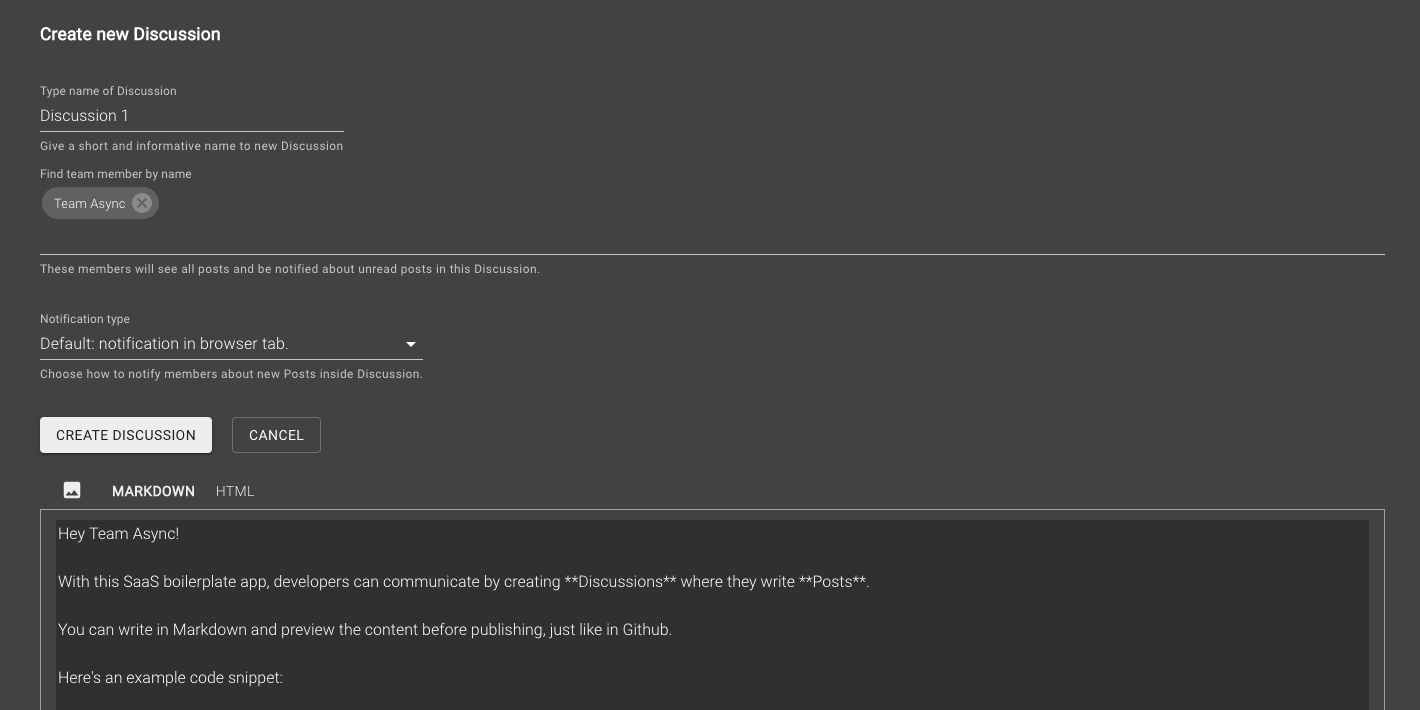
Creating a Discussion:
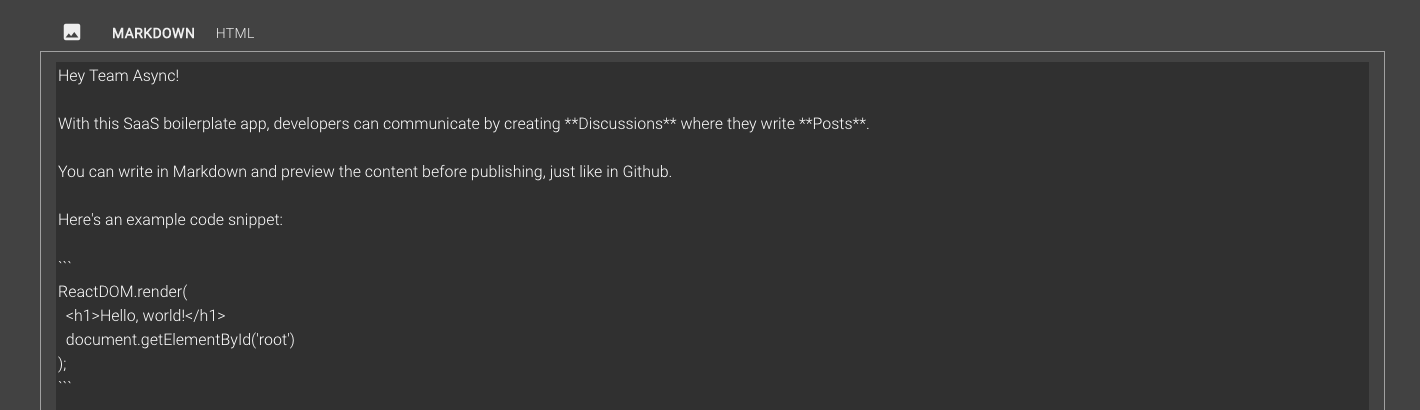
Writing a Post, Markdown vs. HTML view:

Discussion between team members:

Billing settings:

Purchasing a subscription:

Payment history:

Want to support this project? Consider buying our books.
You can contact us at team@async-labs.com.
If you are interested in working with us, check out Async Labs.
All code in this repository is provided under the MIT License.
├── .elasticbeanstalk
│   └── config.yml
├── .github
│   └── FUNDING.yml
├── .vscode
│   ├── extensions.json
│   ├── launch.json
│   └── settings.json
├── api
│   ├── .elasticbeanstalk
│   │   └── config.yml
│   ├── server
│   │   ├── api
│   │   │   ├── index.ts
│   │   │   ├── public.ts
│   │   │   ├── team-leader.ts
│   │   │   └── team-member.ts
│   │   ├── models
│   │   │   ├── Discussion.ts
│   │   │   ├── EmailTemplate.ts
│   │   │   ├── Invitation.ts
│   │   │   ├── Post.ts
│   │   │   ├── Team.ts
│   │   │   └── User.ts
│   │   ├── utils
│   │   │   ├── slugify.ts
│   │   │   └── sum.ts
│   │   ├── aws-s3.ts
│   │   ├── aws-ses.ts
│   │   ├── google-auth.ts
│   │   ├── logger.ts
│   │   ├── mailchimp.ts
│   │   ├── passwordless-auth.ts
│   │   ├── passwordless-token-mongostore.ts
│   │   ├── server.ts
│   │   ├── sockets.ts
│   │   └── stripe.ts
│   ├── static
│   │   └── robots.txt
│   ├── test/server/utils
│   │   ├── slugify.test.ts
│   │   └── sum.test.ts
│   ├── .eslintignore
│   ├── .eslintrc.js
│   ├── .gitignore
│   ├── package.json
│   ├── tsconfig.json
│   ├── tsconfig.server.json
│   └── yarn.lock
├── app
│   ├── .elasticbeanstalk
│   │   └── config.yml
│   ├── components
│   │   ├── common
│   │   │   ├── Confirmer.tsx
│   │   │   ├── LoginButton.tsx
│   │   │   ├── MemberChooser.tsx
│   │   │   ├── MenuWithLinks.tsx
│   │   │   ├── MenuWithMenuItems.tsx
│   │   │   └── Notifier.tsx
│   │   ├── discussions
│   │   │   ├── CreateDiscussionForm.tsx
│   │   │   ├── DiscussionActionMenu.tsx
│   │   │   ├── DiscussionList.tsx
│   │   │   ├── DiscussionListItem.tsx
│   │   │   └── EditDiscussionForm.tsx
│   │   ├── layout
│   │   │   ├── index.tsx
│   │   ├── posts
│   │   │   ├── PostContent.tsx
│   │   │   ├── PostDetail.tsx
│   │   │   ├── PostEditor.tsx
│   │   │   └── PostForm.tsx
│   │   ├── teams
│   │   │   └── InviteMember.tsx
│   ├── lib
│   │   ├── api
│   │   │   ├── makeQueryString.ts
│   │   │   ├── public.ts
│   │   │   ├── sendRequestAndGetResponse.ts
│   │   │   ├── team-leader.ts
│   │   │   └── team-member.ts
│   │   ├── store
│   │   │   ├── discussion.ts
│   │   │   ├── index.ts
│   │   │   ├── invitation.ts
│   │   │   ├── post.ts
│   │   │   ├── team.ts
│   │   │   └── user.ts
│   │   ├── confirm.ts
│   │   ├── isMobile.ts
│   │   ├── notify.ts
│   │   ├── resizeImage.ts
│   │   ├── sharedStyles.ts
│   │   ├── theme.ts
│   │   └── withAuth.tsx
│   ├── pages
│   │   ├── _app.tsx
│   │   ├── _document.tsx
│   │   ├── billing.tsx
│   │   ├── create-team.tsx
│   │   ├── discussion.tsx
│   │   ├── invitation.tsx
│   │   ├── login-cached.tsx
│   │   ├── login.tsx
│   │   ├── team-settings.tsx
│   │   └── your-settings.tsx
│   ├── public
│   │   └── pepe.jpg
│   ├── server
│   │   ├── robots.txt
│   │   ├── routesWithCache.ts
│   │   ├── server.ts
│   │   └── setupSitemapAndRobots.ts
│   ├── .babelrc
│   ├── .eslintignore
│   ├── .eslintrc.js
│   ├── .gitignore
│   ├── next.env.d.ts
│   ├── next.config.js
│   ├── package.json
│   ├── tsconfig.json
│   ├── tsconfig.server.json
│   └── yarn.lock
├── book
├── lambda
│   ├── .estlintignore
│   ├── .eslintrc.js
│   ├── .gitignore
│   ├── api
│   ├── handler.ts
│   ├── package.json
│   ├── serverless.yml
│   ├── tsconfig.json
│   └── yarn.lock
├── .gitignore
├── LICENSE.md
├── README.md
├── package.json
├── yarn.lock
656 followers · starred Mar 2024
21 followers · starred Oct 2018
165 followers · starred Sep 2018
62 followers · starred Nov 2023
Build your own SaaS business with SaaS boilerplate. Productive stack: React, Material-UI, Next, MobX, WebSockets, Express, Node, Mongoose, MongoDB. Written with TypeScript.
See the code
Support Ukraine: link
Open source web app that saves you many days of work when building your own SaaS product. The boilerplate comes with many basic SaaS features (see Features below) so that you can focus on features that differentiate your product.
If you want to learn how to build this project from scratch, check out our book: https://builderbook.org/book
The open source project is located in the saas folder. If you purchased our book, codebases for each of the book's chapters are located in the book folder.
We've used this saas project to build:
Check out projects built with the help of this open source app. Feel free to add your own project by creating a pull request.
AWS SES): welcome, team invitation, and payment.Mailchimp): new users, paying users.AWS S3) with pre-signed request for: Posts, Team Profile, and User Profile.withAuth HOC to pass user prop and control user access to pages,MyApp and MyDocumentMaterial-UI,ActiveLink, Confirm, Notifier, MenuWithLinks, and more.Google Analytics.app - user-facing web app with Next/Express server, responsible for rendering pages (either client-side or server-side rendered). app sends requests via API methods to api Express server.api - server-only code, Express server, responsible for processing requests for internal and external API infrastructures.Stripe:
api locally:.env file inside the api folder with the environmental variables as shown below. These variables are also listed in .env.example, which you can use as a template to create your own .env file inside the api foler.api/.env:
# Used in api/server/server.ts
MONGO_URL_TEST=
MONGO_URL=
SESSION_NAME=
SESSION_SECRET=
COOKIE_DOMAIN=

# Used in api/server/google.ts
GOOGLE_CLIENTID=
GOOGLE_CLIENTSECRET=

# Used in api/server/aws-s3.ts and api/server/aws-ses.ts
AWS_REGION=
AWS_ACCESSKEYID=
AWS_SECRETACCESSKEY=

# Used in api/server/models/Invitation.ts and api/server/models/User.ts
EMAIL_SUPPORT_FROM_ADDRESS=

# Used in api/server/mailchimp.ts
MAILCHIMP_API_KEY=
MAILCHIMP_REGION=
MAILCHIMP_SAAS_ALL_LIST_ID=

----------
# All env variables above this line are needed for successful user signup

# Used in api/server/stripe.ts
STRIPE_TEST_SECRETKEY=sk_test_xxxxxx
STRIPE_LIVE_SECRETKEY=sk_live_xxxxxx

STRIPE_TEST_PLANID=plan_xxxxxx
STRIPE_LIVE_PLANID=plan_xxxxxx

STRIPE_LIVE_ENDPOINTSECRET=whsec_xxxxxx

# Optionally determine the URL
URL_APP="http://localhost:3000"
URL_API="http://localhost:8000"
PRODUCTION_URL_APP="https://saas-app.async-await.com"
PRODUCTION_URL_API="https://saas-api.async-await.com"
Your .env file file must have values for the required variables. To use all features and third-party integrations, also add the optional variables.
IMPORTANT: do not publish your actual values for environmentable variables in .env.example; this file is public and only meant to show you how your .env should look.
IMPORTANT: use your values for PRODUCTION_URL_APP and PRODUCTION_URL_API. These are values for domain name that you own.
IMPORTANT: The above environmental variables are available on the server only. You should add your .env file to .gitignore inside the api folder so that your secret keys are not stored on a remote Github repo.
To get value for MONGO_URL_TEST, we recommend you use a free MongoDB at MongoDB Atlas or $15/month MongoDB at Digital Ocean
Specify your own name and secret keys for Express session: SESSION_NAME and SESSION_SECRET
Get GOOGLE_CLIENTID and GOOGLE_CLIENTSECRET by following the official OAuth tutorial.
Important: For Google OAuth app, callback URL is: http://localhost:8000/oauth2callback
Important: You have to enable Google+ API in your Google Cloud Platform account.
Once .env is created, you can run the api app. Navigate to the api folder, run yarn install to add all packages, then run the command below:
yarn dev
app locally:Navigate to the app folder, run yarn to add all packages, then run yarn dev and navigate to http://localhost:3000:
.env file in the app folder is not required to run, but you can create one to override the default variables. The environmental variables for .env in the app folder are shown below. You can also refer .env.example for creating your own .env file in the app folder. NEXT_PUBLIC_STRIPE_TEST_PUBLISHABLEKEY="pk_test_xxxxxxxxxxxxxxx"
NEXT_PUBLIC_STRIPE_LIVE_PUBLISHABLEKEY="pk_live_xxxxxxxxxxxxxxx"
NEXT_PUBLIC_BUCKET_FOR_POSTS=
NEXT_PUBLIC_BUCKET_FOR_TEAM_AVATARS=
NEXT_PUBLIC_BUCKET_FOR_TEAM_LOGOS=
NEXT_PUBLIC_URL_APP="http://localhost:3000"
NEXT_PUBLIC_URL_API="http://localhost:8000"
NEXT_PUBLIC_PRODUCTION_URL_APP=
NEXT_PUBLIC_PRODUCTION_URL_API=
NEXT_PUBLIC_API_GATEWAY_ENDPOINT=
NEXT_PUBLIC_GA_MEASUREMENT_ID=
IMPORTANT: do not publish your actual values for environmentable variables in .env.example; this file is public and only meant to show you how your .env should look.
IMPORTANT: use your values for PRODUCTION_URL_APP and PRODUCTION_URL_API. These are values for domain name that you own.
To get NEXT_PUBLIC_GA_MEASUREMENT_ID, set up Google Analytics and follow these instructions to find your tracking ID.
To get NEXT_PUBLIC_STRIPE_TEST_PUBLISHABLEKEY, go to your Stripe dashboard, click Developers, then click API keys.
For successful file uploading, make sure your buckets have proper CORS configuration. Go to your AWS account, find your bucket, go to Permissions > CORS configuration, add:
[
  {
    "AllowedHeaders":[
      "*"
    ],
    "AllowedMethods":[
      "PUT",
      "POST",
      "GET",
      "HEAD",
      "DELETE"
    ],
    "AllowedOrigins":[
      "http://localhost:3000",
      "https://saas-app.async-await.com"
    ],
    "ExposeHeaders":[
      "ETag",
      "x-amz-meta-custom-header"
    ]
  }
]
Make sure to update allowed origin with your actual values for NEXT_PUBLIC_URL_APP and NEXT_PUBLIC_PRODUCTION_URL_APP.
Once .env is created, you can run the app app. Navigate to the app folder, run yarn install to add all packages, then run the command below:
yarn dev
api in lambda:In lambda directory we are symlinking api directory. You can run symlink command in lambda folder as mentioned below:
bash symlink ../api
We give detailed instructions inside Chapter 9 and 10 of our SaaS Boilerplate book: https://builderbook.org/book
For more detail, check package.json files in both app and api folders and project's root.
To customize styles, check this guide.
Google or passwordless login:
Dropdown menu for settings:
Personal settings:
Team settings:
Creating a Discussion:
Writing a Post, Markdown vs. HTML view:
Discussion between team members:
Billing settings:
Purchasing a subscription:
Payment history:
Want to support this project? Consider buying our books.
You can contact us at team@async-labs.com.
If you are interested in working with us, check out Async Labs.
All code in this repository is provided under the MIT License.
├── .elasticbeanstalk
│   └── config.yml
├── .github
│   └── FUNDING.yml
├── .vscode
│   ├── extensions.json
│   ├── launch.json
│   └── settings.json
├── api
│   ├── .elasticbeanstalk
│   │   └── config.yml
│   ├── server
│   │   ├── api
│   │   │   ├── index.ts
│   │   │   ├── public.ts
│   │   │   ├── team-leader.ts
│   │   │   └── team-member.ts
│   │   ├── models
│   │   │   ├── Discussion.ts
│   │   │   ├── EmailTemplate.ts
│   │   │   ├── Invitation.ts
│   │   │   ├── Post.ts
│   │   │   ├── Team.ts
│   │   │   └── User.ts
│   │   ├── utils
│   │   │   ├── slugify.ts
│   │   │   └── sum.ts
│   │   ├── aws-s3.ts
│   │   ├── aws-ses.ts
│   │   ├── google-auth.ts
│   │   ├── logger.ts
│   │   ├── mailchimp.ts
│   │   ├── passwordless-auth.ts
│   │   ├── passwordless-token-mongostore.ts
│   │   ├── server.ts
│   │   ├── sockets.ts
│   │   └── stripe.ts
│   ├── static
│   │   └── robots.txt
│   ├── test/server/utils
│   │   ├── slugify.test.ts
│   │   └── sum.test.ts
│   ├── .eslintignore
│   ├── .eslintrc.js
│   ├── .gitignore
│   ├── package.json
│   ├── tsconfig.json
│   ├── tsconfig.server.json
│   └── yarn.lock
├── app
│   ├── .elasticbeanstalk
│   │   └── config.yml
│   ├── components
│   │   ├── common
│   │   │   ├── Confirmer.tsx
│   │   │   ├── LoginButton.tsx
│   │   │   ├── MemberChooser.tsx
│   │   │   ├── MenuWithLinks.tsx
│   │   │   ├── MenuWithMenuItems.tsx
│   │   │   └── Notifier.tsx
│   │   ├── discussions
│   │   │   ├── CreateDiscussionForm.tsx
│   │   │   ├── DiscussionActionMenu.tsx
│   │   │   ├── DiscussionList.tsx
│   │   │   ├── DiscussionListItem.tsx
│   │   │   └── EditDiscussionForm.tsx
│   │   ├── layout
│   │   │   ├── index.tsx
│   │   ├── posts
│   │   │   ├── PostContent.tsx
│   │   │   ├── PostDetail.tsx
│   │   │   ├── PostEditor.tsx
│   │   │   └── PostForm.tsx
│   │   ├── teams
│   │   │   └── InviteMember.tsx
│   ├── lib
│   │   ├── api
│   │   │   ├── makeQueryString.ts
│   │   │   ├── public.ts
│   │   │   ├── sendRequestAndGetResponse.ts
│   │   │   ├── team-leader.ts
│   │   │   └── team-member.ts
│   │   ├── store
│   │   │   ├── discussion.ts
│   │   │   ├── index.ts
│   │   │   ├── invitation.ts
│   │   │   ├── post.ts
│   │   │   ├── team.ts
│   │   │   └── user.ts
│   │   ├── confirm.ts
│   │   ├── isMobile.ts
│   │   ├── notify.ts
│   │   ├── resizeImage.ts
│   │   ├── sharedStyles.ts
│   │   ├── theme.ts
│   │   └── withAuth.tsx
│   ├── pages
│   │   ├── _app.tsx
│   │   ├── _document.tsx
│   │   ├── billing.tsx
│   │   ├── create-team.tsx
│   │   ├── discussion.tsx
│   │   ├── invitation.tsx
│   │   ├── login-cached.tsx
│   │   ├── login.tsx
│   │   ├── team-settings.tsx
│   │   └── your-settings.tsx
│   ├── public
│   │   └── pepe.jpg
│   ├── server
│   │   ├── robots.txt
│   │   ├── routesWithCache.ts
│   │   ├── server.ts
│   │   └── setupSitemapAndRobots.ts
│   ├── .babelrc
│   ├── .eslintignore
│   ├── .eslintrc.js
│   ├── .gitignore
│   ├── next.env.d.ts
│   ├── next.config.js
│   ├── package.json
│   ├── tsconfig.json
│   ├── tsconfig.server.json
│   └── yarn.lock
├── book
├── lambda
│   ├── .estlintignore
│   ├── .eslintrc.js
│   ├── .gitignore
│   ├── api
│   ├── handler.ts
│   ├── package.json
│   ├── serverless.yml
│   ├── tsconfig.json
│   └── yarn.lock
├── .gitignore
├── LICENSE.md
├── README.md
├── package.json
├── yarn.lock
656 followers · starred Mar 2024
21 followers · starred Oct 2018
165 followers · starred Sep 2018
62 followers · starred Nov 2023