




 |  |  |  |
|---|---|---|---|
 |  |  |  |
 |  |  |
“One Day list ” is a small, simple and beautiful app, It can help you keep track of your daily plans. If you happen to have the habit of writing a mission plan, then it must be perfect for you.
For users and developers, I will introduce them separately
Before we start, you can take a look at the demo:
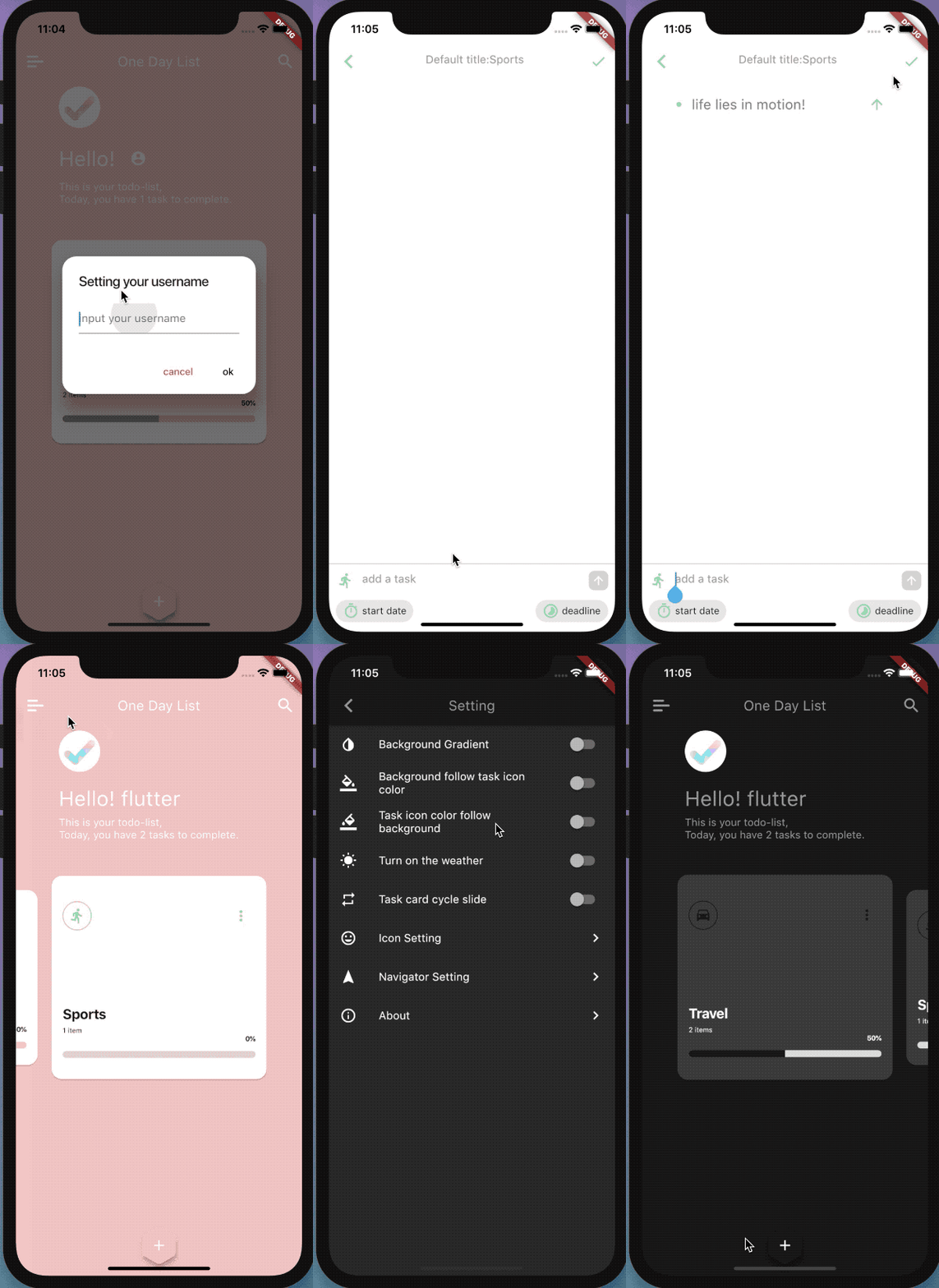
In the app, you can switch between the theme colors in the theme switching interface.The app comes with six default themes, which are the color combinations I've chosen over many attempts. You can also choose a custom theme color.
| Change Theme | Custom Theme |
|---|---|
| |
In the app, each task comes with an icon, and the app provides all the Material Design style icons that Flutter comes with. You can customize with any color.
| Icon Setting | Custom Icon |
|---|---|
| |
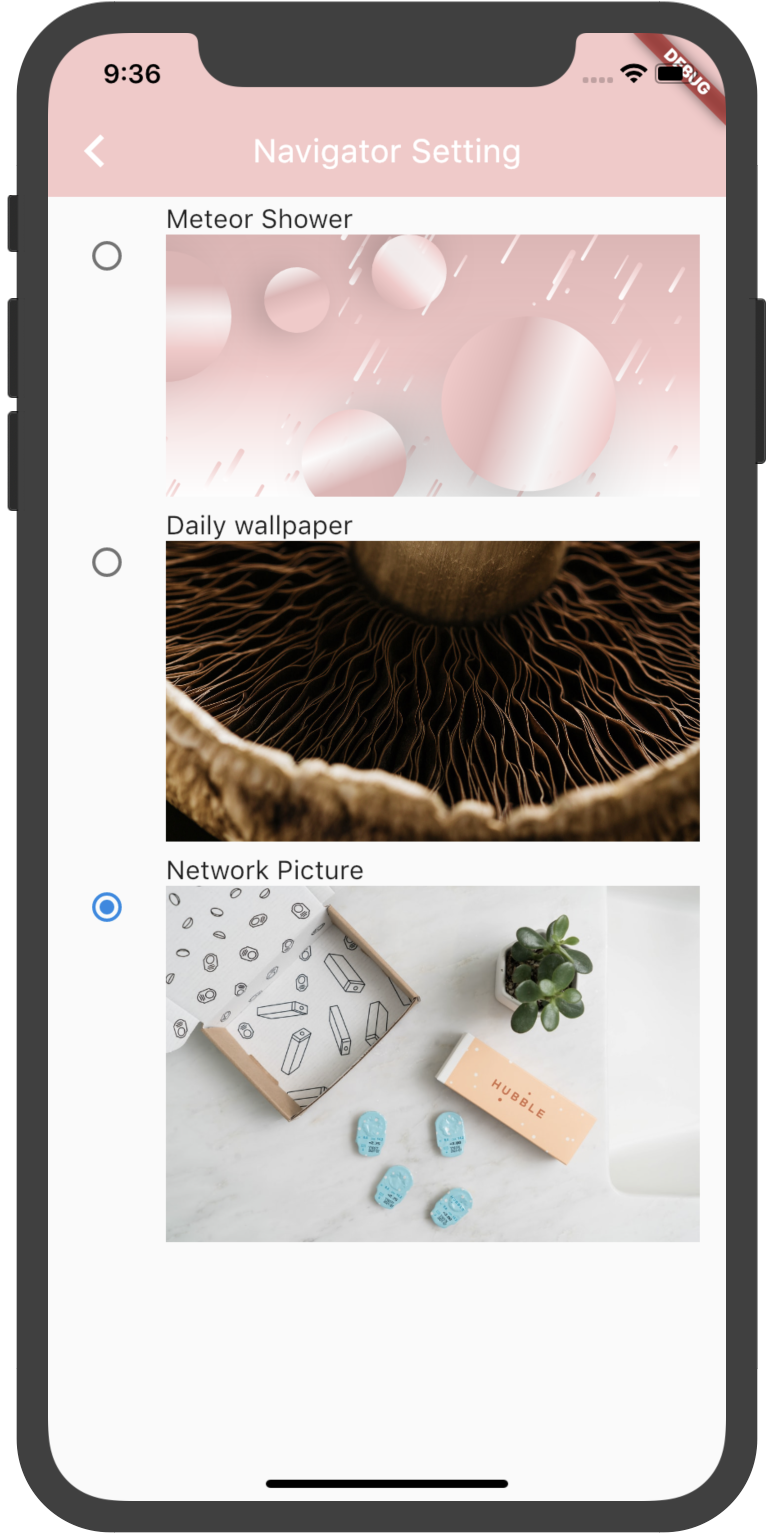
In the app, there are a number of other operations that you can customize.
For example, the head of the homepage slide bar displays content, of course, there are some other operations that you will experience on your own.
| Navigator Setting | Settings | MainPage background |
|---|---|---|
| | |
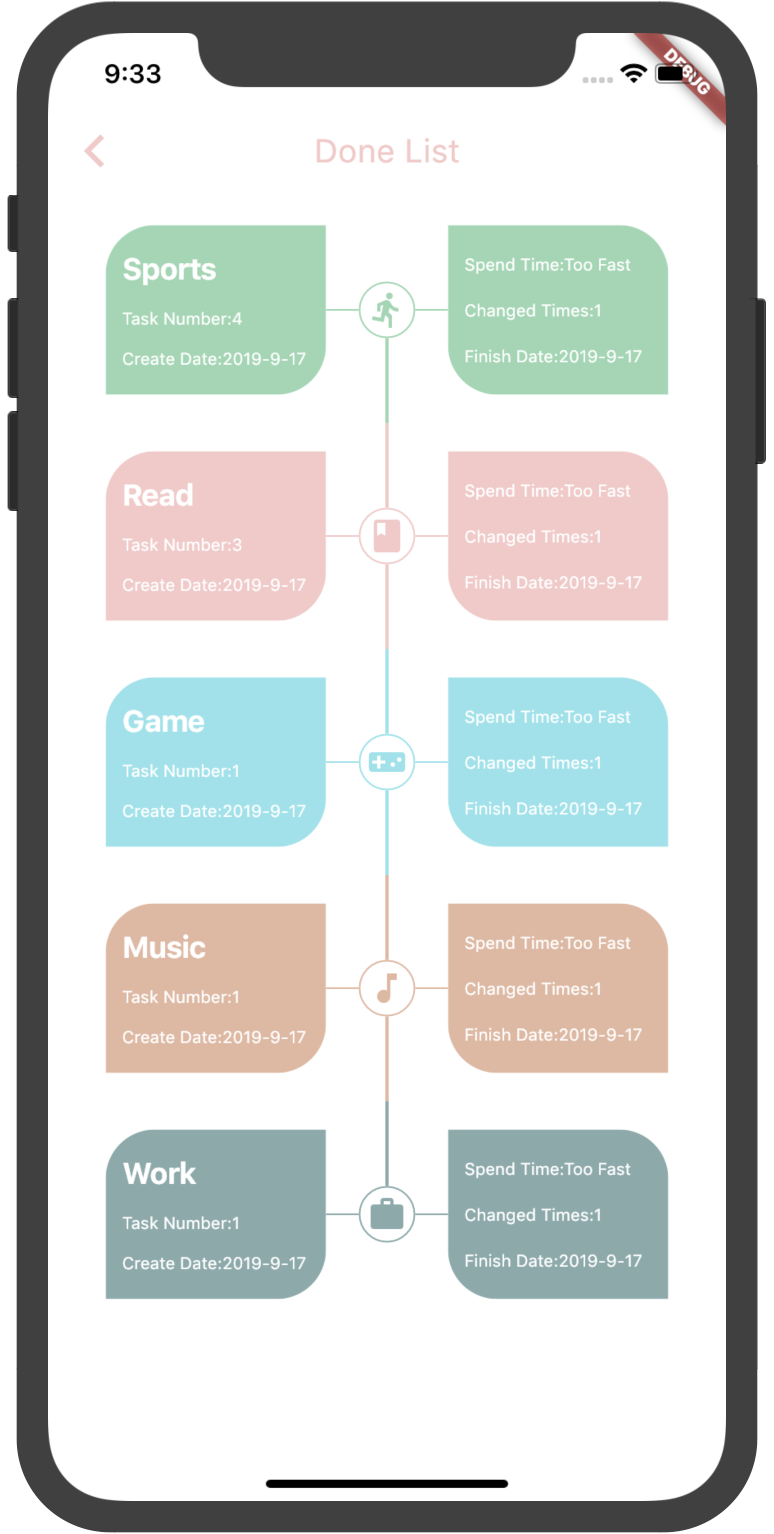
When you have completed a task, the task will be moved from the home page to the done list page, where you can see some additional information about the task.
Then, the introduction to the user ends here.
The following is the time for the majority of developers!
If you have a strong interest in Flutter and have been slow to act, then don't hesitate, hurry up! This project is perfect for getting started with Flutter.
Let me introduce you to the internal structure of this project.
Some very good packages are used in the project, and I am especially grateful to these developers for keeping my hair healthy.
Below are the information about these packages.
| package | explain |
|---|---|
| dio | network request |
| shared_preferences | local storage |
| provider | state management |
| test | unit test |
| carousel_slider | slide control |
| circle_list | circle list |
| intl | change language |
| sqflite | sqlite database |
| flutter_colorpicker | color picker |
| cached_network_image | image cache |
| image_picker | image picker |
| permission_handler | request for permissions |
| path_provider | get path |
| image_crop | image crop |
| flutter_svg | svg pictures |
| package_info | get package info |
| flutter_webview_plugin | webview |
| pull_to_refresh | pull to refresh data |
| photo_view | show the picture |
| url_launcher | open app store |
| open_file | open apk file |
| flare_flutter | flare animation |
| encrypt | encrypt password |
| flutter_staggered_animations | listview animation |
The state management framework used by the project is Provider , and the architecture of the entire project is as follows

Does it look like the MVP pattern in Android? In fact, they are all similar, but the names are slightly different. You can also think of the above mode as the MVP mode.
Flutter is particularly well suited for this architectural model, because the view changes with the data, you basically don't have to care about the View, just go and operate on the data.
The project directory structure is as follows:
├── android
├── build
├── images
├── intl.sh
├── ios
├── lib
├── local_json
├── pubspec.lock
├── pubspec.yaml
├── res
├── svgs
├── test
└── todo_list.iml
Let me explain the other directories besides lib:
| directory | explain |
|---|---|
| images | For storing various pictures |
| local_json | I encapsulate the Icon information of Flutter into a Json file and store it in this directory |
| res | Store the language files generated by the "intl" plugin |
| svgs | Store images in svg format |
Then the lib directory
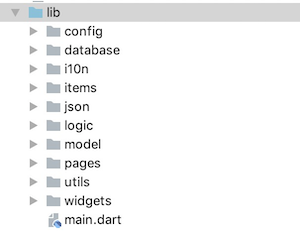
| directory | explain |
|---|---|
| config | Store various configuration classes, such as Dio request encapsulation class, etc. |
| database | Store database operation related classes |
| i10n | Class for storing internationalized related operations |
| items | Item class that stores part of the List list |
| json | Various network requests, databases, etc. related json files |
| logic | Locig layer directory |
| model | Model layer directory |
| pages | Store each page, which is the directory of the View layer |
| utils | Packaged tools, such as file operations |
| widgets | custom widgets |
Android download link:

Ios download link:
I haven't purchased an iOS developer account for 99$ a year
Note: The current project running environment is the version of flutter v1.9.1+hotfix.6. The modified version has more destructive fixes than before.
If your version of flutter is lower than the current version, some third-party libraries that are dependent on the project will not run. Please lower their version at that time.

The following is a third-party library that needs to be modified under version 1.5.4.

-   flutter_svg: ^0.12.4+2
-   image_crop: ^0.2.1
-   flare_flutter: ^1.5.4
-   photo_view: ^0.3.3
If you think this app is good, or if this project helps you, give this project a Star. The project will continue to be updated and maintained afterwards.!
184 followers · starred Mar 2020
553 followers · starred May 2022
104 followers · starred Jan 2020
| | | |
|---|---|---|---|
| | | |
| | |
“One Day list ” is a small, simple and beautiful app, It can help you keep track of your daily plans. If you happen to have the habit of writing a mission plan, then it must be perfect for you.
For users and developers, I will introduce them separately
Before we start, you can take a look at the demo:
In the app, you can switch between the theme colors in the theme switching interface.The app comes with six default themes, which are the color combinations I've chosen over many attempts. You can also choose a custom theme color.
| Change Theme | Custom Theme |
|---|---|
| |
In the app, each task comes with an icon, and the app provides all the Material Design style icons that Flutter comes with. You can customize with any color.
| Icon Setting | Custom Icon |
|---|---|
| |
In the app, there are a number of other operations that you can customize.
For example, the head of the homepage slide bar displays content, of course, there are some other operations that you will experience on your own.
| Navigator Setting | Settings | MainPage background |
|---|---|---|
| | |
When you have completed a task, the task will be moved from the home page to the done list page, where you can see some additional information about the task.
Then, the introduction to the user ends here.
The following is the time for the majority of developers!
If you have a strong interest in Flutter and have been slow to act, then don't hesitate, hurry up! This project is perfect for getting started with Flutter.
Let me introduce you to the internal structure of this project.
Some very good packages are used in the project, and I am especially grateful to these developers for keeping my hair healthy.
Below are the information about these packages.
| package | explain |
|---|---|
| dio | network request |
| shared_preferences | local storage |
| provider | state management |
| test | unit test |
| carousel_slider | slide control |
| circle_list | circle list |
| intl | change language |
| sqflite | sqlite database |
| flutter_colorpicker | color picker |
| cached_network_image | image cache |
| image_picker | image picker |
| permission_handler | request for permissions |
| path_provider | get path |
| image_crop | image crop |
| flutter_svg | svg pictures |
| package_info | get package info |
| flutter_webview_plugin | webview |
| pull_to_refresh | pull to refresh data |
| photo_view | show the picture |
| url_launcher | open app store |
| open_file | open apk file |
| flare_flutter | flare animation |
| encrypt | encrypt password |
| flutter_staggered_animations | listview animation |
The state management framework used by the project is Provider , and the architecture of the entire project is as follows
Does it look like the MVP pattern in Android? In fact, they are all similar, but the names are slightly different. You can also think of the above mode as the MVP mode.
Flutter is particularly well suited for this architectural model, because the view changes with the data, you basically don't have to care about the View, just go and operate on the data.
The project directory structure is as follows:
├── android
├── build
├── images
├── intl.sh
├── ios
├── lib
├── local_json
├── pubspec.lock
├── pubspec.yaml
├── res
├── svgs
├── test
└── todo_list.iml
Let me explain the other directories besides lib:
| directory | explain |
|---|---|
| images | For storing various pictures |
| local_json | I encapsulate the Icon information of Flutter into a Json file and store it in this directory |
| res | Store the language files generated by the "intl" plugin |
| svgs | Store images in svg format |
Then the lib directory
| directory | explain |
|---|---|
| config | Store various configuration classes, such as Dio request encapsulation class, etc. |
| database | Store database operation related classes |
| i10n | Class for storing internationalized related operations |
| items | Item class that stores part of the List list |
| json | Various network requests, databases, etc. related json files |
| logic | Locig layer directory |
| model | Model layer directory |
| pages | Store each page, which is the directory of the View layer |
| utils | Packaged tools, such as file operations |
| widgets | custom widgets |
Android download link:
Ios download link:
I haven't purchased an iOS developer account for 99$ a year
Note: The current project running environment is the version of flutter v1.9.1+hotfix.6. The modified version has more destructive fixes than before.
If your version of flutter is lower than the current version, some third-party libraries that are dependent on the project will not run. Please lower their version at that time.

The following is a third-party library that needs to be modified under version 1.5.4.

-   flutter_svg: ^0.12.4+2
-   image_crop: ^0.2.1
-   flare_flutter: ^1.5.4
-   photo_view: ^0.3.3
If you think this app is good, or if this project helps you, give this project a Star. The project will continue to be updated and maintained afterwards.!
184 followers · starred Mar 2020
553 followers · starred May 2022
104 followers · starred Jan 2020



