
Concise skills for ASD-STE100-inspired writing, Excalidraw diagrams, interactive HTML, and narrated explainer videos
JavaScript
0
6 commits
updated Oct 2, 2026
See what people are saying
README
Karpathy Output Style
Four short skills to make model outputs easier to understand. Inspired by Andrej Karpathy's post: clear writing → diagrams → interactive HTML → bespoke explainer videos.
| Skill | Output | Example request |
|---|---|---|
clear-writing | Readable, ASD-STE100-inspired prose | Explain diffusion models in clear English. |
explain-diagram | Editable Excalidraw diagram | Draw the training and generation workflows. |
explain-webpage | Interactive HTML page | Let me change the noise level and see what changes. |
explainer-videos | Animated video with ElevenLabs narration | Make a visual explainer of iterative denoising. |
Each skill follows a small workflow: understand the question, create the artifact, inspect it, and return it. These are reusable prompts with a small narration helper; there is no hosted application or required model API service.
Examples
Four diffusion-model examples: clear writing, an editable Excalidraw diagram, an interactive HTML page, and a narrated 71-second video. The folder includes finished outputs, editable sources, scene audio, and generation provenance.
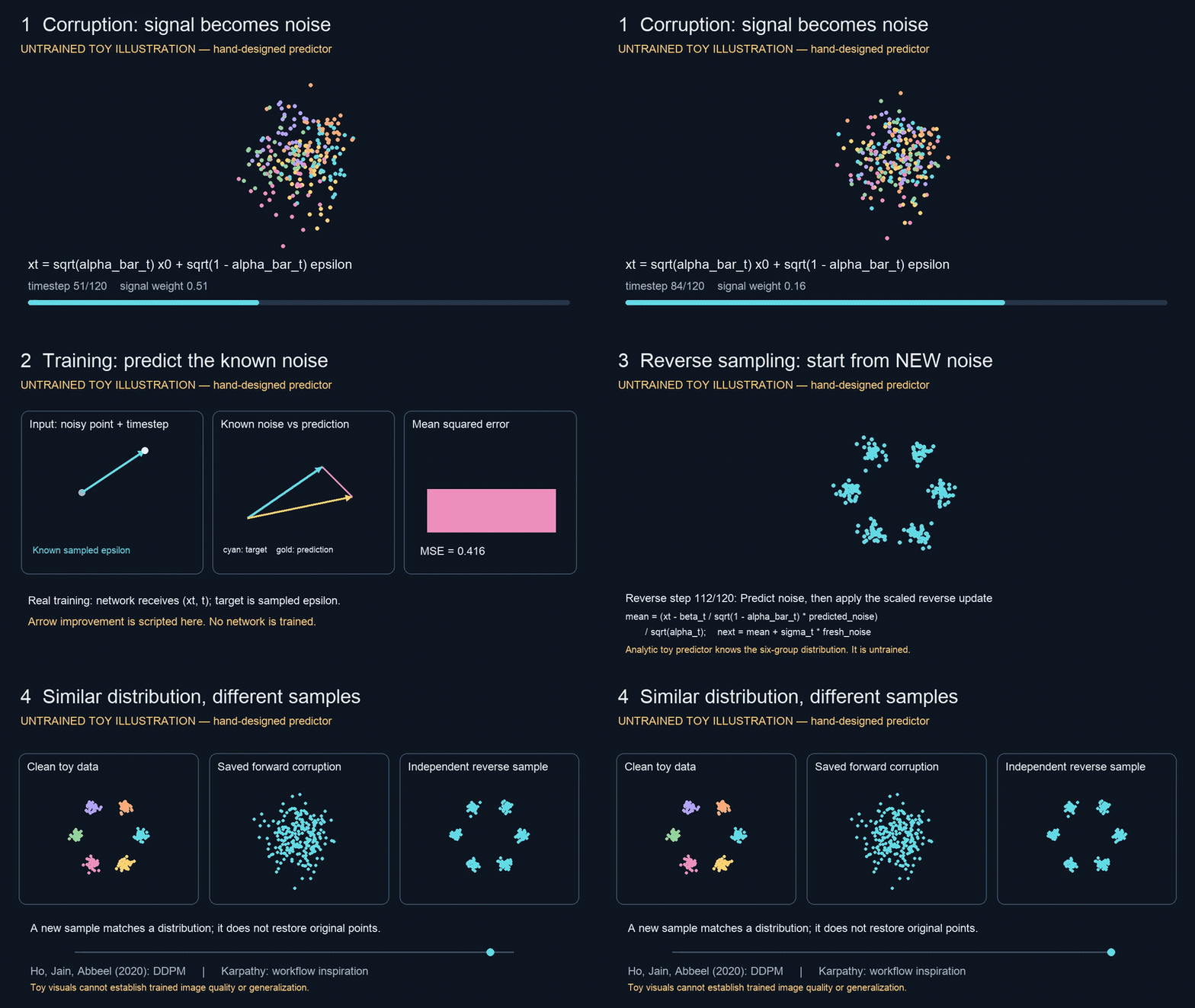
Watch the full explainer (71 seconds, with narration)
The examples use the DDPM paper by Ho, Jain, and Abbeel (2020). The video and webpage show untrained toy distributions. Karpathy inspired the output approach; this is Ashrya's independent implementation.
Install
Use current Codex or Claude Code. Clone the repository:
git clone https://github.com/ashryaagr/karpathy-output-style.git
cd karpathy-output-style
Codex
codex plugin marketplace add ashryaagr/karpathy-output-style
codex plugin add karpathy-output-style@karpathy-output-style
Start a new Codex session after installation. You can also open /plugins
to inspect Karpathy Output Style. Invoke a skill explicitly with
$clear-writing, $explain-diagram, $explain-webpage, or $explainer-videos.
The shared skills/ directory can also be installed as individual skills.
Claude Code, for one session:
claude --plugin-dir .
Or install it persistently:
claude plugin marketplace add ashryaagr/karpathy-output-style
claude plugin install karpathy-output-style@karpathy-output-style
Use /karpathy-output-style:clear-writing, /karpathy-output-style:explain-diagram,
/karpathy-output-style:explain-webpage, or /karpathy-output-style:explainer-videos.
The portable plugin.json and Claude manifest share the same skills and
mcp.json. Excalidraw connects to its official remote MCP server without an API
key. Its editable inline view needs a host that supports MCP Apps; the diagram
skill also supports native .excalidraw files. Remote diagram content goes to
Excalidraw. Use the file workflow when local-only output is required.
Which ASD standard?
ASD-STE100 Simplified Technical English, Issue 9 (15 January 2025). Karpathy suggests "80% of the way to ASD-STE100" for readability. That is the default here: short sentences, consistent terms, and direct verbs. It is a style choice, not a measured conformity score.
The writing reference links the official standard, maps specific rules, gives examples, and includes the tweet's attached image. It also records a dictionary error in that image. Strict drafts require the official rules and dictionary; this package does not certify compliance. The full standard is not redistributed.
ElevenLabs configuration
Python 3 runs the included narration helper without extra packages. Copy
.env.example to a private .env, then fill in your API key and an available
voice ID from your ElevenLabs account. Keep that file outside the plugin cache
so updates do not remove it. .env is ignored by Git; never commit keys.
python3 skills/explainer-videos/scripts/narrate.py scene.txt scene.mp3 \
  --env-file /absolute/path/to/.env
The helper loads only the explicitly selected file; environment values take
precedence. Add --dry-run to check inputs without using credentials or credits.
Live narration uses ElevenLabs credits. Video rendering additionally needs the
renderer chosen for the topic and FFmpeg, as described in the video skill.
SDK samples
The optional sample runner uses the Codex SDK and Claude Agent SDK with your
local authentication. It loads these skills to generate diffusion-model examples
from Ho, Jain, and Abbeel's DDPM paper (2020).
Generated artifacts go under the ignored output/ directory.
npm ci
node scripts/generate_samples.mjs
The runner creates the explanation, Excalidraw scene, interactive HTML, narration
text, and video source. Run the narration helper and the generated renderer to
produce the final MP4. It never loads your ElevenLabs key into either model prompt.
By default, Codex creates the diagram and HTML; Claude creates the explanation,
narration text, and renderer. Select a host with npm run samples -- codex or
npm run samples -- claude.
Add --all to generate all four formats with the selected host; those outputs
go into a separate folder such as output/diffusion/codex-all/.
Use npm run samples -- codex --task video-writing to generate only writing and
video source in output/diffusion/codex-video-writing/. Replace codex with
claude to use Claude for that task.
Use npm run samples -- both --prepare-only to inspect prompts without model
calls. Existing artifacts and run evidence are preserved; move the entire prior
output folder before repeating a generated or failed run. Concurrent runs in the
same output folder are blocked. Codex saves streamed progress and partial
responses. Its timeout is 15 minutes, or 30 minutes for the writing/video task;
Claude's timeout is 15 minutes. Each subprocess receives
only its own provider's exported authentication variables. SDK/model usage may
incur charges. If Claude authentication has expired, refresh your login with
claude auth login, then rerun the selected task.
Tested scope
Fresh install → uninstall → reinstall passed in Codex and Claude Code. Both hosts discover all four skills. A fresh Codex session used the installed writing skill and bundled Excalidraw tools. The four sample outputs were generated and checked; Claude model generation still requires refreshed sign-in.
See validation details and remaining limits.
Check
python3 -m unittest discover -s tests
claude plugin validate .claude-plugin/plugin.json --strict
claude plugin validate .claude-plugin/marketplace.json --strict
References
- Karpathy's source post
- Official ASD-STE100 site, Issue 9 PDF
- Excalidraw MCP
- ElevenLabs speech API
- Portable plugin format, Claude plugin format
- Codex SDK, Claude Agent SDK
MIT for this project's code and prompts. The tweet image remains third-party material and is excluded from that license. This is an independent project; Karpathy, ASD/STEMG, OpenAI, Anthropic, Excalidraw, and ElevenLabs do not endorse it.
Similar repos


Languages
JavaScript
57.2%
Python
42.8%
Concise skills for ASD-STE100-inspired writing, Excalidraw diagrams, interactive HTML, and narrated explainer videos
JavaScript
0
6 commits
updated Oct 2, 2026
See what people are saying
README
Karpathy Output Style
Four short skills to make model outputs easier to understand. Inspired by Andrej Karpathy's post: clear writing → diagrams → interactive HTML → bespoke explainer videos.
| Skill | Output | Example request |
|---|---|---|
clear-writing | Readable, ASD-STE100-inspired prose | Explain diffusion models in clear English. |
explain-diagram | Editable Excalidraw diagram | Draw the training and generation workflows. |
explain-webpage | Interactive HTML page | Let me change the noise level and see what changes. |
explainer-videos | Animated video with ElevenLabs narration | Make a visual explainer of iterative denoising. |
Each skill follows a small workflow: understand the question, create the artifact, inspect it, and return it. These are reusable prompts with a small narration helper; there is no hosted application or required model API service.
Examples
Four diffusion-model examples: clear writing, an editable Excalidraw diagram, an interactive HTML page, and a narrated 71-second video. The folder includes finished outputs, editable sources, scene audio, and generation provenance.
Watch the full explainer (71 seconds, with narration)
The examples use the DDPM paper by Ho, Jain, and Abbeel (2020). The video and webpage show untrained toy distributions. Karpathy inspired the output approach; this is Ashrya's independent implementation.
Install
Use current Codex or Claude Code. Clone the repository:
git clone https://github.com/ashryaagr/karpathy-output-style.git
cd karpathy-output-style
Codex
codex plugin marketplace add ashryaagr/karpathy-output-style
codex plugin add karpathy-output-style@karpathy-output-style
Start a new Codex session after installation. You can also open /plugins
to inspect Karpathy Output Style. Invoke a skill explicitly with
$clear-writing, $explain-diagram, $explain-webpage, or $explainer-videos.
The shared skills/ directory can also be installed as individual skills.
Claude Code, for one session:
claude --plugin-dir .
Or install it persistently:
claude plugin marketplace add ashryaagr/karpathy-output-style
claude plugin install karpathy-output-style@karpathy-output-style
Use /karpathy-output-style:clear-writing, /karpathy-output-style:explain-diagram,
/karpathy-output-style:explain-webpage, or /karpathy-output-style:explainer-videos.
The portable plugin.json and Claude manifest share the same skills and
mcp.json. Excalidraw connects to its official remote MCP server without an API
key. Its editable inline view needs a host that supports MCP Apps; the diagram
skill also supports native .excalidraw files. Remote diagram content goes to
Excalidraw. Use the file workflow when local-only output is required.
Which ASD standard?
ASD-STE100 Simplified Technical English, Issue 9 (15 January 2025). Karpathy suggests "80% of the way to ASD-STE100" for readability. That is the default here: short sentences, consistent terms, and direct verbs. It is a style choice, not a measured conformity score.
The writing reference links the official standard, maps specific rules, gives examples, and includes the tweet's attached image. It also records a dictionary error in that image. Strict drafts require the official rules and dictionary; this package does not certify compliance. The full standard is not redistributed.
ElevenLabs configuration
Python 3 runs the included narration helper without extra packages. Copy
.env.example to a private .env, then fill in your API key and an available
voice ID from your ElevenLabs account. Keep that file outside the plugin cache
so updates do not remove it. .env is ignored by Git; never commit keys.
python3 skills/explainer-videos/scripts/narrate.py scene.txt scene.mp3 \
  --env-file /absolute/path/to/.env
The helper loads only the explicitly selected file; environment values take
precedence. Add --dry-run to check inputs without using credentials or credits.
Live narration uses ElevenLabs credits. Video rendering additionally needs the
renderer chosen for the topic and FFmpeg, as described in the video skill.
SDK samples
The optional sample runner uses the Codex SDK and Claude Agent SDK with your
local authentication. It loads these skills to generate diffusion-model examples
from Ho, Jain, and Abbeel's DDPM paper (2020).
Generated artifacts go under the ignored output/ directory.
npm ci
node scripts/generate_samples.mjs
The runner creates the explanation, Excalidraw scene, interactive HTML, narration
text, and video source. Run the narration helper and the generated renderer to
produce the final MP4. It never loads your ElevenLabs key into either model prompt.
By default, Codex creates the diagram and HTML; Claude creates the explanation,
narration text, and renderer. Select a host with npm run samples -- codex or
npm run samples -- claude.
Add --all to generate all four formats with the selected host; those outputs
go into a separate folder such as output/diffusion/codex-all/.
Use npm run samples -- codex --task video-writing to generate only writing and
video source in output/diffusion/codex-video-writing/. Replace codex with
claude to use Claude for that task.
Use npm run samples -- both --prepare-only to inspect prompts without model
calls. Existing artifacts and run evidence are preserved; move the entire prior
output folder before repeating a generated or failed run. Concurrent runs in the
same output folder are blocked. Codex saves streamed progress and partial
responses. Its timeout is 15 minutes, or 30 minutes for the writing/video task;
Claude's timeout is 15 minutes. Each subprocess receives
only its own provider's exported authentication variables. SDK/model usage may
incur charges. If Claude authentication has expired, refresh your login with
claude auth login, then rerun the selected task.
Tested scope
Fresh install → uninstall → reinstall passed in Codex and Claude Code. Both hosts discover all four skills. A fresh Codex session used the installed writing skill and bundled Excalidraw tools. The four sample outputs were generated and checked; Claude model generation still requires refreshed sign-in.
See validation details and remaining limits.
Check
python3 -m unittest discover -s tests
claude plugin validate .claude-plugin/plugin.json --strict
claude plugin validate .claude-plugin/marketplace.json --strict
References
- Karpathy's source post
- Official ASD-STE100 site, Issue 9 PDF
- Excalidraw MCP
- ElevenLabs speech API
- Portable plugin format, Claude plugin format
- Codex SDK, Claude Agent SDK
MIT for this project's code and prompts. The tweet image remains third-party material and is excluded from that license. This is an independent project; Karpathy, ASD/STEMG, OpenAI, Anthropic, Excalidraw, and ElevenLabs do not endorse it.
Similar repos
Languages
JavaScript
57.2%
Python
42.8%