
README
Fly Arena
A local fruit-fly simulation combining a physical NeuroMechFly body in MuJoCo, MaleCNS connectome data, and explicit behavioral controllers.
The main hybrid mode supports walking, odor-guided food search, contact-based feeding through an articulated proboscis, grooming, sleep pressure, and waking. A separate two-fly arena adds shared food, body collisions, pushing, foreleg fencing, and retreat. These behaviors combine simulated physiology with engineered decisions and motor programs. This is an experimental model, not a physiologically validated digital fly.
| Odor-guided search | Feeding through the proboscis |
|---|---|
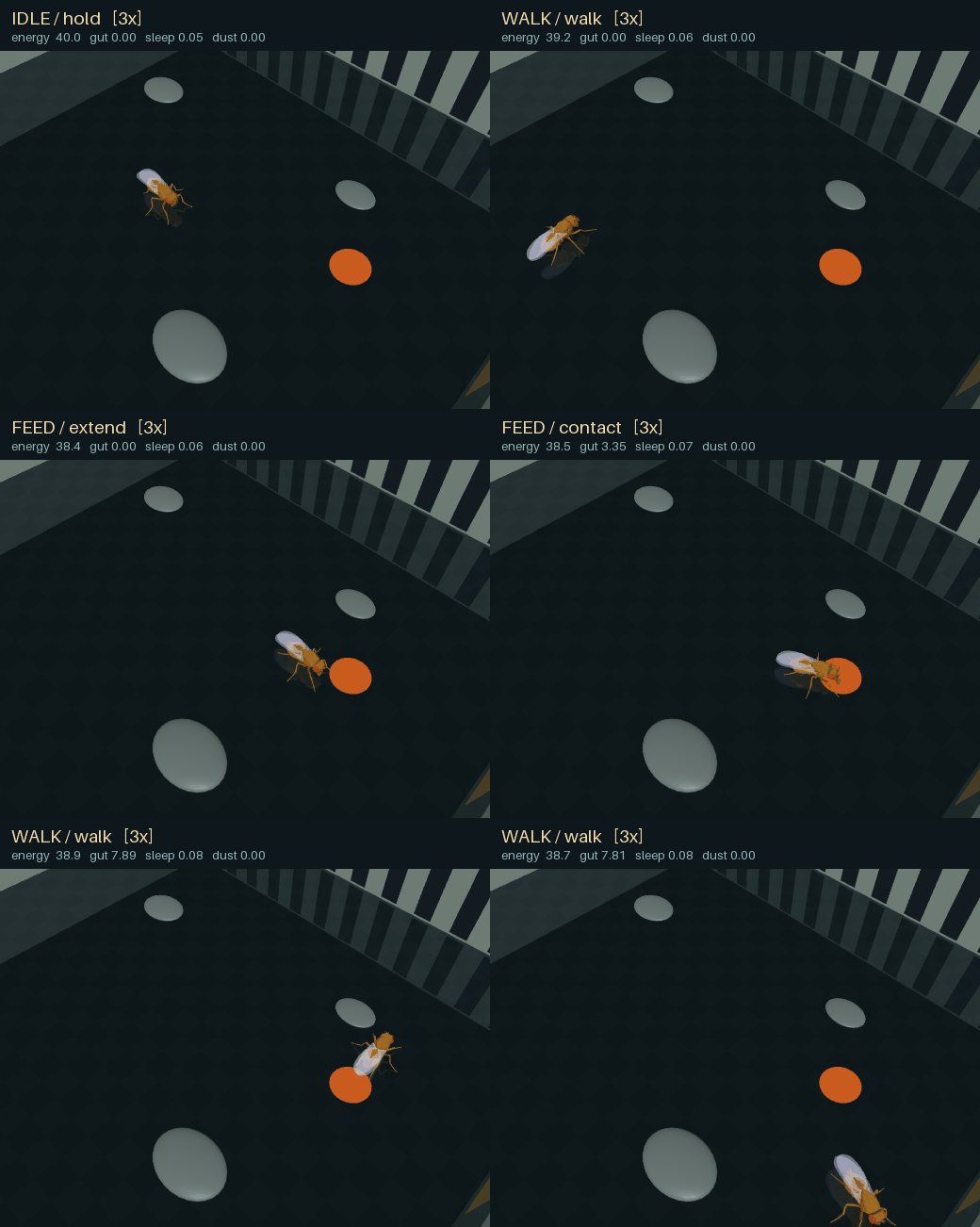 | 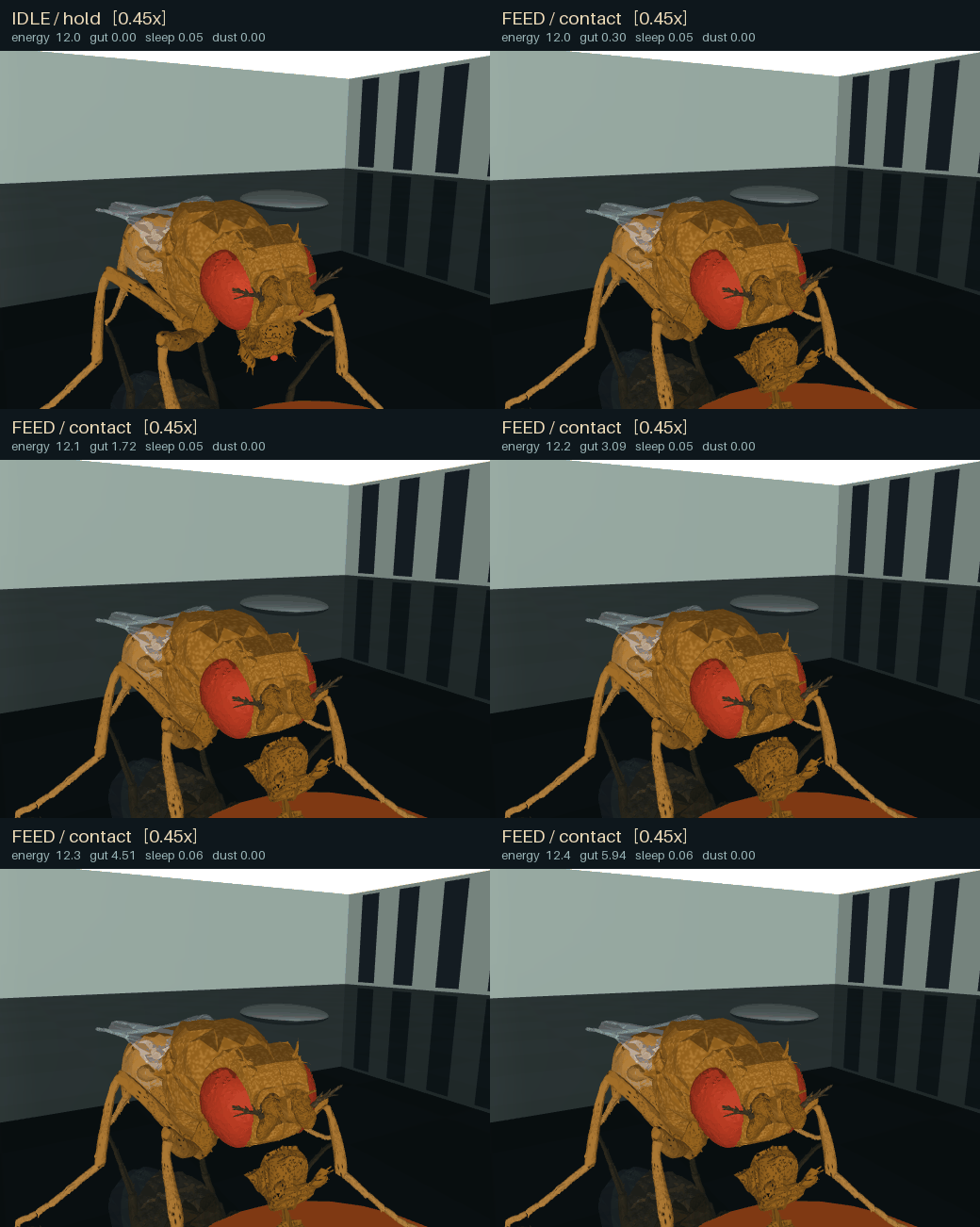 |
| Foreleg grooming | Sleep and tactile waking |
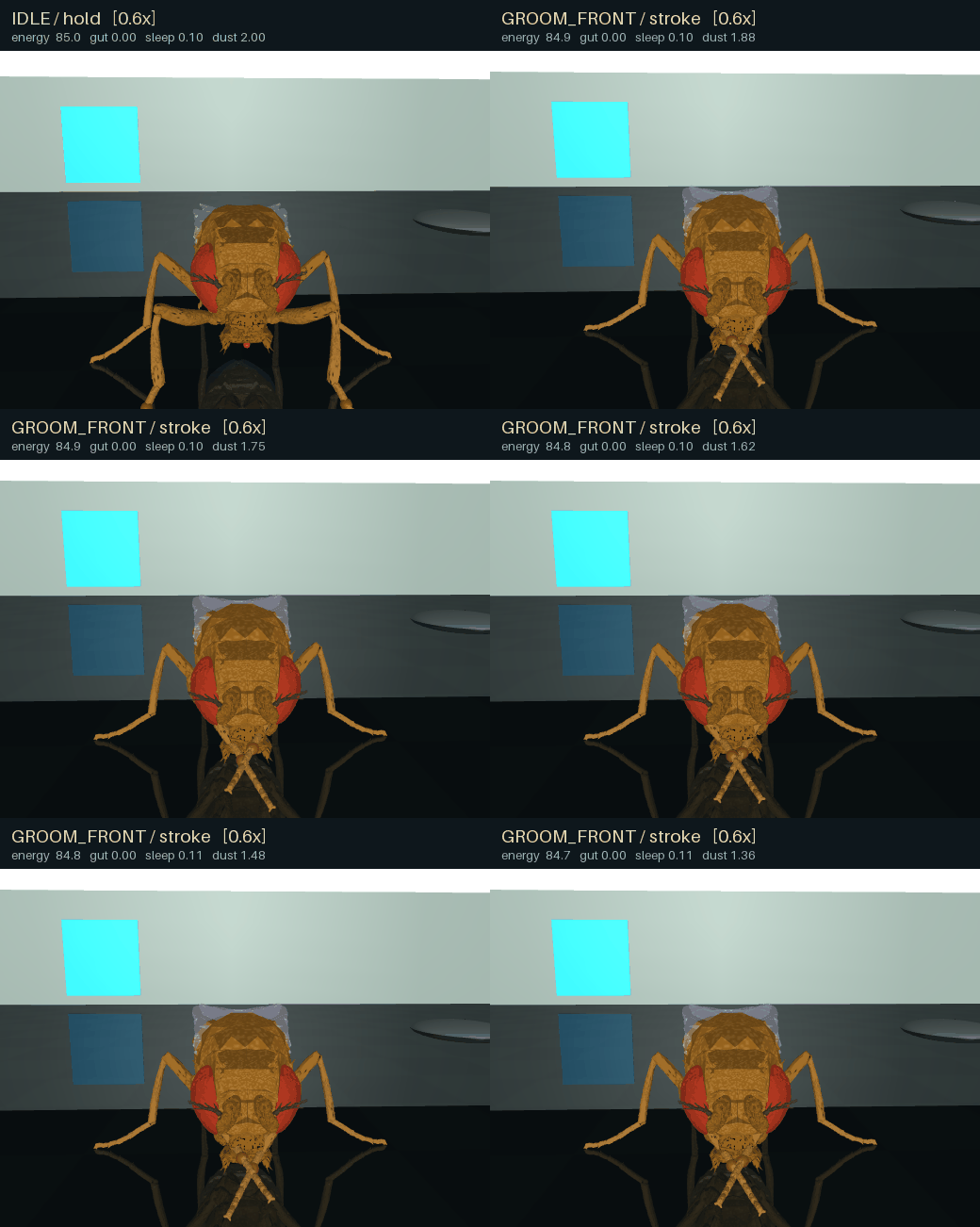 | 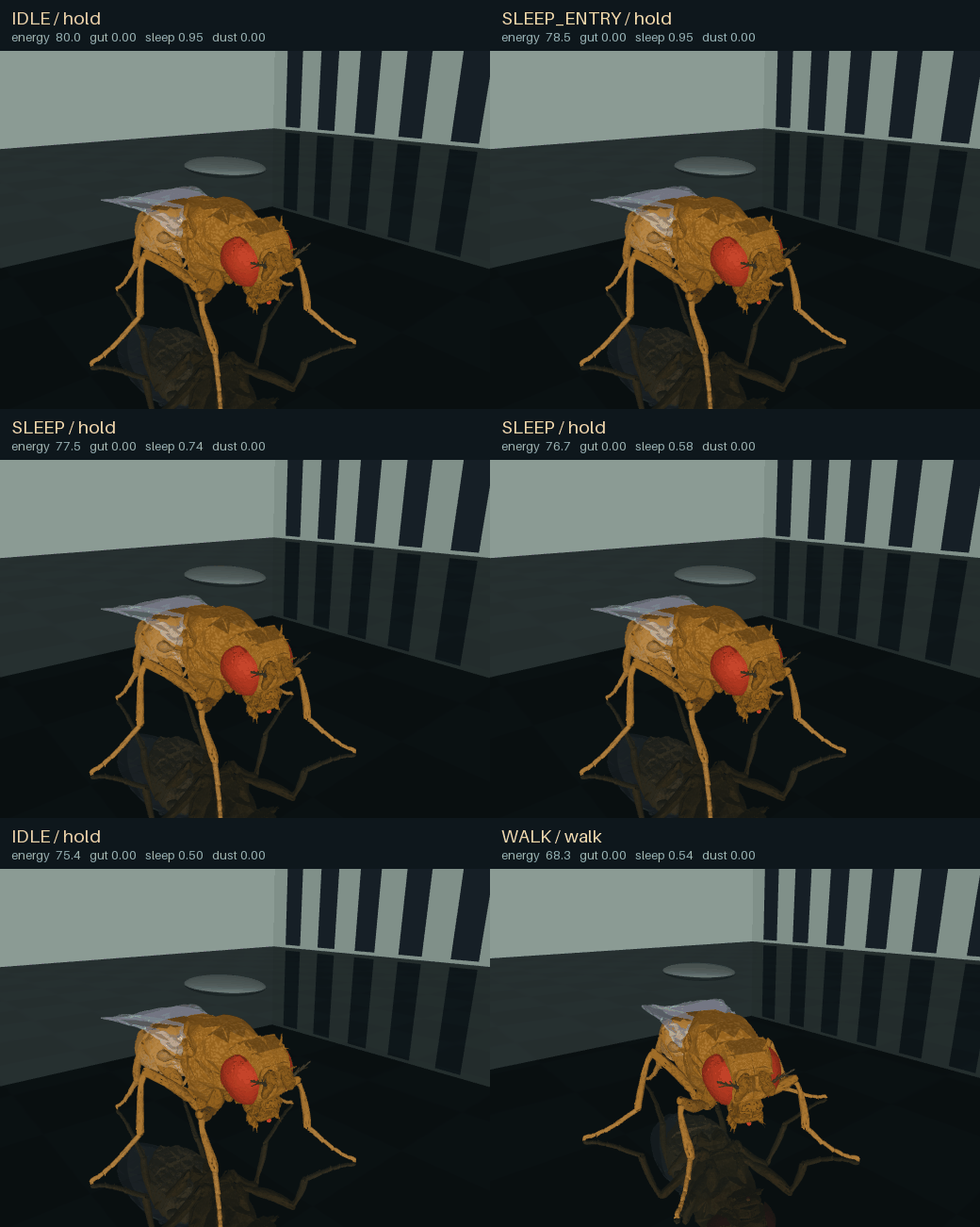 |
These clips show the engineered behavioral and motor controllers with the connectome disabled. Playback speeds vary between clips.
Quick start on Windows
Use 64-bit Python 3.12 and an OpenGL-capable graphics driver. Neural dynamics and physics run on the CPU; CUDA and PyTorch are not required. Allow several GB of disk space for the environment, downloaded data, and generated output. Real-time performance depends on your CPU. The first neural run includes Numba compilation.
Clone the repository and run commands from its root:
git clone https://github.com/artem-x-meta/fly-arena.git
cd fly-arena
py -3.12 -m venv .venv
.\.venv\Scripts\python.exe -m pip install -e .
.\.venv\Scripts\python.exe -m fly_arena run --mode body-demo --seconds 3
The last command checks the physical body and viewer with scripted walking;
it does not load a connectome. Alternatively, use launchers/01_setup_windows.cmd and
then launchers/02_test_body.cmd.
Prepare the neural graph, then start the hybrid arena:
.\.venv\Scripts\python.exe -m fly_arena prepare
.\.venv\Scripts\python.exe -m fly_arena run --mode ethology-hybrid --config configs/ethology-fast.toml --seconds 0
prepare downloads approximately 1.11 GB of public MaleCNS v1.0 source data,
verifies SHA-256 hashes, and builds a sparse graph in data/graph/. Downloads
can resume after interruption. No neuPrint account or token is required.
Subsequent runs use local data.
In the viewer, drag or scroll to move the camera, press Space to pause,
and close the window or press Ctrl+C in the console to stop. In hybrid
mode, W applies a local tactile wake stimulus. --seconds means simulated
seconds; 0 keeps running until stopped. --wall-seconds can limit wall time
for the hybrid arena after loading.
Windows launch scripts are grouped in launchers/. They locate the project
root automatically, so they can be started from any working directory.
Available demonstrations
| Launcher | Demonstration | Prepared graph needed |
|---|---|---|
launchers/02_test_body.cmd | Scripted walking and installation check | No |
launchers/04_run_connectome.cmd | LIF activity driving descending gait commands | Yes |
launchers/05_run_ethology.cmd | Feeding, grooming, sleeping, and walking | Yes |
launchers/07_run_search.cmd | Odor-plume search with recurring food and dust | Yes |
launchers/09_run_escape.cmd | Approaching visual object and engineered escape | Yes |
launchers/13_run_food_fight.cmd | Two flies sharing a scarce food supply | No |
launchers/15_run_shared_meal.cmd | The same encounter with more food available | No |
The demo-fast profile accelerates organism processes such as metabolism and
sleep pressure by 60 times. Physics and neural time retain their normal scale.
Use configs/ethology-unscaled.toml for an organism time scale of one.
Food, energy, and contamination use model-specific units.
The two-fly demonstration can also be started directly:
.\.venv\Scripts\python.exe -m fly_duel --social --scene encounter --single --seed 1 --seconds 12 --viewer
.\.venv\Scripts\python.exe -m fly_duel --social --scene encounter --single --seed 1 --seconds 12 --resources ample --viewer
Each contestant has its own organism state, navigator, and motor controller. Actual feeding draws from a shared finite resource. Failed feeding, remaining hunger, recent food contact, and local rival sensing drive the social policy; successful intake suppresses escalation. The motions include physical pushing and foreleg fencing, but do not reconstruct biological lunges or the full aggression repertoire. This mode runs engineered controllers without a neural graph. Its scarcity scenario can escalate after the food has been consumed; it does not establish a winner's advantage in access to remaining food.
Headless runs and checkpoints
Record a short feeding scenario without opening the viewer:
.\.venv\Scripts\python.exe -m fly_arena run --headless --scenario feeding-contact --seconds 3 --video runs/feed.mp4
On Linux, use Python 3.12 and bash setup_linux.sh. Replace the Windows Python
path with .venv/bin/python; use --headless --gl egl when running without a
desktop and with a working EGL backend.
Outputs go to runs/: telemetry, metadata, optional video, and checkpoints.
Hybrid-mode checkpoints contain physics, neural and organism state, resources,
controller state, filters, and random generators. Continue a saved run with:
.\.venv\Scripts\python.exe -m fly_arena run --resume runs/checkpoints/latest.npz --seconds 10
Here, --seconds adds simulation time and configuration comes from the
checkpoint. Compatibility checks include code, dependencies, graph, and model
fingerprints, so checkpoints from another source revision may be rejected.
The older connectome mode saves neural state for analysis, not a complete
resumable arena.
Neural model and research limits
The prepared graph retains 166,700 annotated non-glial entries and all 25,582,938 connection rows between them, including weak and self connections. Weights derive from synapse counts, simplified transmitter signs, and a global gain. The default backend uses uniform leaky integrate-and-fire neurons with explicit background and descending-neuron stimulation. These dynamics and input choices are project implementations, not physiological parameters supplied or validated by the connectome authors.
Two 96 x 96 cameras provide approximate retinal input. Descending activity is converted to gait commands, while FlyGym supplies an engineered walking controller. Motor neurons are not individually mapped to muscles. In hybrid mode, food search, behavioral arbitration, and escape detection also contain engineered logic. Running the full graph does not demonstrate that natural behavior emerges from connectivity alone. Flight is not implemented.
Additional research packages remain separate from the main arena:
fly_circuit_labcontains visual-pathway probes and a paper-derived escape response model.fly_bioandfly_bio_selectivitycontain graded-response and motion selectivity experiments. They did not achieve a validated replacement for the external visual controller.fly_semanticandsemantic_toolsexplore a small trained neural-activity readout for the need for food, with frozen connectome weights and artificial input ports. Directional instructions are not yet an operational learned navigation interface. The demo requires separately generated calibration, mappings, and trained readout artifacts; these are not shipped in this repository. Existing semantic labels and console messages are in Russian.
Downloaded datasets, recordings, trained artifacts, local experiment reports, and development notes are excluded from version control. The source and configuration files remain available for inspection and further experiments.
Development and troubleshooting
Install the test extra and run the source test suites:
.\.venv\Scripts\python.exe -m pip install -e ".[test]"
.\.venv\Scripts\python.exe -m pytest --import-mode=importlib tests circuit_tests compat_tests duel_tests bio_tests selectivity_tests semantic_tests
The import mode allows similarly named test modules in separate directories.
Some integration and experiment-reproduction checks require OpenGL, a prepared
graph, or local generated artifacts. See each test's prerequisites before
enabling them.
Use python -m fly_arena run --help and python -m fly_duel --help for CLI
options, including diagnostic and ablation controls.
- Missing prepared connectome: run
python -m fly_arena preparefrom the project root, or set--datato the correct data directory. - Missing Python: check
py -3.12 --version; this dependency set targets Python 3.12. - Black or clipped viewer: MuJoCo's side panels are hidden by default due
to a rendering issue on some drivers. Avoid
--mujoco-uion affected systems. - Slow first run: allow Numba compilation to finish. Model seconds are independent of wall-clock seconds.
License and attribution
Project code is available under the MIT License. Connectome data come from MaleCNS v1.0 under CC BY 4.0. The physical body and walking controller come from NeuroMechFly / FlyGym, with physics provided by MuJoCo. See THIRD_PARTY.md for attribution, transformations, and dependency licenses.
Contributors

1 commits
See what people are saying
Similar repos



Languages
Python
99.5%
README
Fly Arena
A local fruit-fly simulation combining a physical NeuroMechFly body in MuJoCo, MaleCNS connectome data, and explicit behavioral controllers.
The main hybrid mode supports walking, odor-guided food search, contact-based feeding through an articulated proboscis, grooming, sleep pressure, and waking. A separate two-fly arena adds shared food, body collisions, pushing, foreleg fencing, and retreat. These behaviors combine simulated physiology with engineered decisions and motor programs. This is an experimental model, not a physiologically validated digital fly.
| Odor-guided search | Feeding through the proboscis |
|---|---|
| |
| Foreleg grooming | Sleep and tactile waking |
| |
These clips show the engineered behavioral and motor controllers with the connectome disabled. Playback speeds vary between clips.
Quick start on Windows
Use 64-bit Python 3.12 and an OpenGL-capable graphics driver. Neural dynamics and physics run on the CPU; CUDA and PyTorch are not required. Allow several GB of disk space for the environment, downloaded data, and generated output. Real-time performance depends on your CPU. The first neural run includes Numba compilation.
Clone the repository and run commands from its root:
git clone https://github.com/artem-x-meta/fly-arena.git
cd fly-arena
py -3.12 -m venv .venv
.\.venv\Scripts\python.exe -m pip install -e .
.\.venv\Scripts\python.exe -m fly_arena run --mode body-demo --seconds 3
The last command checks the physical body and viewer with scripted walking;
it does not load a connectome. Alternatively, use launchers/01_setup_windows.cmd and
then launchers/02_test_body.cmd.
Prepare the neural graph, then start the hybrid arena:
.\.venv\Scripts\python.exe -m fly_arena prepare
.\.venv\Scripts\python.exe -m fly_arena run --mode ethology-hybrid --config configs/ethology-fast.toml --seconds 0
prepare downloads approximately 1.11 GB of public MaleCNS v1.0 source data,
verifies SHA-256 hashes, and builds a sparse graph in data/graph/. Downloads
can resume after interruption. No neuPrint account or token is required.
Subsequent runs use local data.
In the viewer, drag or scroll to move the camera, press Space to pause,
and close the window or press Ctrl+C in the console to stop. In hybrid
mode, W applies a local tactile wake stimulus. --seconds means simulated
seconds; 0 keeps running until stopped. --wall-seconds can limit wall time
for the hybrid arena after loading.
Windows launch scripts are grouped in launchers/. They locate the project
root automatically, so they can be started from any working directory.
Available demonstrations
| Launcher | Demonstration | Prepared graph needed |
|---|---|---|
launchers/02_test_body.cmd | Scripted walking and installation check | No |
launchers/04_run_connectome.cmd | LIF activity driving descending gait commands | Yes |
launchers/05_run_ethology.cmd | Feeding, grooming, sleeping, and walking | Yes |
launchers/07_run_search.cmd | Odor-plume search with recurring food and dust | Yes |
launchers/09_run_escape.cmd | Approaching visual object and engineered escape | Yes |
launchers/13_run_food_fight.cmd | Two flies sharing a scarce food supply | No |
launchers/15_run_shared_meal.cmd | The same encounter with more food available | No |
The demo-fast profile accelerates organism processes such as metabolism and
sleep pressure by 60 times. Physics and neural time retain their normal scale.
Use configs/ethology-unscaled.toml for an organism time scale of one.
Food, energy, and contamination use model-specific units.
The two-fly demonstration can also be started directly:
.\.venv\Scripts\python.exe -m fly_duel --social --scene encounter --single --seed 1 --seconds 12 --viewer
.\.venv\Scripts\python.exe -m fly_duel --social --scene encounter --single --seed 1 --seconds 12 --resources ample --viewer
Each contestant has its own organism state, navigator, and motor controller. Actual feeding draws from a shared finite resource. Failed feeding, remaining hunger, recent food contact, and local rival sensing drive the social policy; successful intake suppresses escalation. The motions include physical pushing and foreleg fencing, but do not reconstruct biological lunges or the full aggression repertoire. This mode runs engineered controllers without a neural graph. Its scarcity scenario can escalate after the food has been consumed; it does not establish a winner's advantage in access to remaining food.
Headless runs and checkpoints
Record a short feeding scenario without opening the viewer:
.\.venv\Scripts\python.exe -m fly_arena run --headless --scenario feeding-contact --seconds 3 --video runs/feed.mp4
On Linux, use Python 3.12 and bash setup_linux.sh. Replace the Windows Python
path with .venv/bin/python; use --headless --gl egl when running without a
desktop and with a working EGL backend.
Outputs go to runs/: telemetry, metadata, optional video, and checkpoints.
Hybrid-mode checkpoints contain physics, neural and organism state, resources,
controller state, filters, and random generators. Continue a saved run with:
.\.venv\Scripts\python.exe -m fly_arena run --resume runs/checkpoints/latest.npz --seconds 10
Here, --seconds adds simulation time and configuration comes from the
checkpoint. Compatibility checks include code, dependencies, graph, and model
fingerprints, so checkpoints from another source revision may be rejected.
The older connectome mode saves neural state for analysis, not a complete
resumable arena.
Neural model and research limits
The prepared graph retains 166,700 annotated non-glial entries and all 25,582,938 connection rows between them, including weak and self connections. Weights derive from synapse counts, simplified transmitter signs, and a global gain. The default backend uses uniform leaky integrate-and-fire neurons with explicit background and descending-neuron stimulation. These dynamics and input choices are project implementations, not physiological parameters supplied or validated by the connectome authors.
Two 96 x 96 cameras provide approximate retinal input. Descending activity is converted to gait commands, while FlyGym supplies an engineered walking controller. Motor neurons are not individually mapped to muscles. In hybrid mode, food search, behavioral arbitration, and escape detection also contain engineered logic. Running the full graph does not demonstrate that natural behavior emerges from connectivity alone. Flight is not implemented.
Additional research packages remain separate from the main arena:
fly_circuit_labcontains visual-pathway probes and a paper-derived escape response model.fly_bioandfly_bio_selectivitycontain graded-response and motion selectivity experiments. They did not achieve a validated replacement for the external visual controller.fly_semanticandsemantic_toolsexplore a small trained neural-activity readout for the need for food, with frozen connectome weights and artificial input ports. Directional instructions are not yet an operational learned navigation interface. The demo requires separately generated calibration, mappings, and trained readout artifacts; these are not shipped in this repository. Existing semantic labels and console messages are in Russian.
Downloaded datasets, recordings, trained artifacts, local experiment reports, and development notes are excluded from version control. The source and configuration files remain available for inspection and further experiments.
Development and troubleshooting
Install the test extra and run the source test suites:
.\.venv\Scripts\python.exe -m pip install -e ".[test]"
.\.venv\Scripts\python.exe -m pytest --import-mode=importlib tests circuit_tests compat_tests duel_tests bio_tests selectivity_tests semantic_tests
The import mode allows similarly named test modules in separate directories.
Some integration and experiment-reproduction checks require OpenGL, a prepared
graph, or local generated artifacts. See each test's prerequisites before
enabling them.
Use python -m fly_arena run --help and python -m fly_duel --help for CLI
options, including diagnostic and ablation controls.
- Missing prepared connectome: run
python -m fly_arena preparefrom the project root, or set--datato the correct data directory. - Missing Python: check
py -3.12 --version; this dependency set targets Python 3.12. - Black or clipped viewer: MuJoCo's side panels are hidden by default due
to a rendering issue on some drivers. Avoid
--mujoco-uion affected systems. - Slow first run: allow Numba compilation to finish. Model seconds are independent of wall-clock seconds.
License and attribution
Project code is available under the MIT License. Connectome data come from MaleCNS v1.0 under CC BY 4.0. The physical body and walking controller come from NeuroMechFly / FlyGym, with physics provided by MuJoCo. See THIRD_PARTY.md for attribution, transformations, and dependency licenses.
See what people are saying
Similar repos
Contributors
1 commits
Languages
Python
99.5%