
Allows switch environment for Visual Studio Code using Nix Package Manager.
Clojure
247
169 commits
updated Sep 2, 2026
README
🇺🇦 Support Ukraine 🇺🇦
Hi folks, My name is Roman Valihura. I'm the author of this extension. I'm Ukrainian. I was born in Ukraine. I'm living here at the moment.
As you all know Russia invaded my country. Russia has already killed thousands of civilians and continues the war and terror in Ukraine.
If you have a wish and ability to support Ukraine, please consider donating to the Come Back Alive foundation — one of the largest and most transparent Ukrainian charitable funds supporting the Armed Forces of Ukraine.
Thank you for your support!
Nix Environment Selector

Extension that lets you use environments declared in .nix files in Visual Studio Code.
Motivation
Nix package manager provides a way of creating isolated environments with a specific configuration of packages. These environments are usually activated in the terminal and are not convenient to use within an IDE.
One option is to run nix-shell on the command line and then
launch code within the activated shell.
However, this process can quickly become tedious.
Nix Environment Selector provides an alternative: can automatically apply the environment.
Getting started
- Install Nix package manager.
- Restart VS Code (to make sure that
nix-shellis in the PATH) - Install the extension.
- Create the Nix environment config (like
default.nixorshell.nixorflake.nix) in the root of your project's workspace. - Open Command Palette (Ctrl + Shift + P)
and run
Nix-Env: Select Environmentcommand. - Choose the Nix environment you'd like to apply.
- Wait for the environment to build.
- Restart VS Code to apply the built environment.
Example
Haskell project
To run a Haskell application you need to have GHC (Haskell compiler) installed. With Nix package manager we can create an isolated environment containing only the GHC version and the dependencies that the project needs without polluting the user's environment.
Environment configuration in shell.nix:
{ pkgs ? import <nixpkgs> { } }:
with pkgs;

let
  haskellDeps = ps: with ps; [
    base
    lens
    mtl
    random
  ];
  haskellEnv = haskell.packages.ghc865.ghcWithPackages haskellDeps;
in mkShell {
  buildInputs = [
    haskellEnv
    haskellPackages.cabal-install
    gdb
  ];
}
Now let's try to open our project in Visual Studio Code.
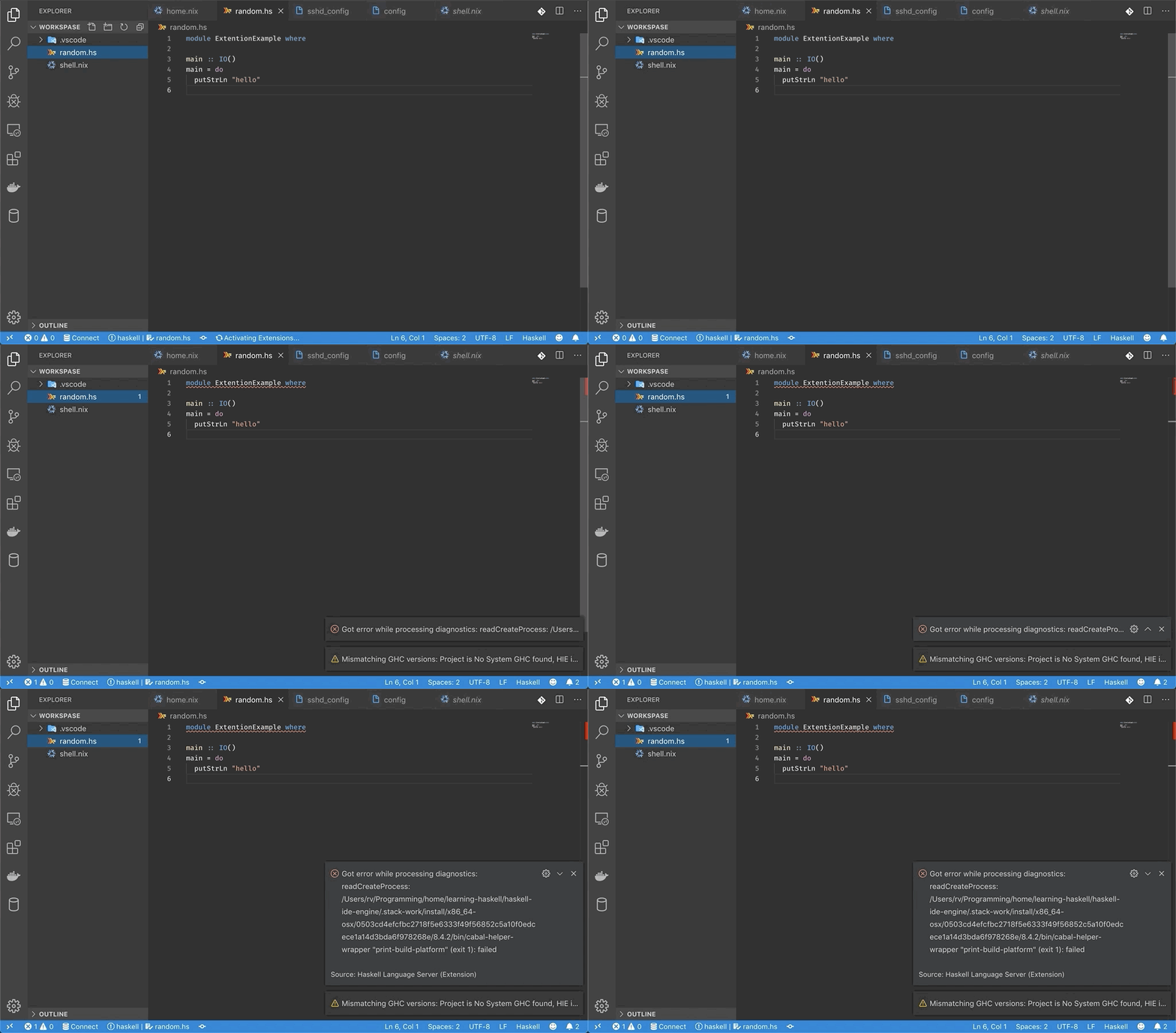
As you can see VS Code can't find the GHC compiler. Let's apply
the environment declared in shell.nix.
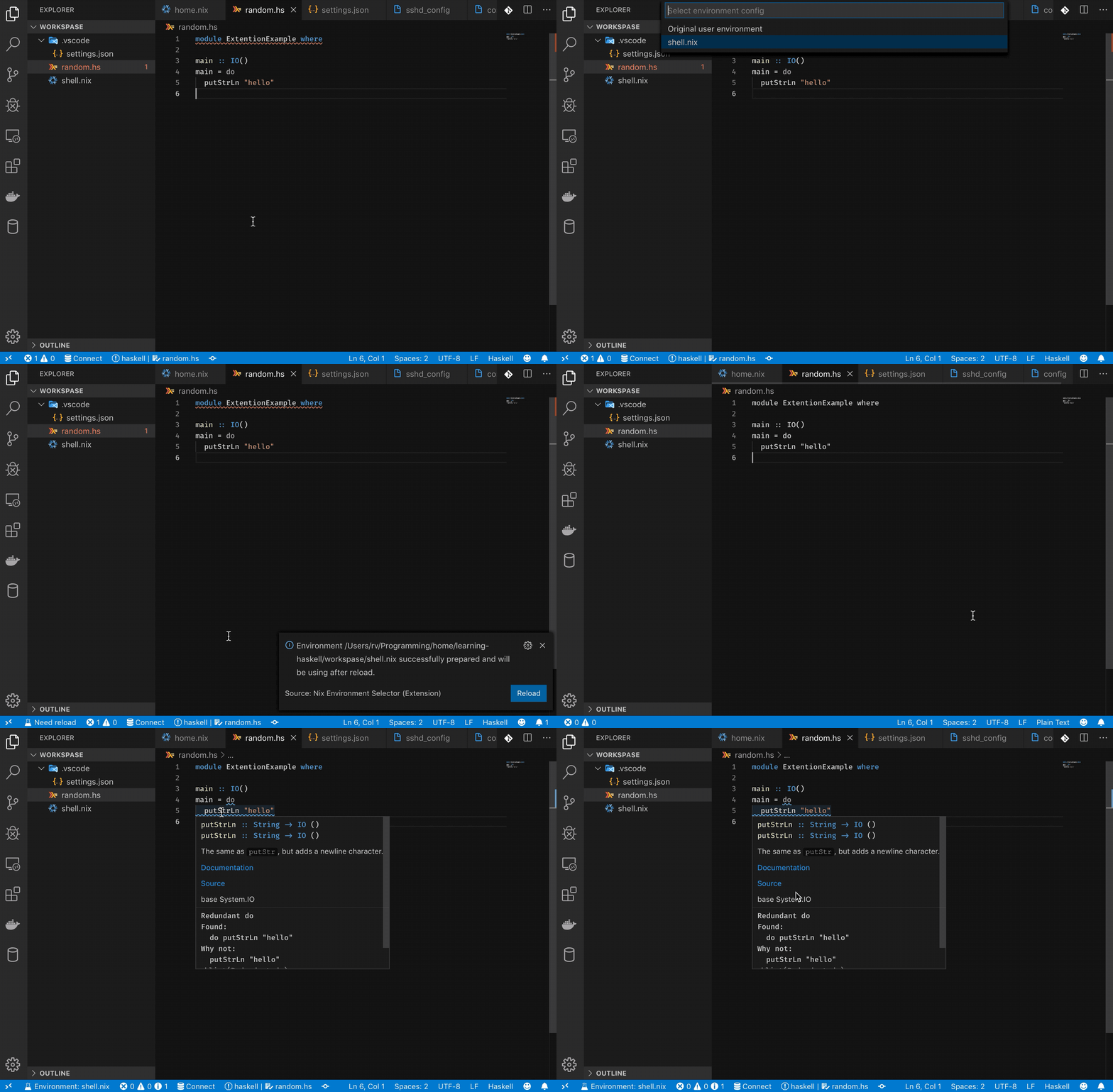
Bingo 🎉🎉🎉. Everything is working now 😈
Configuration
You can configure the extension in .vscode/settings.json
file (located in the root of the workspace). Here are the configuration settings:
| Setting | Default | Description |
|---|---|---|
nixEnvSelector.nixFile | null | Path to the Nix config file |
nixEnvSelector.packages | [] | List of packages passed as -p args to nix-shell |
nixEnvSelector.args | null | Additional args for nix-shell. EX: -A <something> --pure |
nixEnvSelector.nixShellPath | null | Custom path to the nix-shell executable |
nixEnvSelector.useFlakes | false | Enable support for flake.nix |
nixEnvSelector.suggestion | true | Show a proposal to select an environment when a .nix file is detected |
nixEnvSelector.logLevel | info | Output channel verbosity: debug | info | warn | error |
Supported Platforms
- MacOS
- Linux
- Windows (with
Remote - WSLextension)
Support
If you like the extension and want to support author, click the button bellow.

License
Contributors




Similar repos


Languages
Clojure
97.6%
JavaScript
2.0%
Allows switch environment for Visual Studio Code using Nix Package Manager.
Clojure
247
169 commits
updated Sep 2, 2026
README
🇺🇦 Support Ukraine 🇺🇦
Hi folks, My name is Roman Valihura. I'm the author of this extension. I'm Ukrainian. I was born in Ukraine. I'm living here at the moment.
As you all know Russia invaded my country. Russia has already killed thousands of civilians and continues the war and terror in Ukraine.
If you have a wish and ability to support Ukraine, please consider donating to the Come Back Alive foundation — one of the largest and most transparent Ukrainian charitable funds supporting the Armed Forces of Ukraine.
Thank you for your support!
Nix Environment Selector
Extension that lets you use environments declared in .nix files in Visual Studio Code.
Motivation
Nix package manager provides a way of creating isolated environments with a specific configuration of packages. These environments are usually activated in the terminal and are not convenient to use within an IDE.
One option is to run nix-shell on the command line and then
launch code within the activated shell.
However, this process can quickly become tedious.
Nix Environment Selector provides an alternative: can automatically apply the environment.
Getting started
- Install Nix package manager.
- Restart VS Code (to make sure that
nix-shellis in the PATH) - Install the extension.
- Create the Nix environment config (like
default.nixorshell.nixorflake.nix) in the root of your project's workspace. - Open Command Palette (Ctrl + Shift + P)
and run
Nix-Env: Select Environmentcommand. - Choose the Nix environment you'd like to apply.
- Wait for the environment to build.
- Restart VS Code to apply the built environment.
Example
Haskell project
To run a Haskell application you need to have GHC (Haskell compiler) installed. With Nix package manager we can create an isolated environment containing only the GHC version and the dependencies that the project needs without polluting the user's environment.
Environment configuration in shell.nix:
{ pkgs ? import <nixpkgs> { } }:
with pkgs;

let
  haskellDeps = ps: with ps; [
    base
    lens
    mtl
    random
  ];
  haskellEnv = haskell.packages.ghc865.ghcWithPackages haskellDeps;
in mkShell {
  buildInputs = [
    haskellEnv
    haskellPackages.cabal-install
    gdb
  ];
}
Now let's try to open our project in Visual Studio Code.
As you can see VS Code can't find the GHC compiler. Let's apply
the environment declared in shell.nix.
Bingo 🎉🎉🎉. Everything is working now 😈
Configuration
You can configure the extension in .vscode/settings.json
file (located in the root of the workspace). Here are the configuration settings:
| Setting | Default | Description |
|---|---|---|
nixEnvSelector.nixFile | null | Path to the Nix config file |
nixEnvSelector.packages | [] | List of packages passed as -p args to nix-shell |
nixEnvSelector.args | null | Additional args for nix-shell. EX: -A <something> --pure |
nixEnvSelector.nixShellPath | null | Custom path to the nix-shell executable |
nixEnvSelector.useFlakes | false | Enable support for flake.nix |
nixEnvSelector.suggestion | true | Show a proposal to select an environment when a .nix file is detected |
nixEnvSelector.logLevel | info | Output channel verbosity: debug | info | warn | error |
Supported Platforms
- MacOS
- Linux
- Windows (with
Remote - WSLextension)
Support
If you like the extension and want to support author, click the button bellow.
License
Similar repos
Contributors
Languages
Clojure
97.6%
JavaScript
2.0%