
A Lens extension for viewing Kubescape security information
See the codeREADME
Kubescape Lens Extension
This extension brings the power of Kubescape to Lens so managing clusters was never simpler and more secure.



Prerequisites
-
Lens should be installed on your workstation. Please consult the following support matrix for version compatibility:
Lens Kubescape Extension 5.4 0.1.x 5.5 0.1.x 6.0 0.2.x 6.1 0.2.x
Installation
-
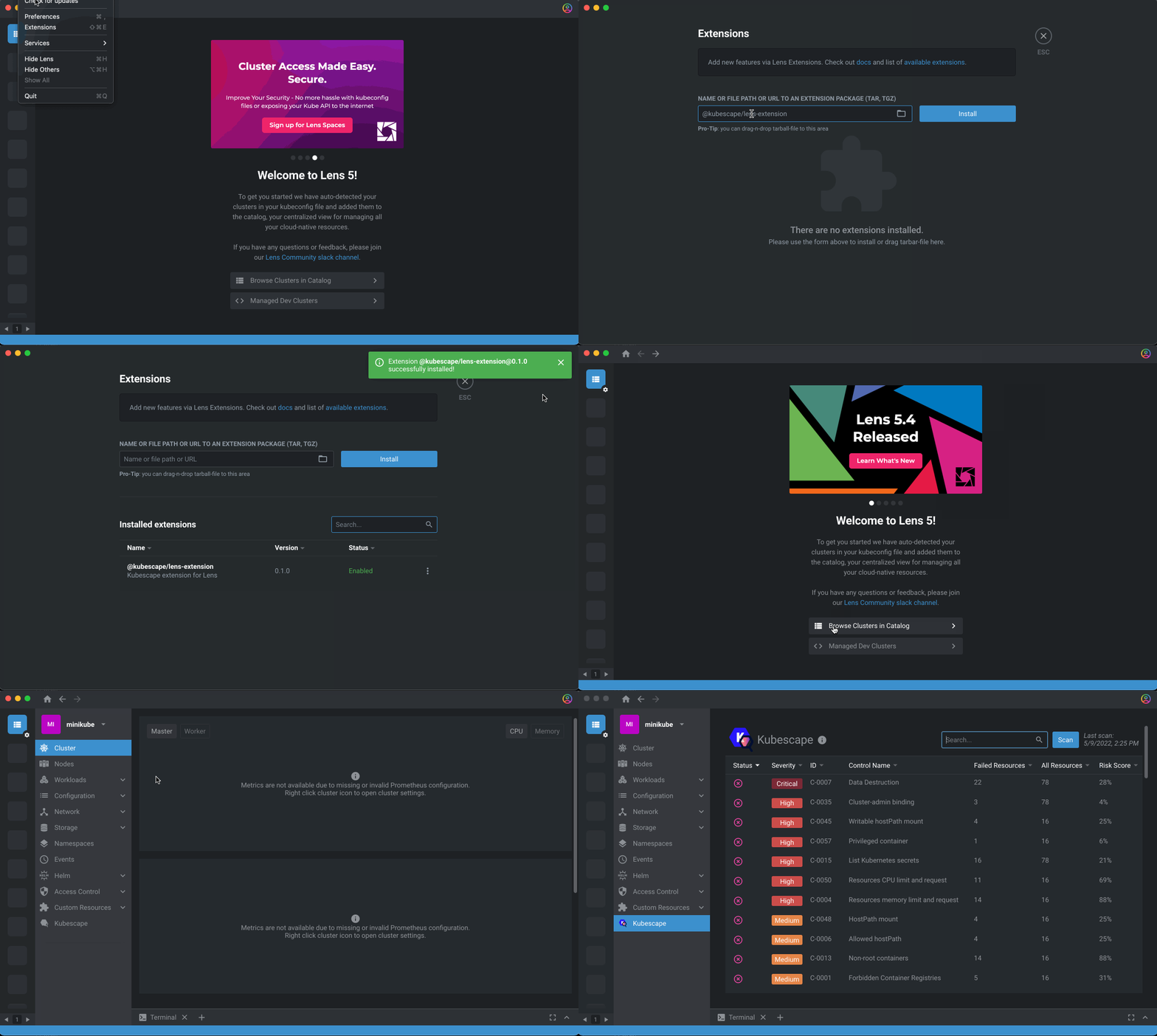
Open Lens and navigate to the Extensions page (or press Command + Shift+E on macOS).
-
Enter
@kubescape/lens-extensioninto the Install Extension box -
Click on the Install button.
Getting Started
The Kubescape extension for Lens will help you to easily scan and detect misconfigurations, software vulnerabilities, and RBAC (role-based-access-control) violations in your Kubernetes cluster.
Cluster-level information
- Navigate to
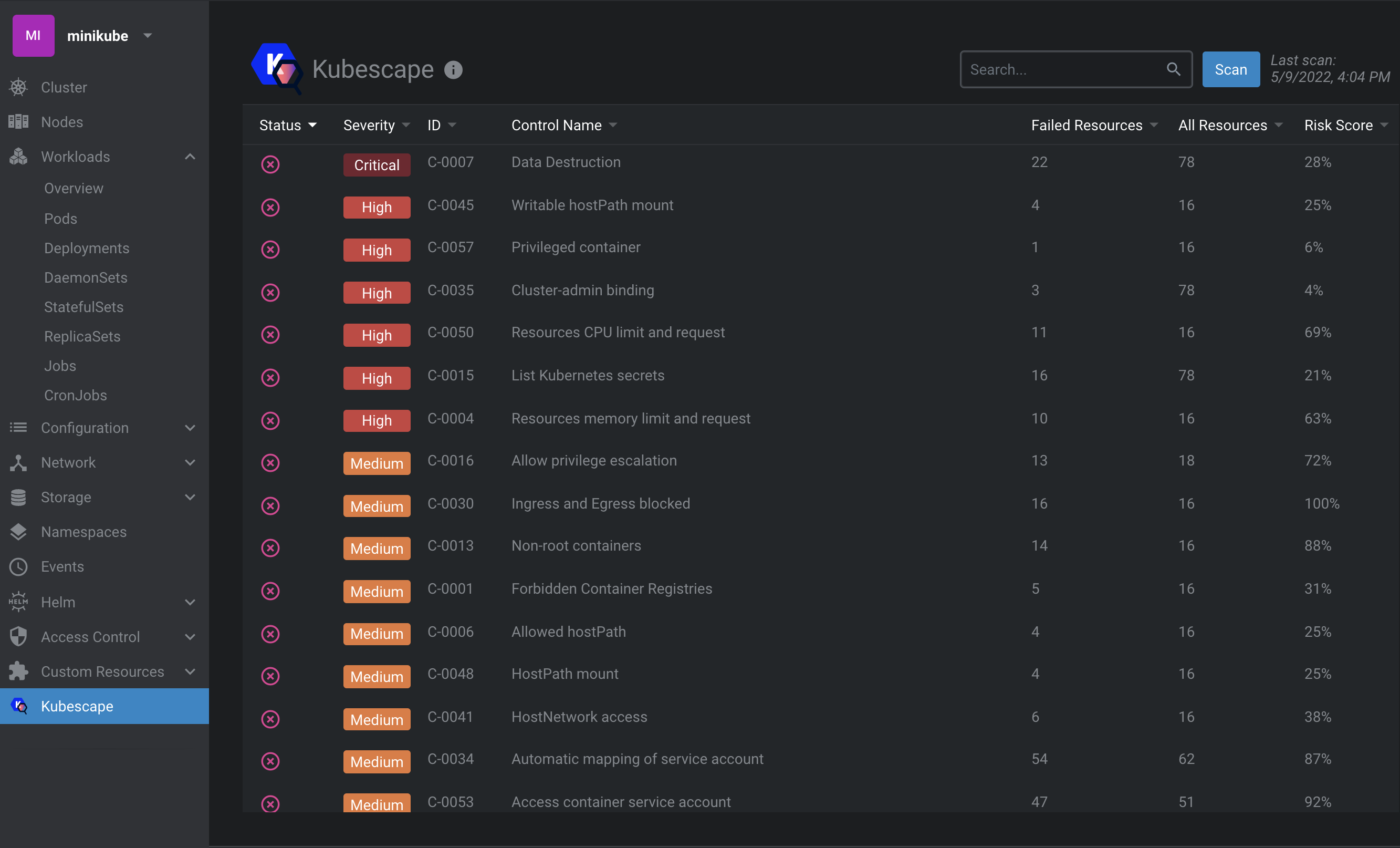
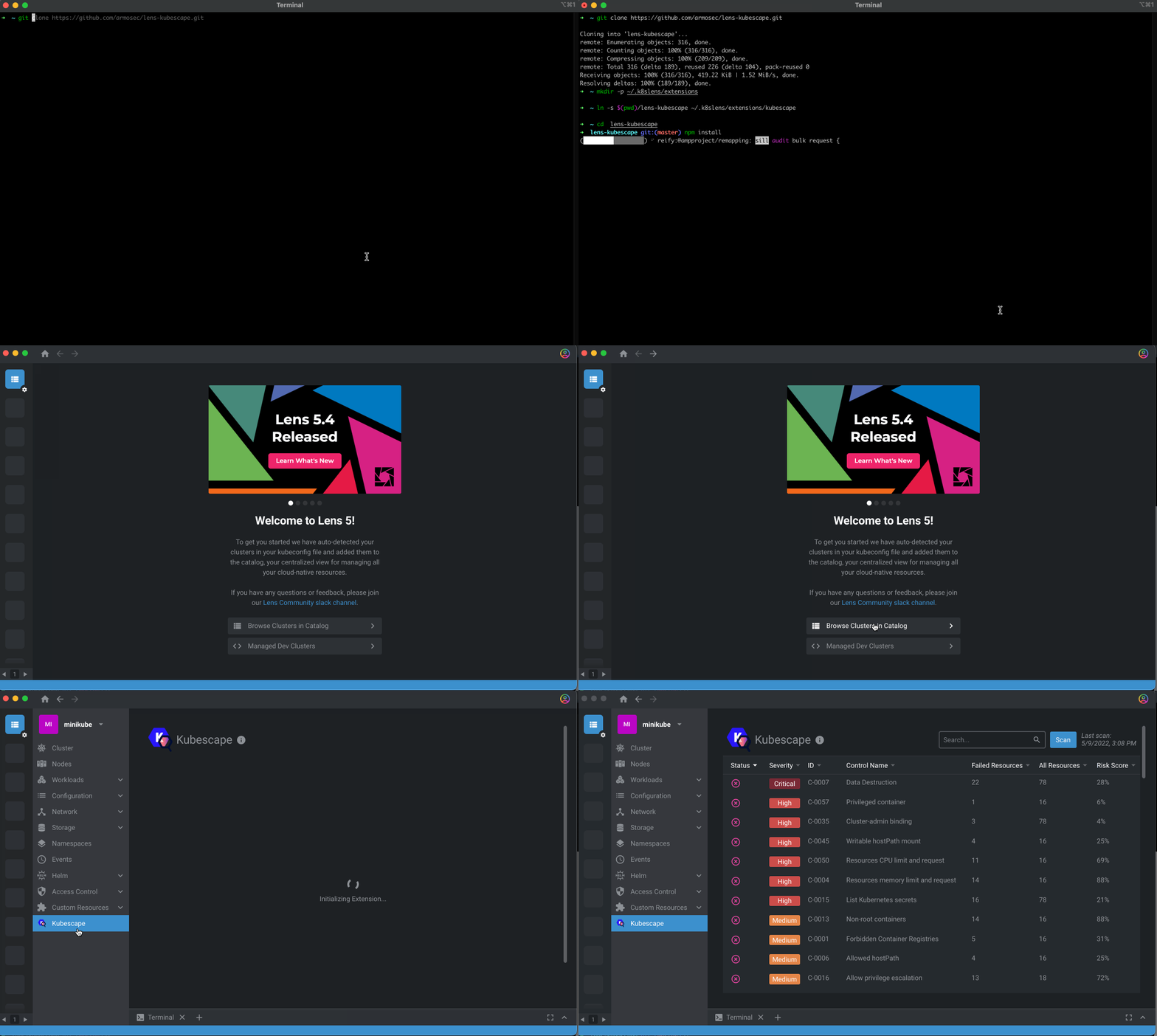
Kubescapefrom the side menu. - A Kubescape scan runs automatically on your cluster for the first time. You can also run a scan on-demand by clicking the Scan button.
- The table reflects a cluster-level summary of Kubescape scan results.
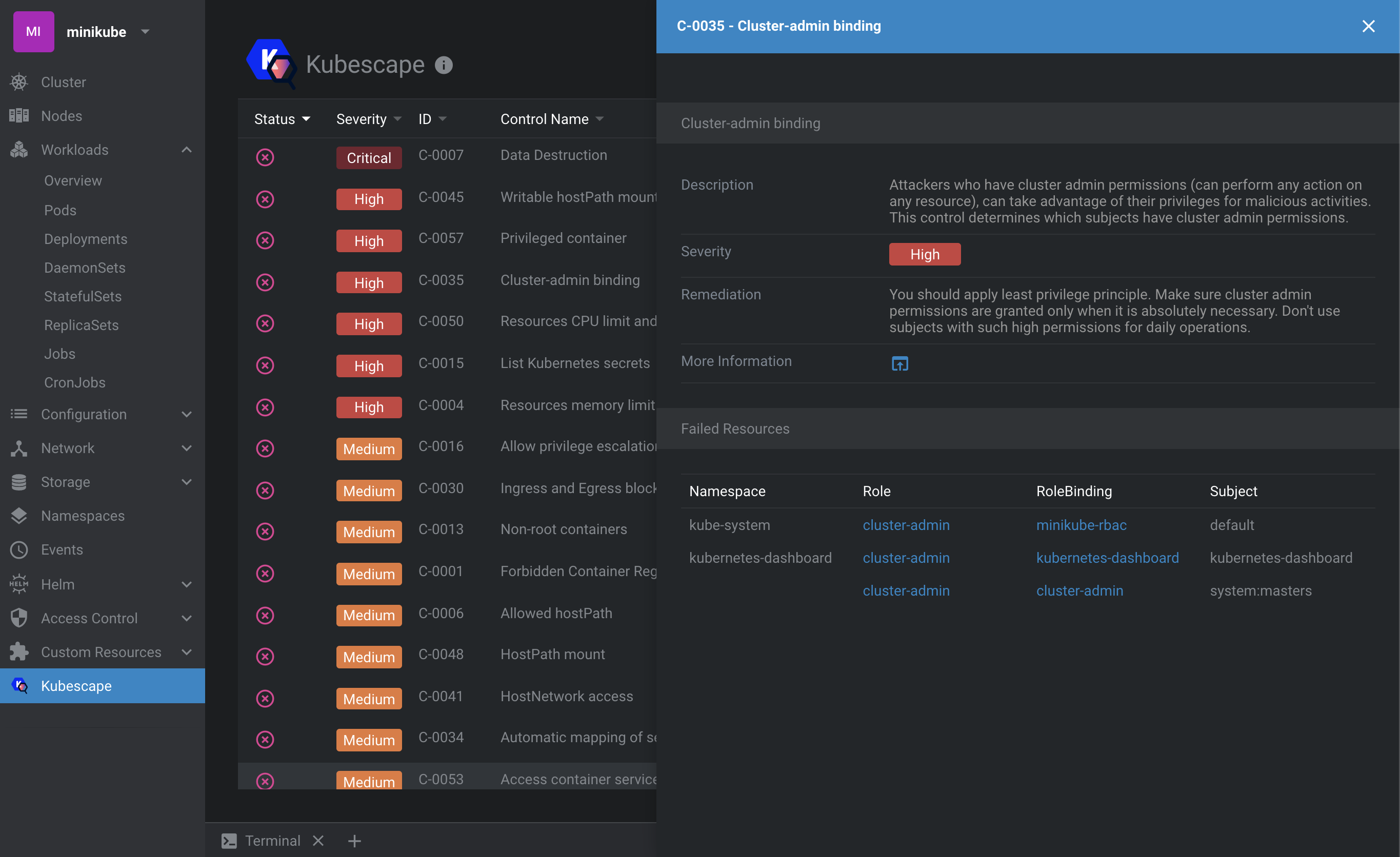
- To find out more information on a specific Kubescape control and its failed resources, click on it to open the side bar for a detailed view:
Object-level information
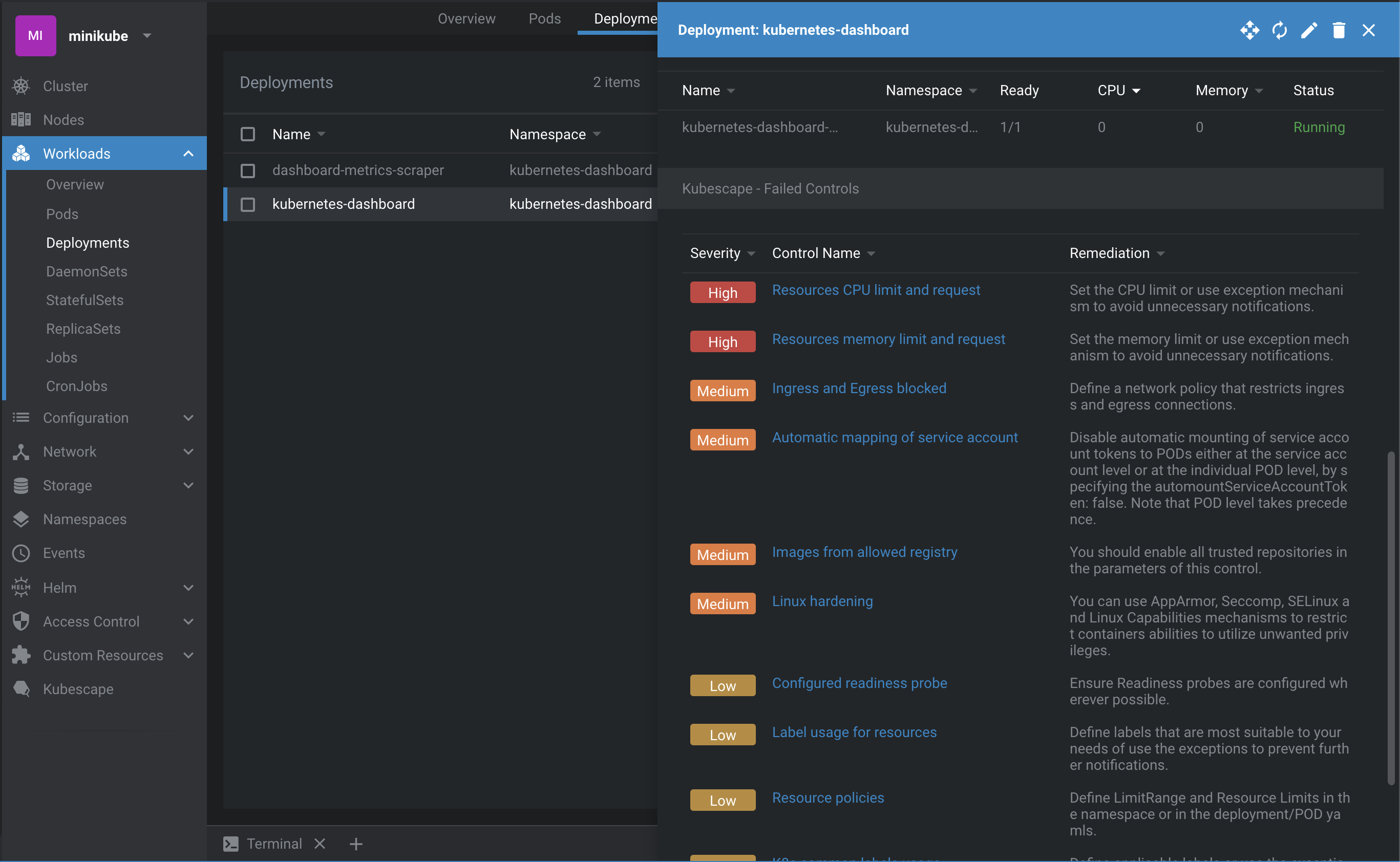
- Kubescape information is also available at the object level. Click on the desired resource to open the details side bar and scroll down to Kubescape section:
This view only shows failed controls. If you don't see any that's a good thing :sweat_smile:
Development mode
You must have a working Node.js environment.
- Clone the repository and then link to it:
git clone https://github.com/kubescape/lens-extension.git
mkdir -p ~/.k8slens/extensions
ln -s $(pwd)/lens-extension ~/.k8slens/extensions/kubescape
- Install dependencies and build the extension by running
makeornpmcommands:
cd lens-extension
make build
OR
cd lens-extension
npm install
npm run build
- To put your development build in watch mode you can run:
npm start
-
Open Lens and navigate to the Extensions page (or press Command + Shift+E on macOS).
-
If everything is fine, you should see the
@kubescape/lens-extensionextension listed under Installed Extensions. Click Enable to enable it.
To reflect your source code changes, reload the Lens window by pressing Command+R (macOS). Note: Any changes which affect Len's main thread will require a restart to the Lens application.
Uninstall
- Remove the link:
rm ~/.k8slens/extensions/kubescape
- Restart Lens application.
Similar repos


A Lens extension for viewing Kubescape security information
See the codeREADME
Kubescape Lens Extension
This extension brings the power of Kubescape to Lens so managing clusters was never simpler and more secure.
Prerequisites
-
Lens should be installed on your workstation. Please consult the following support matrix for version compatibility:
Lens Kubescape Extension 5.4 0.1.x 5.5 0.1.x 6.0 0.2.x 6.1 0.2.x
Installation
-
Open Lens and navigate to the Extensions page (or press Command + Shift+E on macOS).
-
Enter
@kubescape/lens-extensioninto the Install Extension box -
Click on the Install button.
Getting Started
The Kubescape extension for Lens will help you to easily scan and detect misconfigurations, software vulnerabilities, and RBAC (role-based-access-control) violations in your Kubernetes cluster.
Cluster-level information
- Navigate to
Kubescapefrom the side menu. - A Kubescape scan runs automatically on your cluster for the first time. You can also run a scan on-demand by clicking the Scan button.
- The table reflects a cluster-level summary of Kubescape scan results.
- To find out more information on a specific Kubescape control and its failed resources, click on it to open the side bar for a detailed view:
Object-level information
- Kubescape information is also available at the object level. Click on the desired resource to open the details side bar and scroll down to Kubescape section:
This view only shows failed controls. If you don't see any that's a good thing :sweat_smile:
Development mode
You must have a working Node.js environment.
- Clone the repository and then link to it:
git clone https://github.com/kubescape/lens-extension.git
mkdir -p ~/.k8slens/extensions
ln -s $(pwd)/lens-extension ~/.k8slens/extensions/kubescape
- Install dependencies and build the extension by running
makeornpmcommands:
cd lens-extension
make build
OR
cd lens-extension
npm install
npm run build
- To put your development build in watch mode you can run:
npm start
-
Open Lens and navigate to the Extensions page (or press Command + Shift+E on macOS).
-
If everything is fine, you should see the
@kubescape/lens-extensionextension listed under Installed Extensions. Click Enable to enable it.
To reflect your source code changes, reload the Lens window by pressing Command+R (macOS). Note: Any changes which affect Len's main thread will require a restart to the Lens application.
Uninstall
- Remove the link:
rm ~/.k8slens/extensions/kubescape
- Restart Lens application.