Benchmark local text/video/audio-to-motion AI models on VRM avatars — side-by-side VRMA playback, reports, and MP4 export.
Python
1
20 commits
updated Oct 12, 2026
English | 日本語
A local benchmark tool for comparing AI motion generation models on VRM avatars in the browser. Generate motion from text, video, speech, or music with eight models, retarget it to a stickman or your own VRM 1.0 model, and play the results side by side or overlaid on a shared timeline.
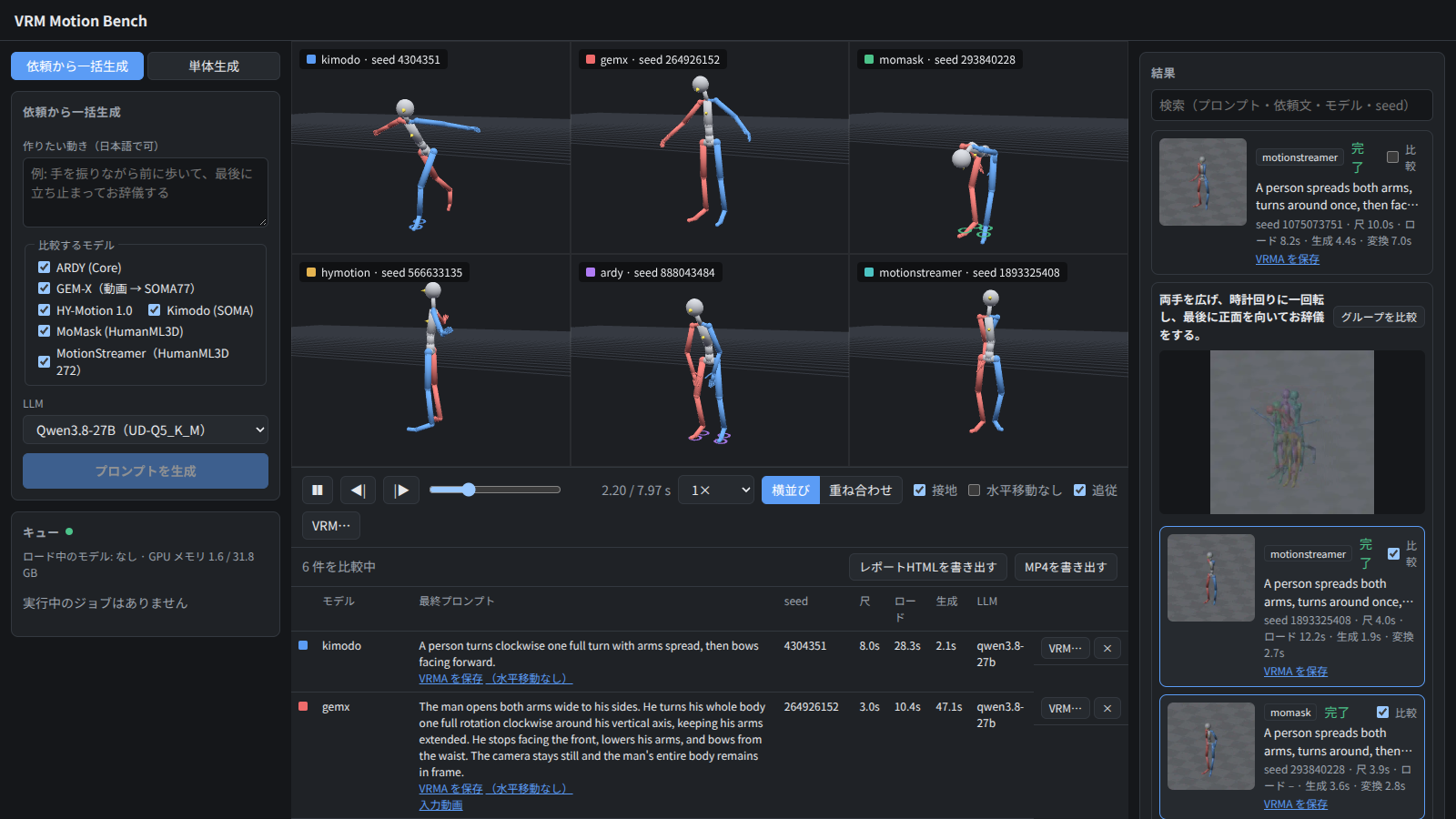
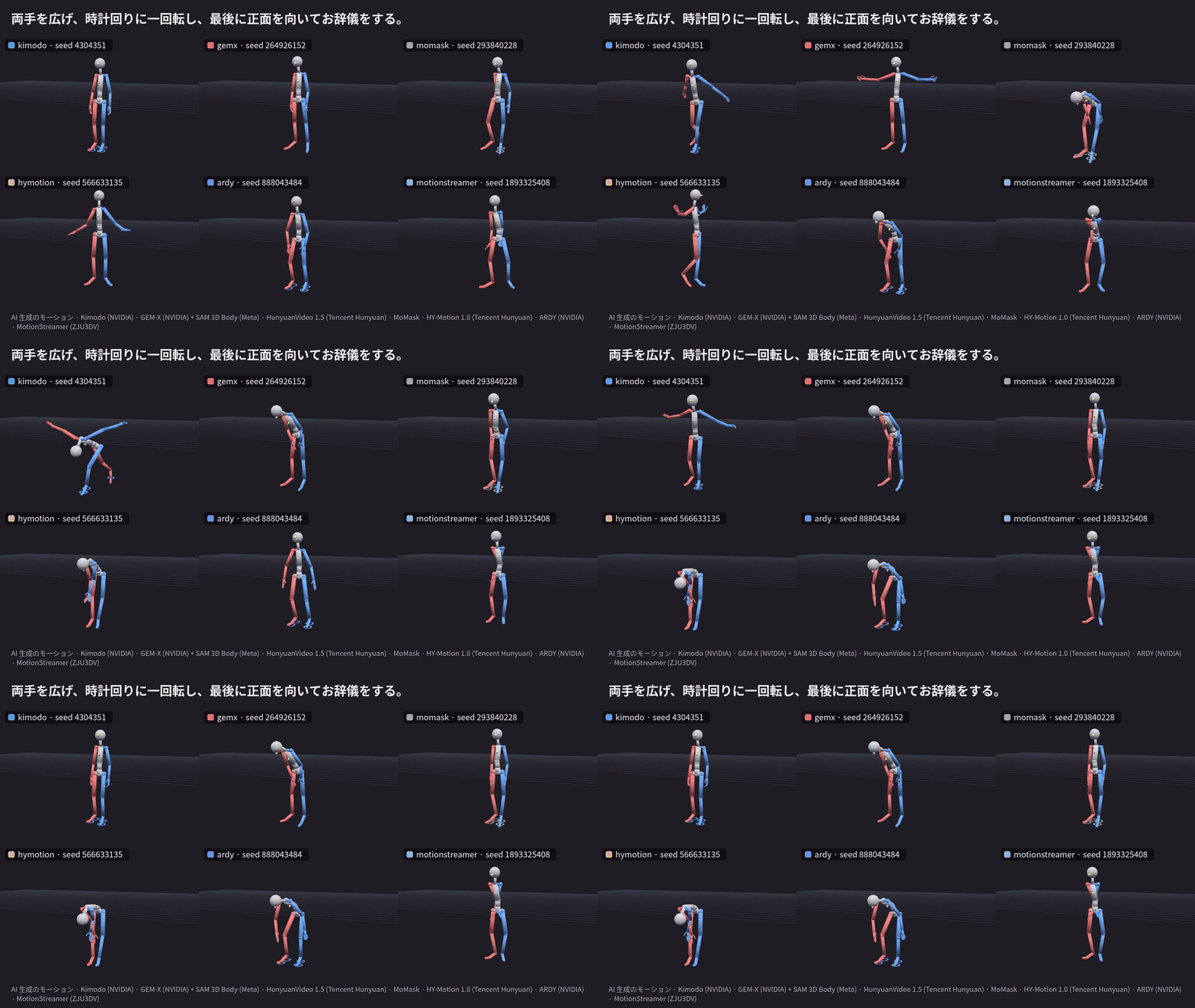
The UI and most documents (including the specification) are in Japanese.
| Model | Input | Output skeleton | VRAM (measured) | Weights | License notes |
|---|---|---|---|---|---|
| Kimodo | Text | SOMA77 | ~16 GB | ~18 GB (shared with ARDY) | NVIDIA Open Model License. The text encoder uses Llama 3 (gated access) |
| ARDY | Text | SOMA (Core) | ~16 GB | (shared with Kimodo) | NVIDIA Open Model Agreement. Llama 3 as for Kimodo |
| MoMask | Text | HumanML3D 22 joints | Runs on CPU | ~0.5 GB | MIT (code). Training data is non-commercial |
| HY-Motion 1.0 | Text | SMPL-H 22 joints | ~22 GB | ~21 GB | Tencent HY-Motion Community License (not available in the EU, UK, and South Korea) |
| MotionStreamer | Text (the model decides the length) | SMPL-X 22 joints | ~20 GB | ~11 GB | Project Registration License (no registration needed for personal evaluation). Training data is for academic use |
| GEM-X | Video, or text (a video is generated with HunyuanVideo 1.5) | SOMA77 | ~12 GB (video generation ~16 GB) | ~7.5 GB + ~57 GB for video generation | NVIDIA Open Model License. Video generation: Tencent Hunyuan Community License |
| EMAGE | Speech | SMPL-X (body, fingers, jaw) + mouth expressions | ~0.7 GB | ~0.7 GB | Weights: Apache 2.0. SMPL-X is non-commercial |
| EDGE | Music | SMPL 24 joints + foot contacts | ~12.5 GB | ~11 GB | MIT. Jukebox weights are non-commercial |
| Qwen3.8-27B (prompt assist) | Request in Japanese | — | ~23 GB | ~19 GB | Apache 2.0 |
VRAM was measured on an RTX 5090 (32 GB). GPU models are loaded one at a time, so the largest model you use sets the VRAM you need.
| Item | Details (tested environment) |
|---|---|
| OS | Linux x86_64 (Ubuntu 26.04) |
| GPU | NVIDIA GPU, 24 GB+ recommended (tested on RTX 5090 32 GB). Driver supporting CUDA 12.8+ (tested with 595.99) |
| RAM | 64 GB+ recommended (HunyuanVideo 1.5 offloads weights to the CPU; tested with 128 GB) |
| Disk | About 150 GB of weights and 75 GB of Docker images for all models. You only need the models you use |
| Software | Docker + NVIDIA Container Toolkit (tested with Docker 29), uv (Python 3.11+), Node.js 20+ (tested with 24), ffmpeg on the host (used to check uploads and to export videos), Hugging Face CLI (hf) |
| Accounts | A Hugging Face account. For Kimodo and ARDY, request access to meta-llama/Meta-Llama-3-8B-Instruct (manual approval) and set HF_TOKEN |
| License agreements | EMAGE uses the SMPL-X body model. Agree to the SMPL-X Model License (non-commercial) before using it |
The backend is meant to run on a GPU machine and be used from a browser on another device in the same LAN. There is no authentication, so do not expose it to the internet.
git clone https://github.com/arianpg/vrm-motion-bench.git && cd vrm-motion-bench

# Python (uv workspace) and the frontend (this also builds the HTML report template)
uv sync --all-packages
(cd frontend && npm install && npm run build:report)

# Shared converter image (Blender + VRM Add-on)
docker build -f converter/Dockerfile -t vmb-converter .

# Build images and download weights for the models you want (see "Model setup").
# MoMask is a good first choice: it runs on the CPU and its weights are small.

# Run
uv run --package vmb-backend vmb-backend      # http://0.0.0.0:8800 (also starts the converter container)
(cd frontend && npx vite --host)              # open http://<gpu-machine>:5173 in a browser
Models without weights show download instructions in the UI and cannot be selected for generation.
Docker images are built from the repository root. Weights go under models/<adapter id>/ (not tracked by Git).
docker build -f adapters/kimodo/docker/Dockerfile -t vmb-adapter-kimodo .
docker build -f adapters/ardy/docker/Dockerfile -t vmb-adapter-ardy .

# Kimodo weights (also downloaded automatically on first start, but faster if prepared in advance)
#   Llama-3-8B-Instruct requires approved access on Hugging Face and HF_TOKEN
export HF_HOME=$PWD/models/kimodo/hf
hf download nvidia/Kimodo-SOMA-RP-v1.1
hf download McGill-NLP/LLM2Vec-Meta-Llama-3-8B-Instruct-mntp
hf download McGill-NLP/LLM2Vec-Meta-Llama-3-8B-Instruct-mntp-supervised
hf download meta-llama/Meta-Llama-3-8B-Instruct --exclude 'original/*'
unset HF_HOME

# ARDY weights. The text encoder (LLM2Vec / Llama-3-8B) is the same as Kimodo's,
# so hard-link it when both are on the same disk (no extra space)
mkdir -p models/ardy/hf/hub
cp -al models/kimodo/hf/hub/blobs models/kimodo/hf/hub/models--McGill-NLP--* \
       models/kimodo/hf/hub/models--meta-llama--* models/ardy/hf/hub/
HF_HOME=$PWD/models/ardy/hf hf download nvidia/ARDY-Core-RP-20FPS-Horizon40
docker build -f adapters/momask/docker/Dockerfile -t vmb-adapter-momask .

# Google Drive (same file as the official prepare/download_models.sh)
mkdir -p models/momask/checkpoints/t2m && cd models/momask/checkpoints/t2m
uvx gdown 1vXS7SHJBgWPt59wupQ5UUzhFObrnGkQ0 -O humanml3d_models.zip && unzip humanml3d_models.zip && rm humanml3d_models.zip
cd -   # CLIP (ViT-B/32) is downloaded to models/momask/clip on first start
docker build -f adapters/hymotion/docker/Dockerfile -t vmb-adapter-hymotion .

# Weights and text encoders (CLIP-L, Qwen3-8B), about 22 GB in total
export HF_HOME=$PWD/models/hymotion/hf
hf download tencent/HY-Motion-1.0 --include 'HY-Motion-1.0/*' --local-dir models/hymotion/ckpts/tencent
hf download openai/clip-vit-large-patch14 --exclude '*.msgpack' --exclude '*.h5' --exclude 'pytorch_model.bin'
hf download Qwen/Qwen3-8B
unset HF_HOME
docker build -f adapters/motionstreamer/docker/Dockerfile -t vmb-adapter-motionstreamer .

# Weights and the sentence-T5-XXL text encoder (~9.7 GB), about 11 GB in total
export HF_HOME=$PWD/models/motionstreamer/hf M=models/motionstreamer
hf download lxxiao/MotionStreamer Causal_TAE/net_last.pth Experiments/t2m_model/latest.pth --local-dir $M/ckpts
hf download lxxiao/272-dim-HumanML3D --repo-type dataset --include 'mean_std/*' --local-dir $M/ckpts/humanml3d_272
hf download sentence-transformers/sentence-t5-xxl --exclude pytorch_model.bin --exclude '2_Dense/pytorch_model.bin' \
   --local-dir $M/sentencet5-xxl   # if it stalls, fetch it in parallel ranges with curl -r and check the sha256
unset HF_HOME M
docker build -f adapters/gemx/docker/Dockerfile -t vmb-adapter-gemx .
docker build -f adapters/hyvideo/docker/Dockerfile -t vmb-adapter-hyvideo .   # only for text input

# GEM-X (video → SOMA77), including the SAM 3D Body weights. About 7 GB in total
export HF_HOME=$PWD/models/gemx/hf I=models/gemx/inputs
hf download nvidia/GEM-X gem_soma.ckpt --local-dir $I/pretrained
hf download nvidia/GEM-X vitpose.pth --local-dir $I/checkpoints/vitpose
hf download nvidia/GEM-X sam3d_body.ckpt model_config.yaml --local-dir $I/checkpoints/sam-3d-body-dinov3
hf download nvidia/GEM-X mhr_model.pt --local-dir $I/mhr_data
hf download nvidia/GEM-X scale_mean.pth scale_comps.pth --local-dir $I/soma_data
unset HF_HOME I

# HunyuanVideo 1.5 (I2V, 480p, step-distilled). About 55 GB in total
#   The image encoder (SigLIP) is the public model with the same architecture,
#   instead of the gated FLUX.1-Redux-dev used in the official instructions
export HF_HOME=$PWD/models/hyvideo/hf C=models/hyvideo/ckpts
hf download tencent/HunyuanVideo-1.5 --include 'config.json' --include 'scheduler/*' --include 'vae/*' \
   --include 'transformer/480p_i2v_step_distilled/*' --local-dir $C
hf download Qwen/Qwen2.5-VL-7B-Instruct --local-dir $C/text_encoder/llm
hf download google/byt5-small --exclude '*.msgpack' --exclude '*.h5' --local-dir $C/text_encoder/byt5-small
hf download nlpcvcode/Glyph-SDXL-v2 --include 'assets/*.json' --include 'checkpoints/byt5_model.pt' --local-dir $C/text_encoder/Glyph-SDXL-v2
hf download google/siglip-so400m-patch14-384 config.json model.safetensors --local-dir $C/vision_encoder/siglip/image_encoder
hf download google/siglip-so400m-patch14-384 preprocessor_config.json --local-dir $C/vision_encoder/siglip/feature_extractor
unset HF_HOME C
docker build -f adapters/emage/docker/Dockerfile -t vmb-adapter-emage .

# Weights and the SMPL-X model (used for the skeleton and mouth shapes; agree to the SMPL-X license first).
# About 750 MB in total
HF_HOME=$PWD/models/emage/hf hf download H-Liu1997/emage_audio
HF_HOME=$PWD/models/emage/hf hf download H-Liu1997/emage_evaltools smplx_models/smplx/SMPLX_NEUTRAL_2020.npz \
   --local-dir models/emage/evaltools
docker build -f adapters/edge/docker/Dockerfile -t vmb-adapter-edge .

# Checkpoint (Google Drive, ~1.2 GB) and Jukebox 5B weights (~10 GB)
uvx gdown 1BAR712cVEqB8GR37fcEihRV_xOC-fZrZ -O models/edge/checkpoint.pt
mkdir -p models/edge/jukemirlib && cd models/edge/jukemirlib
J=https://openaipublic.azureedge.net/jukebox/models/5b
curl -fO $J/vqvae.pth.tar && curl -fO $J/prior_level_2.pth.tar   # if slow, fetch in parallel ranges with curl -r and check the Content-MD5
cd -
docker pull ghcr.io/ggml-org/llama.cpp:server-cuda13
hf download unsloth/Qwen3.8-27B-GGUF Qwen3.8-27B-UD-Q5_K_M.gguf --local-dir models/llm/qwen3.8-27b
The LLM settings are in config/llm.yaml.
| Directory | Contents |
|---|---|
backend/ | Orchestrator (FastAPI): job queue, starting and stopping adapter and LLM containers, SSE, reports and video export |
frontend/ | React + three-vrm UI and the HTML report template |
adapters/<id>/ | Adapters (manifest.yaml, bone_map.yaml, Docker image) |
converter/ | Shared converter (a resident Blender process: retargeting → VRMA, BVH, preview WebP) |
packages/sourcemotion/ | The common motion format (SourceMotion NPZ) and retargeting math (numpy only) |
packages/adapter_kit/ | Shared HTTP server for adapters (/health, /generate, /progress) |
config/llm.yaml | Settings for the prompt-assist LLM (llama-server) |
assets/ | Stickman VRM (built with tools/stickman/build_stickman.py) and the start image for video generation |
docs/ | Specification, license list, and research notes (Japanese) |
tests/fixtures/adapters/dummy/ | Dummy adapter for pipeline tests |
Runtime data goes to data/ and model weights to models/ (neither is tracked by Git).
Main environment variables: VMB_DATA_DIR, VMB_MODELS_DIR, VMB_ADAPTERS_DIR, VMB_PORT (default 8800), VMB_GPU_INDEX, HF_TOKEN. Set VMB_CONVERTER_URL to use a converter worker running on the host instead of the container (for development).
To use the dummy adapter, point VMB_ADAPTERS_DIR to a directory with symlinks to each adapter in adapters/ and to tests/fixtures/adapters/dummy, and build its image with docker build -f tests/fixtures/adapters/dummy/Dockerfile -t vmb-adapter-dummy ..
uv run --package sourcemotion --with pytest pytest -q packages/sourcemotion/tests
uv run --package vmb-backend --with pytest pytest -q backend/tests
(cd frontend && npx tsc -b --noEmit)
The code and bundled assets in this repository (the stickman VRM, the start images, and so on) are released under the MIT License.
Each model, its weights, training data, and body models are covered by their own licenses. They are not included in this repository; you download them yourself. Many of them are limited to non-commercial use, and publishing generated motion comes with conditions such as labeling it as AI-generated. See docs/licenses.md (Japanese) for details. Comparison videos and HTML reports include credits for the models used.
Thanks to the authors of each model, and to three-vrm, VRM Add-on for Blender, Blender, and llama.cpp.
Benchmark local text/video/audio-to-motion AI models on VRM avatars — side-by-side VRMA playback, reports, and MP4 export.
Python
1
20 commits
updated Oct 12, 2026
English | 日本語
A local benchmark tool for comparing AI motion generation models on VRM avatars in the browser. Generate motion from text, video, speech, or music with eight models, retarget it to a stickman or your own VRM 1.0 model, and play the results side by side or overlaid on a shared timeline.
The UI and most documents (including the specification) are in Japanese.
| Model | Input | Output skeleton | VRAM (measured) | Weights | License notes |
|---|---|---|---|---|---|
| Kimodo | Text | SOMA77 | ~16 GB | ~18 GB (shared with ARDY) | NVIDIA Open Model License. The text encoder uses Llama 3 (gated access) |
| ARDY | Text | SOMA (Core) | ~16 GB | (shared with Kimodo) | NVIDIA Open Model Agreement. Llama 3 as for Kimodo |
| MoMask | Text | HumanML3D 22 joints | Runs on CPU | ~0.5 GB | MIT (code). Training data is non-commercial |
| HY-Motion 1.0 | Text | SMPL-H 22 joints | ~22 GB | ~21 GB | Tencent HY-Motion Community License (not available in the EU, UK, and South Korea) |
| MotionStreamer | Text (the model decides the length) | SMPL-X 22 joints | ~20 GB | ~11 GB | Project Registration License (no registration needed for personal evaluation). Training data is for academic use |
| GEM-X | Video, or text (a video is generated with HunyuanVideo 1.5) | SOMA77 | ~12 GB (video generation ~16 GB) | ~7.5 GB + ~57 GB for video generation | NVIDIA Open Model License. Video generation: Tencent Hunyuan Community License |
| EMAGE | Speech | SMPL-X (body, fingers, jaw) + mouth expressions | ~0.7 GB | ~0.7 GB | Weights: Apache 2.0. SMPL-X is non-commercial |
| EDGE | Music | SMPL 24 joints + foot contacts | ~12.5 GB | ~11 GB | MIT. Jukebox weights are non-commercial |
| Qwen3.8-27B (prompt assist) | Request in Japanese | — | ~23 GB | ~19 GB | Apache 2.0 |
VRAM was measured on an RTX 5090 (32 GB). GPU models are loaded one at a time, so the largest model you use sets the VRAM you need.
| Item | Details (tested environment) |
|---|---|
| OS | Linux x86_64 (Ubuntu 26.04) |
| GPU | NVIDIA GPU, 24 GB+ recommended (tested on RTX 5090 32 GB). Driver supporting CUDA 12.8+ (tested with 595.99) |
| RAM | 64 GB+ recommended (HunyuanVideo 1.5 offloads weights to the CPU; tested with 128 GB) |
| Disk | About 150 GB of weights and 75 GB of Docker images for all models. You only need the models you use |
| Software | Docker + NVIDIA Container Toolkit (tested with Docker 29), uv (Python 3.11+), Node.js 20+ (tested with 24), ffmpeg on the host (used to check uploads and to export videos), Hugging Face CLI (hf) |
| Accounts | A Hugging Face account. For Kimodo and ARDY, request access to meta-llama/Meta-Llama-3-8B-Instruct (manual approval) and set HF_TOKEN |
| License agreements | EMAGE uses the SMPL-X body model. Agree to the SMPL-X Model License (non-commercial) before using it |
The backend is meant to run on a GPU machine and be used from a browser on another device in the same LAN. There is no authentication, so do not expose it to the internet.
git clone https://github.com/arianpg/vrm-motion-bench.git && cd vrm-motion-bench

# Python (uv workspace) and the frontend (this also builds the HTML report template)
uv sync --all-packages
(cd frontend && npm install && npm run build:report)

# Shared converter image (Blender + VRM Add-on)
docker build -f converter/Dockerfile -t vmb-converter .

# Build images and download weights for the models you want (see "Model setup").
# MoMask is a good first choice: it runs on the CPU and its weights are small.

# Run
uv run --package vmb-backend vmb-backend      # http://0.0.0.0:8800 (also starts the converter container)
(cd frontend && npx vite --host)              # open http://<gpu-machine>:5173 in a browser
Models without weights show download instructions in the UI and cannot be selected for generation.
Docker images are built from the repository root. Weights go under models/<adapter id>/ (not tracked by Git).
docker build -f adapters/kimodo/docker/Dockerfile -t vmb-adapter-kimodo .
docker build -f adapters/ardy/docker/Dockerfile -t vmb-adapter-ardy .

# Kimodo weights (also downloaded automatically on first start, but faster if prepared in advance)
#   Llama-3-8B-Instruct requires approved access on Hugging Face and HF_TOKEN
export HF_HOME=$PWD/models/kimodo/hf
hf download nvidia/Kimodo-SOMA-RP-v1.1
hf download McGill-NLP/LLM2Vec-Meta-Llama-3-8B-Instruct-mntp
hf download McGill-NLP/LLM2Vec-Meta-Llama-3-8B-Instruct-mntp-supervised
hf download meta-llama/Meta-Llama-3-8B-Instruct --exclude 'original/*'
unset HF_HOME

# ARDY weights. The text encoder (LLM2Vec / Llama-3-8B) is the same as Kimodo's,
# so hard-link it when both are on the same disk (no extra space)
mkdir -p models/ardy/hf/hub
cp -al models/kimodo/hf/hub/blobs models/kimodo/hf/hub/models--McGill-NLP--* \
       models/kimodo/hf/hub/models--meta-llama--* models/ardy/hf/hub/
HF_HOME=$PWD/models/ardy/hf hf download nvidia/ARDY-Core-RP-20FPS-Horizon40
docker build -f adapters/momask/docker/Dockerfile -t vmb-adapter-momask .

# Google Drive (same file as the official prepare/download_models.sh)
mkdir -p models/momask/checkpoints/t2m && cd models/momask/checkpoints/t2m
uvx gdown 1vXS7SHJBgWPt59wupQ5UUzhFObrnGkQ0 -O humanml3d_models.zip && unzip humanml3d_models.zip && rm humanml3d_models.zip
cd -   # CLIP (ViT-B/32) is downloaded to models/momask/clip on first start
docker build -f adapters/hymotion/docker/Dockerfile -t vmb-adapter-hymotion .

# Weights and text encoders (CLIP-L, Qwen3-8B), about 22 GB in total
export HF_HOME=$PWD/models/hymotion/hf
hf download tencent/HY-Motion-1.0 --include 'HY-Motion-1.0/*' --local-dir models/hymotion/ckpts/tencent
hf download openai/clip-vit-large-patch14 --exclude '*.msgpack' --exclude '*.h5' --exclude 'pytorch_model.bin'
hf download Qwen/Qwen3-8B
unset HF_HOME
docker build -f adapters/motionstreamer/docker/Dockerfile -t vmb-adapter-motionstreamer .

# Weights and the sentence-T5-XXL text encoder (~9.7 GB), about 11 GB in total
export HF_HOME=$PWD/models/motionstreamer/hf M=models/motionstreamer
hf download lxxiao/MotionStreamer Causal_TAE/net_last.pth Experiments/t2m_model/latest.pth --local-dir $M/ckpts
hf download lxxiao/272-dim-HumanML3D --repo-type dataset --include 'mean_std/*' --local-dir $M/ckpts/humanml3d_272
hf download sentence-transformers/sentence-t5-xxl --exclude pytorch_model.bin --exclude '2_Dense/pytorch_model.bin' \
   --local-dir $M/sentencet5-xxl   # if it stalls, fetch it in parallel ranges with curl -r and check the sha256
unset HF_HOME M
docker build -f adapters/gemx/docker/Dockerfile -t vmb-adapter-gemx .
docker build -f adapters/hyvideo/docker/Dockerfile -t vmb-adapter-hyvideo .   # only for text input

# GEM-X (video → SOMA77), including the SAM 3D Body weights. About 7 GB in total
export HF_HOME=$PWD/models/gemx/hf I=models/gemx/inputs
hf download nvidia/GEM-X gem_soma.ckpt --local-dir $I/pretrained
hf download nvidia/GEM-X vitpose.pth --local-dir $I/checkpoints/vitpose
hf download nvidia/GEM-X sam3d_body.ckpt model_config.yaml --local-dir $I/checkpoints/sam-3d-body-dinov3
hf download nvidia/GEM-X mhr_model.pt --local-dir $I/mhr_data
hf download nvidia/GEM-X scale_mean.pth scale_comps.pth --local-dir $I/soma_data
unset HF_HOME I

# HunyuanVideo 1.5 (I2V, 480p, step-distilled). About 55 GB in total
#   The image encoder (SigLIP) is the public model with the same architecture,
#   instead of the gated FLUX.1-Redux-dev used in the official instructions
export HF_HOME=$PWD/models/hyvideo/hf C=models/hyvideo/ckpts
hf download tencent/HunyuanVideo-1.5 --include 'config.json' --include 'scheduler/*' --include 'vae/*' \
   --include 'transformer/480p_i2v_step_distilled/*' --local-dir $C
hf download Qwen/Qwen2.5-VL-7B-Instruct --local-dir $C/text_encoder/llm
hf download google/byt5-small --exclude '*.msgpack' --exclude '*.h5' --local-dir $C/text_encoder/byt5-small
hf download nlpcvcode/Glyph-SDXL-v2 --include 'assets/*.json' --include 'checkpoints/byt5_model.pt' --local-dir $C/text_encoder/Glyph-SDXL-v2
hf download google/siglip-so400m-patch14-384 config.json model.safetensors --local-dir $C/vision_encoder/siglip/image_encoder
hf download google/siglip-so400m-patch14-384 preprocessor_config.json --local-dir $C/vision_encoder/siglip/feature_extractor
unset HF_HOME C
docker build -f adapters/emage/docker/Dockerfile -t vmb-adapter-emage .

# Weights and the SMPL-X model (used for the skeleton and mouth shapes; agree to the SMPL-X license first).
# About 750 MB in total
HF_HOME=$PWD/models/emage/hf hf download H-Liu1997/emage_audio
HF_HOME=$PWD/models/emage/hf hf download H-Liu1997/emage_evaltools smplx_models/smplx/SMPLX_NEUTRAL_2020.npz \
   --local-dir models/emage/evaltools
docker build -f adapters/edge/docker/Dockerfile -t vmb-adapter-edge .

# Checkpoint (Google Drive, ~1.2 GB) and Jukebox 5B weights (~10 GB)
uvx gdown 1BAR712cVEqB8GR37fcEihRV_xOC-fZrZ -O models/edge/checkpoint.pt
mkdir -p models/edge/jukemirlib && cd models/edge/jukemirlib
J=https://openaipublic.azureedge.net/jukebox/models/5b
curl -fO $J/vqvae.pth.tar && curl -fO $J/prior_level_2.pth.tar   # if slow, fetch in parallel ranges with curl -r and check the Content-MD5
cd -
docker pull ghcr.io/ggml-org/llama.cpp:server-cuda13
hf download unsloth/Qwen3.8-27B-GGUF Qwen3.8-27B-UD-Q5_K_M.gguf --local-dir models/llm/qwen3.8-27b
The LLM settings are in config/llm.yaml.
| Directory | Contents |
|---|---|
backend/ | Orchestrator (FastAPI): job queue, starting and stopping adapter and LLM containers, SSE, reports and video export |
frontend/ | React + three-vrm UI and the HTML report template |
adapters/<id>/ | Adapters (manifest.yaml, bone_map.yaml, Docker image) |
converter/ | Shared converter (a resident Blender process: retargeting → VRMA, BVH, preview WebP) |
packages/sourcemotion/ | The common motion format (SourceMotion NPZ) and retargeting math (numpy only) |
packages/adapter_kit/ | Shared HTTP server for adapters (/health, /generate, /progress) |
config/llm.yaml | Settings for the prompt-assist LLM (llama-server) |
assets/ | Stickman VRM (built with tools/stickman/build_stickman.py) and the start image for video generation |
docs/ | Specification, license list, and research notes (Japanese) |
tests/fixtures/adapters/dummy/ | Dummy adapter for pipeline tests |
Runtime data goes to data/ and model weights to models/ (neither is tracked by Git).
Main environment variables: VMB_DATA_DIR, VMB_MODELS_DIR, VMB_ADAPTERS_DIR, VMB_PORT (default 8800), VMB_GPU_INDEX, HF_TOKEN. Set VMB_CONVERTER_URL to use a converter worker running on the host instead of the container (for development).
To use the dummy adapter, point VMB_ADAPTERS_DIR to a directory with symlinks to each adapter in adapters/ and to tests/fixtures/adapters/dummy, and build its image with docker build -f tests/fixtures/adapters/dummy/Dockerfile -t vmb-adapter-dummy ..
uv run --package sourcemotion --with pytest pytest -q packages/sourcemotion/tests
uv run --package vmb-backend --with pytest pytest -q backend/tests
(cd frontend && npx tsc -b --noEmit)
The code and bundled assets in this repository (the stickman VRM, the start images, and so on) are released under the MIT License.
Each model, its weights, training data, and body models are covered by their own licenses. They are not included in this repository; you download them yourself. Many of them are limited to non-commercial use, and publishing generated motion comes with conditions such as labeling it as AI-generated. See docs/licenses.md (Japanese) for details. Comparison videos and HTML reports include credits for the models used.
Thanks to the authors of each model, and to three-vrm, VRM Add-on for Blender, Blender, and llama.cpp.



