
Open-source offline translation library written in Python
6,465
stars
819
commits
Python
primary language
Aug 8, 2026
updated
README
Argos Translate
Demo | Website | Docs | Forum | GitHub | PyPI
Open-source offline translation library written in Python
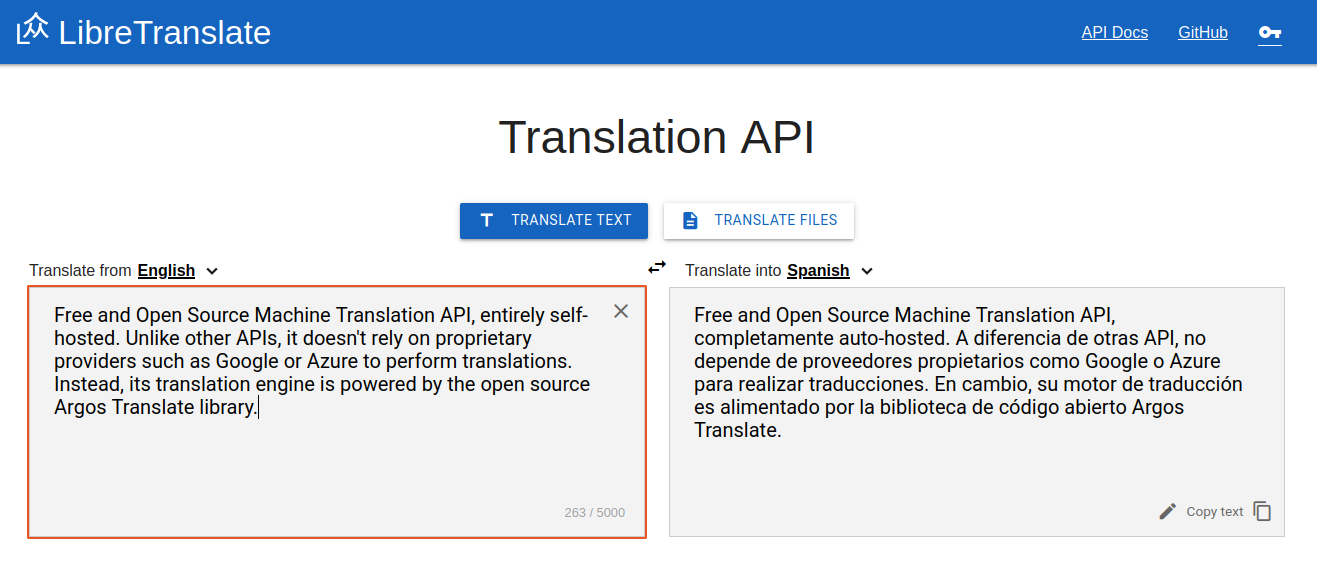
Argos Translate uses OpenNMT for translations and can be used as either a Python library, command-line, or GUI application. Argos Translate supports installing language model packages which are zip archives with a ".argosmodel" extension containing the data needed for translation. LibreTranslate is an API and web-app built on top of Argos Translate.
Argos Translate also manages automatically pivoting through intermediate languages to translate between languages that don't have a direct translation between them installed. For example, if you have a es → en and en → fr translation installed you are able to translate from es → fr as if you had that translation installed. This allows for translating between a wide variety of languages at the cost of some loss of translation quality.
The argospm-index repo contains metadata and download links to access pre-trained Argos Translate models.
Supported languages
Browse Package Index
Arabic, Azerbaijani, Basque, Catalan, Chinese, Czech, Danish, Dutch, English, Esperanto, Finnish, French, Galician, German, Greek, Hebrew, Hindi, Hungarian, Indonesian, Irish, Italian, Japanese, Kyrgyz, Korean, Malay, Persian, Polish, Portuguese, Portuguese (Brazil), Russian, Slovak, Spanish, Swahili, Swedish, Turkish, Ukrainian, Urdu, and more
Installation
Install with Python
Argos Translate is available from PyPI and can be easily installed with pip.
pip install argostranslate
Install GUI:
pip install argostranslategui
Python source installation into virtualenv
Download a copy of this repo and install with pip.
git clone https://github.com/argosopentech/argos-translate.git
cd argos-translate
virtualenv env
source env/bin/activate
pip install -e .
Examples
Python
import argostranslate.package
import argostranslate.translate

from_code = "en"
to_code = "es"

# Download and install Argos Translate package
argostranslate.package.update_package_index()
available_packages = argostranslate.package.get_available_packages()
package_to_install = next(
    filter(
        lambda x: x.from_code == from_code and x.to_code == to_code, available_packages
    )
)
argostranslate.package.install_from_path(package_to_install.download())

# Translate
translatedText = argostranslate.translate.translate("Hello World", from_code, to_code)
print(translatedText)
# '¡Hola Mundo!'
Command Line Interface
argospm update
argospm install translate-en_de
argos-translate --from en --to de "Hello World!"
# Hallo Welt!
Install all translation packages:
argospm install translate
LibreTranslate Web App (Demo)
LibreTranslate API
const res = await fetch("https://translate.argosopentech.com/translate", {
	method: "POST",
	body: JSON.stringify({
		q: "Hello!",
		source: "en",
		target: "es"
	}),
	headers: {
		"Content-Type": "application/json"}
	});

console.log(await res.json());

{
    "translatedText": "¡Hola!"
}
Graphical user interface
The GUI code is in a separate repository.


Packages
GPU Acceleration
To enable GPU support, you need to set the ARGOS_DEVICE_TYPE env variable to cuda or auto.
$ ARGOS_DEVICE_TYPE=cuda argos-translate --from-lang en --to-lang es "Hello World"
Hola Mundo
The above env variable passes the device type to CTranslate2.
HTML Translation
The translate-html library is built on top of Argos Translate and Beautiful Soup and parses and translates HTML. The LibreTranslate API also has support for translating HTML.
Files Translation
The argos-translate-files library is built on top of Argos Translate and parses and translates files. The LibreTranslate API also has support for translating files.
Uninstall
pip uninstall argostranslate
You may choose to also delete temporary and cached files:
rm -r ~/.local/cache/argos-translate
rm -r ~/.local/share/argos-translate
Related Projects
- LibreTranslate-py - Python bindings for LibreTranslate
- MetalTranslate - Customizable translation in C++
- LibreTranslate/Locomotive - Toolkit for training/converting LibreTranslate compatible language models 🚂
- DesktopTranslator - OpenNMT based translation application
- LibreTranslate-rs - LibreTranslate Rust bindings
- LibreTranslate Go - LibreTranslate Golang bindings
- LibreTranslate Java - LibreTranslate Java bindings
- LibreTranslator - LibreTranslate Android app
Contributing
Contributions are welcome! Available issues are on the GitHub issues page. Contributions of code, data, and pre-trained models can all be accepted.
Support
For support please use the LibreTranslate Forum or GitHub Issues.
For questions about CTranslate2 or general machine translation research the OpenNMT Forum is a good resource.
Services
Custom models trained on your own data are available for $1000/language (negotiable).
I am also available for hire to do support, consulting, or custom software development.
Financial Support
Donate
If you find this software useful donations are greatly appreciated and help to make this project sustainable.
- GitHub Sponsor
- PayPal
- Venmo @pjfinlay
- Bitcoin: 16UJrmSEGojFPaqjTGpuSMNhNRSsnspFJT
Paid supporters receive priority support.
Sponsors
Argos Translate is proudly sponsored by TestMu AI.

TestMu AI (formerly LambdaTest) is the world's first full-stack agentic AI quality engineering platform. Autonomous AI agents plan, author, execute, analyze, and optimize tests with humans in the loop, across 3,000+ browser/OS combinations and 10,000+ real devices. Trusted by 18,000+ enterprises including Microsoft, OpenAI, NVIDIA, and Vimeo.
Hosting affiliate links
You can help support Argos Translate financially by purchasing hosting through these referral links:
- Vast.ai - Cheap GPU rentals
- DigitalOcean - Best all around hosting
- Sharktech - Cheap bandwith
- Time4VPS - Cheap storage
Contributing
Contributions are welcome! Bug reports, pull requests, documentation writing, and feature ideas are all appreciated.
License
Argos Translate is dual licensed under either the MIT License or Creative Commons CC0.
Contributors
(top 30 of 33)


Similar repos


Languages
Python
94.8%
Shell
5.2%
Open-source offline translation library written in Python
6,465
stars
819
commits
Python
primary language
Aug 8, 2026
updated
README
Argos Translate
Demo | Website | Docs | Forum | GitHub | PyPI
Open-source offline translation library written in Python
Argos Translate uses OpenNMT for translations and can be used as either a Python library, command-line, or GUI application. Argos Translate supports installing language model packages which are zip archives with a ".argosmodel" extension containing the data needed for translation. LibreTranslate is an API and web-app built on top of Argos Translate.
Argos Translate also manages automatically pivoting through intermediate languages to translate between languages that don't have a direct translation between them installed. For example, if you have a es → en and en → fr translation installed you are able to translate from es → fr as if you had that translation installed. This allows for translating between a wide variety of languages at the cost of some loss of translation quality.
The argospm-index repo contains metadata and download links to access pre-trained Argos Translate models.
Supported languages
Browse Package Index
Arabic, Azerbaijani, Basque, Catalan, Chinese, Czech, Danish, Dutch, English, Esperanto, Finnish, French, Galician, German, Greek, Hebrew, Hindi, Hungarian, Indonesian, Irish, Italian, Japanese, Kyrgyz, Korean, Malay, Persian, Polish, Portuguese, Portuguese (Brazil), Russian, Slovak, Spanish, Swahili, Swedish, Turkish, Ukrainian, Urdu, and more
Installation
Install with Python
Argos Translate is available from PyPI and can be easily installed with pip.
pip install argostranslate
Install GUI:
pip install argostranslategui
Python source installation into virtualenv
Download a copy of this repo and install with pip.
git clone https://github.com/argosopentech/argos-translate.git
cd argos-translate
virtualenv env
source env/bin/activate
pip install -e .
Examples
Python
import argostranslate.package
import argostranslate.translate

from_code = "en"
to_code = "es"

# Download and install Argos Translate package
argostranslate.package.update_package_index()
available_packages = argostranslate.package.get_available_packages()
package_to_install = next(
    filter(
        lambda x: x.from_code == from_code and x.to_code == to_code, available_packages
    )
)
argostranslate.package.install_from_path(package_to_install.download())

# Translate
translatedText = argostranslate.translate.translate("Hello World", from_code, to_code)
print(translatedText)
# '¡Hola Mundo!'
Command Line Interface
argospm update
argospm install translate-en_de
argos-translate --from en --to de "Hello World!"
# Hallo Welt!
Install all translation packages:
argospm install translate
LibreTranslate Web App (Demo)
LibreTranslate API
const res = await fetch("https://translate.argosopentech.com/translate", {
	method: "POST",
	body: JSON.stringify({
		q: "Hello!",
		source: "en",
		target: "es"
	}),
	headers: {
		"Content-Type": "application/json"}
	});

console.log(await res.json());

{
    "translatedText": "¡Hola!"
}
Graphical user interface
The GUI code is in a separate repository.
Packages
GPU Acceleration
To enable GPU support, you need to set the ARGOS_DEVICE_TYPE env variable to cuda or auto.
$ ARGOS_DEVICE_TYPE=cuda argos-translate --from-lang en --to-lang es "Hello World"
Hola Mundo
The above env variable passes the device type to CTranslate2.
HTML Translation
The translate-html library is built on top of Argos Translate and Beautiful Soup and parses and translates HTML. The LibreTranslate API also has support for translating HTML.
Files Translation
The argos-translate-files library is built on top of Argos Translate and parses and translates files. The LibreTranslate API also has support for translating files.
Uninstall
pip uninstall argostranslate
You may choose to also delete temporary and cached files:
rm -r ~/.local/cache/argos-translate
rm -r ~/.local/share/argos-translate
Related Projects
- LibreTranslate-py - Python bindings for LibreTranslate
- MetalTranslate - Customizable translation in C++
- LibreTranslate/Locomotive - Toolkit for training/converting LibreTranslate compatible language models 🚂
- DesktopTranslator - OpenNMT based translation application
- LibreTranslate-rs - LibreTranslate Rust bindings
- LibreTranslate Go - LibreTranslate Golang bindings
- LibreTranslate Java - LibreTranslate Java bindings
- LibreTranslator - LibreTranslate Android app
Contributing
Contributions are welcome! Available issues are on the GitHub issues page. Contributions of code, data, and pre-trained models can all be accepted.
Support
For support please use the LibreTranslate Forum or GitHub Issues.
For questions about CTranslate2 or general machine translation research the OpenNMT Forum is a good resource.
Services
Custom models trained on your own data are available for $1000/language (negotiable).
I am also available for hire to do support, consulting, or custom software development.
Financial Support
Donate
If you find this software useful donations are greatly appreciated and help to make this project sustainable.
- GitHub Sponsor
- PayPal
- Venmo @pjfinlay
- Bitcoin: 16UJrmSEGojFPaqjTGpuSMNhNRSsnspFJT
Paid supporters receive priority support.
Sponsors
Argos Translate is proudly sponsored by TestMu AI.
TestMu AI (formerly LambdaTest) is the world's first full-stack agentic AI quality engineering platform. Autonomous AI agents plan, author, execute, analyze, and optimize tests with humans in the loop, across 3,000+ browser/OS combinations and 10,000+ real devices. Trusted by 18,000+ enterprises including Microsoft, OpenAI, NVIDIA, and Vimeo.
Hosting affiliate links
You can help support Argos Translate financially by purchasing hosting through these referral links:
- Vast.ai - Cheap GPU rentals
- DigitalOcean - Best all around hosting
- Sharktech - Cheap bandwith
- Time4VPS - Cheap storage
Contributing
Contributions are welcome! Bug reports, pull requests, documentation writing, and feature ideas are all appreciated.
License
Argos Translate is dual licensed under either the MIT License or Creative Commons CC0.
Similar repos
Contributors
(top 30 of 33)
Languages
Python
94.8%
Shell
5.2%