
Lecture and hands-on material for Track 6 - AI/ML - of Argonne Training Program on Extreme-Scale Computing
See the codeREADME
ATPESC 2026
Agenda
Monday, August 3
| Time | Talk | Speaker |
|---|---|---|
| 8:30AM | Welcome and Introduction | Shilpika, ANL |
| 8:35AM | Transition time: splitting into groups (people new to deep learning vs. more experienced) | |
| 8:35AM | Parallel Session | |
| - Main room: Introduction to Deep Learning | Huihuo Zheng, ANL | |
| - Breakout room: Distributed Deep Learning | Bethany Lusch, ANL | |
| 9:50AM | Break | |
| 10:15AM | Profiling Deep Learning | Nathan Nichols, ANL |
| 11:20 AM | Introduction to Large Language Models (LLMs) | Jingyan (Jane) Jiang, ANL |
| 12:00PM | Pre-training on a Supercomputer - Part 1 | Sam Foreman, ANL |
| 12:30PM | Lunch | |
| 1:30PM | Pre-training on a Supercomputer - Part 2 | Sam Foreman, ANL |
| 2:30PM | Post-training (Finetuning/Alignment/RL techniques) | Filippo Simini, ANL |
| 4:00PM | Explainable AI for Science | Shilpika, ANL |
| 4:30PM | Break | |
| 5:30PM | Featured Speaker | Jack Dongarra |
Tuesday, August 4
| Time | Talk | Speaker |
|---|---|---|
| 8:30AM | Welcome and introduction | Shilpika, ANL |
| 8:35AM | Workflow Tools for Science | Christine Simpson, ANL |
| 9:30AM | Coupled Workflows for Science (Simulations + AI Workflows) | Riccardo Balin and Christine Simpson, ANL |
| 10:30AM | Break | |
| 10:50AM | Inference | Misha Salim, ANL |
| 11:50 AM | Agentic Tools - Part 1 (Trinity/Hermes/OpenClaw) | Huihuo Zheng, ANL |
| 12:30 PM | Lunch | |
| 1:30 PM | AI Testbed | Varuni Sastry and Murali Emani, ANL |
| 3:00PM | Agentic Workflows for Science | Thang Pham, ANL |
| 4:00PM | Agentic Tools - Part 2 (Academy) | Kyle Chard, UChicago/ANL |
| 4:30PM | Break | |
| 5:30PM | Featured Speaker | Bill Gropp |
At the beginning of the first day, we will temporarily split into two groups. Attendees can choose between Introduction to Deep Learning and Distributed Deep Learning.
The "Introduction to deep learning" session will rely on Jupyter Notebooks which are targeted for running on Google's Colaboratory Platform or ALCF JupyterHub. The Colab platform gives the user a virtual machine in which to run Python codes including machine learning codes. The VM comes with a preinstalled environment that includes most of what is needed for these tutorials.
The other sessions involve Python scripts executed on the Aurora and AI Testbed platforms at ALCF.
Reservations
- Queue:
- Daytime reservations: -q ATPESC
- Evening reservations: -q ATPESC-Night
- Outside of reservations: -q debug or -q prod (more info)
- Project/Allocation: ATPESC2026 (
-A ATPESC2026) - Shared directories:
- Aurora:
/flare/ATPESC2026 - Polaris:
/eagle/ATPESC2026
- Aurora:
- ALCF Unix Groups: ATPESC2026
Using Google Colab
Google Colab involves running Jupyter notebooks.
Do the following before you come to the tutorial:
- You need a Google Account to use Colaboratory
- Go to Google's Colaboratory Platform
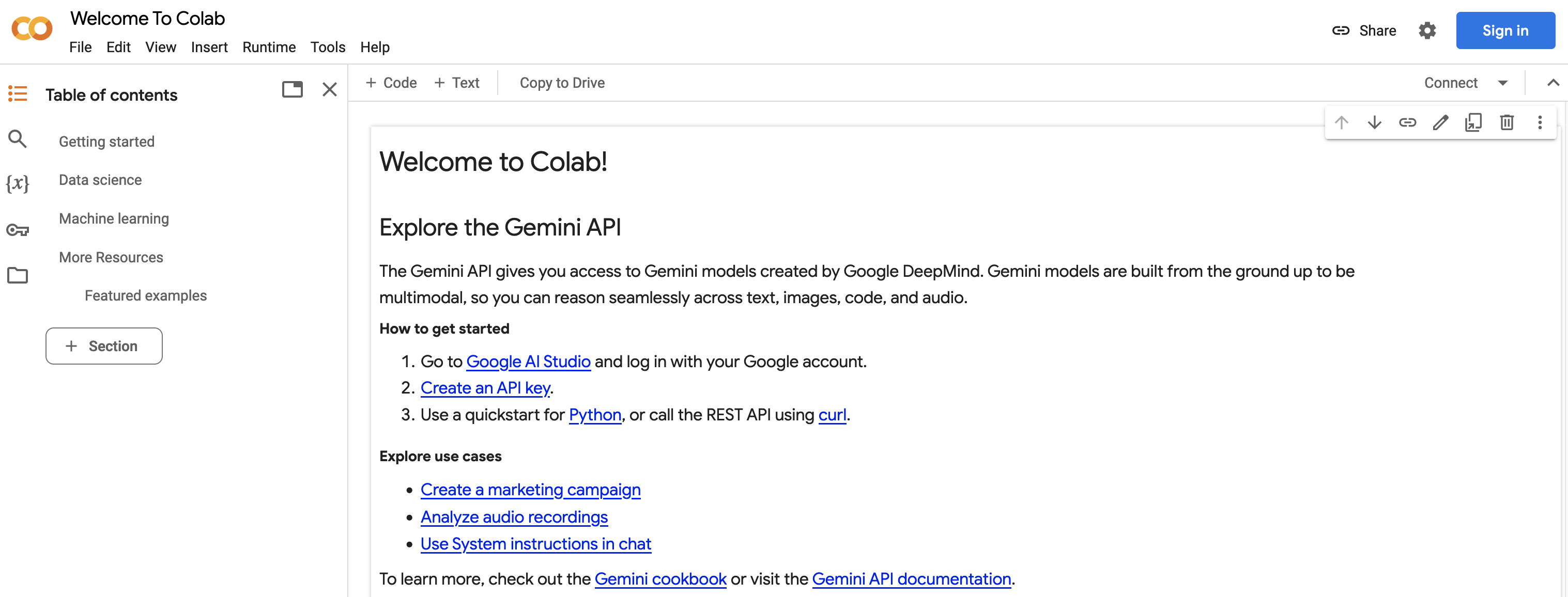
- You should see this page
- Now you can open the
Filemenu at the top left and selectOpen Notebookwhich will open a dialogue box. - Select the
GitHubtab in the dialogue box. - From here you can enter the url for the github repo:
https://github.com/argonne-lcf/ATPESC_MachineLearningand hit<enter>.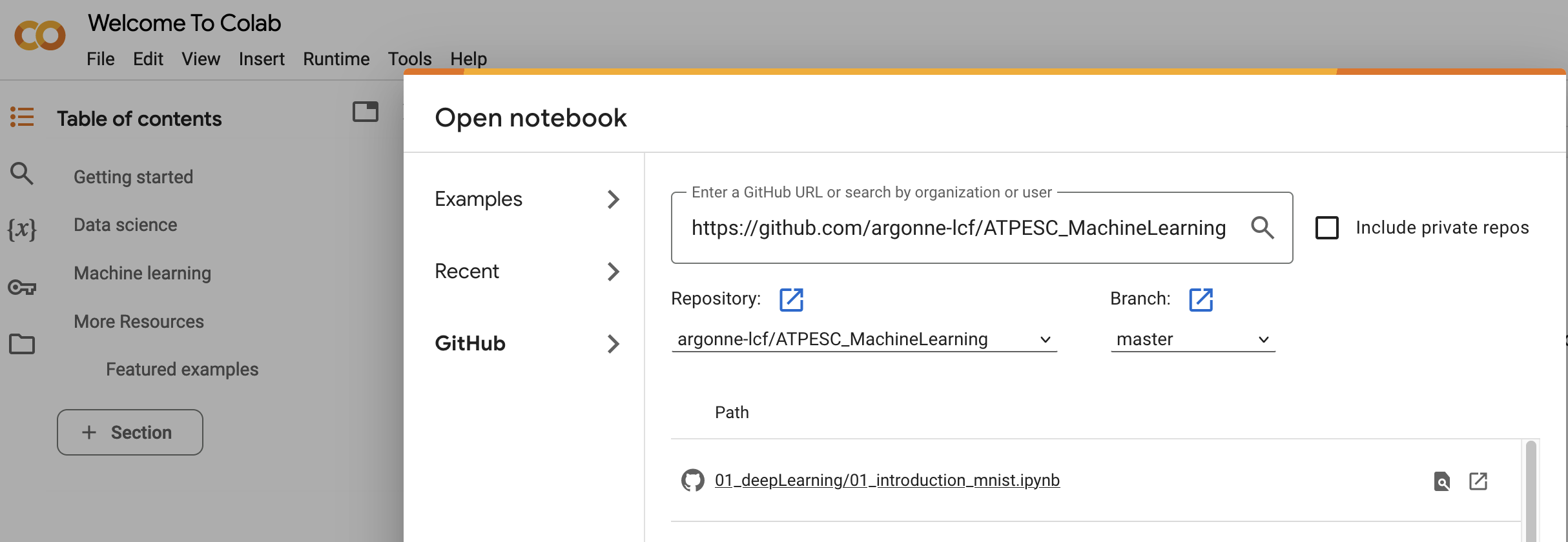
- This will show you a list of the Notebooks available in the repo. When you select a notebook from this list it will create a copy for you in your Colaboratory account (all
*.ipynbfiles in the Colaboratory account will be stored in your Google Drive). - To use a GPU in the notbook select
Runtime->Change Runtime Typeand select an accelerator.
Weights & Biases API key
For the Pre-training on a Supercomputer session, you will need a Wandb api_key. Visit https://docs.wandb.ai/quickstart/ to sign-up and get the key.
Similar repos


Languages
Python
55.0%
Jupyter Notebook
24.8%
HTML
16.1%
Shell
4.1%
Lecture and hands-on material for Track 6 - AI/ML - of Argonne Training Program on Extreme-Scale Computing
See the codeREADME
ATPESC 2026
Agenda
Monday, August 3
| Time | Talk | Speaker |
|---|---|---|
| 8:30AM | Welcome and Introduction | Shilpika, ANL |
| 8:35AM | Transition time: splitting into groups (people new to deep learning vs. more experienced) | |
| 8:35AM | Parallel Session | |
| - Main room: Introduction to Deep Learning | Huihuo Zheng, ANL | |
| - Breakout room: Distributed Deep Learning | Bethany Lusch, ANL | |
| 9:50AM | Break | |
| 10:15AM | Profiling Deep Learning | Nathan Nichols, ANL |
| 11:20 AM | Introduction to Large Language Models (LLMs) | Jingyan (Jane) Jiang, ANL |
| 12:00PM | Pre-training on a Supercomputer - Part 1 | Sam Foreman, ANL |
| 12:30PM | Lunch | |
| 1:30PM | Pre-training on a Supercomputer - Part 2 | Sam Foreman, ANL |
| 2:30PM | Post-training (Finetuning/Alignment/RL techniques) | Filippo Simini, ANL |
| 4:00PM | Explainable AI for Science | Shilpika, ANL |
| 4:30PM | Break | |
| 5:30PM | Featured Speaker | Jack Dongarra |
Tuesday, August 4
| Time | Talk | Speaker |
|---|---|---|
| 8:30AM | Welcome and introduction | Shilpika, ANL |
| 8:35AM | Workflow Tools for Science | Christine Simpson, ANL |
| 9:30AM | Coupled Workflows for Science (Simulations + AI Workflows) | Riccardo Balin and Christine Simpson, ANL |
| 10:30AM | Break | |
| 10:50AM | Inference | Misha Salim, ANL |
| 11:50 AM | Agentic Tools - Part 1 (Trinity/Hermes/OpenClaw) | Huihuo Zheng, ANL |
| 12:30 PM | Lunch | |
| 1:30 PM | AI Testbed | Varuni Sastry and Murali Emani, ANL |
| 3:00PM | Agentic Workflows for Science | Thang Pham, ANL |
| 4:00PM | Agentic Tools - Part 2 (Academy) | Kyle Chard, UChicago/ANL |
| 4:30PM | Break | |
| 5:30PM | Featured Speaker | Bill Gropp |
At the beginning of the first day, we will temporarily split into two groups. Attendees can choose between Introduction to Deep Learning and Distributed Deep Learning.
The "Introduction to deep learning" session will rely on Jupyter Notebooks which are targeted for running on Google's Colaboratory Platform or ALCF JupyterHub. The Colab platform gives the user a virtual machine in which to run Python codes including machine learning codes. The VM comes with a preinstalled environment that includes most of what is needed for these tutorials.
The other sessions involve Python scripts executed on the Aurora and AI Testbed platforms at ALCF.
Reservations
- Queue:
- Daytime reservations: -q ATPESC
- Evening reservations: -q ATPESC-Night
- Outside of reservations: -q debug or -q prod (more info)
- Project/Allocation: ATPESC2026 (
-A ATPESC2026) - Shared directories:
- Aurora:
/flare/ATPESC2026 - Polaris:
/eagle/ATPESC2026
- Aurora:
- ALCF Unix Groups: ATPESC2026
Using Google Colab
Google Colab involves running Jupyter notebooks.
Do the following before you come to the tutorial:
- You need a Google Account to use Colaboratory
- Go to Google's Colaboratory Platform
- You should see this page
- Now you can open the
Filemenu at the top left and selectOpen Notebookwhich will open a dialogue box. - Select the
GitHubtab in the dialogue box. - From here you can enter the url for the github repo:
https://github.com/argonne-lcf/ATPESC_MachineLearningand hit<enter>. - This will show you a list of the Notebooks available in the repo. When you select a notebook from this list it will create a copy for you in your Colaboratory account (all
*.ipynbfiles in the Colaboratory account will be stored in your Google Drive). - To use a GPU in the notbook select
Runtime->Change Runtime Typeand select an accelerator.
Weights & Biases API key
For the Pre-training on a Supercomputer session, you will need a Wandb api_key. Visit https://docs.wandb.ai/quickstart/ to sign-up and get the key.
Similar repos
Languages
Python
55.0%
Jupyter Notebook
24.8%
HTML
16.1%
Shell
4.1%