
ASCII polygon mesh renderer for the DOM. Forked from LayoutitStudio/polycss.
See the codeREADME
glyphcss
ASCII polygon-mesh renderer for the DOM — projects 3D meshes into a monospace character grid in a single <pre>. No WebGL, no canvas, no per-polygon DOM.
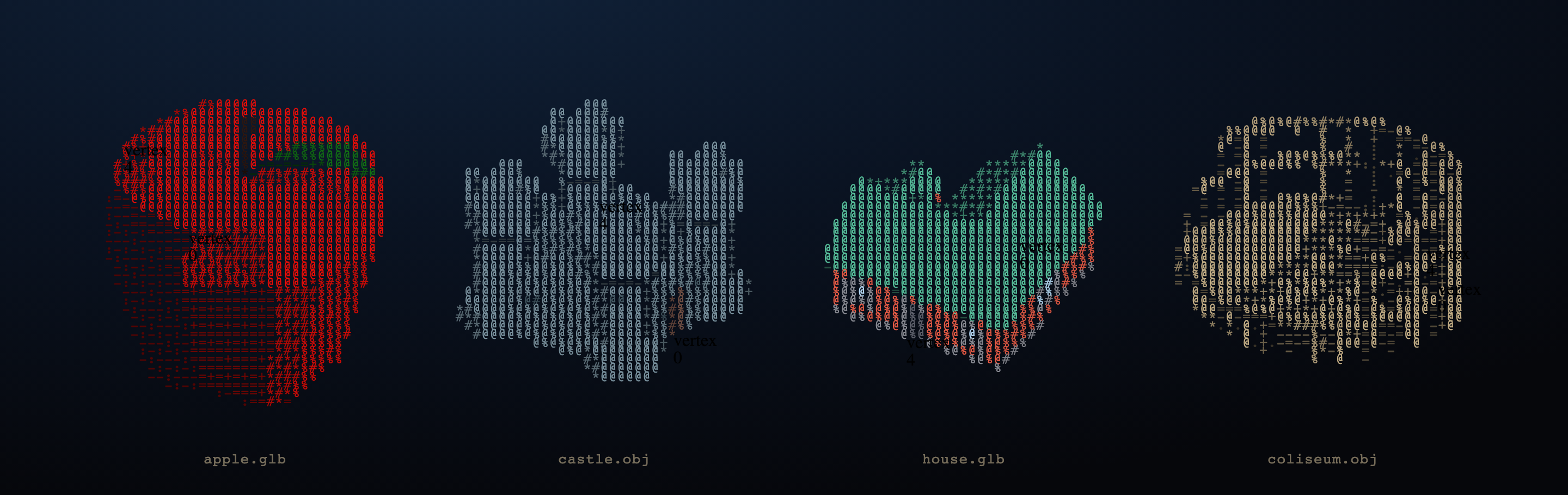
Loads OBJ, glTF, GLB, STL, and MagicaVoxel .vox files. Supports wireframe, solid, voxel, and ink render modes with swappable glyph palettes.
Full documentation: glyphcss.com — guides, component references, and the features not covered in this README.
Forked from polycss — the mesh math, parsers (OBJ / glTF / GLB / VOX), scene composition tree, camera math, and input controls carried over intact. The paint backend is rewritten: instead of emitting one CSS-transformed DOM leaf per polygon, the rasteriser walks all polygons, fills a
cols × rowscharacter grid, and writes a single string to<pre>.textContentper render.
Installation
# Vanilla / custom elements
npm install glyphcss

# React
npm install @glyphcss/react

# Vue 3
npm install @glyphcss/vue

# Reusable surface/scene effects (optional)
npm install @glyphcss/effects
You can also load glyphcss directly from a CDN. Here is a minimal custom-element scene:
<script type="module" src="https://esm.sh/glyphcss/elements"></script>

<glyph-camera rot-x="65" rot-y="45">
  <glyph-scene>
    <glyph-orbit-controls></glyph-orbit-controls>
    <glyph-mesh src="/cottage.glb"></glyph-mesh>
  </glyph-scene>
</glyph-camera>
Framework Components
React and Vue expose the same component model. <GlyphCamera> owns the viewpoint, <GlyphScene> owns the rasteriser options and lighting, and <GlyphMesh> loads or receives polygon data.
React
import {
  GlyphCamera,
  GlyphScene,
  GlyphOrbitControls,
  GlyphMesh,
} from "@glyphcss/react";

export default function App() {
  return (
    <GlyphCamera rotX={65} rotY={45}>
      <GlyphScene mode="solid" glyphPalette="default">
        <GlyphOrbitControls drag wheel />
        <GlyphMesh src="/gallery/obj/cottage.obj" />
      </GlyphScene>
    </GlyphCamera>
  );
}
Vue
<template>
  <GlyphCamera :rot-x="65" :rot-y="45">
    <GlyphScene mode="solid" glyph-palette="default">
      <GlyphOrbitControls drag wheel />
      <GlyphMesh src="/gallery/obj/cottage.obj" />
    </GlyphScene>
  </GlyphCamera>
</template>

<script setup lang="ts">
import {
  GlyphCamera,
  GlyphScene,
  GlyphOrbitControls,
  GlyphMesh,
} from "@glyphcss/vue";
</script>
Render Modes
Each render pass fills a cols × rows character grid and writes the result as a single string assignment to <pre>.textContent (or innerHTML when color spans are enabled).
| Mode | How cells are filled |
|---|---|
wireframe | Polygon edges rasterised as ASCII rules; glyph weight scales with edge prominence |
solid | Filled polygons; glyph picked from the palette's solid ramp by Lambert-shaded intensity |
voxel | Cube-aligned geometry; face normals drive glyph selection |
ink | Silhouette + crease outline only; oriented glyphs trace the contour, interior stays empty |
Glyph Palettes
The glyphPalette option selects a named character set used for both wireframe tiers and solid shading ramps. Built-in palettes:
default, ascii, dots, lines, blocks, solid, detail, stars, arrows, braille, runes, math, binary, hex
<GlyphScene mode="wireframe" glyphPalette="braille">
  <GlyphMesh src="/model.glb" />
</GlyphScene>
API Reference
GlyphCamera
GlyphCamera is the ergonomic default — it resolves to GlyphOrthographicCamera. Use GlyphPerspectiveCamera for perspective depth.
| Prop | Type | Default | Description |
|---|---|---|---|
rotX | number | 65 | Tilt angle in degrees |
rotY | number | 45 | Spin angle in degrees |
zoom | number | 0.65 | Absolute scale in CSS pixels per world unit: zoom=50 → one world unit = 50 px. Not a viewport fraction. |
center | [number, number] | [0.5, 0.5] | Projection center in normalized grid coordinates |
GlyphPerspectiveCamera adds:
| Prop | Type | Default | Description |
|---|---|---|---|
distance | number | 0 | Camera pull-back in CSS pixels under the default CSS-perspective projection. Larger = flatter. |
stretch | number | 1.0 | Extra horizontal scale on top of cellAspect |
rotX=65, rotY=45 is the classic isometric-ish viewpoint. Rotation values are in degrees throughout (XYZ Euler) — there are no radians in the public API.
GlyphScene
Must be placed inside a camera component.
| Prop | Type | Default | Description |
|---|---|---|---|
mode | "wireframe" | "solid" | "voxel" | "ink" | "solid" | Render mode |
glyphPalette | string | "default" | Named glyph character set |
useColors | boolean | true | Emit <span> color elements inside the <pre> |
cols | number | 80 | Character grid width |
rows | number | 24 | Character grid height |
cellAspect | number | 2.0 | Cell height / width ratio |
directionalLight | GlyphDirectionalLight | { direction: [0.5, 0.7, 0.5], intensity: 1 } | Key light. direction points from the surface toward the light source. |
ambientLight | GlyphAmbientLight | { intensity: 0.4 } | Fill light |
smoothShading | boolean | false | Gouraud shading — interpolates Lambert intensity across vertices. Off by default (faceted ASCII look is intentional). |
creaseAngle | number | 60 | Degrees — edges sharper than this stay flat even with smoothShading on |
autoSize | boolean | false | Auto-measure the host element and adapt cols/rows to fill it via ResizeObserver |
shadow | GlyphShadowOptions | undefined | Enable shadow mapping (see Shadows section) |
GlyphMesh
| Prop | Type | Default | Description |
|---|---|---|---|
polygons | Polygon[] | — | Pre-parsed geometry. Takes precedence over src and geometry. |
src | string | — | URL of an OBJ, glTF, GLB, STL, or VOX file — fetched and parsed automatically |
geometry | GlyphGeometryName | — | Built-in geometry shortcut (e.g. "sphere", "cube") |
size | number | 1 | Uniform size passed to resolveGeometry |
color | string | — | Fill color passed to resolveGeometry |
position | Vec3 | — | World-space translation |
rotation | Vec3 | — | XYZ Euler rotation in degrees |
scale | number | Vec3 | — | Uniform or per-axis scale |
castShadow | boolean | false | This mesh casts shadows onto receiveShadow surfaces |
receiveShadow | boolean | false | This mesh receives (displays) shadows |
A mesh that is both castShadow and receiveShadow self-shadows.
GlyphEffectLayer
Effects are ordered appearance programs mounted over the retained glyph frame.
Parameter-only animation does not re-project the mesh, and the stable params
object can be targeted directly by Anime.js or updated by a custom clock.
import { GlyphEffectLayer } from "@glyphcss/react";
import { GlyphEffects } from "@glyphcss/effects";

<GlyphEffectLayer
  effect={GlyphEffects.matrixRain}
  blend="replace"
  params={{ glyphs: "HOLA", speedMin: 5, speedMax: 12 }}
/>
Vanilla scenes use the same definition and handle:
const rain = scene.addEffectLayer({
  effect: GlyphEffects.matrixRain,
  blend: "replace",
});

function tick(now: number) {
  rain.params.time = now / 1000;
  requestAnimationFrame(tick);
}
requestAnimationFrame(tick);
The catalog also includes flow text, scan, wipe, scramble, glitch, noise
dissolve, ripple, and field synth. Flow text and scan default to
space: "auto" (authored UVs when available, generated surface mapping
otherwise); matrix rain defaults to space: "object", a volumetric field in
the mesh's own local space. Matrix rain can keep the model's original surface
colors or tint every strand with one monochrome color while preserving
lighting and shape.
See the effects guide for the full parameter reference and mapping details.
GlyphGround
Convenience ground plane — a horizontal planePolygons registered as a mesh.
| Prop | Type | Default | Description |
|---|---|---|---|
size | number | 5 | Half-extent in world units |
color | string | "#444444" | Fill color |
position | Vec3 | [0, -0.5, 0] | World-space position |
castShadow | boolean | false | |
receiveShadow | boolean | true | Ground planes are the primary shadow receivers |
Controls
| Component | Behaviour |
|---|---|
GlyphOrbitControls | Drag orbit, shift-drag pan, wheel zoom, optional auto-rotate |
GlyphMapControls | Pan-first map-style input |
GlyphFirstPersonControls | Keyboard and pointer-look navigation |
GlyphOrbitControls and GlyphMapControls accept drag, wheel, invert, and animate; orbit also accepts clampPitch.
Hotspots
GlyphHotspot is a 3D anchor that produces an absolutely-positioned DOM overlay tracking a world-space point. The rasteriser projects the at coordinate to a grid cell; glyphcss positions a <div> over that cell. Children are portalled inside that div.
<GlyphHotspot id="label-a" at={[0, 2, 0]}>
  <span className="label">Summit</span>
</GlyphHotspot>
| Prop | Type | Description |
|---|---|---|
id | string | Stable identifier |
at | Vec3 | World-space anchor |
size | [number, number] | Hitbox size in character cells. Default [1, 1]. |
Polygon Data Model
Each polygon describes one renderable face:
import type { Polygon } from "@glyphcss/core";

const polygons: Polygon[] = [
  {
    vertices: [[0, 0, 0], [1, 0, 0], [0, 1, 0]],
    color: "#f97316",
  },
  {
    vertices: [[0, 0, 0], [1, 0, 0], [1, 1, 0], [0, 1, 0]],
    color: "#3b82f6",
  },
];
Polygons can also carry UV coordinates and TextureTriangle data for texture-mapped meshes (loaded via OBJ/MTL or glTF).
Pass polygons directly to a GlyphScene (imperative API) or a GlyphMesh component:
<GlyphCamera rotX={65} rotY={45}>
  <GlyphScene>
    <GlyphMesh polygons={polygons} />
  </GlyphScene>
</GlyphCamera>
Shadows
Shadows are opt-in. Enable them by setting shadow on <GlyphScene>, then flag individual meshes with castShadow and/or receiveShadow. glyphcss uses a shadow-map technique — renders depth from the light direction, then compares per cell — rather than an analytic projection.
<GlyphScene
  shadow={{ color: "#000000", opacity: 0.35, lift: 0.05, maxExtend: 2000 }}
>
  <GlyphMesh src="/tree.glb" castShadow />
  <GlyphGround receiveShadow />
</GlyphScene>
| Option | Type | Default | Description |
|---|---|---|---|
shadow.color | string | "#000000" | Shadow tint hex color |
shadow.opacity | number | 0.25 | Darkness 0–1 toward color |
shadow.lift | number | 0.05 | Depth bias — prevents self-shadow acne on flat lit surfaces |
shadow.maxExtend | number | 2000 | Half-extent of the light-space projection volume |
Loading Mesh Files
Use loadMesh() from @glyphcss/core to parse supported formats imperatively:
import {
  createGlyphScene,
  createGlyphOrthographicCamera,
  loadMesh,
} from "glyphcss";

const host = document.getElementById("scene")!;
const camera = createGlyphOrthographicCamera({ rotX: 65, rotY: 45 });
const scene = createGlyphScene(host, { camera });

const mesh = await loadMesh("/gallery/obj/cottage.obj");
scene.add(mesh.polygons);
In custom element HTML, set the src attribute directly — <glyph-mesh> fetches and parses the file automatically:
<glyph-mesh src="/model.glb"></glyph-mesh>
<glyph-mesh src="/model.obj"></glyph-mesh>
<glyph-mesh src="/model.vox"></glyph-mesh>
In React and Vue, use loadMesh (from @glyphcss/react or @glyphcss/vue) and pass the parsed polygons to <GlyphMesh>:
const { polygons } = await loadMesh("/model.glb");
<GlyphMesh polygons={polygons} />
Supported formats:
- OBJ + MTL, including
map_Kdtextures and UV coordinates - glTF / GLB, including embedded images and
TEXCOORD_0 - STL (binary and ASCII)
- MagicaVoxel
.vox, with face-culling and default or custom palettes
Performance
glyphcss renders through a single <pre> element. The performance envelope is shaped by two things: the number of polygons walked per render and the size of the character grid written to the DOM.
Rendering is change-driven, not a fixed loop: a render is scheduled only when the camera or scene state actually changes, and multiple changes in the same tick are coalesced into a single pass. A static, un-interacted scene performs zero redraws. (Continuous animation — auto-rotate, inertia — does write every frame, but each frame is a genuinely different image.)
On every render pass:
- All mounted meshes are walked in scene order.
- Polygon vertices are transformed through the camera matrix to 2D projected positions.
- A
cols × rowscharacter grid is filled: polygons are depth-tested, each cell picks a glyph from the active palette. - All cells are joined and written to
<pre>.textContent(or.innerHTMLfor color mode) exactly once.
There are no per-polygon DOM elements and no CSS matrix3d. Hotspot overlays update via a single el.style.left/top assignment per hotspot per render — not a DOM rebuild.
autoSize uses a ResizeObserver to re-fit the grid whenever the host element resizes, keeping the character density constant regardless of viewport size.
Packages
| Package | npm name | Description |
|---|---|---|
@glyphcss/core | @glyphcss/core | Pure math: Vec3, Polygon, scene, camera, mesh ops, parsers. Zero browser globals. |
glyphcss | glyphcss | ASCII rasteriser + vanilla custom elements + imperative createGlyphScene API. |
@glyphcss/react | @glyphcss/react | React components, hooks, and controls. |
@glyphcss/vue | @glyphcss/vue | Vue 3 mirror of the React package. |
@glyphcss/effects | @glyphcss/effects | Reusable spatial effect definitions; framework-agnostic and clock-free. |
@glyphcss/fonts | @glyphcss/fonts | Font/text to extruded polygon-mesh generation. |
@glyphcss/compile | @glyphcss/compile | Static compiler, CLI, Vite plugin, and Node API. |
@glyphcss/maps | @glyphcss/maps | Geographic data → glyphcss: projections, elevation tiles, a relief mesh, and the interactive createGlyphMap widget with a MapLibre-shaped layer vocabulary. |
License
MIT.


Similar repos


Languages
TypeScript
88.5%
Astro
3.4%
JavaScript
3.2%
MDX
2.7%
CSS
1.9%
ASCII polygon mesh renderer for the DOM. Forked from LayoutitStudio/polycss.
See the codeREADME
glyphcss
ASCII polygon-mesh renderer for the DOM — projects 3D meshes into a monospace character grid in a single <pre>. No WebGL, no canvas, no per-polygon DOM.
Loads OBJ, glTF, GLB, STL, and MagicaVoxel .vox files. Supports wireframe, solid, voxel, and ink render modes with swappable glyph palettes.
Full documentation: glyphcss.com — guides, component references, and the features not covered in this README.
Forked from polycss — the mesh math, parsers (OBJ / glTF / GLB / VOX), scene composition tree, camera math, and input controls carried over intact. The paint backend is rewritten: instead of emitting one CSS-transformed DOM leaf per polygon, the rasteriser walks all polygons, fills a
cols × rowscharacter grid, and writes a single string to<pre>.textContentper render.
Installation
# Vanilla / custom elements
npm install glyphcss

# React
npm install @glyphcss/react

# Vue 3
npm install @glyphcss/vue

# Reusable surface/scene effects (optional)
npm install @glyphcss/effects
You can also load glyphcss directly from a CDN. Here is a minimal custom-element scene:
<script type="module" src="https://esm.sh/glyphcss/elements"></script>

<glyph-camera rot-x="65" rot-y="45">
  <glyph-scene>
    <glyph-orbit-controls></glyph-orbit-controls>
    <glyph-mesh src="/cottage.glb"></glyph-mesh>
  </glyph-scene>
</glyph-camera>
Framework Components
React and Vue expose the same component model. <GlyphCamera> owns the viewpoint, <GlyphScene> owns the rasteriser options and lighting, and <GlyphMesh> loads or receives polygon data.
React
import {
  GlyphCamera,
  GlyphScene,
  GlyphOrbitControls,
  GlyphMesh,
} from "@glyphcss/react";

export default function App() {
  return (
    <GlyphCamera rotX={65} rotY={45}>
      <GlyphScene mode="solid" glyphPalette="default">
        <GlyphOrbitControls drag wheel />
        <GlyphMesh src="/gallery/obj/cottage.obj" />
      </GlyphScene>
    </GlyphCamera>
  );
}
Vue
<template>
  <GlyphCamera :rot-x="65" :rot-y="45">
    <GlyphScene mode="solid" glyph-palette="default">
      <GlyphOrbitControls drag wheel />
      <GlyphMesh src="/gallery/obj/cottage.obj" />
    </GlyphScene>
  </GlyphCamera>
</template>

<script setup lang="ts">
import {
  GlyphCamera,
  GlyphScene,
  GlyphOrbitControls,
  GlyphMesh,
} from "@glyphcss/vue";
</script>
Render Modes
Each render pass fills a cols × rows character grid and writes the result as a single string assignment to <pre>.textContent (or innerHTML when color spans are enabled).
| Mode | How cells are filled |
|---|---|
wireframe | Polygon edges rasterised as ASCII rules; glyph weight scales with edge prominence |
solid | Filled polygons; glyph picked from the palette's solid ramp by Lambert-shaded intensity |
voxel | Cube-aligned geometry; face normals drive glyph selection |
ink | Silhouette + crease outline only; oriented glyphs trace the contour, interior stays empty |
Glyph Palettes
The glyphPalette option selects a named character set used for both wireframe tiers and solid shading ramps. Built-in palettes:
default, ascii, dots, lines, blocks, solid, detail, stars, arrows, braille, runes, math, binary, hex
<GlyphScene mode="wireframe" glyphPalette="braille">
  <GlyphMesh src="/model.glb" />
</GlyphScene>
API Reference
GlyphCamera
GlyphCamera is the ergonomic default — it resolves to GlyphOrthographicCamera. Use GlyphPerspectiveCamera for perspective depth.
| Prop | Type | Default | Description |
|---|---|---|---|
rotX | number | 65 | Tilt angle in degrees |
rotY | number | 45 | Spin angle in degrees |
zoom | number | 0.65 | Absolute scale in CSS pixels per world unit: zoom=50 → one world unit = 50 px. Not a viewport fraction. |
center | [number, number] | [0.5, 0.5] | Projection center in normalized grid coordinates |
GlyphPerspectiveCamera adds:
| Prop | Type | Default | Description |
|---|---|---|---|
distance | number | 0 | Camera pull-back in CSS pixels under the default CSS-perspective projection. Larger = flatter. |
stretch | number | 1.0 | Extra horizontal scale on top of cellAspect |
rotX=65, rotY=45 is the classic isometric-ish viewpoint. Rotation values are in degrees throughout (XYZ Euler) — there are no radians in the public API.
GlyphScene
Must be placed inside a camera component.
| Prop | Type | Default | Description |
|---|---|---|---|
mode | "wireframe" | "solid" | "voxel" | "ink" | "solid" | Render mode |
glyphPalette | string | "default" | Named glyph character set |
useColors | boolean | true | Emit <span> color elements inside the <pre> |
cols | number | 80 | Character grid width |
rows | number | 24 | Character grid height |
cellAspect | number | 2.0 | Cell height / width ratio |
directionalLight | GlyphDirectionalLight | { direction: [0.5, 0.7, 0.5], intensity: 1 } | Key light. direction points from the surface toward the light source. |
ambientLight | GlyphAmbientLight | { intensity: 0.4 } | Fill light |
smoothShading | boolean | false | Gouraud shading — interpolates Lambert intensity across vertices. Off by default (faceted ASCII look is intentional). |
creaseAngle | number | 60 | Degrees — edges sharper than this stay flat even with smoothShading on |
autoSize | boolean | false | Auto-measure the host element and adapt cols/rows to fill it via ResizeObserver |
shadow | GlyphShadowOptions | undefined | Enable shadow mapping (see Shadows section) |
GlyphMesh
| Prop | Type | Default | Description |
|---|---|---|---|
polygons | Polygon[] | — | Pre-parsed geometry. Takes precedence over src and geometry. |
src | string | — | URL of an OBJ, glTF, GLB, STL, or VOX file — fetched and parsed automatically |
geometry | GlyphGeometryName | — | Built-in geometry shortcut (e.g. "sphere", "cube") |
size | number | 1 | Uniform size passed to resolveGeometry |
color | string | — | Fill color passed to resolveGeometry |
position | Vec3 | — | World-space translation |
rotation | Vec3 | — | XYZ Euler rotation in degrees |
scale | number | Vec3 | — | Uniform or per-axis scale |
castShadow | boolean | false | This mesh casts shadows onto receiveShadow surfaces |
receiveShadow | boolean | false | This mesh receives (displays) shadows |
A mesh that is both castShadow and receiveShadow self-shadows.
GlyphEffectLayer
Effects are ordered appearance programs mounted over the retained glyph frame.
Parameter-only animation does not re-project the mesh, and the stable params
object can be targeted directly by Anime.js or updated by a custom clock.
import { GlyphEffectLayer } from "@glyphcss/react";
import { GlyphEffects } from "@glyphcss/effects";

<GlyphEffectLayer
  effect={GlyphEffects.matrixRain}
  blend="replace"
  params={{ glyphs: "HOLA", speedMin: 5, speedMax: 12 }}
/>
Vanilla scenes use the same definition and handle:
const rain = scene.addEffectLayer({
  effect: GlyphEffects.matrixRain,
  blend: "replace",
});

function tick(now: number) {
  rain.params.time = now / 1000;
  requestAnimationFrame(tick);
}
requestAnimationFrame(tick);
The catalog also includes flow text, scan, wipe, scramble, glitch, noise
dissolve, ripple, and field synth. Flow text and scan default to
space: "auto" (authored UVs when available, generated surface mapping
otherwise); matrix rain defaults to space: "object", a volumetric field in
the mesh's own local space. Matrix rain can keep the model's original surface
colors or tint every strand with one monochrome color while preserving
lighting and shape.
See the effects guide for the full parameter reference and mapping details.
GlyphGround
Convenience ground plane — a horizontal planePolygons registered as a mesh.
| Prop | Type | Default | Description |
|---|---|---|---|
size | number | 5 | Half-extent in world units |
color | string | "#444444" | Fill color |
position | Vec3 | [0, -0.5, 0] | World-space position |
castShadow | boolean | false | |
receiveShadow | boolean | true | Ground planes are the primary shadow receivers |
Controls
| Component | Behaviour |
|---|---|
GlyphOrbitControls | Drag orbit, shift-drag pan, wheel zoom, optional auto-rotate |
GlyphMapControls | Pan-first map-style input |
GlyphFirstPersonControls | Keyboard and pointer-look navigation |
GlyphOrbitControls and GlyphMapControls accept drag, wheel, invert, and animate; orbit also accepts clampPitch.
Hotspots
GlyphHotspot is a 3D anchor that produces an absolutely-positioned DOM overlay tracking a world-space point. The rasteriser projects the at coordinate to a grid cell; glyphcss positions a <div> over that cell. Children are portalled inside that div.
<GlyphHotspot id="label-a" at={[0, 2, 0]}>
  <span className="label">Summit</span>
</GlyphHotspot>
| Prop | Type | Description |
|---|---|---|
id | string | Stable identifier |
at | Vec3 | World-space anchor |
size | [number, number] | Hitbox size in character cells. Default [1, 1]. |
Polygon Data Model
Each polygon describes one renderable face:
import type { Polygon } from "@glyphcss/core";

const polygons: Polygon[] = [
  {
    vertices: [[0, 0, 0], [1, 0, 0], [0, 1, 0]],
    color: "#f97316",
  },
  {
    vertices: [[0, 0, 0], [1, 0, 0], [1, 1, 0], [0, 1, 0]],
    color: "#3b82f6",
  },
];
Polygons can also carry UV coordinates and TextureTriangle data for texture-mapped meshes (loaded via OBJ/MTL or glTF).
Pass polygons directly to a GlyphScene (imperative API) or a GlyphMesh component:
<GlyphCamera rotX={65} rotY={45}>
  <GlyphScene>
    <GlyphMesh polygons={polygons} />
  </GlyphScene>
</GlyphCamera>
Shadows
Shadows are opt-in. Enable them by setting shadow on <GlyphScene>, then flag individual meshes with castShadow and/or receiveShadow. glyphcss uses a shadow-map technique — renders depth from the light direction, then compares per cell — rather than an analytic projection.
<GlyphScene
  shadow={{ color: "#000000", opacity: 0.35, lift: 0.05, maxExtend: 2000 }}
>
  <GlyphMesh src="/tree.glb" castShadow />
  <GlyphGround receiveShadow />
</GlyphScene>
| Option | Type | Default | Description |
|---|---|---|---|
shadow.color | string | "#000000" | Shadow tint hex color |
shadow.opacity | number | 0.25 | Darkness 0–1 toward color |
shadow.lift | number | 0.05 | Depth bias — prevents self-shadow acne on flat lit surfaces |
shadow.maxExtend | number | 2000 | Half-extent of the light-space projection volume |
Loading Mesh Files
Use loadMesh() from @glyphcss/core to parse supported formats imperatively:
import {
  createGlyphScene,
  createGlyphOrthographicCamera,
  loadMesh,
} from "glyphcss";

const host = document.getElementById("scene")!;
const camera = createGlyphOrthographicCamera({ rotX: 65, rotY: 45 });
const scene = createGlyphScene(host, { camera });

const mesh = await loadMesh("/gallery/obj/cottage.obj");
scene.add(mesh.polygons);
In custom element HTML, set the src attribute directly — <glyph-mesh> fetches and parses the file automatically:
<glyph-mesh src="/model.glb"></glyph-mesh>
<glyph-mesh src="/model.obj"></glyph-mesh>
<glyph-mesh src="/model.vox"></glyph-mesh>
In React and Vue, use loadMesh (from @glyphcss/react or @glyphcss/vue) and pass the parsed polygons to <GlyphMesh>:
const { polygons } = await loadMesh("/model.glb");
<GlyphMesh polygons={polygons} />
Supported formats:
- OBJ + MTL, including
map_Kdtextures and UV coordinates - glTF / GLB, including embedded images and
TEXCOORD_0 - STL (binary and ASCII)
- MagicaVoxel
.vox, with face-culling and default or custom palettes
Performance
glyphcss renders through a single <pre> element. The performance envelope is shaped by two things: the number of polygons walked per render and the size of the character grid written to the DOM.
Rendering is change-driven, not a fixed loop: a render is scheduled only when the camera or scene state actually changes, and multiple changes in the same tick are coalesced into a single pass. A static, un-interacted scene performs zero redraws. (Continuous animation — auto-rotate, inertia — does write every frame, but each frame is a genuinely different image.)
On every render pass:
- All mounted meshes are walked in scene order.
- Polygon vertices are transformed through the camera matrix to 2D projected positions.
- A
cols × rowscharacter grid is filled: polygons are depth-tested, each cell picks a glyph from the active palette. - All cells are joined and written to
<pre>.textContent(or.innerHTMLfor color mode) exactly once.
There are no per-polygon DOM elements and no CSS matrix3d. Hotspot overlays update via a single el.style.left/top assignment per hotspot per render — not a DOM rebuild.
autoSize uses a ResizeObserver to re-fit the grid whenever the host element resizes, keeping the character density constant regardless of viewport size.
Packages
| Package | npm name | Description |
|---|---|---|
@glyphcss/core | @glyphcss/core | Pure math: Vec3, Polygon, scene, camera, mesh ops, parsers. Zero browser globals. |
glyphcss | glyphcss | ASCII rasteriser + vanilla custom elements + imperative createGlyphScene API. |
@glyphcss/react | @glyphcss/react | React components, hooks, and controls. |
@glyphcss/vue | @glyphcss/vue | Vue 3 mirror of the React package. |
@glyphcss/effects | @glyphcss/effects | Reusable spatial effect definitions; framework-agnostic and clock-free. |
@glyphcss/fonts | @glyphcss/fonts | Font/text to extruded polygon-mesh generation. |
@glyphcss/compile | @glyphcss/compile | Static compiler, CLI, Vite plugin, and Node API. |
@glyphcss/maps | @glyphcss/maps | Geographic data → glyphcss: projections, elevation tiles, a relief mesh, and the interactive createGlyphMap widget with a MapLibre-shaped layer vocabulary. |
License
MIT.
Similar repos
Languages
TypeScript
88.5%
Astro
3.4%
JavaScript
3.2%
MDX
2.7%
CSS
1.9%