
See what people are saying
README
EtherPK Client



The source of the EtherPK Client and Headless Client, available under the Elastic License 2.0.
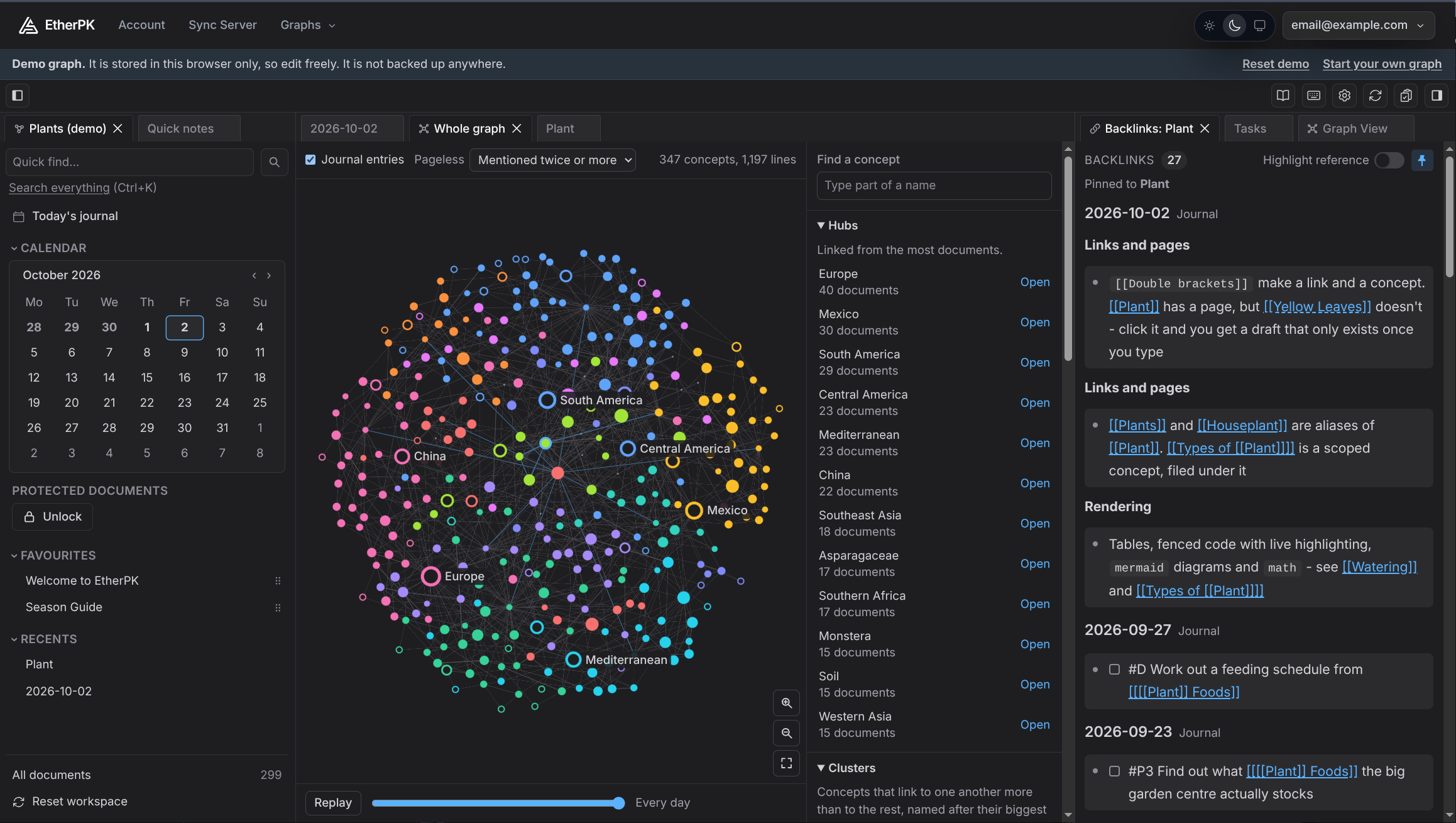
Try the demo from etherpk.com. It runs in your browser, needs no account, and keeps what you write in that browser only.
EtherPK is a personal knowledge base in plain Markdown. Journal entries hold daily thinking, pages
hold what outlives a day, and [[wikilinks]] tie them into a knowledge graph. The Client is the
editor: a SvelteKit app that opens a graph from a folder on your computer, or from a Sync Server
that stores graphs end-to-end encrypted and cannot read them. The Headless Client is the same
engine without an editor: an MCP server that gives an AI agent one of your graphs.
User documentation is at https://docs.etherpk.com.
Licence
The Elastic License 2.0 lets you use, copy, modify and self-host this software. It does not let you offer it to others as a hosted or managed service. It is a source-available licence, not an open source one.
Contents
| Path | Contents |
|---|---|
apps/client | The Client |
apps/mcp | The Headless Client / MCP Server, published to npm as @appsoftwareltd/etherpk-mcp (README) |
packages/shared | Code the Client shares with the Sync Server: the sync protocol, UI components and auth pages |
packages/themes | The site themes the publisher bundles |
Run it
Docker image
docker run --rm -p 3000:3000 ghcr.io/appsoftwareltd/etherpk-client:latest
Every tag is listed on the image's package page.
Open http://localhost:3000. With no settings the Client works with graph folders on your
computer and offers a Custom server form for connecting to a Sync Server by its address. The
settings it reads are listed, with their defaults, in
apps/client/.env.example - pass them with --env-file.
Node bundle
Each release attaches etherpk-client-<version>.tar.gz, which runs on Node.js 22 or later on
Windows, macOS and Linux, with nothing to install:
tar -xzf etherpk-client-<version>.tar.gz
cd etherpk-client
HOST=127.0.0.1 PORT=3000 node build
The full guide, including Windows commands, is Running EtherPK On Your Own Computer.
Headless Client / MCP Server
Published to npm as
@appsoftwareltd/etherpk-mcp.
npx @appsoftwareltd/etherpk-mcp --help
Setup for each kind of graph is in apps/mcp/README.md.
Build from source
You need Node.js 22 or later and pnpm - corepack enable provides the pnpm version that
package.json names.
pnpm install --frozen-lockfile
pnpm dev          # the Client on http://localhost:5174
pnpm check        # type check
pnpm lint
pnpm test         # Vitest unit suites
pnpm build        # the Client and the Headless Client
docker build -f apps/client/Dockerfile -t etherpk-client .
Copy apps/client/.env.example to apps/client/.env to change the development settings.
Versions and releases
- Every commit on
mainpublishes images taggededgeandsha-<commit>. - A release is a
v<version>tag. It publishes images tagged<version>,<major>.<minor>andlatest, a GitHub Release with the Node bundle attached, and@appsoftwareltd/etherpk-mcpat the same version on npm. - The Client and the Headless Client share one version number with EtherPK's Sync Server, and only matching versions are tested together. A Client and a Sync Server on different sync protocol versions refuse to sync, and the Client says which side needs upgrading.
How this repository is maintained
This repository is a one-way copy of App Software's private EtherPK repository, exported on every
change there. Each commit here is one export - its GitOrigin-RevId trailer names the private
commit it came from. Code comments cite design records (ADR 0072) and glossary terms
([[Knowledge Graph]]) that live in the private repository and are not published here.
Issues are welcome. Pull requests are not merged here - CONTRIBUTING.md explains why and what happens instead. Report security issues as SECURITY.md describes.
Similar repos


See what people are saying
README
EtherPK Client
The source of the EtherPK Client and Headless Client, available under the Elastic License 2.0.
Try the demo from etherpk.com. It runs in your browser, needs no account, and keeps what you write in that browser only.
EtherPK is a personal knowledge base in plain Markdown. Journal entries hold daily thinking, pages
hold what outlives a day, and [[wikilinks]] tie them into a knowledge graph. The Client is the
editor: a SvelteKit app that opens a graph from a folder on your computer, or from a Sync Server
that stores graphs end-to-end encrypted and cannot read them. The Headless Client is the same
engine without an editor: an MCP server that gives an AI agent one of your graphs.
User documentation is at https://docs.etherpk.com.
Licence
The Elastic License 2.0 lets you use, copy, modify and self-host this software. It does not let you offer it to others as a hosted or managed service. It is a source-available licence, not an open source one.
Contents
| Path | Contents |
|---|---|
apps/client | The Client |
apps/mcp | The Headless Client / MCP Server, published to npm as @appsoftwareltd/etherpk-mcp (README) |
packages/shared | Code the Client shares with the Sync Server: the sync protocol, UI components and auth pages |
packages/themes | The site themes the publisher bundles |
Run it
Docker image
docker run --rm -p 3000:3000 ghcr.io/appsoftwareltd/etherpk-client:latest
Every tag is listed on the image's package page.
Open http://localhost:3000. With no settings the Client works with graph folders on your
computer and offers a Custom server form for connecting to a Sync Server by its address. The
settings it reads are listed, with their defaults, in
apps/client/.env.example - pass them with --env-file.
Node bundle
Each release attaches etherpk-client-<version>.tar.gz, which runs on Node.js 22 or later on
Windows, macOS and Linux, with nothing to install:
tar -xzf etherpk-client-<version>.tar.gz
cd etherpk-client
HOST=127.0.0.1 PORT=3000 node build
The full guide, including Windows commands, is Running EtherPK On Your Own Computer.
Headless Client / MCP Server
Published to npm as
@appsoftwareltd/etherpk-mcp.
npx @appsoftwareltd/etherpk-mcp --help
Setup for each kind of graph is in apps/mcp/README.md.
Build from source
You need Node.js 22 or later and pnpm - corepack enable provides the pnpm version that
package.json names.
pnpm install --frozen-lockfile
pnpm dev          # the Client on http://localhost:5174
pnpm check        # type check
pnpm lint
pnpm test         # Vitest unit suites
pnpm build        # the Client and the Headless Client
docker build -f apps/client/Dockerfile -t etherpk-client .
Copy apps/client/.env.example to apps/client/.env to change the development settings.
Versions and releases
- Every commit on
mainpublishes images taggededgeandsha-<commit>. - A release is a
v<version>tag. It publishes images tagged<version>,<major>.<minor>andlatest, a GitHub Release with the Node bundle attached, and@appsoftwareltd/etherpk-mcpat the same version on npm. - The Client and the Headless Client share one version number with EtherPK's Sync Server, and only matching versions are tested together. A Client and a Sync Server on different sync protocol versions refuse to sync, and the Client says which side needs upgrading.
How this repository is maintained
This repository is a one-way copy of App Software's private EtherPK repository, exported on every
change there. Each commit here is one export - its GitOrigin-RevId trailer names the private
commit it came from. Code comments cite design records (ADR 0072) and glossary terms
([[Knowledge Graph]]) that live in the private repository and are not published here.
Issues are welcome. Pull requests are not merged here - CONTRIBUTING.md explains why and what happens instead. Report security issues as SECURITY.md describes.