
README
Controlling Language and Diffusion Models by Transporting Activations
Pau Rodriguez, Arno Blaas, Michal Klein, Luca Zappella, Nicholas Apostoloff, Marco Cuturi and Xavier Suau


This software project accompanies the research paper: Controlling Language and Diffusion Models by Transporting Activations (bibtex).
Setup
-
Clone the Repository:
git clone https://github.com/apple/ml-act cd ml-act -
Install dependencies
pip install -r requirements.txt -
Download datasets and models. For ease of explanation, we will use the following environment variables to point to where the datasets and models are stored:
DATA_DIRandCACHE_DIR. Also, setHF_TOKENif needed.export DATA_DIR="some/path" export CACHE_DIR="some/other/path" export HF_HUB_CACHE="another/path" # optionally, models will be saved here export HF_TOKEN="your_token" # required for some specific models like Gemma-2Then just call
python -m act.scripts.download_external_datato download external assets to your local$DATA_DIR. This will download RTP prompts, the Jigsaw toxicity dataset and the COCO captions dataset. Note that models will be downloaded automatically with huggingface. Note you can setupHF_HUB_CACHEto point to a specific folder (see huggingface documentation). -
Optionally, run the provided tests to make sure the setup is correct. It will download some small model from Huggingface during the first run.
pytest . -m "not slow"
Documentation
This repository contains the code for a research paper focusing on controlling model behavior through learned interventions. We provide a pipeline script that enables users to:
- Extract Activations: Obtain activations from specified model layers.
- Learn Interventions: Utilize extracted activations to learn interventions that control model behavior.
- Evaluate Intervened Models: Assess the performance of intervened models on various tasks.
Quick summary of the main files in the repository:
- Python Scripts:
pipeline.py: Main pipeline for incremental learning of model interventions.learn_intervention.py: Core functionality for learning interventions from model activations.
- Hydra Configuration Files (
configsdirectory):text_generation.yamlandtext_to_image_generation.yaml: Primary config files, specifying:- Model architecture and layers
- Task parameters (e.g., dataset, batch size)
- Intervention type and settings (e.g.,
linear_ot) - Evaluation tasks (e.g., RTP, zero-shot evaluation)
- Referenced Sub-Configs:
task_params/giraffes.yaml(task-specific settings)model/gpt2.yaml(model architecture details)intervention_params/linear_ot(intervention-type specific settings; not explicitly listed, implied as part of the config structure)wandb/act.yaml(WandB logging configuration)
The
linear_otintervention in this repository implementsLinear-AcTas defined in our paper: Controlling Language and Diffusion Models by Transporting Activations
Running the pipeline for text generation
# see act/configs/text_generation.yaml for configuration details
python -m act.scripts.pipeline \
"task_params=giraffes" \
"responses.batch_size=20" \
"responses.max_batches=1" \
"wandb.mode=disabled" \
"text_generation.num_sentences=10" \
"text_generation.new_seq_len=48" \
"text_generation.strength_sample_size=3" \
"intervention_params.incremental=atonce" \
"device=cpu" \
"model.dtype=float32"
This command will:
- Extract activations from a pre-trained
Gemma-2-2bmodel as specified inconfigs/text_generation.yaml. We collect 1 batch of size 20 since we provide 20 sentences indata/giraffes.json). Remember to change todevice=mpsif working on MacOS and todevice=cudaif you work on GPU for better speed. - Use the responses to learn an intervention. We set
intervention_params.incremental=atonceto make this example faster, but better performance is achieved withincr. - Generate text with the intervened model. We ask to generate 10 sentences (
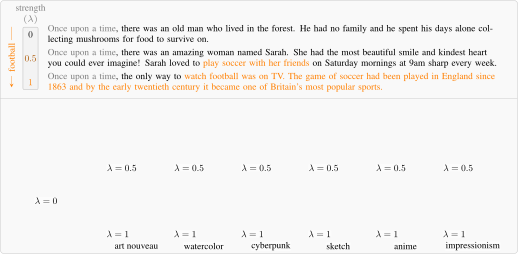
text_generation.num_sentences=10) at 3 different strengths (text_generation.strength_sample_size=3) between 0 and 1 (so 0.0, 0.5, 1.0). - Evaluate the generated text (see
evaluationsinact/configs/task_params/toxicity.yamlandact/configs/text_generation.yaml)
Note that we use Hydra as configuration and arguments manager.
Results will be stored in results_dir (set in the config file or run with results_dir=<your/results_dir/path>). It will also upload them to wandb if you have set it up. (more about wandb config for this project in configs/wandb/act.yaml). For task-specific evaluations (e.g., rtp, text_generation, zero_shot), modify the evaluation parameter in text_generation.yaml or text_to_image_generation.yaml or override it via the command line, and re-run the pipeline.
Running the pipeline for diffusion
python -m act.scripts.pipeline \
    --config-name text_to_image_generation \
    "task_params=coco_styles" \
    "task_params.src_subsets=['none']" \
    "task_params.dst_subsets=['art_nouveau']" \
    "task_params.prompt_subset=['none']" \
    "responses.batch_size=8" \
    "responses.max_batches=64" \
    "interventions.max_batches=null" \
    "wandb.mode=disabled" \
    "evaluation=['text-to-image-generation']" \
    "text_to_image_generation.batch_size=1" \
    "text_to_image_generation.max_batches=1" \
    "text_to_image_generation.create_gif=true" \
    "device=cuda"
Line by line:
--config-name text_to_image_generationchooses the config file inconfigs/text_to_image_generation.yaml."task_params=coco_styles"chooses the taskcoco_stylesinconfigs/task_params"task_params.src_subsets=['none']"and"task_params.dst_subsets=['art_nouveau']"choose the source and destination datasets respectively."task_params.prompt_subset=['none']"chooses the prompt dataset for inference time"responses.batch_size=8"and"responses.max_batches=64"extract 8 responses per batch and run 64 batches. (512 samples). We used 32 x 64 in the paper."interventions.max_batches=null"will use all extrated responses to learn an intervention"evaluation=['text-to-image-generation']"after the intervention, it will generate images. You can also addclip_scorehere."text_to_image_generation.create_gif=true"this will save gif animations with the generated images at different strengths. The strengths used are configured inconfigs/text_to_image_generation.yamlundertext_to_image_generationwithmin_strength,max_strengthandstrength_steps(actual strengths will be anp.linspace(min_strength, max_strength, strength_steps)).
Results will be stored in results_dir (set in the config file or run with results_dir=<your/results_dir/path>). It will also upload them to wandb if you have set it up. (more about wandb config for this project in configs/wandb/act.yaml). In results_dir/generate_with_hooks_diffusion/ you will find the generated images, with a folder for each strength value and guidance scale set up in text_to_image_generation.yaml in the format {strength:.03f}_{guidance:.03f}/<image_id>.png.
Customizing Hydra Configuration (e.g. text_generation.yaml)
Overview of Configurable Sections
- Model: Specify model architecture, path, and layer names for intervention.
- Task Params: Define task-specific settings (e.g., dataset, batch size).
- Intervention Params: Configure intervention type, incremental mode, and hook parameters.
- Evaluation: Choose evaluation tasks to run after learning interventions.
Example Customizations
-
(preferred) Override Config Values via Command Line:
- Use
key=valuepairs, for example:
python -m act.scripts.pipeline \ --config-name text_generation \ interventions.intervention_params.name=your_new_intervention \ evaluation=[rtp, zero_shot]- This approach allows for quick testing of different configurations without modifying the YAML file.
- Use
-
Change where the intervention is performed:
The easiest way is to override arguments via commandline
model.module_names=['.*layernorm.*]. Another option is to directly modify the config file, e.g,model: model_path: "path/to/your/model" module_names: - layer1_regex - layer2_regexor modify/add a new model in
configs/modeland reference it intext_generation.yamlortext_to_image_generation.yaml. -
Switch to a Different Intervention:
interventions: intervention_params: name: your_intervention_name # Update hook_params if necessary for the new intervention hook_params: key: value -
Modify Evaluation Tasks:
evaluation:
  - rtp
  - zero_shot
  # Add or remove tasks as needed
Cite
@article{rodriguez2024controlling,
  title={Controlling Language and Diffusion Models by Transporting Activations},
  author={Rodriguez, Pau and Blaas, Arno and Klein, Michal and Zappella, Luca and Apostoloff, Nicholas and Cuturi, Marco and Suau, Xavier},
  journal={arXiv preprint arXiv:2410.23054},
  year={2024}
}
Similar repos


README
Controlling Language and Diffusion Models by Transporting Activations
Pau Rodriguez, Arno Blaas, Michal Klein, Luca Zappella, Nicholas Apostoloff, Marco Cuturi and Xavier Suau
This software project accompanies the research paper: Controlling Language and Diffusion Models by Transporting Activations (bibtex).
Setup
-
Clone the Repository:
git clone https://github.com/apple/ml-act cd ml-act -
Install dependencies
pip install -r requirements.txt -
Download datasets and models. For ease of explanation, we will use the following environment variables to point to where the datasets and models are stored:
DATA_DIRandCACHE_DIR. Also, setHF_TOKENif needed.export DATA_DIR="some/path" export CACHE_DIR="some/other/path" export HF_HUB_CACHE="another/path" # optionally, models will be saved here export HF_TOKEN="your_token" # required for some specific models like Gemma-2Then just call
python -m act.scripts.download_external_datato download external assets to your local$DATA_DIR. This will download RTP prompts, the Jigsaw toxicity dataset and the COCO captions dataset. Note that models will be downloaded automatically with huggingface. Note you can setupHF_HUB_CACHEto point to a specific folder (see huggingface documentation). -
Optionally, run the provided tests to make sure the setup is correct. It will download some small model from Huggingface during the first run.
pytest . -m "not slow"
Documentation
This repository contains the code for a research paper focusing on controlling model behavior through learned interventions. We provide a pipeline script that enables users to:
- Extract Activations: Obtain activations from specified model layers.
- Learn Interventions: Utilize extracted activations to learn interventions that control model behavior.
- Evaluate Intervened Models: Assess the performance of intervened models on various tasks.
Quick summary of the main files in the repository:
- Python Scripts:
pipeline.py: Main pipeline for incremental learning of model interventions.learn_intervention.py: Core functionality for learning interventions from model activations.
- Hydra Configuration Files (
configsdirectory):text_generation.yamlandtext_to_image_generation.yaml: Primary config files, specifying:- Model architecture and layers
- Task parameters (e.g., dataset, batch size)
- Intervention type and settings (e.g.,
linear_ot) - Evaluation tasks (e.g., RTP, zero-shot evaluation)
- Referenced Sub-Configs:
task_params/giraffes.yaml(task-specific settings)model/gpt2.yaml(model architecture details)intervention_params/linear_ot(intervention-type specific settings; not explicitly listed, implied as part of the config structure)wandb/act.yaml(WandB logging configuration)
The
linear_otintervention in this repository implementsLinear-AcTas defined in our paper: Controlling Language and Diffusion Models by Transporting Activations
Running the pipeline for text generation
# see act/configs/text_generation.yaml for configuration details
python -m act.scripts.pipeline \
"task_params=giraffes" \
"responses.batch_size=20" \
"responses.max_batches=1" \
"wandb.mode=disabled" \
"text_generation.num_sentences=10" \
"text_generation.new_seq_len=48" \
"text_generation.strength_sample_size=3" \
"intervention_params.incremental=atonce" \
"device=cpu" \
"model.dtype=float32"
This command will:
- Extract activations from a pre-trained
Gemma-2-2bmodel as specified inconfigs/text_generation.yaml. We collect 1 batch of size 20 since we provide 20 sentences indata/giraffes.json). Remember to change todevice=mpsif working on MacOS and todevice=cudaif you work on GPU for better speed. - Use the responses to learn an intervention. We set
intervention_params.incremental=atonceto make this example faster, but better performance is achieved withincr. - Generate text with the intervened model. We ask to generate 10 sentences (
text_generation.num_sentences=10) at 3 different strengths (text_generation.strength_sample_size=3) between 0 and 1 (so 0.0, 0.5, 1.0). - Evaluate the generated text (see
evaluationsinact/configs/task_params/toxicity.yamlandact/configs/text_generation.yaml)
Note that we use Hydra as configuration and arguments manager.
Results will be stored in results_dir (set in the config file or run with results_dir=<your/results_dir/path>). It will also upload them to wandb if you have set it up. (more about wandb config for this project in configs/wandb/act.yaml). For task-specific evaluations (e.g., rtp, text_generation, zero_shot), modify the evaluation parameter in text_generation.yaml or text_to_image_generation.yaml or override it via the command line, and re-run the pipeline.
Running the pipeline for diffusion
python -m act.scripts.pipeline \
    --config-name text_to_image_generation \
    "task_params=coco_styles" \
    "task_params.src_subsets=['none']" \
    "task_params.dst_subsets=['art_nouveau']" \
    "task_params.prompt_subset=['none']" \
    "responses.batch_size=8" \
    "responses.max_batches=64" \
    "interventions.max_batches=null" \
    "wandb.mode=disabled" \
    "evaluation=['text-to-image-generation']" \
    "text_to_image_generation.batch_size=1" \
    "text_to_image_generation.max_batches=1" \
    "text_to_image_generation.create_gif=true" \
    "device=cuda"
Line by line:
--config-name text_to_image_generationchooses the config file inconfigs/text_to_image_generation.yaml."task_params=coco_styles"chooses the taskcoco_stylesinconfigs/task_params"task_params.src_subsets=['none']"and"task_params.dst_subsets=['art_nouveau']"choose the source and destination datasets respectively."task_params.prompt_subset=['none']"chooses the prompt dataset for inference time"responses.batch_size=8"and"responses.max_batches=64"extract 8 responses per batch and run 64 batches. (512 samples). We used 32 x 64 in the paper."interventions.max_batches=null"will use all extrated responses to learn an intervention"evaluation=['text-to-image-generation']"after the intervention, it will generate images. You can also addclip_scorehere."text_to_image_generation.create_gif=true"this will save gif animations with the generated images at different strengths. The strengths used are configured inconfigs/text_to_image_generation.yamlundertext_to_image_generationwithmin_strength,max_strengthandstrength_steps(actual strengths will be anp.linspace(min_strength, max_strength, strength_steps)).
Results will be stored in results_dir (set in the config file or run with results_dir=<your/results_dir/path>). It will also upload them to wandb if you have set it up. (more about wandb config for this project in configs/wandb/act.yaml). In results_dir/generate_with_hooks_diffusion/ you will find the generated images, with a folder for each strength value and guidance scale set up in text_to_image_generation.yaml in the format {strength:.03f}_{guidance:.03f}/<image_id>.png.
Customizing Hydra Configuration (e.g. text_generation.yaml)
Overview of Configurable Sections
- Model: Specify model architecture, path, and layer names for intervention.
- Task Params: Define task-specific settings (e.g., dataset, batch size).
- Intervention Params: Configure intervention type, incremental mode, and hook parameters.
- Evaluation: Choose evaluation tasks to run after learning interventions.
Example Customizations
-
(preferred) Override Config Values via Command Line:
- Use
key=valuepairs, for example:
python -m act.scripts.pipeline \ --config-name text_generation \ interventions.intervention_params.name=your_new_intervention \ evaluation=[rtp, zero_shot]- This approach allows for quick testing of different configurations without modifying the YAML file.
- Use
-
Change where the intervention is performed:
The easiest way is to override arguments via commandline
model.module_names=['.*layernorm.*]. Another option is to directly modify the config file, e.g,model: model_path: "path/to/your/model" module_names: - layer1_regex - layer2_regexor modify/add a new model in
configs/modeland reference it intext_generation.yamlortext_to_image_generation.yaml. -
Switch to a Different Intervention:
interventions: intervention_params: name: your_intervention_name # Update hook_params if necessary for the new intervention hook_params: key: value -
Modify Evaluation Tasks:
evaluation:
  - rtp
  - zero_shot
  # Add or remove tasks as needed
Cite
@article{rodriguez2024controlling,
  title={Controlling Language and Diffusion Models by Transporting Activations},
  author={Rodriguez, Pau and Blaas, Arno and Klein, Michal and Zappella, Luca and Apostoloff, Nicholas and Cuturi, Marco and Suau, Xavier},
  journal={arXiv preprint arXiv:2410.23054},
  year={2024}
}