
See what people are saying (1)
README
stepshell
An authenticated web terminal for Kubernetes pods — your cluster's RBAC decides who can shell in, and the audit log sees the real person.




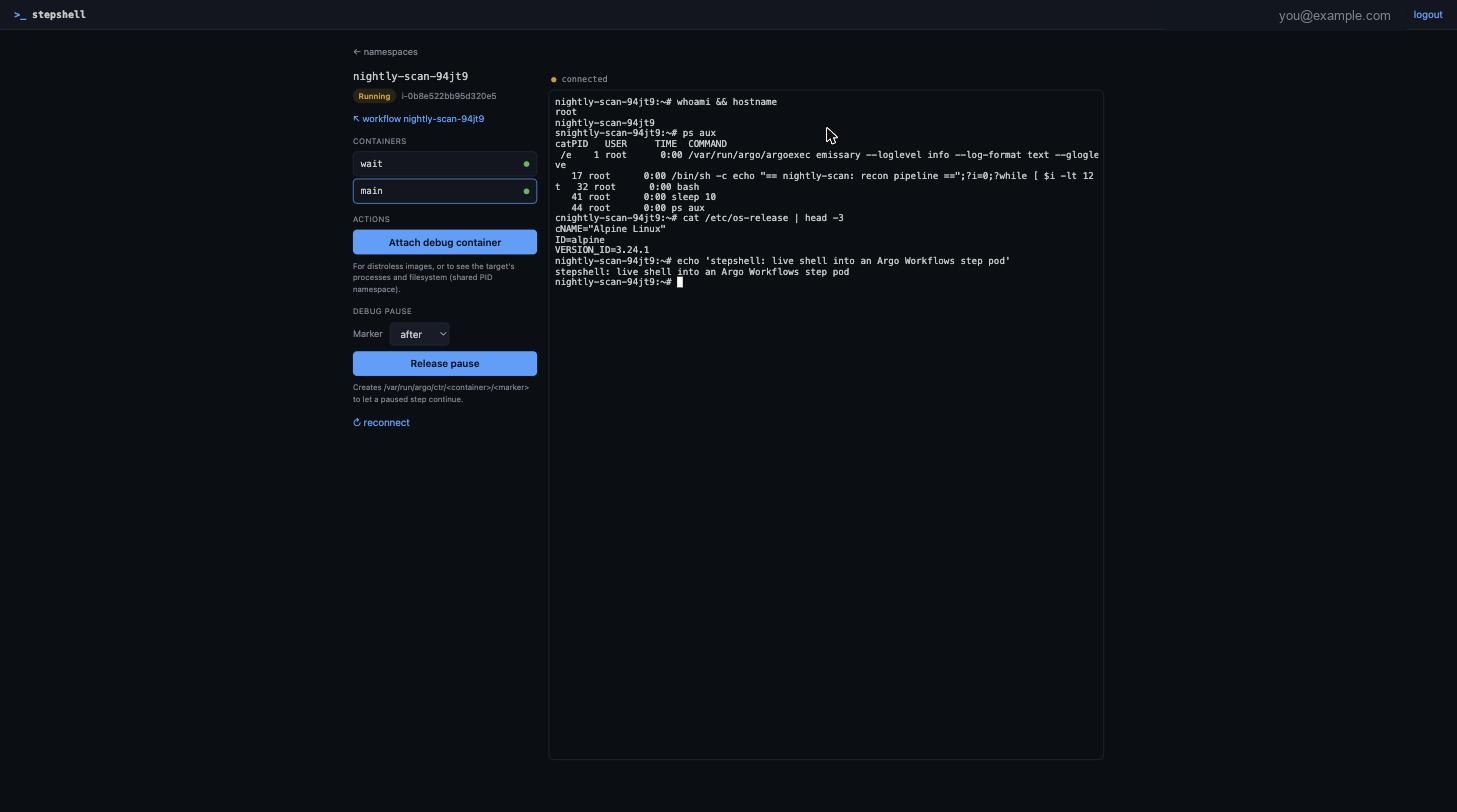
Open a terminal into any running pod — as you, not as a shared service
account. See the processes, tail -f the logs, poke at the filesystem, even on
distroless images. It works for any pod in your cluster; if you run Argo
Workflows, it also speaks debug-pause so you can break on a step and shell in
before it finishes.
Why this exists
Two problems, one small tool.
Every K8s web terminal makes you choose between auth and simplicity. The
lightweight ones ship with no authentication — a root shell for anyone who
reaches the URL, exec'd as a shared service account with no audit trail. The
ones that do auth are whole platforms you now have to operate. stepshell is the
middle: a single binary where the cluster's own RBAC authorizes each session
via impersonation, so a user only reaches what they're already allowed to, and
pods/exec shows up in the API-server audit log under their name.
And if you run Argo Workflows, the debugging story is genuinely broken. A
step fails, you want to look inside the pod, and there's no terminal in the UI —
so you race kubectl exec against a pod that's already been garbage-collected.
- The Argo UI has no terminal, and no extension point to add one:
argoproj/argo-workflows#6945
has been open since 2021 — the maintainers' answer is literally "use
kubectl exec." - The debug-pause backend exists but never got a UI: #6841 shipped the mechanism (two env vars + a marker file) and closed. Nobody built the button.
stepshell's core is plain Kubernetes — nothing about it is Argo-specific, and
--argo.enabled=false turns it into a pure K8s web terminal. The Argo support
is an opt-in layer on top: it understands the Workflow CRD well enough to browse
steps and to re-run one with a breakpoint injected.
Features
| 🔐 Real per-user identity | OIDC login, then Kubernetes impersonation. The server holds no pods/exec rights of its own — your cluster's RBAC decides, and the API-server audit log sees the actual person, not a shared SA. |
| 🐚 Shell-less images | Distroless pod with no /bin/sh? One click attaches an ephemeral debug container sharing the target's PID namespace and mounts — you get its processes (/proc/1/root) and filesystem anyway. |
| 🔗 Deep-linkable | /shell/{ns}/{pod}?container=main, or ?cmd=tail -f /var/log/app.log. Drop it into any UI (Argo, your own dashboard) as a per-pod link. |
| 📦 Standalone | Single Go binary with the UI embedded. No database — the session is an encrypted cookie. Bundled Dex can front GitHub SSO, or point it at your own IdP. |
| 🧩 Argo Workflows (optional) | With --argo.enabled, browse workflows and re-run a step with a breakpoint — one click injects ARGO_DEBUG_PAUSE_*, holds the step Running, and hands you a shell. Turn it off and it's a plain K8s terminal. |
Argo Workflows support
Optional, on by default, --argo.enabled=false to drop it. When on, stepshell
adds a workflow browser and the debug-pause flow:
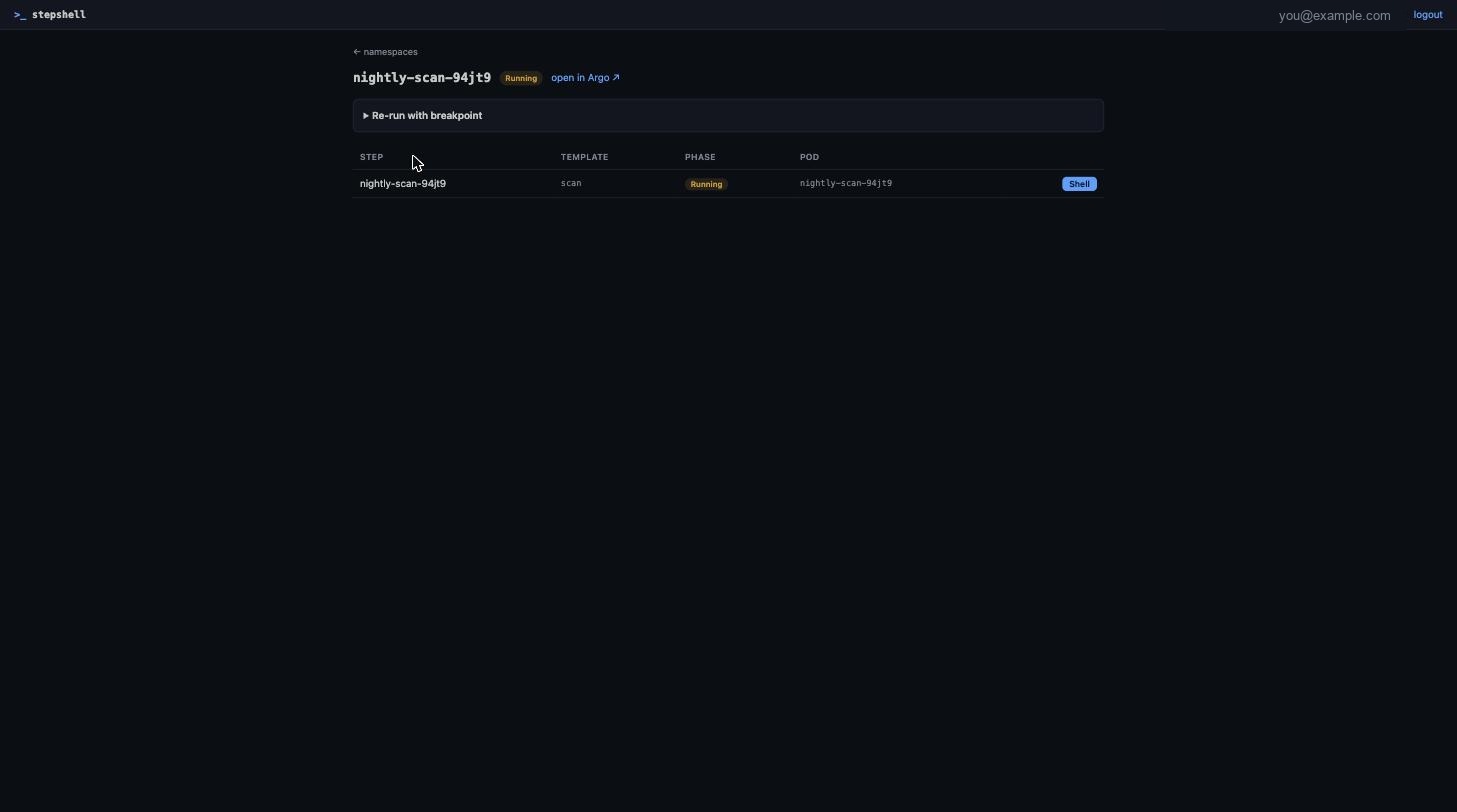
Pausing is optional. A live pod is always shell-able without pausing — the breakpoint is only for the step that finishes before you can catch it.
Architecture
browser ──HTTPS──► stepshell ──impersonated REST/WebSocket──► kube-apiserver
 xterm.js           OIDC + AES-GCM cookie                      RBAC decides
                    exec bridge (client-go remotecommand)      audit sees the user
No database. The session is an encrypted cookie, so replicas only share the
session key. See docs/spec.md for the full design, threat
model and HTTP API.
Quick start (local, no auth)
make ui           # build the embedded UI once
make run          # serves on http://localhost:8080 as $USER@local against your kube-context
--auth.mode=none is refused on any non-localhost URL unless you also pass
--auth.allow-insecure-none. Don't.
Deploy
helm install stepshell ./charts/stepshell \
  --set baseURL=https://stepshell.example.com \
  --set oidc.issuer=https://dex.example.com \
  --set oidc.clientID=stepshell \
  --set oidc.clientSecret=<secret> \
  --set argo.uiURL=https://argo-workflows.example.com \
  --set ingress.enabled=true \
  --set-json 'rbac.allowedGroups=["your-oidc-group"]'
The server ServiceAccount gets only impersonate on users/groups. Grant your
users the namespaced access they need yourself, or let the chart do it:
userAccess:
  enabled: true
  namespaces: [default, csa]
  subjects:
    - kind: Group
      name: your-oidc-group
GitHub login via the bundled Dex
GitHub is not an OIDC provider, so stepshell can bring its own
Dex to bridge it — self-contained, no dependency on any
other service. The groups claim arrives as org:team (e.g.
your-org:platform), which you pin in rbac.allowedGroups and can reuse in
your cluster RBAC.
-
Create a GitHub OAuth app (Settings → Developer settings → OAuth Apps) with callback URL
https://stepshell.example.com/dex/callback. -
Enable the bundled Dex. stepshell's
oidc.*fields are wired to it automatically — you only pass the GitHub app credentials:helm install stepshell ./charts/stepshell \ --set baseURL=https://stepshell.example.com \ --set dex.enabled=true \ --set dex.publicURL=https://stepshell.example.com/dex \ --set dex.github.clientID=<oauth app id> \ --set dex.github.clientSecret=<oauth app secret> \ --set-json 'dex.github.orgs=[{"name":"your-org","teams":["cloud","admins"]}]' \ --set ingress.enabled=true \ --set-json 'rbac.allowedGroups=["your-org:cloud","your-org:admins"]'Dex is served under
/dexon the same host and ingress; the chart routes it automatically. The stepshell↔Dex client secret is generated and kept stable across upgrades.
Prefer an existing IdP (Okta, Entra, Google, or a Dex you already run)? Leave
dex.enabled=false and set oidc.issuer / oidc.clientID / oidc.clientSecret
directly. The issuer must match the provider's advertised issuer exactly.
Behind an AWS ALB, raise the idle timeout so long-lived exec WebSockets don't drop at 60s:
ingress:
  annotations:
    alb.ingress.kubernetes.io/load-balancer-attributes: idle_timeout.timeout_seconds=3600
Wire it into the Argo UIs
Argo Workflows (controller.links):
- name: Shell
  scope: pod
  target: _blank
  url: https://stepshell.example.com/shell/${metadata.namespace}/${metadata.name}?container=main
- name: Debug workflow
  scope: workflow
  target: _blank
  url: https://stepshell.example.com/wf/${metadata.namespace}/${metadata.name}
Argo CD (argocd-cm):
resource.links: |
  - url: https://stepshell.example.com/shell/{{.resource.metadata.namespace}}/{{.resource.metadata.name}}
    title: Shell
    icon.class: fa-terminal
    if: resource.kind == "Pod"
Debug pause, end to end
The feature Argo built but never surfaced — now a button:
- On a workflow page, open Re-run with breakpoint, choose pause after
step (and optionally which templates), submit. stepshell clones the
workflow with
ARGO_DEBUG_PAUSE_AFTER=trueinjected andpodGCset toOnWorkflowCompletionso the paused pod survives. - When the step reaches the breakpoint the pod stays Running. Open its Shell, inspect processes/filesystem/volumes.
- Hit Release pause (or
touch /var/run/argo/ctr/main/afteryourself) and the step continues. Outputs are saved after release.
Security
- Impersonation means a server compromise lets an attacker impersonate any user
the
impersonaterule allows — pinrbac.allowedGroups, run the distroless read-only image, add a NetworkPolicy. - Inside a pod you have whatever the pod's ServiceAccount allows, exactly like
kubectl exec. SetautomountServiceAccountToken: falseon pods that don't need the API. - Sessions are AES-256-GCM cookies (
HttpOnly; Secure; SameSite=Lax), bounded bysession.ttl. Mutating requests require theX-Stepshellheader; the WebSocket handshake checksOrigin.
Development
make test     # go test + tsc --noEmit
make lint     # go vet + gofmt -l
cd web && npm run watch   # rebuild UI on change
License
Apache-2.0.
Contributors

12 commits
Similar repos


Languages
Go
68.1%
TypeScript
20.0%
CSS
5.2%
Go Template
3.8%
JavaScript
1.0%
See what people are saying (1)
README
stepshell
An authenticated web terminal for Kubernetes pods — your cluster's RBAC decides who can shell in, and the audit log sees the real person.
Open a terminal into any running pod — as you, not as a shared service
account. See the processes, tail -f the logs, poke at the filesystem, even on
distroless images. It works for any pod in your cluster; if you run Argo
Workflows, it also speaks debug-pause so you can break on a step and shell in
before it finishes.
Why this exists
Two problems, one small tool.
Every K8s web terminal makes you choose between auth and simplicity. The
lightweight ones ship with no authentication — a root shell for anyone who
reaches the URL, exec'd as a shared service account with no audit trail. The
ones that do auth are whole platforms you now have to operate. stepshell is the
middle: a single binary where the cluster's own RBAC authorizes each session
via impersonation, so a user only reaches what they're already allowed to, and
pods/exec shows up in the API-server audit log under their name.
And if you run Argo Workflows, the debugging story is genuinely broken. A
step fails, you want to look inside the pod, and there's no terminal in the UI —
so you race kubectl exec against a pod that's already been garbage-collected.
- The Argo UI has no terminal, and no extension point to add one:
argoproj/argo-workflows#6945
has been open since 2021 — the maintainers' answer is literally "use
kubectl exec." - The debug-pause backend exists but never got a UI: #6841 shipped the mechanism (two env vars + a marker file) and closed. Nobody built the button.
stepshell's core is plain Kubernetes — nothing about it is Argo-specific, and
--argo.enabled=false turns it into a pure K8s web terminal. The Argo support
is an opt-in layer on top: it understands the Workflow CRD well enough to browse
steps and to re-run one with a breakpoint injected.
Features
| 🔐 Real per-user identity | OIDC login, then Kubernetes impersonation. The server holds no pods/exec rights of its own — your cluster's RBAC decides, and the API-server audit log sees the actual person, not a shared SA. |
| 🐚 Shell-less images | Distroless pod with no /bin/sh? One click attaches an ephemeral debug container sharing the target's PID namespace and mounts — you get its processes (/proc/1/root) and filesystem anyway. |
| 🔗 Deep-linkable | /shell/{ns}/{pod}?container=main, or ?cmd=tail -f /var/log/app.log. Drop it into any UI (Argo, your own dashboard) as a per-pod link. |
| 📦 Standalone | Single Go binary with the UI embedded. No database — the session is an encrypted cookie. Bundled Dex can front GitHub SSO, or point it at your own IdP. |
| 🧩 Argo Workflows (optional) | With --argo.enabled, browse workflows and re-run a step with a breakpoint — one click injects ARGO_DEBUG_PAUSE_*, holds the step Running, and hands you a shell. Turn it off and it's a plain K8s terminal. |
Argo Workflows support
Optional, on by default, --argo.enabled=false to drop it. When on, stepshell
adds a workflow browser and the debug-pause flow:
Pausing is optional. A live pod is always shell-able without pausing — the breakpoint is only for the step that finishes before you can catch it.
Architecture
browser ──HTTPS──► stepshell ──impersonated REST/WebSocket──► kube-apiserver
 xterm.js           OIDC + AES-GCM cookie                      RBAC decides
                    exec bridge (client-go remotecommand)      audit sees the user
No database. The session is an encrypted cookie, so replicas only share the
session key. See docs/spec.md for the full design, threat
model and HTTP API.
Quick start (local, no auth)
make ui           # build the embedded UI once
make run          # serves on http://localhost:8080 as $USER@local against your kube-context
--auth.mode=none is refused on any non-localhost URL unless you also pass
--auth.allow-insecure-none. Don't.
Deploy
helm install stepshell ./charts/stepshell \
  --set baseURL=https://stepshell.example.com \
  --set oidc.issuer=https://dex.example.com \
  --set oidc.clientID=stepshell \
  --set oidc.clientSecret=<secret> \
  --set argo.uiURL=https://argo-workflows.example.com \
  --set ingress.enabled=true \
  --set-json 'rbac.allowedGroups=["your-oidc-group"]'
The server ServiceAccount gets only impersonate on users/groups. Grant your
users the namespaced access they need yourself, or let the chart do it:
userAccess:
  enabled: true
  namespaces: [default, csa]
  subjects:
    - kind: Group
      name: your-oidc-group
GitHub login via the bundled Dex
GitHub is not an OIDC provider, so stepshell can bring its own
Dex to bridge it — self-contained, no dependency on any
other service. The groups claim arrives as org:team (e.g.
your-org:platform), which you pin in rbac.allowedGroups and can reuse in
your cluster RBAC.
-
Create a GitHub OAuth app (Settings → Developer settings → OAuth Apps) with callback URL
https://stepshell.example.com/dex/callback. -
Enable the bundled Dex. stepshell's
oidc.*fields are wired to it automatically — you only pass the GitHub app credentials:helm install stepshell ./charts/stepshell \ --set baseURL=https://stepshell.example.com \ --set dex.enabled=true \ --set dex.publicURL=https://stepshell.example.com/dex \ --set dex.github.clientID=<oauth app id> \ --set dex.github.clientSecret=<oauth app secret> \ --set-json 'dex.github.orgs=[{"name":"your-org","teams":["cloud","admins"]}]' \ --set ingress.enabled=true \ --set-json 'rbac.allowedGroups=["your-org:cloud","your-org:admins"]'Dex is served under
/dexon the same host and ingress; the chart routes it automatically. The stepshell↔Dex client secret is generated and kept stable across upgrades.
Prefer an existing IdP (Okta, Entra, Google, or a Dex you already run)? Leave
dex.enabled=false and set oidc.issuer / oidc.clientID / oidc.clientSecret
directly. The issuer must match the provider's advertised issuer exactly.
Behind an AWS ALB, raise the idle timeout so long-lived exec WebSockets don't drop at 60s:
ingress:
  annotations:
    alb.ingress.kubernetes.io/load-balancer-attributes: idle_timeout.timeout_seconds=3600
Wire it into the Argo UIs
Argo Workflows (controller.links):
- name: Shell
  scope: pod
  target: _blank
  url: https://stepshell.example.com/shell/${metadata.namespace}/${metadata.name}?container=main
- name: Debug workflow
  scope: workflow
  target: _blank
  url: https://stepshell.example.com/wf/${metadata.namespace}/${metadata.name}
Argo CD (argocd-cm):
resource.links: |
  - url: https://stepshell.example.com/shell/{{.resource.metadata.namespace}}/{{.resource.metadata.name}}
    title: Shell
    icon.class: fa-terminal
    if: resource.kind == "Pod"
Debug pause, end to end
The feature Argo built but never surfaced — now a button:
- On a workflow page, open Re-run with breakpoint, choose pause after
step (and optionally which templates), submit. stepshell clones the
workflow with
ARGO_DEBUG_PAUSE_AFTER=trueinjected andpodGCset toOnWorkflowCompletionso the paused pod survives. - When the step reaches the breakpoint the pod stays Running. Open its Shell, inspect processes/filesystem/volumes.
- Hit Release pause (or
touch /var/run/argo/ctr/main/afteryourself) and the step continues. Outputs are saved after release.
Security
- Impersonation means a server compromise lets an attacker impersonate any user
the
impersonaterule allows — pinrbac.allowedGroups, run the distroless read-only image, add a NetworkPolicy. - Inside a pod you have whatever the pod's ServiceAccount allows, exactly like
kubectl exec. SetautomountServiceAccountToken: falseon pods that don't need the API. - Sessions are AES-256-GCM cookies (
HttpOnly; Secure; SameSite=Lax), bounded bysession.ttl. Mutating requests require theX-Stepshellheader; the WebSocket handshake checksOrigin.
Development
make test     # go test + tsc --noEmit
make lint     # go vet + gofmt -l
cd web && npm run watch   # rebuild UI on change
License
Apache-2.0.
Similar repos
Contributors
12 commits
Languages
Go
68.1%
TypeScript
20.0%
CSS
5.2%
Go Template
3.8%
JavaScript
1.0%