
Lightweight, zero-dependency HUD & telemetry overlay for web apps, game engines, and Python backends. Includes WebSocket bridge and custom AI assistant integration.
See the codeSee what people are saying (1)
README
BeeLadybug
Universal telemetry and visual inspection overlay.
BeeLadybug is not a Canvas widget. It is a small open-source debugger core that accepts raw packets from any source — Canvas 2D games, DOM pages, headless bots, Python processes, AI pipelines — and renders them in one dark console.
Il Core non sa cosa sta monitorando. Riceve solo dati grezzi.
Perché questa struttura
Il file storico BeeLadybug era accoppiato a un engine di gioco (entità,
hitbox, ctx.drawOverlay). Quello non scala a un sito HTML o a un modello
Python. Per questo il progetto riparte da zero con due strati:
| Strato | Responsabilità |
|---|---|
src/core/ | Orologio fittizio, buffer, grafici, overlay cyberpunk |
src/adapters/ | Traduttori. Convertono un mondo specifico in sendData() |
L'overlay non è disegnato sul Canvas. È un pannello HTML in Shadow DOM: funziona sopra un gioco, sopra una pagina, o da solo in una sandbox.
bee-ladybug/
├── src/
│   ├── index.js                 # API pubblica
│   ├── index.d.ts               # tipi npm / tsc
│   ├── core/
│   │   ├── BeeLadybugCore.js
│   │   └── UIOverlay.js
│   └── adapters/
│       ├── CanvasAdapter.js
│       ├── WebDOMAdapter.js
│       ├── AntAdapter.js
│       ├── SpiderAdapter.js
│       └── python/PythonBridge.js
├── examples/
│   ├── core.html
│   ├── canvas-sandbox.js
│   ├── dom.html
│   ├── python.html
│   └── python/sender.py
├── tsconfig.json
├── package.json
├── LICENSE
├── index.html
└── README.md
Quick start
Servire la cartella con un server statico (i moduli ES non partono da file://):
python -m http.server 8080
Aprire http://localhost:8080. Premere F2 / F3 / F4. In console:
bee.sendData('log', { source: 'human', message: 'hello core' })
bee.sendData('fps', { value: 61 })
bee.sendData('error', { source: 'ai', message: 'timeout' })
Uso minimo in un'app:
import { BeeLadybugCore } from './src/index.js';

const bee = new BeeLadybugCore();
bee.sendData('log', { message: 'boot', source: 'app' });
Core headless (bot, test, Node con DOM assente):
const bee = new BeeLadybugCore({ ui: false, mount: false, autoAttach: false });
bee.sendData('metric', { name: 'loss', value: 0.12 });
Contratto sendData(type, payload)
Gli adapter parlano solo così. Uno scalare viene avvolto in { value }.
type | payload | Effetto |
|---|---|---|
fps | { value } | HUD + grafico storico |
metric | { name, value, unit? } | HUD + serie storica |
coord | { label?, x, y } | HUD |
state | { key, value } | HUD |
log | { message, level?, source? } | console |
warn | { message, source? } | console ambra |
error | { message, source? } | console rossa |
telemetry | { kind?, duration?, source? } | history + lampeggio pulsante adapter |
clear | { channel?: 'logs'|'history'|'hud' } | reset buffer |
sys | emesso dal Core | freeze / visibilità / scala |
Ogni pacchetto viene stampato con:
wallTime— orologio realesimTime— tempo fittizio del Coreframe— frame-count indipendente dall'host
Il freeze non ferma l'overlay. Ferma solo il clock fittizio. Gli adapter
possono ascoltare type: 'sys' e mettere in pausa il loro mondo.
bee.subscribe((packet) => {
  if (packet.type === 'sys' && packet.payload.op === 'freeze') {
    host.paused = packet.payload.frozen;
  }
});
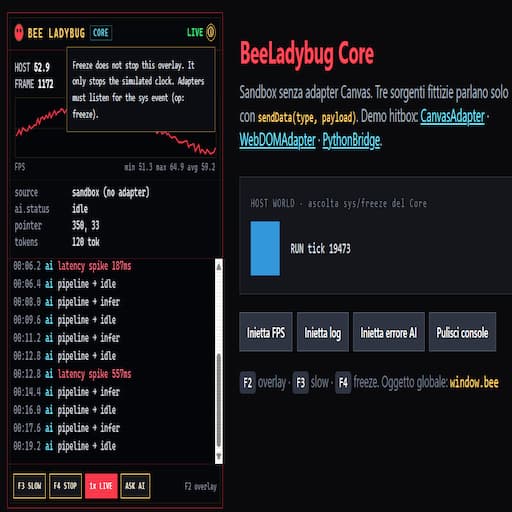
Tasti
| Tasto | Azione |
|---|---|
F2 | mostra / nascondi overlay (e hitbox canvas) |
F3 | slow-motion del tempo fittizio (0.25x / 1x) |
F4 | freeze / run del tempo fittizio |
Niente F12, niente tilde: sui layout italiani la tilde non è un tasto unico.
CanvasAdapter
import { BeeLadybugCore, CanvasAdapter } from './src/index.js';

const bee = new BeeLadybugCore();
const adapter = new CanvasAdapter(bee, {
  canvas,                 // HTMLCanvasElement del gioco
  entities,               // array di AABB, tenuto per riferimento
  overlay: true,          // hitbox su canvas stacked (default)
  computeCollisions: true
});
adapter.attach();

function loop() {
  if (!adapter.frozen) updateGame(adapter.timeScale);
  drawGame();
  adapter.pump();           // una volta per frame host
  requestAnimationFrame(loop);
}
L'adapter accetta oggetti qualsiasi con x/y/width/height (o worldX/worldY).
Disegna le hitbox su un canvas trasparente sopra il gioco: verde = ok, rosso = collide.
Espone frozen e timeScale così l'host può mettere in pausa la simulazione.
Pacchetti: fps, metric entities, metric hits, coord del player, warn all'ingresso collisione.
WebDOMAdapter
import { BeeLadybugCore, WebDOMAdapter } from './src/index.js';

const bee = new BeeLadybugCore();
const adapter = new WebDOMAdapter(bee, {
  root: document.body,     // sottoalbero da ispezionare
  watch: ['.card', '#cta'],
  overlay: true,
  autoTick: true           // non serve un game loop
});
adapter.attach();
Traduce il DOM in pacchetti: nodo sotto il puntatore, box model (margin / padding / content), conteggio nodi, mutazioni (+n -n attr). F4 congela l'hover. F2 nasconde overlay e highlight. Il Core non sa che esiste HTML.
Registro adapter (overlay)
Il Core non conosce ANT/SPIDER. Gli adapter si iscrivono con hook propri; l'overlay disegna un toggle per ciascuno.
bee.registerAdapter('probe', {
  label: 'PROBE',
  enable: () => observer.observe(root, opts),
  disable: () => observer.disconnect()
});
adapter.detach(); // chiama bee.unregisterAdapter('probe')
Click sul pulsante → enable() / disable(). Un pacchetto warn o telemetry con source uguale al nome registrato fa lampeggiare quel pulsante, al massimo una volta ogni 1.5s.
AntAdapter
import { BeeLadybugCore, AntAdapter } from './src/index.js';

const bee = new BeeLadybugCore();
const ant = new AntAdapter(bee, {
  root: document.body,
  threshold: 30          // mutazioni / secondo per nodo
});
ant.attach();
MutationObserver indipendente da WebDOMAdapter (possono condividere lo stesso root). Se un nodo supera la soglia, arriva un warn source: 'ant'.
SpiderAdapter
import { BeeLadybugCore, SpiderAdapter } from './src/index.js';

const bee = new BeeLadybugCore();
const spider = new SpiderAdapter(bee, {
  resourceThreshold: 500 // ms
});
spider.attach();
PerformanceObserver: longtask > 50ms → telemetry; risorse > soglia → warn. Se il browser non espone longtask (Firefox/Safari), un log una tantum e quella parte si spegne senza errori.
PythonBridge
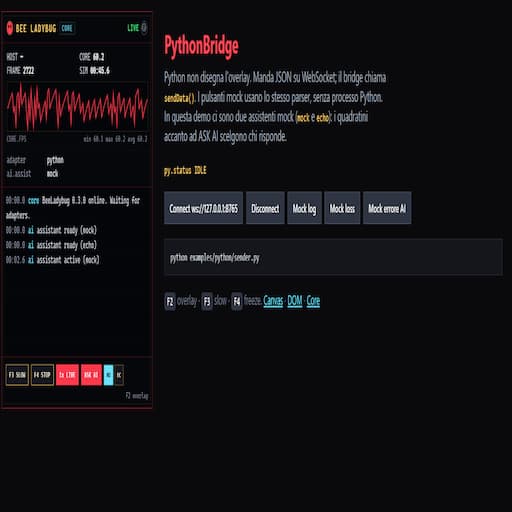
Python non vede l'overlay. Manda JSON. Il browser lo srotola in sendData().
import { BeeLadybugCore, PythonBridge } from './src/index.js';

const bee = new BeeLadybugCore();
const bridge = new PythonBridge(bee, { url: 'ws://127.0.0.1:8765' });
bridge.connect();

// stesso parser, senza socket:
bridge.ingest({ type: 'metric', payload: { name: 'loss', value: 0.12 } });
Forma del filo:
{ "type": "log", "payload": { "message": "epoch 3" } }
{ "type": "error", "message": "CUDA OOM" }
Sender di esempio (solo stdlib, nessun pip):
python examples/python/sender.py
Poi aprire http://localhost:8080/examples/python.html e Connect. I pulsanti mock funzionano anche a processo spento.
npm / TypeScript
npm install
npm run typecheck
import { BeeLadybugCore } from 'bee-ladybug';
Il runtime resta JavaScript ESM. I tipi stanno in src/index.d.ts (package.json → "types").
Keyword e repository puntano a BeeLadybug-universal, non a BeeEngine.
npm run typecheck
npm run lint
npm login
npm publish --access public
Versione runtime e pacchetto: 0.4.1 (BEE_LADYBUG_VERSION e package.json devono restare uguali).
Assistente AI (gancio, nessun vendor)
BeeLadybug non chiama OpenAI, Claude o Ollama. Lo sviluppatore innesta i propri modelli. registerAssistant aggiunge (non sostituisce gli altri). setActiveAssistant(name) sceglie chi risponde a ASK AI.
bee.registerAssistant({
  name: 'ollama',
  async complete({ question, snapshot }) {
    const res = await fetch('http://127.0.0.1:11434/api/generate', {
      method: 'POST',
      headers: { 'Content-Type': 'application/json' },
      body: JSON.stringify({
        model: 'llama3',
        prompt: `${question}\n${JSON.stringify(snapshot)}`,
        stream: false
      })
    });
    const data = await res.json();
    return data.response;
  }
});

bee.registerAssistant({
  name: 'mock',
  complete({ snapshot }) {
    return `logs=${snapshot.logs.length}`;
  }
});

bee.setActiveAssistant('ollama');
await bee.ask('perché il loss sale?');
Il Core manda un snapshot (log recenti, HUD, metriche) a complete(). Chiavi tipo token/password vengono redacted. In overlay: pulsante ASK AI e un quadratino per ogni provider; quello attivo è evidenziato. Senza provider, il bottone spiega come collegarlo. setAssistant resta come scorciatoia: registra e attiva, senza cancellare gli altri.
API Core
const bee = new BeeLadybugCore({
  toggleKey: 'F2',
  slowKey: 'F3',
  freezeKey: 'F4',
  slowScale: 0.25,
  maxLogs: 250,
  historySize: 120,
  mount: 'auto',   // document.body, HTMLElement, o false
  ui: true,
  autoAttach: true,
  autoStart: true
});

bee.sendData(type, payload);
bee.subscribe(handler);          // ritorna unsubscribe
bee.getState();
bee.getLogs();
bee.getHistory('fps');
bee.getHud();
bee.show(); bee.hide(); bee.toggle();
bee.freeze(); bee.unfreeze(); bee.toggleFreeze();
bee.applySlowMo(); bee.restoreRealtime();
bee.registerAssistant({ name: 'mock', complete: async ({ snapshot }) => 'ok' });
bee.setActiveAssistant('mock');
await bee.ask('why fps drop?');
bee.registerAdapter('probe', { label: 'PROBE', enable() {}, disable() {} });
bee.toggleAdapter('probe');
bee.destroy();
Roadmap
- Ora — Core, adapter, registro toggle overlay, Ant/Spider, PythonBridge, tipi, ESLint, gancio AI multi-provider. Fatto.
- npm 0.4.1 —
npm publish.
Come contribuire
Il Core resta cieco. Se una feature ha bisogno di conoscere Canvas, DOM o Python, vive in un adapter. Patch al Core solo per clock, buffer, protocollo o UI condivisa.
Contributors

16 commits


Lightweight, zero-dependency HUD & telemetry overlay for web apps, game engines, and Python backends. Includes WebSocket bridge and custom AI assistant integration.
See the codeSee what people are saying (1)
README
BeeLadybug
Universal telemetry and visual inspection overlay.
BeeLadybug is not a Canvas widget. It is a small open-source debugger core that accepts raw packets from any source — Canvas 2D games, DOM pages, headless bots, Python processes, AI pipelines — and renders them in one dark console.
Il Core non sa cosa sta monitorando. Riceve solo dati grezzi.
Perché questa struttura
Il file storico BeeLadybug era accoppiato a un engine di gioco (entità,
hitbox, ctx.drawOverlay). Quello non scala a un sito HTML o a un modello
Python. Per questo il progetto riparte da zero con due strati:
| Strato | Responsabilità |
|---|---|
src/core/ | Orologio fittizio, buffer, grafici, overlay cyberpunk |
src/adapters/ | Traduttori. Convertono un mondo specifico in sendData() |
L'overlay non è disegnato sul Canvas. È un pannello HTML in Shadow DOM: funziona sopra un gioco, sopra una pagina, o da solo in una sandbox.
bee-ladybug/
├── src/
│   ├── index.js                 # API pubblica
│   ├── index.d.ts               # tipi npm / tsc
│   ├── core/
│   │   ├── BeeLadybugCore.js
│   │   └── UIOverlay.js
│   └── adapters/
│       ├── CanvasAdapter.js
│       ├── WebDOMAdapter.js
│       ├── AntAdapter.js
│       ├── SpiderAdapter.js
│       └── python/PythonBridge.js
├── examples/
│   ├── core.html
│   ├── canvas-sandbox.js
│   ├── dom.html
│   ├── python.html
│   └── python/sender.py
├── tsconfig.json
├── package.json
├── LICENSE
├── index.html
└── README.md
Quick start
Servire la cartella con un server statico (i moduli ES non partono da file://):
python -m http.server 8080
Aprire http://localhost:8080. Premere F2 / F3 / F4. In console:
bee.sendData('log', { source: 'human', message: 'hello core' })
bee.sendData('fps', { value: 61 })
bee.sendData('error', { source: 'ai', message: 'timeout' })
Uso minimo in un'app:
import { BeeLadybugCore } from './src/index.js';

const bee = new BeeLadybugCore();
bee.sendData('log', { message: 'boot', source: 'app' });
Core headless (bot, test, Node con DOM assente):
const bee = new BeeLadybugCore({ ui: false, mount: false, autoAttach: false });
bee.sendData('metric', { name: 'loss', value: 0.12 });
Contratto sendData(type, payload)
Gli adapter parlano solo così. Uno scalare viene avvolto in { value }.
type | payload | Effetto |
|---|---|---|
fps | { value } | HUD + grafico storico |
metric | { name, value, unit? } | HUD + serie storica |
coord | { label?, x, y } | HUD |
state | { key, value } | HUD |
log | { message, level?, source? } | console |
warn | { message, source? } | console ambra |
error | { message, source? } | console rossa |
telemetry | { kind?, duration?, source? } | history + lampeggio pulsante adapter |
clear | { channel?: 'logs'|'history'|'hud' } | reset buffer |
sys | emesso dal Core | freeze / visibilità / scala |
Ogni pacchetto viene stampato con:
wallTime— orologio realesimTime— tempo fittizio del Coreframe— frame-count indipendente dall'host
Il freeze non ferma l'overlay. Ferma solo il clock fittizio. Gli adapter
possono ascoltare type: 'sys' e mettere in pausa il loro mondo.
bee.subscribe((packet) => {
  if (packet.type === 'sys' && packet.payload.op === 'freeze') {
    host.paused = packet.payload.frozen;
  }
});
Tasti
| Tasto | Azione |
|---|---|
F2 | mostra / nascondi overlay (e hitbox canvas) |
F3 | slow-motion del tempo fittizio (0.25x / 1x) |
F4 | freeze / run del tempo fittizio |
Niente F12, niente tilde: sui layout italiani la tilde non è un tasto unico.
CanvasAdapter
import { BeeLadybugCore, CanvasAdapter } from './src/index.js';

const bee = new BeeLadybugCore();
const adapter = new CanvasAdapter(bee, {
  canvas,                 // HTMLCanvasElement del gioco
  entities,               // array di AABB, tenuto per riferimento
  overlay: true,          // hitbox su canvas stacked (default)
  computeCollisions: true
});
adapter.attach();

function loop() {
  if (!adapter.frozen) updateGame(adapter.timeScale);
  drawGame();
  adapter.pump();           // una volta per frame host
  requestAnimationFrame(loop);
}
L'adapter accetta oggetti qualsiasi con x/y/width/height (o worldX/worldY).
Disegna le hitbox su un canvas trasparente sopra il gioco: verde = ok, rosso = collide.
Espone frozen e timeScale così l'host può mettere in pausa la simulazione.
Pacchetti: fps, metric entities, metric hits, coord del player, warn all'ingresso collisione.
WebDOMAdapter
import { BeeLadybugCore, WebDOMAdapter } from './src/index.js';

const bee = new BeeLadybugCore();
const adapter = new WebDOMAdapter(bee, {
  root: document.body,     // sottoalbero da ispezionare
  watch: ['.card', '#cta'],
  overlay: true,
  autoTick: true           // non serve un game loop
});
adapter.attach();
Traduce il DOM in pacchetti: nodo sotto il puntatore, box model (margin / padding / content), conteggio nodi, mutazioni (+n -n attr). F4 congela l'hover. F2 nasconde overlay e highlight. Il Core non sa che esiste HTML.
Registro adapter (overlay)
Il Core non conosce ANT/SPIDER. Gli adapter si iscrivono con hook propri; l'overlay disegna un toggle per ciascuno.
bee.registerAdapter('probe', {
  label: 'PROBE',
  enable: () => observer.observe(root, opts),
  disable: () => observer.disconnect()
});
adapter.detach(); // chiama bee.unregisterAdapter('probe')
Click sul pulsante → enable() / disable(). Un pacchetto warn o telemetry con source uguale al nome registrato fa lampeggiare quel pulsante, al massimo una volta ogni 1.5s.
AntAdapter
import { BeeLadybugCore, AntAdapter } from './src/index.js';

const bee = new BeeLadybugCore();
const ant = new AntAdapter(bee, {
  root: document.body,
  threshold: 30          // mutazioni / secondo per nodo
});
ant.attach();
MutationObserver indipendente da WebDOMAdapter (possono condividere lo stesso root). Se un nodo supera la soglia, arriva un warn source: 'ant'.
SpiderAdapter
import { BeeLadybugCore, SpiderAdapter } from './src/index.js';

const bee = new BeeLadybugCore();
const spider = new SpiderAdapter(bee, {
  resourceThreshold: 500 // ms
});
spider.attach();
PerformanceObserver: longtask > 50ms → telemetry; risorse > soglia → warn. Se il browser non espone longtask (Firefox/Safari), un log una tantum e quella parte si spegne senza errori.
PythonBridge
Python non vede l'overlay. Manda JSON. Il browser lo srotola in sendData().
import { BeeLadybugCore, PythonBridge } from './src/index.js';

const bee = new BeeLadybugCore();
const bridge = new PythonBridge(bee, { url: 'ws://127.0.0.1:8765' });
bridge.connect();

// stesso parser, senza socket:
bridge.ingest({ type: 'metric', payload: { name: 'loss', value: 0.12 } });
Forma del filo:
{ "type": "log", "payload": { "message": "epoch 3" } }
{ "type": "error", "message": "CUDA OOM" }
Sender di esempio (solo stdlib, nessun pip):
python examples/python/sender.py
Poi aprire http://localhost:8080/examples/python.html e Connect. I pulsanti mock funzionano anche a processo spento.
npm / TypeScript
npm install
npm run typecheck
import { BeeLadybugCore } from 'bee-ladybug';
Il runtime resta JavaScript ESM. I tipi stanno in src/index.d.ts (package.json → "types").
Keyword e repository puntano a BeeLadybug-universal, non a BeeEngine.
npm run typecheck
npm run lint
npm login
npm publish --access public
Versione runtime e pacchetto: 0.4.1 (BEE_LADYBUG_VERSION e package.json devono restare uguali).
Assistente AI (gancio, nessun vendor)
BeeLadybug non chiama OpenAI, Claude o Ollama. Lo sviluppatore innesta i propri modelli. registerAssistant aggiunge (non sostituisce gli altri). setActiveAssistant(name) sceglie chi risponde a ASK AI.
bee.registerAssistant({
  name: 'ollama',
  async complete({ question, snapshot }) {
    const res = await fetch('http://127.0.0.1:11434/api/generate', {
      method: 'POST',
      headers: { 'Content-Type': 'application/json' },
      body: JSON.stringify({
        model: 'llama3',
        prompt: `${question}\n${JSON.stringify(snapshot)}`,
        stream: false
      })
    });
    const data = await res.json();
    return data.response;
  }
});

bee.registerAssistant({
  name: 'mock',
  complete({ snapshot }) {
    return `logs=${snapshot.logs.length}`;
  }
});

bee.setActiveAssistant('ollama');
await bee.ask('perché il loss sale?');
Il Core manda un snapshot (log recenti, HUD, metriche) a complete(). Chiavi tipo token/password vengono redacted. In overlay: pulsante ASK AI e un quadratino per ogni provider; quello attivo è evidenziato. Senza provider, il bottone spiega come collegarlo. setAssistant resta come scorciatoia: registra e attiva, senza cancellare gli altri.
API Core
const bee = new BeeLadybugCore({
  toggleKey: 'F2',
  slowKey: 'F3',
  freezeKey: 'F4',
  slowScale: 0.25,
  maxLogs: 250,
  historySize: 120,
  mount: 'auto',   // document.body, HTMLElement, o false
  ui: true,
  autoAttach: true,
  autoStart: true
});

bee.sendData(type, payload);
bee.subscribe(handler);          // ritorna unsubscribe
bee.getState();
bee.getLogs();
bee.getHistory('fps');
bee.getHud();
bee.show(); bee.hide(); bee.toggle();
bee.freeze(); bee.unfreeze(); bee.toggleFreeze();
bee.applySlowMo(); bee.restoreRealtime();
bee.registerAssistant({ name: 'mock', complete: async ({ snapshot }) => 'ok' });
bee.setActiveAssistant('mock');
await bee.ask('why fps drop?');
bee.registerAdapter('probe', { label: 'PROBE', enable() {}, disable() {} });
bee.toggleAdapter('probe');
bee.destroy();
Roadmap
- Ora — Core, adapter, registro toggle overlay, Ant/Spider, PythonBridge, tipi, ESLint, gancio AI multi-provider. Fatto.
- npm 0.4.1 —
npm publish.
Come contribuire
Il Core resta cieco. Se una feature ha bisogno di conoscere Canvas, DOM o Python, vive in un adapter. Patch al Core solo per clock, buffer, protocollo o UI condivisa.
Similar repos
Contributors
16 commits
Languages
JavaScript
97.9%
HTML
2.1%