
Self-hosted AI agents for small teams. Route Telegram, WhatsApp, GitHub, GitLab, crons, webhooks and mesh tasks to agents on Claude Code, Codex, OpenCode or any LLM API. Web dashboard + CLI. MIT.
See the codeSee what people are saying
README

AgentX
Put an AI teammate on the tools your team already uses.




AgentX routes messages and scheduled jobs to AI agents you host. Connect Telegram, WhatsApp, GitLab, GitHub, or a webhook. Give each agent a clear job. Watch the result in a browser dashboard.
Watch it
Short videos show AgentX running, one task each. Click the picture to open the Learn AgentX playlist on YouTube.
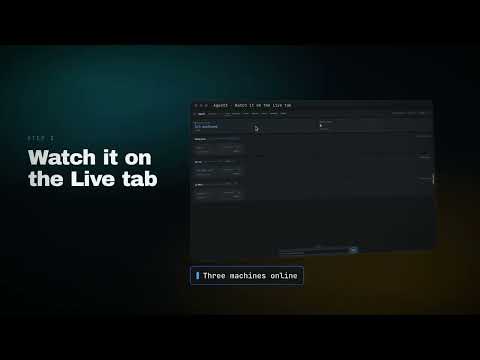
- 01: Run AI agents on your own machine, no account
- 02: Install AgentX and check it with doctor
- Phone part 1: Install the AgentX phone app and pair it
- Phone part 2: Chat with your AI agents from a phone
- Desktop part 1: Install the AgentX desktop widget on a Mac
- Desktop part 2: The floating widget, the pill and the orb
Current state: usable, experimental, not yet stable
AgentX works and can be used today, but it is still an experimental project, not a stable release. There is plenty to polish and fix, especially the Settings experience and configuration flows. Expect rough edges and changes as people try it in real environments.
Releases ship often; see the changelog for what changed. Our priority is to learn from actual use: what works, what breaks, and what is confusing to set up or operate.
Still missing: role-based access control (RBAC) at both mesh and agent levels. We want to define who can access shared nodes and agents, delegate work, and perform particular actions. This would open up more possibilities for shared teams and multi-user deployments. Existing mesh authentication and tool permissions do not provide this complete role model; RBAC is planned work, not an available feature.
Try the demo, check the requirements, or help us test.
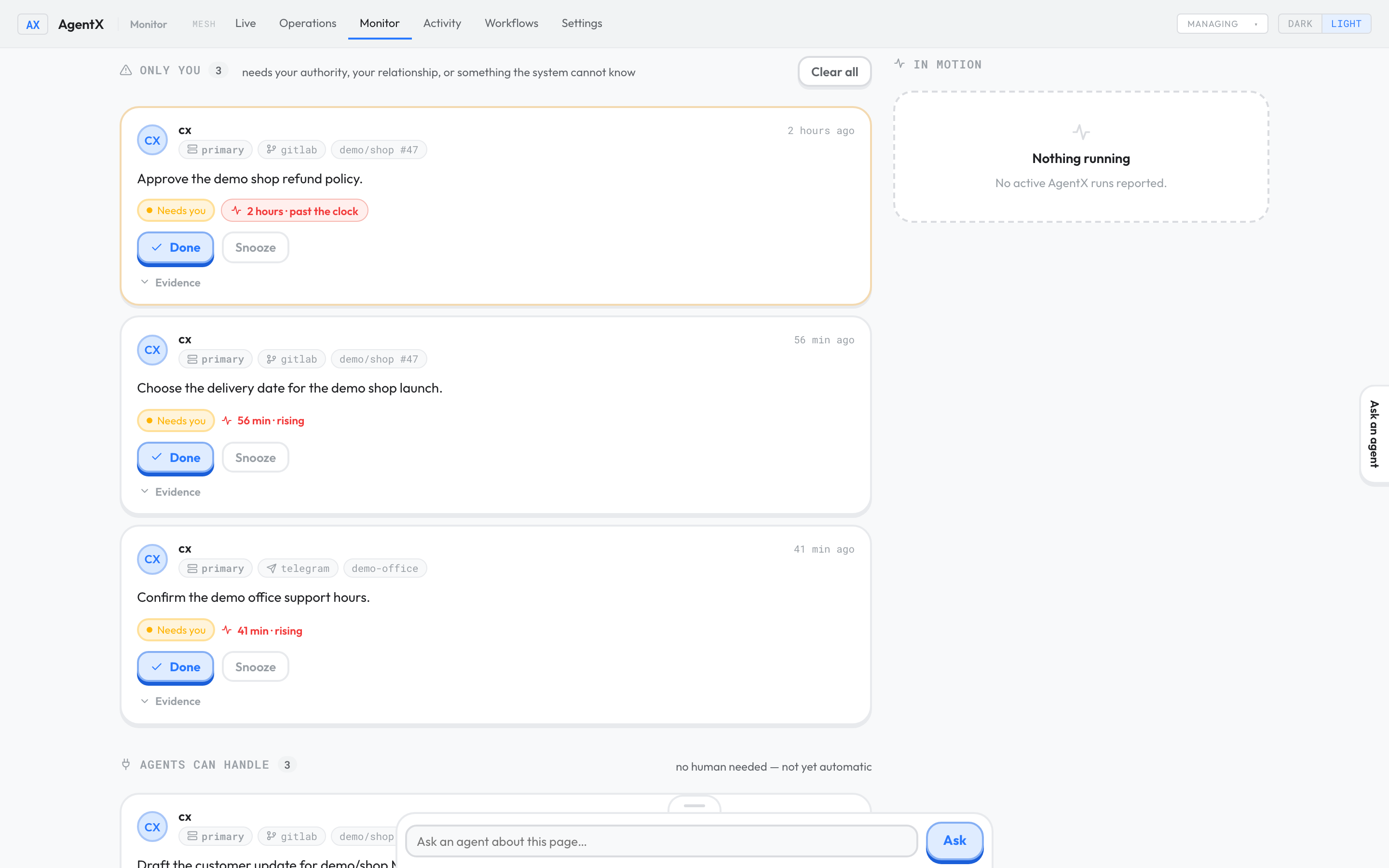
The Monitor dashboard in the isolated demo: review tasks that need you, with in-page agent chat. All displayed tasks are fictional.
See it without an account
With Node.js 22.x, run:
npx agentix-cli demo
No clone, account, or API key is needed. The first run downloads the package, which takes a minute or two. From a built source checkout, node dist/cli.js demo does the same.
The demo starts three local AgentX daemons and sends a task between them. Routing, network calls, and the event record are real. Model responses are scripted, so the demo makes no billable model calls. The terminal prints the dashboard addresses. What to expect.
What it does
- Answers where your team works. Connect a channel and assign its messages to an agent.
- Runs scheduled work. Ask an agent for a daily report or another recurring task.
- Shows what happened. Live shows current work; Activity records completed runs; Monitor shows reviewed work that needs a person and work agents can handle.
- Offers several ways to interact. Use in-page chat, the OpenCode-backed TUI, or the desktop assistant for voice and computer use.
- Grows across machines. Start with one host, then pair another when a job needs its tools or files.
Describe an automation, get an automation
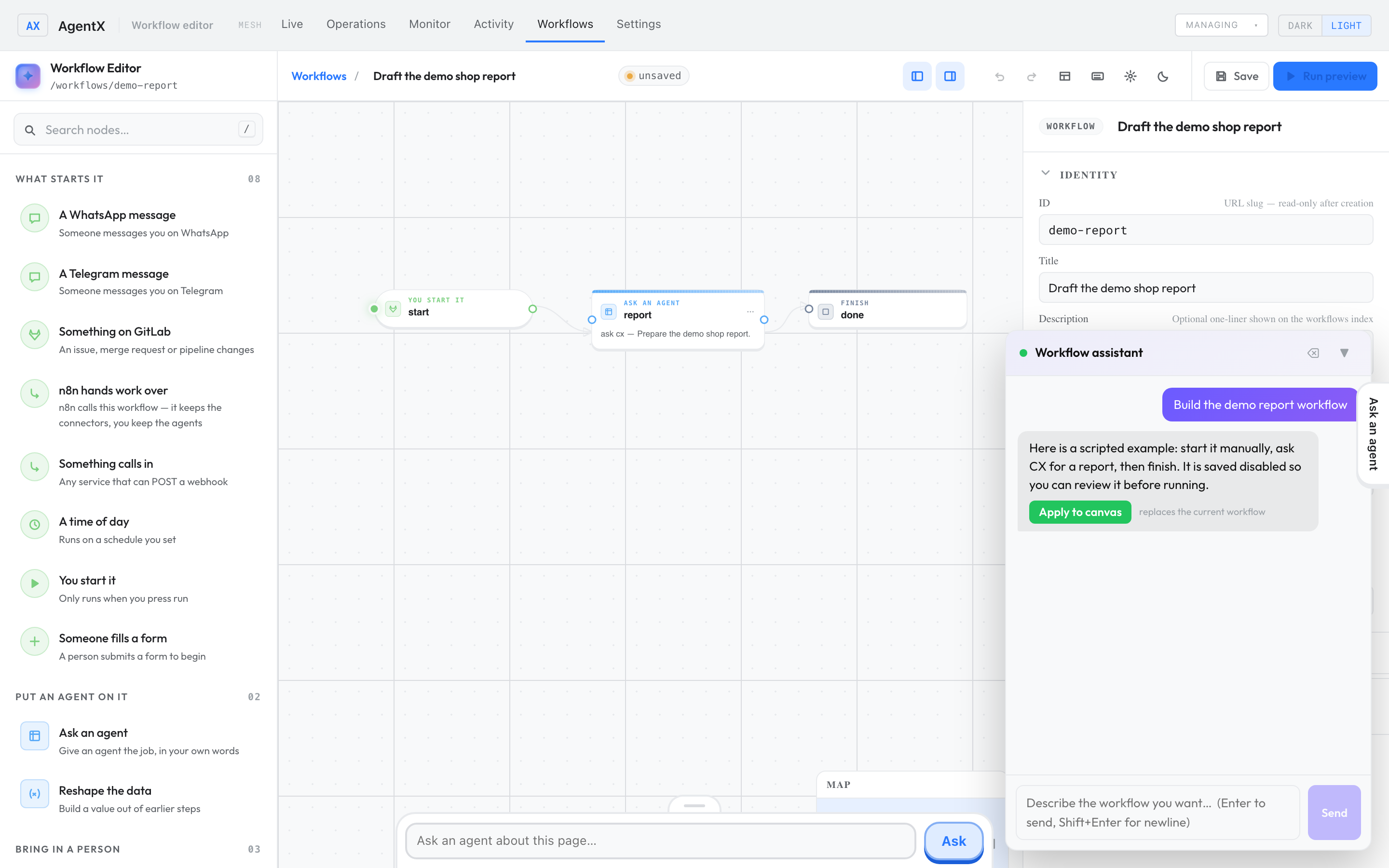
The Workflows editor has a chat control. Describe the timing, source, and destination in ordinary language. An authoring agent can propose a workflow and show an Apply to canvas action. Read the proposed steps before applying them: this replaces the current graph. Real authoring needs a working model. The demo includes a fixed example for Build the demo report workflow. Walk through it.
Install
A technical teammate needs a terminal for installation, model setup, and starting the services. The web wizard handles the rest of the initial setup; daily inspection is in the browser. AgentX requires Node.js 22.x.
git clone https://github.com/anis-marrouchi/agentx.git
cd agentx
git checkout main
cp .env.example .env
docker compose up --build -d
Open http://127.0.0.1:4202/setup. Compose builds this checkout and starts both services; its default image uses an API model rather than a preinstalled model CLI.
Without Docker, install Node 22.x and pnpm 10, then build and open the wizard:
pnpm install
pnpm build
node dist/cli.js setup
On a source install, the wizard serves the dashboard and the daemon is a separate process. Start it in another terminal, or use the wizard's Start daemon now button:
node dist/cli.js daemon start --detach
node dist/cli.js daemon status
The npm package is agentix-cli; the installed executable is agentx. Follow the installation guide for details.
One machine is enough to start
When an agent needs to work on another machine, pair the nodes with agentx connect mesh invite and agentx connect mesh join <link>. A connected agent can pass work to another node. For example:
You:     "@cx CI is red on GitLab — find the cause"
CX:      sends the build investigation to @builder on another node
Builder: checks the project and reports the result
CX:      replies in the original thread
The second-machine guide covers pairing. You do not need mesh for a one-agent setup.
The dashboard
The six top-level tabs are Live, Operations, Monitor, Activity, Workflows, and Settings. Dashboard guide. The dashboard and daemon must both be running for messages to be handled.
Channels and models
Telegram and WhatsApp have pairing flows. GitLab, GitHub, and generic webhooks can bring in events. Slack and Discord are not supported as live channel adapters in this build. Channel reference.
Real agents need a configured model. An API provider needs a key; Claude Code, Codex CLI, and OpenCode need their CLI installed and authenticated on the host. Model-provider charges or subscription terms depend on your chosen provider.
Integrations
- Channels: Telegram, WhatsApp, GitLab, GitHub, and generic webhooks. Channel reference.
- Models: API providers, plus the Claude Code, Codex CLI, and OpenCode CLIs.
- Other programs: the local daemon accepts tasks over HTTP, and
agentx a2aserves the A2A protocol. Agent-to-agent reference. - Raycast: ask your agents and list them from Raycast. Install from this checkout; not in the Raycast Store yet.
Help test and improve AgentX
The most valuable contribution right now is trying AgentX and reporting what happens. You do not need to write code to help.
- Test and report issues. Try installation, Settings, model setup, chat, the desktop assistant, the TUI, or a task across nodes. Report failures and confusing steps, including what you expected and what actually happened.
- Help with triage and workflow/pipeline management. Reproduce reports, identify duplicates, clarify priorities, and help follow issues through fixes, CI, and releases.
- Contribute code and documentation. Fix bugs, improve setup and Settings, clarify instructions, or help design the missing mesh-level and agent-level RBAC. Discuss larger changes in an issue first.
Report an issue yourself, or let your own agent help you draft it with agentx contribute. Include your version, operating system, steps to reproduce, and relevant logs or screenshots. Remove secrets and private data before sharing. Report security vulnerabilities through the security policy.
See Contributing for testing, issue triage, and development instructions.
Most requested
Give a 👍 to the open requests you care about; the community decides together what matters most. This list is updated every day.
No request has 5 votes yet. Yours could be the first: give a 👍 to the issues you care about.
Full ranked list · How voting works
Sponsors
We are grateful for the support of our sponsors, who help make AgentX possible.

Want to sponsor AgentX? Start a discussion and we will add you here.
Help and development
- Start here · Troubleshooting · CLI reference
- Support and supported environments · Ask a question
- Contributing · Security policy · Changelog
AgentX is released under the MIT License.
Similar repos


Languages
TypeScript
93.5%
Swift
4.5%
Self-hosted AI agents for small teams. Route Telegram, WhatsApp, GitHub, GitLab, crons, webhooks and mesh tasks to agents on Claude Code, Codex, OpenCode or any LLM API. Web dashboard + CLI. MIT.
See the codeSee what people are saying
README
AgentX
Put an AI teammate on the tools your team already uses.
AgentX routes messages and scheduled jobs to AI agents you host. Connect Telegram, WhatsApp, GitLab, GitHub, or a webhook. Give each agent a clear job. Watch the result in a browser dashboard.
Watch it
Short videos show AgentX running, one task each. Click the picture to open the Learn AgentX playlist on YouTube.
- 01: Run AI agents on your own machine, no account
- 02: Install AgentX and check it with doctor
- Phone part 1: Install the AgentX phone app and pair it
- Phone part 2: Chat with your AI agents from a phone
- Desktop part 1: Install the AgentX desktop widget on a Mac
- Desktop part 2: The floating widget, the pill and the orb
Current state: usable, experimental, not yet stable
AgentX works and can be used today, but it is still an experimental project, not a stable release. There is plenty to polish and fix, especially the Settings experience and configuration flows. Expect rough edges and changes as people try it in real environments.
Releases ship often; see the changelog for what changed. Our priority is to learn from actual use: what works, what breaks, and what is confusing to set up or operate.
Still missing: role-based access control (RBAC) at both mesh and agent levels. We want to define who can access shared nodes and agents, delegate work, and perform particular actions. This would open up more possibilities for shared teams and multi-user deployments. Existing mesh authentication and tool permissions do not provide this complete role model; RBAC is planned work, not an available feature.
Try the demo, check the requirements, or help us test.
The Monitor dashboard in the isolated demo: review tasks that need you, with in-page agent chat. All displayed tasks are fictional.
See it without an account
With Node.js 22.x, run:
npx agentix-cli demo
No clone, account, or API key is needed. The first run downloads the package, which takes a minute or two. From a built source checkout, node dist/cli.js demo does the same.
The demo starts three local AgentX daemons and sends a task between them. Routing, network calls, and the event record are real. Model responses are scripted, so the demo makes no billable model calls. The terminal prints the dashboard addresses. What to expect.
What it does
- Answers where your team works. Connect a channel and assign its messages to an agent.
- Runs scheduled work. Ask an agent for a daily report or another recurring task.
- Shows what happened. Live shows current work; Activity records completed runs; Monitor shows reviewed work that needs a person and work agents can handle.
- Offers several ways to interact. Use in-page chat, the OpenCode-backed TUI, or the desktop assistant for voice and computer use.
- Grows across machines. Start with one host, then pair another when a job needs its tools or files.
Describe an automation, get an automation
The Workflows editor has a chat control. Describe the timing, source, and destination in ordinary language. An authoring agent can propose a workflow and show an Apply to canvas action. Read the proposed steps before applying them: this replaces the current graph. Real authoring needs a working model. The demo includes a fixed example for Build the demo report workflow. Walk through it.
Install
A technical teammate needs a terminal for installation, model setup, and starting the services. The web wizard handles the rest of the initial setup; daily inspection is in the browser. AgentX requires Node.js 22.x.
git clone https://github.com/anis-marrouchi/agentx.git
cd agentx
git checkout main
cp .env.example .env
docker compose up --build -d
Open http://127.0.0.1:4202/setup. Compose builds this checkout and starts both services; its default image uses an API model rather than a preinstalled model CLI.
Without Docker, install Node 22.x and pnpm 10, then build and open the wizard:
pnpm install
pnpm build
node dist/cli.js setup
On a source install, the wizard serves the dashboard and the daemon is a separate process. Start it in another terminal, or use the wizard's Start daemon now button:
node dist/cli.js daemon start --detach
node dist/cli.js daemon status
The npm package is agentix-cli; the installed executable is agentx. Follow the installation guide for details.
One machine is enough to start
When an agent needs to work on another machine, pair the nodes with agentx connect mesh invite and agentx connect mesh join <link>. A connected agent can pass work to another node. For example:
You:     "@cx CI is red on GitLab — find the cause"
CX:      sends the build investigation to @builder on another node
Builder: checks the project and reports the result
CX:      replies in the original thread
The second-machine guide covers pairing. You do not need mesh for a one-agent setup.
The dashboard
The six top-level tabs are Live, Operations, Monitor, Activity, Workflows, and Settings. Dashboard guide. The dashboard and daemon must both be running for messages to be handled.
Channels and models
Telegram and WhatsApp have pairing flows. GitLab, GitHub, and generic webhooks can bring in events. Slack and Discord are not supported as live channel adapters in this build. Channel reference.
Real agents need a configured model. An API provider needs a key; Claude Code, Codex CLI, and OpenCode need their CLI installed and authenticated on the host. Model-provider charges or subscription terms depend on your chosen provider.
Integrations
- Channels: Telegram, WhatsApp, GitLab, GitHub, and generic webhooks. Channel reference.
- Models: API providers, plus the Claude Code, Codex CLI, and OpenCode CLIs.
- Other programs: the local daemon accepts tasks over HTTP, and
agentx a2aserves the A2A protocol. Agent-to-agent reference. - Raycast: ask your agents and list them from Raycast. Install from this checkout; not in the Raycast Store yet.
Help test and improve AgentX
The most valuable contribution right now is trying AgentX and reporting what happens. You do not need to write code to help.
- Test and report issues. Try installation, Settings, model setup, chat, the desktop assistant, the TUI, or a task across nodes. Report failures and confusing steps, including what you expected and what actually happened.
- Help with triage and workflow/pipeline management. Reproduce reports, identify duplicates, clarify priorities, and help follow issues through fixes, CI, and releases.
- Contribute code and documentation. Fix bugs, improve setup and Settings, clarify instructions, or help design the missing mesh-level and agent-level RBAC. Discuss larger changes in an issue first.
Report an issue yourself, or let your own agent help you draft it with agentx contribute. Include your version, operating system, steps to reproduce, and relevant logs or screenshots. Remove secrets and private data before sharing. Report security vulnerabilities through the security policy.
See Contributing for testing, issue triage, and development instructions.
Most requested
Give a 👍 to the open requests you care about; the community decides together what matters most. This list is updated every day.
No request has 5 votes yet. Yours could be the first: give a 👍 to the issues you care about.
Full ranked list · How voting works
Sponsors
We are grateful for the support of our sponsors, who help make AgentX possible.
Want to sponsor AgentX? Start a discussion and we will add you here.
Help and development
- Start here · Troubleshooting · CLI reference
- Support and supported environments · Ask a question
- Contributing · Security policy · Changelog
AgentX is released under the MIT License.
Similar repos
Languages
TypeScript
93.5%
Swift
4.5%