SortPhotos is a Python script that organizes photos and videos into folders using date/time information
Perl
1,106
97 commits
updated Mar 6, 2026
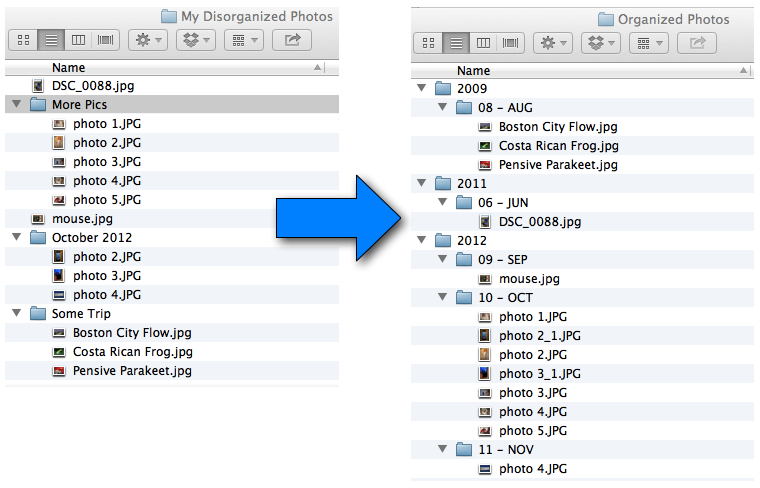
SortPhotos is a Python CLI tool that organizes photos and videos into folders by date and/or time using EXIF and other metadata. It takes a messy collection of files and reorganizes them into a customizable hierarchy of date-based folders (by default, year then month). It works with any file, but works best with image and video files that contain EXIF or other metadata. The tool is also useful for transferring files from your camera into a nicely organized photo collection.
pip install .
For development (includes pytest):
pip install -e ".[dev]"
To see all options:
sortphotos -h
The simplest usage is to specify a source directory and a destination directory:
sortphotos /Users/Me/MessyDirectory /Users/Me/Pictures
The default behavior is to move files. Moving is much faster than copying, especially with videos. To copy instead:
sortphotos -c /source /destination
By default, only the top level of the source directory is searched. To search recursively:
sortphotos -r /source /destination
By default a progress bar and summary are shown. Use -v or --verbose for detailed per-file processing information. Use -s/--silent or --quiet to suppress all output except errors.
sortphotos -v /source /destination      # detailed output
sortphotos --quiet /source /destination  # errors only
Simulate what will happen without moving or copying any files. A summary is printed at the end:
sortphotos -t /source /destination
By default folders are sorted by year then month (e.g., 2010/06-Jun/cool_picture.jpg). Customize with --sort using strftime format codes. Use forward slashes to create subdirectories (even on Windows).
sortphotos --sort %Y/%m-%b /source /destination  # default: 2010/06-Jun
sortphotos --sort %B /source /destination         # by month name: June
sortphotos --sort %y/%W/%a /source /destination   # year/week/day: 10/23/Sun
Rename files based on their date using the same strftime format codes:
sortphotos --rename %Y_%m%d_%H%M /source /destination
This creates files like 2003_1031_1544.jpg. The original extension is preserved (lowercased). A unique number is appended in case of name collisions.
SortPhotos searches all metadata for date information and uses the oldest date found. You can control which groups/tags are searched. All groups/tags are described in the ExifTool Tag Names documentation.
# Ignore file timestamps (not persistent)
sortphotos --ignore-groups File /source /destination

# Ignore specific tags
sortphotos --ignore-tags File:FileModifyDate File:FileCreateDate /source /destination

# Only search specific groups
sortphotos --use-only-groups EXIF XMP IPTC /source /destination

# Only search specific tags
sortphotos --use-only-tags EXIF:CreateDate EXIF:DateTimeOriginal /source /destination
SortPhotos always checks for filename collisions and appends a number to avoid overwriting (e.g., photo_1.jpg, photo_2.jpg). By default, it also detects identical files (same name and content) and skips them. To disable duplicate detection:
sortphotos --keep-duplicates /source /destination
Exclude files from processing using glob patterns:
sortphotos --exclude "*.raw" "*.cr2" /source /destination
Speed up large copy/move operations with multiple workers:
sortphotos -j 4 /source /destination
The default is -j 1 (serial processing).
Group photos taken in the early morning hours with the previous day. For example, to treat anything before 4 AM as the previous day:
sortphotos --day-begins 4 /source /destination
You can automate SortPhotos on macOS using Launch Agents. Edit the supplied plist file com.andrewning.sortphotos.plist:
sortphotos on line 10Then load it:
cp src/com.andrewning.sortphotos.plist ~/Library/LaunchAgents/
launchctl load ~/Library/LaunchAgents/com.andrewning.sortphotos.plist
To verify it's running: launchctl list | grep sortphotos
To stop: launchctl unload ~/Library/LaunchAgents/com.andrewning.sortphotos.plist
For other operating systems, use your platform's task scheduler (cron, Task Scheduler, etc.).
pip install -e ".[dev]"
pytest
SortPhotos grabs EXIF data from photos/videos using the excellent ExifTool by Phil Harvey.
Copyright (c) 2013, S. Andrew Ning. All rights reserved.
All code is licensed under The MIT License.
9,083 followers · starred May 2015
731 followers · starred Jan 2023
241 followers · starred Nov 2021
125 followers · starred Sep 2015
SortPhotos is a Python script that organizes photos and videos into folders using date/time information
Perl
1,106
97 commits
updated Mar 6, 2026
SortPhotos is a Python CLI tool that organizes photos and videos into folders by date and/or time using EXIF and other metadata. It takes a messy collection of files and reorganizes them into a customizable hierarchy of date-based folders (by default, year then month). It works with any file, but works best with image and video files that contain EXIF or other metadata. The tool is also useful for transferring files from your camera into a nicely organized photo collection.
pip install .
For development (includes pytest):
pip install -e ".[dev]"
To see all options:
sortphotos -h
The simplest usage is to specify a source directory and a destination directory:
sortphotos /Users/Me/MessyDirectory /Users/Me/Pictures
The default behavior is to move files. Moving is much faster than copying, especially with videos. To copy instead:
sortphotos -c /source /destination
By default, only the top level of the source directory is searched. To search recursively:
sortphotos -r /source /destination
By default a progress bar and summary are shown. Use -v or --verbose for detailed per-file processing information. Use -s/--silent or --quiet to suppress all output except errors.
sortphotos -v /source /destination      # detailed output
sortphotos --quiet /source /destination  # errors only
Simulate what will happen without moving or copying any files. A summary is printed at the end:
sortphotos -t /source /destination
By default folders are sorted by year then month (e.g., 2010/06-Jun/cool_picture.jpg). Customize with --sort using strftime format codes. Use forward slashes to create subdirectories (even on Windows).
sortphotos --sort %Y/%m-%b /source /destination  # default: 2010/06-Jun
sortphotos --sort %B /source /destination         # by month name: June
sortphotos --sort %y/%W/%a /source /destination   # year/week/day: 10/23/Sun
Rename files based on their date using the same strftime format codes:
sortphotos --rename %Y_%m%d_%H%M /source /destination
This creates files like 2003_1031_1544.jpg. The original extension is preserved (lowercased). A unique number is appended in case of name collisions.
SortPhotos searches all metadata for date information and uses the oldest date found. You can control which groups/tags are searched. All groups/tags are described in the ExifTool Tag Names documentation.
# Ignore file timestamps (not persistent)
sortphotos --ignore-groups File /source /destination

# Ignore specific tags
sortphotos --ignore-tags File:FileModifyDate File:FileCreateDate /source /destination

# Only search specific groups
sortphotos --use-only-groups EXIF XMP IPTC /source /destination

# Only search specific tags
sortphotos --use-only-tags EXIF:CreateDate EXIF:DateTimeOriginal /source /destination
SortPhotos always checks for filename collisions and appends a number to avoid overwriting (e.g., photo_1.jpg, photo_2.jpg). By default, it also detects identical files (same name and content) and skips them. To disable duplicate detection:
sortphotos --keep-duplicates /source /destination
Exclude files from processing using glob patterns:
sortphotos --exclude "*.raw" "*.cr2" /source /destination
Speed up large copy/move operations with multiple workers:
sortphotos -j 4 /source /destination
The default is -j 1 (serial processing).
Group photos taken in the early morning hours with the previous day. For example, to treat anything before 4 AM as the previous day:
sortphotos --day-begins 4 /source /destination
You can automate SortPhotos on macOS using Launch Agents. Edit the supplied plist file com.andrewning.sortphotos.plist:
sortphotos on line 10Then load it:
cp src/com.andrewning.sortphotos.plist ~/Library/LaunchAgents/
launchctl load ~/Library/LaunchAgents/com.andrewning.sortphotos.plist
To verify it's running: launchctl list | grep sortphotos
To stop: launchctl unload ~/Library/LaunchAgents/com.andrewning.sortphotos.plist
For other operating systems, use your platform's task scheduler (cron, Task Scheduler, etc.).
pip install -e ".[dev]"
pytest
SortPhotos grabs EXIF data from photos/videos using the excellent ExifTool by Phil Harvey.
Copyright (c) 2013, S. Andrew Ning. All rights reserved.
All code is licensed under The MIT License.
9,083 followers · starred May 2015
731 followers · starred Jan 2023
241 followers · starred Nov 2021
125 followers · starred Sep 2015



