A Home Assistant integration to provide battery details of devices
Python
1,178
5,379 commits
updated Oct 14, 2026






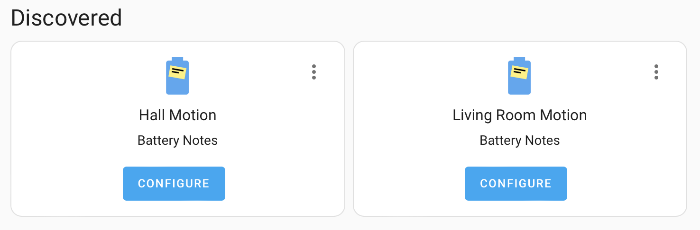
Integration to add battery notes to a device or entity, with automatic discovery via a growing battery library for devices.
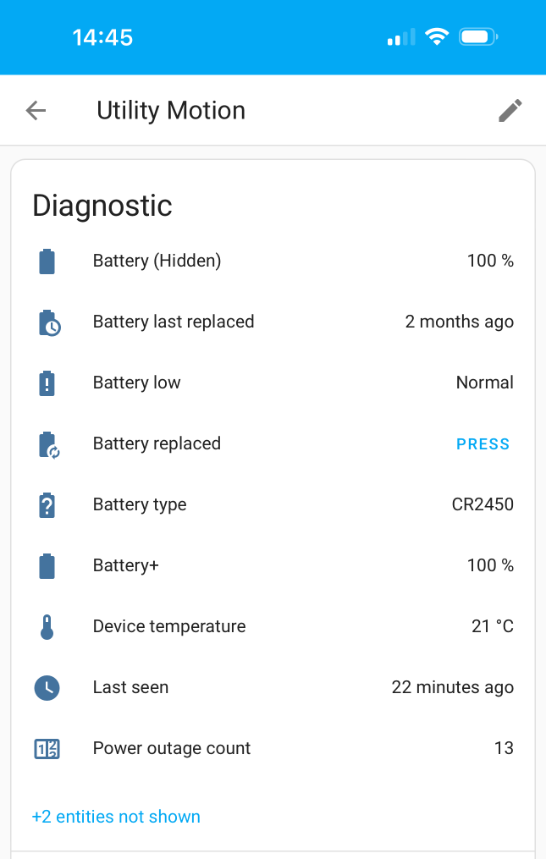
Track the battery type, when the battery was replaced, when a battery is low based on device or global thresholds and also when a battery hasn't been reported for a while.
The library makes adding battery notes easy, identifying the type of battery when known, but you can also add your own manually.
Dashboard cards usage
A battery+ sensor provides useful attributes for easy use in dashboards, the standard battery can optionally be hidden.
Notifications and automations
Battery low, replaced and not reported are all exposed via events and actions, using these you can create your own automations to generate notifications or other actions, there are some predefined ones in community.
Please ⭐ this repo if you find it useful
If you want to show your support please


Or search for Battery Notes in HACS and download it.
Restart Home Assistant
Add the Battery Notes integration

Or go to Settings -> Devices & Services click "+ Add integration" and search for "Battery Notes"
This will create the main Battery Notes integration service and discovery will start shortly afterwards, or you can add battery notes manually within the settings/integrations/Battery Notes page by using the Add Battery Note button.
custom_components into the <config directory>/custom_components folder of your Home Assistant installation.To get full use of the integration, read the documentation. It contains community quick starts as well as details on all the actions, events and entities.


To add a device definition to the battery library so that it will be automatically configured fill out the above form or see the docs for adding via pull request.
Using my companion integration Fake Devices you can create a device place holder that you can then attach battery notes to, allowing you to note the battery type required and also the date you replaced them. Just ensure you have enabled show all devices within Battery Notes settings for them to be visible.
To add a new language translation to Battery Notes see here
If you want to contribute to this please read the Contribution guidelines.
The library relies on community contributions, it is open source under the MIT license and available for anyone to use in their project.
Do not have your client access/download the library directly from this repository, please take a copy and distribute that by your own means.
Please credit the use of this library, it takes a lot of effort to maintain this.
A lot of the inspiration for this integration came from the excellent PowerCalc by bramstroker, without adapting code from PowerCalc I'd never have worked out how to add additional sensors to a device.
Huge thanks to @bmos for creating the issue form & automations for adding new devices.
Thanks to everyone who has submitted devices to the library.
1,337 followers · starred Sep 2023
166 followers · starred Jan 2026
277 followers · starred Oct 2025
216 followers · starred Jan 2025
A Home Assistant integration to provide battery details of devices
Python
1,178
5,379 commits
updated Oct 14, 2026
Integration to add battery notes to a device or entity, with automatic discovery via a growing battery library for devices.
Track the battery type, when the battery was replaced, when a battery is low based on device or global thresholds and also when a battery hasn't been reported for a while.
The library makes adding battery notes easy, identifying the type of battery when known, but you can also add your own manually.
Dashboard cards usage
A battery+ sensor provides useful attributes for easy use in dashboards, the standard battery can optionally be hidden.
Notifications and automations
Battery low, replaced and not reported are all exposed via events and actions, using these you can create your own automations to generate notifications or other actions, there are some predefined ones in community.
Please ⭐ this repo if you find it useful
If you want to show your support please
Or search for Battery Notes in HACS and download it.
Restart Home Assistant
Add the Battery Notes integration
Or go to Settings -> Devices & Services click "+ Add integration" and search for "Battery Notes"
This will create the main Battery Notes integration service and discovery will start shortly afterwards, or you can add battery notes manually within the settings/integrations/Battery Notes page by using the Add Battery Note button.
custom_components into the <config directory>/custom_components folder of your Home Assistant installation.To get full use of the integration, read the documentation. It contains community quick starts as well as details on all the actions, events and entities.
To add a device definition to the battery library so that it will be automatically configured fill out the above form or see the docs for adding via pull request.
Using my companion integration Fake Devices you can create a device place holder that you can then attach battery notes to, allowing you to note the battery type required and also the date you replaced them. Just ensure you have enabled show all devices within Battery Notes settings for them to be visible.
To add a new language translation to Battery Notes see here
If you want to contribute to this please read the Contribution guidelines.
The library relies on community contributions, it is open source under the MIT license and available for anyone to use in their project.
Do not have your client access/download the library directly from this repository, please take a copy and distribute that by your own means.
Please credit the use of this library, it takes a lot of effort to maintain this.
A lot of the inspiration for this integration came from the excellent PowerCalc by bramstroker, without adapting code from PowerCalc I'd never have worked out how to add additional sensors to a device.
Huge thanks to @bmos for creating the issue form & automations for adding new devices.
Thanks to everyone who has submitted devices to the library.
1,337 followers · starred Sep 2023
166 followers · starred Jan 2026
277 followers · starred Oct 2025
216 followers · starred Jan 2025