m3u4me is a self-hosted IPTV (M3U) playlists & EPG manager.
TypeScript
71
19 commits
updated Oct 11, 2026
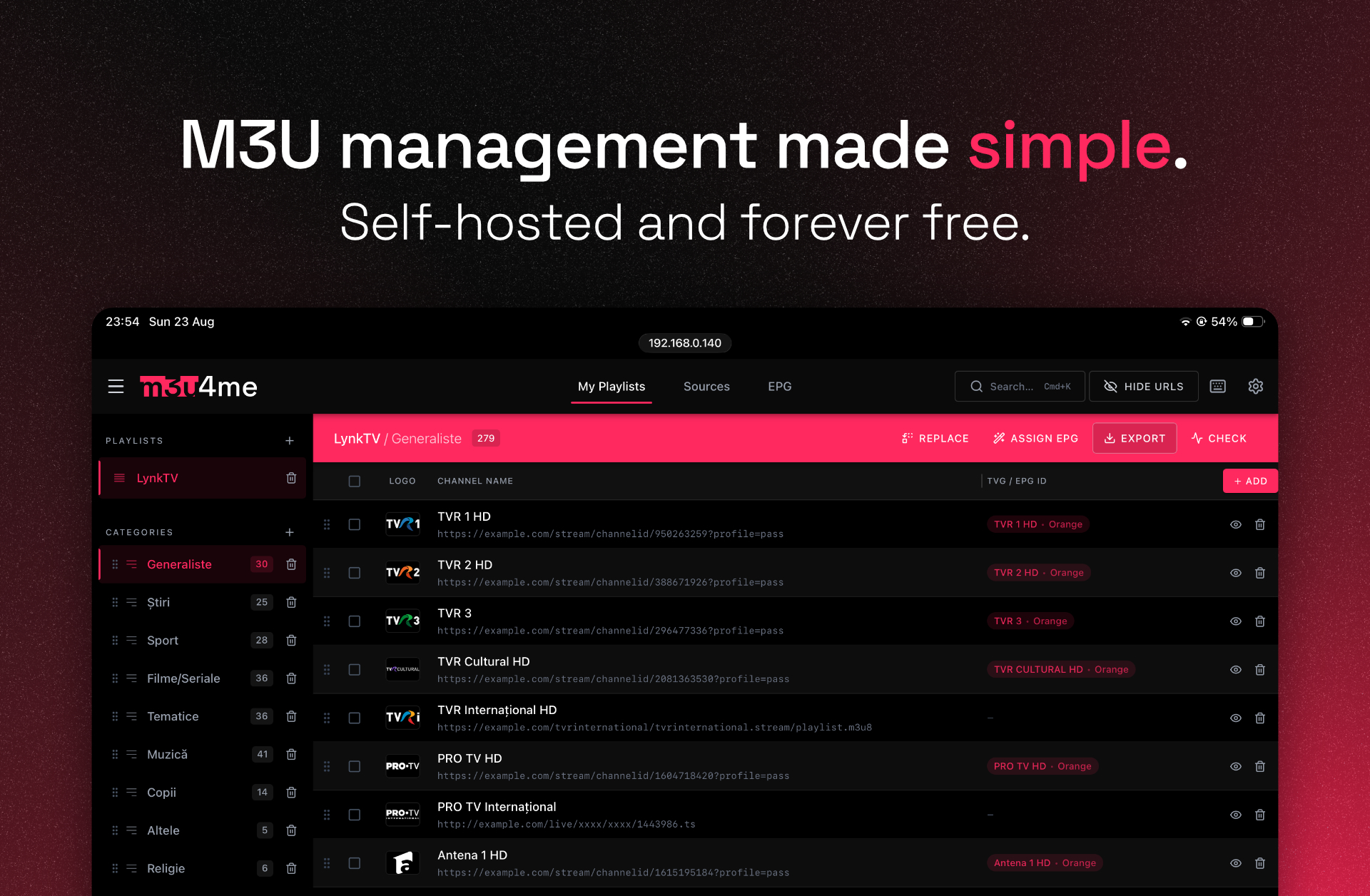
m3u4me is your IPTV playlists' new home. Your streams don't leave your local network, you are in charge, nobody can see or control your playlists.
[!WARNING] m3u4me does NOT provide ANY streams! It is purely a M3U playlist manager. You must bring your own content.
[!NOTE] This app aims to be a self-hosted alternative to https://m3u4u.com/ - as you can see, m3u4me's name is obviously referencing them. The projects are not related in any way. No harm intended!
[!NOTE] This app's code was AI-generated, with minor interventions from me. I am a graphic designer with very limited coding knowledge; I do not support pointless usage of AI and I am fully aware of the harm it can cause.
m3u4me started out as something that was intended only for personal use - I am sharing it only because I believe it is an useful app which might help many other IPTV enthusiasts. It will always be entirely free.
I fully encourage any developer who comes across this app and wants to turn it into something human-made, without AI involvement.
AI was not used for anything else besides writing the actual code of the app.

DEL, select everything with Cmd+A, make your work easier overall. Full list of commands is available inside the app.[!NOTE] m3u4me has been tested on macOS (Apple Silicon) and Debian, running with as little as 512MB of RAM.
There are three ways to install m3u4me. The first one is by far the easiest. Once it's running, open it in your browser and a short setup walks you through the rest.
For Linux servers running systemd that install software with apt or dnf: Debian, Ubuntu, Fedora, and Proxmox containers based on them.
curl -fsSL https://raw.githubusercontent.com/andrei-savin/m3u4me/main/install.sh | sudo bash
This command installs Node.js if it is missing, downloads the latest release, builds the app, and sets it up to start automatically whenever your server boots. When it is done, it prints the address where you can open m3u4me.
To use a port other than 8080:
curl -fsSL https://raw.githubusercontent.com/andrei-savin/m3u4me/main/install.sh | sudo PORT=9090 bash
(Obviously, replace 9090 with your desired port.)
This only works on the first install. To change the port later, edit /etc/m3u4me.env and run sudo m3u4me restart.
[!NOTE] Piping a script into
sudo bashmeans trusting it. install.sh is deliberately commented so you can read the whole thing first. Here is everything it changes on your system:
- Installs git and curl if they are missing.
- Installs Node.js if it is missing or too old. It comes from NodeSource, whose package repository is added to your system so Node.js keeps getting updates.
- Puts m3u4me in
/opt/m3u4meand runs it as a locked-downm3u4meuser, through one systemd service.- Saves the port in
/etc/m3u4me.envand adds them3u4mecommand to/usr/local/bin.
Once it is installed, you get an m3u4me command:
| Command | What it does |
|---|---|
sudo m3u4me update | Update to the newest release and restart |
m3u4me status | Check whether m3u4me is running |
sudo m3u4me logs | Watch the live log (Ctrl+C to stop) |
sudo m3u4me restart | Restart m3u4me |
sudo m3u4me uninstall | Remove m3u4me — your playlists are kept |
Your playlists live in /opt/m3u4me/data, and the port setting lives in /etc/m3u4me.env.
git clone https://github.com/andrei-savin/m3u4me.git
cd m3u4me
docker compose up -d
m3u4me will be running at http://localhost:8080. Your playlists are stored in the data folder next to docker-compose.yml. To use a different port, change it in docker-compose.yml and run the last command again.
The original way to run m3u4me. Use this if you would rather set everything up yourself.
1. Install Node.js
m3u4me needs Node.js 22.18 or newer. The official website is pretty straightforward about installing it: https://nodejs.org/en/download.
After installing, make sure it worked by running node -v in your terminal — it should print v22.18.0 or higher.
2. Install PM2
This keeps your app running 24/7 in the background.
npm install -g pm2
3. Clone the source via git:
git clone https://github.com/andrei-savin/m3u4me.git
4. Navigate into the folder:
cd m3u4me
5. Install the dependencies:
npm ci
m3u4me runs on port 8080 by default. You can change that in ecosystem.config.cjs.
6. Build the app:
npm run build
7. Start up PM2:
pm2 start ecosystem.config.cjs
All done! You can now use m3u4me at http://localhost:8080 [replace localhost with the IP of your server, and 8080 with whatever custom port you set up earlier].
8. Make m3u4me auto-run at startup (optional):
pm2 startup
pm2 save
sudo m3u4me update
That is the entire update. It fetches the newest release, rebuilds the app, restarts it and checks that it is running. If the new version fails to build or does not start, it automatically puts the previous version back.
git pull --ff-only
docker compose up -d --build
1. Navigate into the app's folder
[!NOTE] The folder shown in the command below is only an example.
cd /opt/m3u4me
2. Pull the latest code from this repo
git pull --ff-only
[!NOTE] During this step, you might run into the following error:
Your local changes to the following files would be overwritten by merge. / package-lock.json / Please commit your changes or stash them before you merge.If so, just rungit restore package-lock.jsonand then continue with the following steps.
3. Install any new dependencies
npm ci
4. Rebuild the app
npm run build
5. Restart the PM2 process
pm2 restart ecosystem.config.cjs --update-env
In m3u4me, open Settings → Backup → Download backup. That one file holds your playlists, sources, TV guides and settings. It also holds your providers' logins, so keep it private. Your m3u4me password is not part of it.
To restore a backup:
db.json.before-restore- followed by the date and time.[!NOTE] Older versions of m3u4me don't have the Download backup button. Use the
db.jsonfile from the old server's data folder instead:/opt/m3u4me/datafor the one-line install, or thedatafolder inside the m3u4me folder for Docker and PM2.
If you encounter any AI slop, or other sort of error, feel free to create a GitHub issue. I will reply ASAP.
You can also open issues for any feature requests. However, I can not guarantee that they will be accepted.
m3u4me is a self-hosted IPTV (M3U) playlists & EPG manager.
TypeScript
71
19 commits
updated Oct 11, 2026
m3u4me is your IPTV playlists' new home. Your streams don't leave your local network, you are in charge, nobody can see or control your playlists.
[!WARNING] m3u4me does NOT provide ANY streams! It is purely a M3U playlist manager. You must bring your own content.
[!NOTE] This app aims to be a self-hosted alternative to https://m3u4u.com/ - as you can see, m3u4me's name is obviously referencing them. The projects are not related in any way. No harm intended!
[!NOTE] This app's code was AI-generated, with minor interventions from me. I am a graphic designer with very limited coding knowledge; I do not support pointless usage of AI and I am fully aware of the harm it can cause.
m3u4me started out as something that was intended only for personal use - I am sharing it only because I believe it is an useful app which might help many other IPTV enthusiasts. It will always be entirely free.
I fully encourage any developer who comes across this app and wants to turn it into something human-made, without AI involvement.
AI was not used for anything else besides writing the actual code of the app.
DEL, select everything with Cmd+A, make your work easier overall. Full list of commands is available inside the app.[!NOTE] m3u4me has been tested on macOS (Apple Silicon) and Debian, running with as little as 512MB of RAM.
There are three ways to install m3u4me. The first one is by far the easiest. Once it's running, open it in your browser and a short setup walks you through the rest.
For Linux servers running systemd that install software with apt or dnf: Debian, Ubuntu, Fedora, and Proxmox containers based on them.
curl -fsSL https://raw.githubusercontent.com/andrei-savin/m3u4me/main/install.sh | sudo bash
This command installs Node.js if it is missing, downloads the latest release, builds the app, and sets it up to start automatically whenever your server boots. When it is done, it prints the address where you can open m3u4me.
To use a port other than 8080:
curl -fsSL https://raw.githubusercontent.com/andrei-savin/m3u4me/main/install.sh | sudo PORT=9090 bash
(Obviously, replace 9090 with your desired port.)
This only works on the first install. To change the port later, edit /etc/m3u4me.env and run sudo m3u4me restart.
[!NOTE] Piping a script into
sudo bashmeans trusting it. install.sh is deliberately commented so you can read the whole thing first. Here is everything it changes on your system:
- Installs git and curl if they are missing.
- Installs Node.js if it is missing or too old. It comes from NodeSource, whose package repository is added to your system so Node.js keeps getting updates.
- Puts m3u4me in
/opt/m3u4meand runs it as a locked-downm3u4meuser, through one systemd service.- Saves the port in
/etc/m3u4me.envand adds them3u4mecommand to/usr/local/bin.
Once it is installed, you get an m3u4me command:
| Command | What it does |
|---|---|
sudo m3u4me update | Update to the newest release and restart |
m3u4me status | Check whether m3u4me is running |
sudo m3u4me logs | Watch the live log (Ctrl+C to stop) |
sudo m3u4me restart | Restart m3u4me |
sudo m3u4me uninstall | Remove m3u4me — your playlists are kept |
Your playlists live in /opt/m3u4me/data, and the port setting lives in /etc/m3u4me.env.
git clone https://github.com/andrei-savin/m3u4me.git
cd m3u4me
docker compose up -d
m3u4me will be running at http://localhost:8080. Your playlists are stored in the data folder next to docker-compose.yml. To use a different port, change it in docker-compose.yml and run the last command again.
The original way to run m3u4me. Use this if you would rather set everything up yourself.
1. Install Node.js
m3u4me needs Node.js 22.18 or newer. The official website is pretty straightforward about installing it: https://nodejs.org/en/download.
After installing, make sure it worked by running node -v in your terminal — it should print v22.18.0 or higher.
2. Install PM2
This keeps your app running 24/7 in the background.
npm install -g pm2
3. Clone the source via git:
git clone https://github.com/andrei-savin/m3u4me.git
4. Navigate into the folder:
cd m3u4me
5. Install the dependencies:
npm ci
m3u4me runs on port 8080 by default. You can change that in ecosystem.config.cjs.
6. Build the app:
npm run build
7. Start up PM2:
pm2 start ecosystem.config.cjs
All done! You can now use m3u4me at http://localhost:8080 [replace localhost with the IP of your server, and 8080 with whatever custom port you set up earlier].
8. Make m3u4me auto-run at startup (optional):
pm2 startup
pm2 save
sudo m3u4me update
That is the entire update. It fetches the newest release, rebuilds the app, restarts it and checks that it is running. If the new version fails to build or does not start, it automatically puts the previous version back.
git pull --ff-only
docker compose up -d --build
1. Navigate into the app's folder
[!NOTE] The folder shown in the command below is only an example.
cd /opt/m3u4me
2. Pull the latest code from this repo
git pull --ff-only
[!NOTE] During this step, you might run into the following error:
Your local changes to the following files would be overwritten by merge. / package-lock.json / Please commit your changes or stash them before you merge.If so, just rungit restore package-lock.jsonand then continue with the following steps.
3. Install any new dependencies
npm ci
4. Rebuild the app
npm run build
5. Restart the PM2 process
pm2 restart ecosystem.config.cjs --update-env
In m3u4me, open Settings → Backup → Download backup. That one file holds your playlists, sources, TV guides and settings. It also holds your providers' logins, so keep it private. Your m3u4me password is not part of it.
To restore a backup:
db.json.before-restore- followed by the date and time.[!NOTE] Older versions of m3u4me don't have the Download backup button. Use the
db.jsonfile from the old server's data folder instead:/opt/m3u4me/datafor the one-line install, or thedatafolder inside the m3u4me folder for Docker and PM2.
If you encounter any AI slop, or other sort of error, feel free to create a GitHub issue. I will reply ASAP.
You can also open issues for any feature requests. However, I can not guarantee that they will be accepted.



