
Fast. Flexible. Intuitive. Built for agents — and the people behind them. One API. 100+ LLM providers. System One Ready. Smarter routing, queue-first scheduling, limits & pacing, guardrails, cost tracking, and realtime visibility.
See the codeSee what people are saying (1)
README

We’re live on Product Hunt Today – September 22.
Check out the launch and tell us what you think.

AnchorShell Relay
Fast. Flexible. Intuitive. An AI gateway built for agents — and the people behind them.
Go backend. Nuxt frontend. Compiled for your platform, packaged in one application binary.




Website · Docs · Hosted Relay · Community
What is Relay?
Stop hard-coding your app to one model. One API. Any model. Smarter routing. Built for agents from day one. Built for smart classification with system one models, such as Jev and Laya. Now ships with Laya.
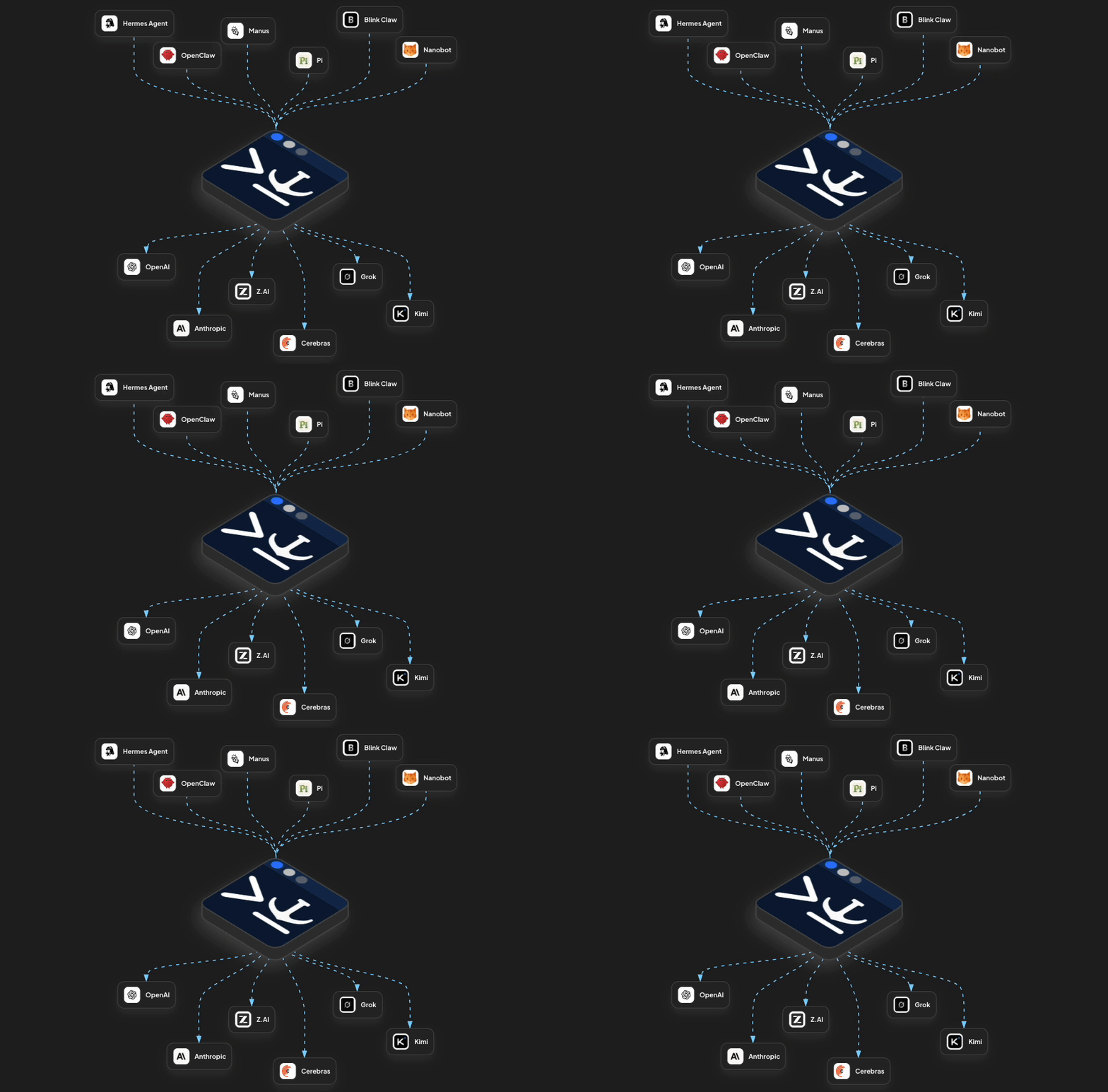
Relay sits between your app and your models. Connect OpenAI, Anthropic, Bedrock, Vertex AI, Groq, Together AI, Fireworks, Ollama, LM Studio, and more — then route everything through one API.
Use a model directly, put models into Groups, or let Relay wait for the model you actually want instead of instantly falling back to whatever happens to have spare capacity.
Relay gives you routing, queueing, pacing & model cooldowns, fallbacks, guardrails, limits, usage tracking, cost tracking, logs, and a realtime view of every request.
Protect quality when traffic spikes. Relay paces requests so you do not blow past provider RPM and token limits, absorbs bursts with queue-first routing, and keeps preferred models in play instead of immediately dropping to weaker backups.
Run it yourself with no separate database or queue to manage. Relay ships as a single Go application with the dashboard built in.
Need smarter routing? Community Edition can classify requests and use that context with its available routing capabilities. Hosted Relay adds stronger request classification and Smart Groups that route automatically based on intent, domain, complexity, and your configured model assignments.
100+ providers. Tens of thousands of models. One place to manage them.
Get started · Read the docs · Try hosted Relay
Quick start
Run with npx (no Go compiler required)
Requires Node.js 22+ with npm. From the directory where you want to keep your Relay configuration and data:
npx @anchorshell/relay@0.1.0 install
npx @anchorshell/relay
The first command downloads and caches the native Relay binary without starting it. The second starts Relay with its built-in dashboard. You can also skip the install step: launching Relay downloads the binary if needed.
Open http://localhost:11730/ in your browser and sign
in with the RELAY_ADMIN_TOKEN printed in your terminal. Leave the terminal
running while you use Relay; press Ctrl+C to stop it.
To install the current npm version without pinning it, use
npx @anchorshell/relay install. To keep both steps on version 0.1.0, launch with
npx @anchorshell/relay@0.1.0. Laya is optional and runs separately; see
Run Laya locally.
Build from source
Requires Git, Make, Go 1.26.4 or a newer Go 1.26 patch, and Node.js 22.19.0 with npm.
git clone https://github.com/anchorshell/relay.git anchorshell-relay
cd anchorshell-relay
make deps
make install-dev-tools
make dev
Open localhost:3030 for the dashboard and sign in with
the RELAY_ADMIN_TOKEN printed in your terminal. make dev starts the frontend
and backend with hot reload.
- Dashboard:
http://localhost:3030— open this in your browser. - Backend API:
http://localhost:11730— use this in curl and API clients. - Realtime:
ws://localhost:11730/api/ws— shares the backend port.
On first startup, Relay creates .env and prints newly generated credentials once:
RELAY_ADMIN_TOKEN: dashboard and management access.RELAY_API_TOKEN: inference requests from your applications.RELAY_MASTER_KEY: encryption for stored provider credentials.
Local data is stored in relay.db. Keep .env private and back up the master key.
Inference authentication is enabled by default; the admin token does not authorize inference.
See the self-hosting guide for configuration.
Use HTTPS and appropriate network restrictions when deploying beyond local development.
First request
In Providers, add a compatible provider and its credential, then enable a model. Optionally add it to a Group to configure ordered fallback models.
Replace <MODEL_OR_GROUP> with your configured group name or provider/model target.
Replace <RELAY_API_TOKEN> with the inference token from your local .env.
curl -X POST http://localhost:11730/v1/chat/completions \
  -H 'Authorization: Bearer <RELAY_API_TOKEN>' \
  -H 'Content-Type: application/json' \
  -d '{
    "model": "<MODEL_OR_GROUP>",
    "messages": [
      {
        "role": "user",
        "content": "Hello from Relay"
      }
    ]
  }'
A successful request returns an OpenAI-compatible chat completion. Or open Playground in the dashboard and enter your Relay API token there.
Run Laya locally (optional)
Community Edition can use Laya to classify request intent and identify coding tasks locally. The built-in AnchorShell Classifier remains the default; Laya is an optional, separate worker.
You need Python 3.11–3.13, uv, and enough disk space and memory for the model and its PyTorch runtime. See the Laya setup guide for platform requirements and existing Python environment options.
From the repository root, run the one-time setup:
make laya-setup
First-time setup downloads the Python dependencies and pinned Laya model. Allow time for the download. The model is cached locally; it is not downloaded again on each startup. Startup requires setup to have completed successfully.
Start the worker in a separate terminal and leave it running:
make laya-start
The worker loads and warms the cached model, then serves on
http://127.0.0.1:11731. CPU is the default. Classification runs locally;
startup and serving do not download models.
Add these settings to Community Relay's own .env:
RELAY_LAYA_URL=http://127.0.0.1:11731
RELAY_LAYA_TIMEOUT=2s
The timeout is an example; adjust it for your hardware and workload. Restart Relay's backend to load these settings, then select Laya under Settings → Request Characterization and click Save. If the worker is unavailable, Relay falls back to AnchorShell classification for that request without changing your saved selection.
Keep the worker private—applications send requests to Relay, not directly to Laya. See the Laya guide for authentication, the fast routing contract, and explicit full-characterization options.
Features
- Agentic-first — route, pace, guard, and observe model calls from agents, workflows, and applications through the same infrastructure.
- One API across providers — connect cloud providers and locally served models through OpenAI-compatible APIs.
- Queue-first routing — absorb bursts, pace requests, and wait for preferred-model capacity within your wait budget.
- Groups and fallbacks — put several models behind one name and control the order Relay tries them.
- Automatic request categorization — inspect task intent, domain, and complexity with the built-in AnchorShell Classifier or an optional local Laya worker.
- Resource limits — keep shared capacity and spend in check with request, token, cost, and concurrency limits.
- Guardrails against data leaks — connect pre-dispatch checks to help block sensitive prompts and post-response checks to inspect output.
- Usage and cost tracking — see where tokens and money go using configured model prices.
- Logs and realtime — watch requests move through queues and models, then inspect what happened.
- Playground — try requests in the dashboard and copy the matching curl command into your client workflow.
- Encrypted credentials — store provider secrets once, protected with AES-256-GCM, instead of sharing them with every client.
See the full documentation for details.
How it works
Your app talks to Relay through one OpenAI-compatible API. Relay handles routing, capacity, fallbacks, guardrails, and visibility before the request reaches a model.
                         Your application
                                │
                                │  OpenAI-compatible API
                                ▼
                  ┌───────────────────────────┐
                  │     AnchorShell Relay     │
                  │                           │
                  │  Route                    │
                  │    ↓                      │
                  │  Queue + Pace             │
                  │    ↓                      │
                  │  Guard                    │
                  │    ↓                      │
                  │  Track                    │
                  └─────────────┬─────────────┘
                                │
                ┌───────────────┼───────────────┐
                ▼               ▼               ▼
             OpenAI         Anthropic       Local models
             Bedrock        Vertex AI       Ollama / vLLM
             Groq           Together        LM Studio / etc.
You choose the target. Relay handles the traffic.
Send requests directly to a model or use a Group to keep preferred models in play. Relay queues and paces requests against provider limits, waits for capacity, falls back when needed, and records usage, cost, logs, and realtime activity along the way.
Provider credentials stay in Relay instead of being copied into every application.
Provider setup → · Groups → · How routing works →
Relay connects to OpenAI-compatible cloud and local model endpoints. See the Providers documentation for provider-specific setup and compatibility notes.
Self-hosted vs hosted
| Capability | Self-host Relay | AnchorShell Hosted |
|---|---|---|
| Queueing | ✅ | ✅ |
| Request pacing | ✅ | ✅ |
| Groups and fallback routing | ✅ | ✅ |
| Smart Groups | — | ✅ |
| API key providers | ✅ | ✅ |
| Supported OAuth provider connections | — | ✅ |
| Guardrails | ✅ | ✅ |
| Provider and resource limits | ✅ | ✅ |
| Logs and traces | ✅ | ✅ |
| Realtime monitoring | ✅ | ✅ |
| Basic request classification | ✅ | ✅ |
| System One Classification (Jev, Laya) | ✅ | ✅ |
| System One Routing (Pro) | — | ✅ |
| Advanced (Pro) request classification | — | ✅ |
| Smart routing based on Pro classification | — | ✅ |
| Teams and invitations | — | ✅ |
| Per-user limits and budgets | — | ✅ |
| Per-API-key limits and budgets | — | ✅ |
| Usage and analytics | ✅ | ✅ |
| Managed API keys | — | ✅ |
| Operate on your infrastructure | ✅ | — |
| Managed infrastructure | — | ✅ |
Hosted Relay includes a free tier. Features and capacity depend on the plan; model-provider charges remain separate.
Want Relay without operating it yourself? Explore hosted Relay →
Documentation
- Getting started
- Self-hosting and configuration
- Providers
- Provider compatibility reference
- Groups and fallbacks
- Limits and guardrails
- API reference
Community
Questions, bug reports, or feature ideas? Contact AnchorShell. For sensitive reports, use the security reporting guide.
Contributing
Contributions to code, tests, and documentation are welcome. See CONTRIBUTING.md for local setup, checks, and pull-request guidance.
Contributors
Thank you to everyone who helps improve Relay.
License
Relay Community Edition is source available under the AnchorShell Relay Community License 1.0. Free for personal/noncommercial use and qualifying small businesses, subject to the license terms. Other commercial use requires a separate license.
See LICENSE for the full terms or contact AnchorShell about commercial licensing.
Contributors

4 commits
Similar repos


Languages
Go
63.9%
Vue
25.1%
TypeScript
6.0%
JavaScript
2.2%
CSS
1.6%
Python
1.0%
Fast. Flexible. Intuitive. Built for agents — and the people behind them. One API. 100+ LLM providers. System One Ready. Smarter routing, queue-first scheduling, limits & pacing, guardrails, cost tracking, and realtime visibility.
See the codeSee what people are saying (1)
README
We’re live on Product Hunt Today – September 22.
Check out the launch and tell us what you think.
AnchorShell Relay
Fast. Flexible. Intuitive. An AI gateway built for agents — and the people behind them.
Go backend. Nuxt frontend. Compiled for your platform, packaged in one application binary.
Website · Docs · Hosted Relay · Community
What is Relay?
Stop hard-coding your app to one model. One API. Any model. Smarter routing. Built for agents from day one. Built for smart classification with system one models, such as Jev and Laya. Now ships with Laya.
Relay sits between your app and your models. Connect OpenAI, Anthropic, Bedrock, Vertex AI, Groq, Together AI, Fireworks, Ollama, LM Studio, and more — then route everything through one API.
Use a model directly, put models into Groups, or let Relay wait for the model you actually want instead of instantly falling back to whatever happens to have spare capacity.
Relay gives you routing, queueing, pacing & model cooldowns, fallbacks, guardrails, limits, usage tracking, cost tracking, logs, and a realtime view of every request.
Protect quality when traffic spikes. Relay paces requests so you do not blow past provider RPM and token limits, absorbs bursts with queue-first routing, and keeps preferred models in play instead of immediately dropping to weaker backups.
Run it yourself with no separate database or queue to manage. Relay ships as a single Go application with the dashboard built in.
Need smarter routing? Community Edition can classify requests and use that context with its available routing capabilities. Hosted Relay adds stronger request classification and Smart Groups that route automatically based on intent, domain, complexity, and your configured model assignments.
100+ providers. Tens of thousands of models. One place to manage them.
Get started · Read the docs · Try hosted Relay
Quick start
Run with npx (no Go compiler required)
Requires Node.js 22+ with npm. From the directory where you want to keep your Relay configuration and data:
npx @anchorshell/relay@0.1.0 install
npx @anchorshell/relay
The first command downloads and caches the native Relay binary without starting it. The second starts Relay with its built-in dashboard. You can also skip the install step: launching Relay downloads the binary if needed.
Open http://localhost:11730/ in your browser and sign
in with the RELAY_ADMIN_TOKEN printed in your terminal. Leave the terminal
running while you use Relay; press Ctrl+C to stop it.
To install the current npm version without pinning it, use
npx @anchorshell/relay install. To keep both steps on version 0.1.0, launch with
npx @anchorshell/relay@0.1.0. Laya is optional and runs separately; see
Run Laya locally.
Build from source
Requires Git, Make, Go 1.26.4 or a newer Go 1.26 patch, and Node.js 22.19.0 with npm.
git clone https://github.com/anchorshell/relay.git anchorshell-relay
cd anchorshell-relay
make deps
make install-dev-tools
make dev
Open localhost:3030 for the dashboard and sign in with
the RELAY_ADMIN_TOKEN printed in your terminal. make dev starts the frontend
and backend with hot reload.
- Dashboard:
http://localhost:3030— open this in your browser. - Backend API:
http://localhost:11730— use this in curl and API clients. - Realtime:
ws://localhost:11730/api/ws— shares the backend port.
On first startup, Relay creates .env and prints newly generated credentials once:
RELAY_ADMIN_TOKEN: dashboard and management access.RELAY_API_TOKEN: inference requests from your applications.RELAY_MASTER_KEY: encryption for stored provider credentials.
Local data is stored in relay.db. Keep .env private and back up the master key.
Inference authentication is enabled by default; the admin token does not authorize inference.
See the self-hosting guide for configuration.
Use HTTPS and appropriate network restrictions when deploying beyond local development.
First request
In Providers, add a compatible provider and its credential, then enable a model. Optionally add it to a Group to configure ordered fallback models.
Replace <MODEL_OR_GROUP> with your configured group name or provider/model target.
Replace <RELAY_API_TOKEN> with the inference token from your local .env.
curl -X POST http://localhost:11730/v1/chat/completions \
  -H 'Authorization: Bearer <RELAY_API_TOKEN>' \
  -H 'Content-Type: application/json' \
  -d '{
    "model": "<MODEL_OR_GROUP>",
    "messages": [
      {
        "role": "user",
        "content": "Hello from Relay"
      }
    ]
  }'
A successful request returns an OpenAI-compatible chat completion. Or open Playground in the dashboard and enter your Relay API token there.
Run Laya locally (optional)
Community Edition can use Laya to classify request intent and identify coding tasks locally. The built-in AnchorShell Classifier remains the default; Laya is an optional, separate worker.
You need Python 3.11–3.13, uv, and enough disk space and memory for the model and its PyTorch runtime. See the Laya setup guide for platform requirements and existing Python environment options.
From the repository root, run the one-time setup:
make laya-setup
First-time setup downloads the Python dependencies and pinned Laya model. Allow time for the download. The model is cached locally; it is not downloaded again on each startup. Startup requires setup to have completed successfully.
Start the worker in a separate terminal and leave it running:
make laya-start
The worker loads and warms the cached model, then serves on
http://127.0.0.1:11731. CPU is the default. Classification runs locally;
startup and serving do not download models.
Add these settings to Community Relay's own .env:
RELAY_LAYA_URL=http://127.0.0.1:11731
RELAY_LAYA_TIMEOUT=2s
The timeout is an example; adjust it for your hardware and workload. Restart Relay's backend to load these settings, then select Laya under Settings → Request Characterization and click Save. If the worker is unavailable, Relay falls back to AnchorShell classification for that request without changing your saved selection.
Keep the worker private—applications send requests to Relay, not directly to Laya. See the Laya guide for authentication, the fast routing contract, and explicit full-characterization options.
Features
- Agentic-first — route, pace, guard, and observe model calls from agents, workflows, and applications through the same infrastructure.
- One API across providers — connect cloud providers and locally served models through OpenAI-compatible APIs.
- Queue-first routing — absorb bursts, pace requests, and wait for preferred-model capacity within your wait budget.
- Groups and fallbacks — put several models behind one name and control the order Relay tries them.
- Automatic request categorization — inspect task intent, domain, and complexity with the built-in AnchorShell Classifier or an optional local Laya worker.
- Resource limits — keep shared capacity and spend in check with request, token, cost, and concurrency limits.
- Guardrails against data leaks — connect pre-dispatch checks to help block sensitive prompts and post-response checks to inspect output.
- Usage and cost tracking — see where tokens and money go using configured model prices.
- Logs and realtime — watch requests move through queues and models, then inspect what happened.
- Playground — try requests in the dashboard and copy the matching curl command into your client workflow.
- Encrypted credentials — store provider secrets once, protected with AES-256-GCM, instead of sharing them with every client.
See the full documentation for details.
How it works
Your app talks to Relay through one OpenAI-compatible API. Relay handles routing, capacity, fallbacks, guardrails, and visibility before the request reaches a model.
                         Your application
                                │
                                │  OpenAI-compatible API
                                ▼
                  ┌───────────────────────────┐
                  │     AnchorShell Relay     │
                  │                           │
                  │  Route                    │
                  │    ↓                      │
                  │  Queue + Pace             │
                  │    ↓                      │
                  │  Guard                    │
                  │    ↓                      │
                  │  Track                    │
                  └─────────────┬─────────────┘
                                │
                ┌───────────────┼───────────────┐
                ▼               ▼               ▼
             OpenAI         Anthropic       Local models
             Bedrock        Vertex AI       Ollama / vLLM
             Groq           Together        LM Studio / etc.
You choose the target. Relay handles the traffic.
Send requests directly to a model or use a Group to keep preferred models in play. Relay queues and paces requests against provider limits, waits for capacity, falls back when needed, and records usage, cost, logs, and realtime activity along the way.
Provider credentials stay in Relay instead of being copied into every application.
Provider setup → · Groups → · How routing works →
Relay connects to OpenAI-compatible cloud and local model endpoints. See the Providers documentation for provider-specific setup and compatibility notes.
Self-hosted vs hosted
| Capability | Self-host Relay | AnchorShell Hosted |
|---|---|---|
| Queueing | ✅ | ✅ |
| Request pacing | ✅ | ✅ |
| Groups and fallback routing | ✅ | ✅ |
| Smart Groups | — | ✅ |
| API key providers | ✅ | ✅ |
| Supported OAuth provider connections | — | ✅ |
| Guardrails | ✅ | ✅ |
| Provider and resource limits | ✅ | ✅ |
| Logs and traces | ✅ | ✅ |
| Realtime monitoring | ✅ | ✅ |
| Basic request classification | ✅ | ✅ |
| System One Classification (Jev, Laya) | ✅ | ✅ |
| System One Routing (Pro) | — | ✅ |
| Advanced (Pro) request classification | — | ✅ |
| Smart routing based on Pro classification | — | ✅ |
| Teams and invitations | — | ✅ |
| Per-user limits and budgets | — | ✅ |
| Per-API-key limits and budgets | — | ✅ |
| Usage and analytics | ✅ | ✅ |
| Managed API keys | — | ✅ |
| Operate on your infrastructure | ✅ | — |
| Managed infrastructure | — | ✅ |
Hosted Relay includes a free tier. Features and capacity depend on the plan; model-provider charges remain separate.
Want Relay without operating it yourself? Explore hosted Relay →
Documentation
- Getting started
- Self-hosting and configuration
- Providers
- Provider compatibility reference
- Groups and fallbacks
- Limits and guardrails
- API reference
Community
Questions, bug reports, or feature ideas? Contact AnchorShell. For sensitive reports, use the security reporting guide.
Contributing
Contributions to code, tests, and documentation are welcome. See CONTRIBUTING.md for local setup, checks, and pull-request guidance.
Contributors
Thank you to everyone who helps improve Relay.
License
Relay Community Edition is source available under the AnchorShell Relay Community License 1.0. Free for personal/noncommercial use and qualifying small businesses, subject to the license terms. Other commercial use requires a separate license.
See LICENSE for the full terms or contact AnchorShell about commercial licensing.
Similar repos
Contributors
4 commits
Languages
Go
63.9%
Vue
25.1%
TypeScript
6.0%
JavaScript
2.2%
CSS
1.6%
Python
1.0%